

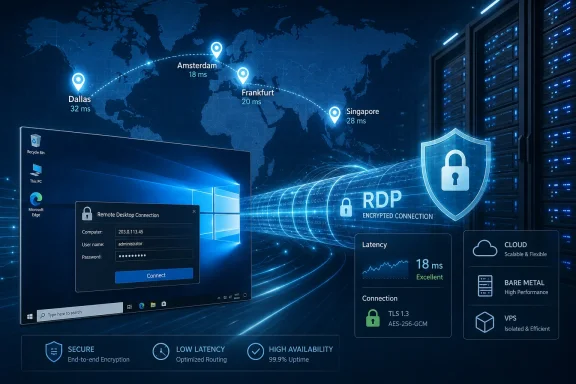
OnliveServer has announced RDP server hosting availability in new data center locations in Amsterdam, Singapore, Dallas, and Frankfurt, expanding its Windows remote desktop, VPS, VDS, cloud, and bare metal offerings across a claimed 35-plus-location global footprint. The announcement is less about a single hosting SKU than about the continuing normalization of rented Windows desktops as infrastructure. For Windows users and administrators, the pitch is familiar: lower latency, regional placement, fast provisioning, and enough abstraction to make a remote server feel like a local workstation. The harder question is whether another RDP hosting expansion solves a real operational problem or merely repackages an old one with a broader map.
Remote Desktop Protocol has always occupied a strange place in the Windows ecosystem. It is both a built-in administrative convenience and, when exposed carelessly, one of the most consequential attack surfaces in a Windows estate. Microsoft built RDP to make a remote Windows machine usable as though it were sitting under the desk, but the hosting market has turned that idea into a commodity: pay for a machine, receive an IP address, log in, and start working.
OnliveServer’s announcement leans into that commoditization. The company says customers can now deploy RDP server hosting from Amsterdam, Singapore, Dallas, and Frankfurt, alongside bare metal servers, VPS instances, VDS plans, and cloud hosting. The stated benefits are the standard infrastructure triad: lower latency, improved redundancy, and regional data placement.
That does not make the move meaningless. Location still matters, even in a cloud market trained to pretend geography has disappeared. A remote desktop in Frankfurt will feel different to a user in central Europe than one in Dallas; a Singapore endpoint can change the usability equation for teams in South and Southeast Asia; Amsterdam remains a practical connectivity hub for European workloads. For RDP especially, milliseconds are not abstract. They are the difference between a session that feels merely remote and one that feels broken.
But this is also a market full of similar claims. Every hosting provider says it has fast storage, DDoS protection, 24/7 support, and instant provisioning. The more interesting story is not that OnliveServer has added locations; it is that RDP hosting continues to survive in an era when vendors would rather talk about zero trust, browser-delivered apps, and managed virtual desktop platforms.
That is why the named locations in OnliveServer’s announcement are doing much of the commercial work. Amsterdam and Frankfurt are not just dots in Europe; they are dense connectivity markets with regional appeal. Dallas is a central U.S. location that can serve a broad North American audience. Singapore is one of the obvious choices for Asia-Pacific reach, particularly for businesses that want a lower-latency foothold without building their own infrastructure in the region.
For WindowsForum readers, the practical point is straightforward: RDP hosting is only as good as the path between the user and the host. A plan with generous CPU and NVMe storage can still feel poor if the user’s route to the server is congested, circuitous, or simply too far away. Conversely, a modest virtual desktop placed close to the user may outperform a more powerful box across an ocean.
This is where a global hosting map becomes more than marketing. If a business has users in Europe, Asia, and North America, a provider with multiple placement options gives administrators a way to reduce pain without redesigning the application stack. The less glamorous version of cloud strategy is simply putting the Windows machine closer to the people who click on it.
Still, latency is not solved by a city name alone. Providers rarely publish the network-level detail an enterprise buyer would actually want: upstream carriers, peering, congestion history, packet loss patterns, or clear service credits for degraded interactive performance. The announcement promises reduced latency and failover options, but the proof will be in real sessions, not in the availability of a region selector during checkout.
That is where hosted RDP remains attractive. It lets a company centralize the messy Windows environment without rewriting the application. Users connect to a remote desktop, run the software in a controlled environment, and avoid installing a brittle stack on every laptop. For small firms, contractors, distributed teams, and shops with legacy line-of-business tools, the model can be cheaper and faster than a full virtual desktop infrastructure project.
OnliveServer’s positioning speaks directly to that crowd. The company describes RDP hosting as useful for remote work, legacy applications, automated tasks, and resource-heavy software. That is the heart of the market. Not every organization wants Azure Virtual Desktop, Citrix, Windows 365, or a managed service with enterprise licensing conversations attached. Some just want a Windows Server instance they can log into today.
There is a reason that low-friction appeal keeps returning. A hosted RDP server can be understood by almost any Windows administrator within minutes. It does not require a new app delivery model. It does not demand that users learn a different interface. It maps onto decades of Windows muscle memory.
The downside is that simplicity can become a trap. When RDP hosting is treated as “just a remote PC,” the surrounding security architecture is often underbuilt. The same feature that makes RDP useful — direct interactive access to a Windows environment — also makes it valuable to attackers if credentials, exposure, or patching are mishandled.
The risk profile of RDP is different from a public website. A website exposes an application interface. RDP exposes a path toward an interactive Windows session. Microsoft has long recommended Network Level Authentication for Remote Desktop because it requires authentication before a full remote session is established. That is a baseline, not an advanced security posture.
For administrators, the key issue is whether an RDP hosting provider helps enforce sane defaults or simply hands over a server with administrator access and leaves the customer to harden it. Full administrator access is attractive, and OnliveServer advertises it. But full control also means full responsibility for account hygiene, patching, firewall scope, logging, lockout policy, and the decision not to leave RDP broadly exposed to the public internet.
A secure RDP deployment should generally include more than a strong password. Multi-factor authentication, IP allowlisting, VPN or gateway-based access, least-privilege accounts, monitored login attempts, and prompt Windows updates should be considered table stakes. If a provider’s main security promise is DDoS mitigation, that may protect availability, but it does not protect against credential stuffing, weak administrative practices, or a misconfigured remote desktop service.
This is where buyers should read past the adjectives. “Enterprise-grade security” can mean a real control plane with hardened defaults, or it can mean a firewall checkbox and a support article. In hosted RDP, the difference matters because the workload is often a privileged Windows environment containing business data, saved credentials, browser sessions, and management tools.
But data residency is not the same thing as compliance. A server located in Frankfurt does not automatically satisfy every German or EU obligation. A Singapore-hosted desktop does not, by itself, create a compliant Asia-Pacific operating model. The provider’s legal entity, subprocessors, support access, backup locations, monitoring systems, and incident response practices may matter just as much as the physical or logical location of the instance.
That distinction often gets blurred in hosting marketing. Regional choice is useful because it gives customers one important lever. It can reduce latency, help keep data closer to users, and align infrastructure with policy. But it is not a substitute for due diligence.
For small and mid-sized businesses, however, even that lever can be meaningful. Many do not have the budget or staffing to negotiate bespoke enterprise cloud arrangements. A provider that offers selectable regions and migration assistance gives them a practical way to avoid the worst mismatch: European users stuck on a faraway server, or customer data placed in a jurisdiction the business never intended to use.
OnliveServer says existing customers can request migration to a new location at no additional cost through support. If implemented smoothly, that could be more valuable than the launch itself. Migration is where infrastructure promises meet operational reality: downtime, IP changes, DNS updates, backup verification, licensing behavior, and user communication all surface at once.
That variance matters because “RDP hosting” is not a performance specification. Two services with the same label can behave very differently depending on CPU contention, storage latency, network quality, GPU availability, session limits, and provider oversubscription. A plan running on high-frequency Ryzen hardware may suit single-user interactive work. An EPYC or Xeon-based configuration may make more sense for multi-user workloads or heavier server tasks. NVMe storage may improve responsiveness, but it cannot compensate for inadequate CPU allocation or a saturated host node.
OnliveServer lists AMD Ryzen, AMD EPYC, and Intel Xeon configurations for its broader server portfolio, with SSD or NVMe storage and bandwidth claims reaching into the 1 Gbps to 10 Gbps range for cloud infrastructure. Those details are useful, but customers still need to map them to workload type. A browser-based admin desktop, QuickBooks-style legacy app, automation runner, and remote development box are not the same use case.
The VDS label deserves particular scrutiny. In hosting marketing, VDS is often used to imply stronger isolation or more dedicated resources than a conventional VPS, but definitions vary. Buyers should look for the actual resource guarantees, not the acronym. Dedicated vCPU allocation, storage IOPS expectations, memory limits, backup policy, and noisy-neighbor protections matter more than whether the plan is called VPS, VDS, cloud VPS, or remote desktop hosting.
This is one reason Windows administrators tend to test before committing. A remote desktop workload exposes infrastructure shortcuts quickly. You can feel CPU steal. You can feel storage stalls. You can feel packet loss. A benchmark chart may impress procurement, but a laggy Start menu will decide the user verdict.
The more important issue is what the SLA covers. Does it apply to power and network availability at the host level, or to the customer’s actual RDP experience? Does it exclude maintenance windows? Does it offer service credits only, rather than compensation for lost productivity? Does it account for degraded performance, or only total outage? The answers are often less comforting than the headline percentage.
RDP workloads make this especially tricky. A server can technically be up while users experience unusable latency. A host can respond to ping while the Windows session is frozen by resource contention. A data center can remain online while a routing problem makes the service poor for a specific region. Traditional uptime language does not always capture these failures.
That does not mean the SLA is irrelevant. It means buyers should treat it as one input. Redundancy planning still matters, particularly for businesses using hosted RDP as a daily workspace. Backups should be tested. Administrative access should not depend on a single credential. Critical data should not live only inside one remote desktop profile. If the RDP server is the office, then the disaster recovery plan needs to be more serious than “open a support ticket.”
OnliveServer’s expanded regional footprint may help with failover options, but failover is not automatic just because a provider has more cities. True resilience requires replication, backup portability, documented restore steps, and clarity about how quickly a workload can be rebuilt elsewhere. A region list is the beginning of that conversation, not the end.
Microsoft’s own direction has increasingly emphasized managed experiences such as Windows 365, Azure Virtual Desktop, Microsoft Entra integration, and cloud-first endpoint administration. Those platforms are designed for organizations that want identity, device, application, and session controls woven together. They also come with complexity, licensing considerations, and costs that may be overkill for a small business that simply needs a persistent Windows desktop in a region close to its users.
Providers like OnliveServer occupy the space below and beside that enterprise stack. They appeal to customers who value immediacy, price flexibility, and root-like control over a Windows environment. In that market, the customer often wants less abstraction, not more. They want to install software, change settings, reboot the machine, and know exactly what server they are paying for.
That model is powerful but unforgiving. Managed platforms reduce certain classes of risk by pushing customers toward opinionated defaults. Commodity RDP hosting gives customers freedom to build something sensible or something fragile. For experienced admins, that freedom is part of the value. For less mature operators, it can become a security and reliability debt.
This is why OnliveServer’s announcement should be read as an infrastructure availability story, not as a complete remote-work strategy. New locations make the service more useful. They do not answer identity governance, endpoint trust, license compliance, data protection, or monitoring questions. Those remain customer responsibilities unless the provider explicitly wraps them into a managed offering.
Windows Server 2019 remains common because many organizations value stability and compatibility. Windows Server 2022 offers a newer baseline and a longer runway. In either case, administrators should think about the server as a maintained platform, not a disposable desktop. If users are logging into it daily, it needs update scheduling, backup strategy, antivirus or endpoint protection, and a plan for application testing after patches.
Licensing also deserves attention. RDP and Remote Desktop Services licensing can become more complicated when multiple users, session hosts, or hosted desktops are involved. Providers may package Windows access in a way that seems simple to the customer, but organizations should understand what rights they actually have, especially if the server is being used by employees or clients rather than as a single administrative machine.
There is also the question of Windows Server 2025, which is now part of the broader Windows Server conversation. The announcement’s listed Windows Server versions stop at 2022, at least in the provided material. That is not necessarily a problem; many production environments avoid the newest server release until tooling, drivers, and operational experience catch up. But buyers planning a long-lived hosted desktop environment should ask about roadmap, image availability, and migration paths.
The broader point is that RDP hosting can make a server feel temporary even when it becomes permanent. A machine spun up in minutes can quietly become the place where business-critical work happens for years. That deserves more planning than a casual trial account.
That is also why it persists. The real world is full of workflows that do not justify a platform migration. A small accounting firm may need a shared Windows environment for a legacy application. A remote contractor may need a stable desktop near a client’s systems. A developer may need a Windows box for testing. A business may need automation tools running in a GUI session because the software vendor never built a proper service interface.
For those use cases, a hosted RDP server is not elegant, but it is pragmatic. The new OnliveServer locations make that pragmatism more geographically flexible. A user in Europe can choose Amsterdam or Frankfurt; a team closer to Texas can choose Dallas; an Asia-Pacific operation can look to Singapore. That is a meaningful improvement if the provider’s network and support execution match the map.
Yet the unfashionable nature of RDP also means it does not receive the same strategic scrutiny inside many organizations. A hosted desktop can be bought on a credit card, configured by one admin, and become operationally important before anyone has reviewed access controls or backup policy. Shadow infrastructure is not limited to SaaS apps. It can look like a Windows Server login prompt.
The best reading of OnliveServer’s announcement is therefore neither hype nor dismissal. It is a reminder that demand for simple remote Windows environments remains strong, and that the hosting market is still racing to serve it with more locations, faster disks, and broader product menus. The technology is mature. The operational discipline around it is not always equally mature.
OnliveServer says it offers 24/7 technical support and migration to new locations for existing customers at no additional cost. Those are meaningful promises if fulfilled well. In hosting, support quality is often the hidden differentiator because the underlying commodity — a virtual or physical server with Windows installed — is widely available.
For Windows admins, the procurement checklist should be practical. Test latency from real user locations. Confirm whether RDP is exposed directly or can be placed behind a VPN or gateway. Ask how backups are handled and where they are stored. Verify Windows licensing terms. Check whether the provider supports MFA on the control panel and whether server access can be restricted by IP. Review the SLA language before treating the server as production infrastructure.
This is not cynicism. It is the normal due diligence required whenever a provider offers a fast path to critical infrastructure. The easier a server is to buy, the more disciplined the buyer needs to be about what happens next.
The practical reading is narrow but useful:
 The RDP Desktop Has Become Cloud Infrastructure Again
Remote Desktop Protocol has always occupied a strange place in the Windows ecosystem. It is both a built-in administrative convenience and, when exposed carelessly, one of the most consequential attack surfaces in a Windows estate. Microsoft built RDP to make a remote Windows machine usable as though it were sitting under the desk, but the hosting market has turned that idea into a commodity: pay for a machine, receive an IP address, log in, and start working.OnliveServer’s announcement leans into that commoditization. The company says customers can now deploy RDP server hosting from Amsterdam, Singapore, Dallas, and Frankfurt, alongside bare metal servers, VPS instances, VDS plans, and cloud hosting. The stated benefits are the standard infrastructure triad: lower latency, improved redundancy, and regional data placement.
That does not make the move meaningless. Location still matters, even in a cloud market trained to pretend geography has disappeared. A remote desktop in Frankfurt will feel different to a user in central Europe than one in Dallas; a Singapore endpoint can change the usability equation for teams in South and Southeast Asia; Amsterdam remains a practical connectivity hub for European workloads. For RDP especially, milliseconds are not abstract. They are the difference between a session that feels merely remote and one that feels broken.
But this is also a market full of similar claims. Every hosting provider says it has fast storage, DDoS protection, 24/7 support, and instant provisioning. The more interesting story is not that OnliveServer has added locations; it is that RDP hosting continues to survive in an era when vendors would rather talk about zero trust, browser-delivered apps, and managed virtual desktop platforms.
Latency Is the Feature Nobody Can Fake
RDP is unusually sensitive to geography because it is interactive. A database backup can tolerate distance. A batch render can tolerate distance. A user dragging a window, typing into an accounting application, or managing a Windows Server desktop notices immediately when the round trip gets ugly.That is why the named locations in OnliveServer’s announcement are doing much of the commercial work. Amsterdam and Frankfurt are not just dots in Europe; they are dense connectivity markets with regional appeal. Dallas is a central U.S. location that can serve a broad North American audience. Singapore is one of the obvious choices for Asia-Pacific reach, particularly for businesses that want a lower-latency foothold without building their own infrastructure in the region.
For WindowsForum readers, the practical point is straightforward: RDP hosting is only as good as the path between the user and the host. A plan with generous CPU and NVMe storage can still feel poor if the user’s route to the server is congested, circuitous, or simply too far away. Conversely, a modest virtual desktop placed close to the user may outperform a more powerful box across an ocean.
This is where a global hosting map becomes more than marketing. If a business has users in Europe, Asia, and North America, a provider with multiple placement options gives administrators a way to reduce pain without redesigning the application stack. The less glamorous version of cloud strategy is simply putting the Windows machine closer to the people who click on it.
Still, latency is not solved by a city name alone. Providers rarely publish the network-level detail an enterprise buyer would actually want: upstream carriers, peering, congestion history, packet loss patterns, or clear service credits for degraded interactive performance. The announcement promises reduced latency and failover options, but the proof will be in real sessions, not in the availability of a region selector during checkout.
Windows Hosting Still Wins Where Apps Refuse to Modernize
The continued demand for RDP hosting says something uncomfortable about enterprise software. Many organizations still depend on Windows applications that were never designed for a clean SaaS migration, a browser-only future, or container-native deployment. These applications may be old, awkward, licensed in peculiar ways, or tightly coupled to local files and desktop assumptions. They persist because they run the business.That is where hosted RDP remains attractive. It lets a company centralize the messy Windows environment without rewriting the application. Users connect to a remote desktop, run the software in a controlled environment, and avoid installing a brittle stack on every laptop. For small firms, contractors, distributed teams, and shops with legacy line-of-business tools, the model can be cheaper and faster than a full virtual desktop infrastructure project.
OnliveServer’s positioning speaks directly to that crowd. The company describes RDP hosting as useful for remote work, legacy applications, automated tasks, and resource-heavy software. That is the heart of the market. Not every organization wants Azure Virtual Desktop, Citrix, Windows 365, or a managed service with enterprise licensing conversations attached. Some just want a Windows Server instance they can log into today.
There is a reason that low-friction appeal keeps returning. A hosted RDP server can be understood by almost any Windows administrator within minutes. It does not require a new app delivery model. It does not demand that users learn a different interface. It maps onto decades of Windows muscle memory.
The downside is that simplicity can become a trap. When RDP hosting is treated as “just a remote PC,” the surrounding security architecture is often underbuilt. The same feature that makes RDP useful — direct interactive access to a Windows environment — also makes it valuable to attackers if credentials, exposure, or patching are mishandled.
The Security Story Is Bigger Than DDoS Protection
OnliveServer’s announcement highlights DDoS protection, firewalls, dedicated IPs, and high-speed uplinks. Those are expected features in the hosting market, and they matter. But they are not the whole security story for RDP.The risk profile of RDP is different from a public website. A website exposes an application interface. RDP exposes a path toward an interactive Windows session. Microsoft has long recommended Network Level Authentication for Remote Desktop because it requires authentication before a full remote session is established. That is a baseline, not an advanced security posture.
For administrators, the key issue is whether an RDP hosting provider helps enforce sane defaults or simply hands over a server with administrator access and leaves the customer to harden it. Full administrator access is attractive, and OnliveServer advertises it. But full control also means full responsibility for account hygiene, patching, firewall scope, logging, lockout policy, and the decision not to leave RDP broadly exposed to the public internet.
A secure RDP deployment should generally include more than a strong password. Multi-factor authentication, IP allowlisting, VPN or gateway-based access, least-privilege accounts, monitored login attempts, and prompt Windows updates should be considered table stakes. If a provider’s main security promise is DDoS mitigation, that may protect availability, but it does not protect against credential stuffing, weak administrative practices, or a misconfigured remote desktop service.
This is where buyers should read past the adjectives. “Enterprise-grade security” can mean a real control plane with hardened defaults, or it can mean a firewall checkbox and a support article. In hosted RDP, the difference matters because the workload is often a privileged Windows environment containing business data, saved credentials, browser sessions, and management tools.
Data Residency Is Becoming a Sales Feature for Smaller Buyers
OnliveServer also frames the new locations as a way to support regional compliance and data residency needs. That is a reasonable claim in the broad sense: where a workload runs can affect legal, contractual, and operational obligations. For companies with clients in the European Union, Germany, the Netherlands, Singapore, or the United States, being able to place infrastructure in a chosen region can simplify some conversations.But data residency is not the same thing as compliance. A server located in Frankfurt does not automatically satisfy every German or EU obligation. A Singapore-hosted desktop does not, by itself, create a compliant Asia-Pacific operating model. The provider’s legal entity, subprocessors, support access, backup locations, monitoring systems, and incident response practices may matter just as much as the physical or logical location of the instance.
That distinction often gets blurred in hosting marketing. Regional choice is useful because it gives customers one important lever. It can reduce latency, help keep data closer to users, and align infrastructure with policy. But it is not a substitute for due diligence.
For small and mid-sized businesses, however, even that lever can be meaningful. Many do not have the budget or staffing to negotiate bespoke enterprise cloud arrangements. A provider that offers selectable regions and migration assistance gives them a practical way to avoid the worst mismatch: European users stuck on a faraway server, or customer data placed in a jurisdiction the business never intended to use.
OnliveServer says existing customers can request migration to a new location at no additional cost through support. If implemented smoothly, that could be more valuable than the launch itself. Migration is where infrastructure promises meet operational reality: downtime, IP changes, DNS updates, backup verification, licensing behavior, and user communication all surface at once.
The Product Stack Blurs the Line Between Server and Desktop
The announcement bundles RDP hosting with bare metal, VPS, VDS, and cloud hosting, and that bundling reveals how fuzzy the category has become. An RDP server may be a Windows VPS with remote access enabled. It may be a virtual dedicated server with more predictable resources. It may be a bare metal system used by a small team as a remote workstation or application host. The user experience is a desktop; the infrastructure underneath can vary widely.That variance matters because “RDP hosting” is not a performance specification. Two services with the same label can behave very differently depending on CPU contention, storage latency, network quality, GPU availability, session limits, and provider oversubscription. A plan running on high-frequency Ryzen hardware may suit single-user interactive work. An EPYC or Xeon-based configuration may make more sense for multi-user workloads or heavier server tasks. NVMe storage may improve responsiveness, but it cannot compensate for inadequate CPU allocation or a saturated host node.
OnliveServer lists AMD Ryzen, AMD EPYC, and Intel Xeon configurations for its broader server portfolio, with SSD or NVMe storage and bandwidth claims reaching into the 1 Gbps to 10 Gbps range for cloud infrastructure. Those details are useful, but customers still need to map them to workload type. A browser-based admin desktop, QuickBooks-style legacy app, automation runner, and remote development box are not the same use case.
The VDS label deserves particular scrutiny. In hosting marketing, VDS is often used to imply stronger isolation or more dedicated resources than a conventional VPS, but definitions vary. Buyers should look for the actual resource guarantees, not the acronym. Dedicated vCPU allocation, storage IOPS expectations, memory limits, backup policy, and noisy-neighbor protections matter more than whether the plan is called VPS, VDS, cloud VPS, or remote desktop hosting.
This is one reason Windows administrators tend to test before committing. A remote desktop workload exposes infrastructure shortcuts quickly. You can feel CPU steal. You can feel storage stalls. You can feel packet loss. A benchmark chart may impress procurement, but a laggy Start menu will decide the user verdict.
The 99.9 Percent Uptime Promise Is Smaller Than It Sounds
OnliveServer advertises a 99.9 percent uptime SLA in the launch material. That number is common in hosting and can sound reassuring, but Windows admins know it is not a magic shield. Over a month, 99.9 percent availability still permits a meaningful amount of downtime. Over a year, it allows enough interruption to matter for businesses that treat a hosted desktop as their primary workplace.The more important issue is what the SLA covers. Does it apply to power and network availability at the host level, or to the customer’s actual RDP experience? Does it exclude maintenance windows? Does it offer service credits only, rather than compensation for lost productivity? Does it account for degraded performance, or only total outage? The answers are often less comforting than the headline percentage.
RDP workloads make this especially tricky. A server can technically be up while users experience unusable latency. A host can respond to ping while the Windows session is frozen by resource contention. A data center can remain online while a routing problem makes the service poor for a specific region. Traditional uptime language does not always capture these failures.
That does not mean the SLA is irrelevant. It means buyers should treat it as one input. Redundancy planning still matters, particularly for businesses using hosted RDP as a daily workspace. Backups should be tested. Administrative access should not depend on a single credential. Critical data should not live only inside one remote desktop profile. If the RDP server is the office, then the disaster recovery plan needs to be more serious than “open a support ticket.”
OnliveServer’s expanded regional footprint may help with failover options, but failover is not automatic just because a provider has more cities. True resilience requires replication, backup portability, documented restore steps, and clarity about how quickly a workload can be rebuilt elsewhere. A region list is the beginning of that conversation, not the end.
The Hosting Market Is Selling Control While the Platform Giants Sell Management
The most interesting tension in this announcement is not between OnliveServer and another budget hosting provider. It is between two philosophies of Windows infrastructure. One sells control: administrator access, selectable server specs, flexible operating systems, and fast provisioning. The other sells management: policy integration, identity controls, conditional access, centralized compliance, and vendor-supported desktop delivery.Microsoft’s own direction has increasingly emphasized managed experiences such as Windows 365, Azure Virtual Desktop, Microsoft Entra integration, and cloud-first endpoint administration. Those platforms are designed for organizations that want identity, device, application, and session controls woven together. They also come with complexity, licensing considerations, and costs that may be overkill for a small business that simply needs a persistent Windows desktop in a region close to its users.
Providers like OnliveServer occupy the space below and beside that enterprise stack. They appeal to customers who value immediacy, price flexibility, and root-like control over a Windows environment. In that market, the customer often wants less abstraction, not more. They want to install software, change settings, reboot the machine, and know exactly what server they are paying for.
That model is powerful but unforgiving. Managed platforms reduce certain classes of risk by pushing customers toward opinionated defaults. Commodity RDP hosting gives customers freedom to build something sensible or something fragile. For experienced admins, that freedom is part of the value. For less mature operators, it can become a security and reliability debt.
This is why OnliveServer’s announcement should be read as an infrastructure availability story, not as a complete remote-work strategy. New locations make the service more useful. They do not answer identity governance, endpoint trust, license compliance, data protection, or monitoring questions. Those remain customer responsibilities unless the provider explicitly wraps them into a managed offering.
The Windows Server Version Choice Matters More Than the Checkout Page Suggests
The launch material mentions flexible OS options, including Linux distributions and Windows Server 2019 and 2022. For RDP hosting, Windows Server selection is not a cosmetic choice. It affects support lifecycle, application compatibility, security baselines, available features, and the operational rhythm of patching.Windows Server 2019 remains common because many organizations value stability and compatibility. Windows Server 2022 offers a newer baseline and a longer runway. In either case, administrators should think about the server as a maintained platform, not a disposable desktop. If users are logging into it daily, it needs update scheduling, backup strategy, antivirus or endpoint protection, and a plan for application testing after patches.
Licensing also deserves attention. RDP and Remote Desktop Services licensing can become more complicated when multiple users, session hosts, or hosted desktops are involved. Providers may package Windows access in a way that seems simple to the customer, but organizations should understand what rights they actually have, especially if the server is being used by employees or clients rather than as a single administrative machine.
There is also the question of Windows Server 2025, which is now part of the broader Windows Server conversation. The announcement’s listed Windows Server versions stop at 2022, at least in the provided material. That is not necessarily a problem; many production environments avoid the newest server release until tooling, drivers, and operational experience catch up. But buyers planning a long-lived hosted desktop environment should ask about roadmap, image availability, and migration paths.
The broader point is that RDP hosting can make a server feel temporary even when it becomes permanent. A machine spun up in minutes can quietly become the place where business-critical work happens for years. That deserves more planning than a casual trial account.
RDP Hosting Is Useful Precisely Because It Is Unfashionable
The cloud industry loves new abstractions. It loves serverless, containers, identity fabrics, edge platforms, AI infrastructure, and anything that makes old server management sound quaint. RDP hosting is unfashionable by comparison. It is a Windows desktop on someone else’s server, reached over a protocol that has existed for decades.That is also why it persists. The real world is full of workflows that do not justify a platform migration. A small accounting firm may need a shared Windows environment for a legacy application. A remote contractor may need a stable desktop near a client’s systems. A developer may need a Windows box for testing. A business may need automation tools running in a GUI session because the software vendor never built a proper service interface.
For those use cases, a hosted RDP server is not elegant, but it is pragmatic. The new OnliveServer locations make that pragmatism more geographically flexible. A user in Europe can choose Amsterdam or Frankfurt; a team closer to Texas can choose Dallas; an Asia-Pacific operation can look to Singapore. That is a meaningful improvement if the provider’s network and support execution match the map.
Yet the unfashionable nature of RDP also means it does not receive the same strategic scrutiny inside many organizations. A hosted desktop can be bought on a credit card, configured by one admin, and become operationally important before anyone has reviewed access controls or backup policy. Shadow infrastructure is not limited to SaaS apps. It can look like a Windows Server login prompt.
The best reading of OnliveServer’s announcement is therefore neither hype nor dismissal. It is a reminder that demand for simple remote Windows environments remains strong, and that the hosting market is still racing to serve it with more locations, faster disks, and broader product menus. The technology is mature. The operational discipline around it is not always equally mature.
The Real Test Comes After Provisioning
Instant provisioning is useful, but the first hour of a server’s life is rarely the most important. The real test begins after users depend on it. How quickly does support respond when RDP becomes unreachable? How transparent is the provider during a network incident? Are backups easy to restore? Can a customer migrate between regions without days of brittle manual work? Are abuse controls aggressive enough to protect the network without surprising legitimate customers?OnliveServer says it offers 24/7 technical support and migration to new locations for existing customers at no additional cost. Those are meaningful promises if fulfilled well. In hosting, support quality is often the hidden differentiator because the underlying commodity — a virtual or physical server with Windows installed — is widely available.
For Windows admins, the procurement checklist should be practical. Test latency from real user locations. Confirm whether RDP is exposed directly or can be placed behind a VPN or gateway. Ask how backups are handled and where they are stored. Verify Windows licensing terms. Check whether the provider supports MFA on the control panel and whether server access can be restricted by IP. Review the SLA language before treating the server as production infrastructure.
This is not cynicism. It is the normal due diligence required whenever a provider offers a fast path to critical infrastructure. The easier a server is to buy, the more disciplined the buyer needs to be about what happens next.
The Map Is Bigger, but the Admin Burden Remains
OnliveServer’s expanded footprint gives customers more placement choices, and for RDP that can translate directly into a better user experience. But the announcement should not be mistaken for a turnkey security or compliance architecture. It is an infrastructure expansion, and infrastructure still needs architecture around it.The practical reading is narrow but useful:
- OnliveServer says RDP server hosting is now available from Amsterdam, Singapore, Dallas, and Frankfurt, alongside its broader server and cloud portfolio.
- The most immediate benefit for Windows users is likely lower interactive latency when the chosen region is close to the people using the desktop.
- Regional placement can help with data-residency planning, but it does not automatically make a workload compliant.
- DDoS protection and firewalls are useful controls, but exposed RDP still requires strong authentication, restricted access, patching, and monitoring.
- Buyers should test real-world session performance and support responsiveness before moving daily work onto a hosted Windows desktop.
- The service is best understood as flexible infrastructure, not a substitute for a managed virtual desktop strategy.
References
- Primary source: openpr.com
Published: 2026-06-03T07:40:33.341444
OnliveServer Announces RDP Server Hosting in New Data Center
Press release - Onlive Server Private Limited - OnliveServer Announces RDP Server Hosting in New Data Center Locations - published on openPR.comwww.openpr.com - Related coverage: cioinfluence.com
HostColor Announced RDP Server Hosting in New Data Center Locations
HostColor.com (HC), a globally recognized provider of managed and semi-managed bare metal servers and cloud infrastructure, has announced the immediate availability of RDP Server Hosting plans with 1 Gbps and 10 Gbps internet connection ports in the following locations: Reston, Virginia; Bend...cioinfluence.com - Related coverage: rdp.sh
Datacenter Locations - Global Infrastructure | RDP.sh
RDP.sh datacenter locations in the Netherlands, Poland, USA, and Norway. Enterprise-grade Tier III facilities with redundant power and premium connectivity.rdp.sh - Related coverage: isstories.com
isStories | Let's spice it up... together
isStories is a provider of independent, focused, in-depth research and financial news. We provide comprehensive coverage of the most important news includingwww.isstories.com - Related coverage: colossuscloud.com
- Related coverage: cherryservers.com
Cherry Servers Locations & Network | Cherry Servers
European-based premium low-latency network, with data center locations worldwide in the Netherlands, Germany, Lithuania, Sweden, the US, and Singapore.www.cherryservers.com
- Related coverage: einnews.com
Rad Web Hosting Announces New Data Center Location in Tokyo, Japan - EIN Presswire
New Tokyo location expands Rad Web Hosting’s footprint, strengthens Asia-Pacific connectivity, and gives businesses options for low-latency hosting deployments.www.einnews.com
- Related coverage: beeksgroup.com
Data Centres - Beeks Group
Our global network of data centres is the backbone of Beeks Group, allowing direct & secure access to key financial hubs & exchange locations. View our options. beeksgroup.com
- Related coverage: ssdnodes.com
SSD Nodes Data Center Locations | Largest Server Network
Discover SSD Nodes' worldwide data center locations designed for high-performance VPS hosting. Choose the best region for speed, reliability, and scalabilitywww.ssdnodes.com - Related coverage: docs.broadcom.com
- Related coverage: issuewire.com
- Related coverage: coltdatacentres.net
ico-copenhagen
Canal in Amsterdam at night. Highlighting buildings and streets and is reflected in the waterwww.coltdatacentres.net
- Related coverage: prlog.org
PRLog - HostPapa launches two new data center locations as demand for cloud services increases
PDF documentwww.prlog.org
