

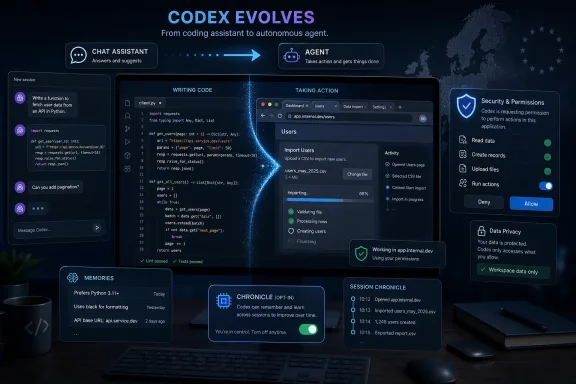
OpenAI on June 16, 2026, expanded Codex app capabilities to users in the European Economic Area, the United Kingdom, and Switzerland, enabling Computer Use on macOS and Windows, the Codex Chrome extension, Memories, and the Chronicle opt-in preview for ChatGPT Pro subscribers on macOS. The move is not just a regional availability note; it is a signal that OpenAI thinks its coding agent is ready to leave the editor and enter the operating system. For European developers and IT teams, that means the useful part and the uncomfortable part arrive together: Codex can now do more real work, but it also needs more real trust.
Codex began life in the public imagination as a coding assistant: a model that could explain functions, draft patches, and help developers get unstuck. That framing is now too small. The latest European rollout makes clear that OpenAI is positioning Codex as a desktop agent, browser operator, project memory layer, and eventually a kind of work companion for technical users.
The most important change is Computer Use. On macOS and Windows, Codex can now see an allowed application, click through its interface, type into fields, and operate software visually rather than only through APIs, shell commands, or text prompts. That matters because much of real work still happens in places that were never designed for automation: admin consoles, proprietary dashboards, setup wizards, internal web tools, and GUI-heavy enterprise applications.
This is why the European expansion is bigger than it looks. OpenAI is not merely giving EEA, UK, and Swiss users the same feature checklist that other regions already had. It is bringing them into the next phase of agentic computing, where the AI assistant is no longer confined to generating instructions but is allowed to execute them in the same messy environment humans use.
For WindowsForum readers, the Windows angle is especially sharp. On Windows, Computer Use works in the foreground, meaning the agent can take over active input while it operates. That makes it powerful for unattended or semi-attended tasks in a virtual machine, test box, or spare workstation, but awkward on a primary desktop where a user is trying to continue working.
That does not mean the questions disappear. Memories are off by default in the EEA, UK, and Switzerland, which is the right posture for a feature that can retain preferences, workflows, technology stacks, and repository conventions over time. A memory system that knows your coding style is useful; a memory system that accidentally stores a client name, internal deployment habit, or sensitive architectural clue is something else.
Chronicle goes further. It is available as an opt-in research preview for ChatGPT Pro subscribers on macOS, and it builds memories from recent screen context. In plain English, Chronicle is designed to infer useful context from what the user has been working on, rather than waiting for the user to restate everything in a prompt.
That is exactly the sort of feature that makes AI agents feel less like chatbots and more like colleagues. It is also exactly the sort of feature that makes security teams reach for policy documents. OpenAI’s own documentation describes Chronicle as opt-in, warns that it can increase prompt-injection risk, and notes that generated memories are stored locally as unencrypted Markdown files.
The European rollout therefore has a double meaning. It expands access, but it also tests whether opt-in consent and local user control are enough to make ambient AI memory acceptable in regions that are less tolerant of “ship it first, explain it later” product design.
But GUI automation is different from code generation. When an AI proposes a patch, the user can review the diff. When an AI clicks through an application, the state changes may happen inside a system that does not produce a clean review pane. A setting might be toggled, a form submitted, a record changed, or a browser session used in ways that are visible only after the fact.
OpenAI has built in permission prompts and app approvals, and those controls matter. Codex can ask before using apps, admins can disable Computer Use through managed configuration, and users can remove always-allowed apps from settings. On Windows, policy can define which apps Computer Use may open without prompting and which it must decline.
Still, the operational lesson is simple: Computer Use should be treated as delegated hands, not delegated advice. If you would not let an intern click through a production admin portal unsupervised, you should not let an AI agent do it just because the interface looks friendly.
That does not make the feature reckless. It makes it consequential. The right place to start is in low-risk, repeatable work: QA flows, local development apps, throwaway test accounts, lab machines, and internal tools where permissions are scoped tightly. The wrong place to start is billing, identity, production infrastructure, or anything involving credentials.
The extension lets Codex operate browser tasks that require a signed-in Chrome context. That is the key phrase. This is not a toy browser sandbox with no memory of who you are; it is a way for Codex to work where the user is already logged in.
OpenAI’s design tries to avoid a crude screen takeover. Codex can work across tabs in the background, use tab groups for task organization, and ask before interacting with new websites. There are allowlists and blocklists, and the in-app browser remains the safer choice for public pages, local previews, and development servers that do not need the user’s Chrome profile.
But browser access raises the stakes because websites are not passive documents. They can contain malicious instructions, misleading UI, hidden state, sensitive history, and signed-in actions that services will treat as the user’s own. If Codex reads the wrong page as instruction rather than content, the old problem of prompt injection becomes a practical workflow hazard.
This is the paradox of agentic browser automation. The more useful the agent becomes, the closer it gets to authenticated systems of record. The feature is compelling precisely because it can use the messy, logged-in web; that is also why it deserves stricter defaults than a normal extension or chatbot.
For individual developers, this could reduce the constant preamble that has become part of AI-assisted work. Instead of repeatedly explaining that a project uses pnpm, prefers functional React components, requires a specific test runner, or follows a particular branch workflow, the user can let Codex retain useful patterns. Over time, that shifts the assistant from generic pair programmer to project-aware collaborator.
For teams, the implications are more complicated. Personal memory can conflict with team standards if left unmanaged. A developer’s preference is not always a repository convention, and a recurring workflow is not always a blessed workflow. Organizations will need to decide where memory should be personal, where it should be project-level, and where it should be disabled.
The European default is important here. Memories are off by default in the EEA, UK, and Switzerland, which puts the user in the loop before persistent personalization begins. That may make the first-run experience slightly less magical, but it is the better tradeoff for a feature that can accumulate work context over time.
The long-term question is whether memory becomes a competitive moat. If Codex remembers how you work across repositories, tools, and routines, switching assistants becomes more costly. That is convenient for users and valuable for OpenAI, but it also makes exportability, deletion, and auditability more important than the product marketing tends to admit.
OpenAI frames Chronicle as a way to build better Codex memories from recent screen context. The pitch is attractive. If a developer has been moving between a pull request, a failing test, an error log, and a local app, Codex can infer the active workflow without forcing the user to narrate every step.
The privacy posture is more cautious than the worst version of this idea could be. Chronicle is opt-in, macOS-only for now, limited to ChatGPT Pro subscribers, and can be paused or disabled. Screen captures are described as temporary on device, while generated memories are stored locally. OpenAI also says the screenshots are processed to generate memories and are not stored on its servers after processing unless legally required.
Even so, the risk is not imaginary. Screen content can include secrets, messages, customer data, financial details, internal URLs, unreleased product names, and personal communications. OpenAI’s warning not to use Chronicle to record meetings or communications without consent is not boilerplate; it is a reminder that ambient context features blur boundaries that normal software usually keeps intact.
Chronicle’s biggest challenge may be social rather than technical. Developers may be comfortable opting in on their own machines, but enterprises will ask harder questions: Who approved this? Where is the data processed? What is retained? Can memories be inspected? Can they be wiped? Can the feature be centrally disabled? The answers will determine whether Chronicle becomes a niche power-user feature or a normalized part of AI-assisted work.
That is not necessarily a flaw. Windows has always been a platform where power users solve problems with spare machines, VMs, Remote Desktop sessions, Hyper-V labs, and disposable environments. Codex Computer Use fits that tradition better than it fits the fantasy of a calm assistant invisibly working beside you on your main desktop.
The practical model is to give Codex a bounded playground. Run it against a VM, a test user profile, a non-production app, or a machine where interruption is acceptable. Let it click through setup flows, reproduce bugs, verify UI regressions, collect screenshots, or perform repetitive browser checks. Keep your real admin sessions, password manager, production consoles, and personal communications outside the blast radius.
For sysadmins, this is not much different from evaluating any automation tool that can act with user credentials. The novelty is that Codex does not need every workflow to expose an API. The risk is that the same flexibility makes behavior harder to reason about.
The safest deployments will combine boring controls with AI-specific skepticism. App allowlists, domain blocklists, least-privilege accounts, VM isolation, change logging, and mandatory human approval for sensitive steps are not glamorous, but they are what turn a clever demo into an operational tool.
That is a different market. The editor is where code is written, but the work of software development sprawls across issue trackers, logs, terminals, dashboards, docs, deployment tools, design systems, and chat threads. An agent that can traverse those surfaces has a broader claim than an autocomplete engine.
This also explains why Chrome and Computer Use matter so much. APIs are clean but incomplete. Human interfaces are messy but universal. If Codex can operate GUIs and signed-in browser sessions safely enough, it can automate the long tail of work that companies never formally integrated.
The danger for OpenAI is that “safely enough” is not a marketing phrase; it is a governance threshold. In consumer settings, a bot making a wrong click is irritating. In enterprise settings, a bot making a wrong click can be a compliance event, an outage, or a data leak.
That is why Europe is an important proving ground. If OpenAI can make these features acceptable in regions with higher privacy expectations and more skeptical enterprise buyers, it strengthens the argument that agentic desktop software can be mainstream rather than experimental.
For individual developers, the best first use cases are narrow and local. Ask Codex to reproduce a UI bug, operate a local app, check a web workflow in a test account, or remember harmless conventions. Do not begin with customer systems, payment settings, identity administration, or anything where a mistaken click has lasting consequences.
For IT departments, the issue is policy. Users will discover these tools because the value is obvious. If administrators do not provide guidance, the default policy will become whatever a motivated developer can enable on a Tuesday afternoon.
That is rarely how good governance happens. Organizations need to decide whether Codex may use Chrome, which domains are allowed, whether Memories are permitted, whether Chronicle is disabled or restricted, and whether Computer Use is confined to VMs or test machines. They should also decide how incidents are reported when an agent takes an unexpected action.
 OpenAI Moves Codex From the Prompt Box to the Workstation
Codex began life in the public imagination as a coding assistant: a model that could explain functions, draft patches, and help developers get unstuck. That framing is now too small. The latest European rollout makes clear that OpenAI is positioning Codex as a desktop agent, browser operator, project memory layer, and eventually a kind of work companion for technical users.The most important change is Computer Use. On macOS and Windows, Codex can now see an allowed application, click through its interface, type into fields, and operate software visually rather than only through APIs, shell commands, or text prompts. That matters because much of real work still happens in places that were never designed for automation: admin consoles, proprietary dashboards, setup wizards, internal web tools, and GUI-heavy enterprise applications.
This is why the European expansion is bigger than it looks. OpenAI is not merely giving EEA, UK, and Swiss users the same feature checklist that other regions already had. It is bringing them into the next phase of agentic computing, where the AI assistant is no longer confined to generating instructions but is allowed to execute them in the same messy environment humans use.
For WindowsForum readers, the Windows angle is especially sharp. On Windows, Computer Use works in the foreground, meaning the agent can take over active input while it operates. That makes it powerful for unattended or semi-attended tasks in a virtual machine, test box, or spare workstation, but awkward on a primary desktop where a user is trying to continue working.
Europe Gets the Features After the Privacy Argument Has Already Started
The timing is notable because these features were previously the kind that companies often delay in Europe. Screen awareness, signed-in browser access, persistent memory, and desktop control all touch the exact anxieties that European regulators, enterprise compliance teams, and privacy-conscious users care about most. OpenAI’s decision to roll them out now suggests the company believes it can meet those expectations with opt-ins, data controls, and regional defaults.That does not mean the questions disappear. Memories are off by default in the EEA, UK, and Switzerland, which is the right posture for a feature that can retain preferences, workflows, technology stacks, and repository conventions over time. A memory system that knows your coding style is useful; a memory system that accidentally stores a client name, internal deployment habit, or sensitive architectural clue is something else.
Chronicle goes further. It is available as an opt-in research preview for ChatGPT Pro subscribers on macOS, and it builds memories from recent screen context. In plain English, Chronicle is designed to infer useful context from what the user has been working on, rather than waiting for the user to restate everything in a prompt.
That is exactly the sort of feature that makes AI agents feel less like chatbots and more like colleagues. It is also exactly the sort of feature that makes security teams reach for policy documents. OpenAI’s own documentation describes Chronicle as opt-in, warns that it can increase prompt-injection risk, and notes that generated memories are stored locally as unencrypted Markdown files.
The European rollout therefore has a double meaning. It expands access, but it also tests whether opt-in consent and local user control are enough to make ambient AI memory acceptable in regions that are less tolerant of “ship it first, explain it later” product design.
Computer Use Is the Feature That Changes the Threat Model
Computer Use is the feature that will grab the headlines because it is the most visible. Ask Codex to use an app, approve the target, and it can operate the interface by seeing, clicking, and typing. For developers, this could mean reproducing a UI bug, checking a local build, stepping through a setup flow, or validating a web form without building a custom automation harness.But GUI automation is different from code generation. When an AI proposes a patch, the user can review the diff. When an AI clicks through an application, the state changes may happen inside a system that does not produce a clean review pane. A setting might be toggled, a form submitted, a record changed, or a browser session used in ways that are visible only after the fact.
OpenAI has built in permission prompts and app approvals, and those controls matter. Codex can ask before using apps, admins can disable Computer Use through managed configuration, and users can remove always-allowed apps from settings. On Windows, policy can define which apps Computer Use may open without prompting and which it must decline.
Still, the operational lesson is simple: Computer Use should be treated as delegated hands, not delegated advice. If you would not let an intern click through a production admin portal unsupervised, you should not let an AI agent do it just because the interface looks friendly.
That does not make the feature reckless. It makes it consequential. The right place to start is in low-risk, repeatable work: QA flows, local development apps, throwaway test accounts, lab machines, and internal tools where permissions are scoped tightly. The wrong place to start is billing, identity, production infrastructure, or anything involving credentials.
Chrome Is Where the Real Work Lives, and Where the Risk Compounds
The Codex Chrome extension may be less theatrical than Computer Use, but it may prove more important day to day. Modern work is browser work. Developers live in GitHub, Jira, Linear, dashboards, docs, cloud consoles, CI systems, Slack links, internal portals, Gmail, Salesforce, and a dozen other authenticated tabs.The extension lets Codex operate browser tasks that require a signed-in Chrome context. That is the key phrase. This is not a toy browser sandbox with no memory of who you are; it is a way for Codex to work where the user is already logged in.
OpenAI’s design tries to avoid a crude screen takeover. Codex can work across tabs in the background, use tab groups for task organization, and ask before interacting with new websites. There are allowlists and blocklists, and the in-app browser remains the safer choice for public pages, local previews, and development servers that do not need the user’s Chrome profile.
But browser access raises the stakes because websites are not passive documents. They can contain malicious instructions, misleading UI, hidden state, sensitive history, and signed-in actions that services will treat as the user’s own. If Codex reads the wrong page as instruction rather than content, the old problem of prompt injection becomes a practical workflow hazard.
This is the paradox of agentic browser automation. The more useful the agent becomes, the closer it gets to authenticated systems of record. The feature is compelling precisely because it can use the messy, logged-in web; that is also why it deserves stricter defaults than a normal extension or chatbot.
Memories Turn Repetition Into Leverage
Memories are the quiet productivity feature in this rollout. A coding assistant that has to be reminded of repository conventions, preferred testing commands, lint rules, naming style, framework assumptions, and deployment habits is useful but still high-friction. A coding assistant that remembers those things can become faster, less annoying, and more aligned with how a team actually works.For individual developers, this could reduce the constant preamble that has become part of AI-assisted work. Instead of repeatedly explaining that a project uses pnpm, prefers functional React components, requires a specific test runner, or follows a particular branch workflow, the user can let Codex retain useful patterns. Over time, that shifts the assistant from generic pair programmer to project-aware collaborator.
For teams, the implications are more complicated. Personal memory can conflict with team standards if left unmanaged. A developer’s preference is not always a repository convention, and a recurring workflow is not always a blessed workflow. Organizations will need to decide where memory should be personal, where it should be project-level, and where it should be disabled.
The European default is important here. Memories are off by default in the EEA, UK, and Switzerland, which puts the user in the loop before persistent personalization begins. That may make the first-run experience slightly less magical, but it is the better tradeoff for a feature that can accumulate work context over time.
The long-term question is whether memory becomes a competitive moat. If Codex remembers how you work across repositories, tools, and routines, switching assistants becomes more costly. That is convenient for users and valuable for OpenAI, but it also makes exportability, deletion, and auditability more important than the product marketing tends to admit.
Chronicle Revives the Windows Recall Debate in Developer Clothing
Chronicle will sound familiar to anyone who followed the controversy around Windows Recall. The resemblance is not exact, and the product goals are different, but the broad idea is similar enough to matter: screen context becomes an input to future AI assistance. What you were looking at can help the system understand what you mean later.OpenAI frames Chronicle as a way to build better Codex memories from recent screen context. The pitch is attractive. If a developer has been moving between a pull request, a failing test, an error log, and a local app, Codex can infer the active workflow without forcing the user to narrate every step.
The privacy posture is more cautious than the worst version of this idea could be. Chronicle is opt-in, macOS-only for now, limited to ChatGPT Pro subscribers, and can be paused or disabled. Screen captures are described as temporary on device, while generated memories are stored locally. OpenAI also says the screenshots are processed to generate memories and are not stored on its servers after processing unless legally required.
Even so, the risk is not imaginary. Screen content can include secrets, messages, customer data, financial details, internal URLs, unreleased product names, and personal communications. OpenAI’s warning not to use Chronicle to record meetings or communications without consent is not boilerplate; it is a reminder that ambient context features blur boundaries that normal software usually keeps intact.
Chronicle’s biggest challenge may be social rather than technical. Developers may be comfortable opting in on their own machines, but enterprises will ask harder questions: Who approved this? Where is the data processed? What is retained? Can memories be inspected? Can they be wiped? Can the feature be centrally disabled? The answers will determine whether Chronicle becomes a niche power-user feature or a normalized part of AI-assisted work.
Windows Users Should Think in Terms of Sandboxes, Not Superpowers
The Windows implementation deserves its own caution. OpenAI’s documentation notes that Computer Use on Windows works in the foreground. That means users should expect Codex to take over active desktop input while it works, rather than quietly operating in a locked or isolated background session.That is not necessarily a flaw. Windows has always been a platform where power users solve problems with spare machines, VMs, Remote Desktop sessions, Hyper-V labs, and disposable environments. Codex Computer Use fits that tradition better than it fits the fantasy of a calm assistant invisibly working beside you on your main desktop.
The practical model is to give Codex a bounded playground. Run it against a VM, a test user profile, a non-production app, or a machine where interruption is acceptable. Let it click through setup flows, reproduce bugs, verify UI regressions, collect screenshots, or perform repetitive browser checks. Keep your real admin sessions, password manager, production consoles, and personal communications outside the blast radius.
For sysadmins, this is not much different from evaluating any automation tool that can act with user credentials. The novelty is that Codex does not need every workflow to expose an API. The risk is that the same flexibility makes behavior harder to reason about.
The safest deployments will combine boring controls with AI-specific skepticism. App allowlists, domain blocklists, least-privilege accounts, VM isolation, change logging, and mandatory human approval for sensitive steps are not glamorous, but they are what turn a clever demo into an operational tool.
OpenAI Is Competing for the Layer Above the IDE
The bigger story is that OpenAI is trying to own the workflow layer around software development. GitHub Copilot, JetBrains AI, Cursor, Windsurf, and other tools all compete inside or near the editor. Codex is increasingly aiming at the entire development loop: read the issue, inspect the app, use the browser, modify the code, run tests, remember conventions, and return with something closer to completed work.That is a different market. The editor is where code is written, but the work of software development sprawls across issue trackers, logs, terminals, dashboards, docs, deployment tools, design systems, and chat threads. An agent that can traverse those surfaces has a broader claim than an autocomplete engine.
This also explains why Chrome and Computer Use matter so much. APIs are clean but incomplete. Human interfaces are messy but universal. If Codex can operate GUIs and signed-in browser sessions safely enough, it can automate the long tail of work that companies never formally integrated.
The danger for OpenAI is that “safely enough” is not a marketing phrase; it is a governance threshold. In consumer settings, a bot making a wrong click is irritating. In enterprise settings, a bot making a wrong click can be a compliance event, an outage, or a data leak.
That is why Europe is an important proving ground. If OpenAI can make these features acceptable in regions with higher privacy expectations and more skeptical enterprise buyers, it strengthens the argument that agentic desktop software can be mainstream rather than experimental.
The Rollout Gives IT a New Checklist Before the Hype Arrives
This release should not send every organization rushing to turn on every Codex feature. It should send them into pilot mode. The right question is not whether Codex is powerful; it clearly is becoming more powerful. The right question is where that power is bounded, observable, reversible, and worth the risk.For individual developers, the best first use cases are narrow and local. Ask Codex to reproduce a UI bug, operate a local app, check a web workflow in a test account, or remember harmless conventions. Do not begin with customer systems, payment settings, identity administration, or anything where a mistaken click has lasting consequences.
For IT departments, the issue is policy. Users will discover these tools because the value is obvious. If administrators do not provide guidance, the default policy will become whatever a motivated developer can enable on a Tuesday afternoon.
That is rarely how good governance happens. Organizations need to decide whether Codex may use Chrome, which domains are allowed, whether Memories are permitted, whether Chronicle is disabled or restricted, and whether Computer Use is confined to VMs or test machines. They should also decide how incidents are reported when an agent takes an unexpected action.
The Codex Expansion Is Useful Because It Is Dangerous Enough to Matter
This European rollout is concrete enough to summarize, but the lesson is broader than the feature list. Codex is becoming useful in the same way human assistants are useful: by seeing context, remembering preferences, and acting inside real tools. That is also why the controls around it must be treated as first-class infrastructure.- Codex Computer Use is now available to users in the EEA, UK, and Switzerland on both macOS and Windows.
- The Codex Chrome extension brings agentic browser work to signed-in Chrome sessions, which makes domain approvals and browser-data caution essential.
- Memories can personalize Codex around workflows, tech stacks, and repository conventions, but they remain disabled by default in these European regions.
- Chronicle is an opt-in research preview for ChatGPT Pro subscribers on macOS, and its screen-context model should be piloted cautiously.
- Windows users should prefer virtual machines, test accounts, and non-production environments before letting Codex operate GUI workflows.
- IT teams should define policy before users normalize AI agents acting inside browsers and desktop apps.
References
- Primary source: thewincentral.com
Published: 2026-06-17T05:20:08.231292
OpenAI Expands Codex Features to Europe, UK & Switzerland - WinCentral
Codex Computer Use, Memories, Chrome Extension, and Chronicle are now available in the EEA, UK, and Switzerland. - Read in AI News on WinCentral thewincentral.com
- Related coverage: techtimes.com
OpenAI Codex Computer Use Now on Windows: Foreground Takeover, Europe Excluded
OpenAI has expanded Codex from a coding assistant into a desktop-operating agent on Windows, officially documenting support for Computer Usewww.techtimes.com - Related coverage: innobu.com
Codex as OpenAI Superapp: Beyond Coding in 2026 | innobu
OpenAI Codex turns into a desktop superapp: Computer Use, 90+ plugins, Chronicle memory, multi-day automations. What European enterprises should do.www.innobu.com - Related coverage: aiturnpoint.com
OpenAI Launches Chronicle to Give Codex Screen-Aware Memory
OpenAI's Chronicle feature lets Codex build memories from periodic screen captures, reducing repeated context in coding sessions. Available for Pro users on macOS.aiturnpoint.com - Related coverage: techfastforward.com
OpenAI's Codex Just Stopped Being a Coding Tool, And That... | TechFastForward
Background screen control, 90+ plugins, and Chronicle memory turn Codex into an AI workspace for 3 million weekly developers.techfastforward.com - Related coverage: aicatchup.com
Codex Chrome Extension: How Codex Drives a Signed-In Browser for LinkedIn, Salesforce, Gmail, and Internal Tools | AI Catchup
OpenAI's Codex Chrome extension lets the agent use Chrome for browser tasks that need signed-in state -- LinkedIn, Salesforce, Gmail, internal tools. Available in the Codex app in all regions except EU and UK at launch. Setup is Codex > Plugins > add Chrome > install extension >...aicatchup.com
- Related coverage: zubnet.ai
OpenAI ships Chronicle for Codex: Pro-only screen-capture memory, unencrypted markdown, not in the EU — Zubnet AI News
Chronicle is an opt-in ChatGPT Pro feature for the Codex macOS app that takes screen captures, OCRs them through sandboxed agents, sends selected frames to an ephemeral Codex session, and stores the resulting memories as unencrypted markdown files locally. Captures auto-delete after six hours...zubnet.ai - Related coverage: digitaltrends.com
OpenAI's Codex just moved into Chrome, where the useful work and the risks live - Digital Trends
OpenAI’s Codex Chrome extension pushes the coding agent into signed-in browser work, making it more useful for real tasks while raising new questions about access, approvals, and agentic AI risk.www.digitaltrends.com - Official source: github.com
Windows Desktop: Chrome plugin unavailable in Norway/EU even though extension is connected · Issue #21598 · openai/codex · GitHub
Summary Codex Desktop on Windows does not expose the Chrome plugin / @Chrome route for a user in Norway, even after the Chrome extension is installed and shows Connected. This may be related to a regional rollout/gating issue for EU/UK u... github.com
- Related coverage: spybara.com
OpenAI Codex history and coding agent changes — Spybara
Track OpenAI Codex product and documentation changes for AI coding agents, developer workflows, and automation.spybara.com - Related coverage: windowscentral.com
OpenAI’s new feature is just like Windows Recall: Chronicle makes its Codex smarter by remembering your screen — Microsoft tried that, and it blew up in controversy | Windows Central
Would you trust OpenAI to watch your screen if you didn't trust Microsoft?www.windowscentral.com - Related coverage: mobigyaan.com
OpenAI rolls out Chronicle for Codex with screen-based memory features
OpenAI has rolled out Chronicle, a new feature designed to help Codex automatically create context-aware memories using what's visible on a user's screen. Thewww.mobigyaan.com - Official source: cdn.openai.com
- Related coverage: cse.chalmers.se
CodeX: Contextual Flow Tracking for Browser Extensions
- Security and privacy -> Browser security.Web application security.www.cse.chalmers.se
