

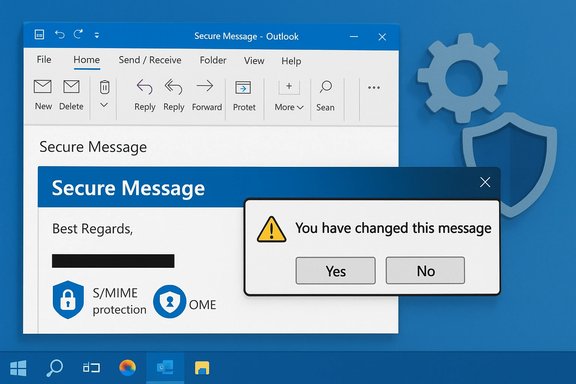
A recent update to the classic Outlook desktop client triggered a high-impact interoperability bug that interrupted the handling of S/MIME-signed messages and Office Message Encryption (OME) protected email, producing confusing prompts and, in some cases, stripping digital signatures when messages were opened — a problem Microsoft has acknowledged and moved to fix while administrators and security-conscious users are left juggling mitigations, compatibility checks, and risk controls.
Background
Classic Outlook for Windows (the long-standing desktop client many organizations still rely on) supports multiple encryption and rights management systems, notably S/MIME (for certificate-based end‑to‑end signing and encryption) and Office Message Encryption (OME) / Microsoft Purview Message Encryption (for label-based or tenant-level encryption). These systems have different cryptographic and rendering paths in the client, and an update that touched Outlook’s message-rendering or protection-handling code can therefore have outsized effects on encrypted mail.Microsoft published a support advisory describing a specific symptom: when opening an S/MIME-signed message that is also protected by OME (for example, an Encrypt‑Only or sensitivity‑labelled message), the client displayed the dialog “You have changed this message. If you save the changes, the message will no longer be digitally signed. Do you want to save your changes?” Selecting the dialog’s affirmative option removed the S/MIME signature; rejecting the prompt preserved it. Both choices still allowed the message to open, but the presence of the dialog and the possibility of a signature being stripped constituted a clear integrity and non‑repudiation concern. Microsoft has documented and fixed this issue in specific Outlook builds. Parallel problems with other encrypted / rights‑protected messages have been reported and investigated — for example, classic Outlook failing to open encrypted emails from other tenants or getting stuck in an Information Rights Management (IRM) configuration loop. Those cases remain under active investigation in some instances and have distinct mitigations. At the same time, community and forum activity shows a broader pattern: classic Outlook has experienced a series of regressions tied to different updates in recent months (copy/paste freezes, drag‑and‑drop breakages and crashes), which helps explain why administrators and power users have been on high alert when any update touches message handling or authentication flows.
What happened (technical summary)
- A specific Outlook build introduced a regression in the code path that handles messages when two protection mechanisms are involved: S/MIME signing plus OME-based encryption or label protection.
- When opening such composite-protection messages, the message renderer incorrectly treated a condition as if the message had been changed. Outlook surfaced the standard unsaved-changes dialog — a UI designed for ordinary composition edits — and presented an option that, if accepted, removed the original S/MIME signature.
- The problem was reproducible in affected builds and reported by users and administrators through support channels and community forums. Microsoft triaged and documented the behavior and then published builds where the fix was included.
How Microsoft responded
Microsoft’s official support documentation describes the symptom, the affected builds, and the builds that include the fix. The advisory lists the versions (channels and build numbers) where the bug was corrected and indicates that the fix has been shipped to relevant update channels. Administrators should verify their clients’ build numbers against Microsoft’s update history to confirm whether their devices have the corrected versions. For other encryption-related regressions (for example, problems opening OMEv2 messages from external tenants), Microsoft has published separate support notices and — in some cases — recommended workarounds such as adjusting cross‑tenant access or conditional access exceptions while the teams investigate. Those items are tracked in the Microsoft support backlog and Q&A threads. The speed and scope of fixes have varied: some regressions were corrected in the next servicing builds, while other scenarios required further coordination with Purview/IRM teams and telemetry to determine root cause.Who’s affected
- Enterprise customers and organizations that use S/MIME certificates plus sensitivity labels / OME for message encryption/rights protection are most likely to encounter the symptom.
- Users running the affected Outlook build(s) on Windows with the classic desktop client will see the dialog; the new Outlook client (the redesign) or Outlook on the web (OWA) may not exhibit the same behavior because they use different rendering stacks and server-side decryption flows.
- Mailboxes configured as POP/IMAP or that rely on older connection models may experience different limitations for encryption; classic Outlook in certain configurations cannot open some protected messages unless connected as a Microsoft 365 / Exchange account. Community troubleshooting and Microsoft Q&A threads highlight scenarios where account type prevents local decryption.
Immediate risks and operational impact
- Integrity / Non‑repudiation risk
The dialog’s option to “save” effectively removes the S/MIME signature — weakening non‑repudiation guarantees. A user who clicks the prompt without understanding the consequence can unintentionally remove a signature that another party might rely upon as proof of authenticity. That is a direct security and compliance risk in regulated or legal communications. - Misleading UI / Human error
The dialog uses a generic save/changes message that’s normally benign in composition scenarios; that UI, applied in a protected-message read path, creates confusion. Users may click the default affirmative option, introducing silent changes to message metadata. - Cross‑tenant and external communication failures
Where encrypted messages from other tenants rely on token exchange or conditional access claims, classic Outlook’s altered behavior can manifest as either an inability to open the message or endless credential prompts. That creates availability risk for confidential communications across business boundaries. - Operational disruption
For teams that depend on encrypted workflows (legal, HR, finance, healthcare), the inability to open messages reliably creates business friction. The fix rollout schedule and staggered channel deployment mean some users may remain on vulnerable builds longer than others.
Verified build and patch guidance
- Confirm your Outlook build from the client: File → Office Account → About Outlook. Microsoft’s advisory lists the specific builds where the S/MIME+OME prompt issue is fixed (the fix appears in the version family labeled Version 2506 Build 18925.20000 for Current Channel, among other channel builds). Ensure you compare your exact build number.
- If your devices are managed centrally (SCCM, Intune, WSUS), coordinate with deployment windows to push the corrected build. For unmanaged or home users, use File → Account → Update Options → Update Now to fetch the latest Microsoft 365 client update.
- If your environment uses conservative update channels (Monthly Enterprise, Semi-Annual Channel), expect a lag between the fix appearing in Current Channel builds and the fix being scheduled for broader servicing. Plan communications and containment steps accordingly.
Practical mitigations — what to do now (end users)
- Do not select the affirmative “save” option in the “You have changed this message” dialog unless you understand the consequences. Selecting No preserves the S/MIME signature; selecting Yes removes it. If you already clicked Yes and the message lost its S/MIME signature, treat the event as a potential integrity loss and re‑request the signed content if needed.
- Open encrypted or signed mail in Outlook on the web (OWA) as a fallback. OWA uses server‑side decryption and rendering and is unaffected by the desktop client’s local rendering regression in many cases.
- Switch temporarily to the New Outlook (if available and compatible) for affected mailboxes — the New Outlook client often employs a different message rendering path and may bypass the bug.
- If you suspect cross‑tenant decryption issues, verify whether the message opens in OWA and consider asking the sender to resend with alternate encryption or to use an external portal (for cross‑tenant OME scenarios) until the client fleet is patched.
Practical mitigations — what administrators should do
- Inventory and prioritize
- Identify users and groups that rely on S/MIME and label/OME protections. Prioritize these as high‑risk and patch them first.
- Classify mailboxes that receive encrypted mail from external tenants or partner organizations.
- Update strategy
- If using managed update channels, plan to accelerate the deployment of the fixed Outlook builds to high-priority users. Use phased deployment to limit regressions elsewhere, but don’t delay sensitive users unnecessarily.
- Communication and training
- Notify affected teams that the dialog may appear and instruct them to choose No to preserve signatures unless they explicitly intend to strip a signature.
- Provide guidance on using OWA and New Outlook as fallbacks.
- Conditional Access and cross‑tenant settings
- For cross‑tenant OME failures, evaluate whether temporary conditional access exceptions or explicit cross‑tenant trust (to accept MFA claims) are acceptable mitigations while working with Microsoft support. These are tenant configuration changes and must be reviewed for security tradeoffs.
- Logging and forensics
- Collect event timestamps and client build numbers for any incidents where a signature was removed or where decryption failed. Those artifacts will be essential if you need to escalate to Microsoft support.
- Test before rollout
- Deploy fixed builds to a pilot set of users and validate typical encrypted workflows (S/MIME signed+OME messages, cross‑tenant encrypted mail) before mass rollout. Lessons from other recent Outlook regressions show that even patches can have narrow side effects, so a measured approach is prudent.
Step‑by‑step rollback and alternative tactics
If immediate patching is not feasible, here are defensible options:- (Short term) Ask users to use OWA or New Outlook for opening encrypted mail.
- (Short term) Communicate the UI guidance: always choose No when the “You have changed this message” prompt appears for protected mail.
- (Medium term) For critical users, accelerate their client update to the fixed build using Click‑to‑Run management commands or your chosen update tooling.
- (Medium term) If necessary and acceptable, temporary changes to cross‑tenant access (to relax certain claims checks) can restore OME decryption for external tenant messages while Microsoft resolves cross‑tenant handling. This requires risk assessment with identity and compliance teams.
- Open an elevated command prompt on the client.
- Navigate to the Click‑to‑Run directory: cd %programfiles%\Common Files\Microsoft Shared\ClickToRun
- Run: officec2rclient.exe /update user updatetoversion=<target build>
- Restart Outlook and verify behavior.
Why this problem matters beyond the immediate bug
- Trust model erosion: S/MIME signatures are a foundational trust primitive for high‑assurance communication. A client behavior that silently offers to strip signatures undermines user confidence and auditability.
- Composability fragility: Modern mail ecosystems layer protections (labels, DLP, S/MIME) and authentication checks; the more layers, the more fragile client logic becomes. This bug is a reminder that combining protections requires coordinated testing across teams (Outlook client, Purview/IRM, Exchange, identity).
- Patch complexity and cadence: Microsoft’s multi‑channel update model (Beta → Current → Monthly Enterprise → Semi‑Annual) means that fixes appear in different windows for different customers. Organizations must decide whether to embrace faster channels or accept the operational lag while protecting sensitive workflows in the meantime. Community reporting of other, unrelated Outlook regressions reinforces the need for careful update testing.
Strengths and limits of Microsoft’s handling
Strengths:- Microsoft publicly documented the symptom and the affected builds; the support advisory included pragmatic guidance for end users (what the dialog does) and the builds where the fix appears. That transparency lets admins verify remediation status quickly.
- Where cross‑tenant or IRM issues were involved, Microsoft provided temporary mitigations and documented ongoing investigation paths.
- The UI dialog was not self‑explanatory for the protected message scenario; that ambiguity created practical risk for non‑technical users.
- The staggered deployment means that organizations with conservative servicing policies may face a longer exposure window.
- Some workarounds (e.g., tenant cross‑trust relaxation) carry non‑trivial security tradeoffs. Admins must weigh availability against identity/security posture.
Recommended checklist for IT teams (quick reference)
- [ ] Identify all users and groups relying on S/MIME and OME.
- [ ] Verify current Outlook builds across endpoints (File → Office Account → About Outlook).
- [ ] Pilot the fixed build for a subset of high‑risk users.
- [ ] Communicate the temporary No choice guidance for the “You have changed this message” dialog.
- [ ] Provide an OWA/New Outlook fallback and document how to use it.
- [ ] If cross‑tenant OME is used, test decryption flows with partner tenants and consider short‑term cross‑tenant trust if necessary and approved.
- [ ] Collect logs and escalate to Microsoft support with client build, timestamps, and example messages if you see persistent failures.
What to tell security and legal stakeholders
- Explain that the client bug is a rendering/handling regression rather than a fundamental cryptographic flaw; making the wrong dialog choice can remove an S/MIME signature, but the cryptographic primitives themselves are not reported compromised.
- Reassure stakeholders that Microsoft issued fixes in specified builds and that the primary controls are patching and avoidance of the affirmative dialog action until patched.
- Recommend conservative measures: require re‑signed copies of any unusually sensitive documents that were opened in the affected timeframe if signature provenance is legally important.
Closing analysis
The Outlook classic S/MIME + OME prompt issue is an instructive case: it shows how user interface semantics, not cryptography, can create security and compliance risk when disparate protection systems interact. Microsoft’s documentation and subsequent fixes reduce the window of exposure, but the incident underlines operational realities for organizations that still depend on legacy clients: test updates in representative environments, maintain clear communications for high‑risk user groups, and have fallbacks (OWA, alternative clients, or controlled update acceleration) for sensitive workflows.Administrators should treat this as both a discrete remediation task (deploy the fixed builds) and a prompt to review encrypted-email processes: which mailboxes rely on S/MIME, which require cross‑tenant OME, and which users must have a higher update priority. The best immediate action is simple and concrete — verify client builds, patch the highest‑risk endpoints, and instruct users to avoid accepting the “save and remove signature” option until machines are confirmed fixed. Microsoft’s advisory and ongoing Q&A threads provide the definitive build numbers and contextual mitigations; administrators should consult those during their remediation and incident documentation.
Conclusion
This regression exposed a subtle but consequential intersection between message-protection technologies and client behavior. It is remediable — patches are available and documented — but the incident emphasizes the value of layered defenses and cautious update management for high‑assurance communications. Prioritize patching, validate workflows, and communicate clear, actionable guidance to users. Doing so will restore both functionality and the trust that secure messaging depends upon.
Source: Windows Report https://windowsreport.com/outlook-classic-bug-breaks-encrypted-emails-after-latest-update/
