

Microsoft 365 administrators should not treat an Online Archive calendar as an active scheduling calendar, even when Microsoft begins adding calendar visibility to archive mailboxes. Microsoft 365 Roadmap ID 410249 points to archived-calendar access, not a documented replacement for the primary calendar’s role in meeting creation, delegation, free/busy lookup, invitations, or mobile scheduling.
The distinction matters because Microsoft’s current guidance says that an Online Archive mailbox calendar cannot be viewed in Outlook on the web by design; Outlook desktop is the stated workaround. The roadmap changes the direction of travel, but it does not yet describe a complete scheduling model—and its dates are still well ahead: preview is listed for May 2027, with rollout beginning in June 2027.
Roadmap ID 410249, titled “Outlook: Calendar support in Online Archive,” remains marked In Development. It currently lists Mac as the platform, with Current Channel and General Availability as release phases. That is a notably narrower commitment than “Outlook calendar archives everywhere.”
For IT teams, the important omission is as consequential as the feature name. The entry does not promise support in Outlook on the web, new Outlook for Windows, classic Outlook for Windows, or Outlook mobile. It also does not document whether users will be able to create appointments in an archived calendar, accept meeting invitations there, expose free/busy information, delegate access, or make an archive calendar the destination for new meetings.
Microsoft may eventually answer some or all of those questions. But a roadmap item is not an architectural specification, and administrators should resist allowing a future visibility feature to redefine where authoritative schedule data lives.
That caution is especially relevant as Outlook’s broader calendar experience keeps moving. WindowsForum readers following the May 2026 Outlook calendar parity and team views update have already seen how quickly Microsoft is filling gaps across clients. Archive calendar support could be useful, but parity in viewing features does not automatically establish parity in collaboration behavior.
Exchange Online message records management, or MRM, creates an additional reason to make that policy explicit. Calendar and Task retention age is calculated from an item’s end date. That means calendar history can enter an archive on a timetable that differs from ordinary mail, and users may discover old meetings in the archive without understanding why the information is no longer in the active calendar.
The risk is not simply user confusion. A calendar event can look deceptively current once it becomes visible again. A past project series, a former manager’s meeting history, or an old travel appointment may be valuable for audit and recall, but it should not be mistaken for a live schedule that reflects current availability, current permissions, or current meeting ownership.
An effective internal rule is simple: an archived calendar is readable history, never a booking surface, unless Microsoft publishes clear behavior for the clients and workflows your organization actually supports.
That rule also gives help desk staff a consistent answer. If a user can see an archived event after the feature arrives, the organization can explain that the item is being displayed for reference, not restored to active scheduling status.
When Microsoft exposes a preview to eligible Mac users, do not begin with broad communications or an organization-wide enablement decision. Begin with a small pilot ring that includes people whose work reveals calendar edge cases: an executive assistant or delegate, a manager with recurring meetings, a compliance or records stakeholder, a user with a long calendar history, and a help desk representative.
Use a staged test plan:
Administrators should collect evidence on whether users can retrieve needed historical details without opening support tickets; whether anyone attempts to create or modify archived items; whether free/busy displays behave consistently; and whether delegates understand the boundary between the archive and the primary mailbox. A small number of mistaken meeting actions may outweigh the convenience of broad access.
The more valuable metric may be reduction in manual historical lookup. If users currently rely on Outlook desktop because Outlook on the web cannot show the Online Archive calendar, a supported archive view could shorten investigations into old meetings, attendance records, project timing, or prior commitments. That is a valid use case—but it is a records-access benefit, not proof that scheduling should move into the archive.
WindowsForum’s earlier coverage of offline calendar support in new Outlook for Windows illustrates the wider context. Calendar capability is often judged by whether it matches the workflows users already expect from desktop Outlook. Archive support should be judged more narrowly: does it make historical information easier to retrieve without blurring the boundaries of active scheduling?
The key governance question is not whether old calendar items may be retained. Many organizations have good reasons to retain them. The question is whether users, managers, records teams, and support staff understand that retained calendar items may be moved out of the active calendar while remaining discoverable in an archive.
That conversation should cover recurring meetings as well. A calendar history can contain older parts of a recurring series or artifacts that make sense to a records professional but appear confusing to an end user. Until Microsoft publishes exact archive-calendar behaviors, IT should avoid making assumptions about how those items will display, whether they can be acted on, or whether their status will mirror the primary calendar.
The same restraint applies to delegation. Outlook has long had complicated interactions among calendars, shared mailboxes, permissions, and client behavior. Archive visibility could improve access without solving any of those broader coordination issues. Organizations using executive assistants and delegated scheduling should make that group a required pilot cohort, not an afterthought.
Not based on the available roadmap information. Microsoft 365 Roadmap ID 410249 remains In Development, with preview listed for May 2027 and rollout beginning in June 2027.
Will the feature arrive in Outlook on the web or Outlook for Windows?
Microsoft’s current roadmap entry identifies Mac and does not promise Outlook on the web, new Outlook for Windows, classic Outlook, or mobile support. Microsoft’s present troubleshooting guidance still says Outlook on the web cannot show an Online Archive mailbox calendar by design.
Should users move active meetings into an Online Archive calendar?
No. Keep active scheduling in the primary calendar unless Microsoft documents supported creation, editing, invitations, free/busy, delegation, and client behavior for archived calendars.
Why can calendar items appear in an archive differently from email?
Exchange Online MRM calculates Calendar and Task retention age from an item’s end date. Calendar retention can therefore produce archive behavior that users do not expect from their mail-retention experience.
Microsoft’s roadmap may eventually make archive calendars much easier to consult, particularly for Mac users who need meeting history. Until the company defines the missing scheduling behaviors and expands—or declines to expand—client support, the safe administrative posture is to pilot archive visibility as historical lookup and keep every live scheduling workflow anchored to the primary calendar.
The distinction matters because Microsoft’s current guidance says that an Online Archive mailbox calendar cannot be viewed in Outlook on the web by design; Outlook desktop is the stated workaround. The roadmap changes the direction of travel, but it does not yet describe a complete scheduling model—and its dates are still well ahead: preview is listed for May 2027, with rollout beginning in June 2027.
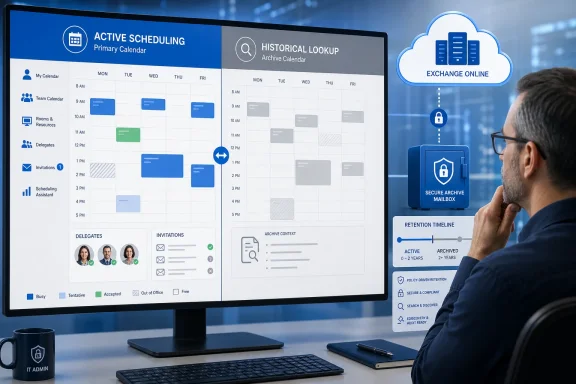 The roadmap is a visibility signal, not a scheduling contract
Roadmap ID 410249, titled “Outlook: Calendar support in Online Archive,” remains marked In Development. It currently lists Mac as the platform, with Current Channel and General Availability as release phases. That is a notably narrower commitment than “Outlook calendar archives everywhere.”For IT teams, the important omission is as consequential as the feature name. The entry does not promise support in Outlook on the web, new Outlook for Windows, classic Outlook for Windows, or Outlook mobile. It also does not document whether users will be able to create appointments in an archived calendar, accept meeting invitations there, expose free/busy information, delegate access, or make an archive calendar the destination for new meetings.
Microsoft may eventually answer some or all of those questions. But a roadmap item is not an architectural specification, and administrators should resist allowing a future visibility feature to redefine where authoritative schedule data lives.
That caution is especially relevant as Outlook’s broader calendar experience keeps moving. WindowsForum readers following the May 2026 Outlook calendar parity and team views update have already seen how quickly Microsoft is filling gaps across clients. Archive calendar support could be useful, but parity in viewing features does not automatically establish parity in collaboration behavior.
Preserve one authoritative calendar before retention makes the choice for you
The primary mailbox calendar should remain the system of record for active work: appointments, meetings, response tracking, delegate workflows, resource booking, and availability. An archive calendar should be treated as a historical record until Microsoft explicitly documents otherwise.Exchange Online message records management, or MRM, creates an additional reason to make that policy explicit. Calendar and Task retention age is calculated from an item’s end date. That means calendar history can enter an archive on a timetable that differs from ordinary mail, and users may discover old meetings in the archive without understanding why the information is no longer in the active calendar.
The risk is not simply user confusion. A calendar event can look deceptively current once it becomes visible again. A past project series, a former manager’s meeting history, or an old travel appointment may be valuable for audit and recall, but it should not be mistaken for a live schedule that reflects current availability, current permissions, or current meeting ownership.
An effective internal rule is simple: an archived calendar is readable history, never a booking surface, unless Microsoft publishes clear behavior for the clients and workflows your organization actually supports.
That rule also gives help desk staff a consistent answer. If a user can see an archived event after the feature arrives, the organization can explain that the item is being displayed for reference, not restored to active scheduling status.
Build the pilot around failure modes, not screenshots
There is no new archive-calendar pilot to validate today based on the stated roadmap. With preview not listed until May 2027, the practical work now is preparation: identify who needs historical calendar access, define what “success” means, and make sure retention design is not creating accidental secondary calendars.When Microsoft exposes a preview to eligible Mac users, do not begin with broad communications or an organization-wide enablement decision. Begin with a small pilot ring that includes people whose work reveals calendar edge cases: an executive assistant or delegate, a manager with recurring meetings, a compliance or records stakeholder, a user with a long calendar history, and a help desk representative.
Use a staged test plan:
- Confirm that test users can distinguish the primary calendar from the Online Archive calendar in the Outlook client Microsoft actually enables. The names, navigation placement, and visual cues should make it difficult to book against history by mistake.
- Validate read-only historical lookup first. Search for old appointments, recurring-series remnants, attendee details, locations, and attachments where applicable, then compare results with the primary calendar and known retention behavior.
- Attempt every scheduling action that users are likely to try: create an appointment, edit an item, accept or decline an invitation, forward a meeting, propose a new time, and cancel an event. Record not merely whether a button appears, but where the resulting item is stored and what recipients see.
- Test free/busy behavior across internal users, delegates, rooms, and shared schedules. An archive calendar must not silently affect availability calculations or lead users to assume that its items reserve time.
- Test delegation and permissions separately. A delegate who can manage a primary calendar may not have equivalent rights in an archive mailbox, and any mismatch can create a support problem for executives and administrative staff.
- Test client boundaries. If the feature begins on Mac, verify what users see in Outlook on the web, new Outlook for Windows, classic Outlook, and mobile rather than assuming consistency. The current roadmap does not promise that consistency.
- Define a rollback before testing starts. If historical access causes mistaken edits, incorrect availability, or help desk confusion, the pilot response should be to limit use to lookup, not to improvise a new scheduling policy.
Measure whether history helps without corrupting active work
A pilot needs success criteria that separate useful access from operational ambiguity. “Users liked it” is too vague for a feature touching retention and meetings.Administrators should collect evidence on whether users can retrieve needed historical details without opening support tickets; whether anyone attempts to create or modify archived items; whether free/busy displays behave consistently; and whether delegates understand the boundary between the archive and the primary mailbox. A small number of mistaken meeting actions may outweigh the convenience of broad access.
The more valuable metric may be reduction in manual historical lookup. If users currently rely on Outlook desktop because Outlook on the web cannot show the Online Archive calendar, a supported archive view could shorten investigations into old meetings, attendance records, project timing, or prior commitments. That is a valid use case—but it is a records-access benefit, not proof that scheduling should move into the archive.
WindowsForum’s earlier coverage of offline calendar support in new Outlook for Windows illustrates the wider context. Calendar capability is often judged by whether it matches the workflows users already expect from desktop Outlook. Archive support should be judged more narrowly: does it make historical information easier to retrieve without blurring the boundaries of active scheduling?
Retention policy deserves a calendar-specific review
Administrators should review whether existing MRM configuration and end-user expectations align. Because Calendar and Task retention age is based on end dates, a user’s calendar archive can become materially different from their mail archive in both content and timing.The key governance question is not whether old calendar items may be retained. Many organizations have good reasons to retain them. The question is whether users, managers, records teams, and support staff understand that retained calendar items may be moved out of the active calendar while remaining discoverable in an archive.
That conversation should cover recurring meetings as well. A calendar history can contain older parts of a recurring series or artifacts that make sense to a records professional but appear confusing to an end user. Until Microsoft publishes exact archive-calendar behaviors, IT should avoid making assumptions about how those items will display, whether they can be acted on, or whether their status will mirror the primary calendar.
The same restraint applies to delegation. Outlook has long had complicated interactions among calendars, shared mailboxes, permissions, and client behavior. Archive visibility could improve access without solving any of those broader coordination issues. Organizations using executive assistants and delegated scheduling should make that group a required pilot cohort, not an afterthought.
Frequently Asked Questions
Can administrators enable Online Archive calendar support now?Not based on the available roadmap information. Microsoft 365 Roadmap ID 410249 remains In Development, with preview listed for May 2027 and rollout beginning in June 2027.
Will the feature arrive in Outlook on the web or Outlook for Windows?
Microsoft’s current roadmap entry identifies Mac and does not promise Outlook on the web, new Outlook for Windows, classic Outlook, or mobile support. Microsoft’s present troubleshooting guidance still says Outlook on the web cannot show an Online Archive mailbox calendar by design.
Should users move active meetings into an Online Archive calendar?
No. Keep active scheduling in the primary calendar unless Microsoft documents supported creation, editing, invitations, free/busy, delegation, and client behavior for archived calendars.
Why can calendar items appear in an archive differently from email?
Exchange Online MRM calculates Calendar and Task retention age from an item’s end date. Calendar retention can therefore produce archive behavior that users do not expect from their mail-retention experience.
Microsoft’s roadmap may eventually make archive calendars much easier to consult, particularly for Mac users who need meeting history. Until the company defines the missing scheduling behaviors and expands—or declines to expand—client support, the safe administrative posture is to pilot archive visibility as historical lookup and keep every live scheduling workflow anchored to the primary calendar.
References
- Primary source: learn.microsoft.com
Cannot access an archived Calendar in Microsoft Outlook Web App - Microsoft 365 | Microsoft Learn
You cannot view the Calendar folder of an online-archive mailbox by using Outlook Web App.learn.microsoft.com - Independent coverage: microsoft.com
Microsoft 365 Roadmap | Microsoft 365
The Microsoft 365 Roadmap lists updates that are currently planned for applicable subscribers. Check here for more information on the status of new features and updates.www.microsoft.com
- Primary source: WindowsForum
Microsoft Outlook for Windows: Offline Calendar Support Delayed but Essential for Users | Windows Forum
For millions of users who rely on Microsoft’s productivity tools for day-to-day operations, any announcement surrounding the evolution of apps like Outlook...windowsforum.com
