

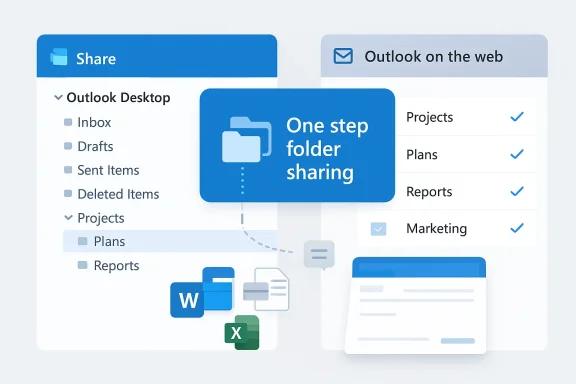
Microsoft appears to be simplifying two of Outlook’s most friction-prone tasks: granting someone access to a mail folder buried deep inside a mailbox, and sending locally stored Office files by email without the multi-step attach dance. A WindowsReport write‑up that cites Microsoft’s roadmap says Outlook will gain a one‑step folder sharing flow and tighter local Office‑to‑mail integration (expected to enter preview in May 2026 and roll out broadly in the following weeks). These changes, if they land as described, will reduce clicks and administrative friction for both end users and IT teams — but they also raise practical and security questions that admins should plan for now.
Outlook’s folder‑sharing model today requires explicit permission settings for each folder in the chain. That means if you want to give someone access to a nested subfolder, you often must also ensure parent folders are shared or otherwise visible — a multi‑step process that causes routine confusion and support tickets. Microsoft’s own documentation still explains the existing flow where sharing a subfolder typically also requires the owner to confirm parent folder access, and administrators commonly handle edge cases through tenant settings or guidance. This is why a single action that applies required permissions up the chain would be a meaningful user experience win.
At the same time, Outlook and Microsoft 365 have been nudging users toward cloud‑link sharing (OneDrive/SharePoint) rather than sending file attachments, which reduces mailbox bloat and preserves a single canonical file copy. That cloud‑first default has introduced its own headaches — recipients lacking the right permissions see “request access” dialogs, and users are forced to switch to “attach as copy” when they need to send a direct attachment. The new Outlook behavior reported by third‑party coverage and roadmap summaries suggests Microsoft is trying to smooth both sides of the equation: make sharing easier when you want the recipient to access the folder and make sending local Office documents to email recipients less error‑prone.
This is notable because the broader ecosystem has pushed link‑first sharing for cloud files; local file sending fixes a common productivity pain for people who work with files that are intentionally kept on a local disk (sensitive files, large files, or offline edits).
WindowsReport’s article explicitly links the planned features to the Microsoft 365 roadmap and gives estimated rollout months: preview in May 2026 and broader rollout in June 2026 for folder sharing, with local Office file sending set for May 2026. I attempted to locate the exact Roadmap/Message Center items referenced; Microsoft’s roadmap and message center are the canonical places for rollout dates and tenant‑specific scheduling, and admins should always verify dates there because timelines are often adjusted between preview and GA. At the time of writing I could not find a publicly accessible, uniquely‑identifying Roadmap entry on Microsoft’s public roadmap pages that matches every detail in the WindowsReport story; for admins that means treat the dates as provisional until they appear in your tenant’s Message Center or on the official Microsoft 365 Roadmap listing.
Independent corroboration: the broader shift in Outlook’s attachment and sharing UX toward cloud links and integrated sharing has been documented across Microsoft support guidance and community reports — for instance, Microsoft’s guidance on attaching files and group file experiences, and independent coverage of how new Outlook defaults to cloud links (which explains the impetus for better local file sending). Those items line up with WindowsReport’s description of a separate, local‑file send integration. Nevertheless, the precise rollout months reported in the story should be verified in your tenant’s Message Center when they appear.
Mitigations:
Mitigations:
Mitigations:
Mitigations:
In short: expect fewer clicks but keep your audit trails and admin playbooks handy — faster sharing is welcome, but governance and training determine whether it’s a win or a support headache.
Source: Windows Report https://windowsreport.com/outlook-to-add-one-step-folder-access-and-easier-file-sending/
 Background / Overview
Outlook’s folder‑sharing model today requires explicit permission settings for each folder in the chain. That means if you want to give someone access to a nested subfolder, you often must also ensure parent folders are shared or otherwise visible — a multi‑step process that causes routine confusion and support tickets. Microsoft’s own documentation still explains the existing flow where sharing a subfolder typically also requires the owner to confirm parent folder access, and administrators commonly handle edge cases through tenant settings or guidance. This is why a single action that applies required permissions up the chain would be a meaningful user experience win.At the same time, Outlook and Microsoft 365 have been nudging users toward cloud‑link sharing (OneDrive/SharePoint) rather than sending file attachments, which reduces mailbox bloat and preserves a single canonical file copy. That cloud‑first default has introduced its own headaches — recipients lacking the right permissions see “request access” dialogs, and users are forced to switch to “attach as copy” when they need to send a direct attachment. The new Outlook behavior reported by third‑party coverage and roadmap summaries suggests Microsoft is trying to smooth both sides of the equation: make sharing easier when you want the recipient to access the folder and make sending local Office documents to email recipients less error‑prone.
What Microsoft (reportedly) plans to change
One‑step folder sharing: what it looks like
According to the WindowsReport piece, Outlook will add a one‑step folder sharing action that:- Lets a mailbox owner pick a folder to share and, in a single operation, applies the necessary permission changes across the folder hierarchy so the invitee can actually open the target folder.
- Presents a clear preview showing every parent and child folder that will be affected before the owner confirms the share.
- Is available in both Outlook Desktop (New Outlook) and Outlook on the web, so the change is cross‑platform within the Microsoft 365 ecosystem.
Easier local file sending from Office apps
WindowsReport also says Microsoft will allow users to send copies of locally stored Word, Excel, and PowerPoint files directly via Outlook without manually attaching them first. In practice this means an integrated “send a copy” flow inside the Office desktop apps that invokes Outlook composition and attaches a snapshot of the file automatically — removing the extra save/attach steps users have long complained about. The report pins the desktop rollout to May 2026 for the preview phase.This is notable because the broader ecosystem has pushed link‑first sharing for cloud files; local file sending fixes a common productivity pain for people who work with files that are intentionally kept on a local disk (sensitive files, large files, or offline edits).
New admin control for recipient delimiters and Copilot integration
The WindowsReport summary also mentions two other items that will interest IT:- A tenant‑level policy to set the default recipient delimiter (comma vs. semicolon) in compose/reply. That’s an admin control for standardizing recipient formatting across the organization.
- Deeper Copilot integration that can launch AI workflows from emails and a note that some fixes (for example, the classic Outlook invisible cursor bug) are being targeted in the same timeframe. The Copilot updates align with Microsoft’s broader Copilot admin readiness work the company has been rolling out in the Microsoft 365 admin center.
How this would change real workflows
End users — faster, fewer surprises
- One click to share a deep subfolder means fewer follow‑ups asking “I still can’t see the folder.” Users don’t need to know which parent folders must be opened to make the subfolder usable.
- Built‑in preview reduces accidental over‑sharing by making the folder hierarchy explicit before permissions change.
- Sending a local Office file directly from Word/Excel/PowerPoint eliminates the classic “save, open Outlook, attach” chore — especially helpful during meetings when speed matters.
Admins — planning and policy implications
- Tenant admins will want to audit the new tenant‑level delimiter policy and update documentation or enforcement scripts accordingly.
- One‑step sharing can change the visibility surface of mailboxes; organizations should review existing sharing governance and train managers and delegates on the new flow.
- Copilot integrations require admin readiness work; Microsoft already provides central Copilot readiness and governance settings in the admin center and message center guidance for admins tracking rollout dates.
Verification, sources, and what’s still uncertain
I verified the core user‑experience rationale against Microsoft’s official documentation for sharing and permissions. Microsoft’s support pages still explain the current multi‑step approach — for example, when you share a subfolder you typically must also share parent folders for visibility. That documentation demonstrates why a one‑step flow would be materially helpful.WindowsReport’s article explicitly links the planned features to the Microsoft 365 roadmap and gives estimated rollout months: preview in May 2026 and broader rollout in June 2026 for folder sharing, with local Office file sending set for May 2026. I attempted to locate the exact Roadmap/Message Center items referenced; Microsoft’s roadmap and message center are the canonical places for rollout dates and tenant‑specific scheduling, and admins should always verify dates there because timelines are often adjusted between preview and GA. At the time of writing I could not find a publicly accessible, uniquely‑identifying Roadmap entry on Microsoft’s public roadmap pages that matches every detail in the WindowsReport story; for admins that means treat the dates as provisional until they appear in your tenant’s Message Center or on the official Microsoft 365 Roadmap listing.
Independent corroboration: the broader shift in Outlook’s attachment and sharing UX toward cloud links and integrated sharing has been documented across Microsoft support guidance and community reports — for instance, Microsoft’s guidance on attaching files and group file experiences, and independent coverage of how new Outlook defaults to cloud links (which explains the impetus for better local file sending). Those items line up with WindowsReport’s description of a separate, local‑file send integration. Nevertheless, the precise rollout months reported in the story should be verified in your tenant’s Message Center when they appear.
Risk analysis: what could go wrong and how to mitigate it
1) Over‑broad sharing and accidental exposure
Risk: A one‑step permission change that automatically grants access up the parent chain could, in edge cases, expose additional inbox structure or content that owners did not fully consider.Mitigations:
- The reported “preview” pane is essential. If Microsoft ships the change, insist on user testing that preview and keep education materials short and prescriptive: explain that accepting the share affects parent folders and how to restrict visibility afterward.
- Deploy monitoring and DLP rules that flag unusual shared folder patterns (for example, if high‑sensitivity folders are shared externally). Use Azure AD and Exchange audit logs to detect sudden permission escalations.
2) Confusion from mixed link vs. attachment behaviors
Risk: As Microsoft nudges users toward cloud‑link sharing, local‑file senders and recipients may still experience permission or “request access” issues — and the coexistence of both attachment models can confuse users and support staff.Mitigations:
- Update internal guidance showing the two flows and when to use each: a) use a cloud link for collaborative, shareable content; b) use “send a copy” for one‑time, offline, or regulated file deliveries.
- Train helpdesk staff on how to quickly switch a cloud link to an attached copy and how to resolve OneDrive/SharePoint permission requests.
3) Administrative and compliance blind spots
Risk: A global tenant policy for recipient delimiters, plus new sharing behaviors, will affect organizations differently. Admins who don’t track Message Center posts may be surprised by automatic changes.Mitigations:
- Ensure an admin (or rotation) monitors Microsoft 365 Message Center and the tenant’s Roadmap exposure. Microsoft’s Message Center and Roadmap guidance explain how items migrate from Roadmap → Message Center → tenant rollouts and why dates change. Use the admin mobile app or weekly digests to stay on top of changes.
4) Auditing and support tooling gaps
Risk: If the new flows are faster but less transparent in logs, forensic audits after an incident could be harder.Mitigations:
- Validate that audited events (share created, permission changed, file sent) remain present in Exchange / Office 365 audit logs after the features roll out.
- Run test scenarios and confirm the audit trail before enabling any tenant‑wide auto‑policies that rely on historical event patterns.
Practical recommendations: what IT teams should do now
- Prepare admin channels to validate timeline
- Add a standing item to your weekly admin sync: “Check Message Center — any new Outlook sharing or attachment items?” Microsoft’s Roadmap is the general catalog, but Message Center is where tenant‑relevant rollout communications appear. Make sure someone receives Message Center digests or uses the Microsoft 365 Admin mobile app.
- Update your support knowledge base and quick troubleshooting scripts
- Draft short troubleshooting steps for three end‑user scenarios: “recipient can’t access shared subfolder,” “recipient gets request access for a cloud link,” and “how to send a local Office file as a copy.”
- Add screenshots of the expected new preview pane once the feature appears in targeted release.
- Pilot the change in a controlled group
- When preview opens in targeted release rings, run a pilot (power users + delegates) to validate the UX and audit trails. Capture feedback and update training material before broad rollout.
- Review sharing governance and DLP rules
- Recheck conditional access and DLP policies tied to mail and file sharing. If your organization keeps critical data on local disks for a reason, document how that data should be transmitted and logged.
- Verify Copilot settings and readiness packages
- If your tenant uses Copilot or plans to, leverage Microsoft’s Copilot readiness packages and admin center guidance to ensure governance knobs are configured in advance. Microsoft has been delivering Copilot admin readiness tooling as part of the admin center updates.
Technical notes for power users and admins
- Current sharing mechanics: Microsoft still documents that sharing a subfolder may require sharing the parent folder(s) for the recipient to navigate into it. That’s a core technical reason one‑step sharing is useful: it automates the multiple ACL updates that used to be necessary. Expect the one‑step function to modify folder ACLs and to surface a summary of changes for confirmation.
- Audit and retention: confirm that the Exchange Online and Microsoft 365 audit logs capture the permission changes applied by one‑step sharing. If you rely on third‑party SIEM ingestion, verify the connector captures those new events.
- Attachment vs. link behavior: Outlook’s default behavior for file attachments increasingly favors cloud links; any new “send a copy” flow should create a conventional attachment (a snapshot) and therefore consume mail transport bandwidth and potentially count against attachment size limits. Use mail flow and transport rules to manage large local attachments if necessary.
Strengths and potential upside
- Real productivity gains: Removing multi‑step sharing and the local file attach roundtrip saves time for people who regularly delegate or collaborate on nested folders and for users who need to email local Office files quickly.
- Reduced helpdesk load: Fewer “I can’t see the folder you shared” tickets will save time and reduce user frustration.
- Better admin controls: A tenant‑wide delimiter policy and Copilot readiness tools give admins more predictable behavior and governance options.
What to watch for after rollout
- Watch Message Center items tied to the feature for any post‑deploy notes or rollback indications. Microsoft’s history shows that expected timelines sometimes slip and that roadmaps are updated publicly and via Message Center. Keep an eye on the official channels and gate production rollout behind a pilot if your org prefers conservative adoption.
- Monitor user behavior and increase communications in the first 30–60 days. Short in‑app guidance and a one‑page FAQ will reduce confusion: “Share vs. Share parent folders,” “When to send a copy vs. share link,” and “How to confirm recipient access.”
- Confirm DLP and compliance workflows still detect and handle shared folders and attached snapshots as expected. A change in the surface area of shared content can trigger governance gaps if not accounted for.
Final assessment
If Microsoft ships the one‑step folder sharing and in‑app local file sending exactly as WindowsReport describes, the net productivity impact will be positive: fewer clicks, clearer previews, and reduced recipient‑access friction. Those changes align logically with Microsoft’s longer push toward making collaboration faster while strengthening admin governance (Copilot readiness, tenant policies). However, the announcement as reported should be treated as an early visibility item: rollout dates and exact behavior are best confirmed via your tenant’s Message Center and the Microsoft 365 Roadmap entries when they appear. Until the feature lands in a targeted release that you can test, plan for pilot validation, update support documentation, and prepare governance checks so the change becomes an operational improvement rather than a surprise.In short: expect fewer clicks but keep your audit trails and admin playbooks handy — faster sharing is welcome, but governance and training determine whether it’s a win or a support headache.
Source: Windows Report https://windowsreport.com/outlook-to-add-one-step-folder-access-and-easier-file-sending/
