

Microsoft is preparing a June 2026 Outlook update for the new Outlook for Windows and Outlook on the web that automatically shows an extra message-list column when users sort mail by fields such as size, category, importance, or flag due date. The change sounds almost comically small beside Microsoft’s larger campaign to move customers off older mail clients. But it lands precisely where the new Outlook has struggled most: not in headline features, but in the muscle memory of people who live in their inboxes all day. A better sort view will not settle the new Outlook debate, yet it shows Microsoft has started fixing the boring workflow gaps that decide whether software feels trustworthy.
Email sorting is not the sort of feature that wins a keynote demo. It has no Copilot glow, no generative rewrite button, no animated productivity promise. It is the sort of small affordance that administrators and power users notice only when it is missing, confusing, or slower than it used to be.
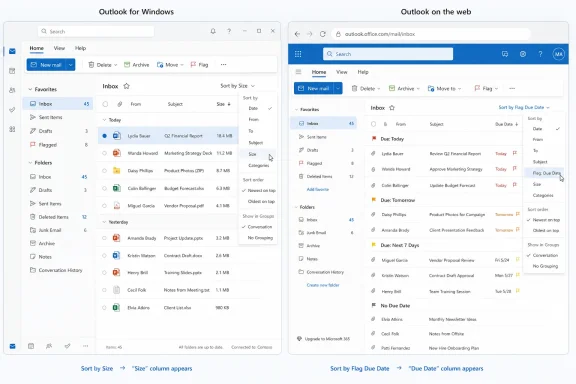
That is why this update matters more than its size suggests. When Outlook sorts a message list by something other than the usual From, Subject, or Date Received fields, the new behavior will display the relevant sort value as an additional column. Sort by Size, and the list will show Size. Sort by another supported attribute, and Outlook will make that attribute visible rather than leaving the user to infer why the list appears in a particular order.
This is software admitting that invisible logic is bad interface design. A sorted list that does not show the thing being sorted is technically functional, but it is cognitively hostile. Users should not have to trust the client’s hidden ordering model or open individual messages to understand what is happening.
Support for sorting by Flag Due Date is the other practical addition. For people who use flags as a lightweight task system, that field is not decorative metadata. It is the difference between an inbox that doubles as a work queue and an inbox that merely accumulates anxiety.
The user argument has been just as familiar: classic Outlook may be old, dense, and occasionally infuriating, but it is also deeply capable. It supports workflows that were built over years, sometimes decades. It feels like a tool for people who process mail for a living, not simply an endpoint for receiving messages.
That tension is why every small new Outlook improvement gets judged twice. First, users ask whether the feature is useful on its own. Then they ask whether it closes a gap Microsoft created by pushing them toward a newer client before it fully matched the old one.
The sorting update passes the first test easily. It is useful, legible, and low-risk. The second test is harder. Microsoft is still in the long middle of a migration where each incremental improvement invites the same response from holdouts: good, now do the next dozen.
Outlook’s message list is a perfect example of why minimalism has limits. Sorting is only useful when the sorted value is visible enough to be inspected. If a mailbox is ordered by message size, users need to see the size. If it is ordered by a due date, users need to see that due date. Otherwise the interface forces the user to remember the current sort state and mentally reconcile the order of messages against a hidden property.
Classic productivity software was often visually crowded because it exposed the state of the system. Newer software often hides state in the name of approachability. The best interface is not the one with the fewest objects on screen; it is the one that makes the next decision obvious.
This is why the Outlook change feels like a small win for pragmatism. It does not ask users to learn a new paradigm. It simply restores a basic relationship between action and evidence: if the app sorts by a value, the app should show the value.
That workflow is not glamorous, but it is extremely common in business environments. A flagged message might represent a contract to review, a ticket to chase, an invoice to approve, or a manager’s request that cannot disappear beneath newsletters and automated alerts. Sorting by due date makes those obligations visible without requiring users to move everything into Planner, To Do, Loop, or whatever Microsoft 365 surface happens to be in strategic favor that quarter.
It also matters because Outlook has always been more than email. Classic Outlook became sticky because it collapsed mail, calendar, contacts, tasks, rules, categories, search folders, PST files, shared mailboxes, and organizational rituals into one heavyweight command center. The new Outlook’s challenge is not simply sending and receiving messages; it is recovering enough of that command-center role to be credible.
Flag Due Date sorting is one of those features that sounds minor until it is part of your daily triage routine. Then it becomes the kind of thing whose absence makes a new client feel unserious.
The problem is that roadmap visibility also exposes how much of the migration is still under construction. When a basic sorting enhancement appears as a scheduled improvement in 2026, users who already distrusted the new Outlook may not read that as evidence of progress. They may read it as confirmation that the client shipped without enough of the basics.
That reaction is not entirely fair, but it is predictable. Microsoft is trying to modernize Outlook while carrying a user base that includes casual consumers, enterprise administrators, regulated industries, executive assistants, help desks, sales teams, and people with elaborate local archives. In that world, almost every “simple” feature has edge cases.
Still, the burden is on Microsoft. The company chose a migration path that put the new Outlook in front of users before every classic workflow had an equivalent. Once that happens, each missing or awkward feature becomes not a future enhancement but a current grievance.
That history colors the reception of every new Outlook announcement. When Microsoft adds a feature, it is not only competing against classic Outlook. It is also competing against nostalgia for the lighter Mail app, frustration with web-based desktop experiences, and suspicion that Microsoft’s preferred architecture serves Microsoft’s platform strategy before it serves users.
The sorting update does not solve those broader complaints. It will not make a web-first app feel native to everyone. It will not satisfy users who need features that remain incomplete, delayed, or different from classic Outlook. It will not silence people who believe Windows’ built-in mail experience should be local, fast, and modest.
But it does move in the right direction. It improves the inbox at the point of use, without requiring a subscription upsell or a change in work habits. In the new Outlook era, that is a more persuasive argument than another glossy list of reasons to switch.
The bigger enterprise question is whether the new Outlook can become predictable enough for broad deployment. Administrators do not need every user to love it. They need it to behave consistently, support required workflows, respect organizational controls, and avoid generating avoidable help-desk churn. A clearer message list helps with that, but it is one square in a much larger migration board.
Microsoft’s web-and-Windows alignment is attractive to IT in theory. A more unified Outlook should mean fewer divergent features, simpler documentation, and a faster path for fixes. In practice, organizations still have to test add-ins, shared mailbox behavior, offline scenarios, data-handling requirements, retention workflows, and user training materials.
That is where small UI improvements become strategically important. They reduce the number of moments where users say, “Why did this change?” A migration succeeds not because the new app has one dazzling feature, but because enough ordinary actions feel unsurprising.
But the sorting-column update is a reminder that productivity software still needs spreadsheet-level honesty. Users need to see fields, dates, values, and states. They need to understand why records are ordered, filtered, grouped, hidden, or highlighted. AI can summarize a conversation, but it cannot compensate for an interface that obscures the basic mechanics of a work queue.
This is especially true in email, where trust is built through repetition. A user may forgive a flashy feature that is occasionally wrong if it is optional. They are less forgiving when the primary message list feels opaque. The inbox is not a toy surface; it is a ledger of obligations.
Microsoft would be wise to treat these unglamorous fixes as central to the new Outlook’s credibility. Copilot may sell licenses, but visible columns, reliable offline behavior, fast search, rules, categories, archives, add-ins, and predictable rendering keep people from fleeing.
That may all be true, but users do not live in a product strategy memo. They live in today’s inbox. They judge the client by whether it helps them process mail faster at 8:47 a.m. on a Monday when the unread count is already moving in the wrong direction.
The sorting update is persuasive because it is not theoretical. It takes a common action and makes the result easier to understand. It adds a due-date-oriented path for follow-up workflows. It reduces the amount of manual view adjustment needed when users sort by less-common fields.
This is the kind of work Microsoft needs to keep doing. Not because every small feature deserves applause, but because the accumulation of small frictions is what made many users wary of the new Outlook in the first place.
 Microsoft Finds Leverage in the Inbox’s Least Glamorous Corner
Email sorting is not the sort of feature that wins a keynote demo. It has no Copilot glow, no generative rewrite button, no animated productivity promise. It is the sort of small affordance that administrators and power users notice only when it is missing, confusing, or slower than it used to be.That is why this update matters more than its size suggests. When Outlook sorts a message list by something other than the usual From, Subject, or Date Received fields, the new behavior will display the relevant sort value as an additional column. Sort by Size, and the list will show Size. Sort by another supported attribute, and Outlook will make that attribute visible rather than leaving the user to infer why the list appears in a particular order.
This is software admitting that invisible logic is bad interface design. A sorted list that does not show the thing being sorted is technically functional, but it is cognitively hostile. Users should not have to trust the client’s hidden ordering model or open individual messages to understand what is happening.
Support for sorting by Flag Due Date is the other practical addition. For people who use flags as a lightweight task system, that field is not decorative metadata. It is the difference between an inbox that doubles as a work queue and an inbox that merely accumulates anxiety.
The New Outlook’s Real Problem Has Never Been Just Missing Features
Microsoft has spent the last several years trying to convince users that the new Outlook is not merely a web wrapper dressed in desktop clothing. The company’s argument is familiar: one codebase, faster feature delivery, more consistent behavior across Windows and the web, and easier integration with Microsoft 365 services. Those are real engineering and product advantages, especially for a company maintaining Outlook across consumer, commercial, web, mobile, and desktop surfaces.The user argument has been just as familiar: classic Outlook may be old, dense, and occasionally infuriating, but it is also deeply capable. It supports workflows that were built over years, sometimes decades. It feels like a tool for people who process mail for a living, not simply an endpoint for receiving messages.
That tension is why every small new Outlook improvement gets judged twice. First, users ask whether the feature is useful on its own. Then they ask whether it closes a gap Microsoft created by pushing them toward a newer client before it fully matched the old one.
The sorting update passes the first test easily. It is useful, legible, and low-risk. The second test is harder. Microsoft is still in the long middle of a migration where each incremental improvement invites the same response from holdouts: good, now do the next dozen.
A Visible Column Is a Quiet Rebuke to Minimalism
Modern productivity software often confuses cleanliness with clarity. Designers remove visible controls, collapse options into menus, and hide metadata until the user asks for it. That can make a screen feel lighter, but it can also make expert workflows slower and less transparent.Outlook’s message list is a perfect example of why minimalism has limits. Sorting is only useful when the sorted value is visible enough to be inspected. If a mailbox is ordered by message size, users need to see the size. If it is ordered by a due date, users need to see that due date. Otherwise the interface forces the user to remember the current sort state and mentally reconcile the order of messages against a hidden property.
Classic productivity software was often visually crowded because it exposed the state of the system. Newer software often hides state in the name of approachability. The best interface is not the one with the fewest objects on screen; it is the one that makes the next decision obvious.
This is why the Outlook change feels like a small win for pragmatism. It does not ask users to learn a new paradigm. It simply restores a basic relationship between action and evidence: if the app sorts by a value, the app should show the value.
Flag Due Dates Push Outlook Back Toward Work, Not Just Mail
The addition of Flag Due Date sorting is especially revealing because it treats email as unfinished work, not just correspondence. Many users do not run a formal task-management system for every follow-up. They flag a message, attach a due date, and expect Outlook to surface it before it becomes a problem.That workflow is not glamorous, but it is extremely common in business environments. A flagged message might represent a contract to review, a ticket to chase, an invoice to approve, or a manager’s request that cannot disappear beneath newsletters and automated alerts. Sorting by due date makes those obligations visible without requiring users to move everything into Planner, To Do, Loop, or whatever Microsoft 365 surface happens to be in strategic favor that quarter.
It also matters because Outlook has always been more than email. Classic Outlook became sticky because it collapsed mail, calendar, contacts, tasks, rules, categories, search folders, PST files, shared mailboxes, and organizational rituals into one heavyweight command center. The new Outlook’s challenge is not simply sending and receiving messages; it is recovering enough of that command-center role to be credible.
Flag Due Date sorting is one of those features that sounds minor until it is part of your daily triage routine. Then it becomes the kind of thing whose absence makes a new client feel unserious.
Microsoft’s Roadmap Strategy Cuts Both Ways
The Microsoft 365 roadmap is now part product plan, part expectation-management machine. It lets administrators see what is coming, gives journalists a steady trail of changes to parse, and allows Microsoft to demonstrate momentum without waiting for a full release announcement. For new Outlook, that matters because the product’s reputation is being rebuilt one roadmap item at a time.The problem is that roadmap visibility also exposes how much of the migration is still under construction. When a basic sorting enhancement appears as a scheduled improvement in 2026, users who already distrusted the new Outlook may not read that as evidence of progress. They may read it as confirmation that the client shipped without enough of the basics.
That reaction is not entirely fair, but it is predictable. Microsoft is trying to modernize Outlook while carrying a user base that includes casual consumers, enterprise administrators, regulated industries, executive assistants, help desks, sales teams, and people with elaborate local archives. In that world, almost every “simple” feature has edge cases.
Still, the burden is on Microsoft. The company chose a migration path that put the new Outlook in front of users before every classic workflow had an equivalent. Once that happens, each missing or awkward feature becomes not a future enhancement but a current grievance.
Windows Users Remember the Mail and Calendar Lesson
The new Outlook did not arrive in a vacuum. Microsoft ended support for the old Windows Mail, Calendar, and People apps at the end of 2024, pushing Windows users toward the newer Outlook experience. For many casual users, that transition may have been acceptable or even invisible. For others, it reinforced a familiar Microsoft pattern: remove a simple native app, replace it with a more service-connected experience, and ask users to trust the roadmap.That history colors the reception of every new Outlook announcement. When Microsoft adds a feature, it is not only competing against classic Outlook. It is also competing against nostalgia for the lighter Mail app, frustration with web-based desktop experiences, and suspicion that Microsoft’s preferred architecture serves Microsoft’s platform strategy before it serves users.
The sorting update does not solve those broader complaints. It will not make a web-first app feel native to everyone. It will not satisfy users who need features that remain incomplete, delayed, or different from classic Outlook. It will not silence people who believe Windows’ built-in mail experience should be local, fast, and modest.
But it does move in the right direction. It improves the inbox at the point of use, without requiring a subscription upsell or a change in work habits. In the new Outlook era, that is a more persuasive argument than another glossy list of reasons to switch.
Enterprise IT Will Care About Predictability More Than Polish
For IT departments, the new sorting behavior is a modest support win. Confusing message order creates tickets, especially when users accidentally sort by a field and cannot tell why their inbox no longer looks “right.” Showing the active sort value makes the state of the view easier to diagnose over a screen share or a support call.The bigger enterprise question is whether the new Outlook can become predictable enough for broad deployment. Administrators do not need every user to love it. They need it to behave consistently, support required workflows, respect organizational controls, and avoid generating avoidable help-desk churn. A clearer message list helps with that, but it is one square in a much larger migration board.
Microsoft’s web-and-Windows alignment is attractive to IT in theory. A more unified Outlook should mean fewer divergent features, simpler documentation, and a faster path for fixes. In practice, organizations still have to test add-ins, shared mailbox behavior, offline scenarios, data-handling requirements, retention workflows, and user training materials.
That is where small UI improvements become strategically important. They reduce the number of moments where users say, “Why did this change?” A migration succeeds not because the new app has one dazzling feature, but because enough ordinary actions feel unsurprising.
The Copilot Era Still Needs Spreadsheet-Level Honesty
Microsoft’s current productivity story is dominated by AI. Outlook is increasingly presented as a place where Copilot can summarize threads, draft replies, prepare users for meetings, and eventually act more agentically across mail and calendar. That is the future Microsoft wants customers to imagine.But the sorting-column update is a reminder that productivity software still needs spreadsheet-level honesty. Users need to see fields, dates, values, and states. They need to understand why records are ordered, filtered, grouped, hidden, or highlighted. AI can summarize a conversation, but it cannot compensate for an interface that obscures the basic mechanics of a work queue.
This is especially true in email, where trust is built through repetition. A user may forgive a flashy feature that is occasionally wrong if it is optional. They are less forgiving when the primary message list feels opaque. The inbox is not a toy surface; it is a ledger of obligations.
Microsoft would be wise to treat these unglamorous fixes as central to the new Outlook’s credibility. Copilot may sell licenses, but visible columns, reliable offline behavior, fast search, rules, categories, archives, add-ins, and predictable rendering keep people from fleeing.
The Best Argument for New Outlook Is Becoming Less Theoretical
For a long time, Microsoft’s case for the new Outlook leaned heavily on future benefits. The new client would get features faster. It would be consistent across platforms. It would support modern experiences better than the classic Windows codebase. It would be the foundation for the next decade of Outlook.That may all be true, but users do not live in a product strategy memo. They live in today’s inbox. They judge the client by whether it helps them process mail faster at 8:47 a.m. on a Monday when the unread count is already moving in the wrong direction.
The sorting update is persuasive because it is not theoretical. It takes a common action and makes the result easier to understand. It adds a due-date-oriented path for follow-up workflows. It reduces the amount of manual view adjustment needed when users sort by less-common fields.
This is the kind of work Microsoft needs to keep doing. Not because every small feature deserves applause, but because the accumulation of small frictions is what made many users wary of the new Outlook in the first place.
The Inbox Migration Is Being Won in Inches
The practical read on this update is simple: Microsoft is tightening the new Outlook’s message list for people who use sorting as an actual work tool, not a cosmetic preference. That will not convert every classic Outlook loyalist, but it narrows one more gap between the new client and the expectations set by decades of desktop email.- Outlook for Windows and Outlook on the web are expected to gain automatic sort-value columns when users sort by fields beyond From, Subject, or Date Received.
- Sorting by Size should show a Size column in the message list, making the reason for the current order visible without inspecting individual messages.
- Flag Due Date sorting should help users who treat flagged email as a follow-up queue with real deadlines.
- The change is tied to Microsoft 365 Roadmap ID 564803 and is currently expected to reach general availability in June 2026, though roadmap timing can change.
- The feature is small, but it addresses a larger credibility problem: the new Outlook must prove it can handle everyday power-user workflows, not just modernize the shell around them.
References
- Primary source: Neowin
Published: Mon, 08 Jun 2026 01:00:00 GMT
New Outlook for Windows and Web is getting a simple but very useful email feature - Neowin
Microsoft confirms that New Outlook for Windows will soon receive a simple yet highly useful feature. www.neowin.net
- Related coverage: m365admin.handsontek.net
Outlook: Sort improvements to the message list - M365 Admin
When sorting on Outlook for Web or Outlook for Windows, if the Sort By field is not one of From, Subject, or Date Received, we will now show an additional column for the Sort By value (e.g., Size). We will also support sorting by Flag Due Date. Product Outlook Release phase General Availability...m365admin.handsontek.net - Related coverage: windowscentral.com
Microsoft Outlook for Windows enables offline file attachments | Windows Central
Outlook for Windows is getting a new feature that lets users attach files to emails offline, sending them automatically when the internet is restored.www.windowscentral.com - Related coverage: windowslatest.com
Microsoft is pushing 15 new Outlook features, but Classic users have had most of them for years
Microsoft says the new Outlook for Windows (based on Outlook.com) has added over 15 productivity features, and it's the right time to switch. www.windowslatest.com
- Related coverage: howtogeek.com
I Switched to New Outlook for Windows so You Didn't Have To
Oh New Outlook, you could have been so great. www.howtogeek.com
- Related coverage: pcworld.com
Windows' new Outlook app: 4 key details you absolutely need to know | PCWorld
The new Outlook replaces the classic Outlook in Windows 10/11 and the Windows Mail and Windows Calendar app. Here's what you need to know.www.pcworld.com
- Related coverage: slipstick.com
Mail Templates in Outlook for Windows (and Web) | Slipstick Systems
Mail templates are available in (new) Outlook for Windows. No, not the My Templates feature available in Microsoft email accounts, but real templates, the same templates you use in Outlook Classic.www.slipstick.com - Related coverage: tech-talk.com
- Related coverage: pioncomm.net
- Related coverage: rock-hill.k12.sc.us
</rdf:Alt> </dc:title> <dc:description> <rdf:Alt> <rdf:li xml:lang="x-default"/> </rdf:Alt> </dc:description> <dc:creator> <rdf:Seq> <rdf:li>Ginny H
</rdf:Alt> </dc:description> <dc:creator> <rdf:Seq> <rdf:li>Ginny Hedgpathwww.rock-hill.k12.sc.us
- Related coverage: pentagonsolutions.com
Excitech DOCS User Guide
</rdf:Alt> </dc:description> <dc:creator> <rdf:Seq> <rdf:li>Johnathan Ward;Julian Jones;[email protected]www.pentagonsolutions.com
- Official source: support.microsoft.com
Feature comparison between new Outlook and classic Outlook | Microsoft Support
Feature comparison between new Outlook and classic Outlooksupport.microsoft.com - Official source: techcommunity.microsoft.com

Mail & Calendar Apps Will Be Replaced with New Outlook for Windows December 2024 | Microsoft Community Hub
Original Publish Date: June 2023 | MC650424 Revised Date: August 30, 2023, based on Microsoft's Updated Message See text in red font. Microsoft's...
techcommunity.microsoft.com
- Official source: microsoft.com
Your request has been blocked. This could be due to several reasons.
www.microsoft.com
- Official source: enablement.microsoft.com
New Microsoft Outlook for Windows – Microsoft Adoption
The new Outlook brings the speed of our latest technology into the performance and reliability of a Windows desktop app to build a simple, powerful, and consistent experience in Windows that allows a faster and more agile way to deploy updates and fixes.enablement.microsoft.com - Related coverage: tei.forrester.com
