

Microsoft is retiring Outlook’s Meeting Insights feature beginning in mid-August 2026, replacing its automatic file-and-email suggestions with the Copilot-powered Prepare for your meeting experience. The immediate consequence is stark for organizations that have not assigned Microsoft 365 Copilot licenses: a previously available meeting-preparation aid will disappear rather than receive a like-for-like replacement.
The change, outlined in Message Center post MC1430531 and first reported by Neowin, is expected to finish rolling out in early September. It affects Outlook meeting experiences across Microsoft’s supported platforms, though the practical availability of the Copilot replacement will depend on licensing and client support.
Meeting Insights has long surfaced potentially relevant recent emails and files inside a meeting’s calendar item. Those suggestions were personalized, meaning Outlook did not share a user’s related content with other invitees. It was a relatively quiet productivity feature, but it addressed a familiar problem: opening an invite minutes before a call and trying to reconstruct the email thread, document history, and prior commitments behind it.
Microsoft’s replacement changes the model. Instead of simply surfacing related artifacts, Copilot generates a summary of the meeting context, identifies possible action items, and can respond to follow-up prompts. That may be more useful when it works well. But it also turns a broadly available contextual feature into a premium AI workload.
Microsoft’s support documentation describes Prepare for your meeting as a meeting-specific Copilot experience that gathers content a user is authorized to access, including related emails, chats, documents, tasks, and other pre-read material. The output is personal to the user; two attendees can receive different results because their Microsoft 365 permissions differ.
That maintains one of Meeting Insights’ most important privacy properties. Copilot is not meant to expose a colleague’s private mailbox or files merely because both people are attending the same meeting. In practice, however, admins should remember that the quality of the result will depend on the organization’s permissions, information architecture, and how consistently teams store work in Microsoft 365.
Microsoft also cautions that the feature may provide only a generic answer when it cannot find enough related material. A meeting with no shared documents, no meaningful email history, and no Teams context does not suddenly become well documented because a generative model is present. Copilot can synthesize accessible context; it cannot reliably manufacture it.
The new workflow is also more interactive. Users can open a calendar event, view the preparation summary at the top of the meeting form, expand it, or continue into Copilot chat with suggested prompts. Microsoft documents the experience for Outlook on the web and new Outlook for Windows, and says related versions are available in Teams, Outlook for Mac, and Outlook mobile, with some variation by app.
That is a real expansion over static suggestions. It is not, however, a transparent upgrade for every Outlook deployment.
For tenants that bought Copilot broadly, the transition may be mostly a user-training exercise. The upgraded output can combine the familiar related-content approach with a meeting brief, action-item extraction, and conversational follow-up. Employees who already work in new Outlook or Outlook on the web may see the change as a useful improvement rather than a removal.
For selective Copilot deployments, the change creates a visible feature divide inside Outlook. A licensed executive, project manager, or sales representative may receive a generated briefing in the event form, while an unlicensed coworker loses Meeting Insights entirely. The organization can make a deliberate case for that licensing boundary, but it should not describe the change internally as a universal “enhancement.”
The distinction matters even more because Microsoft has been positioning Copilot Chat and paid Microsoft 365 Copilot capabilities differently. Some users may have access to Copilot Chat in Outlook, but that does not necessarily entitle them to the full meeting-preparation experience grounded in work data. Admins should verify the assigned SKU and service plans rather than assuming that a visible Copilot button means Prepare for your meeting will appear.
Microsoft’s current requirements documentation also says Microsoft 365 Copilot can work with both classic Outlook and new Outlook on Windows and Mac. Still, the most direct Prepare for your meeting guidance centers on Outlook on the web and new Outlook for Windows. Organizations retaining classic Outlook should test the exact client build and update channel their users run instead of relying on a broad compatibility statement.
Prepare for your meeting is another example of Microsoft concentrating new value in its AI and modern-client strategy. The feature is not presented as an add-in for legacy workflows; it is woven into the calendar experience and Copilot chat. For IT departments, that means the retirement is not only about an Outlook panel. It also strengthens the case that future Outlook capabilities will increasingly arrive as licensed cloud services rather than locally familiar functions.
There is an administrative upside. Meeting Insights could be managed through Microsoft 365 search and intelligence settings, and it could occasionally surprise users by presenting content they had not consciously connected to an upcoming appointment. Copilot’s explicit summaries and prompts may make the mechanism feel more intentional, while preserving the rule that it only uses information a user can access.
But the AI version introduces its own support burden. Users must understand that an output may be incomplete, that a polished summary is not a source of record, and that suggested action items require human review. Microsoft explicitly advises users to check Copilot-generated material. That warning is particularly important for meetings involving deadlines, operational changes, contract decisions, incident response, or sensitive personnel matters.
Administrators should take several practical steps before rollout begins:
Microsoft is framing the move as an enhancement from passive insights to AI-assisted preparation. For licensed Copilot users, it may be exactly that. For everyone else, the calendar invite that once surfaced helpful context will become noticeably quieter by early September 2026.
The change, outlined in Message Center post MC1430531 and first reported by Neowin, is expected to finish rolling out in early September. It affects Outlook meeting experiences across Microsoft’s supported platforms, though the practical availability of the Copilot replacement will depend on licensing and client support.
Meeting Insights has long surfaced potentially relevant recent emails and files inside a meeting’s calendar item. Those suggestions were personalized, meaning Outlook did not share a user’s related content with other invitees. It was a relatively quiet productivity feature, but it addressed a familiar problem: opening an invite minutes before a call and trying to reconstruct the email thread, document history, and prior commitments behind it.
Microsoft’s replacement changes the model. Instead of simply surfacing related artifacts, Copilot generates a summary of the meeting context, identifies possible action items, and can respond to follow-up prompts. That may be more useful when it works well. But it also turns a broadly available contextual feature into a premium AI workload.
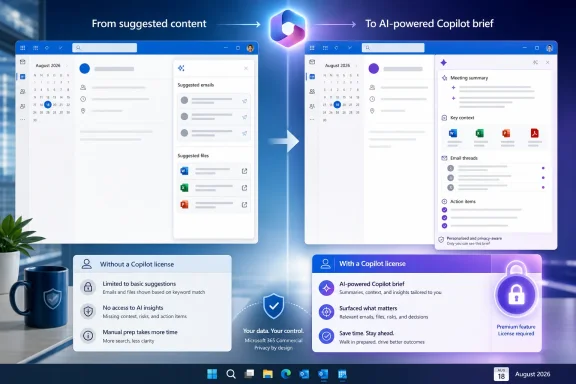 The Upgrade Is More Capable, but Not Equivalent
Microsoft’s support documentation describes Prepare for your meeting as a meeting-specific Copilot experience that gathers content a user is authorized to access, including related emails, chats, documents, tasks, and other pre-read material. The output is personal to the user; two attendees can receive different results because their Microsoft 365 permissions differ.That maintains one of Meeting Insights’ most important privacy properties. Copilot is not meant to expose a colleague’s private mailbox or files merely because both people are attending the same meeting. In practice, however, admins should remember that the quality of the result will depend on the organization’s permissions, information architecture, and how consistently teams store work in Microsoft 365.
Microsoft also cautions that the feature may provide only a generic answer when it cannot find enough related material. A meeting with no shared documents, no meaningful email history, and no Teams context does not suddenly become well documented because a generative model is present. Copilot can synthesize accessible context; it cannot reliably manufacture it.
The new workflow is also more interactive. Users can open a calendar event, view the preparation summary at the top of the meeting form, expand it, or continue into Copilot chat with suggested prompts. Microsoft documents the experience for Outlook on the web and new Outlook for Windows, and says related versions are available in Teams, Outlook for Mac, and Outlook mobile, with some variation by app.
That is a real expansion over static suggestions. It is not, however, a transparent upgrade for every Outlook deployment.
Licensing Is the Real Retirement Story
Microsoft’s own Outlook Copilot FAQ says Prepare for your meeting requires a Microsoft 365 Copilot work license. That is the operational detail administrators need to focus on before the August retirement window: Meeting Insights is being removed for everyone, while the new feature is reserved for licensed users.For tenants that bought Copilot broadly, the transition may be mostly a user-training exercise. The upgraded output can combine the familiar related-content approach with a meeting brief, action-item extraction, and conversational follow-up. Employees who already work in new Outlook or Outlook on the web may see the change as a useful improvement rather than a removal.
For selective Copilot deployments, the change creates a visible feature divide inside Outlook. A licensed executive, project manager, or sales representative may receive a generated briefing in the event form, while an unlicensed coworker loses Meeting Insights entirely. The organization can make a deliberate case for that licensing boundary, but it should not describe the change internally as a universal “enhancement.”
The distinction matters even more because Microsoft has been positioning Copilot Chat and paid Microsoft 365 Copilot capabilities differently. Some users may have access to Copilot Chat in Outlook, but that does not necessarily entitle them to the full meeting-preparation experience grounded in work data. Admins should verify the assigned SKU and service plans rather than assuming that a visible Copilot button means Prepare for your meeting will appear.
Microsoft’s current requirements documentation also says Microsoft 365 Copilot can work with both classic Outlook and new Outlook on Windows and Mac. Still, the most direct Prepare for your meeting guidance centers on Outlook on the web and new Outlook for Windows. Organizations retaining classic Outlook should test the exact client build and update channel their users run instead of relying on a broad compatibility statement.
New Outlook Adoption Gets Another Push
The timing is awkward for Microsoft because the company is still trying to move customers away from classic Outlook for Windows. Many enterprise environments have delayed or limited that migration because of feature gaps, add-in dependencies, workflow changes, and user resistance.Prepare for your meeting is another example of Microsoft concentrating new value in its AI and modern-client strategy. The feature is not presented as an add-in for legacy workflows; it is woven into the calendar experience and Copilot chat. For IT departments, that means the retirement is not only about an Outlook panel. It also strengthens the case that future Outlook capabilities will increasingly arrive as licensed cloud services rather than locally familiar functions.
There is an administrative upside. Meeting Insights could be managed through Microsoft 365 search and intelligence settings, and it could occasionally surprise users by presenting content they had not consciously connected to an upcoming appointment. Copilot’s explicit summaries and prompts may make the mechanism feel more intentional, while preserving the rule that it only uses information a user can access.
But the AI version introduces its own support burden. Users must understand that an output may be incomplete, that a polished summary is not a source of record, and that suggested action items require human review. Microsoft explicitly advises users to check Copilot-generated material. That warning is particularly important for meetings involving deadlines, operational changes, contract decisions, incident response, or sensitive personnel matters.
What IT Teams Should Do Before Mid-August
The retirement does not appear to require a tenant-side migration, but it deserves more than a passive Message Center acknowledgment. Help desks will likely receive questions from users who interpret the disappearance of Meeting Insights as an Outlook regression, especially if colleagues with Copilot licenses retain a richer-looking replacement.Administrators should take several practical steps before rollout begins:
- Review whether Meeting Insights is currently enabled and identify business groups that rely on related files and emails in calendar events.
- Confirm which users hold a Microsoft 365 Copilot license, rather than assuming standard Microsoft 365 subscriptions include the replacement.
- Test Prepare for your meeting in the Outlook clients actually used in the organization, including classic Outlook where it remains in production.
- Set user expectations that Copilot summaries are permission-trimmed, individualized, and potentially incomplete.
- Update internal support documentation to distinguish a missing Copilot license from a client, policy, or sign-in problem.
Microsoft is framing the move as an enhancement from passive insights to AI-assisted preparation. For licensed Copilot users, it may be exactly that. For everyone else, the calendar invite that once surfaced helpful context will become noticeably quieter by early September 2026.
References
- Primary source: Neowin
Published: 2026-07-18T06:30:01+00:00
Microsoft is killing an Outlook feature and replacing it with Copilot - Neowin
Another familiar Outlook feature is disappearing soon, but its replacement comes with a catch that not every Microsoft 365 user may like. www.neowin.net
- Official source: support.microsoft.com
Prepare for your meeting with Copilot | Microsoft Support
Learn how Copilot in Outlook can help you arrive prepared for your meeting by summarizing key information such as summaries of meeting-related emails and documents, your tasks, and a recap of the previous meeting.support.microsoft.com - Official source: learn.microsoft.com
Microsoft 365 Copilot - Service Descriptions | Microsoft Learn
Learn about Microsoft 365 Copilot and its feature availability across plans.learn.microsoft.com - Official source: microsoft.com
</rdf:Alt> </dc:title> <dc:description> <rdf:Alt> <rdf:li xml:lang="x-default"/> </rdf:Alt> </dc:description> <dc:creator> <rdf:Seq> <rdf:li>Lukas V
</rdf:Alt> </dc:description> <dc:creator> <rdf:Seq> <rdf:li>Lukas Velushwww.microsoft.com
- Official source: dmc.partner.microsoft.com
- Related coverage: windowscentral.com
Microsoft 365 is paywalling most of Copilot in its Office apps | Windows Central
Commercial customers will soon need a Microsoft 365 Copilot license to use Copilot Chat in Word, Excel, PowerPoint, and OneNote.www.windowscentral.com