
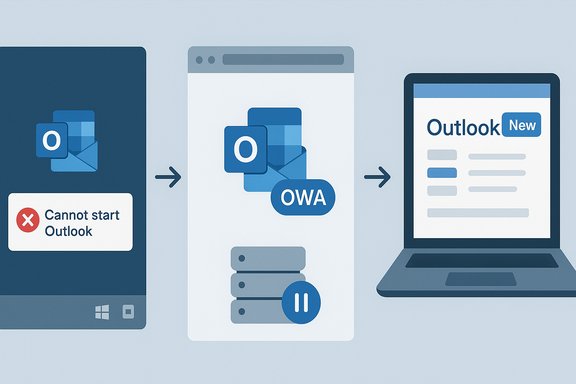
Microsoft has acknowledged and begun to address a disruptive bug that in some instances prevents the classic Outlook for Windows from launching — an error that leaves affected Microsoft 365 users locked out of the desktop client — but its official guidance still lists Outlook Web Access (OWA) and the new Outlook for Windows as primary workarounds, a recommendation that reignites debate because many users and admins consider the new Outlook not yet ready to replace the classic client in production environments.
Background / Overview
The visible failure typically presents with the well-known startup error:"Cannot start Microsoft Outlook. Cannot open the Outlook window. The set of folders cannot be opened. The attempt to log on to Microsoft Exchange has failed." That same error string, long‑familiar in help forums, is now tied to support cases where the desktop client’s attempt to authenticate or enumerate server side mailbox resources is being blocked or backed off by service-side conditions. Microsoft’s published support guidance points administrators toward capturing diagnostic data (for example, a Fiddler trace) and — where the specific service-side concurrency/backoff pattern is observed — opening a Microsoft 365 support case so Exchange Online engineers can apply a mitigation at the service layer. At the same time, mainstream outlets and community threads have documented multiple Outlook problems during 2024–2025: copy/paste freezes, drag‑and‑drop failures after certain Windows updates, and a set of separate startup crashes caused by corrupted server‑based rules — each incident underlining fragility at the intersection of Windows, Office/Outlook updates, and Exchange Online. Those incidents were fixed or mitigated in staggered updates and support responses, but the cumulative effect has raised concern among power users and IT pros.
What Microsoft says right now
- The official Microsoft support page describing the startup failure is explicit: the error can have multiple causes, but recent support cases point to server-side mailbox issues where the client is being backed off due to authentication/concurrency limits. Microsoft instructs teams to capture debug traces (for example, look for Microsoft.Exchange.RpcClientAccess.ServerTooBusyException and LID 49586 entries) and to open a support case so Exchange Online support can request a service change to mitigate such cases.
- For immediate access to mailboxes while the problem is being investigated or mitigated, Microsoft lists two practical alternatives: Outlook Web Access (OWA) or the new Outlook for Windows (the web‑backed app Microsoft shipped to replace Mail & Calendar). That guidance is explicitly presented as a workaround.
- The support document also recognizes the heterogeneity of the problem: the same error text may appear for different root causes, so the remediation path must be tailored by diagnostics and Microsoft support.
Timeline and context (concise)
- Throughout 2024 and into 2025 Microsoft released frequent updates to Outlook and Windows; several updates produced regressions affecting classic Outlook: copy/paste freezes, drag‑and‑drop loss, and crashes at email compose or startup. Community reporting and vendor-issued fixes were frequent.
- In late 2024 Microsoft began a formal transition to the new Outlook for Windows (a web‑based client shipped as a packaged Windows app), and by 2025 Mail & Calendar were removed as defaults on fresh Windows 11 24H2 installs — a move that angered some users and organizations.
- In September–October 2025 Microsoft published support guidance acknowledging a classic Outlook startup failure that, in many reported cases, requires Exchange Online support to mitigate server-side service conditions. That guidance recommended OWA or the new Outlook for Windows as interim access options.
Technical diagnosis: what seems to be happening
The public technical indicators Microsoft points to are narrow but specific:- When reproducing the error, Microsoft asks admins to capture a Fiddler trace and search for traces of RPC or client‑backoff exceptions. Service‑side traces referenced in Microsoft’s guidance show errors like Microsoft.Exchange.RpcClientAccess.ServerTooBusyException and ClientBackoffException tied to an "Authentication concurrency limit" — in short, the service is throttling or backing off the client during account enumeration/authentication.
- Separately, community and editorial reporting has shown other startup crash causes: in several tracked incidents, corrupted server‑side mailbox rules or unexpected message processing conditions caused Outlook to crash very early in startup; removing or cleaning mailbox rules restored service for some users. Windows Central documented an instance where corrupted server‑based rules were implicated; Microsoft advised deletion of affected rules as a temporary mitigation while it pursued a permanent fix.
- Not every trigger is the same. The shared symptom string masks a family of underlying problems (local profile corruption, add‑ins, OST/PST file issues, server throttling, malformed server‑side objects). That multiplicity is why Microsoft’s troubleshooting guidance ranges from local repairs (safe mode, resetnavpane, new profile) to server‑side interventions requiring Exchange Online support.
Why Microsoft’s workaround recommendation matters — and why it’s controversial
Microsoft’s support doc explicitly lists OWA and the new Outlook for Windows as workarounds. That’s an operationally sensible recommendation — both are web‑federated clients that reach mailbox data without relying on the same MAPI/NSPI/legacy stacks that can be impacted by server‑side throttles or client‑side add‑ins.But recommending the new Outlook as a fallback has political and pragmatic consequences:
- Many in the Windows and Microsoft 365 community regard the new Outlook as a web wrapper rather than a full native replacement, and they report inconsistencies: UI parity gaps, missing advanced features (shared mailbox behavior, some keyboard shortcuts, offline parity in earlier builds) and occasional perf regressions in certain workflows. Those critiques were widely publicized when Microsoft began replacing Mail & Calendar as defaults on Windows 11 24H2, and they still influence whether IT shops accept a "use the new Outlook" directive as realistic for their user base.
- Enterprises that depend on classic Outlook features (complex Exchange policies, third‑party add‑ins, VBA macros, offline PST workflows, or heavy local search integration) cannot always accept a web client as a like‑for‑like substitute. The friction is practical: retraining, element‑level feature differences, and updated admin policies are all real costs.
- From a user confidence perspective, advising customers to switch immediately to the new client when Microsoft itself continues to roll out feature parity and fixes undermines trust; many administrators interpret that guidance as Microsoft nudging migrations while the new client is still maturing. That tension explains why editorial voices and seasoned Windows users continue to view the new Outlook as not yet “prime time” for every organization.
Cross‑checked facts and what’s verified
- The startup error string and Microsoft’s diagnostic guidance (capture Fiddler, look for RPC ClientBackoff exceptions, open an M365 support case) are verbatim from Microsoft’s support documentation.
- Microsoft’s official article explicitly lists OWA and the new Outlook for Windows as workarounds; it also states the current mitigation in many reported cases requires Exchange Online support to request a service change. That instruction is verifiable in Microsoft’s published guidance.
- Independent reporting and troubleshooting threads confirm that a range of Outlook regressions (drag‑and‑drop failures, copy/paste freezes, and other crashes) were fixed by subsequent Office/Windows updates or by server‑side mitigation; the community and editorial coverage of those incidents provide corroborating context.
- The claim that Microsoft “updated the support document, tagging the issue as fixed” cannot be universally verified at the time of writing: Microsoft’s support content shows an investigating status for the exchange‑backoff class of startup failures and directs affected customers to open a support case for mitigation. If you have a link or a timestamped notice indicating the document is marked “fixed,” treat that as a distinct support update and confirm it against Microsoft’s live support page.
Practical steps for IT admins and end users
Below are tactical measures to triage and mitigate impact, ordered from fastest to more involved:- For end users (fastest access):
- Use Outlook Web Access (OWA) immediately — it offers full mailbox access without depending on the desktop MAPI stack.
- If your organization accepts it, switch to the new Outlook for Windows as a temporary client. Confirm feature availability for your most-used workflows first.
- For help desks / admins (diagnose and escalate):
- Check Event Viewer Application logs for Event 1000/1001 related to OUTLOOK.EXE and note any crash details.
- Capture a Fiddler trace while reproducing the startup failure; search for ClientBackoff or ServerTooBusy RPC exceptions (LID entries such as 49586) — if present, open a Microsoft 365 Admin support case and request an Exchange Online service mitigation.
- Try classic local triage steps if traces do not show service backoff: start Outlook in safe mode (Outlook.exe /safe), reset navigation pane (Outlook.exe /resetnavpane), create a new Outlook profile, or temporarily remove suspect add‑ins.
- If corrupted server‑side rules are suspected (Windows Central documented one such pattern), consider deleting problematic mailbox rules via OWA or Outlook Web (after confirming which rules are implicated) as a temporary step while seeking support. Document this action carefully for compliance/audit.
- As a last resort, migrate an affected user to an alternative client temporarily, but coordinate with security teams to ensure policies, DLP, and conditional access remain enforced.
- Longer term for enterprises:
- Test the new Outlook for Windows in a controlled ring for representative user personas (power users, shared mailbox owners, field workers with limited connectivity).
- Maintain a rollback/back‑out plan and ensure local PST/OST backup strategies for users who must remain on classic Outlook.
- Track Microsoft message center announcements and support pages for a definitive “fixed” notice before decommissioning fallback options.
Risks and implications
- Operational risk: When Microsoft’s guidance requires opening an Exchange Online support case and requesting a service change, the timeline for mitigation depends on Microsoft support workflows and the severity/scale of the impacted tenants. This can leave enterprises without an immediate, self‑service fix.
- Migration pressure: Directing customers toward the new Outlook as a workaround accelerates migration pressure at scale, potentially shifting organizations into a partial or full migration before the new client reaches feature parity for mission‑critical uses. That can create subtle productivity regressions and compliance/archiving gaps if features differ.
- Trust and user experience: Repeated incidents around Outlook behavior after cumulative updates have eroded some user confidence; recommending the new Outlook as the default workaround may be perceived as Microsoft prioritizing its product roadmap over enterprise readiness, even when the web client is functionally sufficient for many users.
- Hidden technical debt: Heavy reliance on server‑side mitigations implies the underlying issue may be systemic (authentication throttling, mailbox state corruption, or unexpected service interactions) rather than a simple client bug — that influences how and when a durable fix can be implemented.
Critical assessment
Strengths in Microsoft’s approach:- Microsoft’s support article is pragmatic: it acknowledges complexity, provides clear diagnostic signals (look for LID 49586 and backoff exceptions), and directs customers to the proper support path when service‑side remediation is required. This prevents scattershot troubleshooting and centralizes mitigation for service‑level issues.
- Microsoft offers viable access alternatives — OWA and the new Outlook — which do restore mailbox access even when classic Outlook fails. For many users, OWA is a reliable fallback that preserves mailbox continuity instantly.
- Telling customers to rely on Exchange Online support for a fix is operationally heavy and not a substitute for an actionable self‑repair path; smaller organizations without prioritized support contracts will experience greater downtime risk.
- Recommending the new Outlook as a workaround ignores real-world parity gaps some organizations still face: shared mailbox behavior, certain offline scenarios, and advanced Outlook automation are not always seamless in the web‑backed client. This has been a recurring complaint as Mail & Calendar were deprecated and the new Outlook positioned as the successor.
- Some reporting suggests Microsoft’s status messaging can lag or be inconsistent; claims that the support entry moved from “investigating” to “fixed” need to be validated against the live Microsoft support page for each separate symptom set. Practically, admins must treat the support page as the single source of truth and not rely on third‑party reporting to confirm fix status.
Practical recommendation (brief)
- Treat this as a prioritized incident: identify affected users quickly, move them to OWA immediately for continuity, and use the new Outlook only after validating your organization’s critical workflows.
- Capture the diagnostic traces Microsoft requests (Fiddler + Event Viewer) — if you find the client backoff patterns, open an Exchange Online support case right away.
- Maintain a Windows/Office update ring that allows staging of new builds for power users before broad rollout; test critical scenarios (shared mailboxes, delegates, add‑ins).
- If you are being told the issue is “fixed,” verify the exact symptom set the fix addresses and confirm by testing with a representative affected mailbox before broadly restoring default usage.
Conclusion
The recent classic Outlook launch failures and Microsoft’s support guidance bring to light a structural tension at the heart of the Windows‑Outlook ecosystem: legacy desktop dependencies and modern cloud service behavior are still tightly coupled, and when service‑side conditions or nuanced server objects fail, the desktop client can be trapped by those interactions. Microsoft’s operational response — asking administrators to collect diagnostic data and to open Exchange Online support cases — is appropriate for service‑level problems, and OWA genuinely restores access for affected users.But the decision to recommend the new Outlook for Windows as a fallback — while operationally sensible for Microsoft — is not a neutral one for enterprises. Many organizations remain justified in asking for a clearer, fully supported detour path that does not require adopting a web‑backed client that lacks complete parity with the classic experience. Until the new Outlook demonstrably meets enterprise parity for the broad spectrum of classic workflows, administrators should treat Microsoft’s new‑Outlook workaround as a pragmatic short‑term fix rather than a drop‑in replacement, and they should require verification from Microsoft support that their specific issue was closed before switching users back to a full‑desktop posture. For now, the most defensible path for IT teams is: triage with OWA, collect diagnostics, escalate to Exchange Online support where service‑backoff patterns are detected, and methodically test the new Outlook only within a controlled ring until feature parity and stability are demonstrated for each critical user persona.
Source: Windows Central Microsoft fixes bug preventing classic Outlook launch — but still recommends the new Outlook for Windows as a workaround, despite it not being prime-time ready
