

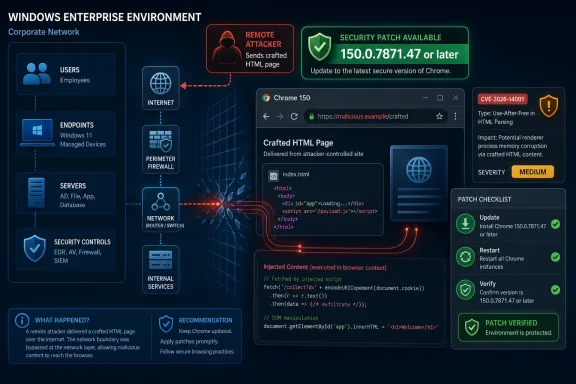
Google Chrome before version 150.0.7871.47 contains CVE-2026-14001, a medium-severity Network component flaw disclosed on June 30, 2026, that can let a remote attacker inject arbitrary scripts or HTML through a crafted web page. The bug is not the loudest defect in Chrome 150’s enormous security haul, but it is the kind administrators should not dismiss because the word “medium” appears beside it. Universal cross-site scripting sits in an awkward risk category: rarely cinematic, often constrained, and still capable of undermining the browser’s most important promise. As documented by NVD, CISA’s ADP enrichment, and Google’s Chrome Releases post, this is a patch-now issue for Windows fleets, not a wait-for-the-next-maintenance-window curiosity.
The short description of CVE-2026-14001 is almost aggressively bland: “Inappropriate implementation in Network.” That phrasing is typical of Chromium advisories, where component names are precise but exploit narratives are intentionally sparse until most users have updated. Underneath it, however, is a more meaningful phrase: UXSS, or universal cross-site scripting.
Ordinary cross-site scripting is usually a flaw in a website. Universal cross-site scripting is more troubling because the failure is in the browser or browser-adjacent logic, meaning the attacker’s crafted page may be able to cross boundaries the web platform normally enforces. The practical risk is not simply “someone can run JavaScript,” because websites already run JavaScript all day; the risk is that script or HTML lands in a context where it should not be allowed.
That is why the Network component matters. Browsers are boundary machines. They isolate origins, mediate requests, apply security headers, enforce content rules, and decide what code belongs to which site. A flaw in that machinery can turn the browser from a referee into a participant.
NVD’s entry says Chrome versions prior to 150.0.7871.47 are affected, and CISA’s ADP scoring gives the issue a CVSS 3.1 base score of 6.1, with network attack vector, low attack complexity, no privileges required, and user interaction required. In plain English: an attacker does not need an account on the victim’s machine or target service, but the victim does need to visit or otherwise load a malicious page.
That user-interaction requirement is doing a lot of work in the severity score. In enterprise reality, “convince a user to open a page” is not much of a barrier. It is the business model of phishing, malvertising, search poisoning, compromised websites, and chat-message lures.
The surrounding release matters because Chrome 150 was not a tiny point fix. Reporting from PCWorld and Malwarebytes described the update as a major security rollup containing hundreds of fixes, with critical issues elsewhere in the browser stack. That scale changes the operational picture: CVE-2026-14001 is not an isolated patch decision but one entry in a broad Chrome hardening cycle that administrators should already be pushing.
For Windows users, the relevant threshold is straightforward: Chrome must be at 150.0.7871.47 or later to clear this CVE as described by NVD. Google’s release numbering can be confusing because adjacent platform builds differ by one patch number, and because staged rollouts mean not every endpoint sees the same build at the same moment. On Windows, the safer administrative posture is to inventory actual installed versions rather than assume auto-update has already completed.
This is also where downstream Chromium-based browsers enter the story. Microsoft Edge, Brave, Vivaldi, Opera, and other Chromium-derived browsers do not become safe merely because Google patched Chrome. They need their own vendor-shipped builds that incorporate the relevant Chromium fixes. The lag is often short, but it is still a lag, and vulnerability management tools should treat each browser product separately.
The bug’s published history shows how the ecosystem now works. Chrome issued the CVE on June 30, CISA enriched it on July 1 with CWE and CVSS metadata, and NIST added affected CPE configuration and reference typing the same day. That pipeline is useful, but it also means defenders should expect scanner results, CPE mappings, and risk dashboards to evolve for several days after the initial advisory.
Google routinely restricts bug details and links until a majority of users have received fixes. The Chromium issue associated with CVE-2026-14001 is permission-restricted, which means outside observers cannot yet reconstruct the exploit path from the public tracker. For defenders, that creates the usual asymmetry: attackers may be diffing patches while administrators are reading one-sentence summaries.
The correct response is not speculation masquerading as reverse engineering. The correct response is to reason from the public facts. The bug allows injection of arbitrary scripts or HTML, the attack is remote, the vector is a crafted HTML page, the required interaction is user-driven browsing, and the consequence is partial confidentiality and integrity impact across a changed scope.
That “scope changed” flag in CISA’s CVSS vector is important. CVSS scope changes when exploitation affects a security authority beyond the vulnerable component’s own boundary. In the context of a browser UXSS, that aligns with the intuitive concern: a flaw in browser behavior may let attacker-controlled content influence a context it should not control.
The CWE assignment, CWE-79, is also telling but imperfect. CWE-79 is the familiar cross-site scripting bucket, “Improper Neutralization of Input During Web Page Generation.” For a browser bug, that label can feel website-centric. Still, it captures the resulting class of failure: untrusted script or markup is executed or interpreted where the security model expected it to be neutralized or isolated.
That distinction matters for WindowsForum readers because so much modern Windows work happens in browsers. Microsoft 365, Entra admin center, Azure Portal, Intune, Salesforce, ServiceNow, GitHub, Jira, banking portals, password managers, and remote management consoles are all “just websites” until the browser becomes the operating environment. A UXSS bug is not merely a consumer browsing issue; it is a productivity-stack issue.
The public CVSS vector does not claim full account takeover, full data theft, or remote code execution. CISA marked confidentiality and integrity impact as low, availability as none, exploitation as none, automatable as no, and technical impact as partial. That is a sober assessment, and it should restrain panic.
But “partial” is not “irrelevant.” Script injection can be enough to read page content, alter what a user sees, perform actions in the context of a session, steal anti-CSRF tokens, or manipulate workflows, depending on the exact bug and target context. With UXSS, the dangerous word is not always critical; it is context.
The attacker’s page is also a modest requirement. Users are trained to click links in email, Teams, Slack, Discord, browser notifications, search results, ads, and vendor portals. A crafted HTML page does not need to look like malware. It can look like a shipping notice, a help article, a fake invoice, a documentation page, or a login troubleshooting prompt.
A medium UXSS vulnerability can become more serious when paired with the right target. An attacker who can inject script into a privileged web application session may not need native code execution. If the goal is to approve an OAuth consent prompt, alter an invoice destination, scrape a ticket, pivot through an admin dashboard, or capture sensitive page data, browser code execution inside the wrong origin can be enough.
This is especially relevant in Windows environments that have moved aggressively toward cloud management. The browser is now the front door to device compliance, conditional access, endpoint security dashboards, source control, CI/CD, and finance systems. Organizations that treat Chrome as a consumer app bolted onto Windows are missing the point: Chrome is part of the control plane.
The good news is that the remediation is ordinary. Update Chrome, restart it, verify the version, and confirm that managed update policies are not pinning machines below the fixed build. The bad news is that “ordinary” is where many browser patches fail, because users leave sessions open, VDI images lag, kiosks are forgotten, and line-of-business machines get carved out of normal update rings.
Chrome’s own update mechanism is generally reliable, but reliability is not the same as verification. On Windows, administrators should be checking fleet telemetry, installed application inventory, and browser version reporting from endpoint management tools. If the asset is important enough to hold company data, it is important enough to prove it crossed the patch line.
Chrome’s Windows update path usually flows through Google Update, enterprise policies, or packaged deployment channels. Those controls are useful, but they can also create failure modes. A policy designed to slow major version jumps can accidentally hold back a security update; a stale base image can keep reintroducing vulnerable builds; a nonpersistent VDI pool can reset to an old browser every morning.
There is also the extended stable channel. Extended Stable exists for organizations that want a slower feature cadence, but it does not absolve them from security patching. PCWorld reported that the Extended Stable Channel for Windows and macOS also moved to a Chromium 150.0.7871.47 build, which means enterprises using that channel should still have a fixed path without jumping into every feature churn immediately.
Administrators should pay attention to the exact platform guidance from their browser vendor. Google’s stable release listed Windows and macOS as 150.0.7871.46/.47, while NVD marks Chrome prior to 150.0.7871.47 as affected. In practice, a Windows fleet should target 150.0.7871.47 or newer and treat anything below that as needing remediation unless vendor documentation for that specific channel says otherwise.
The same logic applies to vulnerability scanners. Early CPE data can be incomplete or noisy, and the user-submitted NVD text itself asks whether a CPE is missing. NIST added a Google Chrome CPE configuration for versions up to but excluding 150.0.7871.47, but organizations should not wait for every scanner dashboard to become elegant. Inventory first, normalize versions second, argue with CPE edge cases third.
NVD’s listed affected configuration for CVE-2026-14001 is Google Chrome before 150.0.7871.47. That is the cleanest and most defensible statement because the CVE source is Chrome and the release note is Google’s. It does not automatically enumerate every Chromium consumer, every embedded WebView scenario, or every downstream vendor’s patch status.
This is where administrators need to separate formal vulnerability records from practical exposure management. A scanner may flag Chrome but not a Chromium-based secondary browser. Another may flag Chromium generically and overstate exposure. A third may miss portable installs, user-profile installs, developer channel builds, or browsers bundled into application stacks.
The answer is not to distrust NVD. It is to understand what NVD is and is not. NVD is a vulnerability database with enrichment, not a live bill of materials for every Chromium derivative on every Windows endpoint. When the vulnerable behavior lives in Chromium code, defenders should ask which products in their estate consume that code and then check whether those vendors have shipped corresponding updates.
Microsoft Edge deserves particular attention in Windows shops because it is both Chromium-based and deeply present in Windows environments. Even when the user’s default browser is Chrome, Edge may be used by WebView2-powered applications, system links, admin portals, or embedded workflows. CVE-2026-14001 is a Chrome CVE as published, but the broader lesson is Chromium hygiene.
But “no known exploitation” is not a time machine. Browser bugs can move quickly from advisory to proof-of-concept once patches are available for comparison. Attackers can diff Chromium source, inspect binary changes, and infer vulnerable logic, especially when the component and behavioral class are known.
The restricted Chromium bug also cuts both ways. It reduces casual exploit development by withholding details, but it does not eliminate reverse engineering. Well-resourced actors do not need a friendly public bug report if the patched and unpatched builds tell enough of the story.
That is why medium-severity browser updates should be treated as fast-cycle hygiene. They may not justify an all-hands incident bridge, but they do justify compressed patch timelines. If an enterprise can patch Teams, Zoom, VPN clients, and endpoint agents quickly, it can patch the browser that mediates access to nearly every SaaS account.
The broader Chrome 150 release adds urgency because attackers are not limited to picking CVE-2026-14001. A large security rollup creates a menu. Some bugs will be dead ends; others may compose with renderer compromises, UI spoofing, policy bypasses, or sandbox-adjacent behavior. Defenders do not need to predict the winning exploit chain to know that staying behind the release is a bad bet.
That restraint is defensible. Chrome’s install base is enormous, and detailed exploit notes can harm users who have not yet received updates. But it creates a documentation gap that enterprises fill with scanner output, vendor blogs, third-party reporting, and internal assumptions.
For CVE-2026-14001, the most stable facts are the ones repeated across NVD, the Chrome release note, Ubuntu’s security tracker, and CISA’s enrichment: it affects Chrome before 150.0.7871.47, it is a Network component inappropriate implementation issue, it allows arbitrary script or HTML injection through a crafted HTML page, and Chromium rates it medium. Everything beyond that should be treated carefully until more technical detail is public.
Security teams should resist the temptation to invent a dramatic exploit chain for the sake of urgency. The plain version is sufficient. A remote web page can trigger a browser-level injection condition in vulnerable Chrome versions, and the fix is available. That is enough to patch.
There is a communications lesson here too. Telling users “Chrome has a medium XSS bug” is unlikely to move behavior. Telling them “restart Chrome today because the browser update fixes a flaw that can let a malicious page inject script where it does not belong” is more concrete and more accurate.
Users can check Chrome by opening the three-dot menu, going to Help, selecting About Google Chrome, and allowing the browser to update. The important step is the restart. Chrome can download an update and still keep old vulnerable code alive until the process is relaunched.
Administrators should pair that user-facing guidance with fleet validation. Endpoint management should report installed versions, security tooling should watch for stale browser processes, and help desks should be prepared for the familiar “Chrome says relaunch” nudge. Where browser restart prompts are routinely ignored, policy may need to enforce relaunch deadlines.
Managed environments should also review update policies. Chrome policies that delay updates, pin versions, or control target channels are often set for good reasons, but they must not become security blind spots. If an organization intentionally uses Extended Stable, it should verify the fixed Extended Stable build rather than assume standard stable guidance applies.
Finally, do not forget machines that are easy to exclude from normal thinking: conference-room PCs, digital signage controllers, lab systems, jump boxes, shared workstations, training-room images, and developer machines with multiple browser channels. Browser vulnerabilities are attractive because they meet users where they already are. Attackers do not care whether the vulnerable endpoint was missing from the dashboard for an understandable reason.
The browser patching problem has also become harder to narrate. Chrome updates arrive frequently, contain dozens or hundreds of security fixes, and often withhold the details defenders crave. The result is a constant low-grade fog: too many CVEs to explain individually, too much risk to ignore collectively.
For Windows administrators, the answer is to make the process less dependent on drama. Browser updates should have defined service-level expectations, measurable compliance, forced relaunch rules where appropriate, and exception handling that expires. If a Chrome patch only moves when a CVE becomes famous, the process is already broken.
The same applies to asset visibility. If the organization cannot answer which Windows endpoints are running Chrome below 150.0.7871.47, the immediate problem is not just this CVE. It is the absence of reliable browser inventory in an era when browsers are the main application runtime.
CVE-2026-14001 also underlines why “medium” cannot mean “later” by default. Severity ratings are useful triage tools, but they compress too much context into one word. A medium browser bug that touches web-origin boundaries may be more operationally relevant than a higher-scored flaw in software that barely exists in the environment.
 Chrome’s Medium-Severity Bug Is Really a Boundary Problem
The short description of CVE-2026-14001 is almost aggressively bland: “Inappropriate implementation in Network.” That phrasing is typical of Chromium advisories, where component names are precise but exploit narratives are intentionally sparse until most users have updated. Underneath it, however, is a more meaningful phrase: UXSS, or universal cross-site scripting.Ordinary cross-site scripting is usually a flaw in a website. Universal cross-site scripting is more troubling because the failure is in the browser or browser-adjacent logic, meaning the attacker’s crafted page may be able to cross boundaries the web platform normally enforces. The practical risk is not simply “someone can run JavaScript,” because websites already run JavaScript all day; the risk is that script or HTML lands in a context where it should not be allowed.
That is why the Network component matters. Browsers are boundary machines. They isolate origins, mediate requests, apply security headers, enforce content rules, and decide what code belongs to which site. A flaw in that machinery can turn the browser from a referee into a participant.
NVD’s entry says Chrome versions prior to 150.0.7871.47 are affected, and CISA’s ADP scoring gives the issue a CVSS 3.1 base score of 6.1, with network attack vector, low attack complexity, no privileges required, and user interaction required. In plain English: an attacker does not need an account on the victim’s machine or target service, but the victim does need to visit or otherwise load a malicious page.
That user-interaction requirement is doing a lot of work in the severity score. In enterprise reality, “convince a user to open a page” is not much of a barrier. It is the business model of phishing, malvertising, search poisoning, compromised websites, and chat-message lures.
The Patch Arrived Inside a Much Larger Chrome 150 Security Drop
Google’s Chrome Releases blog announced the Stable Channel update for desktop at the end of June 2026, moving Windows and macOS builds to the 150.0.7871.46/.47 range and Linux to 150.0.7871.46. The NVD entry for CVE-2026-14001 points to that release note and to a restricted Chromium issue tracker item, which is standard practice when disclosure could help attackers before the user base has caught up.The surrounding release matters because Chrome 150 was not a tiny point fix. Reporting from PCWorld and Malwarebytes described the update as a major security rollup containing hundreds of fixes, with critical issues elsewhere in the browser stack. That scale changes the operational picture: CVE-2026-14001 is not an isolated patch decision but one entry in a broad Chrome hardening cycle that administrators should already be pushing.
For Windows users, the relevant threshold is straightforward: Chrome must be at 150.0.7871.47 or later to clear this CVE as described by NVD. Google’s release numbering can be confusing because adjacent platform builds differ by one patch number, and because staged rollouts mean not every endpoint sees the same build at the same moment. On Windows, the safer administrative posture is to inventory actual installed versions rather than assume auto-update has already completed.
This is also where downstream Chromium-based browsers enter the story. Microsoft Edge, Brave, Vivaldi, Opera, and other Chromium-derived browsers do not become safe merely because Google patched Chrome. They need their own vendor-shipped builds that incorporate the relevant Chromium fixes. The lag is often short, but it is still a lag, and vulnerability management tools should treat each browser product separately.
The bug’s published history shows how the ecosystem now works. Chrome issued the CVE on June 30, CISA enriched it on July 1 with CWE and CVSS metadata, and NIST added affected CPE configuration and reference typing the same day. That pipeline is useful, but it also means defenders should expect scanner results, CPE mappings, and risk dashboards to evolve for several days after the initial advisory.
“Inappropriate Implementation” Is Chromium-Speak for “Details Withheld”
Security advisories often read as if they were written to frustrate everyone except patch managers. “Inappropriate implementation” does not say whether the bug lives in request parsing, redirect handling, response processing, origin checks, cache behavior, MIME interpretation, or another corner of the Network stack. That vagueness is not accidental.Google routinely restricts bug details and links until a majority of users have received fixes. The Chromium issue associated with CVE-2026-14001 is permission-restricted, which means outside observers cannot yet reconstruct the exploit path from the public tracker. For defenders, that creates the usual asymmetry: attackers may be diffing patches while administrators are reading one-sentence summaries.
The correct response is not speculation masquerading as reverse engineering. The correct response is to reason from the public facts. The bug allows injection of arbitrary scripts or HTML, the attack is remote, the vector is a crafted HTML page, the required interaction is user-driven browsing, and the consequence is partial confidentiality and integrity impact across a changed scope.
That “scope changed” flag in CISA’s CVSS vector is important. CVSS scope changes when exploitation affects a security authority beyond the vulnerable component’s own boundary. In the context of a browser UXSS, that aligns with the intuitive concern: a flaw in browser behavior may let attacker-controlled content influence a context it should not control.
The CWE assignment, CWE-79, is also telling but imperfect. CWE-79 is the familiar cross-site scripting bucket, “Improper Neutralization of Input During Web Page Generation.” For a browser bug, that label can feel website-centric. Still, it captures the resulting class of failure: untrusted script or markup is executed or interpreted where the security model expected it to be neutralized or isolated.
UXSS Is the Browser Bug That Looks Like a Website Bug Until It Doesn’t
Universal cross-site scripting is uncomfortable because it blurs accountability. If a user’s banking session, webmail tab, admin console, or SaaS dashboard is exposed through a browser-level injection flaw, the affected website may have done nothing wrong. Its headers, sanitizers, templates, and CSP rules may all be correct, while the browser misapplies the rules underneath.That distinction matters for WindowsForum readers because so much modern Windows work happens in browsers. Microsoft 365, Entra admin center, Azure Portal, Intune, Salesforce, ServiceNow, GitHub, Jira, banking portals, password managers, and remote management consoles are all “just websites” until the browser becomes the operating environment. A UXSS bug is not merely a consumer browsing issue; it is a productivity-stack issue.
The public CVSS vector does not claim full account takeover, full data theft, or remote code execution. CISA marked confidentiality and integrity impact as low, availability as none, exploitation as none, automatable as no, and technical impact as partial. That is a sober assessment, and it should restrain panic.
But “partial” is not “irrelevant.” Script injection can be enough to read page content, alter what a user sees, perform actions in the context of a session, steal anti-CSRF tokens, or manipulate workflows, depending on the exact bug and target context. With UXSS, the dangerous word is not always critical; it is context.
The attacker’s page is also a modest requirement. Users are trained to click links in email, Teams, Slack, Discord, browser notifications, search results, ads, and vendor portals. A crafted HTML page does not need to look like malware. It can look like a shipping notice, a help article, a fake invoice, a documentation page, or a login troubleshooting prompt.
Medium Severity Still Deserves Fast Enterprise Handling
Chrome vulnerabilities invite a bad habit in patch triage. Critical sandbox escapes and V8 memory corruption bugs get emergency treatment, while medium browser logic bugs are left to the normal drift of auto-update. That approach underestimates how browsers function in enterprise identity.A medium UXSS vulnerability can become more serious when paired with the right target. An attacker who can inject script into a privileged web application session may not need native code execution. If the goal is to approve an OAuth consent prompt, alter an invoice destination, scrape a ticket, pivot through an admin dashboard, or capture sensitive page data, browser code execution inside the wrong origin can be enough.
This is especially relevant in Windows environments that have moved aggressively toward cloud management. The browser is now the front door to device compliance, conditional access, endpoint security dashboards, source control, CI/CD, and finance systems. Organizations that treat Chrome as a consumer app bolted onto Windows are missing the point: Chrome is part of the control plane.
The good news is that the remediation is ordinary. Update Chrome, restart it, verify the version, and confirm that managed update policies are not pinning machines below the fixed build. The bad news is that “ordinary” is where many browser patches fail, because users leave sessions open, VDI images lag, kiosks are forgotten, and line-of-business machines get carved out of normal update rings.
Chrome’s own update mechanism is generally reliable, but reliability is not the same as verification. On Windows, administrators should be checking fleet telemetry, installed application inventory, and browser version reporting from endpoint management tools. If the asset is important enough to hold company data, it is important enough to prove it crossed the patch line.
The Windows Angle Is Version Drift, Not Exploit Drama
For WindowsForum readers, the central question is not whether Chrome is uniquely unsafe on Windows. The issue is that Windows fleets are where browser version drift becomes visible at scale. A home user can open Chrome’s About page and restart. An administrator has to account for update services, group policies, user privileges, maintenance windows, golden images, and the weird laptop that has not checked in since June.Chrome’s Windows update path usually flows through Google Update, enterprise policies, or packaged deployment channels. Those controls are useful, but they can also create failure modes. A policy designed to slow major version jumps can accidentally hold back a security update; a stale base image can keep reintroducing vulnerable builds; a nonpersistent VDI pool can reset to an old browser every morning.
There is also the extended stable channel. Extended Stable exists for organizations that want a slower feature cadence, but it does not absolve them from security patching. PCWorld reported that the Extended Stable Channel for Windows and macOS also moved to a Chromium 150.0.7871.47 build, which means enterprises using that channel should still have a fixed path without jumping into every feature churn immediately.
Administrators should pay attention to the exact platform guidance from their browser vendor. Google’s stable release listed Windows and macOS as 150.0.7871.46/.47, while NVD marks Chrome prior to 150.0.7871.47 as affected. In practice, a Windows fleet should target 150.0.7871.47 or newer and treat anything below that as needing remediation unless vendor documentation for that specific channel says otherwise.
The same logic applies to vulnerability scanners. Early CPE data can be incomplete or noisy, and the user-submitted NVD text itself asks whether a CPE is missing. NIST added a Google Chrome CPE configuration for versions up to but excluding 150.0.7871.47, but organizations should not wait for every scanner dashboard to become elegant. Inventory first, normalize versions second, argue with CPE edge cases third.
CPE Confusion Is a Symptom of Browser Supply Chains
The “Are we missing a CPE here?” line in NVD entries often looks like bureaucratic clutter, but it points to a real weakness in software vulnerability management. Chrome is a product, Chromium is a project, and Chromium code is embedded across a family of browsers and applications. A single security fix can matter to more software than the initial CPE suggests.NVD’s listed affected configuration for CVE-2026-14001 is Google Chrome before 150.0.7871.47. That is the cleanest and most defensible statement because the CVE source is Chrome and the release note is Google’s. It does not automatically enumerate every Chromium consumer, every embedded WebView scenario, or every downstream vendor’s patch status.
This is where administrators need to separate formal vulnerability records from practical exposure management. A scanner may flag Chrome but not a Chromium-based secondary browser. Another may flag Chromium generically and overstate exposure. A third may miss portable installs, user-profile installs, developer channel builds, or browsers bundled into application stacks.
The answer is not to distrust NVD. It is to understand what NVD is and is not. NVD is a vulnerability database with enrichment, not a live bill of materials for every Chromium derivative on every Windows endpoint. When the vulnerable behavior lives in Chromium code, defenders should ask which products in their estate consume that code and then check whether those vendors have shipped corresponding updates.
Microsoft Edge deserves particular attention in Windows shops because it is both Chromium-based and deeply present in Windows environments. Even when the user’s default browser is Chrome, Edge may be used by WebView2-powered applications, system links, admin portals, or embedded workflows. CVE-2026-14001 is a Chrome CVE as published, but the broader lesson is Chromium hygiene.
The Absence of Known Exploitation Is Useful, Not Comforting
CISA’s SSVC data for CVE-2026-14001 marks exploitation as “none,” automatable as “no,” and technical impact as “partial.” That is good news. It means public enrichment did not identify known active exploitation at the time of that assessment, and the vulnerability does not appear to be a push-button wormable condition.But “no known exploitation” is not a time machine. Browser bugs can move quickly from advisory to proof-of-concept once patches are available for comparison. Attackers can diff Chromium source, inspect binary changes, and infer vulnerable logic, especially when the component and behavioral class are known.
The restricted Chromium bug also cuts both ways. It reduces casual exploit development by withholding details, but it does not eliminate reverse engineering. Well-resourced actors do not need a friendly public bug report if the patched and unpatched builds tell enough of the story.
That is why medium-severity browser updates should be treated as fast-cycle hygiene. They may not justify an all-hands incident bridge, but they do justify compressed patch timelines. If an enterprise can patch Teams, Zoom, VPN clients, and endpoint agents quickly, it can patch the browser that mediates access to nearly every SaaS account.
The broader Chrome 150 release adds urgency because attackers are not limited to picking CVE-2026-14001. A large security rollup creates a menu. Some bugs will be dead ends; others may compose with renderer compromises, UI spoofing, policy bypasses, or sandbox-adjacent behavior. Defenders do not need to predict the winning exploit chain to know that staying behind the release is a bad bet.
Google’s Disclosure Model Still Leaves Admins Doing Detective Work
Google’s Chrome security posts are intentionally sparse. They provide affected versions, credited researchers where appropriate, severity, CVE identifiers, and sometimes bounty amounts. They rarely provide the kind of exploit mechanics that would satisfy a security engineer trying to model precise blast radius.That restraint is defensible. Chrome’s install base is enormous, and detailed exploit notes can harm users who have not yet received updates. But it creates a documentation gap that enterprises fill with scanner output, vendor blogs, third-party reporting, and internal assumptions.
For CVE-2026-14001, the most stable facts are the ones repeated across NVD, the Chrome release note, Ubuntu’s security tracker, and CISA’s enrichment: it affects Chrome before 150.0.7871.47, it is a Network component inappropriate implementation issue, it allows arbitrary script or HTML injection through a crafted HTML page, and Chromium rates it medium. Everything beyond that should be treated carefully until more technical detail is public.
Security teams should resist the temptation to invent a dramatic exploit chain for the sake of urgency. The plain version is sufficient. A remote web page can trigger a browser-level injection condition in vulnerable Chrome versions, and the fix is available. That is enough to patch.
There is a communications lesson here too. Telling users “Chrome has a medium XSS bug” is unlikely to move behavior. Telling them “restart Chrome today because the browser update fixes a flaw that can let a malicious page inject script where it does not belong” is more concrete and more accurate.
The Practical Response Is Boring, Which Is Why It Works
The remediation for CVE-2026-14001 is not a new security product. It is not a registry incantation, a network signature, or a browser extension. It is the unglamorous act of getting Chrome to version 150.0.7871.47 or later and making sure the process actually completed.Users can check Chrome by opening the three-dot menu, going to Help, selecting About Google Chrome, and allowing the browser to update. The important step is the restart. Chrome can download an update and still keep old vulnerable code alive until the process is relaunched.
Administrators should pair that user-facing guidance with fleet validation. Endpoint management should report installed versions, security tooling should watch for stale browser processes, and help desks should be prepared for the familiar “Chrome says relaunch” nudge. Where browser restart prompts are routinely ignored, policy may need to enforce relaunch deadlines.
Managed environments should also review update policies. Chrome policies that delay updates, pin versions, or control target channels are often set for good reasons, but they must not become security blind spots. If an organization intentionally uses Extended Stable, it should verify the fixed Extended Stable build rather than assume standard stable guidance applies.
Finally, do not forget machines that are easy to exclude from normal thinking: conference-room PCs, digital signage controllers, lab systems, jump boxes, shared workstations, training-room images, and developer machines with multiple browser channels. Browser vulnerabilities are attractive because they meet users where they already are. Attackers do not care whether the vulnerable endpoint was missing from the dashboard for an understandable reason.
The Real Chrome 150 Lesson Is Patch Discipline Under Noise
CVE-2026-14001 is not the scariest Chrome bug of 2026, and it may not be the scariest bug in the Chrome 150 release. That is precisely why it is a useful test of security maturity. Organizations tend to respond well to sirens. They are less consistent with medium-severity defects that require the same operational machinery without the emotional payoff of an emergency.The browser patching problem has also become harder to narrate. Chrome updates arrive frequently, contain dozens or hundreds of security fixes, and often withhold the details defenders crave. The result is a constant low-grade fog: too many CVEs to explain individually, too much risk to ignore collectively.
For Windows administrators, the answer is to make the process less dependent on drama. Browser updates should have defined service-level expectations, measurable compliance, forced relaunch rules where appropriate, and exception handling that expires. If a Chrome patch only moves when a CVE becomes famous, the process is already broken.
The same applies to asset visibility. If the organization cannot answer which Windows endpoints are running Chrome below 150.0.7871.47, the immediate problem is not just this CVE. It is the absence of reliable browser inventory in an era when browsers are the main application runtime.
CVE-2026-14001 also underlines why “medium” cannot mean “later” by default. Severity ratings are useful triage tools, but they compress too much context into one word. A medium browser bug that touches web-origin boundaries may be more operationally relevant than a higher-scored flaw in software that barely exists in the environment.
The Patch Line Windows Admins Should Draw This Week
CVE-2026-14001 gives IT teams a clean patch line and a messy ecosystem around it. The clean line is Chrome 150.0.7871.47. The messy part is proving every relevant browser instance crossed it, including managed, unmanaged, extended-stable, and Chromium-derived deployments.- Chrome for Windows should be updated to 150.0.7871.47 or later to address the vulnerability as listed by NVD.
- The flaw is a medium-severity UXSS issue in Chrome’s Network component, not a confirmed zero-day or known exploited vulnerability based on CISA’s current enrichment.
- The attack requires user interaction, but that requirement should be read in the real-world context of phishing, malicious ads, compromised sites, and routine link-clicking.
- Enterprises should verify installed browser versions instead of assuming Chrome’s automatic updater has completed and restarted every endpoint.
- Chromium-based browsers and embedded browser runtimes should be tracked separately because a Chrome CPE entry does not automatically prove every downstream product is fixed.
- Scanner noise around CPEs should not delay remediation when the affected-version threshold is already clear.
References
- Primary source: NVD / Chromium
Published: 2026-07-03T07:00:37-07:00
NVD - CVE-2026-14001
 nvd.nist.gov
- Security advisory: MSRC
Published: 2026-07-03T07:00:37-07:00
Original feed URL
Security Update Guide - Microsoft Security Response Center
 msrc.microsoft.com
