

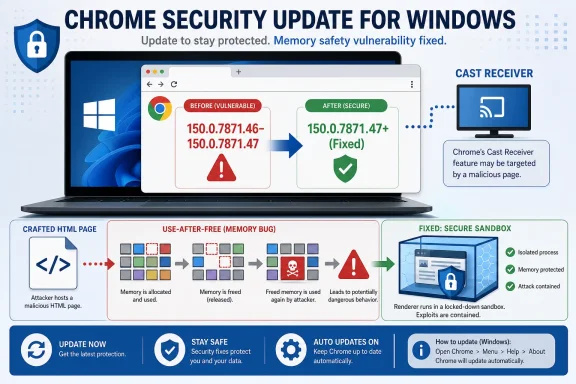
Google Chrome before version 150.0.7871.47 contains CVE-2026-13898, a use-after-free flaw in the browser’s Cast Receiver component that can let a remote attacker run code inside Chrome’s sandbox through a crafted HTML page. That is the dry registry wording; the practical story is messier and more familiar. Another browser memory-safety bug has landed in the routine update stream, and the safest assumption for Windows users is that “Medium” in Chromium’s own severity scale does not mean “optional.” As reflected in the National Vulnerability Database entry and Google’s Chrome Releases advisory, this is a patch-now issue for anyone managing Chrome at scale.
The first oddity in CVE-2026-13898 is the rating split. Chromium classifies the issue as Medium, while CISA’s ADP enrichment gives it a CVSS 3.1 score of 8.8, a High rating, with network attack vector, low attack complexity, no privileges required, user interaction required, and high confidentiality, integrity, and availability impact. That difference is not necessarily a contradiction; it is a reminder that browser security scoring depends heavily on what layer of the browser you are measuring.
Google’s phrasing says the bug allows arbitrary code execution inside a sandbox. That qualifier matters. A sandboxed renderer compromise is not the same as full system takeover, and Chrome’s architecture is designed precisely to keep a compromised webpage from becoming a compromised PC.
But that is also why these bugs matter. Browser attacks are frequently chained: one flaw gets code execution in a renderer or sandboxed process, another breaks out, and a third provides persistence or privilege escalation. A single Medium bug can become the first brick in a very expensive wall.
The user-interaction requirement is similarly easy to misread. In browser terms, “user interaction” often means visiting or being redirected to a malicious page. That is a lower bar than persuading someone to install a binary, approve an admin prompt, or open a suspicious attachment.
Cast support is one of those features many users barely think about until it fails. The code exists so Chrome can participate in Google’s casting ecosystem, receiving and handling media-related workflows that bridge webpages, devices, and displays. That sort of boundary-crossing feature is useful, but it also expands the amount of parsing, state management, and object lifetime handling exposed to hostile content.
Use-after-free bugs thrive in exactly that kind of complexity. They happen when software continues to use memory after it has been released, creating an opportunity for an attacker to manipulate what now occupies that memory. In a browser, where untrusted pages constantly create, destroy, and rearrange objects at high speed, that class of bug has been a recurring source of serious vulnerabilities.
The CWE assigned here, CWE-416, is one of the old villains of native-code security. It is not exotic. It is not theoretical. It is what happens when code written for performance and flexibility mismanages object lifetime in a way that a determined attacker can turn into control.
That means Chrome on Windows should be at 150.0.7871.47 or later if the system is in the affected desktop line. If a machine is stuck below that level, it should be treated as missing a security fix even if the user insists Chrome “updates itself.” Automatic updating is excellent when it works, but enterprise reality is full of delayed restarts, pinned application packages, VDI images, disabled services, broken update tasks, and security products that interfere with patch delivery.
The NVD change history also matters here. NIST added the Chrome CPE configuration on July 2, 2026, covering Google Chrome versions up to but excluding 150.0.7871.47. That kind of enrichment is what vulnerability scanners and asset systems often depend on, and its timing can create a short window where a real vulnerability exists before every dashboard cleanly recognizes it.
This is one reason security teams should not wait for a scanner to become the single source of truth. Vendor release notes, CVE records, CISA enrichment, and endpoint inventory each tell part of the story. When they line up, remediation is easy. When they lag each other, the safest operational answer is to verify installed browser versions directly.
For home users, that usually means clicking Help, About Google Chrome, letting the update finish, and restarting the browser. For IT teams, it means something more uncomfortable. The browser has become an application platform with a release cadence closer to cloud software than traditional desktop software, yet it still sits on endpoints that may be rebooted reluctantly and audited quarterly.
That mismatch is now a security risk. A vulnerability like CVE-2026-13898 does not require a user to be a developer, administrator, or high-value target. It requires a vulnerable browser and a crafted page. The exposure is broad precisely because the browser is universal.
The temptation is to downgrade urgency because Google did not say this specific CVE is being exploited in the wild. That is a reasonable data point, but not a reason to relax. Public CVE publication, vendor release notes, and registry enrichment all increase attacker awareness, while patch adoption remains uneven.
The better interpretation is that the bug gives an attacker a foothold within Chrome’s security boundary. From there, the attacker still needs another way out to own the host. That is a meaningful barrier, but it is not a permanent one.
Attack chains are assembled from parts. One vulnerability provides initial code execution. Another abuses GPU, IPC, kernel, font, driver, or OS behavior. A third handles privilege or persistence. The fact that CVE-2026-13898 is not described as a sandbox escape does not make it irrelevant; it makes it a component that defenders should remove before someone pairs it with something worse.
This is especially important on Windows, where Chrome is often present alongside legacy browser plugins, aggressive endpoint hooks, document handlers, password vaults, collaboration apps, and single sign-on extensions. The browser process may be sandboxed, but the user’s session is full of valuable tokens and data. Even constrained execution can be dangerous if it gives an attacker a bridge to steal secrets, manipulate page content, or prepare a second-stage exploit.
That pipeline is progress, but it is not instantaneous. During the first day or two of a new CVE, security teams may see partial records: missing NVD score, no CPE, incomplete affected-product mapping, or inconsistent severity. In this case, the user’s question about whether a CPE is missing reflects a real operational concern, not pedantry.
The CPE listed by NIST is the expected broad Chrome application identifier: Google Chrome, all versions up to but excluding 150.0.7871.47. That is enough for many vulnerability scanners to flag vulnerable Chrome installations. But Chromium-based ecosystems complicate the picture.
Microsoft Edge, Brave, Vivaldi, Opera, Electron apps, embedded Chromium frameworks, and vendor-custom browsers may share code ancestry without sharing identical version numbers, patch timelines, or affected component exposure. A Chrome CPE does not automatically cover every Chromium derivative. It tells you Chrome is affected; it does not prove every Chromium-based product in your estate is fixed.
Chrome’s update mechanism works best when it is allowed to run normally and when users restart the browser. In managed Windows environments, Group Policy, enterprise deployment tooling, and update controls can all help, but they can also delay patches if configured too conservatively. The line between “controlled rollout” and “known vulnerable fleet” can be surprisingly thin.
There is also the problem of stale sessions. Chrome may download an update, but the vulnerable code can remain in use until the browser restarts. A laptop that sleeps rather than reboots, with Chrome open for weeks, can sit in a half-updated state while the user believes everything is current.
Administrators should verify the running version, not just the installed package state. Browser telemetry, EDR inventory, software management tools, and user prompts all have roles to play. The goal is not merely to have the update available; it is to make sure the vulnerable process is gone.
The same advice applies to people who think they are too careful to be affected. A crafted HTML page can be delivered through a compromised website, malicious ad chain, phishing link, poisoned search result, or message in a trusted collaboration tool. Browser bugs do not require the victim to be reckless; they require the victim to browse.
Users should also resist the habit of postponing restarts indefinitely. The modern browser is effectively part of the operating system’s attack surface. Treating it as a disposable app that can wait until next week is increasingly out of step with how attacks work.
There is one more consumer wrinkle: update fatigue. Chrome updates so often that users stop noticing them. That is understandable, but it is also exactly why the update mechanism needs to be trusted, automatic, and followed by a restart when required.
CISA’s SSVC entry marks exploitation as “none,” automatable as “no,” and technical impact as “total.” That combination says a lot. There is no known exploitation at the time of the enrichment, and the bug is not considered easily automatable in the SSVC sense, but the possible technical impact is still severe if exploited successfully.
That is exactly the gray zone where many enterprise patch programs struggle. Emergency patching is usually reserved for active exploitation or critical remote code execution. Routine browser updates are often treated as background hygiene. CVE-2026-13898 sits between those instincts: not a declared zero-day, but too exposed and too consequential to ignore.
Security teams should not need a logo, a brand name, or a ransomware blog mention to patch a browser RCE-class issue. The browser is the front door for too many workflows. If the fix is available and the attack path is web content, the bar for action should be low.
The caveat is that CPE coverage is only as good as product identification. If Chrome is installed per user, bundled by another vendor, deployed through a custom image, or reported inconsistently by endpoint tools, the CPE may exist in the database while vulnerable copies still escape detection. The database can describe the affected product; it cannot guarantee your inventory sees every instance of it.
There is also a separate issue with the CVE’s affected-version statement as shown in the record. The affected array appears to name version 150.0.7871.47 while also using a “lessThan 150.0.7871.47” condition. The meaningful interpretation, reinforced by the description and CPE configuration, is that versions prior to 150.0.7871.47 are affected and 150.0.7871.47 is the fixed threshold.
That kind of metadata awkwardness is common enough that security teams should read the description, CPE, vendor advisory, and version condition together rather than trusting one field in isolation. Vulnerability management is partly database work, but it is still judgment work.
For managed Windows fleets, the most useful controls are boring. Enforce Chrome update policies. Monitor versions. Alert on stale browsers. Prompt or force relaunches after a reasonable grace period. Track user-installed browser copies. Do not assume that because Edge is the corporate standard, Chrome is absent.
For security teams, this is also a good moment to review how vulnerability scanners handle rapidly updated desktop apps. If a scanner depends on NVD CPE enrichment, it may lag the vendor by a day or two. If it scans too infrequently, browser bugs can appear and be patched between scans, leaving no useful audit trail. If it cannot see per-user installs, it may undercount exposure.
For help desks, the message should be plain English: Chrome needs to restart to finish a security update. Users do not need a lecture about memory corruption. They need a reason not to click “later” for the fifth time.
The security industry tends to reserve attention for zero-days, named campaigns, and critical scores. That bias misses the cumulative risk of ordinary browser bugs landing week after week in components most users never knew existed. Cast Receiver is not an obscure lab curiosity; it is part of the feature mass that makes Chrome Chrome.
The lesson is not that casting is uniquely dangerous or that Chrome is uniquely careless. The lesson is that any browser with this much responsibility will produce a steady stream of memory-safety fixes, and organizations need a patch culture that treats that stream as normal operational weather rather than exceptional crisis.
 A Medium Bug With High-Impact Edges
The first oddity in CVE-2026-13898 is the rating split. Chromium classifies the issue as Medium, while CISA’s ADP enrichment gives it a CVSS 3.1 score of 8.8, a High rating, with network attack vector, low attack complexity, no privileges required, user interaction required, and high confidentiality, integrity, and availability impact. That difference is not necessarily a contradiction; it is a reminder that browser security scoring depends heavily on what layer of the browser you are measuring.Google’s phrasing says the bug allows arbitrary code execution inside a sandbox. That qualifier matters. A sandboxed renderer compromise is not the same as full system takeover, and Chrome’s architecture is designed precisely to keep a compromised webpage from becoming a compromised PC.
But that is also why these bugs matter. Browser attacks are frequently chained: one flaw gets code execution in a renderer or sandboxed process, another breaks out, and a third provides persistence or privilege escalation. A single Medium bug can become the first brick in a very expensive wall.
The user-interaction requirement is similarly easy to misread. In browser terms, “user interaction” often means visiting or being redirected to a malicious page. That is a lower bar than persuading someone to install a binary, approve an admin prompt, or open a suspicious attachment.
Cast Receiver Is Not Just a Living-Room Feature
The affected component, Cast Receiver, sounds like something that belongs next to a TV rather than inside a corporate browser build. That is part of the problem. Modern browsers are not just document viewers; they are media stacks, GPU interfaces, JavaScript engines, sync clients, identity brokers, password managers, PDF viewers, hardware abstraction layers, and remote-display endpoints wrapped in one constantly updating application.Cast support is one of those features many users barely think about until it fails. The code exists so Chrome can participate in Google’s casting ecosystem, receiving and handling media-related workflows that bridge webpages, devices, and displays. That sort of boundary-crossing feature is useful, but it also expands the amount of parsing, state management, and object lifetime handling exposed to hostile content.
Use-after-free bugs thrive in exactly that kind of complexity. They happen when software continues to use memory after it has been released, creating an opportunity for an attacker to manipulate what now occupies that memory. In a browser, where untrusted pages constantly create, destroy, and rearrange objects at high speed, that class of bug has been a recurring source of serious vulnerabilities.
The CWE assigned here, CWE-416, is one of the old villains of native-code security. It is not exotic. It is not theoretical. It is what happens when code written for performance and flexibility mismanages object lifetime in a way that a determined attacker can turn into control.
The Version Number Is the Policy
For Windows and Mac users, Google’s stable channel update moved Chrome to 150.0.7871.46 or 150.0.7871.47, with the CVE entry identifying versions before 150.0.7871.47 as vulnerable. Linux received 150.0.7871.46, while Android moved to 150.0.7871.63 in the same broader update cycle, according to Google’s release information as summarized by Malwarebytes. For administrators, the lesson is simple: do not manage this bug by adjective; manage it by version.That means Chrome on Windows should be at 150.0.7871.47 or later if the system is in the affected desktop line. If a machine is stuck below that level, it should be treated as missing a security fix even if the user insists Chrome “updates itself.” Automatic updating is excellent when it works, but enterprise reality is full of delayed restarts, pinned application packages, VDI images, disabled services, broken update tasks, and security products that interfere with patch delivery.
The NVD change history also matters here. NIST added the Chrome CPE configuration on July 2, 2026, covering Google Chrome versions up to but excluding 150.0.7871.47. That kind of enrichment is what vulnerability scanners and asset systems often depend on, and its timing can create a short window where a real vulnerability exists before every dashboard cleanly recognizes it.
This is one reason security teams should not wait for a scanner to become the single source of truth. Vendor release notes, CVE records, CISA enrichment, and endpoint inventory each tell part of the story. When they line up, remediation is easy. When they lag each other, the safest operational answer is to verify installed browser versions directly.
The Browser Patch Train Is Moving Faster Than Most Inventories
CVE-2026-13898 arrived in a larger Chrome update that reportedly addressed hundreds of security fixes. Malwarebytes described the late-June update as containing 382 security fixes, following another very large Chrome 149 update earlier in June. Whether or not every organization experiences those numbers as individually actionable, the trend is unmistakable: Chromium security work is arriving in bulk, and browser patching is no longer a quiet background chore.For home users, that usually means clicking Help, About Google Chrome, letting the update finish, and restarting the browser. For IT teams, it means something more uncomfortable. The browser has become an application platform with a release cadence closer to cloud software than traditional desktop software, yet it still sits on endpoints that may be rebooted reluctantly and audited quarterly.
That mismatch is now a security risk. A vulnerability like CVE-2026-13898 does not require a user to be a developer, administrator, or high-value target. It requires a vulnerable browser and a crafted page. The exposure is broad precisely because the browser is universal.
The temptation is to downgrade urgency because Google did not say this specific CVE is being exploited in the wild. That is a reasonable data point, but not a reason to relax. Public CVE publication, vendor release notes, and registry enrichment all increase attacker awareness, while patch adoption remains uneven.
“Inside the Sandbox” Is Comforting Until It Becomes Step One
Chrome’s sandbox is one of the great security engineering successes of the last two decades. It reduced the blast radius of browser memory corruption and forced attackers to work harder. But the phrase “inside a sandbox” can lull organizations into thinking the threat is contained by default.The better interpretation is that the bug gives an attacker a foothold within Chrome’s security boundary. From there, the attacker still needs another way out to own the host. That is a meaningful barrier, but it is not a permanent one.
Attack chains are assembled from parts. One vulnerability provides initial code execution. Another abuses GPU, IPC, kernel, font, driver, or OS behavior. A third handles privilege or persistence. The fact that CVE-2026-13898 is not described as a sandbox escape does not make it irrelevant; it makes it a component that defenders should remove before someone pairs it with something worse.
This is especially important on Windows, where Chrome is often present alongside legacy browser plugins, aggressive endpoint hooks, document handlers, password vaults, collaboration apps, and single sign-on extensions. The browser process may be sandboxed, but the user’s session is full of valuable tokens and data. Even constrained execution can be dangerous if it gives an attacker a bridge to steal secrets, manipulate page content, or prepare a second-stage exploit.
The NVD Record Tells a Story of Modern Vulnerability Plumbing
The change history for CVE-2026-13898 is a useful miniature of how vulnerability intelligence now works. Chrome submitted the CVE on June 30, 2026. CISA ADP added CVSS and SSVC data on July 1. NIST added the CPE configuration and reference typing on July 2. Each step made the issue more machine-readable and more useful to scanners, dashboards, and prioritization systems.That pipeline is progress, but it is not instantaneous. During the first day or two of a new CVE, security teams may see partial records: missing NVD score, no CPE, incomplete affected-product mapping, or inconsistent severity. In this case, the user’s question about whether a CPE is missing reflects a real operational concern, not pedantry.
The CPE listed by NIST is the expected broad Chrome application identifier: Google Chrome, all versions up to but excluding 150.0.7871.47. That is enough for many vulnerability scanners to flag vulnerable Chrome installations. But Chromium-based ecosystems complicate the picture.
Microsoft Edge, Brave, Vivaldi, Opera, Electron apps, embedded Chromium frameworks, and vendor-custom browsers may share code ancestry without sharing identical version numbers, patch timelines, or affected component exposure. A Chrome CPE does not automatically cover every Chromium derivative. It tells you Chrome is affected; it does not prove every Chromium-based product in your estate is fixed.
Windows Admins Should Look Beyond Chrome.exe
For WindowsForum readers, the immediate patch is Chrome. The broader task is browser governance. If your organization allows multiple Chromium-based browsers, you need an inventory that can distinguish Chrome Stable from Edge Stable, user-installed Chrome from managed Chrome, and portable or per-user browser installs from machine-wide deployments.Chrome’s update mechanism works best when it is allowed to run normally and when users restart the browser. In managed Windows environments, Group Policy, enterprise deployment tooling, and update controls can all help, but they can also delay patches if configured too conservatively. The line between “controlled rollout” and “known vulnerable fleet” can be surprisingly thin.
There is also the problem of stale sessions. Chrome may download an update, but the vulnerable code can remain in use until the browser restarts. A laptop that sleeps rather than reboots, with Chrome open for weeks, can sit in a half-updated state while the user believes everything is current.
Administrators should verify the running version, not just the installed package state. Browser telemetry, EDR inventory, software management tools, and user prompts all have roles to play. The goal is not merely to have the update available; it is to make sure the vulnerable process is gone.
Home Users Get the Same Threat With Fewer Tools
The home-user advice is simpler but no less urgent. Open Chrome’s About page, allow it to check for updates, and relaunch when prompted. On Windows, Chrome’s version should be 150.0.7871.47 or later for this fix line.The same advice applies to people who think they are too careful to be affected. A crafted HTML page can be delivered through a compromised website, malicious ad chain, phishing link, poisoned search result, or message in a trusted collaboration tool. Browser bugs do not require the victim to be reckless; they require the victim to browse.
Users should also resist the habit of postponing restarts indefinitely. The modern browser is effectively part of the operating system’s attack surface. Treating it as a disposable app that can wait until next week is increasingly out of step with how attacks work.
There is one more consumer wrinkle: update fatigue. Chrome updates so often that users stop noticing them. That is understandable, but it is also exactly why the update mechanism needs to be trusted, automatic, and followed by a restart when required.
Severity Labels Are Becoming Less Useful Than Exploit Shape
The “Medium” label attached by Chromium may be accurate within Google’s internal severity model, especially because the described code execution is sandboxed. But defenders increasingly need to prioritize by exploit shape rather than severity word. A network-reachable, low-complexity browser bug that triggers through a crafted page has a different operational profile than a local bug requiring privileges, even if both land near each other in a database.CISA’s SSVC entry marks exploitation as “none,” automatable as “no,” and technical impact as “total.” That combination says a lot. There is no known exploitation at the time of the enrichment, and the bug is not considered easily automatable in the SSVC sense, but the possible technical impact is still severe if exploited successfully.
That is exactly the gray zone where many enterprise patch programs struggle. Emergency patching is usually reserved for active exploitation or critical remote code execution. Routine browser updates are often treated as background hygiene. CVE-2026-13898 sits between those instincts: not a declared zero-day, but too exposed and too consequential to ignore.
Security teams should not need a logo, a brand name, or a ransomware blog mention to patch a browser RCE-class issue. The browser is the front door for too many workflows. If the fix is available and the attack path is web content, the bar for action should be low.
The CPE Question Has a Straight Answer and a Bigger Caveat
On the narrow question — are we missing a CPE here? — the answer appears to be no for Google Chrome itself. NIST’s July 2 update added the expected vulnerable configuration forcpe:2.3:a:google:chrome:*:*:*:*:*:*:*:*, covering versions before 150.0.7871.47. That should allow CPE-aware tools to associate the CVE with vulnerable Chrome installations.The caveat is that CPE coverage is only as good as product identification. If Chrome is installed per user, bundled by another vendor, deployed through a custom image, or reported inconsistently by endpoint tools, the CPE may exist in the database while vulnerable copies still escape detection. The database can describe the affected product; it cannot guarantee your inventory sees every instance of it.
There is also a separate issue with the CVE’s affected-version statement as shown in the record. The affected array appears to name version 150.0.7871.47 while also using a “lessThan 150.0.7871.47” condition. The meaningful interpretation, reinforced by the description and CPE configuration, is that versions prior to 150.0.7871.47 are affected and 150.0.7871.47 is the fixed threshold.
That kind of metadata awkwardness is common enough that security teams should read the description, CPE, vendor advisory, and version condition together rather than trusting one field in isolation. Vulnerability management is partly database work, but it is still judgment work.
The Real Patch Is a Shorter Delay Between Advisory and Restart
The practical remediation is not complicated. Update Chrome, verify the fixed version, and restart the browser. The difficulty lies in making that happen reliably across thousands of human-operated endpoints.For managed Windows fleets, the most useful controls are boring. Enforce Chrome update policies. Monitor versions. Alert on stale browsers. Prompt or force relaunches after a reasonable grace period. Track user-installed browser copies. Do not assume that because Edge is the corporate standard, Chrome is absent.
For security teams, this is also a good moment to review how vulnerability scanners handle rapidly updated desktop apps. If a scanner depends on NVD CPE enrichment, it may lag the vendor by a day or two. If it scans too infrequently, browser bugs can appear and be patched between scans, leaving no useful audit trail. If it cannot see per-user installs, it may undercount exposure.
For help desks, the message should be plain English: Chrome needs to restart to finish a security update. Users do not need a lecture about memory corruption. They need a reason not to click “later” for the fifth time.
The Patch Note Is Small, but the Signal Is Loud
CVE-2026-13898 is not the loudest Chrome vulnerability of the year, and there is no public indication from Google’s advisory language or CISA’s enrichment that it is being exploited in the wild. But it is exactly the sort of vulnerability that explains why browser patching has become one of the core disciplines of endpoint security. The web browser is both the most-used application on the machine and one of the most aggressively attacked.The security industry tends to reserve attention for zero-days, named campaigns, and critical scores. That bias misses the cumulative risk of ordinary browser bugs landing week after week in components most users never knew existed. Cast Receiver is not an obscure lab curiosity; it is part of the feature mass that makes Chrome Chrome.
The lesson is not that casting is uniquely dangerous or that Chrome is uniquely careless. The lesson is that any browser with this much responsibility will produce a steady stream of memory-safety fixes, and organizations need a patch culture that treats that stream as normal operational weather rather than exceptional crisis.
Chrome 150 Turns a Registry Entry Into an Admin Checklist
CVE-2026-13898 should leave Windows users and administrators with a few concrete actions, not just another tab in a vulnerability dashboard.- Chrome on Windows should be updated to 150.0.7871.47 or later to clear the affected-version threshold described in the CVE record.
- Administrators should verify running browser versions after relaunch, because downloaded updates do not remove risk until the old browser process exits.
- Vulnerability scanners should now be able to map the issue through NIST’s Chrome CPE entry, but per-user and unmanaged installations still need separate inventory attention.
- The lack of known exploitation should reduce panic, not urgency, because browser memory-corruption bugs are attractive building blocks for chained attacks.
- Chromium-based products outside Google Chrome should be checked through their own vendor advisories rather than assumed fixed from Chrome’s CPE alone.
References
- Primary source: NVD / Chromium
Published: 2026-07-03T07:00:21-07:00
NVD - CVE-2026-13898
 nvd.nist.gov
- Security advisory: MSRC
Published: 2026-07-03T07:00:21-07:00
Original feed URL
Security Update Guide - Microsoft Security Response Center
 msrc.microsoft.com
- Related coverage: cvefeed.io
CVE-2026-13898 - Google Chrome Cast Receiver Use-After-Free
Use after free in Cast Receiver in Google Chrome prior to 150.0.7871.47 allowed a remote attacker to execute arbitrary code inside a sandbox via a crafted HTML page. (Chromium security severity: Medium)cvefeed.io
