

The Poly Voyager 4310 UC Wireless Headset, sold under part number 218470-02, is a Microsoft Teams-certified monaural Bluetooth headset with a USB-A BT700 adapter, designed for Windows PCs, Macs, phones, and long workdays of voice-first collaboration. It is not a revolutionary device, and that is precisely the point. In the post-pandemic office, the winning accessory is often the one that disappears into the workflow, survives a full day of calls, and does not make IT support relearn Bluetooth every Monday morning.
A decade ago, a headset was a peripheral in the old sense of the word: useful, replaceable, and mostly personal. Today, for millions of workers, it is closer to office infrastructure. It is the meeting room, the phone handset, the customer-service station, and the mute button all compressed into a plastic headband.
That shift explains why a product like the Voyager 4310 UC matters more than its modest silhouette suggests. This is a single-ear Bluetooth headset with a boom mic, not a premium noise-canceling music rig or a gamer-style desk ornament. Its pitch is simpler: take the everyday friction out of Teams calls without requiring a wired tether or a user manual worthy of a router.
The “UC” in the name, for unified communications, is doing a lot of work here. Poly is not selling only audio hardware; it is selling compatibility with the stack that now defines office life. For Windows users, that usually means Teams, Outlook calendars, device policies, USB dongles, firmware utilities, and the low-grade anxiety that the wrong audio endpoint will hijack the next call.
The Voyager 4310 UC sits directly in that anxiety zone. It promises Bluetooth freedom while still shipping with a dedicated USB-A adapter, because native PC Bluetooth remains a surprisingly fragile foundation for professional audio. That combination tells the real story: wireless convenience is desirable, but predictable behavior still wins.
Teams certification is ultimately about reducing ambiguity. Certified devices are tested for expected behavior with Microsoft’s calling and meeting environment, including call controls, audio handling, and integration points that generic Bluetooth devices may treat as optional. In practical terms, that matters because Teams is no longer just another app running on Windows; in many organizations, it is the phone system.
The Voyager 4310 UC’s Teams positioning therefore has a specific audience: organizations that want predictable endpoint behavior at scale. A headset that can answer calls, adjust volume, mute reliably, and present itself consistently to Teams is not glamorous. But multiplied across hundreds or thousands of employees, small reductions in failure rate become meaningful.
There is also a subtle procurement story here. “Works with Teams” and “certified for Teams” are not the same sentence. The former is a hope; the latter is a buying criterion. IT departments have learned to respect that distinction because consumer Bluetooth gear can work brilliantly for music and still behave oddly inside conferencing software.
That does not mean certification eliminates every problem. Firmware updates, USB power management, Windows audio device switching, and user behavior can still produce chaos. But certification narrows the blast radius. It gives administrators a supportable baseline, and in enterprise computing, a baseline is often more valuable than a headline feature.
That may sound strange in 2026, when many laptops have pushed USB-C as the modern connector and Bluetooth radios are built into practically everything. But the dongle exists because workplace Bluetooth is not only about pairing. It is about profiles, codecs, call control signaling, range, reconnection behavior, and whether the headset shows up to the collaboration app in a way the app understands.
The included BT700-style adapter gives Poly a controlled path between the headset and the PC. Instead of relying entirely on the host machine’s Bluetooth stack, driver version, chipset, antenna design, and enterprise image, the headset can operate through a known intermediary. For IT, that is boring in exactly the right way.
USB-A also says something about the installed base. Plenty of desktops, docks, thin clients, and business laptops still expose USB-A ports. In many offices, the USB-A port remains the universal accessory slot, especially for devices that are meant to be left plugged into a dock or workstation.
There is an irony here. A wireless headset that ships with a dongle is admitting that the cable-free future still needs a little hardware crutch. But that crutch is what makes the experience viable for many users. Pure native Bluetooth sounds cleaner on a spec sheet; a dedicated adapter often behaves better in the field.
The choice of USB-A over USB-C may frustrate owners of newer ultraportables, but it also reflects the target market. This is not a fashion accessory for the thinnest possible laptop bag. It is a deployable office endpoint, and office endpoints still live in a world of docking stations, keyboard trays, shared desks, and legacy ports that refuse to die.
It is, but not necessarily a bad one. A single-ear design lets workers stay aware of their surroundings while remaining connected to calls. For reception desks, shared offices, call-heavy support roles, and home environments where a doorbell or child may matter, total isolation is not always the goal.
There is also the fatigue factor. Large over-ear stereo headsets can be comfortable, but they are still more physically present. A lighter mono headset can be easier to wear continuously, especially for users who spend the day moving between short calls rather than settling into one long listening session.
The tradeoff is obvious: this is not the headset for people who want cinematic sound, deep focus, or strong speaker-side active noise cancellation. The Voyager 4310’s value is centered on voice communication. It is built around the microphone, the call controls, the wireless range, and the ability to stay on someone’s head without becoming the day’s main annoyance.
That makes the product less exciting but more honest. Most office calls do not need audiophile reproduction. They need intelligible speech, reliable muting, and enough comfort that the user does not rip the thing off after hour three.
That distinction matters. A boom mic with background-noise rejection can make the person wearing the headset sound better to everyone else, even if the wearer still hears the room around them. This is collaboration etiquette as much as audio engineering. In Teams meetings, the worst headset is often not the one you wear; it is the one worn by someone else in a noisy kitchen.
Poly’s Acoustic Fence branding points to that outbound-audio problem. The goal is to isolate the user’s voice and suppress surrounding noise so the call sounds more professional. For hybrid workers, that is often more important than speaker-side isolation.
Still, buyers should be careful with the word “noise cancellation.” If they expect premium ANC that hushes HVAC systems, traffic, or office chatter in their own ear, a mono business headset will disappoint. If they want coworkers to hear fewer keyboard clacks and side conversations, the design makes more sense.
This is where the Voyager 4310 occupies a practical middle ground. It is not a travel headphone replacement. It is a meeting headset that tries to make imperfect rooms sound less imperfect to everyone else.
That promise is more important than it used to be. When calls were occasional, a weak battery was an inconvenience. When a calendar is stacked with video meetings, customer calls, and quick huddles, battery failure becomes a business continuity problem, just on a tiny scale.
The Voyager 4310 also supports use while plugged in, which is one of those features that sounds pedestrian until the day it saves a meeting. A headset that can limp through a low-battery afternoon over USB is a better office tool than one that becomes a paperweight at 2:30 p.m.
Standby time is another underrated metric. In hybrid work, devices sit in bags, on desks, and beside docking stations, often unused for stretches and then suddenly required. A headset that can retain charge over long idle periods reduces the ritual of pre-meeting panic.
None of this turns battery claims into guarantees. Real-world endurance depends on volume, range, pairing behavior, battery age, firmware, and use pattern. But the broader category has matured enough that all-day voice use is now a reasonable expectation rather than a luxury feature.
That lineage matters because headset buying is unusually trust-based. Users may not care who owns the brand, but IT departments remember which vendors have provisioning tools, firmware channels, warranty processes, and device management stories that scale beyond one Amazon order.
HP’s stewardship places devices like the Voyager 4310 inside a broader endpoint strategy. PCs, webcams, headsets, docking stations, and collaboration bars are increasingly sold as a managed hybrid-work ecosystem rather than disconnected accessories. The headset becomes part of the endpoint fleet.
That can be good for administrators. A serious vendor has incentives to maintain firmware, documentation, and compatibility matrices. It can also make product naming more confusing, as old Poly part numbers, newer HP SKUs, regional variants, Teams versions, UC versions, USB-A models, USB-C models, and charge-stand bundles pile up in reseller listings.
The 218470-02 identifier is therefore not trivia. It is how buyers distinguish the Teams-certified USB-A mono model from neighboring configurations. In enterprise procurement, the wrong suffix can mean the wrong connector, missing charging stand, or a non-Teams variant that behaves differently than expected.
For Windows administrators, the practical issues are usually less dramatic than spy-movie scenarios. They involve firmware currency, driver behavior, USB device control, Bluetooth pairing policies, and whether management utilities such as Poly Lens are allowed, required, or blocked. The headset is another thing that can be outdated, misconfigured, or incompatible with a locked-down image.
The BT700 adapter also creates an inventory question. Is it treated as part of the headset, as a USB peripheral, or as an unmanaged radio device? In high-security environments, that distinction may matter. Some organizations restrict Bluetooth generally but allow approved wireless headsets through managed adapters because the alternative is worse: users bringing whatever consumer devices they have at home.
This is where certified business hardware earns its keep. It gives IT a narrower set of variables to validate. Instead of supporting every Bluetooth headset an employee bought for travel, the organization can standardize on known devices with known firmware channels and known behavior in Teams.
The counterargument is cost. Business headsets are rarely the cheapest way to put audio on someone’s head. But cheap peripherals can become expensive when they generate support churn, meeting failures, and inconsistent user experiences across the fleet.
Consumer Bluetooth gear has improved dramatically. For individual users, modern earbuds can sound good, travel well, and switch between devices with a convenience that business peripherals sometimes struggle to match. The problem is that good enough for one person is not the same as manageable for a company.
A consumer headset may work well in Teams until it does not. It may lack a reliable hardware mute sync, appear under confusing audio device names, use a microphone profile that degrades sound quality, or switch unexpectedly between laptop and phone. None of those issues is catastrophic, but they are corrosive.
The Voyager 4310’s answer is not glamour. It is repeatability. The headset is built for the unromantic world of calls, support desks, remote training sessions, and meetings where everyone just wants the audio to behave.
That is why the USB adapter is again central. It lets the headset act less like an unpredictable personal gadget and more like an office tool. For users, the difference may be invisible. For admins, invisible is the point.
The Voyager 4310’s mono, on-ear design suggests a bet on lightness over enclosure. At around the low-hundreds of grams, it is not trying to be a padded audio cocoon. It is trying to be wearable enough that a user forgets about it between calls.
That is a rational design for many roles, but not all. Workers in noisy environments may prefer dual-ear models. People who split time between meetings and music may want stereo audio. Users who dislike on-ear pressure may reject the form factor no matter how good the microphone sounds.
This is why standardizing on one headset can backfire if IT treats the workforce as physically identical. The Voyager 4310 is a credible default, especially for voice-heavy Teams users, but defaults should have exceptions. Accessibility, comfort, hearing needs, and job role all complicate the neatness of a single SKU.
The best headset programs acknowledge that. They define a standard model, a stereo option, a wired fallback, and perhaps a premium ANC tier for travel or open offices. The Voyager 4310 fits cleanly into the first of those categories: the everyday wireless Teams headset.
But product listings for business peripherals can be deceptively slippery. Part numbers matter. Regional SKUs matter. The presence or absence of a charging stand matters. USB-A versus USB-C matters. Teams-certified variants can sit beside non-Teams UC versions that look nearly identical in photos.
The listed part number, 218470-02, aligns with a Teams-oriented USB-A Voyager 4310 UC configuration commonly associated with the BT700 adapter and no charge stand. Nearby part numbers may indicate charge-stand bundles or USB-C versions. That is not pedantry; it is the difference between a user opening the box and finding the right connector for their dock.
There is also the “brand new in box” claim, which buyers should evaluate as they would any reseller listing. A sealed box is reassuring, but warranty eligibility, seller reputation, return policy, and regional support can matter more than shrink wrap. Enterprise accessories often move through complex channels, and not every listing offers the same post-sale safety net.
For WindowsForum readers, the lesson is familiar: hardware that looks commodity-like can still hide compatibility traps. The headset itself may be solid, but the purchasing decision should still be precise.
Bluetooth adds another layer. A headset can expose separate modes for high-quality audio and two-way calling, and the transition between them is not always elegant. A device that sounds great for media playback can sound worse once the microphone is active, because bandwidth and profile choices change.
Dedicated business adapters try to smooth that over. They do not magically rewrite the laws of Bluetooth, but they can create a more predictable path for conferencing. In a world where the meeting starts at 9:00 and not after the third trip through Settings, predictability is a feature.
Microsoft’s own ecosystem has reinforced this reality. Teams devices exist because the app is not merely software; it is a communications environment that depends on cameras, speakers, microphones, room systems, and headsets behaving in concert. The more central Teams becomes, the more valuable certified peripherals become.
That does not absolve Microsoft or hardware vendors from improving the basics. Users should not need tribal knowledge to understand which microphone is live. But until the PC audio stack becomes boring in the way Ethernet is boring, certified headsets and dedicated adapters will remain the pragmatic workaround.
Still, range is not trivial. People behave differently when they can move. Long calls become less physically punishing. A support tech can step across a room. A manager can take a quick call without hunching over a laptop microphone.
The cost is maintenance. Wireless devices need charging. They need pairing. They sometimes need firmware updates. They can be left in a bag, connected to the wrong phone, or muted at the hardware level while the software insists otherwise.
This is why the best wireless office devices include graceful failure modes. Use while charging is one. Clear mute indicators are another. A physical boom and tactile controls help users trust the device without staring at software.
The Voyager 4310 appears built around that philosophy. It does not try to eliminate every responsibility from the user. It tries to make the responsibilities obvious enough that the device does not become a daily puzzle.
The USB-A version makes sense for desktops, docks, and older laptops. The USB-C version may be better for modern ultraportables. A charge stand can be worth the extra cost in fixed-desk environments because it creates a habitual place to store and charge the headset. For mobile workers, the travel pouch and cable may matter more.
The Teams variant is the safer choice for organizations standardized on Teams. A generic UC version may still work, but the dedicated Teams model is the one aligned with Microsoft’s certification path and button behavior. If Teams is the phone system, that alignment should not be dismissed as branding.
Buyers should also distinguish between microphone noise reduction and listener-side ANC. The Voyager 4310 is not a premium quieting headset for loud open offices. It is a voice-first tool that prioritizes call clarity, mobility, and Teams integration.
That makes it a strong fit for many office workers but an imperfect fit for others. The honest evaluation is not “best headset” but “right default.” On that narrower and more useful question, the Voyager 4310 UC has a credible case.
There are flashier alternatives. Stereo ANC models offer better isolation. Premium earbuds are more discreet. Wired USB headsets are cheaper and simpler. DECT headsets can offer different range and density advantages in some office deployments. The Voyager 4310 does not erase those categories.
Instead, it occupies the middle: wireless but dongle-backed, lightweight but not invisible, Teams-specific but broadly usable, professional but not extravagant. That middle is where a lot of enterprise hardware actually lives.
For Windows enthusiasts, the device is also a reminder that the PC experience is increasingly defined at the edges. The CPU, RAM, and display still matter, but the daily emotional quality of work often comes from the webcam, microphone, dock, keyboard, and headset. A great laptop with terrible call audio is not a great work machine.
The Voyager 4310 is one small answer to that edge-device problem. It is not transformative. It is the kind of tool that proves its worth by avoiding drama.
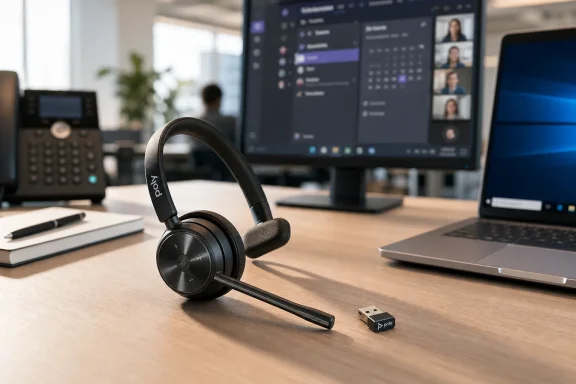 The Office Headset Became Infrastructure While Nobody Was Looking
A decade ago, a headset was a peripheral in the old sense of the word: useful, replaceable, and mostly personal. Today, for millions of workers, it is closer to office infrastructure. It is the meeting room, the phone handset, the customer-service station, and the mute button all compressed into a plastic headband.That shift explains why a product like the Voyager 4310 UC matters more than its modest silhouette suggests. This is a single-ear Bluetooth headset with a boom mic, not a premium noise-canceling music rig or a gamer-style desk ornament. Its pitch is simpler: take the everyday friction out of Teams calls without requiring a wired tether or a user manual worthy of a router.
The “UC” in the name, for unified communications, is doing a lot of work here. Poly is not selling only audio hardware; it is selling compatibility with the stack that now defines office life. For Windows users, that usually means Teams, Outlook calendars, device policies, USB dongles, firmware utilities, and the low-grade anxiety that the wrong audio endpoint will hijack the next call.
The Voyager 4310 UC sits directly in that anxiety zone. It promises Bluetooth freedom while still shipping with a dedicated USB-A adapter, because native PC Bluetooth remains a surprisingly fragile foundation for professional audio. That combination tells the real story: wireless convenience is desirable, but predictable behavior still wins.
Microsoft Teams Certification Is a Workflow Claim, Not a Sticker
“Microsoft Teams certified” sounds like a marketing badge until a user’s headset mute button stops matching the mute state inside Teams. Then it becomes the difference between a productive morning and a support ticket with screenshots, driver reinstalls, and someone saying, “It worked yesterday.”Teams certification is ultimately about reducing ambiguity. Certified devices are tested for expected behavior with Microsoft’s calling and meeting environment, including call controls, audio handling, and integration points that generic Bluetooth devices may treat as optional. In practical terms, that matters because Teams is no longer just another app running on Windows; in many organizations, it is the phone system.
The Voyager 4310 UC’s Teams positioning therefore has a specific audience: organizations that want predictable endpoint behavior at scale. A headset that can answer calls, adjust volume, mute reliably, and present itself consistently to Teams is not glamorous. But multiplied across hundreds or thousands of employees, small reductions in failure rate become meaningful.
There is also a subtle procurement story here. “Works with Teams” and “certified for Teams” are not the same sentence. The former is a hope; the latter is a buying criterion. IT departments have learned to respect that distinction because consumer Bluetooth gear can work brilliantly for music and still behave oddly inside conferencing software.
That does not mean certification eliminates every problem. Firmware updates, USB power management, Windows audio device switching, and user behavior can still produce chaos. But certification narrows the blast radius. It gives administrators a supportable baseline, and in enterprise computing, a baseline is often more valuable than a headline feature.
The USB-A Dongle Is the Most Honest Part of the Package
The most revealing item in the box is not the headset. It is the USB-A Bluetooth adapter.That may sound strange in 2026, when many laptops have pushed USB-C as the modern connector and Bluetooth radios are built into practically everything. But the dongle exists because workplace Bluetooth is not only about pairing. It is about profiles, codecs, call control signaling, range, reconnection behavior, and whether the headset shows up to the collaboration app in a way the app understands.
The included BT700-style adapter gives Poly a controlled path between the headset and the PC. Instead of relying entirely on the host machine’s Bluetooth stack, driver version, chipset, antenna design, and enterprise image, the headset can operate through a known intermediary. For IT, that is boring in exactly the right way.
USB-A also says something about the installed base. Plenty of desktops, docks, thin clients, and business laptops still expose USB-A ports. In many offices, the USB-A port remains the universal accessory slot, especially for devices that are meant to be left plugged into a dock or workstation.
There is an irony here. A wireless headset that ships with a dongle is admitting that the cable-free future still needs a little hardware crutch. But that crutch is what makes the experience viable for many users. Pure native Bluetooth sounds cleaner on a spec sheet; a dedicated adapter often behaves better in the field.
The choice of USB-A over USB-C may frustrate owners of newer ultraportables, but it also reflects the target market. This is not a fashion accessory for the thinnest possible laptop bag. It is a deployable office endpoint, and office endpoints still live in a world of docking stations, keyboard trays, shared desks, and legacy ports that refuse to die.
Mono Audio Looks Old-Fashioned Until the Workday Starts
The Voyager 4310 is a monaural headset, which means it covers one ear. That immediately separates it from stereo headsets built for immersion, focus, and music. In an era of hybrid work and open-plan offices, mono can look like a compromise.It is, but not necessarily a bad one. A single-ear design lets workers stay aware of their surroundings while remaining connected to calls. For reception desks, shared offices, call-heavy support roles, and home environments where a doorbell or child may matter, total isolation is not always the goal.
There is also the fatigue factor. Large over-ear stereo headsets can be comfortable, but they are still more physically present. A lighter mono headset can be easier to wear continuously, especially for users who spend the day moving between short calls rather than settling into one long listening session.
The tradeoff is obvious: this is not the headset for people who want cinematic sound, deep focus, or strong speaker-side active noise cancellation. The Voyager 4310’s value is centered on voice communication. It is built around the microphone, the call controls, the wireless range, and the ability to stay on someone’s head without becoming the day’s main annoyance.
That makes the product less exciting but more honest. Most office calls do not need audiophile reproduction. They need intelligible speech, reliable muting, and enough comfort that the user does not rip the thing off after hour three.
Noise Cancellation Means the Microphone, Not a Cone of Silence
Product descriptions around headsets often blur the distinction between noise-canceling microphones and active noise cancellation for the listener. The Voyager 4310 UC is best understood through the first lens. Its selling point is Poly’s microphone-side noise reduction, intended to keep background chatter from leaking into calls.That distinction matters. A boom mic with background-noise rejection can make the person wearing the headset sound better to everyone else, even if the wearer still hears the room around them. This is collaboration etiquette as much as audio engineering. In Teams meetings, the worst headset is often not the one you wear; it is the one worn by someone else in a noisy kitchen.
Poly’s Acoustic Fence branding points to that outbound-audio problem. The goal is to isolate the user’s voice and suppress surrounding noise so the call sounds more professional. For hybrid workers, that is often more important than speaker-side isolation.
Still, buyers should be careful with the word “noise cancellation.” If they expect premium ANC that hushes HVAC systems, traffic, or office chatter in their own ear, a mono business headset will disappoint. If they want coworkers to hear fewer keyboard clacks and side conversations, the design makes more sense.
This is where the Voyager 4310 occupies a practical middle ground. It is not a travel headphone replacement. It is a meeting headset that tries to make imperfect rooms sound less imperfect to everyone else.
Battery Life Has Become the New Uptime Metric
Poly’s published figures for this class of headset put the Voyager 4310 UC in all-day territory, with talk time commonly listed up to 24 hours when used with the USB adapter and substantially longer listening time. The exact number matters less than the operational promise: a headset should not introduce battery management into an already overloaded workday.That promise is more important than it used to be. When calls were occasional, a weak battery was an inconvenience. When a calendar is stacked with video meetings, customer calls, and quick huddles, battery failure becomes a business continuity problem, just on a tiny scale.
The Voyager 4310 also supports use while plugged in, which is one of those features that sounds pedestrian until the day it saves a meeting. A headset that can limp through a low-battery afternoon over USB is a better office tool than one that becomes a paperweight at 2:30 p.m.
Standby time is another underrated metric. In hybrid work, devices sit in bags, on desks, and beside docking stations, often unused for stretches and then suddenly required. A headset that can retain charge over long idle periods reduces the ritual of pre-meeting panic.
None of this turns battery claims into guarantees. Real-world endurance depends on volume, range, pairing behavior, battery age, firmware, and use pattern. But the broader category has matured enough that all-day voice use is now a reasonable expectation rather than a luxury feature.
The Poly Name Carries Plantronics Baggage and HP Ambition
The product description’s “Poly, formerly Plantronics” phrasing is more than a parenthetical. Plantronics spent decades as a default name in professional headsets, especially in call centers and enterprise voice. Poly inherited that reputation after Plantronics combined with Polycom, and HP later acquired Poly to strengthen its hybrid-work hardware portfolio.That lineage matters because headset buying is unusually trust-based. Users may not care who owns the brand, but IT departments remember which vendors have provisioning tools, firmware channels, warranty processes, and device management stories that scale beyond one Amazon order.
HP’s stewardship places devices like the Voyager 4310 inside a broader endpoint strategy. PCs, webcams, headsets, docking stations, and collaboration bars are increasingly sold as a managed hybrid-work ecosystem rather than disconnected accessories. The headset becomes part of the endpoint fleet.
That can be good for administrators. A serious vendor has incentives to maintain firmware, documentation, and compatibility matrices. It can also make product naming more confusing, as old Poly part numbers, newer HP SKUs, regional variants, Teams versions, UC versions, USB-A models, USB-C models, and charge-stand bundles pile up in reseller listings.
The 218470-02 identifier is therefore not trivia. It is how buyers distinguish the Teams-certified USB-A mono model from neighboring configurations. In enterprise procurement, the wrong suffix can mean the wrong connector, missing charging stand, or a non-Teams variant that behaves differently than expected.
The Modern Headset Is a Security and Management Surface
It is tempting to treat a headset as benign because it is small and familiar. But any device that includes a radio, firmware, a USB adapter, and management software belongs in the endpoint conversation. That does not make it dangerous by default; it makes it part of the environment.For Windows administrators, the practical issues are usually less dramatic than spy-movie scenarios. They involve firmware currency, driver behavior, USB device control, Bluetooth pairing policies, and whether management utilities such as Poly Lens are allowed, required, or blocked. The headset is another thing that can be outdated, misconfigured, or incompatible with a locked-down image.
The BT700 adapter also creates an inventory question. Is it treated as part of the headset, as a USB peripheral, or as an unmanaged radio device? In high-security environments, that distinction may matter. Some organizations restrict Bluetooth generally but allow approved wireless headsets through managed adapters because the alternative is worse: users bringing whatever consumer devices they have at home.
This is where certified business hardware earns its keep. It gives IT a narrower set of variables to validate. Instead of supporting every Bluetooth headset an employee bought for travel, the organization can standardize on known devices with known firmware channels and known behavior in Teams.
The counterargument is cost. Business headsets are rarely the cheapest way to put audio on someone’s head. But cheap peripherals can become expensive when they generate support churn, meeting failures, and inconsistent user experiences across the fleet.
The Real Competition Is “Good Enough” Consumer Bluetooth
The Voyager 4310 UC does not compete only with other enterprise headsets. It competes with AirPods, gaming headsets, laptop microphones, monitor speakers, and whatever earbuds came free with a phone four years ago. In many organizations, that shadow fleet is already deployed because users solved their own problems before procurement caught up.Consumer Bluetooth gear has improved dramatically. For individual users, modern earbuds can sound good, travel well, and switch between devices with a convenience that business peripherals sometimes struggle to match. The problem is that good enough for one person is not the same as manageable for a company.
A consumer headset may work well in Teams until it does not. It may lack a reliable hardware mute sync, appear under confusing audio device names, use a microphone profile that degrades sound quality, or switch unexpectedly between laptop and phone. None of those issues is catastrophic, but they are corrosive.
The Voyager 4310’s answer is not glamour. It is repeatability. The headset is built for the unromantic world of calls, support desks, remote training sessions, and meetings where everyone just wants the audio to behave.
That is why the USB adapter is again central. It lets the headset act less like an unpredictable personal gadget and more like an office tool. For users, the difference may be invisible. For admins, invisible is the point.
Comfort Is the Feature Nobody Can Validate on a Spec Sheet
Headset specifications can tell buyers the weight, range, talk time, and connector type. They cannot tell a user whether the headband creates pressure after six hours or whether the ear cushion feels irritating by Thursday. Comfort remains stubbornly personal.The Voyager 4310’s mono, on-ear design suggests a bet on lightness over enclosure. At around the low-hundreds of grams, it is not trying to be a padded audio cocoon. It is trying to be wearable enough that a user forgets about it between calls.
That is a rational design for many roles, but not all. Workers in noisy environments may prefer dual-ear models. People who split time between meetings and music may want stereo audio. Users who dislike on-ear pressure may reject the form factor no matter how good the microphone sounds.
This is why standardizing on one headset can backfire if IT treats the workforce as physically identical. The Voyager 4310 is a credible default, especially for voice-heavy Teams users, but defaults should have exceptions. Accessibility, comfort, hearing needs, and job role all complicate the neatness of a single SKU.
The best headset programs acknowledge that. They define a standard model, a stereo option, a wired fallback, and perhaps a premium ANC tier for travel or open offices. The Voyager 4310 fits cleanly into the first of those categories: the everyday wireless Teams headset.
The Listing Tells a Bigger Story Than the Product Page
The supplied product description is written like a straightforward resale listing: new in box, Microsoft Teams certified, USB-A dongle, Bluetooth connectivity, mute button, volume controls, rechargeable battery. It is simple, practical, and aimed at someone who wants a workday problem solved rather than a spec-sheet debate.But product listings for business peripherals can be deceptively slippery. Part numbers matter. Regional SKUs matter. The presence or absence of a charging stand matters. USB-A versus USB-C matters. Teams-certified variants can sit beside non-Teams UC versions that look nearly identical in photos.
The listed part number, 218470-02, aligns with a Teams-oriented USB-A Voyager 4310 UC configuration commonly associated with the BT700 adapter and no charge stand. Nearby part numbers may indicate charge-stand bundles or USB-C versions. That is not pedantry; it is the difference between a user opening the box and finding the right connector for their dock.
There is also the “brand new in box” claim, which buyers should evaluate as they would any reseller listing. A sealed box is reassuring, but warranty eligibility, seller reputation, return policy, and regional support can matter more than shrink wrap. Enterprise accessories often move through complex channels, and not every listing offers the same post-sale safety net.
For WindowsForum readers, the lesson is familiar: hardware that looks commodity-like can still hide compatibility traps. The headset itself may be solid, but the purchasing decision should still be precise.
Windows Still Needs Better Audio Device Discipline
The existence of Teams-certified headsets is also an indictment of how messy PC audio remains. Windows has improved device handling over the years, and Teams has matured as a communications platform, but users still encounter duplicate endpoints, stale devices, profile switches, and mysteries around why one app hears a microphone while another does not.Bluetooth adds another layer. A headset can expose separate modes for high-quality audio and two-way calling, and the transition between them is not always elegant. A device that sounds great for media playback can sound worse once the microphone is active, because bandwidth and profile choices change.
Dedicated business adapters try to smooth that over. They do not magically rewrite the laws of Bluetooth, but they can create a more predictable path for conferencing. In a world where the meeting starts at 9:00 and not after the third trip through Settings, predictability is a feature.
Microsoft’s own ecosystem has reinforced this reality. Teams devices exist because the app is not merely software; it is a communications environment that depends on cameras, speakers, microphones, room systems, and headsets behaving in concert. The more central Teams becomes, the more valuable certified peripherals become.
That does not absolve Microsoft or hardware vendors from improving the basics. Users should not need tribal knowledge to understand which microphone is live. But until the PC audio stack becomes boring in the way Ethernet is boring, certified headsets and dedicated adapters will remain the pragmatic workaround.
The Price of Freedom Is Another Device to Maintain
Wireless headsets sell freedom: stand up, pace, refill coffee, answer a call without being chained to the laptop. The Voyager 4310’s published range, often described as up to 50 meters or 164 feet with the adapter under ideal conditions, reinforces that promise. In a real office or home, walls, interference, body position, and adapter placement will reduce the fantasy version of that number.Still, range is not trivial. People behave differently when they can move. Long calls become less physically punishing. A support tech can step across a room. A manager can take a quick call without hunching over a laptop microphone.
The cost is maintenance. Wireless devices need charging. They need pairing. They sometimes need firmware updates. They can be left in a bag, connected to the wrong phone, or muted at the hardware level while the software insists otherwise.
This is why the best wireless office devices include graceful failure modes. Use while charging is one. Clear mute indicators are another. A physical boom and tactile controls help users trust the device without staring at software.
The Voyager 4310 appears built around that philosophy. It does not try to eliminate every responsibility from the user. It tries to make the responsibilities obvious enough that the device does not become a daily puzzle.
The Practical Buyer Should Read the Suffix Before the Slogan
The Voyager 4310 UC is easy to summarize and easy to buy incorrectly. That is a dangerous combination. Anyone shopping for this model should pay close attention to the exact configuration rather than relying on a product photo or a generic “Voyager 4310” label.The USB-A version makes sense for desktops, docks, and older laptops. The USB-C version may be better for modern ultraportables. A charge stand can be worth the extra cost in fixed-desk environments because it creates a habitual place to store and charge the headset. For mobile workers, the travel pouch and cable may matter more.
The Teams variant is the safer choice for organizations standardized on Teams. A generic UC version may still work, but the dedicated Teams model is the one aligned with Microsoft’s certification path and button behavior. If Teams is the phone system, that alignment should not be dismissed as branding.
Buyers should also distinguish between microphone noise reduction and listener-side ANC. The Voyager 4310 is not a premium quieting headset for loud open offices. It is a voice-first tool that prioritizes call clarity, mobility, and Teams integration.
That makes it a strong fit for many office workers but an imperfect fit for others. The honest evaluation is not “best headset” but “right default.” On that narrower and more useful question, the Voyager 4310 UC has a credible case.
The 4310’s Value Is in the Problems It Refuses to Create
The strongest argument for the Voyager 4310 UC is not that it has the most features. It is that its features line up with the most common failures of hybrid work: bad microphones, unreliable mute behavior, weak battery life, confusing Bluetooth, and uncomfortable all-day wear.There are flashier alternatives. Stereo ANC models offer better isolation. Premium earbuds are more discreet. Wired USB headsets are cheaper and simpler. DECT headsets can offer different range and density advantages in some office deployments. The Voyager 4310 does not erase those categories.
Instead, it occupies the middle: wireless but dongle-backed, lightweight but not invisible, Teams-specific but broadly usable, professional but not extravagant. That middle is where a lot of enterprise hardware actually lives.
For Windows enthusiasts, the device is also a reminder that the PC experience is increasingly defined at the edges. The CPU, RAM, and display still matter, but the daily emotional quality of work often comes from the webcam, microphone, dock, keyboard, and headset. A great laptop with terrible call audio is not a great work machine.
The Voyager 4310 is one small answer to that edge-device problem. It is not transformative. It is the kind of tool that proves its worth by avoiding drama.
The Headset Checklist Hidden Inside One Poly Box
For anyone considering this specific listing, the smart move is to treat the Voyager 4310 UC less like a gadget purchase and more like a miniature endpoint decision. The marketing tells you it is comfortable, wireless, and Teams-certified. The operational questions tell you whether it belongs in your setup.- The 218470-02 configuration is the Microsoft Teams-oriented USB-A version, so buyers should confirm that USB-A is the connector they actually want.
- The headset is best suited to voice-heavy Teams work rather than immersive music, travel silence, or dual-ear concentration.
- The included USB adapter is not an afterthought, because it is central to predictable PC behavior and Teams integration.
- The microphone-side noise reduction is aimed at making the wearer sound better to others, not at creating premium active noise cancellation for the wearer.
- The all-day battery claims are compelling, but real-world endurance will still depend on volume, range, firmware, and aging.
- The most important procurement check is the exact SKU, bundle contents, warranty path, and seller reliability, not the product photo.
References
- Primary source: cineset.com.br
Published: 2026-06-15T14:42:07.776355
- Related coverage: ipphone-warehouse.com
Poly Voyager 4310 UC Microsoft Teams Bluetooth Headset, USB-A (218470-02, 77Y91AA) - IP Phone Warehouse
Buy the Poly Voyager 4310 UC Microsoft Teams Bluetooth Headset with USB-A Adapter from the experts at IP Phone Warehouse. Purchase Poly 218470-02 / HP 77Y91AA and get fast shipping!www.ipphone-warehouse.com - Official source: microsoft.com
Microsoft Teams enabled devices
www.microsoft.com
- Related coverage: printerbase.co.uk
- Related coverage: metrolinedirect.com

Poly Voyager 4310 UC Wireless Headset with Charge Stand, Teams, USB-A (218471-02)
The Poly Voyager 4310 UC for Microsoft Teams is a Bluetooth wireless headset that is perfect for your home office or at work environment. It provides an integrated Teams button on the headset for easy access to your Teams app. The Voyager 4310 features Bluetooth wireless technology, extended...
www.metrolinedirect.com
- Related coverage: mwave.com.au
- Related coverage: bhphotovideo.com
Poly Voyager 4310 Bluetooth Mono Headset with BT700 USB-A
Buy Poly Voyager 4310 Bluetooth Mono Headset with BT700 USB-A Dongle and Charging Stand (Microsoft Teams Certified) featuring USB-A & Bluetooth 5.2 Connectivity, Flexible Boom Mic, On-Ear Controls, Up to 24 Hours Talk Time, Up to Two Simultaneous Connections, Acoustic Fence Technology...www.bhphotovideo.com - Related coverage: euroffice.co.uk
- Related coverage: screenmoove.com
Poly VOYAGER 4310 UC Wireless Headset | 218470-02
Cut wires, not quality! Enjoy pro audio in an affordable Bluetooth® headset. All-day comfort, dual-mic noise canceling & multi-device connection. Perfect for work!screenmoove.com - Related coverage: telephonesystems.com
- Related coverage: also.com
