

Microsoft released PowerToys 0.100.0 on June 9, 2026, for Windows users, adding a rebuilt Shortcut Guide, a Command Palette extension gallery, multi-monitor Dock support, Power Display fixes, ZoomIt recording improvements, and a platform move to .NET 10. The update is less a single headline feature than a statement of intent: PowerToys is becoming the place where Microsoft ships the Windows features too experimental, too niche, or too enthusiast-focused to put directly into the OS. The version number still looks like a dare to anyone waiting for 1.0, but the software itself keeps getting more serious.
PowerToys 0.100.0 is exactly the sort of release that makes the project hard to categorize. It is not Windows, but it increasingly patches over Windows. It is not an official admin toolkit, but plenty of sysadmins install it immediately after a clean build. It is not marketed as a productivity suite, but that is what it has become.
The joke, naturally, is the version number. After 0.99, Microsoft did not declare victory and ship 1.0. It went to 0.100.0, a mathematically valid but emotionally perverse continuation of PowerToys’ long-running “preview forever” identity.
That numbering matters only because PowerToys no longer feels like a toy. The suite now includes window management, launcher behavior, keyboard remapping, file previewing, mouse sharing, text extraction, color picking, bulk renaming, display controls, and a growing Command Palette ecosystem. If this is still preview software, it is preview software that many Windows power users treat as part of the base operating system.
The 0.100.0 release sharpens that tension. Microsoft is not merely sprinkling bug fixes over a hobby project. It is modernizing frameworks, reducing installer size, improving auto-update reliability, and rebuilding utilities around more context-aware user experiences.
That is a better interface, but it is also a confession. Windows has accumulated decades of keyboard shortcuts, app-specific conventions, hidden productivity gestures, and modifier-key rituals. The problem is not that power users refuse to learn them. The problem is that the operating system has never been especially good at teaching them in context.
A full-screen shortcut overlay always felt like something from a training manual. A side pane that adapts to the foreground app feels closer to how modern software should behave. It does not assume the user wants a wall of commands; it assumes the user wants help with the thing they are actually doing.
That distinction is important. Microsoft has spent years trying to make Windows friendlier through search boxes, Start menu changes, Copilot surfaces, and Settings redesigns. But for the people who live on keyboard shortcuts, productivity comes from discoverability at the edge of action. The new Shortcut Guide is a better fit for that world.
There is still a limit to what Microsoft can solve here. A shortcut guide is only as useful as its coverage, and application-specific support will need to grow before it becomes indispensable. But the redesign moves the utility from novelty toward infrastructure.
This is where PowerToys begins to resemble the Windows equivalent of the extensible command bars that developers already know from tools like Visual Studio Code. Once extensions are easier to find and manage, the friction drops. Once the friction drops, the ecosystem has a reason to exist.
That is especially relevant because Command Palette sits at the intersection of several Microsoft instincts. It is keyboard-first, extensible, developer-friendly, and capable of bridging local actions, system commands, apps, and eventually web-backed services. It is also an obvious place for Microsoft to test ideas that would be too disruptive if baked straight into Start or Windows Search.
The new multi-monitor Dock support also fits the enthusiast reality better than the average Windows feature spec. Many PowerToys users have complex desk setups. They are running multiple displays, mixed DPI settings, docking stations, remote desktops, and KVM-like arrangements. A command surface that assumes one monitor is not enough.
The Battery widget for the performance monitor is a smaller addition, but it reinforces the same direction. Command Palette is not just a launcher. It is slowly becoming a personalized operational surface for the PC.
That is the language of a feature leaving the “interesting idea” phase and entering the “people are depending on this” phase. Display management is one of those Windows areas where theory and reality often diverge. In theory, monitors identify themselves, docks pass along the right information, profiles stick, and settings survive sleep, hot-plugging, and driver updates.
In reality, many Windows users have at least one story about a monitor waking up in the wrong order, a laptop forgetting an external layout, or a display utility misidentifying hardware after a dock reconnect. Power Display exists because Windows’ native display experience still leaves room for specialized control.
The Max compatibility mode is particularly telling. Compatibility modes are rarely glamorous; they are engineering humility in checkbox form. They acknowledge that the PC ecosystem is messy and that no amount of clean API design can erase the chaos of cables, firmware, adapters, GPUs, and display controllers.
For IT pros, the question is not whether Power Display is elegant. The question is whether it reduces support friction. If it helps preserve monitor behavior across machines and setups, it earns its place.
Version 0.100.0 adds webcam overlay support while recording and the ability to append multiple clips with transitions. Those are not tiny quality-of-life features. They move ZoomIt toward the workflow of modern technical content creation, where screen recording, face cam, annotations, and stitched clips are ordinary expectations.
This is another example of PowerToys absorbing a job that Windows itself does not quite own. Windows includes screen recording surfaces through Xbox Game Bar and Snipping Tool evolutions, but technical presenters often need something more direct. They need to zoom, annotate, explain, record, and assemble without building an entire production pipeline.
ZoomIt’s second life inside PowerToys is therefore more than nostalgia. It is Microsoft recognizing that developer advocacy, training, remote work, and internal documentation have changed what “screen utility” means. The same tool that once helped presenters zoom into a dialog box now has to compete with lightweight creator workflows.
That is not just housekeeping. PowerToys is a suite of utilities that many users keep running constantly. Any reduction in footprint, startup delay, update friction, or UI inconsistency has a cumulative effect because the software lives in the background of everyday Windows use.
The WPF-to-WinUI migration matters for the same reason. PowerToys has grown over time through utilities that did not always feel like they belonged to the same app. Modernizing the interface framework helps Microsoft make the suite feel less like a bag of clever hacks and more like a coherent Windows companion.
Workspaces also received a visual refresh, including updated typography, spacing, layout changes, and a cleaner overall experience. That may sound cosmetic, but visual consistency is part of trust. Users are more likely to rely on a utility suite when it behaves and looks like maintained software rather than a collection of abandoned experiments.
There is an enterprise angle here, too. Auto-update reliability and installer size are not glamorous release-note items, but they matter to managed environments. If PowerToys is going to keep spreading from enthusiast desktops into professional workflows, the plumbing has to improve.
None of those changes alone would define a release. Together, they show the scale of Microsoft’s challenge. PowerToys is no longer a couple of charming utilities. It is a constellation of features touching input, display, windows, files, search, productivity, accessibility-adjacent workflows, and developer convenience.
That breadth is both the project’s strength and its risk. PowerToys can move quickly precisely because it is not Windows proper. But users still experience it as part of Windows once they install it. A broken keyboard remap or flaky display utility does not feel like a harmless add-on when it interrupts work.
Microsoft’s answer appears to be gradual modernization rather than dramatic consolidation. WinUI migrations, installer reductions, update fixes, and reliability improvements are the boring work required to keep a sprawling suite from collapsing under its own usefulness.
That is why 0.100.0 feels bigger than its changelog. It is a release about turning accumulated cleverness into something more maintainable.
But the longer PowerToys remains in perpetual pre-1.0 territory, the stranger that posture becomes. The suite is open source, widely used, distributed through the Microsoft Store, installable through winget, and regularly covered as part of the Windows ecosystem. It is not a weekend repo with a cute icon.
There are defensible reasons to avoid 1.0. PowerToys changes rapidly. Some utilities appear, evolve, or get folded into broader Windows ideas. The team may not want to imply that every module has reached a final architectural state. In that sense, 0.100.0 is honest: this is mature software that still wants permission to mutate.
Still, Microsoft should be careful. “Preview” can be a useful shield, but it can also become a way of under-describing user reliance. At some point, the market decides maturity by behavior, not by semver.
PowerToys crossed that line a while ago for many Windows enthusiasts. Version 0.100.0 merely makes the contradiction harder to ignore.
That arrangement has real benefits. Enthusiasts get tools sooner. Microsoft gets feedback before committing features to the platform. Developers and IT pros get optional power without forcing casual users to navigate more complexity in Windows Settings.
But it also reveals a structural problem. Many PowerToys features feel like they address gaps that Windows could arguably have solved natively years ago. Better window management, better shortcut discovery, better launcher extensibility, better file utilities, better display handling — these are not exotic needs for the people who use Windows professionally.
The answer is not necessarily to merge all of PowerToys into Windows. That would slow the project down and clutter the OS. The better answer is for Microsoft to treat PowerToys as a proving ground whose best ideas can graduate when they are clearly mainstream enough.
That graduation path has to be explicit. Otherwise, PowerToys becomes a permanent annex: essential to power users, invisible to everyone else, and always slightly outside the official Windows story.
The Extension Gallery makes Command Palette easier to grow. The Shortcut Guide makes Windows shortcuts easier to discover. Power Display’s fixes make multi-monitor life less fragile. The .NET 10 move makes the suite smaller and faster. These are practical upgrades rather than novelty features.
That matters because PowerToys has already won the attention of Windows enthusiasts. The next challenge is keeping their trust. The more utilities Microsoft adds, the more important consistency, recoverability, and sane defaults become.
PowerToys 0.100.0 suggests Microsoft understands that. The release is broad, but it is not chaotic. It adds, rebuilds, tightens, and modernizes in roughly equal measure.
 PowerToys Reaches 0.100 Without Becoming a Product in the Usual Microsoft Sense
PowerToys 0.100.0 is exactly the sort of release that makes the project hard to categorize. It is not Windows, but it increasingly patches over Windows. It is not an official admin toolkit, but plenty of sysadmins install it immediately after a clean build. It is not marketed as a productivity suite, but that is what it has become.The joke, naturally, is the version number. After 0.99, Microsoft did not declare victory and ship 1.0. It went to 0.100.0, a mathematically valid but emotionally perverse continuation of PowerToys’ long-running “preview forever” identity.
That numbering matters only because PowerToys no longer feels like a toy. The suite now includes window management, launcher behavior, keyboard remapping, file previewing, mouse sharing, text extraction, color picking, bulk renaming, display controls, and a growing Command Palette ecosystem. If this is still preview software, it is preview software that many Windows power users treat as part of the base operating system.
The 0.100.0 release sharpens that tension. Microsoft is not merely sprinkling bug fixes over a hobby project. It is modernizing frameworks, reducing installer size, improving auto-update reliability, and rebuilding utilities around more context-aware user experiences.
The Rebuilt Shortcut Guide Is a Small Admission About Windows Itself
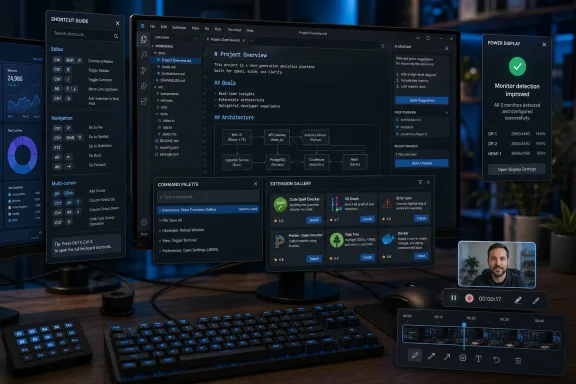
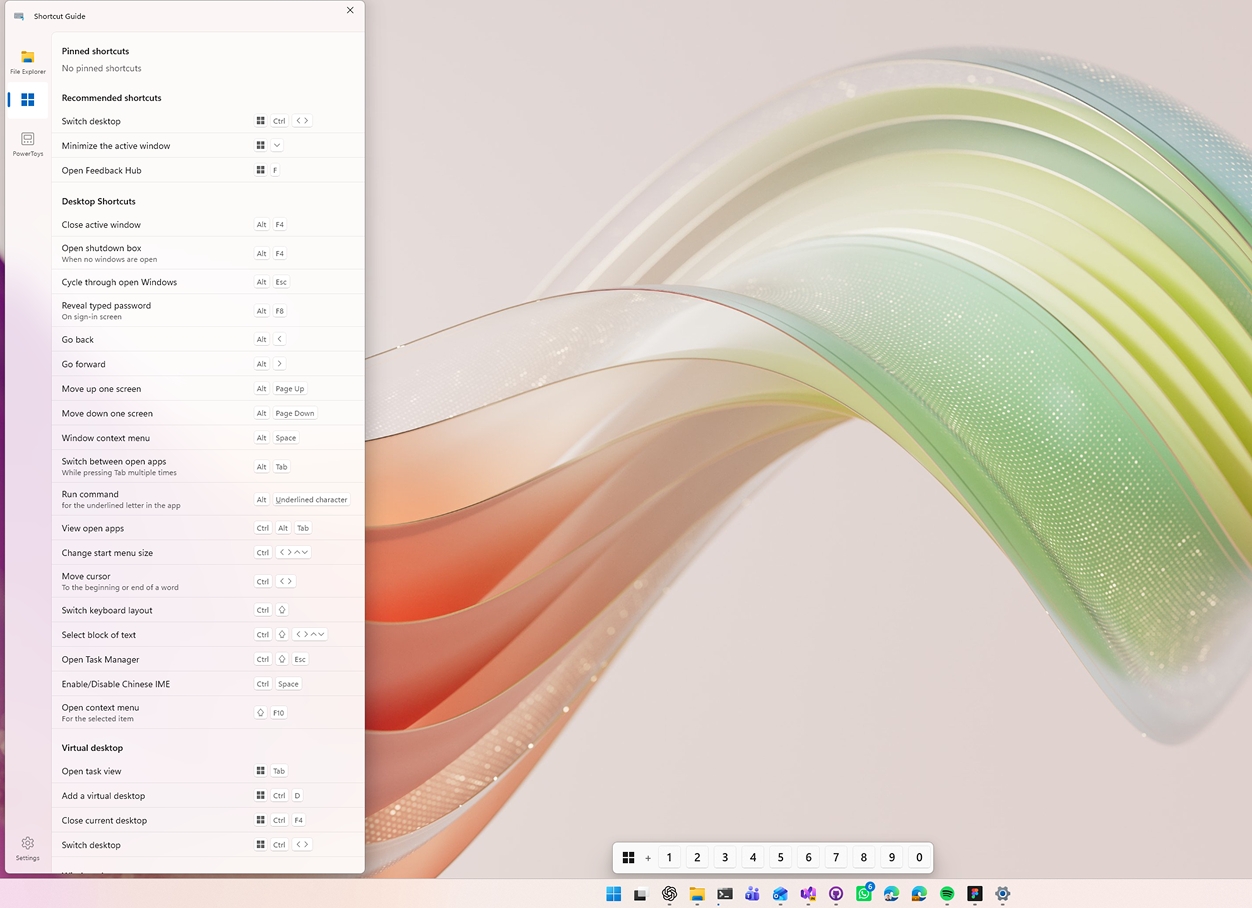
The most visible change is the new Shortcut Guide, which has been redesigned from the ground up. The old version behaved like a cheat sheet plastered over the entire desktop. The new one appears as a side pane and detects the active application, showing shortcuts relevant to the task in front of the user.That is a better interface, but it is also a confession. Windows has accumulated decades of keyboard shortcuts, app-specific conventions, hidden productivity gestures, and modifier-key rituals. The problem is not that power users refuse to learn them. The problem is that the operating system has never been especially good at teaching them in context.
A full-screen shortcut overlay always felt like something from a training manual. A side pane that adapts to the foreground app feels closer to how modern software should behave. It does not assume the user wants a wall of commands; it assumes the user wants help with the thing they are actually doing.
That distinction is important. Microsoft has spent years trying to make Windows friendlier through search boxes, Start menu changes, Copilot surfaces, and Settings redesigns. But for the people who live on keyboard shortcuts, productivity comes from discoverability at the edge of action. The new Shortcut Guide is a better fit for that world.
There is still a limit to what Microsoft can solve here. A shortcut guide is only as useful as its coverage, and application-specific support will need to grow before it becomes indispensable. But the redesign moves the utility from novelty toward infrastructure.
Command Palette Starts Looking Like the Real PowerToys Platform
The Command Palette changes may end up being more consequential than the Shortcut Guide refresh. Version 0.100.0 adds an Extension Gallery, letting users browse, discover, install, update, and remove extensions without leaving the app. That turns Command Palette from a launcher with add-ons into something closer to a small app platform.This is where PowerToys begins to resemble the Windows equivalent of the extensible command bars that developers already know from tools like Visual Studio Code. Once extensions are easier to find and manage, the friction drops. Once the friction drops, the ecosystem has a reason to exist.
That is especially relevant because Command Palette sits at the intersection of several Microsoft instincts. It is keyboard-first, extensible, developer-friendly, and capable of bridging local actions, system commands, apps, and eventually web-backed services. It is also an obvious place for Microsoft to test ideas that would be too disruptive if baked straight into Start or Windows Search.
The new multi-monitor Dock support also fits the enthusiast reality better than the average Windows feature spec. Many PowerToys users have complex desk setups. They are running multiple displays, mixed DPI settings, docking stations, remote desktops, and KVM-like arrangements. A command surface that assumes one monitor is not enough.
The Battery widget for the performance monitor is a smaller addition, but it reinforces the same direction. Command Palette is not just a launcher. It is slowly becoming a personalized operational surface for the PC.
Power Display Gets the Kind of Fixes That Matter Only After the Demo Ends
Power Display’s improvements are less flashy, but they may be among the most practically useful parts of the release. Microsoft says the utility now starts significantly faster, identifies monitors more reliably, preserves settings more consistently, and includes a new Max compatibility mode for displays that do not behave correctly.That is the language of a feature leaving the “interesting idea” phase and entering the “people are depending on this” phase. Display management is one of those Windows areas where theory and reality often diverge. In theory, monitors identify themselves, docks pass along the right information, profiles stick, and settings survive sleep, hot-plugging, and driver updates.
In reality, many Windows users have at least one story about a monitor waking up in the wrong order, a laptop forgetting an external layout, or a display utility misidentifying hardware after a dock reconnect. Power Display exists because Windows’ native display experience still leaves room for specialized control.
The Max compatibility mode is particularly telling. Compatibility modes are rarely glamorous; they are engineering humility in checkbox form. They acknowledge that the PC ecosystem is messy and that no amount of clean API design can erase the chaos of cables, firmware, adapters, GPUs, and display controllers.
For IT pros, the question is not whether Power Display is elegant. The question is whether it reduces support friction. If it helps preserve monitor behavior across machines and setups, it earns its place.
ZoomIt’s PowerToys Life Turns a Sysinternals Classic Into a Modern Presenter Tool
ZoomIt’s presence in PowerToys still feels like a cultural crossover. Mark Russinovich’s beloved Sysinternals utility was long associated with live demos, conference talks, and technical walkthroughs. In PowerToys, it gets exposed to a much larger audience of Windows users who may never have browsed the Sysinternals catalog.Version 0.100.0 adds webcam overlay support while recording and the ability to append multiple clips with transitions. Those are not tiny quality-of-life features. They move ZoomIt toward the workflow of modern technical content creation, where screen recording, face cam, annotations, and stitched clips are ordinary expectations.
This is another example of PowerToys absorbing a job that Windows itself does not quite own. Windows includes screen recording surfaces through Xbox Game Bar and Snipping Tool evolutions, but technical presenters often need something more direct. They need to zoom, annotate, explain, record, and assemble without building an entire production pipeline.
ZoomIt’s second life inside PowerToys is therefore more than nostalgia. It is Microsoft recognizing that developer advocacy, training, remote work, and internal documentation have changed what “screen utility” means. The same tool that once helped presenters zoom into a dialog box now has to compete with lightweight creator workflows.
The .NET 10 Move Is the Quiet Center of the Release
The platform work in PowerToys 0.100.0 deserves more attention than it will probably get. Microsoft says PowerToys has moved to .NET 10, improving performance and reducing the installation footprint by 15 percent. Auto-update reliability has also been improved, while Quick Access and Workspaces have moved from WPF to WinUI.That is not just housekeeping. PowerToys is a suite of utilities that many users keep running constantly. Any reduction in footprint, startup delay, update friction, or UI inconsistency has a cumulative effect because the software lives in the background of everyday Windows use.
The WPF-to-WinUI migration matters for the same reason. PowerToys has grown over time through utilities that did not always feel like they belonged to the same app. Modernizing the interface framework helps Microsoft make the suite feel less like a bag of clever hacks and more like a coherent Windows companion.
Workspaces also received a visual refresh, including updated typography, spacing, layout changes, and a cleaner overall experience. That may sound cosmetic, but visual consistency is part of trust. Users are more likely to rely on a utility suite when it behaves and looks like maintained software rather than a collection of abandoned experiments.
There is an enterprise angle here, too. Auto-update reliability and installer size are not glamorous release-note items, but they matter to managed environments. If PowerToys is going to keep spreading from enthusiast desktops into professional workflows, the plumbing has to improve.
The Smaller Changes Show How Broad the Suite Has Become
The rest of the release reads like a map of how sprawling PowerToys has become. Keyboard Manager now uses the new WinUI editor by default. Mouse Without Borders gains a Refresh Connections feature. Quick Accent gets better high-DPI and multi-monitor reliability. Peek can disable file preview tooltips. PowerToys Run gets calculator improvements.None of those changes alone would define a release. Together, they show the scale of Microsoft’s challenge. PowerToys is no longer a couple of charming utilities. It is a constellation of features touching input, display, windows, files, search, productivity, accessibility-adjacent workflows, and developer convenience.
That breadth is both the project’s strength and its risk. PowerToys can move quickly precisely because it is not Windows proper. But users still experience it as part of Windows once they install it. A broken keyboard remap or flaky display utility does not feel like a harmless add-on when it interrupts work.
Microsoft’s answer appears to be gradual modernization rather than dramatic consolidation. WinUI migrations, installer reductions, update fixes, and reliability improvements are the boring work required to keep a sprawling suite from collapsing under its own usefulness.
That is why 0.100.0 feels bigger than its changelog. It is a release about turning accumulated cleverness into something more maintainable.
The Version Number Is Funny Because the Product Is Not
The refusal to call PowerToys 1.0 is now part of the brand. It signals experimentation, openness, and a certain developer-channel informality. It also gives Microsoft room to avoid promising the stability expectations that usually attach to a major release.But the longer PowerToys remains in perpetual pre-1.0 territory, the stranger that posture becomes. The suite is open source, widely used, distributed through the Microsoft Store, installable through winget, and regularly covered as part of the Windows ecosystem. It is not a weekend repo with a cute icon.
There are defensible reasons to avoid 1.0. PowerToys changes rapidly. Some utilities appear, evolve, or get folded into broader Windows ideas. The team may not want to imply that every module has reached a final architectural state. In that sense, 0.100.0 is honest: this is mature software that still wants permission to mutate.
Still, Microsoft should be careful. “Preview” can be a useful shield, but it can also become a way of under-describing user reliance. At some point, the market decides maturity by behavior, not by semver.
PowerToys crossed that line a while ago for many Windows enthusiasts. Version 0.100.0 merely makes the contradiction harder to ignore.
Windows Keeps Outsourcing Its Power-User Soul to PowerToys
The broader story is that PowerToys has become Microsoft’s pressure valve for Windows. When the OS needs a feature that is too niche for mainstream users, too risky for default inclusion, or too fast-moving for the Windows release cadence, PowerToys is where it can live.That arrangement has real benefits. Enthusiasts get tools sooner. Microsoft gets feedback before committing features to the platform. Developers and IT pros get optional power without forcing casual users to navigate more complexity in Windows Settings.
But it also reveals a structural problem. Many PowerToys features feel like they address gaps that Windows could arguably have solved natively years ago. Better window management, better shortcut discovery, better launcher extensibility, better file utilities, better display handling — these are not exotic needs for the people who use Windows professionally.
The answer is not necessarily to merge all of PowerToys into Windows. That would slow the project down and clutter the OS. The better answer is for Microsoft to treat PowerToys as a proving ground whose best ideas can graduate when they are clearly mainstream enough.
That graduation path has to be explicit. Otherwise, PowerToys becomes a permanent annex: essential to power users, invisible to everyone else, and always slightly outside the official Windows story.
The Real Upgrade Is Trust, Not Novelty
For users deciding whether to install or update PowerToys 0.100.0, the release is easy to recommend with the usual caveat: this is still a fast-moving toolkit, and users who depend on specific shortcuts, display behavior, or admin-controlled environments should test before rolling it out broadly. The most interesting changes are not just new features, but the signs that Microsoft is investing in reliability.The Extension Gallery makes Command Palette easier to grow. The Shortcut Guide makes Windows shortcuts easier to discover. Power Display’s fixes make multi-monitor life less fragile. The .NET 10 move makes the suite smaller and faster. These are practical upgrades rather than novelty features.
That matters because PowerToys has already won the attention of Windows enthusiasts. The next challenge is keeping their trust. The more utilities Microsoft adds, the more important consistency, recoverability, and sane defaults become.
PowerToys 0.100.0 suggests Microsoft understands that. The release is broad, but it is not chaotic. It adds, rebuilds, tightens, and modernizes in roughly equal measure.
The 0.100 Release Draws the Map for Microsoft’s Next Windows Laboratory
PowerToys 0.100.0 is not just another utility update; it is a snapshot of where Microsoft thinks serious Windows users still need help.- The rebuilt Shortcut Guide turns a static cheat sheet into a contextual aid that better matches how people actually work.
- The Command Palette Extension Gallery lowers the barrier for a real extension ecosystem inside PowerToys.
- Multi-monitor Dock support and Power Display fixes acknowledge that modern Windows desks are messy, display-heavy, and failure-prone.
- ZoomIt’s recording upgrades show PowerToys adapting old-school technical tools for today’s demo, training, and creator workflows.
- The move to .NET 10, smaller installers, and improved auto-updates show that Microsoft is treating PowerToys less like a lab experiment and more like durable infrastructure.
- The 0.100.0 version number keeps the project’s preview-era personality alive, even as the software behaves more like something Windows power users already depend on.
References
- Primary source: thurrott.com
Published: Thu, 11 Jun 2026 16:21:01 GMT
Loading…
www.thurrott.com - Official source: devblogs.microsoft.com

PowerToys 0.100 is here: new Shortcut Guide, Command Palette improvements and much more!
We're back with a fresh PowerToys release! This month introduces the brand-new Shortcut Guide, a major Command Palette update with the new Extension devblogs.microsoft.com
- Related coverage: windowscentral.com
Windows 11 search and app launching are getting a speed boost | Windows Central
A new Extension Gallery in PowerToys streamlines how you find, install, and update Command Palette extensions.www.windowscentral.com - Related coverage: techspot.com
Loading…
www.techspot.com - Related coverage: tchgdns.de
Loading…
tchgdns.de - Related coverage: htnovo.net
Loading…
www.htnovo.net
- Official source: github.com
Releases · microsoft/PowerToys
Microsoft PowerToys is a collection of utilities that supercharge productivity and customization on Windows - microsoft/PowerToys github.com
- Related coverage: deskmodder.de
PowerToys 0.100.0 nutzt jetzt .NET 10 und bietet den neuen Shortcut Guide
PowerToys 0.100.0 wurde von Microsoft veröffentlicht und bringt einige Änderungen mit. So nutzen die PowerToys jetzt .NET 10. Neu gestaltet wurde der Shortcut Guide. Die Auswahl erscheint jetzt am Rand des Bildschirms. (Siehe Bild) Auch die Befehlspalette kommt mit einer…www.deskmodder.de - Related coverage: nwsgenealogy.org
Loading…
nwsgenealogy.org - Related coverage: doccompiler.ai
