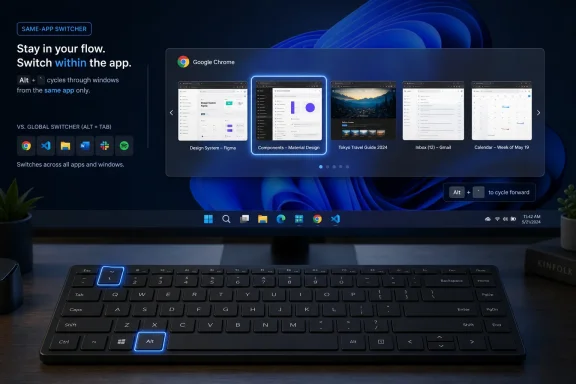
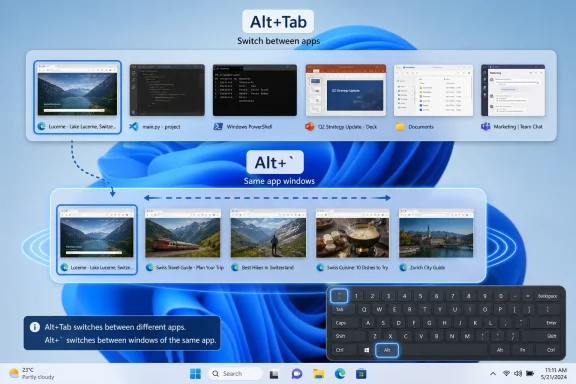
Microsoft is preparing a new PowerToys utility called Alt Window Cycle that will let Windows 10 and Windows 11 users switch between open windows belonging to the same app with Alt + `, according to a recent PowerToys GitHub pull request. The feature is small, almost suspiciously so, but that is exactly why it matters. Windows has spent decades making app switching universal while leaving same-app window juggling oddly inconsistent. PowerToys is once again being used to sand down a rough edge that probably should have been part of Windows itself.
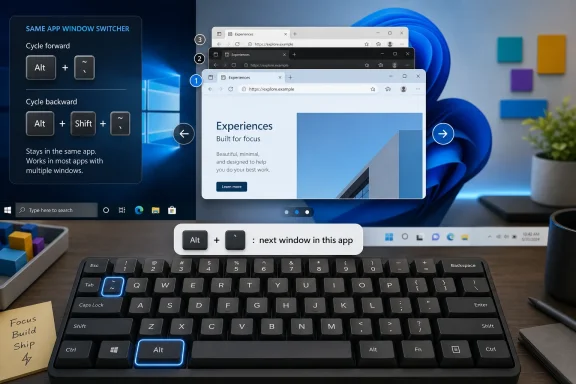
The proposed utility, named AltWindowCycle in the pull request, does not try to reinvent window management. It borrows one of the oldest habits in desktop computing — pressing a shortcut to move through windows — and narrows its scope. Alt + Tab moves across everything. Alt + ` would move only across windows from the currently active app.
That distinction sounds minor until you think about how people actually work. A browser is no longer one window with a handful of tabs. It is often a research window, an admin console window, a webmail window, a documentation window, and a video meeting window, all technically part of the same executable but mentally filed as separate workspaces.
The same is true for terminals, code editors, file managers, chat clients, remote desktop sessions, and Office apps. Windows users can already summon every open window with Alt + Tab, but that becomes noisy fast on a busy desktop. Alt Window Cycle aims to make the common case faster: stay inside the app you are using, and rotate through its sibling windows without dragging the whole desktop into the conversation.
The default shortcuts are expected to be Alt +
That difference reflects deeper platform philosophy. Classic Windows made each top-level window feel like a peer, whether it came from the same app or not. macOS tended to preserve a stronger notion of “the app” as a container, with windows living beneath it.
Modern Windows has drifted toward a hybrid model without fully committing to either side. Taskbar grouping, virtual desktops, Snap layouts, and app tabs all try to reduce window chaos, but none of them provide a fast, universal, same-process cycle that works the way Alt + Tab works. PowerToys is stepping into that gap with the kind of pragmatic shortcut that experienced users tend to adopt instantly if it is reliable.
The word “process” in the proposed utility description is doing some technical work here. If the feature scopes switching by process, it may behave differently depending on how an app structures itself internally. Some apps use one process for many windows; modern browsers often use many processes for tabs and services while still maintaining distinct browser windows under an application umbrella. The user expectation is simple, but the implementation has to translate Windows internals into something that feels obvious.
Alt Window Cycle is smaller than those tools, but it belongs to the same family. It does not arrange windows, freeze them, tile them, or capture them. It simply reduces the cost of moving between them.
That is a very PowerToys kind of feature. The suite is at its best when it turns an expert habit into a supported, configurable utility. FancyZones helped users who had already invented their own multi-monitor rituals. PowerRename formalized bulk renaming workflows that administrators and power users had handled with scripts. Command Palette tries to turn scattered commands into a discoverable launcher.
Alt Window Cycle may look like a shortcut, but it is really a statement about where Windows productivity still leaks time. Microsoft has spent years polishing the visible parts of multitasking: rounded Snap previews, centered taskbars, virtual desktops, touch gestures, and animated task switchers. The next gains are less glamorous. They are measured in seconds saved hundreds of times a day.
Developers are another natural audience. Multiple Visual Studio Code windows, several Windows Terminal instances, and separate browser profiles are common in modern dev work. When the work is split across repositories, containers, tenants, or documentation sets, the operating system’s generic switcher becomes too blunt.
Sysadmins may benefit even more. A typical admin session can involve multiple MMC consoles, browser-based dashboards, PowerShell windows, remote sessions, and documentation pages. The desktop becomes less a workspace than a stack of nearly identical rectangles. Same-app cycling provides a quick way to stay inside one tool without losing spatial context.
The most interesting part is that this is not a “new user” feature in the usual Windows sense. Microsoft is not trying to teach the average user about multitasking with a splashy animation. It is serving the person who already knows the machine could be faster if the interface got out of the way.
But it also creates an uncomfortable question. If a feature becomes essential for serious Windows users, why is it still living in PowerToys rather than the operating system? FancyZones has lived with that question for years, especially as Windows 11’s Snap layouts matured without fully replacing it.
Alt Window Cycle sharpens the issue because the feature is conceptually basic. It is not a niche image tool, a developer toy, or a shell extension for unusual workflows. It is a keyboard shortcut for moving between windows. That is operating-system territory.
The counterargument is that Windows cannot absorb every good PowerToys idea without becoming even more crowded. Global shortcuts have conflicts. Enterprise environments need predictability. Accessibility, localization, keyboard layout behavior, app compatibility, and support obligations all become more serious when a feature moves from optional utility to inbox component.
Still, the pattern is hard to miss. PowerToys increasingly functions as a parallel Windows UX lab, one that moves faster because it is opt-in. For enthusiasts, that is a gift. For the platform, it is also a quiet admission that Windows’ default experience still leaves too much productivity on the table.
Window ordering is one likely challenge. Alt + Tab has a familiar recency model, even if users sometimes disagree with it. A same-app switcher needs its own logic: should it cycle by most recently used window, taskbar order, creation order, z-order, monitor position, or something else? The answer may not matter as much as consistency, but users will notice if it feels arbitrary.
Elevation is another Windows-specific trap. PowerToys often has to contend with the boundary between normal and administrator-level processes. A utility running without elevation may not interact cleanly with elevated windows, while running PowerToys as administrator has its own trade-offs. For a window switcher, those edge cases are not theoretical; admins live in them.
Then there are virtual desktops and multiple monitors. If a user has two browser windows on one desktop and two on another, should Alt + ` cross that boundary? If windows are minimized, should they appear in the cycle? If an app has tool windows, pop-outs, or hidden helper windows, should those count? The best answer is usually the one that matches user intuition, but Windows apps are not always built around user intuition.
On some keyboard layouts, the character may be dead-key behavior, require a modifier, sit in a different physical location, or be less familiar to users. Laptop keyboards can complicate matters further. Remote desktop sessions, virtual machines, and keyboard remappers add another layer of uncertainty.
That is why remapping is not a luxury here; it is part of the feature’s viability. A same-app switcher must be easy to adapt because shortcut collisions are personal. Developers may already use Alt combinations in editors. Terminal users may have shell or multiplexer bindings. International users may simply need a different chord.
PowerToys has generally understood this better than Windows itself. Its utilities often expose configuration because the project assumes its users have opinions. Alt Window Cycle will need to follow that pattern from day one, not as a concession but as a requirement.
The rebuilt Shortcut Guide is especially relevant. PowerToys is no longer just adding shortcuts; it is trying to make them discoverable. That matters because the Windows power-user experience has always suffered from a paradox: the best workflows are often hidden behind keyboard combinations that many users never learn.
Command Palette’s extension gallery points in the same direction. Microsoft is building PowerToys into a framework for discoverable, modular productivity rather than a random bag of utilities. The suite still has its eccentric corners, but it increasingly looks like a structured answer to the question Windows itself avoids: how much customization should a mainstream desktop expose?
Alt Window Cycle fits neatly into that trajectory. It is not a marquee feature, but it reinforces the idea that PowerToys is where Microsoft can iterate on workflow before deciding whether a concept deserves broader treatment. The project’s refusal to rush toward a 1.0 label almost becomes part of its identity. It is stable enough to matter, experimental enough to keep moving.
Microsoft’s Extended Security Updates program has given some Windows 10 users additional breathing room, but it has not changed the strategic direction. Windows 11 is where Microsoft wants customers to go. Windows 10 is where a large installed base still lives.
PowerToys sits awkwardly but usefully between those realities. It gives Windows 10 users access to ongoing productivity improvements even as the operating system itself is past its mainstream moment. For IT departments, that can be a small but meaningful benefit during migration windows. For enthusiasts, it softens the sense that Windows 10 became functionally frozen overnight.
There is a limit to that comfort. PowerToys cannot turn an unsupported or partially supported operating system into a long-term safe harbor. It cannot solve driver stagnation, future app support, or the eventual end of security coverage. But it can keep the daily desktop experience from feeling abandoned while users make the jump.
Same-app switching is one of those behaviors. Windows users have been trained to manage chaos with Alt + Tab, taskbar previews, Snap groups, virtual desktops, and manual window placement. Those tools are useful, but they do not erase the need for a focused cycle inside one app.
The risk for Microsoft is that PowerToys becomes the place where the best desktop ideas live indefinitely. That is fine for enthusiasts who already install it after setting up a new PC. It is less fine for the broader Windows ecosystem, where useful conventions remain optional, obscure, or unavailable in locked-down environments.
The opportunity is equally clear. If Alt Window Cycle proves reliable, Microsoft could eventually fold the concept into Windows proper, perhaps as an advanced multitasking setting or a documented shell shortcut. Not every PowerToys utility deserves that path. This one might.
The modern Windows desktop is under pressure from several directions. Microsoft wants Copilot and cloud-connected features to define the next era of PC productivity. Users still want the old things to work better: switching windows, finding files, arranging screens, renaming batches, launching commands, and keeping work organized across too many apps.
PowerToys succeeds because it serves the second demand without pretending the first one does not exist. It is not anti-modern; it is anti-friction. Alt Window Cycle continues that philosophy by accepting that the fastest interface is sometimes just a keystroke that should have been there all along.
 PowerToys Finds Another Gap in the Windows Muscle Memory Map
The proposed utility, named AltWindowCycle in the pull request, does not try to reinvent window management. It borrows one of the oldest habits in desktop computing — pressing a shortcut to move through windows — and narrows its scope. Alt + Tab moves across everything. Alt + ` would move only across windows from the currently active app.That distinction sounds minor until you think about how people actually work. A browser is no longer one window with a handful of tabs. It is often a research window, an admin console window, a webmail window, a documentation window, and a video meeting window, all technically part of the same executable but mentally filed as separate workspaces.
The same is true for terminals, code editors, file managers, chat clients, remote desktop sessions, and Office apps. Windows users can already summon every open window with Alt + Tab, but that becomes noisy fast on a busy desktop. Alt Window Cycle aims to make the common case faster: stay inside the app you are using, and rotate through its sibling windows without dragging the whole desktop into the conversation.
The default shortcuts are expected to be Alt +
for the next same-app window and Alt + Shift + for the previous one. Like most PowerToys modules, the feature is also expected to support remapping, which matters because keyboard layouts, regional keyboards, and personal shortcut habits can make the backtick key less universal than it looks on a U.S. keyboard.The Mac-Like Shortcut Windows Never Quite Standardized
Anyone coming from macOS will recognize the idea immediately. Apple’s desktop has long distinguished between switching applications and switching windows within the current application, even if the exact shortcuts and keyboard layouts vary by region. Windows, by contrast, has historically treated the window as the primary unit in Alt + Tab, with grouping and taskbar behavior layered on top.That difference reflects deeper platform philosophy. Classic Windows made each top-level window feel like a peer, whether it came from the same app or not. macOS tended to preserve a stronger notion of “the app” as a container, with windows living beneath it.
Modern Windows has drifted toward a hybrid model without fully committing to either side. Taskbar grouping, virtual desktops, Snap layouts, and app tabs all try to reduce window chaos, but none of them provide a fast, universal, same-process cycle that works the way Alt + Tab works. PowerToys is stepping into that gap with the kind of pragmatic shortcut that experienced users tend to adopt instantly if it is reliable.
The word “process” in the proposed utility description is doing some technical work here. If the feature scopes switching by process, it may behave differently depending on how an app structures itself internally. Some apps use one process for many windows; modern browsers often use many processes for tabs and services while still maintaining distinct browser windows under an application umbrella. The user expectation is simple, but the implementation has to translate Windows internals into something that feels obvious.
FancyZones Was the Opening Argument, Not the Whole Case
PowerToys already has several utilities that orbit window management. FancyZones lets users define custom layouts beyond basic Snap behavior. Always on Top pins a window above the rest. Crop and Lock creates interactive or static cropped views of existing windows. Mouse Without Borders, Peek, Workspaces, and other modules also brush against the same theme: the desktop is powerful, but it is too often manual.Alt Window Cycle is smaller than those tools, but it belongs to the same family. It does not arrange windows, freeze them, tile them, or capture them. It simply reduces the cost of moving between them.
That is a very PowerToys kind of feature. The suite is at its best when it turns an expert habit into a supported, configurable utility. FancyZones helped users who had already invented their own multi-monitor rituals. PowerRename formalized bulk renaming workflows that administrators and power users had handled with scripts. Command Palette tries to turn scattered commands into a discoverable launcher.
Alt Window Cycle may look like a shortcut, but it is really a statement about where Windows productivity still leaks time. Microsoft has spent years polishing the visible parts of multitasking: rounded Snap previews, centered taskbars, virtual desktops, touch gestures, and animated task switchers. The next gains are less glamorous. They are measured in seconds saved hundreds of times a day.
The Real Audience Is the User With Too Many Identical Icons
The feature’s most obvious beneficiaries are browser-heavy users. A person with four Edge, Chrome, Firefox, or Brave windows open may not want to Alt + Tab through Teams, Outlook, File Explorer, PowerShell, and a remote desktop just to get back to the right browser window. They want the next browser window, not the next thing Windows happens to consider recently used.Developers are another natural audience. Multiple Visual Studio Code windows, several Windows Terminal instances, and separate browser profiles are common in modern dev work. When the work is split across repositories, containers, tenants, or documentation sets, the operating system’s generic switcher becomes too blunt.
Sysadmins may benefit even more. A typical admin session can involve multiple MMC consoles, browser-based dashboards, PowerShell windows, remote sessions, and documentation pages. The desktop becomes less a workspace than a stack of nearly identical rectangles. Same-app cycling provides a quick way to stay inside one tool without losing spatial context.
The most interesting part is that this is not a “new user” feature in the usual Windows sense. Microsoft is not trying to teach the average user about multitasking with a splashy animation. It is serving the person who already knows the machine could be faster if the interface got out of the way.
A Tiny Utility Exposes a Larger Windows Tension
PowerToys has become Microsoft’s unofficial proving ground for features that are useful, enthusiast-approved, and not quite ready to be declared part of Windows. That status gives it freedom. It can ship fast, break occasionally, and cater to users who enjoy tuning their systems.But it also creates an uncomfortable question. If a feature becomes essential for serious Windows users, why is it still living in PowerToys rather than the operating system? FancyZones has lived with that question for years, especially as Windows 11’s Snap layouts matured without fully replacing it.
Alt Window Cycle sharpens the issue because the feature is conceptually basic. It is not a niche image tool, a developer toy, or a shell extension for unusual workflows. It is a keyboard shortcut for moving between windows. That is operating-system territory.
The counterargument is that Windows cannot absorb every good PowerToys idea without becoming even more crowded. Global shortcuts have conflicts. Enterprise environments need predictability. Accessibility, localization, keyboard layout behavior, app compatibility, and support obligations all become more serious when a feature moves from optional utility to inbox component.
Still, the pattern is hard to miss. PowerToys increasingly functions as a parallel Windows UX lab, one that moves faster because it is opt-in. For enthusiasts, that is a gift. For the platform, it is also a quiet admission that Windows’ default experience still leaves too much productivity on the table.
The Shortcut Has to Feel Boring to Be Good
The success of Alt Window Cycle will depend almost entirely on whether it behaves predictably. A shortcut like this cannot be clever one day and confused the next. If it skips windows, cycles in a strange order, fails with elevated apps, or treats multi-process applications inconsistently, users will abandon it faster than they discovered it.Window ordering is one likely challenge. Alt + Tab has a familiar recency model, even if users sometimes disagree with it. A same-app switcher needs its own logic: should it cycle by most recently used window, taskbar order, creation order, z-order, monitor position, or something else? The answer may not matter as much as consistency, but users will notice if it feels arbitrary.
Elevation is another Windows-specific trap. PowerToys often has to contend with the boundary between normal and administrator-level processes. A utility running without elevation may not interact cleanly with elevated windows, while running PowerToys as administrator has its own trade-offs. For a window switcher, those edge cases are not theoretical; admins live in them.
Then there are virtual desktops and multiple monitors. If a user has two browser windows on one desktop and two on another, should Alt + ` cross that boundary? If windows are minimized, should they appear in the cycle? If an app has tool windows, pop-outs, or hidden helper windows, should those count? The best answer is usually the one that matches user intuition, but Windows apps are not always built around user intuition.
The Backtick Key Is Not as Universal as the Idea
The proposed default shortcut makes sense for U.S. keyboard users because Alt + ` is physically close, easy to remember, and already associated in some desktop environments with same-app switching. But PowerToys is distributed globally, and the backtick key is not equally convenient everywhere.On some keyboard layouts, the character may be dead-key behavior, require a modifier, sit in a different physical location, or be less familiar to users. Laptop keyboards can complicate matters further. Remote desktop sessions, virtual machines, and keyboard remappers add another layer of uncertainty.
That is why remapping is not a luxury here; it is part of the feature’s viability. A same-app switcher must be easy to adapt because shortcut collisions are personal. Developers may already use Alt combinations in editors. Terminal users may have shell or multiplexer bindings. International users may simply need a different chord.
PowerToys has generally understood this better than Windows itself. Its utilities often expose configuration because the project assumes its users have opinions. Alt Window Cycle will need to follow that pattern from day one, not as a concession but as a requirement.
Version 0.100 Shows PowerToys Is Growing Up Without Settling Down
The timing of the proposed utility is notable because PowerToys recently reached version 0.100, a strangely symbolic number for a project that still has not become 1.0. That release brought a reworked Shortcut Guide, a Command Palette extension gallery, and a set of refinements that made the suite feel more cohesive.The rebuilt Shortcut Guide is especially relevant. PowerToys is no longer just adding shortcuts; it is trying to make them discoverable. That matters because the Windows power-user experience has always suffered from a paradox: the best workflows are often hidden behind keyboard combinations that many users never learn.
Command Palette’s extension gallery points in the same direction. Microsoft is building PowerToys into a framework for discoverable, modular productivity rather than a random bag of utilities. The suite still has its eccentric corners, but it increasingly looks like a structured answer to the question Windows itself avoids: how much customization should a mainstream desktop expose?
Alt Window Cycle fits neatly into that trajectory. It is not a marquee feature, but it reinforces the idea that PowerToys is where Microsoft can iterate on workflow before deciding whether a concept deserves broader treatment. The project’s refusal to rush toward a 1.0 label almost becomes part of its identity. It is stable enough to matter, experimental enough to keep moving.
Windows 10 Support Keeps the Audience Bigger Than Microsoft’s Marketing
PowerToys remains available for both Windows 10 and Windows 11, which makes Alt Window Cycle more than a Windows 11 productivity perk. That matters in 2026 because Windows 10 has officially moved beyond normal support, yet it remains present in homes, small businesses, labs, and enterprise fleets that cannot or will not complete the migration quickly.Microsoft’s Extended Security Updates program has given some Windows 10 users additional breathing room, but it has not changed the strategic direction. Windows 11 is where Microsoft wants customers to go. Windows 10 is where a large installed base still lives.
PowerToys sits awkwardly but usefully between those realities. It gives Windows 10 users access to ongoing productivity improvements even as the operating system itself is past its mainstream moment. For IT departments, that can be a small but meaningful benefit during migration windows. For enthusiasts, it softens the sense that Windows 10 became functionally frozen overnight.
There is a limit to that comfort. PowerToys cannot turn an unsupported or partially supported operating system into a long-term safe harbor. It cannot solve driver stagnation, future app support, or the eventual end of security coverage. But it can keep the daily desktop experience from feeling abandoned while users make the jump.
The Feature Microsoft Should Watch Closely
If Alt Window Cycle ships and users adopt it quickly, Microsoft should pay attention. The strongest PowerToys features often reveal a mismatch between Windows defaults and real-world behavior. They are not popular because they are complicated. They are popular because they make something obvious finally feel direct.Same-app switching is one of those behaviors. Windows users have been trained to manage chaos with Alt + Tab, taskbar previews, Snap groups, virtual desktops, and manual window placement. Those tools are useful, but they do not erase the need for a focused cycle inside one app.
The risk for Microsoft is that PowerToys becomes the place where the best desktop ideas live indefinitely. That is fine for enthusiasts who already install it after setting up a new PC. It is less fine for the broader Windows ecosystem, where useful conventions remain optional, obscure, or unavailable in locked-down environments.
The opportunity is equally clear. If Alt Window Cycle proves reliable, Microsoft could eventually fold the concept into Windows proper, perhaps as an advanced multitasking setting or a documented shell shortcut. Not every PowerToys utility deserves that path. This one might.
The Small Shortcut That Says Where Windows Is Headed
Alt Window Cycle is not the kind of feature that sells a PC, headlines a keynote, or changes Microsoft’s AI story. It is the kind of feature that makes Windows feel less wasteful for the people who spend all day inside it. That distinction is important.The modern Windows desktop is under pressure from several directions. Microsoft wants Copilot and cloud-connected features to define the next era of PC productivity. Users still want the old things to work better: switching windows, finding files, arranging screens, renaming batches, launching commands, and keeping work organized across too many apps.
PowerToys succeeds because it serves the second demand without pretending the first one does not exist. It is not anti-modern; it is anti-friction. Alt Window Cycle continues that philosophy by accepting that the fastest interface is sometimes just a keystroke that should have been there all along.
The Keystroke Is the Product Roadmap
The concrete story is simple, but the implications are broader:- Alt Window Cycle is being developed as a PowerToys utility for switching between windows that belong to the same app or process.
- The proposed default shortcuts are Alt +
for the next window and Alt + Shift +for the previous window. - The utility is expected to allow shortcut customization, which will be important for international keyboards and existing power-user bindings.
- The feature will likely be most useful for users who keep multiple browser, terminal, editor, File Explorer, or admin console windows open.
- There is no confirmed release date yet, so the earliest realistic expectation is a future PowerToys feature update rather than an immediate stable release.
- PowerToys’ continued support for Windows 10 means the feature should matter to users who are still on the older operating system during the ESU transition period.
References
- Primary source: Neowin
Published: 2026-06-25T17:22:13.228980
PowerToys is getting a new window management utility - Neowin
PowerToys for Windows 11 already has plenty of window-management tools, and a future update will bring another useful one. www.neowin.net
- Official source: learn.microsoft.com
Finding and installing Command Palette extensions | Microsoft Learn
Learn how to discover, install, update, and uninstall extensions for PowerToys Command Palette using the built-in Gallery or community sources.learn.microsoft.com - Related coverage: betanews.com
Microsoft releases PowerToys v0.100.0 with new Command Palette Extension Gallery, new Shortcut Guide and more - BetaNews
If you were thinking that PowerToys was getting close to a 1.x release, you may be surprised to see that the latest update in fact takes the version number upbetanews.com
- Related coverage: pcworld.com
Microsoft PowerToys turns 20 and gets its best feature update yet | PCWorld
PowerToys is turning 20 and is getting a major update from Microsoft. It includes handy new features, a performance boost and many other improvements. All the details.www.pcworld.com - Related coverage: pureinfotech.com
PowerToys gets major changes and new features for Windows 11 in version 0.100 - Pureinfotech
PowerToys 0.100 adds a new Shortcut Guide, Extension Gallery, multi-monitor Dock support, faster Power Display, and .NET 10. pureinfotech.com
- Official source: github.com
Pull requests · microsoft/PowerToys · GitHub
Microsoft PowerToys is a collection of utilities that supercharge productivity and customization on Windows - Pull requests · microsoft/PowerToys github.com
- Related coverage: windowscentral.com
Windows 11 search and app launching are getting a speed boost | Windows Central
A new Extension Gallery in PowerToys streamlines how you find, install, and update Command Palette extensions.www.windowscentral.com - Related coverage: windowsforum.com
PowerToys v0.100.0 Adds Command Palette Extension Gallery and Shortcut Guide Updates | Windows Forum
Microsoft released PowerToys v0.100.0 on June 9, 2026, bringing a built-in Command Palette Extension Gallery, a redesigned Shortcut Guide, multi-monitor...windowsforum.com - Related coverage: gigazine.net
Microsoft公式ツール集「PowerToys」のショートカットキー一覧機能が刷新される&コマンドパレットの拡張機能ギャラリーも登場 - GIGAZINE
Microsoft公式のWindows向け小技ツール集「PowerToys」のバージョン0.100が2026年6月9日にリリースされました。ショートカット一覧機能が刷新されたほか、コマンドパレットの拡張機能ギャラリーが追加されています。gigazine.net