

Microsoft PowerToys has become a credible replacement for several small Windows utilities because its newer Command Palette, FancyZones, and Text Extractor features now cover everyday launcher, window-layout, and quick OCR jobs inside one Microsoft-maintained app. That is the real story behind the How-To Geek account: not that PowerToys suddenly beats every specialist tool, but that it has become good enough in enough places to change the default Windows setup ritual.
For years, the Windows power-user routine has been almost ceremonial. Install the browser, install the password manager, install the archive utility, install the launcher, install the window manager, install the screenshot or OCR helper, and then spend the next six months forgetting which background process owns which keyboard shortcut. PowerToys is not ending that culture, but it is starting to compress it.
That matters because Windows customization has always lived in the gap between what Microsoft ships and what users actually need. The latest PowerToys era suggests Microsoft has stopped treating that gap as a hobbyist afterthought and started using it as a semi-official testing ground for the Windows workflow it still has not quite built into Windows itself.
PowerToys has always had a strange place in the Windows ecosystem. It is official enough to carry Microsoft’s name, open enough to feel community-shaped, and experimental enough that users do not expect every feature to graduate into Windows proper. That mix once made it feel like a curiosity cabinet: useful, but not central.
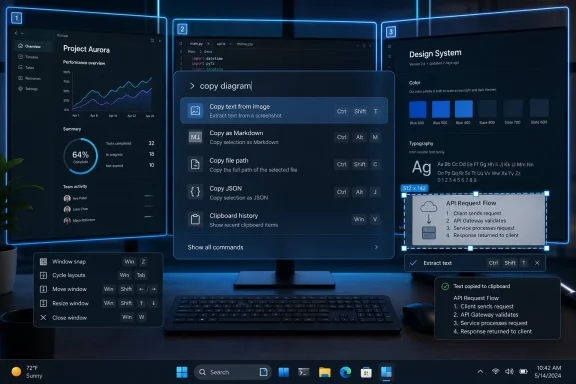
The How-To Geek piece captures a shift many Windows users have probably felt without naming it. PowerToys is becoming less like a pile of add-ons and more like a coherent productivity layer. Command Palette launches things, FancyZones arranges them, Text Extractor pulls usable text out of places Windows still treats as inert pixels, and the rest of the suite fills in similar gaps.
That does not make PowerToys an operating system within the operating system. It makes it something more interesting: a sanctioned workaround package. Microsoft is effectively acknowledging that Windows, as shipped, is still too uneven for people who work quickly, manage multiple windows, or live by keyboard shortcuts.
The argument is not that every Windows PC needs PowerToys. Most casual users will never touch FancyZones or care whether a launcher can run a command without opening the Start menu. But among enthusiasts, sysadmins, developers, writers, and anyone who frequently rebuilds machines, the question has changed from “Which little utilities should I install?” to “How much can PowerToys replace before I need anything else?”
Windows has long had pieces of that experience, but rarely in a way that felt elegant. The Start menu searches, sort of. Windows Search finds files, eventually. Run still exists for people whose muscle memory predates half the modern shell. PowerToys Run gave users a better launcher, but it remained more of a utility than a platform.
Command Palette is Microsoft’s attempt to move beyond that. It is positioned as a quick launcher for apps, commands, tools, and extensions, and it sits naturally alongside the rest of PowerToys. That integration is the critical distinction. Raycast wants to be a command center; Command Palette wants to be a command surface for a growing Microsoft-adjacent toolkit.
For a user who depends on Raycast’s broader extension ecosystem, clipboard features, notes, snippets, and deeper service integrations, PowerToys is not a full replacement. The How-To Geek author says as much, and it is the most honest part of the comparison. But most users do not live at the far edge of a launcher’s feature set. They open apps, run quick actions, search, and avoid the mouse.
That is where Command Palette becomes dangerous to third-party launchers. It does not need to be better than Raycast at everything. It only needs to be good enough at the 70 percent of launcher behavior most people actually use, while being free, Microsoft-branded, open-source, and already installed for those who use PowerToys anyway.
That is not always unfair. Sometimes the bundled feature is safer, simpler, or easier to deploy. Sometimes it is worse but more convenient. In PowerToys’ case, the threat is subtler because Microsoft is not folding these features directly into Windows for every user. It is putting them one step away, in a suite that power users already trust.
Command Palette therefore competes on convenience before it competes on capability. If a user already installed PowerToys for FancyZones, Text Extractor, Keyboard Manager, Awake, or File Locksmith, the marginal cost of trying Command Palette is essentially zero. Raycast, Flow Launcher, Listary, Keypirinha, and other launcher-style tools have to justify their place against something the user already has.
That is the software equivalent of gravity. PowerToys does not have to shove every rival off the desktop. It just has to become the default gravitational center for “small things I install after Windows.”
The same dynamic explains why the author’s move away from Raycast is persuasive even though it is not universal. They were not using Raycast as a full workflow platform. They were using it as a fast launcher and command bar. Once PowerToys covered that need well enough, the separate app became redundant.
But most Windows users do not want a philosophy. They want their browser, terminal, editor, chat app, and file manager to land where they expect. They want some structure without signing a treaty with their window manager.
That is why FancyZones has endured. It does not try to turn Windows into Linux. It extends Windows’ existing snap behavior with custom zones, giving users enough control to build monitor-specific layouts without making the entire desktop feel like a new operating system.
The How-To Geek author’s observation about Windows 11 Snap Layouts is important here. If the built-in hover-over-maximize layout picker changed their habits, that suggests they were not really looking for fully automatic tiling. They were looking for less friction. FancyZones answers that need with more precision than Windows 11’s default Snap Layouts, but without the conceptual overhead of a full tiling environment.
That is the PowerToys pattern again. It does not beat the specialist tool on purity. It wins by matching the user’s actual behavior more closely than the user’s imagined ideal setup.
PowerToys increasingly occupies that missing middle. FancyZones is more flexible than Snap Layouts but less radical than a tiling window manager. Command Palette is more powerful than Start search but less all-encompassing than Raycast. Text Extractor is more immediate than sending an image through a separate OCR workflow but less suitable than dedicated document recognition software for heavy jobs.
This middle layer is where Microsoft can have the most impact because it addresses the small frictions Windows users encounter all day. Those frictions rarely justify major OS redesigns. They also rarely make sense as separate commercial products for mainstream users. But collected under PowerToys, they become a compelling maintenance story: install one trusted suite and stop collecting tiny utilities like browser tabs.
There is a practical sysadmin angle here too. A single Microsoft-maintained package is easier to explain than a curated bundle of niche tools, even if PowerToys itself is not appropriate for every managed environment. In workplaces where users have some latitude but IT still cares about software sprawl, the difference between “I installed seven utilities” and “I installed PowerToys” is not trivial.
The irony is that PowerToys’ strength also highlights Windows’ weakness. Every indispensable PowerToy is an implicit admission that the baseline OS did not go far enough. Microsoft can frame the suite as a playground for power users, but the popularity of utilities like FancyZones and Text Extractor suggests these are not exotic needs anymore.
The How-To Geek author describes using Text Extractor as a replacement for a workaround rather than a dedicated app. That is exactly the kind of gap PowerToys is best at closing. Many users do not need a full OCR package. They need to drag a rectangle around some words, copy the result, and move on.
That distinction matters. Software markets often overestimate how much users want comprehensive tools. In daily work, the most loved utilities are frequently the ones that reduce a 90-second annoyance to a five-second shortcut. Text Extractor is not glamorous, but it turns an image into something searchable, pasteable, and reusable.
For IT pros, this is also a reminder that productivity is not always found in the heavyweight categories. Endpoint management, security tooling, cloud storage, and collaboration platforms get the budget and the roadmaps. But the user’s day is shaped by hundreds of tiny moments where the machine either cooperates or resists.
PowerToys succeeds when it makes Windows cooperate.
Raycast can still win with users who want a rich command environment, advanced extensions, cross-platform habits, and a more ambitious productivity model. GlazeWM can still win with users who want real tiling behavior and keyboard-driven window management as a core desktop principle. Dedicated OCR tools can still win on accuracy, formatting, language handling, batch processing, and document workflows.
But casual utility usage is being squeezed. A third-party tool that once survived because Windows lacked a feature now has to survive because it is meaningfully better than PowerToys. That is a higher bar.
This is healthy in one sense. It forces specialist developers to sharpen their products and serve power users more deliberately. It is also risky because Microsoft’s distribution advantage can flatten categories before they mature, especially when a feature becomes “free enough” inside an official package.
The Windows ecosystem has seen this story many times. Compression tools, screenshot tools, terminal experiences, clipboard managers, virtual desktop helpers, and search enhancements all live in the shadow of whatever Microsoft decides to improve next. PowerToys makes that shadow more dynamic because it lets Microsoft experiment faster than the Windows release cadence typically allows.
A random utility that hooks into window management, keyboard shortcuts, OCR, or launching behavior asks for a lot of trust. It runs persistently, listens for shortcuts, reads screen content, and sometimes interacts deeply with the shell. Users may accept that from a beloved independent developer, but in managed or security-conscious environments, every extra tool becomes a question.
PowerToys does not eliminate those questions. It still needs scrutiny, especially in enterprise settings where policy, telemetry, update behavior, and supportability matter. But its Microsoft identity and open development model give it a trust baseline that many small utilities cannot match.
That trust baseline is one reason the How-To Geek author’s conclusion feels bigger than personal preference. PowerToys reduces not only app count but also decision count. Instead of evaluating separate tools for launching, window zones, OCR, and other conveniences, a user can start with PowerToys and only look elsewhere when they hit a real limitation.
This is not the same as saying Microsoft should own every utility category. The best Windows setups have always benefited from independent developers pushing ahead of the platform. But for foundational workflow glue, trust and consolidation matter. PowerToys is increasingly where Microsoft puts that glue.
Some of the answers are practical. Windows has billions of users, immense compatibility constraints, and a lower tolerance for experimental behavior in core features. PowerToys can move quickly because it is optional. It can serve power users without forcing new interaction models on everyone.
But optionality can also become an excuse. Microsoft has a habit of letting its best workflow ideas live at the edge of Windows instead of the center. PowerToys, Windows Terminal, winget, Dev Home, and related tools often feel like dispatches from a more coherent Windows future that has not fully arrived.
For users, that creates a strange split reality. The best version of Windows is increasingly not the one you get after setup. It is the one you assemble from Microsoft’s own optional pieces. That is better than relying entirely on third-party patches, but it still means the default experience lags behind what the platform already knows how to do.
PowerToys is therefore both a solution and an indictment. It makes Windows better. It also proves Windows could be better by default.
Every experienced Windows user has a fresh-install checklist. Some of it is essential software. Some of it is personal preference. Some of it is muscle memory from problems Windows solved years ago. The list persists because rebuilding a PC is not just installation; it is restoration of a working environment.
PowerToys is becoming a way to shorten that list. Not eliminate it, but shorten it. That matters more than any single feature because the post-install ritual defines what users think Windows lacks.
If PowerToys replaces three utilities for one user, it changes the mental model. The next time they set up a machine, they do not ask, “Which launcher, window manager, and OCR helper do I need?” They ask, “Which PowerToys modules do I turn on?” That is a win for Microsoft even if none of the individual modules dominates its category.
This is also why PowerToys updates now deserve more attention than they used to. A new utility or Command Palette improvement is not merely a toy for hobbyists. It can alter the standard Windows toolkit for the people who influence family PCs, office setups, lab machines, developer environments, and small-business deployments.
The enthusiasts who install PowerToys first are often the same people everyone else asks for help.
On one hand, consolidating small utilities into a Microsoft-maintained suite can reduce shadow IT. Users who might otherwise install random launchers, window managers, key remappers, or OCR tools can be pointed toward a better-known package. In developer-heavy shops, PowerToys may already be part of the unofficial workstation baseline.
On the other hand, PowerToys is broad by design. A suite that includes window management, keyboard remapping, file tools, screen utilities, launcher extensions, and other behavior-changing modules is not something every administrator will enable casually. One user’s productivity tweak can be another team’s support ticket.
The right enterprise conversation is not whether PowerToys is good. It is which modules are appropriate, how updates are controlled, and whether users understand the implications of the features they enable. Keyboard Manager, for example, is a different administrative concern from Text Extractor. Command Palette extensions raise different questions than FancyZones layouts.
This is where Microsoft could do more. If PowerToys is going to become the unofficial productivity layer for Windows, it needs enterprise-grade manageability to match its influence. Policy controls, clearer module governance, and predictable deployment behavior would make it easier for IT departments to bless the parts they like without accepting the whole toolbox blindly.
Power users see PowerToys as liberation. IT departments see it as surface area. Both are right.
That sideways approach has advantages. It lets Microsoft test ideas with enthusiasts before exposing them to the entire Windows population. It gives the company room to iterate quickly and tolerate rough edges. It also gives users a sense that Windows remains extensible and alive, not merely a locked-down consumer shell.
But there is a cost. Optional excellence can coexist with mediocre defaults for too long. A user who never hears about PowerToys may never discover that Microsoft already has a better answer to several daily irritations. The platform improves, but unevenly.
That unevenness is especially visible when comparing Windows with macOS productivity culture. Mac users have long leaned on launchers, automation tools, clipboard managers, and window utilities to bend the system into shape. Windows users did too, but with a more fragmented mix of old utilities, gaming-adjacent tools, enterprise scripts, and community projects. PowerToys gives Windows a more unified center of gravity.
Raycast entering Windows makes this comparison sharper. It brings a Mac-born productivity sensibility to Microsoft’s platform at the same time Microsoft is improving its own power-user suite. That competition is good for users. It may also force Microsoft to decide whether Command Palette is a side project or the beginning of a more serious command-driven Windows interface.
That is not a flaw, exactly. PowerToys is aimed at power users. But Microsoft must be careful not to recreate the same sprawl inside a single app that users were trying to escape across many apps. Discoverability, sensible defaults, and clear module boundaries will matter more as the suite grows.
Command Palette is especially important because it can either organize that complexity or amplify it. If it becomes the front door to PowerToys features, extensions, commands, and system actions, it needs to remain fast and predictable. A launcher that feels sluggish or noisy loses trust quickly because users invoke it constantly.
FancyZones faces a different challenge. It must stay close enough to native Windows snapping that it feels like an enhancement, not a second windowing system. Text Extractor must remain instant and lightweight enough that users trust it for quick captures rather than treating it as another app to manage.
The winning formula is not “more features.” It is fewer moments where users have to think about the tool instead of the work.
PowerToys has reached the point where that audit should start with Microsoft’s own suite. If a separate app is only doing one small job, and PowerToys now does that job well enough, the burden of proof shifts. The third-party tool has to justify its background process, update channel, permissions, and mental overhead.
That does not mean minimalism for its own sake. A specialist utility that saves real time is still worth installing. But a utility that merely survives out of habit is exactly the kind of thing PowerToys can replace.
For years, the Windows power-user routine has been almost ceremonial. Install the browser, install the password manager, install the archive utility, install the launcher, install the window manager, install the screenshot or OCR helper, and then spend the next six months forgetting which background process owns which keyboard shortcut. PowerToys is not ending that culture, but it is starting to compress it.
That matters because Windows customization has always lived in the gap between what Microsoft ships and what users actually need. The latest PowerToys era suggests Microsoft has stopped treating that gap as a hobbyist afterthought and started using it as a semi-official testing ground for the Windows workflow it still has not quite built into Windows itself.
 PowerToys Is No Longer Just a Drawer Full of Oddities
PowerToys has always had a strange place in the Windows ecosystem. It is official enough to carry Microsoft’s name, open enough to feel community-shaped, and experimental enough that users do not expect every feature to graduate into Windows proper. That mix once made it feel like a curiosity cabinet: useful, but not central.The How-To Geek piece captures a shift many Windows users have probably felt without naming it. PowerToys is becoming less like a pile of add-ons and more like a coherent productivity layer. Command Palette launches things, FancyZones arranges them, Text Extractor pulls usable text out of places Windows still treats as inert pixels, and the rest of the suite fills in similar gaps.
That does not make PowerToys an operating system within the operating system. It makes it something more interesting: a sanctioned workaround package. Microsoft is effectively acknowledging that Windows, as shipped, is still too uneven for people who work quickly, manage multiple windows, or live by keyboard shortcuts.
The argument is not that every Windows PC needs PowerToys. Most casual users will never touch FancyZones or care whether a launcher can run a command without opening the Start menu. But among enthusiasts, sysadmins, developers, writers, and anyone who frequently rebuilds machines, the question has changed from “Which little utilities should I install?” to “How much can PowerToys replace before I need anything else?”
The Launcher Wars Have Come to Windows Late, but Not Quietly
The most important comparison in the How-To Geek story is between Raycast for Windows and PowerToys Command Palette. Raycast arrived on Windows in public beta in November 2025 after years of being associated with the Mac power-user crowd. Its pitch was immediately understandable: press a shortcut, type what you want, and let the launcher become the front door to apps, actions, search, snippets, and extensions.Windows has long had pieces of that experience, but rarely in a way that felt elegant. The Start menu searches, sort of. Windows Search finds files, eventually. Run still exists for people whose muscle memory predates half the modern shell. PowerToys Run gave users a better launcher, but it remained more of a utility than a platform.
Command Palette is Microsoft’s attempt to move beyond that. It is positioned as a quick launcher for apps, commands, tools, and extensions, and it sits naturally alongside the rest of PowerToys. That integration is the critical distinction. Raycast wants to be a command center; Command Palette wants to be a command surface for a growing Microsoft-adjacent toolkit.
For a user who depends on Raycast’s broader extension ecosystem, clipboard features, notes, snippets, and deeper service integrations, PowerToys is not a full replacement. The How-To Geek author says as much, and it is the most honest part of the comparison. But most users do not live at the far edge of a launcher’s feature set. They open apps, run quick actions, search, and avoid the mouse.
That is where Command Palette becomes dangerous to third-party launchers. It does not need to be better than Raycast at everything. It only needs to be good enough at the 70 percent of launcher behavior most people actually use, while being free, Microsoft-branded, open-source, and already installed for those who use PowerToys anyway.
“Good Enough” Is a Brutal Competitive Strategy
The Windows utility market has always been vulnerable to bundling. A small app can be beloved for years, but if Microsoft ships a tolerable version of its core function, the audience changes overnight. The specialist tool keeps its devotees; the casual adopters drift away.That is not always unfair. Sometimes the bundled feature is safer, simpler, or easier to deploy. Sometimes it is worse but more convenient. In PowerToys’ case, the threat is subtler because Microsoft is not folding these features directly into Windows for every user. It is putting them one step away, in a suite that power users already trust.
Command Palette therefore competes on convenience before it competes on capability. If a user already installed PowerToys for FancyZones, Text Extractor, Keyboard Manager, Awake, or File Locksmith, the marginal cost of trying Command Palette is essentially zero. Raycast, Flow Launcher, Listary, Keypirinha, and other launcher-style tools have to justify their place against something the user already has.
That is the software equivalent of gravity. PowerToys does not have to shove every rival off the desktop. It just has to become the default gravitational center for “small things I install after Windows.”
The same dynamic explains why the author’s move away from Raycast is persuasive even though it is not universal. They were not using Raycast as a full workflow platform. They were using it as a fast launcher and command bar. Once PowerToys covered that need well enough, the separate app became redundant.
FancyZones Wins by Refusing to Become a Religion
The second replacement in the How-To Geek piece is more revealing: FancyZones taking the place of GlazeWM. GlazeWM brings an i3-inspired tiling window manager approach to Windows, which means structured, keyboard-driven window placement rather than the usual grab-and-drag desktop choreography. For users who love tiling window managers, that is not merely a convenience; it is a philosophy.But most Windows users do not want a philosophy. They want their browser, terminal, editor, chat app, and file manager to land where they expect. They want some structure without signing a treaty with their window manager.
That is why FancyZones has endured. It does not try to turn Windows into Linux. It extends Windows’ existing snap behavior with custom zones, giving users enough control to build monitor-specific layouts without making the entire desktop feel like a new operating system.
The How-To Geek author’s observation about Windows 11 Snap Layouts is important here. If the built-in hover-over-maximize layout picker changed their habits, that suggests they were not really looking for fully automatic tiling. They were looking for less friction. FancyZones answers that need with more precision than Windows 11’s default Snap Layouts, but without the conceptual overhead of a full tiling environment.
That is the PowerToys pattern again. It does not beat the specialist tool on purity. It wins by matching the user’s actual behavior more closely than the user’s imagined ideal setup.
Microsoft Keeps Building the Missing Middle of Windows
Power users often talk as if the choice is between stock Windows and extreme customization. In reality, most people live in the middle. They want a handful of improvements that make Windows feel less clumsy, but they do not want to maintain a pile of background tools that could break on the next feature update.PowerToys increasingly occupies that missing middle. FancyZones is more flexible than Snap Layouts but less radical than a tiling window manager. Command Palette is more powerful than Start search but less all-encompassing than Raycast. Text Extractor is more immediate than sending an image through a separate OCR workflow but less suitable than dedicated document recognition software for heavy jobs.
This middle layer is where Microsoft can have the most impact because it addresses the small frictions Windows users encounter all day. Those frictions rarely justify major OS redesigns. They also rarely make sense as separate commercial products for mainstream users. But collected under PowerToys, they become a compelling maintenance story: install one trusted suite and stop collecting tiny utilities like browser tabs.
There is a practical sysadmin angle here too. A single Microsoft-maintained package is easier to explain than a curated bundle of niche tools, even if PowerToys itself is not appropriate for every managed environment. In workplaces where users have some latitude but IT still cares about software sprawl, the difference between “I installed seven utilities” and “I installed PowerToys” is not trivial.
The irony is that PowerToys’ strength also highlights Windows’ weakness. Every indispensable PowerToy is an implicit admission that the baseline OS did not go far enough. Microsoft can frame the suite as a playground for power users, but the popularity of utilities like FancyZones and Text Extractor suggests these are not exotic needs anymore.
OCR Is the Small Feature That Explains the Whole Suite
Text Extractor sounds minor until you need it. Then it feels obvious. Screenshots, error dialogs, images inside documentation, product labels, social graphics, and locked-down interface elements all create the same annoying problem: the text is visible, but Windows cannot treat it as text.The How-To Geek author describes using Text Extractor as a replacement for a workaround rather than a dedicated app. That is exactly the kind of gap PowerToys is best at closing. Many users do not need a full OCR package. They need to drag a rectangle around some words, copy the result, and move on.
That distinction matters. Software markets often overestimate how much users want comprehensive tools. In daily work, the most loved utilities are frequently the ones that reduce a 90-second annoyance to a five-second shortcut. Text Extractor is not glamorous, but it turns an image into something searchable, pasteable, and reusable.
For IT pros, this is also a reminder that productivity is not always found in the heavyweight categories. Endpoint management, security tooling, cloud storage, and collaboration platforms get the budget and the roadmaps. But the user’s day is shaped by hundreds of tiny moments where the machine either cooperates or resists.
PowerToys succeeds when it makes Windows cooperate.
Third-Party Utilities Still Matter, but Their Job Is Changing
None of this means Raycast, GlazeWM, or dedicated OCR tools are obsolete. In fact, the opposite may be true. As PowerToys absorbs the middle of the market, specialist tools will need to become more explicit about who they are for.Raycast can still win with users who want a rich command environment, advanced extensions, cross-platform habits, and a more ambitious productivity model. GlazeWM can still win with users who want real tiling behavior and keyboard-driven window management as a core desktop principle. Dedicated OCR tools can still win on accuracy, formatting, language handling, batch processing, and document workflows.
But casual utility usage is being squeezed. A third-party tool that once survived because Windows lacked a feature now has to survive because it is meaningfully better than PowerToys. That is a higher bar.
This is healthy in one sense. It forces specialist developers to sharpen their products and serve power users more deliberately. It is also risky because Microsoft’s distribution advantage can flatten categories before they mature, especially when a feature becomes “free enough” inside an official package.
The Windows ecosystem has seen this story many times. Compression tools, screenshot tools, terminal experiences, clipboard managers, virtual desktop helpers, and search enhancements all live in the shadow of whatever Microsoft decides to improve next. PowerToys makes that shadow more dynamic because it lets Microsoft experiment faster than the Windows release cadence typically allows.
The Open-Source Wrapper Changes the Trust Equation
PowerToys is not just Microsoft freeware. Its modern incarnation is open source, distributed through familiar channels, and visibly updated. That changes how many enthusiasts perceive it.A random utility that hooks into window management, keyboard shortcuts, OCR, or launching behavior asks for a lot of trust. It runs persistently, listens for shortcuts, reads screen content, and sometimes interacts deeply with the shell. Users may accept that from a beloved independent developer, but in managed or security-conscious environments, every extra tool becomes a question.
PowerToys does not eliminate those questions. It still needs scrutiny, especially in enterprise settings where policy, telemetry, update behavior, and supportability matter. But its Microsoft identity and open development model give it a trust baseline that many small utilities cannot match.
That trust baseline is one reason the How-To Geek author’s conclusion feels bigger than personal preference. PowerToys reduces not only app count but also decision count. Instead of evaluating separate tools for launching, window zones, OCR, and other conveniences, a user can start with PowerToys and only look elsewhere when they hit a real limitation.
This is not the same as saying Microsoft should own every utility category. The best Windows setups have always benefited from independent developers pushing ahead of the platform. But for foundational workflow glue, trust and consolidation matter. PowerToys is increasingly where Microsoft puts that glue.
Windows 11 Still Has a Native-Feature Problem
The uncomfortable question is why so much of this still lives outside Windows 11. If Command Palette is useful, why is Start search still the main built-in launcher experience for most people? If FancyZones is valuable, why are custom Snap Layouts not a first-class Windows feature? If Text Extractor solves a common copy-and-paste failure, why is it not built into Snipping Tool, Photos, or the shell in a more obvious way?Some of the answers are practical. Windows has billions of users, immense compatibility constraints, and a lower tolerance for experimental behavior in core features. PowerToys can move quickly because it is optional. It can serve power users without forcing new interaction models on everyone.
But optionality can also become an excuse. Microsoft has a habit of letting its best workflow ideas live at the edge of Windows instead of the center. PowerToys, Windows Terminal, winget, Dev Home, and related tools often feel like dispatches from a more coherent Windows future that has not fully arrived.
For users, that creates a strange split reality. The best version of Windows is increasingly not the one you get after setup. It is the one you assemble from Microsoft’s own optional pieces. That is better than relying entirely on third-party patches, but it still means the default experience lags behind what the platform already knows how to do.
PowerToys is therefore both a solution and an indictment. It makes Windows better. It also proves Windows could be better by default.
The Real Competition Is the Fresh Install
The most telling phrase in the How-To Geek story is not about Raycast, GlazeWM, or OCR. It is the idea of tools the author used to install on every Windows PC. That is the real battlefield.Every experienced Windows user has a fresh-install checklist. Some of it is essential software. Some of it is personal preference. Some of it is muscle memory from problems Windows solved years ago. The list persists because rebuilding a PC is not just installation; it is restoration of a working environment.
PowerToys is becoming a way to shorten that list. Not eliminate it, but shorten it. That matters more than any single feature because the post-install ritual defines what users think Windows lacks.
If PowerToys replaces three utilities for one user, it changes the mental model. The next time they set up a machine, they do not ask, “Which launcher, window manager, and OCR helper do I need?” They ask, “Which PowerToys modules do I turn on?” That is a win for Microsoft even if none of the individual modules dominates its category.
This is also why PowerToys updates now deserve more attention than they used to. A new utility or Command Palette improvement is not merely a toy for hobbyists. It can alter the standard Windows toolkit for the people who influence family PCs, office setups, lab machines, developer environments, and small-business deployments.
The enthusiasts who install PowerToys first are often the same people everyone else asks for help.
Enterprises Will Like the Idea and Fear the Details
For corporate IT, PowerToys presents a familiar tension. The productivity case is easy to understand. The governance case is more complicated.On one hand, consolidating small utilities into a Microsoft-maintained suite can reduce shadow IT. Users who might otherwise install random launchers, window managers, key remappers, or OCR tools can be pointed toward a better-known package. In developer-heavy shops, PowerToys may already be part of the unofficial workstation baseline.
On the other hand, PowerToys is broad by design. A suite that includes window management, keyboard remapping, file tools, screen utilities, launcher extensions, and other behavior-changing modules is not something every administrator will enable casually. One user’s productivity tweak can be another team’s support ticket.
The right enterprise conversation is not whether PowerToys is good. It is which modules are appropriate, how updates are controlled, and whether users understand the implications of the features they enable. Keyboard Manager, for example, is a different administrative concern from Text Extractor. Command Palette extensions raise different questions than FancyZones layouts.
This is where Microsoft could do more. If PowerToys is going to become the unofficial productivity layer for Windows, it needs enterprise-grade manageability to match its influence. Policy controls, clearer module governance, and predictable deployment behavior would make it easier for IT departments to bless the parts they like without accepting the whole toolbox blindly.
Power users see PowerToys as liberation. IT departments see it as surface area. Both are right.
Microsoft’s Best Windows Ideas Are Arriving Sideways
The broader lesson from this How-To Geek piece is that Microsoft’s most interesting Windows improvements are often arriving sideways. They do not always appear as marquee Windows 11 features. They show up in PowerToys, in Terminal, in developer tooling, in optional downloads, and in GitHub repositories that only later become part of the mainstream conversation.That sideways approach has advantages. It lets Microsoft test ideas with enthusiasts before exposing them to the entire Windows population. It gives the company room to iterate quickly and tolerate rough edges. It also gives users a sense that Windows remains extensible and alive, not merely a locked-down consumer shell.
But there is a cost. Optional excellence can coexist with mediocre defaults for too long. A user who never hears about PowerToys may never discover that Microsoft already has a better answer to several daily irritations. The platform improves, but unevenly.
That unevenness is especially visible when comparing Windows with macOS productivity culture. Mac users have long leaned on launchers, automation tools, clipboard managers, and window utilities to bend the system into shape. Windows users did too, but with a more fragmented mix of old utilities, gaming-adjacent tools, enterprise scripts, and community projects. PowerToys gives Windows a more unified center of gravity.
Raycast entering Windows makes this comparison sharper. It brings a Mac-born productivity sensibility to Microsoft’s platform at the same time Microsoft is improving its own power-user suite. That competition is good for users. It may also force Microsoft to decide whether Command Palette is a side project or the beginning of a more serious command-driven Windows interface.
The New Default Toolkit Is Smaller, Not Simpler
The risk in praising consolidation is pretending that fewer apps automatically means a simpler system. PowerToys can reduce clutter, but it also introduces its own complexity. A suite with dozens of modules can become a control panel for people who enjoy control panels.That is not a flaw, exactly. PowerToys is aimed at power users. But Microsoft must be careful not to recreate the same sprawl inside a single app that users were trying to escape across many apps. Discoverability, sensible defaults, and clear module boundaries will matter more as the suite grows.
Command Palette is especially important because it can either organize that complexity or amplify it. If it becomes the front door to PowerToys features, extensions, commands, and system actions, it needs to remain fast and predictable. A launcher that feels sluggish or noisy loses trust quickly because users invoke it constantly.
FancyZones faces a different challenge. It must stay close enough to native Windows snapping that it feels like an enhancement, not a second windowing system. Text Extractor must remain instant and lightweight enough that users trust it for quick captures rather than treating it as another app to manage.
The winning formula is not “more features.” It is fewer moments where users have to think about the tool instead of the work.
The Windows Setup Script Gets a Rewrite
The practical lesson from this PowerToys moment is not that everyone should uninstall their favorite utilities. It is that Windows users should periodically audit their setup. Many of us keep installing tools because they solved a problem in 2019, 2021, or 2023, not because they remain the best answer in 2026.PowerToys has reached the point where that audit should start with Microsoft’s own suite. If a separate app is only doing one small job, and PowerToys now does that job well enough, the burden of proof shifts. The third-party tool has to justify its background process, update channel, permissions, and mental overhead.
That does not mean minimalism for its own sake. A specialist utility that saves real time is still worth installing. But a utility that merely survives out of habit is exactly the kind of thing PowerToys can replace.
The PowerToys Test Is Now a Real Buying Guide
A short checklist is useful here because the PowerToys decision is no longer theoretical. It belongs in the same practical category as choosing a browser, terminal, or password manager: not glamorous, but foundational to how the machine feels every day.- If you mainly use a launcher to open apps, run quick actions, and avoid the mouse, Command Palette is now strong enough to try before installing a separate launcher.
- If you want custom window layouts without committing to a full tiling window manager, FancyZones is the more natural Windows-shaped compromise.
- If your OCR needs are mostly screenshots, images, and quick error-message captures, Text Extractor can replace a surprising number of awkward workarounds.
- If you rely on deep extensions, automation, snippets, notes, or platform-specific workflows, a specialist tool like Raycast may still be the better fit.
- If you manage PCs for other people, PowerToys should be evaluated module by module rather than treated as a single harmless utility.
- If your fresh-install checklist has not changed in years, PowerToys is a good reason to question what you still install out of habit.
References
- Primary source: How-To Geek
Published: Wed, 24 Jun 2026 14:30:18 GMT
PowerToys replaced tools I used to install on every Windows PC
PowerToys replaced several utilities I used to install on every PC, helping me simplify and declutter my setup. www.howtogeek.com
- Official source: learn.microsoft.com
PowerToys Command Palette Utility for Windows | Microsoft Learn
Learn how to use PowerToys Command Palette, a quick launcher for Windows power users. Access apps, commands, and tools instantly with customizable shortcuts and extensions.learn.microsoft.com - Related coverage: raycast.com
Raycast for Windows - Raycast Blog
Your computer, but faster. Raycast for Windows is now in public beta.www.raycast.com - Related coverage: windowslatest.com
PowerToys brings "Command Palette" to Windows 11 as a new launcher experience
PowerToys introduces an upgraded version of Run that works faster, boosts Peek and Color Picker tools' performance. www.windowslatest.com
- Related coverage: pcworld.com
Windows PowerToys update brings 3 big changes and improvements | PCWorld
The Command Palette, Keyboard Manager, and CursorWrap features just got even better.www.pcworld.com - Related coverage: techspot.com
11 Need-To-Know Tools in Microsoft PowerToys | TechSpot
Microsoft PowerToys packs more than 30 utilities into a single toolbox, but not all of them are worth using. These 11 stand out as genuinely useful, and...www.techspot.com
- Related coverage: windowscentral.com
Microsoft PowerToys gets major update with new feature | Windows Central
Microsoft PowerToys just got a big update, adding a new Command Palette, improved Color Picker, and more powerful tools for Windows users.www.windowscentral.com - Official source: devblogs.microsoft.com
PowerToys 0.95 is here: new Light Switch utility, faster Command Palette, and Peek with Spacebar - Windows Command Line
New month, new release! This one’s packed with quality-of-life improvements, performance boosts, and a bunch of long-standing community requests finallydevblogs.microsoft.com - Official source: github.com
Releases · microsoft/PowerToys · GitHub
Microsoft PowerToys is a collection of utilities that supercharge productivity and customization on Windows - Releases · microsoft/PowerToys github.com
- Related coverage: techradar.com
Miss Windows 10's movable taskbar? You still can't relocate it in Windows 11, but a new PowerToys feature could be the next best thing | TechRadar
Possible PowerToys feature is proving somewhat divisivewww.techradar.com - Related coverage: doccompiler.ai
- Related coverage: nwsgenealogy.org
- Related coverage: helmuthinterthuer.de
