ElizabethD
New Member
- Joined
- Apr 24, 2011
- Messages
- 4
- Thread Author
- #1
Hello and thanks in advance for your help,
I have a Gateway desktop with two disk drives, C and D. I have been getting a message for quite awhile that I am running out of space on C. So I now try to download any software to the D drive, as there is over 900 GB of space on there. I have managed to get Adobe Acrobat on to D but now am trying to download ITunes/QuickTime and it is not working.
I download the installation file to D and set the destination folder as D, but I get a pop-up message saying there is inadequate space to install it. The pop-up message shows both C and D but I can't click on D.
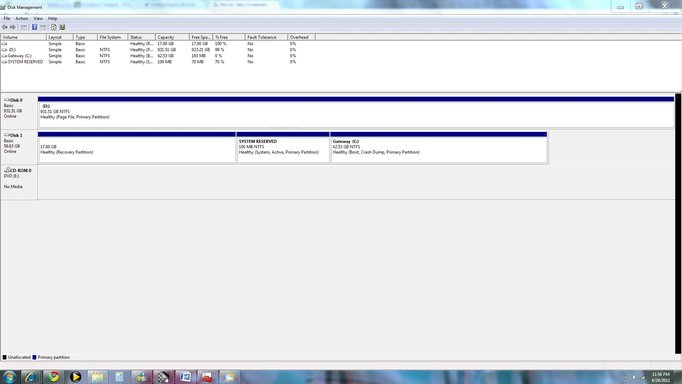
Any ideas what could be causing this and how to fix it? I am attaching a screenshot of the Disk Management view in case that is helpful.
Thanks!
I have a Gateway desktop with two disk drives, C and D. I have been getting a message for quite awhile that I am running out of space on C. So I now try to download any software to the D drive, as there is over 900 GB of space on there. I have managed to get Adobe Acrobat on to D but now am trying to download ITunes/QuickTime and it is not working.
I download the installation file to D and set the destination folder as D, but I get a pop-up message saying there is inadequate space to install it. The pop-up message shows both C and D but I can't click on D.
Any ideas what could be causing this and how to fix it? I am attaching a screenshot of the Disk Management view in case that is helpful.
Thanks!