Microsoft unveiled Project Solara at its Build conference in San Francisco on Tuesday, presenting an Android-based device platform for enterprise hardware that runs AI agents rather than conventional apps. The project is early, the hardware is still reference-design territory, and Microsoft says it does not plan to sell the devices itself. But the strategic signal is loud: Microsoft is preparing for a world in which Windows is not always the front door to work.
That is the tension at the heart of Solara. For decades, Microsoft’s power came from making the PC the universal workplace surface. Now it is arguing, implicitly and sometimes explicitly, that the next useful computer may be a badge, a desk puck, a scanner, a pair of glasses, or some other specialized object that does not look like a PC at all.
Project Solara is not a Windows replacement in the familiar consumer-platform-war sense. It is more interesting than that. Microsoft is building a new class of enterprise devices that may depend on Windows, Microsoft 365, Azure, Intune, Entra ID, and Defender, while not actually running Windows locally.
That is a very Microsoft move in 2026. The company no longer needs every device to boot Windows if the device still authenticates through Entra, talks to Azure, consumes Copilot-style agents, and lives under Microsoft’s management stack. In Solara, Windows becomes one surface among many, sometimes streamed from the cloud, sometimes paired over Bluetooth, sometimes abstracted behind an agent that decides what interface is needed.
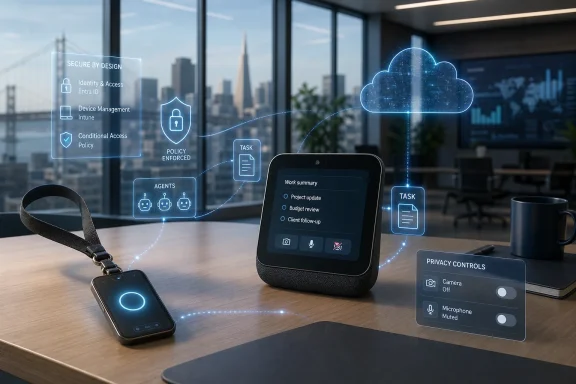
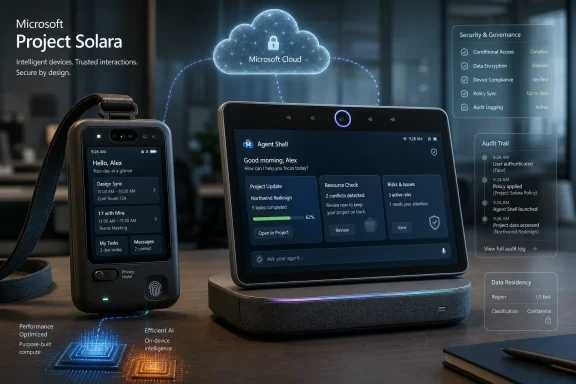
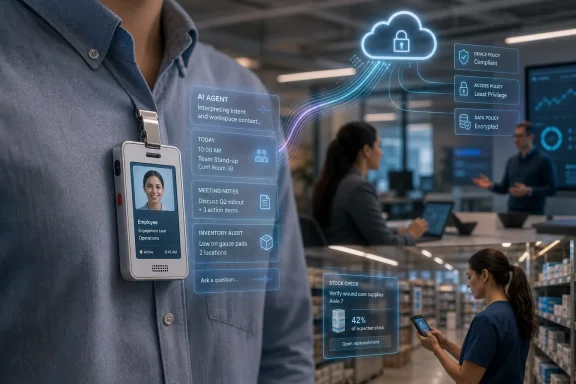
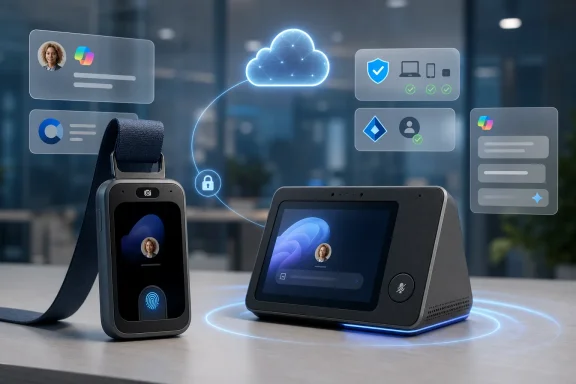
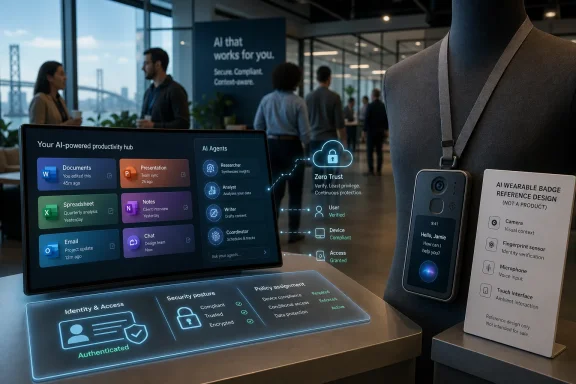
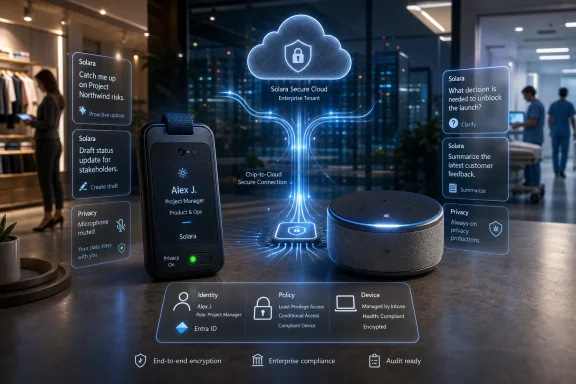
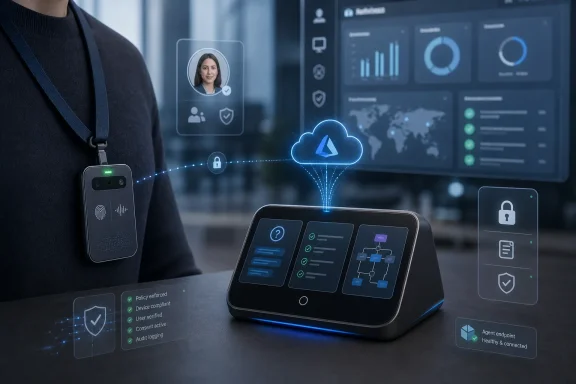
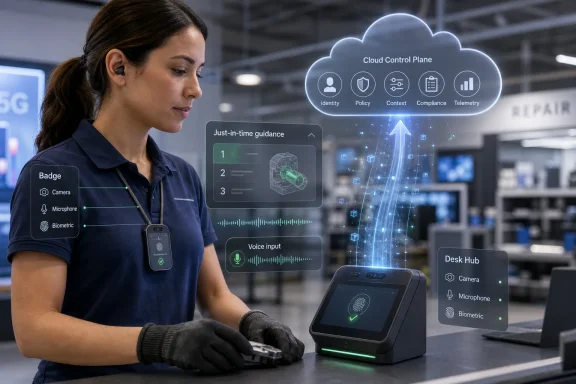
The first two reference designs make the point neatly. One is a desktop hub that sits next to a PC, responds to voice, recognizes the user, and can become a cloud-hosted Windows machine when attached to a monitor. The other is a wearable badge that behaves like an employee ID card crossed with a sensor pack: fingerprint wake, tap-to-record, transcription, and a camera that lets an agent act on what the worker is seeing.
Neither device is meant to be a mass-market gadget in the Surface tradition. Microsoft says hardware makers and industry partners are supposed to take the designs and turn them into practical devices for their own sectors. That distinction matters because Solara is not being pitched as a product launch so much as a platform bet.
The bet is that the app model is becoming too heavy for many work situations. A nurse, a retail worker, a field technician, or a warehouse employee does not necessarily need a phone, a laptop, and a stack of apps. They may need a small device that can authenticate them, observe context, call the right agent, and record the result in a system of record.
That means Solara is not Windows-first. It is Microsoft-cloud-first.
For old-school Windows partisans, this may look like heresy. For enterprise IT, it is more pragmatic than ideological. Android-derived platforms run well on low-power chips, fit small device form factors, and have a mature hardware supply chain. If Microsoft wants badges, hubs, scanners, room devices, and eventually glasses or rings to get to market quickly, Windows is not always the obvious substrate.
The company’s argument is that MDEP gives it the middle ground it wants: Android’s hardware flexibility with Microsoft’s enterprise controls. Microsoft can talk about over-the-air updates, device integrity, Defender, Intune, Entra sign-in, and conditional access rather than asking administrators to trust a loose fleet of semi-smart gadgets.
That is the real Solara pitch to IT. Microsoft is not saying, “Here is another Android device.” It is saying, “Here is another managed Microsoft endpoint that happens to run on Android.” The distinction is the product.
The move also fits a broader pattern. Microsoft has spent years separating its business from the assumption that Windows owns every computing session. Office became Microsoft 365. Active Directory gave way to Entra. Endpoint management became cross-platform. Windows moved into the cloud. Solara is another turn of that wheel: Microsoft would rather own the identity, management, agent runtime, and cloud bill than lose the scenario because the hardware cannot run Windows elegantly.
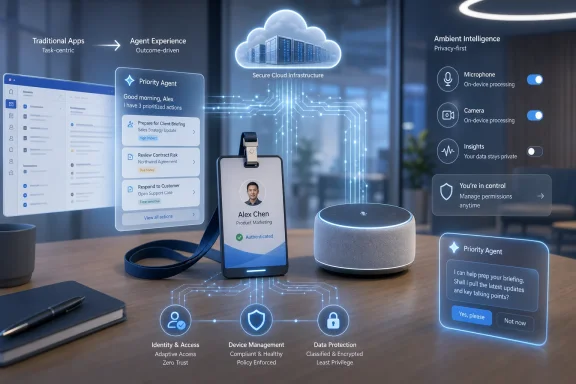
In the old model, a user picks an app, navigates its interface, enters data, and moves to the next app. In the Solara model, a user wakes a device, states or implies intent, and a coordination layer routes the job to whichever agent can complete it. The agent might transcribe a conversation, summarize a patient visit, identify a QR code, log vitals, start a prescription workflow, or suggest changes after looking at a whiteboard.
That does not mean apps disappear overnight. Enterprise software is sticky, regulated, customized, and deeply political. But it does mean Microsoft is trying to move the center of gravity away from the visible application and toward a set of callable services, models, and workflows.
This is where the word agent becomes both useful and dangerous. Useful, because a well-scoped agent can automate a chunk of work that previously required several screens and manual context switching. Dangerous, because the industry is now tempted to call every chatbot, macro, script, and workflow an agent whether or not it can reliably act in the world.
Solara’s hardware-first framing gives the agent idea more substance. A badge with a camera, microphone, fingerprint sensor, and corporate identity is not just a chatbot endpoint. It is a context-capturing device. Its value depends on whether the agent can turn that context into a controlled business action without creating privacy, compliance, or safety problems.
That is the hard part. A device that transcribes a visit is easy to demo. A device that transcribes a visit, correctly separates clinical facts from casual conversation, respects consent, avoids hallucinated entries, integrates with health-record systems, survives audit, and satisfies regulators is a very different proposition.
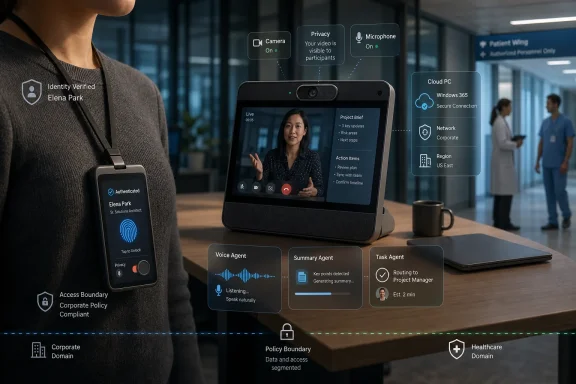
Microsoft’s healthcare example is obvious for a reason. A nurse or clinician pulling out a personal phone in front of a patient can look unprofessional even when the intent is legitimate. It can also raise practical security concerns. A managed badge that authenticates the worker, records only under controlled conditions, and feeds the right workflow could be a better fit.
But the same device also concentrates the anxieties that will define agentic hardware. A badge with a camera and microphone worn by employees in workplaces, stores, clinics, and offices is a surveillance device unless the governance is extremely clear. The fact that it is powered by AI does not make that concern smaller. It makes it larger.
Microsoft’s pitch depends on purpose-built hardware having a smaller attack surface than a general-purpose phone. That may be true in a narrow technical sense. A locked-down device with fewer apps, fewer user behaviors, and enterprise management can be easier to secure than a personal smartphone.
Yet the social attack surface is bigger. Who can start a recording? Who is notified? Where are transcripts stored? Can managers query them? Are customers and patients meaningfully consenting? What happens when an agent sees something sensitive in the background? What are workers allowed to delete, dispute, or review?
Those questions are not peripheral to Solara. They are the product. If Microsoft wants agents to operate in the physical workplace, identity and device integrity are only the beginning. The real buying decision will hinge on policy, auditability, data boundaries, and trust.
The comparison to an Amazon Echo-style smart display is inevitable, and Microsoft clearly wants to avoid it. The argument is that Solara is not one consumer assistant trying to do everything. It is a managed enterprise endpoint that can run an organization’s own agents and stay synchronized with the user’s PC.
That is a plausible distinction. An Echo on a desk may know your calendar if you wire enough services into it, but it does not belong to the enterprise fabric in the same way. It is not necessarily enrolled, governed, conditioned, and logged under the same administrative model as the rest of the workplace.
The desk hub also shows how Microsoft can make Solara additive rather than threatening to existing Windows deployments. If a monitor is attached and the device becomes a cloud Windows machine, the familiar Windows environment remains available. If the user is working at a PC, the hub can function as an ambient agent endpoint. If the user steps away, the session can be locked or handed off.
In other words, Solara gives Microsoft a way to say that the PC is no longer the only computer in the workflow without saying the PC is obsolete. That is a careful line, and Microsoft has to walk it. Windows remains a massive business, a developer target, and an administrative baseline. But it is no longer sufficient as the company’s answer to every workplace computing problem.
It is also the kind of story that should make enterprise buyers slow down.
Fast prototyping is valuable, especially when off-the-shelf chips from Qualcomm and MediaTek can support multiple device categories. It means the cost of experimentation drops. A retailer, hospital system, logistics company, or manufacturer can imagine purpose-built devices without commissioning a moonshot hardware program.
But fast prototyping is not the same as dependable deployment. Hardware that works in a briefing room still needs battery validation, thermal design, ruggedization, firmware lifecycle planning, replacement logistics, support channels, accessibility testing, and security review. Add AI agents and the list gets longer: model behavior, prompt injection, data retention, human review, policy enforcement, and failure modes.
This is where Microsoft’s choice not to sell the devices itself is both sensible and risky. Sensible, because industry-specific hardware is better handled by partners that understand vertical markets and supply chains. Risky, because the quality of the Solara experience will depend on a partner ecosystem Microsoft does not fully control.
The PC era worked because Microsoft could build a broad software platform and let OEMs flood the market with hardware. It also produced decades of driver problems, crapware, inconsistent device quality, and support fragmentation. Solara inherits the promise of that model and some of its old ghosts.
If Solara devices are cheap to build but expensive to operate, customers will notice. A badge that records and transcribes conversations, analyzes images, calls agents, writes summaries, and interacts with business systems is not just a hardware purchase. It is an ongoing cloud-consumption machine.
That may be exactly what Microsoft wants. The company has spent years turning enterprise computing into recurring cloud and subscription revenue. Solara extends that logic into places where conventional PCs and phones are awkward: hospital rooms, sales floors, warehouses, service counters, and field sites.
The economic question is whether the productivity gains are concrete enough. For a retailer, does an agent badge reduce training time, improve inventory accuracy, shorten customer interactions, or prevent loss? For healthcare, does it cut documentation burden without increasing compliance risk? For facilities or field service, does it reduce truck rolls, improve safety, or accelerate repair?
Enterprises will not buy “AI agents instead of apps” as a slogan for long. They will buy reduced minutes, fewer errors, faster workflows, better compliance, or new capabilities that were previously impractical. Solara’s future depends less on whether the demos look magical and more on whether pilots with companies such as AccuWeather, Best Buy, CVS Health, Levi’s, and Target can produce numbers that survive procurement scrutiny.
But Solara enters a market very different from the one that made Windows dominant. In the early PC era, the operating system was the scarce control point. In the agent-device era, the control points are more distributed: chips, models, clouds, identity systems, app ecosystems, data platforms, developer tools, and regulatory trust.
Microsoft has strengths in many of those layers, but it does not own them all. Qualcomm and MediaTek matter. Android matters. OpenAI matters. Google, Amazon, Apple, and a long list of enterprise AI vendors matter. So do the vertical software vendors that own the systems where work actually gets recorded.
The competitive field is also less forgiving. Google has Android and Gemini. Amazon has Alexa’s history in ambient computing and AWS’s enterprise reach. OpenAI has enormous model mindshare and has reportedly been exploring AI-first hardware. Apple, as ever, has patience, silicon, devices, and a deep understanding of personal computing experiences even when it moves slowly.
Microsoft’s advantage is enterprise legitimacy. It already sits inside the identity provider, endpoint manager, collaboration suite, productivity suite, security stack, and cloud budget of many organizations. If an AI badge or desk hub needs to be administered by the same people who manage Windows laptops and Teams Rooms, Microsoft has a natural opening.
That advantage is not absolute. Enterprise buyers are also wary of lock-in, rising cloud costs, and AI features that arrive before governance models are mature. Solara’s challenge is to feel like an extension of existing management investments rather than another proprietary funnel into Azure consumption.
The more defensible argument is that apps will lose territory at the edges. Many workflows do not deserve a full app session. Many workers do not have the time, hands, attention, or device posture to navigate one. Many tasks are really combinations of observation, authentication, summarization, lookup, and update.
That is where agentic devices could matter. They collapse the distance between event and record. A worker sees something, says something, scans something, or taps something, and the system turns that into structured work.
The danger is that collapsing that distance can also collapse the moment for human judgment. A traditional app slows the user down, sometimes annoyingly, but it also exposes fields, choices, and confirmation steps. An agent that acts too smoothly can hide assumptions. In regulated or safety-critical environments, that opacity is unacceptable.
The future likely belongs to hybrid patterns. Agents will gather context, draft actions, summarize evidence, and recommend next steps. Apps, dashboards, and review surfaces will remain where humans inspect, approve, correct, and audit. Solara’s success will depend on how well Microsoft balances those modes.
Microsoft is wise to build the story around Intune, Entra ID, Defender, device integrity, and over-the-air updates. Those are the words that make strange hardware less strange to enterprise administrators. If a Solara badge can be treated like another managed endpoint with known policy controls, it has a chance.
But IT will also ask what happens when the network is down, when the camera breaks, when a device is lost, when an employee leaves, when a transcript is wrong, when an agent takes the wrong action, or when a line-of-business system rejects an update. The answer cannot be “the AI will handle it.” It has to be logs, rollback, human review, least privilege, and support contracts.
Security teams will be especially wary of prompt injection and environmental manipulation. A device that can see a whiteboard or scan a code can also be tricked by malicious text, spoofed labels, or adversarial instructions placed in the physical world. Once agents can act, the physical environment becomes part of the input surface.
That does not make Solara doomed. It makes Solara enterprise software. The winners in this category will not be the companies with the flashiest demos. They will be the companies that make agentic hardware governable enough that a cautious CIO can say yes.
The first assumption is that purpose-built agent devices are better than phones or tablets for certain jobs. That will vary by workflow. A badge may be ideal for hands-free capture, but terrible for tasks that require review, comparison, or detailed input. A desk hub may be useful for ambient coordination, but redundant for users already drowning in notifications.
The second assumption is that organizations want their own agents rather than a generic assistant. Microsoft’s argument here is strong. Enterprises do not want one all-purpose consumer assistant wandering through proprietary workflows. They want constrained agents with identity, permissions, business context, and audit trails.
The third assumption is that hardware specialization can return after years of smartphone consolidation. For a long time, the phone absorbed everything: camera, recorder, scanner, authenticator, pager, and terminal. Solara suggests the pendulum may swing back, with specialized devices reappearing because AI makes them useful without requiring a full app interface.
The fourth assumption is that Microsoft can coordinate the ecosystem. Chip vendors, OEMs, cloud services, enterprise developers, security teams, and vertical partners all have to line up. That is difficult, but it is also the kind of orchestration Microsoft understands better than almost anyone in enterprise technology.
If the pilots produce only novelty, Solara will become another interesting Microsoft lab project. If they produce measurable workflow improvements, the platform could become one of the first serious attempts to define post-smartphone enterprise hardware.
That is the tension at the heart of Solara. For decades, Microsoft’s power came from making the PC the universal workplace surface. Now it is arguing, implicitly and sometimes explicitly, that the next useful computer may be a badge, a desk puck, a scanner, a pair of glasses, or some other specialized object that does not look like a PC at all.
 Microsoft Is Letting the PC Become an Endpoint, Not the Center
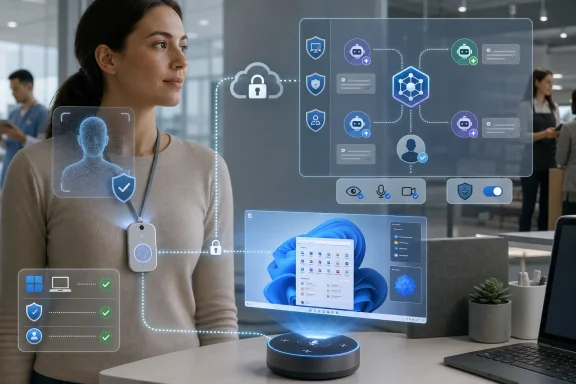
Project Solara is not a Windows replacement in the familiar consumer-platform-war sense. It is more interesting than that. Microsoft is building a new class of enterprise devices that may depend on Windows, Microsoft 365, Azure, Intune, Entra ID, and Defender, while not actually running Windows locally.That is a very Microsoft move in 2026. The company no longer needs every device to boot Windows if the device still authenticates through Entra, talks to Azure, consumes Copilot-style agents, and lives under Microsoft’s management stack. In Solara, Windows becomes one surface among many, sometimes streamed from the cloud, sometimes paired over Bluetooth, sometimes abstracted behind an agent that decides what interface is needed.
The first two reference designs make the point neatly. One is a desktop hub that sits next to a PC, responds to voice, recognizes the user, and can become a cloud-hosted Windows machine when attached to a monitor. The other is a wearable badge that behaves like an employee ID card crossed with a sensor pack: fingerprint wake, tap-to-record, transcription, and a camera that lets an agent act on what the worker is seeing.
Neither device is meant to be a mass-market gadget in the Surface tradition. Microsoft says hardware makers and industry partners are supposed to take the designs and turn them into practical devices for their own sectors. That distinction matters because Solara is not being pitched as a product launch so much as a platform bet.
The bet is that the app model is becoming too heavy for many work situations. A nurse, a retail worker, a field technician, or a warehouse employee does not necessarily need a phone, a laptop, and a stack of apps. They may need a small device that can authenticate them, observe context, call the right agent, and record the result in a system of record.
Android Is the Tell
The most revealing part of Project Solara is not the badge or the desk hub. It is the operating-system choice. Microsoft built Solara on the Microsoft Device Ecosystem Platform, an Android Open Source Project-based enterprise platform already used in the orbit of Teams Rooms and other managed workplace devices.That means Solara is not Windows-first. It is Microsoft-cloud-first.
For old-school Windows partisans, this may look like heresy. For enterprise IT, it is more pragmatic than ideological. Android-derived platforms run well on low-power chips, fit small device form factors, and have a mature hardware supply chain. If Microsoft wants badges, hubs, scanners, room devices, and eventually glasses or rings to get to market quickly, Windows is not always the obvious substrate.
The company’s argument is that MDEP gives it the middle ground it wants: Android’s hardware flexibility with Microsoft’s enterprise controls. Microsoft can talk about over-the-air updates, device integrity, Defender, Intune, Entra sign-in, and conditional access rather than asking administrators to trust a loose fleet of semi-smart gadgets.
That is the real Solara pitch to IT. Microsoft is not saying, “Here is another Android device.” It is saying, “Here is another managed Microsoft endpoint that happens to run on Android.” The distinction is the product.
The move also fits a broader pattern. Microsoft has spent years separating its business from the assumption that Windows owns every computing session. Office became Microsoft 365. Active Directory gave way to Entra. Endpoint management became cross-platform. Windows moved into the cloud. Solara is another turn of that wheel: Microsoft would rather own the identity, management, agent runtime, and cloud bill than lose the scenario because the hardware cannot run Windows elegantly.
Agents Are Microsoft’s New Runtime
Project Solara’s most ambitious claim is that devices can be organized around agents instead of apps. That phrase can sound like conference-stage fog, but the demos suggest a concrete shift in how Microsoft wants work to happen.In the old model, a user picks an app, navigates its interface, enters data, and moves to the next app. In the Solara model, a user wakes a device, states or implies intent, and a coordination layer routes the job to whichever agent can complete it. The agent might transcribe a conversation, summarize a patient visit, identify a QR code, log vitals, start a prescription workflow, or suggest changes after looking at a whiteboard.
That does not mean apps disappear overnight. Enterprise software is sticky, regulated, customized, and deeply political. But it does mean Microsoft is trying to move the center of gravity away from the visible application and toward a set of callable services, models, and workflows.
This is where the word agent becomes both useful and dangerous. Useful, because a well-scoped agent can automate a chunk of work that previously required several screens and manual context switching. Dangerous, because the industry is now tempted to call every chatbot, macro, script, and workflow an agent whether or not it can reliably act in the world.
Solara’s hardware-first framing gives the agent idea more substance. A badge with a camera, microphone, fingerprint sensor, and corporate identity is not just a chatbot endpoint. It is a context-capturing device. Its value depends on whether the agent can turn that context into a controlled business action without creating privacy, compliance, or safety problems.
That is the hard part. A device that transcribes a visit is easy to demo. A device that transcribes a visit, correctly separates clinical facts from casual conversation, respects consent, avoids hallucinated entries, integrates with health-record systems, survives audit, and satisfies regulators is a very different proposition.
The Badge Is the Most Interesting Device Because It Is the Most Dangerous
The wearable badge is the stronger proof of concept because it attacks a real enterprise problem: frontline workers are often badly served by phones and laptops. They need access to data and workflows, but the dominant devices were designed for seated knowledge workers or consumers.Microsoft’s healthcare example is obvious for a reason. A nurse or clinician pulling out a personal phone in front of a patient can look unprofessional even when the intent is legitimate. It can also raise practical security concerns. A managed badge that authenticates the worker, records only under controlled conditions, and feeds the right workflow could be a better fit.
But the same device also concentrates the anxieties that will define agentic hardware. A badge with a camera and microphone worn by employees in workplaces, stores, clinics, and offices is a surveillance device unless the governance is extremely clear. The fact that it is powered by AI does not make that concern smaller. It makes it larger.
Microsoft’s pitch depends on purpose-built hardware having a smaller attack surface than a general-purpose phone. That may be true in a narrow technical sense. A locked-down device with fewer apps, fewer user behaviors, and enterprise management can be easier to secure than a personal smartphone.
Yet the social attack surface is bigger. Who can start a recording? Who is notified? Where are transcripts stored? Can managers query them? Are customers and patients meaningfully consenting? What happens when an agent sees something sensitive in the background? What are workers allowed to delete, dispute, or review?
Those questions are not peripheral to Solara. They are the product. If Microsoft wants agents to operate in the physical workplace, identity and device integrity are only the beginning. The real buying decision will hinge on policy, auditability, data boundaries, and trust.
The Desk Hub Shows Why Microsoft Still Needs Windows
The desk concept is less futuristic but more revealing about Microsoft’s transitional strategy. A small device beside the PC that recognizes the user, handles voice commands, surfaces priorities, and hands work back and forth with the computer is not a revolution on its own. Its significance is that it treats the PC as something to coordinate with rather than something to replace.The comparison to an Amazon Echo-style smart display is inevitable, and Microsoft clearly wants to avoid it. The argument is that Solara is not one consumer assistant trying to do everything. It is a managed enterprise endpoint that can run an organization’s own agents and stay synchronized with the user’s PC.
That is a plausible distinction. An Echo on a desk may know your calendar if you wire enough services into it, but it does not belong to the enterprise fabric in the same way. It is not necessarily enrolled, governed, conditioned, and logged under the same administrative model as the rest of the workplace.
The desk hub also shows how Microsoft can make Solara additive rather than threatening to existing Windows deployments. If a monitor is attached and the device becomes a cloud Windows machine, the familiar Windows environment remains available. If the user is working at a PC, the hub can function as an ambient agent endpoint. If the user steps away, the session can be locked or handed off.
In other words, Solara gives Microsoft a way to say that the PC is no longer the only computer in the workflow without saying the PC is obsolete. That is a careful line, and Microsoft has to walk it. Windows remains a massive business, a developer target, and an administrative baseline. But it is no longer sufficient as the company’s answer to every workplace computing problem.
The Fast Prototype Is Also a Warning
One striking detail from the briefing is that Microsoft reportedly got the badge running on the platform in about three days, using the same software as the desk device on a different chipset. That is exactly the kind of story platform companies love to tell: same stack, different form factor, rapid hardware iteration.It is also the kind of story that should make enterprise buyers slow down.
Fast prototyping is valuable, especially when off-the-shelf chips from Qualcomm and MediaTek can support multiple device categories. It means the cost of experimentation drops. A retailer, hospital system, logistics company, or manufacturer can imagine purpose-built devices without commissioning a moonshot hardware program.
But fast prototyping is not the same as dependable deployment. Hardware that works in a briefing room still needs battery validation, thermal design, ruggedization, firmware lifecycle planning, replacement logistics, support channels, accessibility testing, and security review. Add AI agents and the list gets longer: model behavior, prompt injection, data retention, human review, policy enforcement, and failure modes.
This is where Microsoft’s choice not to sell the devices itself is both sensible and risky. Sensible, because industry-specific hardware is better handled by partners that understand vertical markets and supply chains. Risky, because the quality of the Solara experience will depend on a partner ecosystem Microsoft does not fully control.
The PC era worked because Microsoft could build a broad software platform and let OEMs flood the market with hardware. It also produced decades of driver problems, crapware, inconsistent device quality, and support fragmentation. Solara inherits the promise of that model and some of its old ghosts.
The Business Model Is Hiding in the Cloud
Microsoft has apparently not fully defined the Solara business model, beyond the obvious role of Azure. That ambiguity is unsurprising, but it is not trivial. Every agentic device eventually becomes an argument about who pays for inference, storage, management, integration, and support.If Solara devices are cheap to build but expensive to operate, customers will notice. A badge that records and transcribes conversations, analyzes images, calls agents, writes summaries, and interacts with business systems is not just a hardware purchase. It is an ongoing cloud-consumption machine.
That may be exactly what Microsoft wants. The company has spent years turning enterprise computing into recurring cloud and subscription revenue. Solara extends that logic into places where conventional PCs and phones are awkward: hospital rooms, sales floors, warehouses, service counters, and field sites.
The economic question is whether the productivity gains are concrete enough. For a retailer, does an agent badge reduce training time, improve inventory accuracy, shorten customer interactions, or prevent loss? For healthcare, does it cut documentation burden without increasing compliance risk? For facilities or field service, does it reduce truck rolls, improve safety, or accelerate repair?
Enterprises will not buy “AI agents instead of apps” as a slogan for long. They will buy reduced minutes, fewer errors, faster workflows, better compliance, or new capabilities that were previously impractical. Solara’s future depends less on whether the demos look magical and more on whether pilots with companies such as AccuWeather, Best Buy, CVS Health, Levi’s, and Target can produce numbers that survive procurement scrutiny.
Microsoft Is Replaying the PC Playbook Under Worse Conditions
The historical analogy is irresistible: Microsoft wants to provide the platform layer for a new generation of devices, much as it did for PCs. The company supplies the software foundation, partners build the hardware, developers and enterprises create the use cases, and Microsoft captures value through the platform.But Solara enters a market very different from the one that made Windows dominant. In the early PC era, the operating system was the scarce control point. In the agent-device era, the control points are more distributed: chips, models, clouds, identity systems, app ecosystems, data platforms, developer tools, and regulatory trust.
Microsoft has strengths in many of those layers, but it does not own them all. Qualcomm and MediaTek matter. Android matters. OpenAI matters. Google, Amazon, Apple, and a long list of enterprise AI vendors matter. So do the vertical software vendors that own the systems where work actually gets recorded.
The competitive field is also less forgiving. Google has Android and Gemini. Amazon has Alexa’s history in ambient computing and AWS’s enterprise reach. OpenAI has enormous model mindshare and has reportedly been exploring AI-first hardware. Apple, as ever, has patience, silicon, devices, and a deep understanding of personal computing experiences even when it moves slowly.
Microsoft’s advantage is enterprise legitimacy. It already sits inside the identity provider, endpoint manager, collaboration suite, productivity suite, security stack, and cloud budget of many organizations. If an AI badge or desk hub needs to be administered by the same people who manage Windows laptops and Teams Rooms, Microsoft has a natural opening.
That advantage is not absolute. Enterprise buyers are also wary of lock-in, rising cloud costs, and AI features that arrive before governance models are mature. Solara’s challenge is to feel like an extension of existing management investments rather than another proprietary funnel into Azure consumption.
The App Model Will Not Die, but It Will Lose Territory
The most overblown version of the Solara story is that apps are going away. They are not. Apps remain excellent containers for repeatable tasks, rich interfaces, permissions, offline behavior, and user control. Enterprises have spent decades building around them, and users still need visible tools they can understand.The more defensible argument is that apps will lose territory at the edges. Many workflows do not deserve a full app session. Many workers do not have the time, hands, attention, or device posture to navigate one. Many tasks are really combinations of observation, authentication, summarization, lookup, and update.
That is where agentic devices could matter. They collapse the distance between event and record. A worker sees something, says something, scans something, or taps something, and the system turns that into structured work.
The danger is that collapsing that distance can also collapse the moment for human judgment. A traditional app slows the user down, sometimes annoyingly, but it also exposes fields, choices, and confirmation steps. An agent that acts too smoothly can hide assumptions. In regulated or safety-critical environments, that opacity is unacceptable.
The future likely belongs to hybrid patterns. Agents will gather context, draft actions, summarize evidence, and recommend next steps. Apps, dashboards, and review surfaces will remain where humans inspect, approve, correct, and audit. Solara’s success will depend on how well Microsoft balances those modes.
IT Will Ask the Boring Questions, and the Boring Questions Will Decide Everything
The glamorous part of Solara is the idea of agents that see, listen, and act. The decisive part will be the administrative plumbing. IT departments will want to know how these devices enroll, update, authenticate, recover, isolate data, report compliance, and fail safely.Microsoft is wise to build the story around Intune, Entra ID, Defender, device integrity, and over-the-air updates. Those are the words that make strange hardware less strange to enterprise administrators. If a Solara badge can be treated like another managed endpoint with known policy controls, it has a chance.
But IT will also ask what happens when the network is down, when the camera breaks, when a device is lost, when an employee leaves, when a transcript is wrong, when an agent takes the wrong action, or when a line-of-business system rejects an update. The answer cannot be “the AI will handle it.” It has to be logs, rollback, human review, least privilege, and support contracts.
Security teams will be especially wary of prompt injection and environmental manipulation. A device that can see a whiteboard or scan a code can also be tricked by malicious text, spoofed labels, or adversarial instructions placed in the physical world. Once agents can act, the physical environment becomes part of the input surface.
That does not make Solara doomed. It makes Solara enterprise software. The winners in this category will not be the companies with the flashiest demos. They will be the companies that make agentic hardware governable enough that a cautious CIO can say yes.
The Pilots Will Reveal Whether Solara Is a Platform or a Press Briefing
The named pilot companies give Solara credibility, but pilots are not deployments. They are structured experiments, and in this case they will test several assumptions at once.The first assumption is that purpose-built agent devices are better than phones or tablets for certain jobs. That will vary by workflow. A badge may be ideal for hands-free capture, but terrible for tasks that require review, comparison, or detailed input. A desk hub may be useful for ambient coordination, but redundant for users already drowning in notifications.
The second assumption is that organizations want their own agents rather than a generic assistant. Microsoft’s argument here is strong. Enterprises do not want one all-purpose consumer assistant wandering through proprietary workflows. They want constrained agents with identity, permissions, business context, and audit trails.
The third assumption is that hardware specialization can return after years of smartphone consolidation. For a long time, the phone absorbed everything: camera, recorder, scanner, authenticator, pager, and terminal. Solara suggests the pendulum may swing back, with specialized devices reappearing because AI makes them useful without requiring a full app interface.
The fourth assumption is that Microsoft can coordinate the ecosystem. Chip vendors, OEMs, cloud services, enterprise developers, security teams, and vertical partners all have to line up. That is difficult, but it is also the kind of orchestration Microsoft understands better than almost anyone in enterprise technology.
If the pilots produce only novelty, Solara will become another interesting Microsoft lab project. If they produce measurable workflow improvements, the platform could become one of the first serious attempts to define post-smartphone enterprise hardware.
Redmond’s Agent Hardware Bet Comes Down to Five Tests
Solara is early enough that skepticism is not cynicism; it is discipline. The platform has a coherent strategic logic, but the gap between reference design and deployed fleet is where many ambitious hardware ideas go to die.- Microsoft is using Android through MDEP because small, low-power, enterprise-managed devices do not always need Windows to be useful Microsoft endpoints.
- The badge is the most important concept because it targets frontline workflows where phones and PCs are often awkward, but it also raises the hardest privacy and surveillance questions.
- The desk hub is less radical than the badge, but it shows how Microsoft can keep Windows central by streaming, pairing, and coordinating it rather than requiring it on every device.
- The platform’s real business model will likely be tied to Azure consumption, agent services, identity, management, and security rather than hardware margins.
- The first pilots will matter only if they prove concrete operational value, not just that AI can be embedded into a novel device.
- Enterprise adoption will depend on governance, auditability, lifecycle support, and failure handling as much as model quality.
References
- Primary source: GeekWire
Published: 2026-06-02T17:12:06.351110
Inside Microsoft’s Project Solara: A new platform for devices that run AI agents instead of apps – GeekWire
A team inside Microsoft has been quietly building a platform for devices that run AI agents instead of apps, based on Android instead of Windows. The first two concept devices, a desktop hub and a wearable badge, are headed to pilots with some big-name businesses.www.geekwire.com - Official source: learn.microsoft.com
- Official source: techcommunity.microsoft.com
MDEP: One year of innovation, collaboration, and growth | Microsoft Community Hub
The announcement last year marked the first step in building a community of innovation and collaboration around MDEP. Since then, we have transformed the way... techcommunity.microsoft.com
- Related coverage: nxtoffice.nl
Wat is MDEP? Uitleg over Microsoft Device Ecosystem Platform
MDEP is Microsofts Android/AOSP-platform voor enterprise Teams-devices. Lees wat het is, wat het uniek maakt en waarom het belangrijk is voor IT-beheer.www.nxtoffice.nl - Official source: microsoft.com
Microsoft Intune Core Features | Microsoft Security
Discover Microsoft Intune: its core capabilities, features, and benefits. Learn what Microsoft Intune does as a unified endpoint management solution to drive operational efficiency.www.microsoft.com
- Related coverage: teamsinsider.show
Microsoft Devices Ecosystem Platform (MDEP) Explained
Yoav Barzilay, Microsoft Senior Product Manager, explains the Microsoft Devices Ecosystem Platform (MDEP) and how it fits in the Microsoft Teams devices ecosystem.Microsoft Devices Ecosystem Platform (MDEP) is a distribution of Android Open Source Platform (AOSP) from MicrosoftMDEP aims to provid...www.teamsinsider.show
- Official source: adoption.microsoft.com
- Related coverage: support.neat.no
Microsoft Word - Neat MS Implementation Guide - Quick Start 3-19-25.docx
PDF documentsupport.neat.no
- Related coverage: channelpartners.net