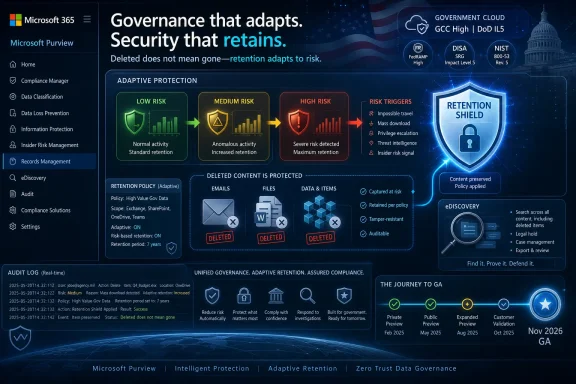
Microsoft has added Microsoft Purview roadmap item 566324 for GCC, GCC High, and DoD tenants, promising a November 2026 general availability release that lets Adaptive Protection in Insider Risk Management automatically apply Data Lifecycle Management retention labels to deleted emails and files based on user risk levels. The feature sounds narrow, but it points to a larger shift in Microsoft 365 governance: retention is becoming less of a static records-management setting and more of a live security control. As described in the Microsoft 365 Roadmap and Microsoft Learn documentation, Purview is moving closer to a model where user behavior changes what the platform preserves, blocks, or escalates without waiting for an administrator to rewrite policy.
That is both the appeal and the discomfort. Microsoft is not merely adding another checkbox to the Purview portal; it is tying together insider-risk scoring, deletion behavior, and retention outcomes in a way that will matter deeply to public-sector IT teams. For administrators in GCC, GCC High, and DoD environments, the practical question is no longer whether Microsoft 365 can retain content. It is whether organizations are ready for retention decisions that follow a person’s risk level in near-real time.
For years, Microsoft Purview Data Lifecycle Management has mostly lived in the governance wing of the Microsoft 365 estate. Retention labels and policies helped organizations decide how long to keep email, Teams messages, SharePoint files, OneDrive content, and other business records before deletion or disposition. The work was important, but it was usually framed around compliance: legal hold, regulatory retention, records management, defensible deletion.
Adaptive Protection comes from a different neighborhood. Microsoft introduced it as part of Purview’s insider-risk strategy, using signals from Insider Risk Management to place users into dynamic risk levels and then connect those levels to other policy engines. Microsoft’s own security blog positioned the concept as “people-centric data protection,” a phrase that sounds innocuous until you unpack it: the policy is no longer just about the file, the label, or the site. It is also about the user’s current risk posture.
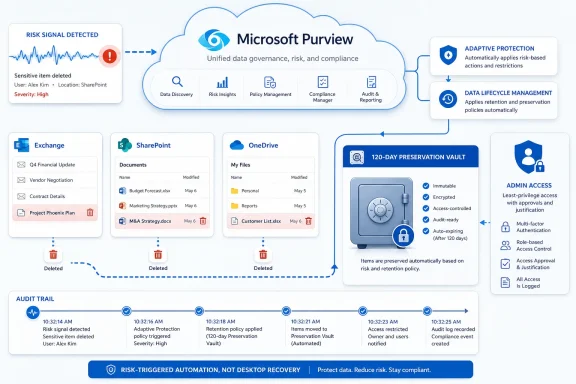
The new roadmap item extends that idea into lifecycle management. If a user is considered elevated risk and deletes emails or files, Purview can automatically apply retention labels so that the deleted content is preserved. In earlier Microsoft Learn guidance for the preview version, Microsoft described this as an automatically created retention label and auto-apply policy that retains deleted content associated with elevated-risk users, with the policy operating behind the scenes rather than behaving like a normal admin-authored label deployment.
That is a meaningful architectural move. Deletion is often where insider-risk investigations become painful: the suspicious user leaves, deletes, syncs, empties, or “cleans up,” and IT later discovers that the standard retention posture was designed for normal business hygiene rather than hostile or negligent behavior. Microsoft’s answer is to make deletion by a risky user a trigger for preservation.
That is not a cosmetic distinction. Government-cloud customers tend to move more slowly because they have to; their security, audit, sovereignty, procurement, and accreditation requirements make “just turn it on” a fantasy. A feature that automatically preserves deleted content based on insider-risk level will be scrutinized not only by Microsoft 365 administrators but also by records officers, agency counsel, privacy teams, security operations, and labor or HR stakeholders.
Microsoft’s July 6, 2026 roadmap update also puts a timestamp on intent. This is not a stale compliance concept buried in Purview’s documentation; it is an active roadmap item, created June 18, 2026, and updated the same day the broader Microsoft 365 roadmap refreshed. For public-sector tenants that treat roadmap entries as procurement and change-management inputs, that is a signal to begin policy design well before the November 2026 target.
The cloud targeting also hints at Microsoft’s confidence that the feature has crossed from experiment to institutional requirement. Insider risk is a politically sensitive domain, especially in government environments where employee monitoring, security clearance processes, and records retention already operate under formal rules. By bringing lifecycle automation into those environments, Microsoft is betting that automated preservation will be seen less as surveillance expansion and more as a defensible control against sabotage, exfiltration, and spoliation.
That design avoids one of the classic failures of compliance tooling: static scoping. A retention policy that applies to everyone can be too blunt, too expensive, and too intrusive. A policy that applies only to a hand-maintained list of users can miss the moment when someone becomes risky. Adaptive Protection tries to split the difference by letting the system follow changing risk.
Microsoft Learn’s Adaptive Protection guidance describes this pattern across policy engines such as Data Loss Prevention and Conditional Access. A user’s risk level can cause stricter DLP controls to apply, then relax when the risk level changes. With Data Lifecycle Management, the same logic is being used not to block a risky action but to preserve evidence of it.
That distinction is important. DLP interrupts or warns. Conditional Access can challenge, restrict, or block. Retention quietly changes what survives after deletion. In many organizations, that quieter control may be less disruptive and more valuable, because it creates recoverability and investigatory continuity without necessarily tipping off the user or freezing routine work.
But quiet controls are also harder to govern. If an admin deploys a visible DLP rule, users may complain quickly. If a background retention label is applied to deleted content because a user crossed an insider-risk threshold, the side effects may emerge later as storage pressure, discovery scope expansion, or confusion over why supposedly deleted items remain preserved.
Traditional retention policies can solve part of this by retaining broad categories of content, but broad retention has a cost. It increases the volume of discoverable material. It can conflict with data-minimization goals. It can turn Microsoft 365 into an ever-growing swamp of recoverable content that nobody wants to pay to store or review.
Adaptive retention based on risk level is Microsoft’s attempt to make preservation more targeted. Instead of retaining everything forever because someone might someday do something suspicious, the platform retains deleted content when the user’s behavior has already raised concern. In theory, that gives organizations a more proportionate response.
The awkwardness is that retention labels are still retention labels. They are not a magical forensic snapshot, and they are not a substitute for backup, endpoint logging, case management, or human investigation. They are governance artifacts being used as part of a security response. That can work, but only if administrators understand exactly what content is covered, how long it is preserved, how it appears in eDiscovery, and what happens when a user’s risk level drops.
The feature also depends on the quality of insider-risk configuration. If an organization’s Insider Risk Management policies are too permissive, the retention integration may miss the moments that matter. If they are too sensitive, administrators may preserve content for users who are merely noisy, unusual, or caught in a badly tuned policy. Dynamic enforcement does not remove the need for judgment; it moves judgment upstream into the risk model.
The new integration adds another conditional layer: content deleted by an elevated-risk user may receive a retention label automatically. In preview-era Microsoft documentation, Microsoft described the system as preserving deleted emails and files by applying a retention label when Adaptive Protection identifies a user at elevated risk. The roadmap language for item 566324 carries that same logic into the government-cloud GA plan.
For security teams, this is attractive because it closes a familiar gap. Insider-risk cases often start with weak signals: unusual downloads, mass deletions, sharing anomalies, policy violations, or activity around resignation. By the time the organization is confident enough to open a formal case, the content trail may already be degraded. Preserving deleted content earlier gives investigators and counsel more room to reconstruct events.
For records managers, the picture is less tidy. Retention is supposed to be intentional. Labels should map to business rules, legal requirements, or operational value. A hidden or automatically generated preservation mechanism based on risk level may be defensible, but it must still fit the organization’s retention schedule and privacy obligations.
This is where public-sector tenants will need careful governance. An agency cannot simply say, “Microsoft preserved it because the algorithm said so,” and expect that to satisfy every oversight body. The organization will need to document who defines risk levels, what signals are used, what retention duration applies, who can review preserved content, and how the control is audited.
But privacy by design is not the same as privacy by operation. A tool can be architected with safeguards and still be deployed in a way that employees, unions, regulators, or internal watchdogs view as excessive. Adaptive Protection makes this tension sharper because it connects risk categorization to automatic enforcement.
The Data Lifecycle Management integration is arguably less intrusive than some alternatives because it does not necessarily block the user or display a warning. Yet it also means a person’s behavior can silently change what the organization preserves about them. That may be exactly what a security team wants during a sabotage investigation, but it is also why policy transparency matters.
Organizations should avoid treating Adaptive Protection as a purely technical rollout. It belongs in acceptable-use policy, insider-risk governance, records-management documentation, and privacy review. Employees do not need a playbook for evading controls, but they should not be surprised that deletion in Microsoft 365 is subject to preservation when risk conditions are met.
Public-sector customers in particular should assume that this feature will be discoverable in audits, grievances, investigations, and litigation. The question will not only be whether the technology worked. It will be whether the organization had a legitimate, documented basis for using it.
The most obvious cost is storage pressure. If elevated-risk users delete large volumes of mail or files, the content may remain preserved even when users and frontline admins believe it is gone. In some tenants, retention and holds already create confusion when mailboxes, sites, or OneDrive accounts appear larger than expected. Adding adaptive preservation can make that confusion more acute unless administrators know how to inspect and explain it.
The second cost is discovery scope. Preserved content can become available to eDiscovery depending on the organization’s configuration and legal process. That is often the point, but it also means targeted retention can create review obligations. A security team may be pleased that suspicious deletions were preserved; legal may be less pleased if the volume is high, poorly categorized, or retained longer than necessary.
The third cost is operational opacity. Microsoft’s documentation has described automatically created labels and policies that are not managed like ordinary retention objects. That makes sense from a product-design standpoint because the feature needs to work as a system integration. But admins who are used to seeing every policy in a familiar portal blade may need updated runbooks to understand where the control lives and how to troubleshoot it.
None of these costs make the feature a bad idea. They make it a grown-up compliance feature. The organizations that benefit most will be the ones that treat storage, discovery, and auditability as part of deployment, not as cleanup items after the first incident.
Microsoft’s broader Purview strategy assumes convergence. DLP, sensitivity labels, retention labels, audit, eDiscovery, communication compliance, and insider-risk controls are increasingly being tied together. That convergence is useful because real incidents do not respect product boundaries. A departing employee may download files, email data externally, delete chats, rename documents, and use unmanaged devices inside the same timeline.
The danger is that convergence can obscure accountability. If an adaptive retention label appears because an insider-risk level changed, is that owned by the security team, compliance team, records team, or Microsoft 365 platform team? If a user challenges the preservation of deleted content, who explains the policy? If the feature misfires, who tunes the signal?
Those are organizational questions, not portal questions. Microsoft can ship the integration, but customers have to decide whether Purview is governed as a set of disconnected admin centers or as a unified risk platform. The more automated the platform becomes, the less tolerable fragmented ownership will be.
The smart move is to begin with policy mapping rather than portal exploration. Which user behaviors should place someone into elevated risk? Which categories of deleted content should be preserved? What retention duration is appropriate? How will preserved items be searched, reviewed, and eventually disposed of? Who can see the underlying user identity when pseudonymization is used?
Organizations should also test edge cases before relying on the feature in production. What happens when a user becomes elevated risk, deletes content, and then returns to a lower risk level? What happens to content already preserved during the elevated period? How does the label interact with existing retention labels, legal holds, or records-management policies? What reports or audit logs prove that the control activated?
Microsoft’s roadmap language is necessarily brief, and roadmap dates can slip. But the fact that the feature is in development for GCC, GCC High, and DoD should be enough to justify planning. Waiting until the feature appears in the tenant is how compliance automation becomes emergency change management.
That is both the appeal and the discomfort. Microsoft is not merely adding another checkbox to the Purview portal; it is tying together insider-risk scoring, deletion behavior, and retention outcomes in a way that will matter deeply to public-sector IT teams. For administrators in GCC, GCC High, and DoD environments, the practical question is no longer whether Microsoft 365 can retain content. It is whether organizations are ready for retention decisions that follow a person’s risk level in near-real time.
 Microsoft Turns Retention Into a Security Response
For years, Microsoft Purview Data Lifecycle Management has mostly lived in the governance wing of the Microsoft 365 estate. Retention labels and policies helped organizations decide how long to keep email, Teams messages, SharePoint files, OneDrive content, and other business records before deletion or disposition. The work was important, but it was usually framed around compliance: legal hold, regulatory retention, records management, defensible deletion.Adaptive Protection comes from a different neighborhood. Microsoft introduced it as part of Purview’s insider-risk strategy, using signals from Insider Risk Management to place users into dynamic risk levels and then connect those levels to other policy engines. Microsoft’s own security blog positioned the concept as “people-centric data protection,” a phrase that sounds innocuous until you unpack it: the policy is no longer just about the file, the label, or the site. It is also about the user’s current risk posture.
The new roadmap item extends that idea into lifecycle management. If a user is considered elevated risk and deletes emails or files, Purview can automatically apply retention labels so that the deleted content is preserved. In earlier Microsoft Learn guidance for the preview version, Microsoft described this as an automatically created retention label and auto-apply policy that retains deleted content associated with elevated-risk users, with the policy operating behind the scenes rather than behaving like a normal admin-authored label deployment.
That is a meaningful architectural move. Deletion is often where insider-risk investigations become painful: the suspicious user leaves, deletes, syncs, empties, or “cleans up,” and IT later discovers that the standard retention posture was designed for normal business hygiene rather than hostile or negligent behavior. Microsoft’s answer is to make deletion by a risky user a trigger for preservation.
The Public-Sector Rollout Is the Signal, Not a Footnote
The Microsoft 365 Roadmap entry lists the feature for GCC, GCC High, and DoD, with General Availability planned for November 2026. That cloud-instance targeting matters. Commercial tenants have already seen preview-era documentation and message-center references around Adaptive Protection and Data Lifecycle Management, but this roadmap item is specifically about bringing the integration to government clouds.That is not a cosmetic distinction. Government-cloud customers tend to move more slowly because they have to; their security, audit, sovereignty, procurement, and accreditation requirements make “just turn it on” a fantasy. A feature that automatically preserves deleted content based on insider-risk level will be scrutinized not only by Microsoft 365 administrators but also by records officers, agency counsel, privacy teams, security operations, and labor or HR stakeholders.
Microsoft’s July 6, 2026 roadmap update also puts a timestamp on intent. This is not a stale compliance concept buried in Purview’s documentation; it is an active roadmap item, created June 18, 2026, and updated the same day the broader Microsoft 365 roadmap refreshed. For public-sector tenants that treat roadmap entries as procurement and change-management inputs, that is a signal to begin policy design well before the November 2026 target.
The cloud targeting also hints at Microsoft’s confidence that the feature has crossed from experiment to institutional requirement. Insider risk is a politically sensitive domain, especially in government environments where employee monitoring, security clearance processes, and records retention already operate under formal rules. By bringing lifecycle automation into those environments, Microsoft is betting that automated preservation will be seen less as surveillance expansion and more as a defensible control against sabotage, exfiltration, and spoliation.
The Clever Part Is That Users Move, Not Policies
The mechanics of Adaptive Protection are simple in concept and complicated in consequence. Insider Risk Management assigns risk levels based on configured signals and policies. Adaptive Protection then lets other Purview controls use those risk levels so that users move in and out of enforcement automatically.That design avoids one of the classic failures of compliance tooling: static scoping. A retention policy that applies to everyone can be too blunt, too expensive, and too intrusive. A policy that applies only to a hand-maintained list of users can miss the moment when someone becomes risky. Adaptive Protection tries to split the difference by letting the system follow changing risk.
Microsoft Learn’s Adaptive Protection guidance describes this pattern across policy engines such as Data Loss Prevention and Conditional Access. A user’s risk level can cause stricter DLP controls to apply, then relax when the risk level changes. With Data Lifecycle Management, the same logic is being used not to block a risky action but to preserve evidence of it.
That distinction is important. DLP interrupts or warns. Conditional Access can challenge, restrict, or block. Retention quietly changes what survives after deletion. In many organizations, that quieter control may be less disruptive and more valuable, because it creates recoverability and investigatory continuity without necessarily tipping off the user or freezing routine work.
But quiet controls are also harder to govern. If an admin deploys a visible DLP rule, users may complain quickly. If a background retention label is applied to deleted content because a user crossed an insider-risk threshold, the side effects may emerge later as storage pressure, discovery scope expansion, or confusion over why supposedly deleted items remain preserved.
Microsoft Is Solving a Real Problem With an Awkward Tool
The strongest argument for this integration is brutally practical: deletion is cheap, fast, and often ambiguous. A user can delete emails because they are cleaning up. They can delete files because a project ended. They can delete content because they are leaving for a competitor, covering a mistake, or trying to erase evidence.Traditional retention policies can solve part of this by retaining broad categories of content, but broad retention has a cost. It increases the volume of discoverable material. It can conflict with data-minimization goals. It can turn Microsoft 365 into an ever-growing swamp of recoverable content that nobody wants to pay to store or review.
Adaptive retention based on risk level is Microsoft’s attempt to make preservation more targeted. Instead of retaining everything forever because someone might someday do something suspicious, the platform retains deleted content when the user’s behavior has already raised concern. In theory, that gives organizations a more proportionate response.
The awkwardness is that retention labels are still retention labels. They are not a magical forensic snapshot, and they are not a substitute for backup, endpoint logging, case management, or human investigation. They are governance artifacts being used as part of a security response. That can work, but only if administrators understand exactly what content is covered, how long it is preserved, how it appears in eDiscovery, and what happens when a user’s risk level drops.
The feature also depends on the quality of insider-risk configuration. If an organization’s Insider Risk Management policies are too permissive, the retention integration may miss the moments that matter. If they are too sensitive, administrators may preserve content for users who are merely noisy, unusual, or caught in a badly tuned policy. Dynamic enforcement does not remove the need for judgment; it moves judgment upstream into the risk model.
Deleted Does Not Mean Gone, and Now That Becomes Conditional
Microsoft 365 administrators already know that deletion is not a single event. Exchange has recoverable items. SharePoint and OneDrive have recycle bins and preservation hold libraries. Retention policies can keep content after users think they have removed it. Legal holds and eDiscovery holds add still more layers.The new integration adds another conditional layer: content deleted by an elevated-risk user may receive a retention label automatically. In preview-era Microsoft documentation, Microsoft described the system as preserving deleted emails and files by applying a retention label when Adaptive Protection identifies a user at elevated risk. The roadmap language for item 566324 carries that same logic into the government-cloud GA plan.
For security teams, this is attractive because it closes a familiar gap. Insider-risk cases often start with weak signals: unusual downloads, mass deletions, sharing anomalies, policy violations, or activity around resignation. By the time the organization is confident enough to open a formal case, the content trail may already be degraded. Preserving deleted content earlier gives investigators and counsel more room to reconstruct events.
For records managers, the picture is less tidy. Retention is supposed to be intentional. Labels should map to business rules, legal requirements, or operational value. A hidden or automatically generated preservation mechanism based on risk level may be defensible, but it must still fit the organization’s retention schedule and privacy obligations.
This is where public-sector tenants will need careful governance. An agency cannot simply say, “Microsoft preserved it because the algorithm said so,” and expect that to satisfy every oversight body. The organization will need to document who defines risk levels, what signals are used, what retention duration applies, who can review preserved content, and how the control is audited.
The Privacy Story Depends on Process, Not Product Copy
Microsoft consistently describes Insider Risk Management as built with privacy in mind. Its documentation notes pseudonymization by default, role-based access controls, audit logs, and configurable workflows intended to prevent casual snooping. Those are important safeguards, especially in a product category that can easily become a workplace surveillance machine if implemented badly.But privacy by design is not the same as privacy by operation. A tool can be architected with safeguards and still be deployed in a way that employees, unions, regulators, or internal watchdogs view as excessive. Adaptive Protection makes this tension sharper because it connects risk categorization to automatic enforcement.
The Data Lifecycle Management integration is arguably less intrusive than some alternatives because it does not necessarily block the user or display a warning. Yet it also means a person’s behavior can silently change what the organization preserves about them. That may be exactly what a security team wants during a sabotage investigation, but it is also why policy transparency matters.
Organizations should avoid treating Adaptive Protection as a purely technical rollout. It belongs in acceptable-use policy, insider-risk governance, records-management documentation, and privacy review. Employees do not need a playbook for evading controls, but they should not be surprised that deletion in Microsoft 365 is subject to preservation when risk conditions are met.
Public-sector customers in particular should assume that this feature will be discoverable in audits, grievances, investigations, and litigation. The question will not only be whether the technology worked. It will be whether the organization had a legitimate, documented basis for using it.
Storage and Discovery Are the Costs Nobody Should Hand-Wave
Preserving deleted content sounds cheap until it becomes routine. Exchange recoverable storage, SharePoint preservation behavior, OneDrive retention, and eDiscovery indexes all carry operational consequences. Microsoft 365 hides much of the machinery, but it does not make retained data weightless.The most obvious cost is storage pressure. If elevated-risk users delete large volumes of mail or files, the content may remain preserved even when users and frontline admins believe it is gone. In some tenants, retention and holds already create confusion when mailboxes, sites, or OneDrive accounts appear larger than expected. Adding adaptive preservation can make that confusion more acute unless administrators know how to inspect and explain it.
The second cost is discovery scope. Preserved content can become available to eDiscovery depending on the organization’s configuration and legal process. That is often the point, but it also means targeted retention can create review obligations. A security team may be pleased that suspicious deletions were preserved; legal may be less pleased if the volume is high, poorly categorized, or retained longer than necessary.
The third cost is operational opacity. Microsoft’s documentation has described automatically created labels and policies that are not managed like ordinary retention objects. That makes sense from a product-design standpoint because the feature needs to work as a system integration. But admins who are used to seeing every policy in a familiar portal blade may need updated runbooks to understand where the control lives and how to troubleshoot it.
None of these costs make the feature a bad idea. They make it a grown-up compliance feature. The organizations that benefit most will be the ones that treat storage, discovery, and auditability as part of deployment, not as cleanup items after the first incident.
The Feature’s Value Rises With Better Insider-Risk Maturity
Adaptive Protection is not a shortcut to insider-risk maturity. It is an amplifier. In a tenant with well-designed Insider Risk Management policies, sensible thresholds, documented escalation paths, and trained reviewers, automatic preservation can be a force multiplier. In a tenant with vague policies and little governance, it can become another mysterious Purview behavior that nobody fully owns.Microsoft’s broader Purview strategy assumes convergence. DLP, sensitivity labels, retention labels, audit, eDiscovery, communication compliance, and insider-risk controls are increasingly being tied together. That convergence is useful because real incidents do not respect product boundaries. A departing employee may download files, email data externally, delete chats, rename documents, and use unmanaged devices inside the same timeline.
The danger is that convergence can obscure accountability. If an adaptive retention label appears because an insider-risk level changed, is that owned by the security team, compliance team, records team, or Microsoft 365 platform team? If a user challenges the preservation of deleted content, who explains the policy? If the feature misfires, who tunes the signal?
Those are organizational questions, not portal questions. Microsoft can ship the integration, but customers have to decide whether Purview is governed as a set of disconnected admin centers or as a unified risk platform. The more automated the platform becomes, the less tolerable fragmented ownership will be.
Government Tenants Get a Useful Delay, If They Use It
A November 2026 General Availability target gives public-sector organizations time, but not as much as it appears. Government-cloud deployments often involve internal review cycles that can consume months before a single setting is changed. Security architecture boards, privacy officers, records managers, and tenant administrators may all need a say.The smart move is to begin with policy mapping rather than portal exploration. Which user behaviors should place someone into elevated risk? Which categories of deleted content should be preserved? What retention duration is appropriate? How will preserved items be searched, reviewed, and eventually disposed of? Who can see the underlying user identity when pseudonymization is used?
Organizations should also test edge cases before relying on the feature in production. What happens when a user becomes elevated risk, deletes content, and then returns to a lower risk level? What happens to content already preserved during the elevated period? How does the label interact with existing retention labels, legal holds, or records-management policies? What reports or audit logs prove that the control activated?
Microsoft’s roadmap language is necessarily brief, and roadmap dates can slip. But the fact that the feature is in development for GCC, GCC High, and DoD should be enough to justify planning. Waiting until the feature appears in the tenant is how compliance automation becomes emergency change management.
The November Roadmap Item Is a Warning to Write the Policy Now
The concrete news is small enough to fit in a single roadmap card. The operational meaning is not. Microsoft is taking a security signal, applying it to data lifecycle behavior, and aiming that integration at some of its most regulated cloud customers.- Microsoft lists roadmap item 566324 as in development for Microsoft Purview on the web, with General Availability planned for November 2026 in GCC, GCC High, and DoD.
- The integration uses Adaptive Protection risk levels from Insider Risk Management to apply Data Lifecycle Management retention labels to deleted emails and files.
- The feature is designed to preserve content associated with elevated-risk users, not to replace backup, legal hold, eDiscovery, or incident-response tooling.
- Public-sector tenants should review privacy, records-management, labor, and audit implications before enabling automated preservation based on user risk.
- Administrators should test how adaptive preservation interacts with existing retention labels, holds, storage limits, and eDiscovery workflows before treating it as production-ready evidence protection.
References
- Primary source: Microsoft 365 Roadmap
Published: 2026-07-06T23:00:50.6928566Z
Microsoft 365 Roadmap | Microsoft 365
The Microsoft 365 Roadmap lists updates that are currently planned for applicable subscribers. Check here for more information on the status of new features and updates.www.microsoft.com
- Official source: learn.microsoft.com
Adaptive Protection configuration guide | Microsoft Learn
Learn about recommendations to configure Adaptive Protection with Insider Risk Management and Data Loss Prevention (DLP).learn.microsoft.com - Official source: techcommunity.microsoft.com
- Official source: download.microsoft.com
- Related coverage: sharepointeurope.com