

Redox OS is a pre-1.0, Unix-like operating system written in Rust that replaces Linux’s monolithic kernel model with a microkernel, moving many drivers and services into userspace. Its version 0.9.0 desktop release includes the Orbital graphical environment and demonstrates that Redox is more than a kernel experiment. It is not another Linux distribution wearing a different desktop theme; it is an attempt to reconsider assumptions beneath the entire operating system. That ambition is also its central weakness, because a different kernel architecture cannot instantly reproduce decades of Linux hardware support, applications, packaging, documentation, and accumulated compatibility work. Redox is already credible as an operating-system project, but not yet credible as a general-purpose replacement for Windows or Linux.
Most operating systems presented as Windows alternatives are not entirely new operating systems. They are distributions assembled around the Linux kernel, established Unix utilities, familiar package repositories, and one of several mature desktop environments. The result may be friendlier or more attractive than another distribution, but many of its architectural choices were made before that distribution existed.
MakeUseOf’s account of Redox OS is compelling because Redox refuses that inheritance. It is not a Linux distribution, does not use the Linux kernel, and is not trying to distinguish itself primarily through a package manager, default application selection, or wallpaper. It begins beneath those layers, with a separate kernel and a different answer to the question of what must be trusted to run inside it.
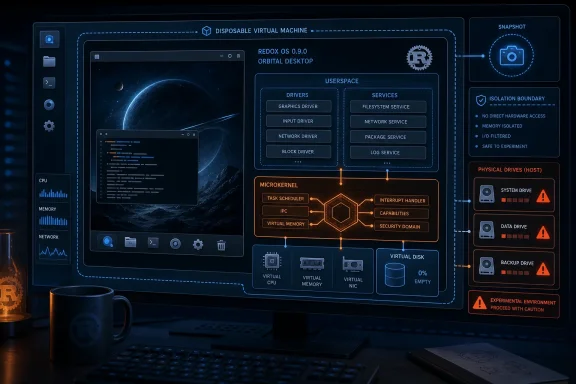
Linux generally places drivers and many core services in the kernel’s privileged address space. Redox instead uses a microkernel design that keeps the kernel comparatively small and moves many drivers and services into userspace. The intended advantage is containment: less code operates at the system’s highest privilege level, and boundaries between components can limit the consequences of some failures.
That is a design objective, not a magical security switch. Userspace services can still contain bugs. Interfaces can be implemented incorrectly. Permissions can be too broad, and mistakes in the kernel remain serious. Moving components across a privilege boundary also creates communication and coordination work that Redox must implement correctly.
The concise architectural distinction is therefore enough: Redox minimizes the privileged kernel and places more operating-system functionality in separate userspace components, while Linux integrates far more of that functionality into a mature monolithic kernel. The rest of the comparison has to be decided by implementation, compatibility, reliability, and the user’s actual workload.
Redox is best understood not as a Linux clone, but as a critique expressed in working code.
Rust is designed to prevent many memory-management errors at compile time. Defects involving invalid memory access, ownership, and unsafe object lifetimes have historically caused serious reliability and security problems in systems software. By rejecting many unsafe patterns before a program can run, Rust can remove classes of potential defects earlier in the development process.
The important word is classes. Rust does not prove that an operating system is correct. It cannot eliminate flawed logic, incorrect permission checks, insecure protocol design, or every dangerous interaction with hardware. Low-level development can also require explicitly marked unsafe operations where software must communicate directly with processors, memory, and devices.
What Rust changes is the default development model. Rather than granting broad freedom to manipulate memory and depending entirely on developer discipline, review, testing, and defensive conventions, Rust places more restrictions in the language and compiler.
For Redox, that is not merely a developer convenience. It is part of the project’s construction. The microkernel design seeks to reduce the amount of code occupying the most trusted layer, while Rust seeks to reduce memory-safety defects across much of the codebase.
Those choices reinforce each other without guaranteeing a secure final product. Architectural boundaries can reduce exposure, and language-level checks can prevent mistakes, but the system must still be tested as a whole. Drivers, filesystems, installation tools, services, applications, and update mechanisms remain capable of failing even when their source language offers stronger memory-safety protections.
Redox’s wider significance therefore does not depend on it replacing Linux. The project is a practical demonstration of how far Rust can be taken in building a recognizable Unix-like environment. Its value includes what operating-system developers can learn from the attempt, even while ordinary desktop users wait for broader hardware and software support.
Redox 0.9.0 goes further by providing a graphical environment built around Orbital, the project’s desktop and windowing system. That is the verified milestone worth emphasizing. Redox can present users with a recognizable desktop rather than limiting evaluation to a command line or boot demonstration.
A graphical desktop exposes weaknesses that a terminal-only demonstration can conceal. Input, graphics, window management, storage, fonts, process handling, installation behavior, and any available network support must cooperate before the system feels cohesive. Each additional interactive component creates another opportunity for hardware assumptions or incomplete software to become visible.
MakeUseOf reported that Redox felt responsive during testing, including in a live USB session on an HP computer. It also reported a desktop build able to run with less than 512 MB of RAM and disk images ranging from roughly 536 MB to 1.6 GB.
That compact footprint is noteworthy, but it should not be interpreted as proof that Redox is already a superior low-resource desktop. A developing operating system does not yet carry the same inventory of applications, drivers, compatibility layers, accessibility tools, administrative features, and long-developed infrastructure found in mainstream platforms. Small size can reflect architectural efficiency, limited scope, or both.
The desktop still matters because it makes Redox inspectable. Users can observe how the system handles windows, input, files, applications, and installation rather than judging it only by design documents.
The same testing also exposed practical limits. MakeUseOf encountered problematic text-editor keybindings in a virtual machine and reported that the installer could not detect a second drive. Those failures are not cosmetic. Reliable input and storage detection sit directly on the path between an interesting live demonstration and a dependable workstation.
The desktop consequently performs two opposing roles. It proves that Redox’s architecture can support a graphical operating system, but it also moves the project into the harsher phase where every missing driver, installer assumption, and compatibility gap becomes visible to ordinary users.
That is progress. It is not readiness.
Linux benefits from decades of accumulated support for processors, storage controllers, graphics hardware, network adapters, laptops, virtual machines, and specialist devices. Its coverage is never perfect, but its scale changes what users can reasonably expect when they boot an established distribution.
A similarly powerful network effect exists in software. Applications, packaging systems, desktop components, troubleshooting knowledge, deployment tools, and update processes reinforce one another. The practical consequence is that Linux users can often solve a problem by installing an existing package, selecting another supported component, or finding documentation created by someone with comparable hardware.
Redox must accumulate its own equivalents gradually. Every successful application port or hardware test makes the system more useful, but another computer may introduce a different firmware implementation, input controller, wireless chipset, graphics device, or storage controller. A successful result on one model cannot safely be generalized to a superficially similar machine.
This is the unglamorous arithmetic of operating-system relevance. Kernel architecture attracts discussion, but hardware enablement determines whether a computer reaches a usable desktop. A safer driver model has practical value only when the required driver exists and behaves reliably.
It is also why isolated performance impressions cannot settle the question. A new system may feel responsive on supported hardware, but users do not choose an operating system based on responsiveness alone. They need the display to work, the keyboard to respond, the installer to see the correct disk, networking to connect, and required applications to be available.
For Windows users, that distinction is decisive. Someone leaving Windows is normally attempting to preserve a workflow while changing platforms, not volunteering to reconstruct the workflow around a young kernel. Mainstream Linux distributions are much closer to being practical Windows alternatives because they begin with a large body of existing hardware support and software.
General comparisons must also be kept in perspective. Established platforms often benefit from broader contributor communities, packaging expertise, coordinated maintenance, hardware testing, and commercial support options. Those are broad ecosystem advantages, not evidence that every Linux distribution or commercial operating-system vendor performs every task perfectly. They simply illustrate why a technically promising new kernel faces more than a kernel-engineering problem.
Redox has no equivalent bridge at present. Its model may be more radical, but Linux remains vastly more practical because users do not have to re-establish the viability of the platform every time they test a different computer.
The real competition is not Redox versus the Linux kernel; it is Redox versus everything Linux users already take for granted.
Those examples should be treated as individual reports, not as a blanket certification of every component in each model. Firmware versions and hardware configurations can vary within a product line, and reaching the desktop does not necessarily mean that networking, audio, input devices, power management, USB hardware, graphics behavior, and storage are all supported.
“Boots” and “usable” are different compatibility levels.
That distinction also explains why Redox can perform well in one environment and fail much earlier in another. MakeUseOf obtained a working live session on an HP computer while encountering separate problems during virtual-machine and installation tests. These outcomes are not contradictory. They describe a young operating system whose behavior depends heavily on the exact environment and the method used to test it.
That variability is normal for a pre-1.0 system, but it changes how the software should be handled. An enthusiast may treat compatibility discovery as part of the experiment. An administrator must treat unpredictable input, storage, networking, or boot behavior as operational risk.
MakeUseOf also relayed warnings about possible data loss and bootloader problems affecting other operating-system installations. That makes dual-booting an unjustifiable first experiment, especially on a computer containing a working Windows or Linux environment.
A live USB avoids committing immediately to installation, but it does not remove every risk associated with experimental software and physical disks. A verified backup should exist before the computer is booted into Redox. “Verified” means more than seeing that a backup job completed: at least a sample of important files should be restored or inspected so that the user knows the backup can actually be read.
A virtual machine provides stronger separation and should be the first test path for most WindowsForum readers. That recommendation is deliberately conservative. It does not imply that every hypervisor or virtual device configuration is supported by Redox. It means that failure inside an isolated VM is generally preferable to discovering installation or storage limitations on a physical machine.
If the goal is to test the installer, create a disposable VM containing only a new, empty virtual disk. Do not attach physical disks or partitions from the host.
If the goal is to test a specific laptop or desktop, first look for a compatibility report naming that exact model. A report for a related model or similar processor is not enough to assume that storage, networking, graphics, and input will work.
Attach the Redox desktop image and attempt a live boot first. Check basic keyboard input, pointer behavior, display output, window interaction, and shutdown before attempting installation.
Take a VM snapshot before running the installer. The snapshot is not needed because Redox is known to damage VM hosts; it is a conservative rollback measure for testing pre-1.0 software.
Return to the live environment, record the virtual hardware configuration, and treat installation as unsupported in that setup. Trying another disposable VM configuration can be reasonable, but the objective should remain containment rather than forcing the installer to continue at any cost.
During the live session, test in this order:
For most readers, the correct endpoint is a VM evaluation or a short live USB session—not a permanent installation.
A userspace wireless driver that does not exist cannot connect the machine. A storage design cannot help if the installer does not recognize the target disk. Failure isolation cannot make an unavailable keyboard functional. Each missing implementation creates a hard stop regardless of how convincing the architecture looks on paper.
This is the recurring tension in Redox coverage. The portions that work can demonstrate coherence and responsiveness, but ordinary users eventually reach questions that architecture alone cannot answer:
That does not make the project unsuccessful. It establishes the correct evaluation standard for a pre-1.0 system.
The Redox team cannot close the compatibility gap through kernel work alone. Progress will depend on device support, application work, installation testing, bug reports, documentation, and repeated testing across real machines. It will also depend on contributors being able to reproduce failures that appear only with particular controllers, firmware, or virtual hardware.
Those are slow tasks. They are also the tasks that determine whether Redox remains an impressive demonstration or becomes an operating system that more people can use.
In general, well-funded platform owners can devote more resources to test equipment, engineering time, hardware relationships, and compatibility programs. Community projects must achieve comparable breadth through contributors, donated hardware, carefully selected priorities, and sustained volunteer effort. This is an ecosystem-level constraint rather than a criticism of Redox’s engineering.
The challenge is especially large because Redox is not building only one component for insertion into an established operating-system stack. It is developing a kernel and the surrounding components required to turn that kernel into a recognizable system. Every area competes for limited attention, while users judge the final result by whether all of the necessary pieces work together.
That breadth is part of what makes Redox noteworthy. It is also why version 0.9.0 must be interpreted conservatively. Pre-1.0 is not a decorative disclaimer. It means users should expect incomplete support, changing behavior, and rough edges rather than the stability promises associated with mature production platforms.
The optimistic reading is that Redox has crossed the line between a theoretical proposal and an inspectable graphical operating system. People can boot it in at least some environments, interact with Orbital, and evaluate architectural ideas in an actual system.
The cautious reading is that operating-system history contains many technically interesting platforms that never escaped the gap between demonstration and ecosystem. Once an alternative becomes usable enough to attract attention, it begins competing against incumbents whose most powerful advantages were accumulated over years rather than designed in a single release.
Redox does not need to match Linux package for package before becoming useful. It could first establish value on carefully controlled hardware, in educational settings, for operating-system research, or among developers willing to work within its limitations. A narrower set of known-good configurations would be easier to evaluate than an implied promise of broad PC compatibility.
Whatever route the project takes, ordinary operations eventually have to become boring: booting, installing, entering text, connecting to a network, accessing storage, shutting down, and recovering after a failure. For an operating system, boredom is an advanced feature.
Haiku’s purpose is continuity. It preserves and develops the BeOS experience, giving the project a coherent identity and audience without requiring it to present itself as a universal Linux replacement.
SerenityOS is openly associated with learning, experimentation, and building an independent system. Its value does not depend on persuading businesses or mainstream consumers to abandon established platforms. It can succeed as an understandable and enjoyable operating-system project even without broad deployment.
Fuchsia represents a different model: an alternative platform backed by a major company. Its Zircon microkernel makes it relevant to architectural comparisons, but corporate funding does not automatically create a broadly adopted general-purpose desktop ecosystem.
Redox occupies an uncomfortable middle position. It proposes a Rust-based, Unix-like alternative with a desktop, but it does not possess the resources of a vendor-owned platform or the accumulated ecosystem of Linux. At the same time, readers naturally judge it by more demanding standards than they would apply to a project positioned only as an educational exercise.
That is also what makes Redox worth watching. It is testing whether a community project can combine microkernel separation, Rust memory safety, Unix-like concepts, and a usable graphical environment without inheriting Linux itself.
Most alternative systems either preserve an earlier vision or deliberately constrain the scope of the new one. Redox is attempting to rebuild the foundation while remaining recognizable enough that existing Unix knowledge could still be useful. That balance—architecturally different but operationally familiar—is much harder than designing a completely isolated system.
Redox does not need mass-market adoption to validate the usefulness of exploring a Rust-based operating system or a smaller privileged kernel. It can contribute ideas, experience, and practical lessons even if most Windows and Linux users never install it permanently.
The more immediate question is whether Redox can convert architectural promise into repeatable compatibility. A graphical desktop on selected hardware is an important milestone, but repeatability is what changes a demonstration into a platform. Users need to know not only that Redox booted somewhere, but that it works on a named configuration with confirmed input, storage, networking, installation, shutdown, and recovery behavior.
That gives WindowsForum readers a clear watch criterion:
Future releases should therefore be judged less by headline architecture and more by concrete compatibility gains. Does the installer recognize more ordinary storage configurations? Do keyboard and pointer behaviors remain dependable across physical and virtual machines? Are networking results documented by exact adapter and model? Can a user complete a test without placing another operating system’s boot process or data at risk?
Those are not glamorous benchmarks, but they are the benchmarks that matter.
Redox has already answered one important question: a Rust-based microkernel system can grow into a recognizable graphical Unix-like environment. It has not yet answered the harder question of whether that environment can become predictable across the varied hardware and workloads expected of a mainstream desktop operating system.
For now, Redox is neither a Windows replacement nor a practical Linux substitute. It is a serious pre-1.0 operating-system project whose architecture deserves attention and whose deployment risks demand restraint. Watch the compatibility reports, test only in disposable environments, and wait for your exact hardware—not the project’s promise in the abstract—to decide when Redox is ready for another look.
Should you try it?
Yes, if you are curious—but begin in a virtual machine. Treat that as a conservative containment recommendation, not a guarantee of compatibility. Use a newly created VM with an empty virtual disk, take a snapshot before installation, and avoid host-disk passthrough, shared credentials, or access to important files. If the installer cannot see the VM’s virtual disk, stop the installation and continue only with the live environment; do not redirect it toward a physical drive.
Try a live USB only after making and verifying a complete backup of the physical computer. Do not dual-boot Redox, install it on a work machine, or deploy it anywhere that contains production data.
 Redox Rejects the Easiest Route to a New Desktop OS
Most operating systems presented as Windows alternatives are not entirely new operating systems. They are distributions assembled around the Linux kernel, established Unix utilities, familiar package repositories, and one of several mature desktop environments. The result may be friendlier or more attractive than another distribution, but many of its architectural choices were made before that distribution existed.MakeUseOf’s account of Redox OS is compelling because Redox refuses that inheritance. It is not a Linux distribution, does not use the Linux kernel, and is not trying to distinguish itself primarily through a package manager, default application selection, or wallpaper. It begins beneath those layers, with a separate kernel and a different answer to the question of what must be trusted to run inside it.
Linux generally places drivers and many core services in the kernel’s privileged address space. Redox instead uses a microkernel design that keeps the kernel comparatively small and moves many drivers and services into userspace. The intended advantage is containment: less code operates at the system’s highest privilege level, and boundaries between components can limit the consequences of some failures.
That is a design objective, not a magical security switch. Userspace services can still contain bugs. Interfaces can be implemented incorrectly. Permissions can be too broad, and mistakes in the kernel remain serious. Moving components across a privilege boundary also creates communication and coordination work that Redox must implement correctly.
The concise architectural distinction is therefore enough: Redox minimizes the privileged kernel and places more operating-system functionality in separate userspace components, while Linux integrates far more of that functionality into a mature monolithic kernel. The rest of the comparison has to be decided by implementation, compatibility, reliability, and the user’s actual workload.
Redox is best understood not as a Linux clone, but as a critique expressed in working code.
Rust Turns a Language Choice Into an Operating-System Policy
Redox’s second foundational decision is to implement the system in Rust. That gives the project an identity beyond kernel architecture and places memory safety near the center of its engineering model rather than treating it solely as an auditing objective applied after development.Rust is designed to prevent many memory-management errors at compile time. Defects involving invalid memory access, ownership, and unsafe object lifetimes have historically caused serious reliability and security problems in systems software. By rejecting many unsafe patterns before a program can run, Rust can remove classes of potential defects earlier in the development process.
The important word is classes. Rust does not prove that an operating system is correct. It cannot eliminate flawed logic, incorrect permission checks, insecure protocol design, or every dangerous interaction with hardware. Low-level development can also require explicitly marked unsafe operations where software must communicate directly with processors, memory, and devices.
What Rust changes is the default development model. Rather than granting broad freedom to manipulate memory and depending entirely on developer discipline, review, testing, and defensive conventions, Rust places more restrictions in the language and compiler.
For Redox, that is not merely a developer convenience. It is part of the project’s construction. The microkernel design seeks to reduce the amount of code occupying the most trusted layer, while Rust seeks to reduce memory-safety defects across much of the codebase.
Those choices reinforce each other without guaranteeing a secure final product. Architectural boundaries can reduce exposure, and language-level checks can prevent mistakes, but the system must still be tested as a whole. Drivers, filesystems, installation tools, services, applications, and update mechanisms remain capable of failing even when their source language offers stronger memory-safety protections.
Redox’s wider significance therefore does not depend on it replacing Linux. The project is a practical demonstration of how far Rust can be taken in building a recognizable Unix-like environment. Its value includes what operating-system developers can learn from the attempt, even while ordinary desktop users wait for broader hardware and software support.
A Working Desktop Proves This Is More Than a Kernel Demo
Alternative operating-system projects often reach a stage where they can boot, print diagnostic messages, launch a shell, and perform selected tasks. Those are legitimate engineering achievements, but they do not necessarily add up to an environment people can meaningfully explore.Redox 0.9.0 goes further by providing a graphical environment built around Orbital, the project’s desktop and windowing system. That is the verified milestone worth emphasizing. Redox can present users with a recognizable desktop rather than limiting evaluation to a command line or boot demonstration.
A graphical desktop exposes weaknesses that a terminal-only demonstration can conceal. Input, graphics, window management, storage, fonts, process handling, installation behavior, and any available network support must cooperate before the system feels cohesive. Each additional interactive component creates another opportunity for hardware assumptions or incomplete software to become visible.
MakeUseOf reported that Redox felt responsive during testing, including in a live USB session on an HP computer. It also reported a desktop build able to run with less than 512 MB of RAM and disk images ranging from roughly 536 MB to 1.6 GB.
That compact footprint is noteworthy, but it should not be interpreted as proof that Redox is already a superior low-resource desktop. A developing operating system does not yet carry the same inventory of applications, drivers, compatibility layers, accessibility tools, administrative features, and long-developed infrastructure found in mainstream platforms. Small size can reflect architectural efficiency, limited scope, or both.
The desktop still matters because it makes Redox inspectable. Users can observe how the system handles windows, input, files, applications, and installation rather than judging it only by design documents.
The same testing also exposed practical limits. MakeUseOf encountered problematic text-editor keybindings in a virtual machine and reported that the installer could not detect a second drive. Those failures are not cosmetic. Reliable input and storage detection sit directly on the path between an interesting live demonstration and a dependable workstation.
The desktop consequently performs two opposing roles. It proves that Redox’s architecture can support a graphical operating system, but it also moves the project into the harsher phase where every missing driver, installer assumption, and compatibility gap becomes visible to ordinary users.
That is progress. It is not readiness.
Linux’s Greatest Asset Is Everything Outside Its Kernel
The most difficult part of offering an alternative to Linux is not designing another kernel. It is reproducing enough of the surrounding ecosystem that users can preserve their hardware and workflows.Linux benefits from decades of accumulated support for processors, storage controllers, graphics hardware, network adapters, laptops, virtual machines, and specialist devices. Its coverage is never perfect, but its scale changes what users can reasonably expect when they boot an established distribution.
A similarly powerful network effect exists in software. Applications, packaging systems, desktop components, troubleshooting knowledge, deployment tools, and update processes reinforce one another. The practical consequence is that Linux users can often solve a problem by installing an existing package, selecting another supported component, or finding documentation created by someone with comparable hardware.
Redox must accumulate its own equivalents gradually. Every successful application port or hardware test makes the system more useful, but another computer may introduce a different firmware implementation, input controller, wireless chipset, graphics device, or storage controller. A successful result on one model cannot safely be generalized to a superficially similar machine.
This is the unglamorous arithmetic of operating-system relevance. Kernel architecture attracts discussion, but hardware enablement determines whether a computer reaches a usable desktop. A safer driver model has practical value only when the required driver exists and behaves reliably.
It is also why isolated performance impressions cannot settle the question. A new system may feel responsive on supported hardware, but users do not choose an operating system based on responsiveness alone. They need the display to work, the keyboard to respond, the installer to see the correct disk, networking to connect, and required applications to be available.
For Windows users, that distinction is decisive. Someone leaving Windows is normally attempting to preserve a workflow while changing platforms, not volunteering to reconstruct the workflow around a young kernel. Mainstream Linux distributions are much closer to being practical Windows alternatives because they begin with a large body of existing hardware support and software.
General comparisons must also be kept in perspective. Established platforms often benefit from broader contributor communities, packaging expertise, coordinated maintenance, hardware testing, and commercial support options. Those are broad ecosystem advantages, not evidence that every Linux distribution or commercial operating-system vendor performs every task perfectly. They simply illustrate why a technically promising new kernel faces more than a kernel-engineering problem.
Redox has no equivalent bridge at present. Its model may be more radical, but Linux remains vastly more practical because users do not have to re-establish the viability of the platform every time they test a different computer.
The real competition is not Redox versus the Linux kernel; it is Redox versus everything Linux users already take for granted.
Laptop Compatibility Turns Ambition Into a Risk Calculation
Hardware support is where Redox’s theoretical advantages collide most directly with consumer PCs. According to the compatibility reporting discussed by MakeUseOf, the Lenovo IdeaPad Y510P, System76 Galago Pro identified as galp5, and System76 Lemur Pro identified as lemp9 were notable laptop booting examples. The same coverage warned readers not to assume that Redox would boot successfully on most other laptops.Those examples should be treated as individual reports, not as a blanket certification of every component in each model. Firmware versions and hardware configurations can vary within a product line, and reaching the desktop does not necessarily mean that networking, audio, input devices, power management, USB hardware, graphics behavior, and storage are all supported.
“Boots” and “usable” are different compatibility levels.
That distinction also explains why Redox can perform well in one environment and fail much earlier in another. MakeUseOf obtained a working live session on an HP computer while encountering separate problems during virtual-machine and installation tests. These outcomes are not contradictory. They describe a young operating system whose behavior depends heavily on the exact environment and the method used to test it.
That variability is normal for a pre-1.0 system, but it changes how the software should be handled. An enthusiast may treat compatibility discovery as part of the experiment. An administrator must treat unpredictable input, storage, networking, or boot behavior as operational risk.
MakeUseOf also relayed warnings about possible data loss and bootloader problems affecting other operating-system installations. That makes dual-booting an unjustifiable first experiment, especially on a computer containing a working Windows or Linux environment.
A live USB avoids committing immediately to installation, but it does not remove every risk associated with experimental software and physical disks. A verified backup should exist before the computer is booted into Redox. “Verified” means more than seeing that a backup job completed: at least a sample of important files should be restored or inspected so that the user knows the backup can actually be read.
A virtual machine provides stronger separation and should be the first test path for most WindowsForum readers. That recommendation is deliberately conservative. It does not imply that every hypervisor or virtual device configuration is supported by Redox. It means that failure inside an isolated VM is generally preferable to discovering installation or storage limitations on a physical machine.
A Concrete Redox Test Decision Tree
The safest useful test is not complicated, but it requires clear stopping points.1. Decide what you are trying to learn
If the goal is simply to see Orbital and understand the project’s direction, use a VM and remain in the live environment. Installation is unnecessary.If the goal is to test the installer, create a disposable VM containing only a new, empty virtual disk. Do not attach physical disks or partitions from the host.
If the goal is to test a specific laptop or desktop, first look for a compatibility report naming that exact model. A report for a related model or similar processor is not enough to assume that storage, networking, graphics, and input will work.
2. Build an isolated VM
Create a new VM rather than repurposing one that contains data. Give it a new virtual disk that can be deleted without consequence. Keep shared folders, host-disk passthrough, clipboard sharing, saved credentials, and access to sensitive networks disabled unless they are specifically required for a later controlled test.Attach the Redox desktop image and attempt a live boot first. Check basic keyboard input, pointer behavior, display output, window interaction, and shutdown before attempting installation.
Take a VM snapshot before running the installer. The snapshot is not needed because Redox is known to damage VM hosts; it is a conservative rollback measure for testing pre-1.0 software.
3. Stop if the installer cannot see the virtual disk
If the installer does not show the empty virtual disk, do not improvise by exposing a physical disk, attaching a host partition, or changing the test into a dual-boot installation. That failure is itself a useful compatibility result.Return to the live environment, record the virtual hardware configuration, and treat installation as unsupported in that setup. Trying another disposable VM configuration can be reasonable, but the objective should remain containment rather than forcing the installer to continue at any cost.
4. Move to a live USB only after backup verification
If the VM provides enough confidence to justify a hardware test, create a live USB and use a noncritical machine where possible. Make and verify a full backup first. Disconnect unnecessary external drives so they cannot be selected accidentally or exposed to unexpected behavior.During the live session, test in this order:
- Keyboard and pointer input
- Display output and window behavior
- Detection of internal storage
- Networking, if available
- USB devices needed for recovery
- Clean shutdown and the ability to boot the original operating system afterward
5. Do not convert a successful live boot into an installation
A live session that appears stable for several minutes does not establish safe installation, complete driver support, or bootloader compatibility. Do not install Redox beside Windows or Linux merely because the desktop opened successfully.For most readers, the correct endpoint is a VM evaluation or a short live USB session—not a permanent installation.
Action checklist for admins
- Begin with a new, disposable virtual machine.
- Use only an empty virtual disk; never pass through a host disk.
- Take a snapshot before testing installation.
- If the installer cannot see the virtual disk, stop rather than exposing physical storage.
- Compare the exact computer model against available compatibility reports.
- Keep production data, corporate credentials, and management networks outside the test environment.
- Verify a complete backup before using a live USB.
- Disconnect unnecessary external storage before physical testing.
- Do not dual-boot Redox on a business-critical or personal primary workstation.
- Treat storage, keyboard, networking, installer, shutdown, and bootloader behavior as unvalidated until tested on the exact machine.
Missing Drivers Matter More Than Architectural Elegance
The strongest case for Redox is architectural: a comparatively small privileged kernel, userspace services, and extensive use of a memory-safe language. The strongest case against deploying it is practical: an elegant component model does not provide hardware support by itself.A userspace wireless driver that does not exist cannot connect the machine. A storage design cannot help if the installer does not recognize the target disk. Failure isolation cannot make an unavailable keyboard functional. Each missing implementation creates a hard stop regardless of how convincing the architecture looks on paper.
This is the recurring tension in Redox coverage. The portions that work can demonstrate coherence and responsiveness, but ordinary users eventually reach questions that architecture alone cannot answer:
- Does it boot on this exact firmware and hardware combination?
- Does the keyboard work correctly?
- Can it see the intended disk without threatening another one?
- Is the network adapter recognized?
- Can the original operating system still boot after the test?
- Are the required applications present?
- Is there a recovery path if installation fails?
That does not make the project unsuccessful. It establishes the correct evaluation standard for a pre-1.0 system.
The Redox team cannot close the compatibility gap through kernel work alone. Progress will depend on device support, application work, installation testing, bug reports, documentation, and repeated testing across real machines. It will also depend on contributors being able to reproduce failures that appear only with particular controllers, firmware, or virtual hardware.
Those are slow tasks. They are also the tasks that determine whether Redox remains an impressive demonstration or becomes an operating system that more people can use.
Donation-Backed Development Makes the Road Longer
Redox is mainly donation-backed rather than financed like a major commercial platform. That helps preserve its independence, but it also limits the number of people and machines that can be assigned to slow, hardware-specific development and testing.In general, well-funded platform owners can devote more resources to test equipment, engineering time, hardware relationships, and compatibility programs. Community projects must achieve comparable breadth through contributors, donated hardware, carefully selected priorities, and sustained volunteer effort. This is an ecosystem-level constraint rather than a criticism of Redox’s engineering.
The challenge is especially large because Redox is not building only one component for insertion into an established operating-system stack. It is developing a kernel and the surrounding components required to turn that kernel into a recognizable system. Every area competes for limited attention, while users judge the final result by whether all of the necessary pieces work together.
That breadth is part of what makes Redox noteworthy. It is also why version 0.9.0 must be interpreted conservatively. Pre-1.0 is not a decorative disclaimer. It means users should expect incomplete support, changing behavior, and rough edges rather than the stability promises associated with mature production platforms.
The optimistic reading is that Redox has crossed the line between a theoretical proposal and an inspectable graphical operating system. People can boot it in at least some environments, interact with Orbital, and evaluate architectural ideas in an actual system.
The cautious reading is that operating-system history contains many technically interesting platforms that never escaped the gap between demonstration and ecosystem. Once an alternative becomes usable enough to attract attention, it begins competing against incumbents whose most powerful advantages were accumulated over years rather than designed in a single release.
Redox does not need to match Linux package for package before becoming useful. It could first establish value on carefully controlled hardware, in educational settings, for operating-system research, or among developers willing to work within its limitations. A narrower set of known-good configurations would be easier to evaluate than an implied promise of broad PC compatibility.
Whatever route the project takes, ordinary operations eventually have to become boring: booting, installing, entering text, connecting to a network, accessing storage, shutting down, and recovering after a failure. For an operating system, boredom is an advanced feature.
The Other Linux Alternatives Are Solving Different Problems
Redox is not the only operating-system project operating beyond Linux, but comparisons with other projects show why its position is unusually difficult.| Project | Primary goal | Kernel | Current maturity |
|---|---|---|---|
| Redox OS | Rust-based, Unix-like alternative | Microkernel | Pre-1.0 |
| Haiku | Continue and develop the BeOS experience | Hybrid | Established hobby desktop |
| SerenityOS | Independent educational and hobbyist system | Monolithic | Development-stage hobby OS |
| Fuchsia | Google-developed platform | Zircon microkernel | Limited public adoption |
SerenityOS is openly associated with learning, experimentation, and building an independent system. Its value does not depend on persuading businesses or mainstream consumers to abandon established platforms. It can succeed as an understandable and enjoyable operating-system project even without broad deployment.
Fuchsia represents a different model: an alternative platform backed by a major company. Its Zircon microkernel makes it relevant to architectural comparisons, but corporate funding does not automatically create a broadly adopted general-purpose desktop ecosystem.
Redox occupies an uncomfortable middle position. It proposes a Rust-based, Unix-like alternative with a desktop, but it does not possess the resources of a vendor-owned platform or the accumulated ecosystem of Linux. At the same time, readers naturally judge it by more demanding standards than they would apply to a project positioned only as an educational exercise.
That is also what makes Redox worth watching. It is testing whether a community project can combine microkernel separation, Rust memory safety, Unix-like concepts, and a usable graphical environment without inheriting Linux itself.
Most alternative systems either preserve an earlier vision or deliberately constrain the scope of the new one. Redox is attempting to rebuild the foundation while remaining recognizable enough that existing Unix knowledge could still be useful. That balance—architecturally different but operationally familiar—is much harder than designing a completely isolated system.
Redox May Influence Operating-System Design Before It Replaces Anything
The conventional question is whether Redox can replace Linux. It is probably the wrong question for the project’s current stage.Redox does not need mass-market adoption to validate the usefulness of exploring a Rust-based operating system or a smaller privileged kernel. It can contribute ideas, experience, and practical lessons even if most Windows and Linux users never install it permanently.
The more immediate question is whether Redox can convert architectural promise into repeatable compatibility. A graphical desktop on selected hardware is an important milestone, but repeatability is what changes a demonstration into a platform. Users need to know not only that Redox booted somewhere, but that it works on a named configuration with confirmed input, storage, networking, installation, shutdown, and recovery behavior.
That gives WindowsForum readers a clear watch criterion:
Until then, the VM-first decision remains the right one. A live USB can be a second step after a verified backup, but dual-booting and workplace deployment add risk without providing enough practical benefit.Redox becomes worth retesting when your exact computer model appears in credible compatibility reports and storage, keyboard, networking, and installer behavior are all confirmed for that configuration.
Future releases should therefore be judged less by headline architecture and more by concrete compatibility gains. Does the installer recognize more ordinary storage configurations? Do keyboard and pointer behaviors remain dependable across physical and virtual machines? Are networking results documented by exact adapter and model? Can a user complete a test without placing another operating system’s boot process or data at risk?
Those are not glamorous benchmarks, but they are the benchmarks that matter.
Redox has already answered one important question: a Rust-based microkernel system can grow into a recognizable graphical Unix-like environment. It has not yet answered the harder question of whether that environment can become predictable across the varied hardware and workloads expected of a mainstream desktop operating system.
For now, Redox is neither a Windows replacement nor a practical Linux substitute. It is a serious pre-1.0 operating-system project whose architecture deserves attention and whose deployment risks demand restraint. Watch the compatibility reports, test only in disposable environments, and wait for your exact hardware—not the project’s promise in the abstract—to decide when Redox is ready for another look.
References
- Primary source: MakeUseOf
Published: Sat, 11 Jul 2026 19:30:18 GMT
The most ambitious Linux alternative in years isn't Linux at all
Rebuilding an operating system from zero is a wild bet. www.makeuseof.com
