

Windows users can try Linux without abandoning Windows by first testing a beginner-friendly distribution in a virtual machine, then installing it alongside Windows in a dual-boot setup, and only later deleting Windows if Linux becomes their daily operating system. That path matters because the hardest part of switching operating systems is rarely the installer. It is the fear of losing a working life. Linux’s best sales pitch, oddly enough, may be that it does not require an immediate breakup with Windows at all.
The old caricature of the Linux switcher is a person who wipes a hard drive, burns the boats, and spends the weekend in a terminal rebuilding a computing identity from scratch. That version still exists, usually in comment sections and heroic blog posts. It is not the route most Windows users should take.
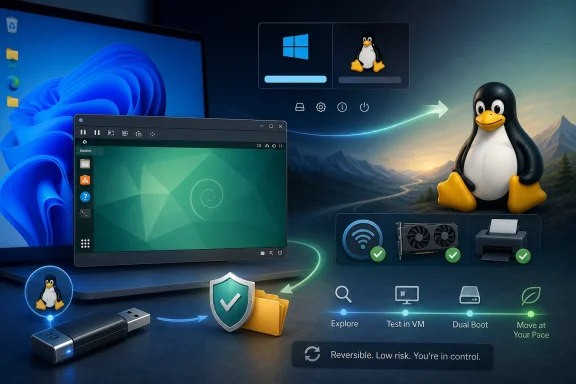
The more realistic migration looks less like a revolution and more like a long overlap. You run Linux in a window. You boot it from USB. You install it next to Windows. You reboot back to Windows when something breaks, gets weird, or simply needs to be done quickly.
That reversibility is the point. A user who knows Windows is still available behaves differently from a user who believes every mistake could strand them. They experiment more, panic less, and learn the new system in context rather than under deadline pressure.
This is the safety net many Windows users miss when they think about Linux. The decision is not “Windows or Linux.” For months, and often years, it can be “Windows and Linux, with the balance slowly shifting.”
For many Windows 10 users, Windows 11 is not merely a software upgrade. It is a hardware and policy checkpoint. TPM 2.0, Secure Boot expectations, Microsoft account pressure during setup, and Microsoft’s broader AI-first direction have all made the upgrade feel less like maintenance and more like a change in ownership terms.
Linux enters that story as an escape hatch, but that framing can oversell it. Linux is not a magic version of Windows without Microsoft. It is a different desktop culture, a different software distribution model, and a different relationship between the user and the machine.
The useful insight from the How-To Geek migration story is that Linux becomes less intimidating when it is treated as a parallel track rather than an ideological conversion. You do not have to become “a Linux person” on day one. You only have to create enough space to find out whether you might become one.
The better rule is simple: pick something friendly, mainstream enough to search for help, and well suited to your hardware. Linux distributions differ, sometimes significantly, but a beginner should not treat the choice like buying a house. It is closer to picking a neighborhood for a long visit.
For Windows users, the obvious candidates are the ones that reduce early friction. Zorin OS leans heavily into a familiar desktop layout and provides Windows App Support through Wine-based tooling. Linux Mint remains the conservative recommendation because it is stable, well documented, and deliberately unflashy. Nobara targets gamers and creators by bundling or smoothing over pieces that stock Fedora often leaves to the user.
That does not mean these three are interchangeable. Zorin’s pitch is comfort. Mint’s pitch is dependability. Nobara’s pitch is fewer post-install chores for multimedia and gaming. The right choice depends less on abstract Linux purity than on whether your Wi-Fi, GPU, printer, work apps, and games behave.
The mistake is turning distro selection into a referendum on your future. You can change later. Your files, browser profile, passwords, documents, and habits matter more than the logo on the boot screen.
This is where a lot of anxiety evaporates. The installer becomes familiar. The app store concept makes sense. The file manager is less alien than expected. The desktop may feel different, but not necessarily hostile.
A VM is also the right place to discover which expectations do not survive contact with reality. Some Windows applications run under Wine. Some sort of run. Some fail in boring, time-wasting ways. A compatibility layer is not a guarantee, and “Windows app support” should never be read as “Windows itself.”
Graphics performance inside a VM can also mislead new users. A Linux desktop running in VirtualBox may feel sluggish because virtualized graphics are not the same as a native install. Judging Linux gaming, video editing, or desktop compositing from a basic VM is like judging a car from a simulator running on hotel Wi-Fi.
But as a scouting tool, the VM is ideal. If a distro’s installer confuses you, if the desktop feels wrong, or if basic software discovery is unpleasant, you have learned something useful without repartitioning a disk. That is not failure. That is what the safety net is for.
Wine is a compatibility layer that allows many Windows applications to run on Linux and other POSIX-like systems. It is a remarkable project, and gaming-focused tools such as Proton have made Windows game compatibility on Linux dramatically better than it was a decade ago. But Wine is not Windows, and it cannot convert every proprietary workflow into a native Linux one.
That distinction matters most for professional software. If your job depends on Adobe Creative Cloud, Autodesk tools, specialized accounting software, hardware vendor utilities, or a locked-down corporate VPN client, the Linux migration is not just about taste. It is about whether the software supply chain around your work permits it.
This is where the gradual approach is strongest. You do not have to answer every compatibility question in advance. You can keep Windows for the stubborn apps while moving web browsing, email, writing, coding, media playback, and file management to Linux.
Over time, the list of Windows-only necessities may shrink. A web app replaces a desktop app. LibreOffice or OnlyOffice becomes good enough for personal documents. Steam and Proton cover more games than expected. A native Linux tool does the job better than the old Windows utility.
Or the list may not shrink enough. That is fine too. The point is not to win an argument against Windows. The point is to avoid pretending that a migration is successful until your real workload says it is.
Dual booting is the pragmatic middle ground. Windows remains on the machine, Linux gets its own partition, and the boot menu becomes the border crossing. Most mainstream Linux installers can detect Windows and set up a side-by-side installation, though any operation involving partitions deserves a full backup first.
This is also where UEFI and Secure Boot enter the picture. Modern Linux distributions generally understand UEFI systems, and several support Secure Boot, but firmware settings vary wildly across consumer PCs. A laptop that looks ordinary from the outside can hide a quirky storage controller, a troublesome Wi-Fi chipset, or a BIOS menu designed by someone with contempt for users.
Backups are not optional here. A good Linux installer is still an installer. Resizing partitions is still resizing partitions. If a family photo archive, tax folder, or work project exists only on the internal drive, the problem is not Linux; the problem is that the data was already one bad afternoon away from being gone.
Once dual booting works, the migration takes on a rhythm. Linux becomes the default for low-stakes sessions. Windows remains the fallback for the tax app, the anti-cheat game, the firmware updater, or the “I need this done in five minutes” moment. The computer becomes bilingual.
That bilingual phase is underrated. It lets the user learn Linux without making every missing shortcut feel like a crisis. It also exposes whether Linux is becoming a preference or merely a hobby.
This is why the “just install Linux” advice can be irresponsible. The same distribution that feels effortless on one laptop can become a driver scavenger hunt on another. Two machines with the same brand name may ship with different wireless cards, display panels, fingerprint readers, or audio codecs.
ThinkPads have earned their Linux-friendly reputation partly because many models are common among developers and sysadmins, which means problems get noticed and documented. That does not make every ThinkPad perfect, and it does not mean every Dell, HP, Framework, or ASUS machine is suspect. It means hardware popularity creates a support ecosystem.
For Windows users considering Linux seriously, the best upgrade may not be a new distribution. It may be a $20 Intel Wi-Fi card, a USB Ethernet adapter kept in a drawer, or choosing a laptop whose components are known to behave. Linux is often free; reliable hardware compatibility sometimes is not.
The industry has improved, but the Windows world still benefits from vendor assumptions Linux does not always get. Peripheral makers test Windows first. Firmware tools are often Windows-only. RGB control panels, BIOS utilities, and niche device managers can remain stubbornly tied to Microsoft’s platform.
That is another argument for keeping Windows around during the transition. Not because Linux has failed, but because the hardware ecosystem still treats Windows as the service entrance.
For Windows veterans, this can feel both refreshing and abrasive. Linux gives users more visibility, but visibility is not the same as simplicity. When something breaks, the explanation may be available, but it may also assume vocabulary the user does not yet have.
This is where “gradually shift” is more than motivational advice. The user who spends six months reading Linux forums, watching distro reviews, learning what Flatpak is, discovering AppImage quirks, and understanding why Wayland matters will make better decisions than the user who expects Windows habits to transfer intact.
The trick is to replace workflows one at a time. Move the browser first. Then messaging. Then documents. Then media. Then gaming or creative work if the pieces line up. Each successful replacement reduces the emotional surface area of Windows.
Eventually, Windows may stop being the main house and become the storage unit. It is still there, but you visit it with a purpose. The rest of your computing life has moved.
Operating systems are tools, not vows. A user who spends 90 percent of their time in Linux and reboots to Windows for one game or one firmware updater has not failed the migration. They have designed a system around reality.
There is also a security argument for caution. An abandoned Windows partition that is rarely booted and never updated is not a great long-term plan, especially if it remains connected to accounts and sensitive files. If Windows stays, it should be maintained. If it no longer receives security updates, it should be isolated, upgraded, enrolled in appropriate extended updates, or retired.
A Windows virtual machine can become the next stage. For office tools, legacy apps, and occasional administrative tasks, a VM may be enough. For gaming or GPU-heavy work, virtualization gets more complicated, and GPU passthrough remains a project for confident users rather than beginners.
But the direction is clear. First Windows hosts Linux in a VM. Then Windows and Linux share the disk. Later Linux may host Windows in a VM. The center of gravity moves slowly, and that is exactly why the switch can work.
Windows 11 is a capable operating system, and for many people it remains the obvious default. It has the commercial software, the hardware certification pipeline, the gaming support, the enterprise tooling, and the institutional inertia. Linux does not erase those advantages.
But Microsoft has spent years making Windows feel more conditional. More account integration. More cloud prompts. More advertising surfaces. More AI features presented as strategic inevitability. More hardware requirements that leave otherwise usable PCs outside the official path.
Linux, by contrast, often wins by lowering the temperature. It lets an old laptop remain useful. It lets the user choose a desktop environment. It lets the system feel less like a subscription funnel, even when the setup is imperfect.
That does not mean Linux is ready to replace Windows everywhere. It means Windows has created a market for permissionless computing again. The person trying Linux in VirtualBox is not merely testing a desktop. They are testing whether the computer can feel like theirs.
Windows users tempted by Linux should stop asking whether they are ready to switch and start asking what they can safely move today. The answer may be only a VM this weekend, a dual-boot install next month, and a mostly Linux workflow by next year. That is not hesitation. It is how durable platform changes actually happen: slowly at first, then all at once when the fallback finally stops being necessary.
 The Real Linux On-Ramp Is Reversibility
The old caricature of the Linux switcher is a person who wipes a hard drive, burns the boats, and spends the weekend in a terminal rebuilding a computing identity from scratch. That version still exists, usually in comment sections and heroic blog posts. It is not the route most Windows users should take.The more realistic migration looks less like a revolution and more like a long overlap. You run Linux in a window. You boot it from USB. You install it next to Windows. You reboot back to Windows when something breaks, gets weird, or simply needs to be done quickly.
That reversibility is the point. A user who knows Windows is still available behaves differently from a user who believes every mistake could strand them. They experiment more, panic less, and learn the new system in context rather than under deadline pressure.
This is the safety net many Windows users miss when they think about Linux. The decision is not “Windows or Linux.” For months, and often years, it can be “Windows and Linux, with the balance slowly shifting.”
Windows 10 Made the Question Less Theoretical
The Linux-curious moment has sharpened because Windows itself has become a less neutral default. Windows 10 reached its end of mainstream support on October 14, 2025, pushing users toward Windows 11, paid extended updates, new hardware, or a different operating system. That deadline did not create Linux interest out of nowhere, but it made the cost of staying put more visible.For many Windows 10 users, Windows 11 is not merely a software upgrade. It is a hardware and policy checkpoint. TPM 2.0, Secure Boot expectations, Microsoft account pressure during setup, and Microsoft’s broader AI-first direction have all made the upgrade feel less like maintenance and more like a change in ownership terms.
Linux enters that story as an escape hatch, but that framing can oversell it. Linux is not a magic version of Windows without Microsoft. It is a different desktop culture, a different software distribution model, and a different relationship between the user and the machine.
The useful insight from the How-To Geek migration story is that Linux becomes less intimidating when it is treated as a parallel track rather than an ideological conversion. You do not have to become “a Linux person” on day one. You only have to create enough space to find out whether you might become one.
Choosing a Distro Is Less Important Than Starting
New Linux users often lose days to the distribution question. Ubuntu, Mint, Zorin, Fedora, Nobara, Pop!_OS, Debian, KDE Neon, elementary OS — the list looks less like consumer choice and more like a personality test. That is bad onboarding.The better rule is simple: pick something friendly, mainstream enough to search for help, and well suited to your hardware. Linux distributions differ, sometimes significantly, but a beginner should not treat the choice like buying a house. It is closer to picking a neighborhood for a long visit.
For Windows users, the obvious candidates are the ones that reduce early friction. Zorin OS leans heavily into a familiar desktop layout and provides Windows App Support through Wine-based tooling. Linux Mint remains the conservative recommendation because it is stable, well documented, and deliberately unflashy. Nobara targets gamers and creators by bundling or smoothing over pieces that stock Fedora often leaves to the user.
That does not mean these three are interchangeable. Zorin’s pitch is comfort. Mint’s pitch is dependability. Nobara’s pitch is fewer post-install chores for multimedia and gaming. The right choice depends less on abstract Linux purity than on whether your Wi-Fi, GPU, printer, work apps, and games behave.
The mistake is turning distro selection into a referendum on your future. You can change later. Your files, browser profile, passwords, documents, and habits matter more than the logo on the boot screen.
A Virtual Machine Lets Curiosity Stay Cheap
The first serious step should usually be a virtual machine. VirtualBox, VMware Workstation Pro, GNOME Boxes, and other tools let users run Linux as an application inside Windows. The experience is not perfect, but it is psychologically important: you can click around Linux without touching your Windows installation.This is where a lot of anxiety evaporates. The installer becomes familiar. The app store concept makes sense. The file manager is less alien than expected. The desktop may feel different, but not necessarily hostile.
A VM is also the right place to discover which expectations do not survive contact with reality. Some Windows applications run under Wine. Some sort of run. Some fail in boring, time-wasting ways. A compatibility layer is not a guarantee, and “Windows app support” should never be read as “Windows itself.”
Graphics performance inside a VM can also mislead new users. A Linux desktop running in VirtualBox may feel sluggish because virtualized graphics are not the same as a native install. Judging Linux gaming, video editing, or desktop compositing from a basic VM is like judging a car from a simulator running on hotel Wi-Fi.
But as a scouting tool, the VM is ideal. If a distro’s installer confuses you, if the desktop feels wrong, or if basic software discovery is unpleasant, you have learned something useful without repartitioning a disk. That is not failure. That is what the safety net is for.
Wine Is a Bridge, Not a Treaty
Windows users often approach Linux with one make-or-break question: will my apps run? The honest answer is unsatisfying but liberating: some will, some won’t, and some should be replaced rather than dragged across the border.Wine is a compatibility layer that allows many Windows applications to run on Linux and other POSIX-like systems. It is a remarkable project, and gaming-focused tools such as Proton have made Windows game compatibility on Linux dramatically better than it was a decade ago. But Wine is not Windows, and it cannot convert every proprietary workflow into a native Linux one.
That distinction matters most for professional software. If your job depends on Adobe Creative Cloud, Autodesk tools, specialized accounting software, hardware vendor utilities, or a locked-down corporate VPN client, the Linux migration is not just about taste. It is about whether the software supply chain around your work permits it.
This is where the gradual approach is strongest. You do not have to answer every compatibility question in advance. You can keep Windows for the stubborn apps while moving web browsing, email, writing, coding, media playback, and file management to Linux.
Over time, the list of Windows-only necessities may shrink. A web app replaces a desktop app. LibreOffice or OnlyOffice becomes good enough for personal documents. Steam and Proton cover more games than expected. A native Linux tool does the job better than the old Windows utility.
Or the list may not shrink enough. That is fine too. The point is not to win an argument against Windows. The point is to avoid pretending that a migration is successful until your real workload says it is.
Dual Booting Changes the Experiment
A native Linux install is where the experiment becomes real. The system runs on your hardware, not through a virtual graphics adapter. Battery life, suspend behavior, Wi-Fi reliability, Bluetooth, external displays, GPU drivers, and audio all reveal themselves honestly.Dual booting is the pragmatic middle ground. Windows remains on the machine, Linux gets its own partition, and the boot menu becomes the border crossing. Most mainstream Linux installers can detect Windows and set up a side-by-side installation, though any operation involving partitions deserves a full backup first.
This is also where UEFI and Secure Boot enter the picture. Modern Linux distributions generally understand UEFI systems, and several support Secure Boot, but firmware settings vary wildly across consumer PCs. A laptop that looks ordinary from the outside can hide a quirky storage controller, a troublesome Wi-Fi chipset, or a BIOS menu designed by someone with contempt for users.
Backups are not optional here. A good Linux installer is still an installer. Resizing partitions is still resizing partitions. If a family photo archive, tax folder, or work project exists only on the internal drive, the problem is not Linux; the problem is that the data was already one bad afternoon away from being gone.
Once dual booting works, the migration takes on a rhythm. Linux becomes the default for low-stakes sessions. Windows remains the fallback for the tax app, the anti-cheat game, the firmware updater, or the “I need this done in five minutes” moment. The computer becomes bilingual.
That bilingual phase is underrated. It lets the user learn Linux without making every missing shortcut feel like a crisis. It also exposes whether Linux is becoming a preference or merely a hobby.
Hardware Is the Part of the Story Enthusiasts Underplay
Linux has excellent hardware support in many areas, but the details still matter. Intel Wi-Fi is usually a safer bet than some Realtek, Broadcom, or MediaTek adapters. AMD and Intel graphics are generally simpler on Linux than Nvidia, although Nvidia support has improved and some distributions do a better job of smoothing the process.This is why the “just install Linux” advice can be irresponsible. The same distribution that feels effortless on one laptop can become a driver scavenger hunt on another. Two machines with the same brand name may ship with different wireless cards, display panels, fingerprint readers, or audio codecs.
ThinkPads have earned their Linux-friendly reputation partly because many models are common among developers and sysadmins, which means problems get noticed and documented. That does not make every ThinkPad perfect, and it does not mean every Dell, HP, Framework, or ASUS machine is suspect. It means hardware popularity creates a support ecosystem.
For Windows users considering Linux seriously, the best upgrade may not be a new distribution. It may be a $20 Intel Wi-Fi card, a USB Ethernet adapter kept in a drawer, or choosing a laptop whose components are known to behave. Linux is often free; reliable hardware compatibility sometimes is not.
The industry has improved, but the Windows world still benefits from vendor assumptions Linux does not always get. Peripheral makers test Windows first. Firmware tools are often Windows-only. RGB control panels, BIOS utilities, and niche device managers can remain stubbornly tied to Microsoft’s platform.
That is another argument for keeping Windows around during the transition. Not because Linux has failed, but because the hardware ecosystem still treats Windows as the service entrance.
The Cultural Switch Comes After the Technical One
Installing Linux is the easy part. Becoming comfortable in Linux takes longer because the operating system asks users to adopt different instincts. Software is usually installed from repositories or curated app stores, not random executable downloads. Updates cover much of the system, not just the OS. Configuration may live in plain text files. Community forums can be more useful than vendor support scripts.For Windows veterans, this can feel both refreshing and abrasive. Linux gives users more visibility, but visibility is not the same as simplicity. When something breaks, the explanation may be available, but it may also assume vocabulary the user does not yet have.
This is where “gradually shift” is more than motivational advice. The user who spends six months reading Linux forums, watching distro reviews, learning what Flatpak is, discovering AppImage quirks, and understanding why Wayland matters will make better decisions than the user who expects Windows habits to transfer intact.
The trick is to replace workflows one at a time. Move the browser first. Then messaging. Then documents. Then media. Then gaming or creative work if the pieces line up. Each successful replacement reduces the emotional surface area of Windows.
Eventually, Windows may stop being the main house and become the storage unit. It is still there, but you visit it with a purpose. The rest of your computing life has moved.
Keeping Windows Is Not a Betrayal
Some Linux discourse treats dual booting as a temporary weakness, a training wheel to be discarded once the user becomes enlightened. That is silly. Keeping Windows available is often the rational choice, especially for people with work obligations, shared family machines, school requirements, or expensive software licenses.Operating systems are tools, not vows. A user who spends 90 percent of their time in Linux and reboots to Windows for one game or one firmware updater has not failed the migration. They have designed a system around reality.
There is also a security argument for caution. An abandoned Windows partition that is rarely booted and never updated is not a great long-term plan, especially if it remains connected to accounts and sensitive files. If Windows stays, it should be maintained. If it no longer receives security updates, it should be isolated, upgraded, enrolled in appropriate extended updates, or retired.
A Windows virtual machine can become the next stage. For office tools, legacy apps, and occasional administrative tasks, a VM may be enough. For gaming or GPU-heavy work, virtualization gets more complicated, and GPU passthrough remains a project for confident users rather than beginners.
But the direction is clear. First Windows hosts Linux in a VM. Then Windows and Linux share the disk. Later Linux may host Windows in a VM. The center of gravity moves slowly, and that is exactly why the switch can work.
The Migration Microsoft Should Be Studying
There is a lesson here for Microsoft, though perhaps not the one Linux advocates want to hear. Users do not necessarily flee Windows because Linux is easier. They look elsewhere when Windows feels less under their control.Windows 11 is a capable operating system, and for many people it remains the obvious default. It has the commercial software, the hardware certification pipeline, the gaming support, the enterprise tooling, and the institutional inertia. Linux does not erase those advantages.
But Microsoft has spent years making Windows feel more conditional. More account integration. More cloud prompts. More advertising surfaces. More AI features presented as strategic inevitability. More hardware requirements that leave otherwise usable PCs outside the official path.
Linux, by contrast, often wins by lowering the temperature. It lets an old laptop remain useful. It lets the user choose a desktop environment. It lets the system feel less like a subscription funnel, even when the setup is imperfect.
That does not mean Linux is ready to replace Windows everywhere. It means Windows has created a market for permissionless computing again. The person trying Linux in VirtualBox is not merely testing a desktop. They are testing whether the computer can feel like theirs.
The Sensible Escape Hatch Is a Long Doorway
The most practical advice in this migration story is also the least dramatic: do not over-commit. Choose a friendly distribution, test it virtually, install it natively only after backing up, and keep Windows until it becomes unnecessary rather than symbolically impure.- You should choose a beginner-friendly distribution quickly instead of spending weeks optimizing a decision you can change later.
- You should test Linux in a virtual machine first, while remembering that VM graphics performance is not representative of a native install.
- You should verify Wi-Fi, GPU, sleep, Bluetooth, external displays, printers, and must-have applications before treating Linux as your primary OS.
- You should dual boot only after backing up important data, because partition resizing is routine but never risk-free.
- You should keep Windows available for as long as real workloads require it, while making sure any retained Windows installation remains patched or isolated.
- You should expect the migration to take months, not days, because the cultural shift matters as much as the technical one.
Windows users tempted by Linux should stop asking whether they are ready to switch and start asking what they can safely move today. The answer may be only a VM this weekend, a dual-boot install next month, and a mostly Linux workflow by next year. That is not hesitation. It is how durable platform changes actually happen: slowly at first, then all at once when the fallback finally stops being necessary.
References
- Primary source: How-To Geek
Published: 2026-05-25T11:20:08.921184
The safety net Windows users miss: How I switched to Linux without over-committing
You don't need to fully commit or leave everything behind. You can have the best of both worlds. www.howtogeek.com
- Related coverage: help.zorin.com
- Related coverage: makeuseof.com
Nobara Linux: A Bleeding-Edge Gaming Distro for Linux Beginners
Nobara is a Fedora-based distribution that takes Linux gaming to the next level by offering relevant gaming-related configurations out of the box. www.makeuseof.com
- Related coverage: linux-magazine.com
Nobara Project Releases New Version of Its Modi... » Linux Magazine
For those who use Linux for gaming, streaming, and content creation, this distribution could be a great fit.www.linux-magazine.com - Related coverage: notebookcheck.net
Gaming Linux Nobara 39 released as a complete package with Steam Deck OLED support - Notebookcheck Review
Version 39 of Nobara, the Linux distribution dedicated to games and content creation, has been released. As well as changing the desktop interface from Gnome to KDE and using Fedora 39 as the base, there are a number of new features and enhancements. www.notebookcheck.net
- Related coverage: windowscentral.com
Zorin OS 18.1 adds guided migrations, stronger app compatibility and wider hardware support, making switching from Windows far more practical for millions [clone] | Windows Central
A practical update that reduces friction for Windows users considering a move to Linux.www.windowscentral.com
- Related coverage: geeksforgeeks.org
How to Dual Boot Windows 10 and Linux Mint? - GeeksforGeeks
Your All-in-One Learning Portal: GeeksforGeeks is a comprehensive educational platform that empowers learners across domains-spanning computer science and programming, school education, upskilling, commerce, software tools, competitive exams, and more. www.geeksforgeeks.org
- Related coverage: forum.zorin.com
Zorin windows app support installation problem - Page 3 - General Help - Zorin Forum
Hi, I have a problem installing zorin-windows-app-support: zorin-windows-app-support : depends: wine32:i386 E: Unable to correct problems, you have held broken packages. I've tried theese posts: https://zoringroup.co… forum.zorin.com
- Related coverage: tomshardware.com
In wake of Windows 10 retirement, over 780,000 Windows users skip Win 11 for Linux, says Zorin OS developers — distro hits unprecedented 1 million downloads in five weeks | Tom's Hardware
Windows-like Linux distribution claims over a million downloads in the past month for its latest build.www.tomshardware.com - Official source: support.microsoft.com
Windows 10 notification: “Your device has reached the end of service” | Microsoft Support
Windows 10 notification: “Your device has reached the end of service”support.microsoft.com - Official source: microsoft.com
End of support for Windows 10, Windows 8.1, and Windows 7 | Microsoft Windows
Make a smooth transition to Windows 11 from your unsupported operating system with help from Microsoft. Enjoy the benefits of upgrading to a Windows 11 PC.www.microsoft.com - Official source: learn.microsoft.com
Windows 10 Home and Pro - Microsoft Lifecycle | Microsoft Learn
Windows 10 Home and Pro follows the Modern Lifecycle Policy.learn.microsoft.com - Official source: techcommunity.microsoft.com
Windows Hardware Compatibility Program - Windows 10 Certification Deprecation Plan | Microsoft Community Hub
As part of our ongoing commitment to transparency and ecosystem readiness, we are sharing the Windows Hardware Compatibility Program (WHCP) and Hardware Lab... techcommunity.microsoft.com
- Related coverage: rcpmag.com
The Era of Windows 10 (and Some Office and Skype Editions) Officially Comes to an End -- Redmond Channel Partner
Microsoft has formally withdrawn support for Windows 10 as of Oct. 14, 2025, bringing the curtain down on one of its most widely adopted operating systems.rcpmag.com - Related coverage: arstechnica.com
Office apps on Windows 10 are no longer tied to its October 2025 end-of-support date - Ars Technica
Windows 10 will stop getting free security updates on October 14, 2025.arstechnica.com - Related coverage: tomsguide.com
Windows 10 support officially ends — are you upgrading to Windows 11? | Tom's Guide
Windows 10 has reached its end of life, but millions of PCs are still using Microsoft's older OS. Tell us if you're upgrading to Windows 11 or keeping your Windows 10 PC!www.tomsguide.com - Related coverage: techradar.com
Microsoft in 2025: year in review | TechRadar
Microsoft pushed AI even harder this year – and Windows 11 users rebelledwww.techradar.com - Related coverage: atomicdata.com
