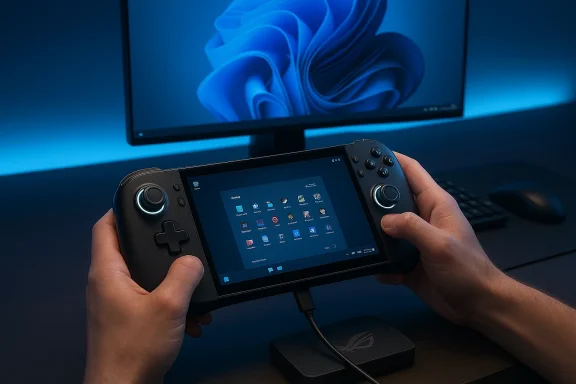
After three months with the ROG Xbox Ally X, the headline is simple: as a piece of portable gaming hardware it is a genuine leap forward—delivering sustained, high-frame-rate play and flexible docking options—but as a Windows 11 handheld it also exposes the platform’s fragility. The Ally X pairs flagship-grade internal components (an AMD Ryzen AI Z2 Extreme–class APU, up to 24 GB of LPDDR5X, a 1 TB M.2 SSD and an ~80 Wh battery) with a 7-inch 120 Hz IPS display and Xbox-style ergonomics, producing a handheld that plays like a compact gaming PC; yet day-to-day reliability, firmware/OS interactions, and chassis durability are uneven and must be actively managed by owners.
The Ally X arrived as ASUS’s premium Windows-first handheld in close partnership with Xbox: it is designed to give users the openness of Windows—full access to Xbox, Steam, Epic, and other launchers—inside a controller-first chassis. That combination solves one of the biggest constraints of console-style portability: software availability. Windows brings native anti-cheat compatibility and broad title support that closed handheld ecosystems often cannot match, and the Ally X’s spec sheet puts it in a different class than most earlier handhelds.
This review is a synthesis of hands-on testing across AAA and legacy titles, combined with a careful reading of community reports and troubleshooting threads that emerged after the device’s launch. That cross-checking is vital: the Ally X is hardware-forward, but many of the issues owners report trace back to how Windows 11, Microsoft security features, and OEM utilities interact with that hardware.
Why this matters: the combination of a high-refresh 120 Hz panel and a GPU/APU capable of sustaining higher clocks for longer sessions translates to visibly smoother input response and, for games that support high refresh, a clear competitive advantage. The built-in gyroscope also enhances precision for aiming in shooter titles—an unexpected but welcome improvement to handheld control ergonomics.
Beyond SAC, Windows Updates have introduced transient but serious reliability issues on some units: USB port dysfunctions during updates (interrupting charging), boot loops where the device restarts into repair flows, and sleep/resume failures that require forcible power cycles. These events underscore a core tension: Windows gives the Ally X freedom and broad compatibility, but the OS also introduces an attack surface of updates and security features that can break device functionality. Community troubleshooting and reporting corroborate multiple real-world instances of these symptoms.
However, if you demand plug-and-play, console-style simplicity and absolute reliability out of the box—where software updates are invisible and the device never needs security feature gymnastics—the Ally X may frustrate you. Windows 11’s strengths are simultaneously its risk vector: expect to manage Smart App Control and occasional update-induced hiccups. For buyers who are less tolerant of tinkering or dependent on guaranteed long-term durability for travel-heavy use, consider alternatives or plan for the overhead of support and potential RMAs. Community and support threads show that while many owners have smooth experiences, a non-trivial minority have faced serious failures that required service.
Source: NoobFeed ROG Xbox Ally X 3-Month Verdict: 120hz Gaming Power with Windows 11 Problems | NoobFeed
 Background
The Ally X arrived as ASUS’s premium Windows-first handheld in close partnership with Xbox: it is designed to give users the openness of Windows—full access to Xbox, Steam, Epic, and other launchers—inside a controller-first chassis. That combination solves one of the biggest constraints of console-style portability: software availability. Windows brings native anti-cheat compatibility and broad title support that closed handheld ecosystems often cannot match, and the Ally X’s spec sheet puts it in a different class than most earlier handhelds.This review is a synthesis of hands-on testing across AAA and legacy titles, combined with a careful reading of community reports and troubleshooting threads that emerged after the device’s launch. That cross-checking is vital: the Ally X is hardware-forward, but many of the issues owners report trace back to how Windows 11, Microsoft security features, and OEM utilities interact with that hardware.
What the Ally X Gets Right
Performance and frame-rate delivery
The Ally X’s core strength is performance density: in demanding modern titles the device maintains smooth frame rates at settings handily beyond what previous handhelds could sustain. In our extended sessions, contemporary AAA titles ran without dropped-frame stutters at settings that kept gameplay fluid; the device regularly hit 60 fps in heavy campaign situations and 90–120 fps in lighter multiplayer arenas. Older titles ran even higher—Borderlands 2 stayed above 120 fps in boss-heavy encounters during testing—illustrating that the Ally X can deliver both modern fidelity and legacy speed. These observations match broader early-adopter reports.Why this matters: the combination of a high-refresh 120 Hz panel and a GPU/APU capable of sustaining higher clocks for longer sessions translates to visibly smoother input response and, for games that support high refresh, a clear competitive advantage. The built-in gyroscope also enhances precision for aiming in shooter titles—an unexpected but welcome improvement to handheld control ergonomics.
Storage, memory, and multitasking headroom
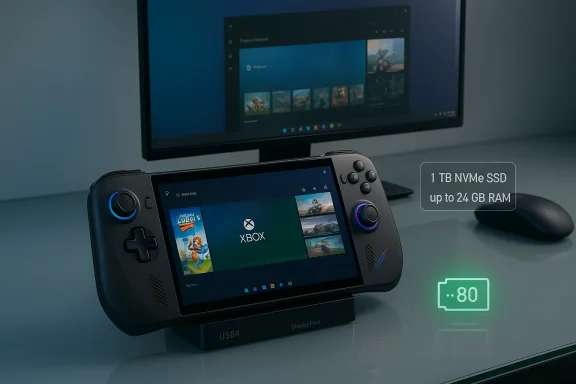
Top-tier Ally X SKUs ship with 1 TB of NVMe storage and up to 24 GB of LPDDR5X RAM. That’s a practical, not just headline, improvement. Modern AAA installs can consume hundreds of gigabytes (one blockbuster can approach ~400 GB), and the large SSD prevents frequent uninstall cycles. The 24 GB of RAM reduces swapping when you run background tasks—game launchers, overlays, streaming software, and voice chat—so the device behaves like a proper mini-PC rather than a constrained handheld. These hardware choices align with other detailed spec breakdowns seen in hands-on coverage and technical write-ups.Docking and desktop substitution
The Ally X is credible as a docked mini-PC. With a USB4/DisplayPort–capable port and a full-length M.2 slot on top SKUs, the Ally X can dock to a monitor with keyboard and mouse and act as the primary gaming machine for some users. When connected to a TV or external display, the Ally X behaves like a small desktop: full Windows, full launcher compatibility, and a controller-first shell when desired. This extendability is a meaningful differentiator versus handhelds that are strictly portable consoles.Screen: practical choices over marketing flash
ASUS elected to use a 7-inch 1080p IPS panel refreshable at 120 Hz rather than OLED, which drew complaints from those who expected deeper blacks and higher contrast. In practice the IPS panel provides predictable color, good peak brightness (helpful for outdoor use), and avoids OLED burn-in risk. Response times are low enough for fast-paced play, and the 120 Hz refresh brings the benefits of high-framerate gaming to a handheld form factor. If there’s a hardware gripe here, it’s the bezel width: thinner bezels would increase the apparent screen-to-body ratio without increasing footprint.Where the Ally X Trips Up
Windows 11: the operating-system problem, not the silicon
The most consistent source of headaches is not the Ally X’s hardware but Windows 11 and its ecosystem. Multiple owners and community threads documented interactions where Microsoft’s Smart App Control (SAC) and other Windows security features blocked ASUS’s device management tools (Armoury Crate SE) or refused to allow vendor helpers to launch—effectively preventing owners from using the performance profiles, firmware update tools, and controller remappings that make the handheld feel cohesive. The community’s interim workaround—disabling Smart App Control—restores functionality but weakens the security posture and is not an ideal long-term fix.Beyond SAC, Windows Updates have introduced transient but serious reliability issues on some units: USB port dysfunctions during updates (interrupting charging), boot loops where the device restarts into repair flows, and sleep/resume failures that require forcible power cycles. These events underscore a core tension: Windows gives the Ally X freedom and broad compatibility, but the OS also introduces an attack surface of updates and security features that can break device functionality. Community troubleshooting and reporting corroborate multiple real-world instances of these symptoms.
Build quality and mechanical durability
Internally, the Ally X’s components are class-leading, but the chassis does not always match that ambition. Owners report flexible plastics, creaks in the grip area, occasional joystick or button failures, noisy speakers, and problematic SD card reader heat. Our device did not develop catastrophic mechanical faults in three months, but the casing yielded under modest pressure and the grip area could creak when used intensively. The result is a feel that is excellent for comfort and ergonomics but less reassuring for long-term survivability in a commuter or travel use case. These are not isolated anecdotal notes: RMA and forum threads indicate multiple users have sent units for repair due to power or mechanical failures.Packaging, accessories, and out-of-box readiness
The box includes the handheld, a fixed-cable charger and a cardboard desk stand. A molded travel case is not included and is often sold separately (and frequently out of stock); that omission hurts portability—a core selling point. The fixed-cable charger is also a convenience miss: a detachable USB-C cable or a higher-compatibility compact adapter would be better for actual travel use. The included cardboard stand is serviceable for desktop mode but not travel-worthy. These are practical, low-cost misses that affect real-world ownership.Testing Notes: Games and Real-World Experience
Representative workloads
- Warhammer 40,000: Space Marine 2—campaign sections with dense action remained above 60 fps; lighter multiplayer maps ranged 90–120 fps.
- Borderlands 2 and Fallout 4—older engines ran at very high frame rates (Borderlands 2 maintained >120 fps in stress scenarios).
- Mixed launchers—Steam, Xbox app, and Epic all operated as expected so long as Armoury Crate and underlying services were running.
Thermals and battery life
Sustaining high clocks comes at a cost. Even with the ~80 Wh battery, expect 2–4 hours in demanding AAA titles unless you cap framerates, use aggressive upscaling, or game in a lower-power profile. For long sessions, plugging in or docking remains the practical way to go; the larger battery extends run times compared with earlier handhelds but does not eliminate the physics of high-power play. This is an important user-experience point: think of the Ally X as a high-performance device that can be portable, rather than a long-duration all-day handheld.Critical Analysis: Strengths, Risks, and Where ASUS and Microsoft Must Improve
Strengths (why the Ally X is compelling)
- Top-tier internal hardware: CPU/GPU headroom and 24 GB of RAM deliver desktop-like responsiveness in a handheld chassis.
- True Windows openness: full launcher compatibility and anti-cheat support make the Ally X a uniquely flexible portable for PC gamers.
- Docking potential: USB4/DP and M.2 expansion let it function as a compact desktop alternative for some workflows.
- 120 Hz panel with practical benefits: high refresh and bright IPS help competitive play and outside use without OLED burn-in concerns.
Risks and shortcomings (what buyers must weigh)
- OS fragility and update risk: Windows 11 features like Smart App Control and unpredictable updates can block Armoury Crate, break USB/charging during updates, and create boot or sleep failures. Until Microsoft and ASUS coordinate fixes, owners may face reliability pain. This is not theoretical; multiple community reports and troubleshooting guides document these exact failures.
- Chassis durability questions: the plastic back and grip creaks reveal a mismatch between internal performance and physical robustness; heavy users or travelers may see failures that require RMA.
- Accessory shortfalls: lack of an included travel case and a fixed-cable charger are frustrating omissions for a device whose primary promise is portable power.
The software-security tradeoff
Smart App Control exemplifies a systemic tension: protective OS measures can prevent malware but also block vendor-supplied, device-essential tools. For handhelds whose unique features depend on these vendor agents, the tradeoff becomes a false choice—owners either disable SAC to regain functionality or accept a degraded device experience. The right long-term fix requires coordinated vendor signing, Microsoft whitelisting, or deeper compatibility testing; community workarounds are brittle and insecure in the long run.Practical Advice: Buy, Patch, and Live with an Ally X
If you already own an Ally X or are deciding whether to buy, here is a practical checklist for minimizing pain and maximizing value.- Before turn-on: make sure you have a USB-C PD charger with a detachable cable and a travel case ready. The box contents are spare—plan to protect and power the device properly.
- Out-of-box setup: complete Windows Update and Armoury Crate SE installs while the unit is plugged in and in a stable environment. Do not let the battery approach empty during the update cycle.
- If Armoury Crate fails under Smart App Control:
- Try a reboot first.
- If that fails, temporarily disable Smart App Control (Windows Security → App & browser control → Smart App Control → Off), repair or reinstall Armoury Crate using the ASUS uninstall/reinstall flow, then monitor for fixes before re-enabling SAC. Be aware this reduces an OS security layer and is a trade-off.
- For sleep/resume or boot-loop problems: ensure firmware and system drivers are up to date, and document symptoms before contacting support—logs, timestamps, and steps to reproduce speed RMA triage. Community threads recommend full battery-charge cycles and safe-mode diagnostics while awaiting OEM patches.
- For sustained high-frame-rate play: use a framerate cap or fidelity scaling when portable to preserve battery life and temperature; dock for extended sessions where possible.
What ASUS and Microsoft Should Do Next
- ASUS should prioritize a signed, SAC-friendly distribution of Armoury Crate SE (or work with Microsoft for a targeted policy exception) and improve chassis rigidity on the next production run. The device’s premium internal parts deserve a correspondingly robust outer shell.
- Microsoft should refine Smart App Control heuristics and provide clearer, reversible administrator paths for OEM utilities that need elevated privileges to manage hardware. A cooperative whitelist or a streamlined certification track for device management tools would prevent the current cat-and-mouse between security and usability.
- Both companies should publish clearer, coordinated guidance for end users before and after updates that affect low-level hardware interactions—charging behavior during updates is a case where a small change to the update flow could avoid bricked devices or interrupted updates.
Final Verdict: For whom is the Ally X the right buy?
The Ally X is a compelling choice for PC gamers who prioritize raw portable performance, launcher flexibility, and docking versatility—and who are comfortable managing a Windows environment. If you want the ability to run full Windows libraries, play titles with platform-dependent anti-cheat, and occasionally dock to a monitor, the Ally X delivers an experience that handhelds from earlier generations simply cannot match. Hardware-wise, it is a success: the 120 Hz IPS display, 24 GB RAM option, and 1 TB SSD make it a performance-focused portable that behaves like a compact gaming PC.However, if you demand plug-and-play, console-style simplicity and absolute reliability out of the box—where software updates are invisible and the device never needs security feature gymnastics—the Ally X may frustrate you. Windows 11’s strengths are simultaneously its risk vector: expect to manage Smart App Control and occasional update-induced hiccups. For buyers who are less tolerant of tinkering or dependent on guaranteed long-term durability for travel-heavy use, consider alternatives or plan for the overhead of support and potential RMAs. Community and support threads show that while many owners have smooth experiences, a non-trivial minority have faced serious failures that required service.
Closing thoughts
The ROG Xbox Ally X is a bold, mostly successful attempt to bring desktop-class Windows gaming into the palm of your hands. It proves the concept: yes, a 7-inch handheld can be a serious AAA gaming machine, and yes, you can meaningfully replace some desktop use cases with a single compact device. But the experience is not frictionless. Buyers must accept a trade: hardware excellence matched with an ongoing need to manage Windows quirks, security controls, and accessory gaps. If ASUS and Microsoft execute coordinated fixes—signed OEM tooling, clearer SAC pathways, firmer chassis iterations—the Ally X’s next chapter could be the one where the promise of a truly portable Windows gaming PC is finally realized without compromise.Source: NoobFeed ROG Xbox Ally X 3-Month Verdict: 120hz Gaming Power with Windows 11 Problems | NoobFeed