

Microsoft’s handheld moment has finally arrived: the ROG Xbox Ally X pairs ASUS’ ROG handheld engineering with Microsoft’s Xbox front end to deliver a Windows 11 portable that promises console‑grade controls and near‑desktop PC power — but it still arrives with software rough edges, library caveats, and battery tradeoffs that matter to real buyers.
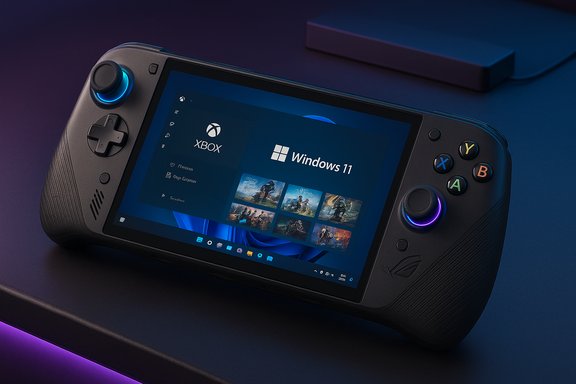
The ROG Xbox Ally X is the premium entry in ASUS’ new Xbox‑branded handheld family. It ships as a one‑piece, grip‑first Windows 11 device that boots into an Xbox‑centric full‑screen interface designed to look and behave more like a console while preserving full Windows openness for Steam, Epic, GOG, and other PC launchers. That hybrid identity — a console‑like shell over a full desktop OS — is the product’s defining promise and its central tension.
ASUS and Microsoft position the Ally X to be the most capable Windows handheld at launch: more RAM, a larger battery, a beefier APU, and a tuned cooling chassis compared with the base Ally. Independent hands‑ons and retail listings converge on the headline hardware: an AMD Ryzen AI Z2 Extreme (Z2 family) APU, up to 24 GB LPDDR5X, a 1 TB M.2 2280 SSD, an 80 Wh battery, and a 7‑inch 1080p 120 Hz touchscreen. Those specs are consistent across OEM materials and early third‑party reporting.
That layered approach is also a double‑edged sword. Because Windows is still the underlying OS, users will occasionally see Windows pop‑ups, driver prompts, or background launcher behaviors that interrupt gameplay. Several hands‑on reviews and community reports documented UI lag, occasional freezes, and sleep/resume fragility in early firmware builds, highlighting that the shell reduces friction but doesn’t erase the desktop’s legacy behaviors.
That said, not every Xbox purchase maps cleanly to a native handheld install. A number of Microsoft titles depend on Play Anywhere qualification to be downloadable; otherwise they’re reliant on cloud streaming. Cloud Gaming via Game Pass can bridge gaps, but it depends on a stable, low‑latency connection and still isn’t a full substitute for native installs when you want offline play or lower latency for competitive titles. Buyers who expect every Xbox purchase to run as a local install will find important limitations.
Comparisons matter:
For enthusiasts who prize flexibility, Game Pass convenience, and the ability to run full PC launchers in a comfortable handheld, the Ally X is a persuasive choice. For buyers who want a finished, console‑perfect handheld experience or the longest possible battery life without tinkering, patience remains a sensible posture: the product’s hardware is impressive, but the software and ecosystem must continue to mature for the Ally X’s full promise to be realized.
The Ally X proves Windows handhelds can be genuinely compelling hardware; whether they become mainstream depends on follow‑up — driver cadence, developer adoption of handheld profiles, and independent validation of the AI features long touted on paper. Treat this launch as a major milestone and an honest warning: the future of portable PC gaming looks powerful, but it will take iterative polish to feel as effortless as the consoles it emulates.
Source: saltmag.online ROG Xbox Ally X review: impressive power, frustrating flaws - (SALT) Magazine
 Background / Overview
The ROG Xbox Ally X is the premium entry in ASUS’ new Xbox‑branded handheld family. It ships as a one‑piece, grip‑first Windows 11 device that boots into an Xbox‑centric full‑screen interface designed to look and behave more like a console while preserving full Windows openness for Steam, Epic, GOG, and other PC launchers. That hybrid identity — a console‑like shell over a full desktop OS — is the product’s defining promise and its central tension.ASUS and Microsoft position the Ally X to be the most capable Windows handheld at launch: more RAM, a larger battery, a beefier APU, and a tuned cooling chassis compared with the base Ally. Independent hands‑ons and retail listings converge on the headline hardware: an AMD Ryzen AI Z2 Extreme (Z2 family) APU, up to 24 GB LPDDR5X, a 1 TB M.2 2280 SSD, an 80 Wh battery, and a 7‑inch 1080p 120 Hz touchscreen. Those specs are consistent across OEM materials and early third‑party reporting.
Design and controls: Xbox ergonomics in your hands
Form factor and weight
The Ally X adopts familiar Xbox ergonomics: staggered thumbstick placement, Xbox‑style button geometry, and extended textured grips that aim to reduce hand fatigue during long sessions. The grips are designed to feel snug, and the device is well balanced despite being heavier than some rivals — at roughly 1.5–1.6 pounds the unit sits closer to Valve’s Steam Deck in heft than to thinner devices like Switch‑class handhelds. Early impressions consistently praise the physical design for comfort and long‑session usability.Inputs and finishing
Buttons offer crisp travel and a satisfying click, and the thumbsticks are arranged in a staggered layout to echo the Xbox controller familiar to console players. Decorative RGB under the sticks and a built‑in fingerprint reader for Windows Hello add polish and convenience. Some reviewers noted minor tactile complaints about screen feel and certain plastics, but the overall consensus is that ASUS refined the Ally chassis substantially compared with prior ROG handhelds.Turning it on: Windows 11 with an Xbox full‑screen shell
Dual identity: benefits and friction
The Ally X boots through a Windows 11 setup and then layers a fullscreen Xbox interface ASUS calls the “Xbox Full‑Screen” experience. The idea is to give a console‑like launcher atop Windows, suppressing desktop clutter and presenting Game Pass, your local library, and Cloud Gaming as primary entry points. When it works, the shell dramatically improves pick‑up‑and‑play flow and helps the Ally X feel less like a PC and more like a handheld console.That layered approach is also a double‑edged sword. Because Windows is still the underlying OS, users will occasionally see Windows pop‑ups, driver prompts, or background launcher behaviors that interrupt gameplay. Several hands‑on reviews and community reports documented UI lag, occasional freezes, and sleep/resume fragility in early firmware builds, highlighting that the shell reduces friction but doesn’t erase the desktop’s legacy behaviors.
Game access through the Xbox UI
The Xbox Full‑Screen interface exposes three core entry points: Game Pass, your local library, and Cloud Gaming. Important caveat: only Game Pass and Play Anywhere titles are available for direct download from the Xbox UI. Other purchases from the Microsoft Store may not qualify as Play Anywhere, and legacy backward‑compatible Xbox 360/original Xbox titles are not downloadable in native form on the Ally X. For non‑Play Anywhere PC titles, Steam and Epic must be used via their native clients — which the device supports because it runs a full Windows stack.Game library: native installs, cloud fills, and practical limits
Running Windows natively is the Ally X’s key advantage: it can install Steam, Epic, GOG, Battle.net, and other PC launchers without sandboxing restrictions. That makes the handheld highly flexible for players who own large multi‑store libraries, want to run mods, or need desktop tools on the go. Early coverage emphasized this ecosystem openness as the Ally X’s core value proposition.That said, not every Xbox purchase maps cleanly to a native handheld install. A number of Microsoft titles depend on Play Anywhere qualification to be downloadable; otherwise they’re reliant on cloud streaming. Cloud Gaming via Game Pass can bridge gaps, but it depends on a stable, low‑latency connection and still isn’t a full substitute for native installs when you want offline play or lower latency for competitive titles. Buyers who expect every Xbox purchase to run as a local install will find important limitations.
How games run on the Ally X: performance, display, and variability
Real‑world performance profile
The Ally X’s AMD Ryzen AI Z2 Extreme gives it a measurable edge over earlier handheld APUs and many competitors in sustained GPU‑bound workloads. In practice, that translates to solid framerates in fast‑paced shooters and many action‑adventure titles at reasonable settings, but it does not turn the device into a desktop replacement. Large open world RPGs, Soulslikes during heavy combat, and the most demanding ray‑traced titles can show inconsistent framerates, microstutter, or require quality compromises to hit stable 60 fps. Multiple early reviews and benchmarks found meaningful uplifts versus the non‑X models but stopped short of calling the Ally X a transformative, desktop‑class performer.Display tradeoffs: 1080p 120 Hz LED vs. OLED
The Ally X uses a 7‑inch 1080p LED (IPS) panel with a 120 Hz refresh rate. That high refresh rate benefits competitive and fast‑paced games, and colors and contrast are competent for a handheld form factor. However, several reviewers noted that an OLED panel on a competitor can produce deeper blacks and a more vivid palette; ASUS prioritized predictable power draw and thermal characteristics over OLED’s richer contrast when choosing an LED solution for the Ally X. If you prioritize absolute picture richness, OLED competitors may still have an edge.Battery life, power modes and thermal trade‑offs
Practical numbers and profiles
Battery life on the Ally X varies dramatically with workload and power profile:- Turbo mode (~25 W sustained APU draw): expect heavy AAA sessions to fall toward ~2 hours under demanding loads.
- Performance mode (~17 W): many titles extend to around 3 hours depending on scene complexity and frame caps.
- Lower wattage / power saver modes: can stretch runtime considerably but at the cost of reduced framerates and visual quality.
Thermals and sustained performance
ASUS’ thermal design and a larger 80 Wh battery on the Ally X help deliver better sustained clocks than smaller handhelds, but physics still applies: sustained high TDP operation results in warm surfaces and eventual thermal throttling for the most GPU‑heavy workloads. Long sessions will benefit from docking or plugging into a higher‑wattage USB‑PD charger for consistent performance.AI features, Copilot, and unverifiable claims
Microsoft’s Copilot for Gaming and on‑device AI features appear on the Ally X in beta form, and ASUS highlights an integrated NPU/TOPS figure in marketing materials. Early impressions are mixed: Copilot offers quick in‑game guidance that can be helpful for newcomers but may feel generic to experienced players, and the practical benefits of an on‑device NPU for gaming (Auto SR, frame post‑processing, or shader work) remain unproven in independent testing at launch. Multiple independent outlets and community reports flag NPU/TOPS claims as promising but not yet validated by reproducible benchmarks; treat those marketing points as potential future advantages rather than day‑one differentiators.Where the Ally X shines — and where it stumbles
Strengths
- Comfort and physical ergonomics: A well‑executed Xbox‑style layout that supports multi‑hour sessions.
- Windows openness: Native support for Steam, Epic, GOG and PC tools — no sandboxing.
- Higher sustained performance: A measurable uplift over earlier handhelds in GPU‑bound scenarios thanks to the Z2 Extreme and improved cooling.
- Upgradeability and I/O: Full‑length M.2 2280 storage, microSD UHS‑II for expansion, and USB4/DisplayPort capability make the Ally X versatile for docking and storage upgrades.
Weaknesses and practical risks
- Library limits via Xbox UI: Only Game Pass and Play Anywhere titles are downloadable directly from the Xbox shell; other Xbox purchases may require cloud streaming or the original launcher.
- Software polish: UI lags, sleep/resume inconsistencies, and occasional crashes in early firmware reduce the out‑of‑box, console‑like experience.
- Battery life: High‑Watt play is power‑hungry; plan for 2–3‑hour sessions under heavy loads and expect to rely on power profiles or cloud streaming for long sessions.
- Unverified AI claims: NPU/TOPS marketing and promised Auto SR benefits need independent validation; buyers should be cautious using AI as a purchase rationale today.
Pricing, availability, and competition
The Ally X launched at an MSRP of $999.99, positioning it above value handhelds like Valve’s mainstream Steam Deck SKUs and the Switch 2, and beneath some premium compact gaming laptops. It’s available through select retailers (Microsoft Store, ASUS, Best Buy among channels) but initial stock and allocation were uneven at launch. Early resale pricing volatility and regional allocation differences mean buyers should shop carefully and confirm SKU details before purchase.Comparisons matter:
- Versus Steam Deck: Ally X runs Windows natively and integrates Xbox/Game Pass, but costs more and trades some pick‑up‑and‑play simplicity for Windows flexibility.
- Versus Nintendo Switch 2: Switch 2 is lighter and offers detachable controllers and a different first‑party library; Ally X prioritizes PC compatibility and raw handheld performance.
- Versus other Windows handhelds (Lenovo Legion Go 2, Aya Neo): Ally X distinguishes itself with more RAM, larger battery, USB4 docking, and focused Xbox front‑end integration. OLED competitors may still win on display deep‑black quality.
Who should buy the ROG Xbox Ally X
The Ally X is best for players who:- Are heavily invested in Xbox Game Pass or Play Anywhere and value instant access to large catalogs on a handheld.
- Want a Windows handheld that can run multiple PC launchers natively, mod titles, and act as a portable productivity machine when needed.
- Prioritize ergonomics and upgradeability (M.2 2280 SSD, USB4 docking) and prefer a controller‑first device that still keeps Windows power available.
Technical specifications and quick facts
- Processor: AMD Ryzen AI Z2 Extreme (Ally X premium SKU).
- RAM: Up to 24 GB LPDDR5X (soldered in many Ally X SKUs).
- Storage: 1 TB M.2 2280 NVMe SSD (user‑upgradeable).
- Display: 7‑inch 1080p LED (IPS), 120 Hz.
- Battery: ~80 Wh (Ally X).
- Ports: Dual USB‑C (one USB4/DP on Ally X), 3.5mm audio, microSD (UHS‑II).
- Weight: ~1.5–1.6 pounds (varies by SKU and reported sources).
- OS: Windows 11 with Xbox Full‑Screen Experience layered on top.
- MSRP (Ally X): $999.99.
Practical tips for buyers and early adopters
- Update Windows, the Xbox PC app, and Armoury Crate SE before heavy use to get the most stable full‑screen experience and driver fixes. Early hands‑on testing showed staged rollouts and that Insider builds may receive features first.
- Use Performance/Turbo profiles while plugged in, and switch to Performance or Silent profiles on battery. Cap framerates where acceptable to save power.
- Prefer Hibernate over Sleep if you want multiple game states preserved without battery drain; sleep/resume quirks were reported in early units.
- If you plan to rely on the device for desktop use, invest in a USB4/DisplayPort‑capable dock and a high‑wattage PD charger. The Ally X’s Thunderbolt‑class I/O unlocks more productive docking scenarios.
- Treat NPU/AI features as a future bonus: don’t buy primarily for Auto SR or unspecified on‑device AI gains without independent validation.
Conclusion
The ROG Xbox Ally X is a bold, hardware‑first statement in the emerging Windows handheld market: comfortable Xbox‑style ergonomics, strong native Windows compatibility, and a higher sustained performance ceiling make it the most capable single‑piece Windows handheld available at launch. Yet that capability comes with clear compromises — a premium price, limited direct Xbox‑UI downloads for non‑Play‑Anywhere purchases, ongoing software polish needs, and battery tradeoffs that limit marathon unplugged sessions.For enthusiasts who prize flexibility, Game Pass convenience, and the ability to run full PC launchers in a comfortable handheld, the Ally X is a persuasive choice. For buyers who want a finished, console‑perfect handheld experience or the longest possible battery life without tinkering, patience remains a sensible posture: the product’s hardware is impressive, but the software and ecosystem must continue to mature for the Ally X’s full promise to be realized.
The Ally X proves Windows handhelds can be genuinely compelling hardware; whether they become mainstream depends on follow‑up — driver cadence, developer adoption of handheld profiles, and independent validation of the AI features long touted on paper. Treat this launch as a major milestone and an honest warning: the future of portable PC gaming looks powerful, but it will take iterative polish to feel as effortless as the consoles it emulates.
Source: saltmag.online ROG Xbox Ally X review: impressive power, frustrating flaws - (SALT) Magazine
