

Microsoft and NVIDIA used Computex 2026 and Build 2026 to introduce RTX Spark, a new Arm-based Windows PC platform whose launch required Microsoft to tune Windows 11’s scheduler, memory management, Prism emulation, and power behavior for a 20-core heterogeneous CPU. The headline is not merely that Windows is being optimized for one flashy NVIDIA chip. It is that Microsoft is again admitting, through engineering rather than marketing, that the old assumptions underneath PC performance are no longer enough.
For years, Windows performance work could be sold as a matter of faster CPUs, better drivers, and fewer background tasks. RTX Spark forces a different question: can Windows become smart enough to understand the intent of a workload before the user notices the machine making bad decisions? That question matters well beyond one developer box or one generation of AI-branded laptops, because every modern PC is becoming a negotiation between CPU cores, GPU engines, NPUs, emulation layers, memory bandwidth, battery limits, and security boundaries.
The Windows scheduler has always been one of those invisible pieces of plumbing that only becomes interesting when it fails. Users rarely think about which core is handling a browser tab, a compile job, a video export, or an emulator. They simply notice whether the machine feels responsive, whether the fans spin up, and whether battery life collapses under load.
RTX Spark makes that invisibility harder to maintain. NVIDIA’s platform combines a Grace CPU, Blackwell-class graphics, large unified memory, and local AI ambitions into a Windows-on-Arm machine designed for creators, developers, gamers, and personal AI agents. That is not a conventional PC with a discrete GPU bolted beside a familiar x86 processor. It is closer to a compact workstation architecture being squeezed into consumer and developer hardware.
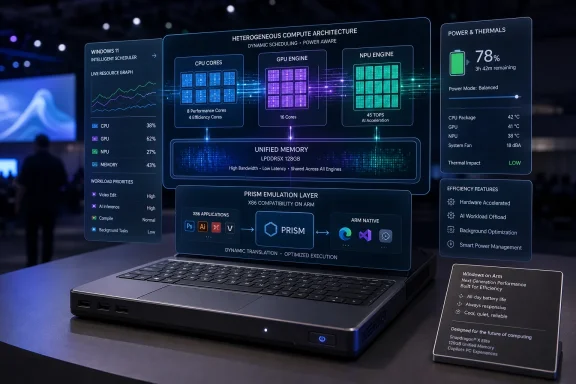
Microsoft’s answer is Workload Profile Scheduling, or WPS, a mechanism meant to help Windows scale work more intelligently across RTX Spark’s 20 CPU cores. The premise is straightforward: not all tasks should be treated equally, and not all cores should be used the same way at the same time. The hard part is teaching the operating system to make those calls consistently without turning performance into a casino.
That is why this story is more important than a vendor-specific optimization note. Windows has spent decades thriving on hardware diversity, but the diversity is now deeper than “Intel versus AMD” or “integrated versus discrete graphics.” The operating system has to understand heterogeneous compute as a normal condition, not a special case.
That makes Windows compatibility the center of gravity. NVIDIA can promise CUDA, TensorRT, RTX graphics, DLSS, and AI acceleration, but a Windows PC still lives or dies by whether it runs the software users already depend on. On Arm, that means native apps where possible and Microsoft’s Prism emulator where necessary.
The marketing line is easy: every Windows app should work. The engineering reality is harsher. Emulation performance, driver compatibility, anti-cheat systems, niche utilities, plug-ins, installers, shell extensions, and old enterprise software all have ways of turning platform promises into support tickets.
That is why Microsoft’s scheduler work belongs in the same conversation as Prism tuning. If an x86 app is running through translation on a heterogeneous Arm system while the GPU is servicing an AI workload and a local agent is monitoring context in the background, Windows has more than one bottleneck to manage. The scheduler is no longer just allocating time slices. It is mediating the credibility of the entire platform.
A modern laptop can be technically powerful and still feel irritating if it sends trivial work to the wrong cores, wakes hardware unnecessarily, burns energy during background tasks, or lets a long-running AI process interfere with foreground responsiveness. The user does not care whether the culprit is a scheduler heuristic, a power plan, an application thread pool, or firmware policy. The user experiences it as lag, heat, noise, or lost battery life.
This is where Workload Profile Scheduling could matter beyond RTX Spark. Microsoft says the Windows foundation work around this platform will produce system performance improvements that benefit all Windows 11 PCs, not just the new NVIDIA machines. That kind of claim deserves skepticism until independent benchmarks arrive, but it is plausible in principle because scheduler intelligence is portable knowledge.
Windows already has to juggle hybrid x86 CPUs from Intel, power-sensitive AMD laptops, Qualcomm Snapdragon X systems, NPUs, integrated GPUs, discrete GPUs, and background AI features. The RTX Spark work may give Microsoft a more explicit framework for classifying workloads and choosing where they belong. If that framework matures inside Windows rather than living as a one-off vendor path, the dividend could spread.
The risk is that “optimized for RTX Spark” becomes another way of saying “best on the machine used in the demo.” Windows history is full of features that looked elegant under controlled conditions and messy in the field. The scheduler’s job is to perform well in the field, where users run old apps, bad drivers, browser tabs by the dozen, Teams calls, game launchers, endpoint agents, and half-forgotten tray utilities.
That turns background work into a strategic layer of the operating system. In the old model, background tasks were often nuisances to be suppressed. In the AI PC model, background intelligence is part of the product promise. The machine is supposed to do more on the user’s behalf without feeling like it has been hijacked.
That is a scheduler nightmare if handled crudely. A local agent debugging code, summarizing documents, or indexing project files might be genuinely useful, but it cannot be allowed to ruin a video call, a game, or a compile that the user actually cares about. Nor can it simply be starved until it becomes useless.
RTX Spark’s appeal depends on this balance. NVIDIA can deliver a large pool of local AI compute, and Microsoft can wrap it in Windows integration, but the lived experience will be determined by policy. Which tasks get priority? Which tasks get deferred? Which hardware blocks wake up? Which operations stay local? Which ones require user consent? The scheduler is becoming part of the trust model.
Unified memory can make certain workloads easier and faster by reducing the friction of moving data between CPU and GPU memory pools. For AI developers and creative applications, that can be a major advantage. Large models, media assets, and simulation data benefit when the system can treat memory less like a set of isolated islands.
But unified memory also makes operating-system policy more important. If CPU, GPU, and AI workloads share a large memory address space, Windows must be good at deciding not only where compute runs, but how memory pressure is handled. Poor choices can create stalls that look like mysterious slowdowns rather than obvious failures.
This is one reason Adobe’s reported work to rearchitect Photoshop and Premiere for RTX Spark matters. Hardware and OS improvements are only half the equation. Flagship applications need to understand the platform well enough to exploit it without overcommitting resources or assuming desktop-class power envelopes.
Windows has been here before in a different form. New hardware capabilities often arrive before the software ecosystem fully knows what to do with them. The difference now is that the platform transition is not just about performance APIs. It is about making Windows feel coherent across native Arm code, translated x86 code, local AI runtimes, GPU acceleration, and memory-sharing behavior.
The uncomfortable truth is that compatibility claims are always broader than compatibility reality. Most users do not run synthetic compatibility suites. They run their specific apps, their specific plug-ins, their specific games, their specific VPN clients, and their specific corporate security stack. One failure can define the whole machine.
Scheduler improvements can help translated apps by putting the right work on the right cores at the right moments, but they cannot solve every compatibility issue. Some problems require native Arm builds. Some require driver support. Some require vendors to update ancient assumptions. Some may not be solvable without abandoning software that should have been retired years ago.
Still, better Prism behavior could make the difference between RTX Spark feeling experimental and feeling viable. Windows on Arm has improved substantially in recent years, but the burden of proof remains on Microsoft and its hardware partners. Apple reset user expectations with its own Arm transition by pairing silicon, OS, and app migration into a coherent story. Microsoft has to do something harder: achieve coherence across a far messier ecosystem.
Will endpoint detection tools behave correctly on RTX Spark? Will VPN clients and smart-card middleware support the platform? Will line-of-business apps run natively, under Prism, or not at all? Will device management policies expose enough control over local AI agents and hardware acceleration? Will users understand when data is processed locally versus in the cloud?
Microsoft’s Surface RTX Spark Dev Box is wisely aimed at developers first. That gives the ecosystem a testbed before the platform is pushed broadly into enterprise fleets. Developers can use it to port applications, tune local AI workflows, and discover weird behavior before a procurement department buys hundreds of laptops on the strength of a keynote.
The enterprise opportunity is real. A Windows machine with strong local AI performance, large unified memory, and familiar management hooks could be valuable for software teams, data scientists, creative departments, and regulated organizations that want more processing to happen on-device. But enterprise IT is allergic to platforms that require special pleading. If RTX Spark needs too many exceptions, it will remain a niche developer and creator machine rather than a fleet candidate.
But the path from vendor-specific tuning to broad benefit is not automatic. RTX Spark’s architecture is unusually specific: Arm CPU cores, NVIDIA GPU technology, unified memory, local AI acceleration, and Windows-on-Arm compatibility demands. Some scheduler insights may generalize; others may be tightly bound to the platform.
The best outcome would be a more capable Windows scheduling framework that vendors can describe through firmware, drivers, and performance profiles without fragmenting the user experience. The worst outcome would be a growing pile of platform-specific optimizations where each chipmaker gets its own magic path and Windows becomes harder to reason about.
Microsoft has an incentive to avoid the worst outcome. Windows remains valuable because it abstracts hardware variety better than any other desktop operating system at scale. If AI PCs turn that variety into chaos, users and developers will blame Windows, not the footnotes in a silicon vendor’s architecture brief.
The absence of independent benchmarks matters here. Keynote numbers and vendor demos can show potential, but they do not answer the practical questions: how does RTX Spark behave after a week of real use, with background services installed, battery aging, browser tabs open, and software that was not curated for a demo? Until reviewers and developers can test shipping hardware, the right posture is interested skepticism.
RTX Spark is a forcing function. To make it work well, Microsoft has to improve scheduling, power behavior, emulation, memory management, security primitives, and developer tooling in concert. These are not cosmetic changes. They reach into the machinery that determines whether Windows can credibly host the next wave of local computing.
That also explains why this moment feels different from ordinary OEM collaboration. Microsoft is not merely certifying a new laptop design. It is helping create a platform story in which Windows becomes the front end for local AI agents and NVIDIA supplies much of the accelerated compute stack underneath.
There is strategic tension in that arrangement. Microsoft wants Windows to remain the neutral platform for many silicon vendors. NVIDIA wants its stack to become the obvious best place to run AI and graphics workloads. Users want the machine to work. Developers want performance without rewriting everything twice. The scheduler sits in the middle of that tension, a technical mechanism carrying strategic weight.
But developer enthusiasm does not guarantee consumer success. Windows users have seen too many “future of the PC” moments arrive with caveats. The AI PC label itself has been stretched across machines whose practical AI advantage is not always obvious. RTX Spark must show that local AI and heterogeneous scheduling produce everyday wins, not just impressive spec sheets.
Those wins might be subtle. Faster AI-assisted editing in creative apps. Better local inference for developer agents. More responsive multitasking during GPU-heavy work. Longer battery life when background intelligence is active. Smoother emulation for legacy apps. Less thermal drama under mixed workloads.
Subtle wins are harder to market than raw performance numbers, but they are what make a platform stick. A PC that quietly makes better decisions earns trust. A PC that occasionally performs miracles but often behaves unpredictably becomes another enthusiast curiosity.
That is a big ask, but it is also the right battlefield for Microsoft. Windows’ advantage has never been elegance in the abstract. It has been breadth: the ability to run on strange hardware, support old software, host new software, and keep an enormous ecosystem moving forward without a clean break.
RTX Spark tests whether that advantage still works in the AI era. If Microsoft can absorb NVIDIA’s architecture into Windows in a way that improves scheduling for everyone, the platform gets stronger. If it produces yet another island of special optimization, the PC ecosystem gets faster on paper and more fragmented in practice.
For years, Windows performance work could be sold as a matter of faster CPUs, better drivers, and fewer background tasks. RTX Spark forces a different question: can Windows become smart enough to understand the intent of a workload before the user notices the machine making bad decisions? That question matters well beyond one developer box or one generation of AI-branded laptops, because every modern PC is becoming a negotiation between CPU cores, GPU engines, NPUs, emulation layers, memory bandwidth, battery limits, and security boundaries.
 Microsoft Is Rewriting the Rules Because the Hardware Stopped Being Simple
The Windows scheduler has always been one of those invisible pieces of plumbing that only becomes interesting when it fails. Users rarely think about which core is handling a browser tab, a compile job, a video export, or an emulator. They simply notice whether the machine feels responsive, whether the fans spin up, and whether battery life collapses under load.RTX Spark makes that invisibility harder to maintain. NVIDIA’s platform combines a Grace CPU, Blackwell-class graphics, large unified memory, and local AI ambitions into a Windows-on-Arm machine designed for creators, developers, gamers, and personal AI agents. That is not a conventional PC with a discrete GPU bolted beside a familiar x86 processor. It is closer to a compact workstation architecture being squeezed into consumer and developer hardware.
Microsoft’s answer is Workload Profile Scheduling, or WPS, a mechanism meant to help Windows scale work more intelligently across RTX Spark’s 20 CPU cores. The premise is straightforward: not all tasks should be treated equally, and not all cores should be used the same way at the same time. The hard part is teaching the operating system to make those calls consistently without turning performance into a casino.
That is why this story is more important than a vendor-specific optimization note. Windows has spent decades thriving on hardware diversity, but the diversity is now deeper than “Intel versus AMD” or “integrated versus discrete graphics.” The operating system has to understand heterogeneous compute as a normal condition, not a special case.
RTX Spark Is a Windows-on-Arm Test That NVIDIA Cannot Afford to Flunk
NVIDIA’s move into Windows PC silicon carries an obvious strategic ambition. The company wants its AI and graphics stack to live not only in data centers and gaming rigs, but in everyday machines that can run local models, developer tools, creative workloads, and agentic software. RTX Spark is being positioned as the PC counterpart to a broader AI-computing worldview: local compute close to the user, backed by NVIDIA software and Windows reach.That makes Windows compatibility the center of gravity. NVIDIA can promise CUDA, TensorRT, RTX graphics, DLSS, and AI acceleration, but a Windows PC still lives or dies by whether it runs the software users already depend on. On Arm, that means native apps where possible and Microsoft’s Prism emulator where necessary.
The marketing line is easy: every Windows app should work. The engineering reality is harsher. Emulation performance, driver compatibility, anti-cheat systems, niche utilities, plug-ins, installers, shell extensions, and old enterprise software all have ways of turning platform promises into support tickets.
That is why Microsoft’s scheduler work belongs in the same conversation as Prism tuning. If an x86 app is running through translation on a heterogeneous Arm system while the GPU is servicing an AI workload and a local agent is monitoring context in the background, Windows has more than one bottleneck to manage. The scheduler is no longer just allocating time slices. It is mediating the credibility of the entire platform.
The Scheduler Has Become the New Battery Manager
For mainstream users, the most visible effect of smarter scheduling may not be peak performance. It may be fewer moments where the PC behaves stupidly.A modern laptop can be technically powerful and still feel irritating if it sends trivial work to the wrong cores, wakes hardware unnecessarily, burns energy during background tasks, or lets a long-running AI process interfere with foreground responsiveness. The user does not care whether the culprit is a scheduler heuristic, a power plan, an application thread pool, or firmware policy. The user experiences it as lag, heat, noise, or lost battery life.
This is where Workload Profile Scheduling could matter beyond RTX Spark. Microsoft says the Windows foundation work around this platform will produce system performance improvements that benefit all Windows 11 PCs, not just the new NVIDIA machines. That kind of claim deserves skepticism until independent benchmarks arrive, but it is plausible in principle because scheduler intelligence is portable knowledge.
Windows already has to juggle hybrid x86 CPUs from Intel, power-sensitive AMD laptops, Qualcomm Snapdragon X systems, NPUs, integrated GPUs, discrete GPUs, and background AI features. The RTX Spark work may give Microsoft a more explicit framework for classifying workloads and choosing where they belong. If that framework matures inside Windows rather than living as a one-off vendor path, the dividend could spread.
The risk is that “optimized for RTX Spark” becomes another way of saying “best on the machine used in the demo.” Windows history is full of features that looked elegant under controlled conditions and messy in the field. The scheduler’s job is to perform well in the field, where users run old apps, bad drivers, browser tabs by the dozen, Teams calls, game launchers, endpoint agents, and half-forgotten tray utilities.
Local AI Turns Background Work Into a First-Class Citizen
The agentic PC pitch changes the scheduler problem because AI agents are not always foreground applications. They may listen, index, summarize, search, automate, infer, and wait. They may need bursts of compute at moments the user did not explicitly initiate. They may also be governed by new security boundaries that determine what they can access and when.That turns background work into a strategic layer of the operating system. In the old model, background tasks were often nuisances to be suppressed. In the AI PC model, background intelligence is part of the product promise. The machine is supposed to do more on the user’s behalf without feeling like it has been hijacked.
That is a scheduler nightmare if handled crudely. A local agent debugging code, summarizing documents, or indexing project files might be genuinely useful, but it cannot be allowed to ruin a video call, a game, or a compile that the user actually cares about. Nor can it simply be starved until it becomes useless.
RTX Spark’s appeal depends on this balance. NVIDIA can deliver a large pool of local AI compute, and Microsoft can wrap it in Windows integration, but the lived experience will be determined by policy. Which tasks get priority? Which tasks get deferred? Which hardware blocks wake up? Which operations stay local? Which ones require user consent? The scheduler is becoming part of the trust model.
Unified Memory Raises the Stakes for Windows
The Surface RTX Spark Dev Box announcement gives the clearest view of Microsoft’s near-term target: a compact developer machine with up to 1 petaflop of AI compute and 128 GB of unified memory shared across CPU and GPU. That memory model is one of the most consequential parts of the platform.Unified memory can make certain workloads easier and faster by reducing the friction of moving data between CPU and GPU memory pools. For AI developers and creative applications, that can be a major advantage. Large models, media assets, and simulation data benefit when the system can treat memory less like a set of isolated islands.
But unified memory also makes operating-system policy more important. If CPU, GPU, and AI workloads share a large memory address space, Windows must be good at deciding not only where compute runs, but how memory pressure is handled. Poor choices can create stalls that look like mysterious slowdowns rather than obvious failures.
This is one reason Adobe’s reported work to rearchitect Photoshop and Premiere for RTX Spark matters. Hardware and OS improvements are only half the equation. Flagship applications need to understand the platform well enough to exploit it without overcommitting resources or assuming desktop-class power envelopes.
Windows has been here before in a different form. New hardware capabilities often arrive before the software ecosystem fully knows what to do with them. The difference now is that the platform transition is not just about performance APIs. It is about making Windows feel coherent across native Arm code, translated x86 code, local AI runtimes, GPU acceleration, and memory-sharing behavior.
Prism Is the Compatibility Layer Everyone Will Blame
Microsoft’s Prism emulator has become one of the quiet pillars of Windows on Arm. Its job is thankless: if it works, users forget it exists; if it fails, the entire platform gets blamed. RTX Spark will put Prism under a brighter spotlight because NVIDIA’s pitch depends on making Arm-based Windows feel less like a compromise.The uncomfortable truth is that compatibility claims are always broader than compatibility reality. Most users do not run synthetic compatibility suites. They run their specific apps, their specific plug-ins, their specific games, their specific VPN clients, and their specific corporate security stack. One failure can define the whole machine.
Scheduler improvements can help translated apps by putting the right work on the right cores at the right moments, but they cannot solve every compatibility issue. Some problems require native Arm builds. Some require driver support. Some require vendors to update ancient assumptions. Some may not be solvable without abandoning software that should have been retired years ago.
Still, better Prism behavior could make the difference between RTX Spark feeling experimental and feeling viable. Windows on Arm has improved substantially in recent years, but the burden of proof remains on Microsoft and its hardware partners. Apple reset user expectations with its own Arm transition by pairing silicon, OS, and app migration into a coherent story. Microsoft has to do something harder: achieve coherence across a far messier ecosystem.
Enterprise IT Will Care Less About the Keynote and More About the Failure Modes
For sysadmins, RTX Spark is not primarily a dazzling AI workstation story. It is another platform to validate, secure, image, patch, inventory, and explain to users. The scheduler work is interesting, but enterprise adoption will be governed by boring questions that determine whether a machine survives contact with the help desk.Will endpoint detection tools behave correctly on RTX Spark? Will VPN clients and smart-card middleware support the platform? Will line-of-business apps run natively, under Prism, or not at all? Will device management policies expose enough control over local AI agents and hardware acceleration? Will users understand when data is processed locally versus in the cloud?
Microsoft’s Surface RTX Spark Dev Box is wisely aimed at developers first. That gives the ecosystem a testbed before the platform is pushed broadly into enterprise fleets. Developers can use it to port applications, tune local AI workflows, and discover weird behavior before a procurement department buys hundreds of laptops on the strength of a keynote.
The enterprise opportunity is real. A Windows machine with strong local AI performance, large unified memory, and familiar management hooks could be valuable for software teams, data scientists, creative departments, and regulated organizations that want more processing to happen on-device. But enterprise IT is allergic to platforms that require special pleading. If RTX Spark needs too many exceptions, it will remain a niche developer and creator machine rather than a fleet candidate.
The “All PCs Benefit” Claim Is Plausible, but It Needs Proof
Microsoft’s suggestion that broader Windows 11 PCs will benefit from this work is the most interesting claim and the one that deserves the most caution. Scheduler and power-management improvements often do migrate across hardware classes. A better model for identifying workload intent could help Intel, AMD, Qualcomm, and NVIDIA systems alike.But the path from vendor-specific tuning to broad benefit is not automatic. RTX Spark’s architecture is unusually specific: Arm CPU cores, NVIDIA GPU technology, unified memory, local AI acceleration, and Windows-on-Arm compatibility demands. Some scheduler insights may generalize; others may be tightly bound to the platform.
The best outcome would be a more capable Windows scheduling framework that vendors can describe through firmware, drivers, and performance profiles without fragmenting the user experience. The worst outcome would be a growing pile of platform-specific optimizations where each chipmaker gets its own magic path and Windows becomes harder to reason about.
Microsoft has an incentive to avoid the worst outcome. Windows remains valuable because it abstracts hardware variety better than any other desktop operating system at scale. If AI PCs turn that variety into chaos, users and developers will blame Windows, not the footnotes in a silicon vendor’s architecture brief.
The absence of independent benchmarks matters here. Keynote numbers and vendor demos can show potential, but they do not answer the practical questions: how does RTX Spark behave after a week of real use, with background services installed, battery aging, browser tabs open, and software that was not curated for a demo? Until reviewers and developers can test shipping hardware, the right posture is interested skepticism.
NVIDIA Is Forcing Microsoft to Compete With Its Own Past
The deeper story is that NVIDIA’s entrance puts pressure on Microsoft to make Windows feel modern at the system level. For years, Microsoft has layered new experiences onto Windows while preserving enormous backward compatibility underneath. That trade-off made Windows dominant, but it also made the platform difficult to transform.RTX Spark is a forcing function. To make it work well, Microsoft has to improve scheduling, power behavior, emulation, memory management, security primitives, and developer tooling in concert. These are not cosmetic changes. They reach into the machinery that determines whether Windows can credibly host the next wave of local computing.
That also explains why this moment feels different from ordinary OEM collaboration. Microsoft is not merely certifying a new laptop design. It is helping create a platform story in which Windows becomes the front end for local AI agents and NVIDIA supplies much of the accelerated compute stack underneath.
There is strategic tension in that arrangement. Microsoft wants Windows to remain the neutral platform for many silicon vendors. NVIDIA wants its stack to become the obvious best place to run AI and graphics workloads. Users want the machine to work. Developers want performance without rewriting everything twice. The scheduler sits in the middle of that tension, a technical mechanism carrying strategic weight.
The Real Test Comes After the Dev Box
The Surface RTX Spark Dev Box is an intelligent first vehicle because it narrows the audience. Developers are more tolerant of rough edges if the payoff is early access to a compelling platform. They also generate the native software, benchmarks, bug reports, and tooling knowledge that a broader ecosystem needs.But developer enthusiasm does not guarantee consumer success. Windows users have seen too many “future of the PC” moments arrive with caveats. The AI PC label itself has been stretched across machines whose practical AI advantage is not always obvious. RTX Spark must show that local AI and heterogeneous scheduling produce everyday wins, not just impressive spec sheets.
Those wins might be subtle. Faster AI-assisted editing in creative apps. Better local inference for developer agents. More responsive multitasking during GPU-heavy work. Longer battery life when background intelligence is active. Smoother emulation for legacy apps. Less thermal drama under mixed workloads.
Subtle wins are harder to market than raw performance numbers, but they are what make a platform stick. A PC that quietly makes better decisions earns trust. A PC that occasionally performs miracles but often behaves unpredictably becomes another enthusiast curiosity.
The Scheduler Story Is Really a Windows Credibility Story
The most concrete lesson from the RTX Spark announcement is that operating systems now have to be active participants in performance, not passive dispatchers of work. Windows cannot simply expose hardware and hope applications do the right thing. It has to interpret workloads, enforce priorities, preserve responsiveness, protect user intent, and make heterogeneous silicon feel ordinary.That is a big ask, but it is also the right battlefield for Microsoft. Windows’ advantage has never been elegance in the abstract. It has been breadth: the ability to run on strange hardware, support old software, host new software, and keep an enormous ecosystem moving forward without a clean break.
RTX Spark tests whether that advantage still works in the AI era. If Microsoft can absorb NVIDIA’s architecture into Windows in a way that improves scheduling for everyone, the platform gets stronger. If it produces yet another island of special optimization, the PC ecosystem gets faster on paper and more fragmented in practice.
The Computex Promise Has a Short List of Non-Negotiables
The RTX Spark news is exciting because it attacks real bottlenecks rather than merely adding another badge to the laptop lid. But the practical bar is unforgiving, and the next year will determine whether this is a platform shift or a polished demo.- Microsoft’s Workload Profile Scheduling must prove that it can improve responsiveness and efficiency in messy real-world workloads, not just controlled RTX Spark showcases.
- NVIDIA’s Windows-on-Arm push must deliver credible compatibility through native apps, Prism emulation, and driver support, because one broken workflow can outweigh a dozen benchmark wins.
- Unified memory and local AI acceleration must translate into visible benefits for developers, creators, and power users rather than remaining spec-sheet advantages.
- Enterprise adoption will depend on manageability, security controls, endpoint compatibility, and predictable support lifecycles more than on keynote performance claims.
- The broader Windows 11 benefit will be real only if Microsoft turns RTX Spark-specific engineering into general platform intelligence across Intel, AMD, Qualcomm, and future NVIDIA PCs.
References
- Primary source: Windows Latest
Published: Tue, 02 Jun 2026 15:37:08 GMT
Microsoft is rebuilding Windows 11's task scheduler for RTX Spark, and it might benefit all PCs
Microsoft rewrote the Windows 11 on Arm scheduler for the NVIDIA RTX Spark chip, introducing Workload Profile Scheduling for the 20-core SoC www.windowslatest.com
- Independent coverage: Let's Data Science
Published: 2026-06-02T16:10:07.524918
Microsoft Rewrites Windows Scheduler for RTX Spark | Let's Data Science
WindowsLatest reports that Microsoft rewrote parts of **Windows 11** for NVIDIA's new **RTX Spark** SoC introduced at Computex. According to WindowsLatest and blog posts from Microsoft and NVIDIA published during the Taipei event, the OS changes include a new Workload Profile Scheduling... letsdatascience.com
- Related coverage: windowscentral.com
How to watch Microsoft Build 2026: Windows 11, NVIDIA RTX Spark, AI agents, and more | Windows Central
Build isn't just some boring developer conference. It showcases the future of Windows and computing.www.windowscentral.com - Related coverage: techradar.com
Watch out, Apple — Nvidia just unveiled its RTX Spark Arm 'superchip' to take on the M5 at Computex 2026 | TechRadar
Things are hotting up in Taiwanwww.techradar.com - Related coverage: t3.com
Here's why the Nvidia RTX Spark might be super important for the future of laptops | T3
This chipset could upset the market in a big waywww.t3.com - Related coverage: nvidianews.nvidia.com
NVIDIA and Microsoft Reinvent Windows PCs for the Age of Personal AI | NVIDIA Newsroom
NVIDIA today unveiled NVIDIA RTX Spark™, a new superchip that reinvents Windows PCs for the era of personal AI agents — offering a new class of computer that moves from tool to teammate.nvidianews.nvidia.com
- Official source: blogs.windows.com
Introducing a powerful new chapter for Windows PCs, accelerated by NVIDIA RTX Spark
Today at NVIDIA GTC, Microsoft and NVIDIA announced the world’s most powerful and efficient thin-and-light Windows PCs ever. Accelerated by NVIDIA RTX Sparkblogs.windows.com - Related coverage: tomshardware.com
Nvidia unveils RTX Spark Superchip for laptops and desktop PCs at Computex 2026 – new platform promises to turn Windows into an agentic AI OS with Arm CPU, Blackwell GPU, and 128GB unified memory | Tom's Hardware
Over 30 laptops and 10 desktops coming this fall with "the most efficent platform ever built"www.tomshardware.com - Related coverage: blogs.nvidia.com
Faster Local AI Agents on RTX PCs and DGX Spark | NVIDIA Blog
Announced at GTC Taipei at COMPUTEX, NVIDIA OpenShell brings secure agents to Windows with 2x inference performance on llama.cpp — plus, Adobe rebuilds its apps with performance and memory enhancements, and Blender adds NVIDIA DLSS 4.5 Ray Reconstruction for NVIDIA RTX Spark.blogs.nvidia.com - Related coverage: blogs.nvidia.co.jp
NVIDIA と Microsoft がパーソナル AI 時代に向けて Windows PC を再発明 - NVIDIA | Japan Blog
※本発表資料は台湾時間 2026 年 6 月 1 日に発表されたプレスリリースの抄訳です。 ニュース概要: NVIDIA RTX Spark は、パーソナル エージェント専用に設計された世界初の Windows PC に 続きを読むblogs.nvidia.co.jp - Official source: news.microsoft.com
- Related coverage: docs.nvidia.com

