

Rufus 4.14, released at the end of April 2026, has introduced a persistence bug in its Windows User Experience dialog that makes the Windows 11 hardware-requirements bypass option reappear even after users clear it while creating installation media. The breakage is narrow, but it lands in the most politically charged corner of Windows setup: the place where Microsoft’s rules meet user control. Rufus still appears able to create bypass-capable Windows 11 media, and the option’s return is not the same as a failed bypass. The real story is that even the tools built to simplify Windows installation are now absorbing the complexity of Microsoft’s increasingly opinionated setup process.
Rufus has spent years as the tiny utility that turns Windows ISOs into bootable USB drives, but Windows 11 made it something more consequential. Once Microsoft tied the new OS to TPM 2.0, Secure Boot, RAM thresholds, supported CPU lists, Microsoft-account nudges, and OOBE choreography, Rufus became a pressure valve for users who wanted a cleaner or more permissive installer.
That is why a bug in a checkbox matters. The newly reported issue is not that Rufus can no longer bypass Windows 11’s TPM, Secure Boot, or RAM gates. It is that the Windows User Experience settings in Rufus 4.14 do not always remember the user’s preference when all WUE options are deselected.
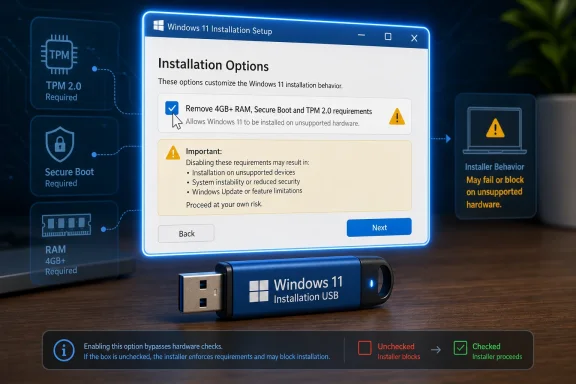
According to the Neowin report, a user testing Rufus 4.14 found that if all WUE options were cleared, Rufus could forget that state and bring back the “remove requirement for 4GB+ RAM, Secure Boot and TPM 2.0” option the next time the dialog appeared. Earlier builds, including Rufus 4.13, reportedly retained the preference as expected.
That distinction is important. A broken preference is not the same thing as a broken installer, and it is not the same thing as a new Microsoft block. Still, the optics are bad because the option involved is the one most closely associated with Windows 11’s long-running hardware-eligibility fight.
That puts Rufus in familiar territory: doing the work Microsoft could make easier but chooses not to. Windows installation is no longer just the act of laying down an operating system. It is an onboarding funnel, an account-conversion moment, a cloud-services pitch, an app-provisioning pipeline, and a policy negotiation.
The irony is that Rufus 4.14’s biggest feature is also where a separate bug has already drawn attention. The new silent install mode has reportedly been getting stuck around the 75 percent mark in some scenarios, with Batard explaining that the problem relates to drive-letter handling during the unattended setup flow. That is the kind of bug one expects from a tool stepping deeper into automation: the more setup is hidden, the more edge cases matter.
The WUE preference bug is smaller, but it compounds the sense that Rufus 4.14 is a release with sharp new capabilities and a few fresh cuts. For cautious users, especially those preparing installation media for more than one machine, that combination argues for testing before trusting.
Microsoft has reasonable arguments on some of these fronts. TPMs, Secure Boot, virtualization-based security, and modern CPU baselines are not imaginary benefits. They give Windows a stronger security foundation than the anything-goes PC ecosystem of the Windows 7 era.
But Microsoft has weakened its case by bundling security requirements with growth tactics. The same setup experience that enforces hardware checks also pushes Microsoft accounts, cloud services, advertising surfaces, and bundled applications. Once users perceive the installer as an upsell mechanism, even legitimate security requirements become easier to dismiss as control mechanisms.
Rufus lives precisely in that gap. It is not merely a bootable-media utility anymore; it is a referendum on how much friction users will tolerate before they reach for a third-party tool. The WUE dialog is where that referendum becomes visible, option by option.
That point deserves emphasis because the checkbox wording can make the option sound more invasive than it is. Rufus is not telling Windows to ignore security hardware forever. It is altering the installation path so setup does not refuse to proceed on machines that fail particular checks.
On supported systems, the bypass being left enabled should normally be inert. The installer can proceed, Windows can still detect the hardware, and the resulting OS can still use the machine’s TPM and Secure Boot state where available. For most users, the danger is not that Rufus 4.14 will sabotage a compliant PC.
The danger is procedural. If a tool does not remember that every WUE option was deselected, administrators and power users lose confidence in repeatability. In imaging, repeatability is not a luxury; it is the whole point.
That matters because Windows 11 bypass stories often mutate quickly. A checkbox changes, a setup screen looks different, an ISO behaves unexpectedly, and suddenly the internet concludes that Microsoft has “blocked Rufus.” Sometimes Microsoft really does change setup behavior in ways that break familiar workarounds. This does not appear to be one of those moments.
The better reading is more prosaic and more useful. Rufus 4.14 widened the surface area of the WUE dialog with new automation and app-suppression controls, and one corner of the preference logic stopped behaving. The fix should be straightforward if the diagnosis is correct.
Still, mundane bugs can be meaningful. When a small utility becomes part of the unofficial Windows deployment stack, its UI state becomes operational state. A checkbox is not just a checkbox when it encodes an organization’s installation policy.
The timing is uncomfortable. Windows 10 has moved past its mainstream consumer relevance, and many users who delayed Windows 11 upgrades are now deciding what to do with aging but usable hardware. For home users, that decision may be whether to buy a new PC. For small businesses, schools, labs, and hobbyist environments, it may mean weighing risk against budget reality.
Rufus became popular in this context because it made the unsupported path simple. A user could point Rufus at a Windows 11 ISO, prepare a USB stick, and select options to remove certain setup barriers. The tool did not make old hardware magically supported, but it lowered the friction enough that Microsoft’s line became porous.
That porosity is both useful and uncomfortable. It gives users agency, but it also normalizes running an operating system outside the vendor’s preferred envelope. Microsoft can warn about compatibility, support, and updates; Rufus can make installation possible anyway. The user is left in the middle, choosing between official compliance and practical reuse.
The WUE options in Rufus speak to that frustration. They let users remove some requirements, create local-account paths, tune privacy defaults, and now suppress certain bundled experiences. Each option is small on its own, but together they form an alternate vision of Windows setup: less guided, less cloud-first, less commercial.
Microsoft would argue that the modern setup experience provides security, integration, recovery features, identity continuity, and a better default experience for mainstream users. That is not entirely wrong. A Microsoft account can simplify device recovery, Store licensing, BitLocker key backup, OneDrive sync, and cross-device settings.
But power users and IT pros hear a different pitch. They see forced defaults, additional cleanup work, and yet another reason to maintain scripts, answer files, provisioning packages, or third-party tools. Rufus succeeds because it packages that resistance into a simple interface.
A silent install that targets the first detected disk can be useful in controlled environments and dangerous in casual ones. Anyone who has managed deployment workflows knows that “first disk” is a phrase that deserves respect. On a test bench it can save time; on a machine with multiple drives it can become a data-loss story if misunderstood.
That does not make the feature reckless. Rufus is aimed at users who are often more technically literate than the average Windows installer audience, and the tool has long been explicit about destructive write operations. But silent install changes the emotional contract. The user is no longer stepping through every screen and catching every assumption.
That is why early bugs around silent setup and WUE persistence matter beyond their immediate symptoms. They remind users that convenience and control are not the same thing. Automation is wonderful only when the assumptions are visible, predictable, and correct.
Those edge cases matter because they are exactly where informal process becomes institutional habit. A technician finds that Rufus solves a problem quickly, writes down the steps, and the workaround becomes part of the organization’s folk knowledge. Months later, a subtle default change or persistence bug can produce inconsistent results.
The WUE bug is a reminder that consumer-grade convenience tools should be treated like any other deployment component. Version pinning, test media, documented settings, and checks after install are not bureaucratic excess. They are how you avoid discovering too late that last month’s USB stick and this month’s USB stick were not created with the same assumptions.
For unsupported Windows 11 installations, the stakes are higher. If an organization knowingly bypasses hardware checks, it should also know which machines are outside Microsoft’s supported baseline, why that exception exists, and what the retirement plan is. Rufus can create the media, but it cannot own the risk register.
On unsupported hardware, the calculus is different. Rufus can help Windows 11 install on systems that Microsoft does not want to bless, but it does not turn those systems into supported devices. Users may encounter future feature-update blocks, driver issues, security-feature limitations, or performance surprises depending on the age and configuration of the machine.
That does not mean every unsupported installation is doomed. Many older PCs run Windows 11 acceptably, and Microsoft’s public warnings have often sounded more absolute than real-world experience. But unsupported is still unsupported, and users should treat it as a trade-off rather than a loophole with no consequences.
The practical advice is simple: if Rufus 4.14’s behavior bothers you, wait for the fix or use an earlier known-good version for non-experimental work. If you proceed with 4.14, verify the WUE settings before writing the drive and verify the installed system afterward. The bug is not a panic event, but it is a reason to slow down.
Commercial software has bugs too, including setup bugs with far less transparency. The difference is that Rufus develops in public, so users can see the sausage being made: commits, regressions, comments, workarounds, fixes. That visibility can make a project look messier than closed-source alternatives, but it often makes it more trustworthy.
There is also a useful humility in this kind of bug. Rufus is widely respected, but it is still software, and software that manipulates operating-system installation paths is particularly exposed to edge cases. Windows setup is not a static target. Every Microsoft change in OOBE, app provisioning, Secure Boot policy, unattend behavior, or ISO structure can ripple outward.
The correct lesson is not that Rufus is unreliable. The lesson is that a tool sitting between Microsoft’s installer and user intent must constantly translate between two moving systems. Sometimes the translation layer gets a pronoun wrong.
Microsoft can continue tightening Windows setup, and Rufus can continue giving users ways around the parts they dislike. That contest will keep producing bugs, fixes, workarounds, and headlines because it is not really about one checkbox. It is about whether the PC remains a machine the user configures or becomes an endpoint Microsoft enrolls, and that argument is nowhere near finished.
Source: Neowin New Rufus update bugs out the Windows 11 system requirements bypass option
 Rufus Tripped Over the Checkbox Everyone Watches
Rufus has spent years as the tiny utility that turns Windows ISOs into bootable USB drives, but Windows 11 made it something more consequential. Once Microsoft tied the new OS to TPM 2.0, Secure Boot, RAM thresholds, supported CPU lists, Microsoft-account nudges, and OOBE choreography, Rufus became a pressure valve for users who wanted a cleaner or more permissive installer.That is why a bug in a checkbox matters. The newly reported issue is not that Rufus can no longer bypass Windows 11’s TPM, Secure Boot, or RAM gates. It is that the Windows User Experience settings in Rufus 4.14 do not always remember the user’s preference when all WUE options are deselected.
According to the Neowin report, a user testing Rufus 4.14 found that if all WUE options were cleared, Rufus could forget that state and bring back the “remove requirement for 4GB+ RAM, Secure Boot and TPM 2.0” option the next time the dialog appeared. Earlier builds, including Rufus 4.13, reportedly retained the preference as expected.
That distinction is important. A broken preference is not the same thing as a broken installer, and it is not the same thing as a new Microsoft block. Still, the optics are bad because the option involved is the one most closely associated with Windows 11’s long-running hardware-eligibility fight.
The New Release Was Supposed to Be About Automation, Not Anxiety
Rufus 4.14 arrived as a substantial update rather than a routine maintenance build. Its marquee addition is a silent Windows installation option that can automate setup more aggressively than the usual guided installer path. It also adds quality-of-life controls for suppressing some preinstalled Microsoft experiences, including modern inbox apps and services that many users consider clutter rather than value.That puts Rufus in familiar territory: doing the work Microsoft could make easier but chooses not to. Windows installation is no longer just the act of laying down an operating system. It is an onboarding funnel, an account-conversion moment, a cloud-services pitch, an app-provisioning pipeline, and a policy negotiation.
The irony is that Rufus 4.14’s biggest feature is also where a separate bug has already drawn attention. The new silent install mode has reportedly been getting stuck around the 75 percent mark in some scenarios, with Batard explaining that the problem relates to drive-letter handling during the unattended setup flow. That is the kind of bug one expects from a tool stepping deeper into automation: the more setup is hidden, the more edge cases matter.
The WUE preference bug is smaller, but it compounds the sense that Rufus 4.14 is a release with sharp new capabilities and a few fresh cuts. For cautious users, especially those preparing installation media for more than one machine, that combination argues for testing before trusting.
A Preference Bug Became News Because Windows 11 Made Setup Political
Ten years ago, a dialog-state bug in a USB creation utility would have been a minor GitHub issue. In 2026, the same bug becomes news because Windows setup has become a proxy battle over ownership. Who decides whether a PC is good enough? Who decides whether a local account is acceptable? Who decides which apps belong on a clean install?Microsoft has reasonable arguments on some of these fronts. TPMs, Secure Boot, virtualization-based security, and modern CPU baselines are not imaginary benefits. They give Windows a stronger security foundation than the anything-goes PC ecosystem of the Windows 7 era.
But Microsoft has weakened its case by bundling security requirements with growth tactics. The same setup experience that enforces hardware checks also pushes Microsoft accounts, cloud services, advertising surfaces, and bundled applications. Once users perceive the installer as an upsell mechanism, even legitimate security requirements become easier to dismiss as control mechanisms.
Rufus lives precisely in that gap. It is not merely a bootable-media utility anymore; it is a referendum on how much friction users will tolerate before they reach for a third-party tool. The WUE dialog is where that referendum becomes visible, option by option.
The Bypass Coming Back Is Annoying, Not Catastrophic
The practical impact of the newly reported bug appears limited. Batard’s explanation, as relayed in the report, is that leaving the bypass option enabled should not harm a Windows installation on systems that already meet the requirements. A TPM bypass does not prevent Windows from using a TPM, just as a RAM bypass does not somehow cap a machine with 16GB or 32GB of memory at 4GB.That point deserves emphasis because the checkbox wording can make the option sound more invasive than it is. Rufus is not telling Windows to ignore security hardware forever. It is altering the installation path so setup does not refuse to proceed on machines that fail particular checks.
On supported systems, the bypass being left enabled should normally be inert. The installer can proceed, Windows can still detect the hardware, and the resulting OS can still use the machine’s TPM and Secure Boot state where available. For most users, the danger is not that Rufus 4.14 will sabotage a compliant PC.
The danger is procedural. If a tool does not remember that every WUE option was deselected, administrators and power users lose confidence in repeatability. In imaging, repeatability is not a luxury; it is the whole point.
The Commit Trail Points to Plumbing, Not Policy
The apparent root cause is refreshingly mundane. Batard reportedly traced the regression to internal dialog-handling changes, specifically a recent commit identified by the hash 92a8926. In other words, this looks like a state-management bug inside Rufus, not a change imposed by Microsoft and not a failure of the Windows 11 bypass mechanism itself.That matters because Windows 11 bypass stories often mutate quickly. A checkbox changes, a setup screen looks different, an ISO behaves unexpectedly, and suddenly the internet concludes that Microsoft has “blocked Rufus.” Sometimes Microsoft really does change setup behavior in ways that break familiar workarounds. This does not appear to be one of those moments.
The better reading is more prosaic and more useful. Rufus 4.14 widened the surface area of the WUE dialog with new automation and app-suppression controls, and one corner of the preference logic stopped behaving. The fix should be straightforward if the diagnosis is correct.
Still, mundane bugs can be meaningful. When a small utility becomes part of the unofficial Windows deployment stack, its UI state becomes operational state. A checkbox is not just a checkbox when it encodes an organization’s installation policy.
Microsoft’s Requirements Fight Still Casts the Long Shadow
The reason this bug attracts attention is that Windows 11’s system requirements have never fully escaped controversy. Microsoft drew a harder line than many users expected, especially around TPM 2.0 and supported CPUs. That left a large population of otherwise functional PCs either officially stranded on Windows 10 or pushed into unsupported Windows 11 installations.The timing is uncomfortable. Windows 10 has moved past its mainstream consumer relevance, and many users who delayed Windows 11 upgrades are now deciding what to do with aging but usable hardware. For home users, that decision may be whether to buy a new PC. For small businesses, schools, labs, and hobbyist environments, it may mean weighing risk against budget reality.
Rufus became popular in this context because it made the unsupported path simple. A user could point Rufus at a Windows 11 ISO, prepare a USB stick, and select options to remove certain setup barriers. The tool did not make old hardware magically supported, but it lowered the friction enough that Microsoft’s line became porous.
That porosity is both useful and uncomfortable. It gives users agency, but it also normalizes running an operating system outside the vendor’s preferred envelope. Microsoft can warn about compatibility, support, and updates; Rufus can make installation possible anyway. The user is left in the middle, choosing between official compliance and practical reuse.
The Clean Install Has Become a Culture War in Miniature
There is a reason users react strongly to Rufus features that remove apps, skip account requirements, or bypass checks. The clean install used to symbolize a fresh start. Today, even a clean Windows 11 install can feel pre-negotiated by Microsoft’s product strategy.The WUE options in Rufus speak to that frustration. They let users remove some requirements, create local-account paths, tune privacy defaults, and now suppress certain bundled experiences. Each option is small on its own, but together they form an alternate vision of Windows setup: less guided, less cloud-first, less commercial.
Microsoft would argue that the modern setup experience provides security, integration, recovery features, identity continuity, and a better default experience for mainstream users. That is not entirely wrong. A Microsoft account can simplify device recovery, Store licensing, BitLocker key backup, OneDrive sync, and cross-device settings.
But power users and IT pros hear a different pitch. They see forced defaults, additional cleanup work, and yet another reason to maintain scripts, answer files, provisioning packages, or third-party tools. Rufus succeeds because it packages that resistance into a simple interface.
Silent Install Raises the Stakes for a Small Utility
The silent installation option in Rufus 4.14 is more ambitious than the usual checkbox tweak. It moves Rufus closer to the territory occupied by unattended deployment systems, where the tool is not merely creating media but making decisions about how Windows lands on disk. That is powerful, and power increases the cost of ambiguity.A silent install that targets the first detected disk can be useful in controlled environments and dangerous in casual ones. Anyone who has managed deployment workflows knows that “first disk” is a phrase that deserves respect. On a test bench it can save time; on a machine with multiple drives it can become a data-loss story if misunderstood.
That does not make the feature reckless. Rufus is aimed at users who are often more technically literate than the average Windows installer audience, and the tool has long been explicit about destructive write operations. But silent install changes the emotional contract. The user is no longer stepping through every screen and catching every assumption.
That is why early bugs around silent setup and WUE persistence matter beyond their immediate symptoms. They remind users that convenience and control are not the same thing. Automation is wonderful only when the assumptions are visible, predictable, and correct.
For IT Pros, the Bug Is a Warning About Informal Deployment Paths
Most enterprise Windows shops are not baselining fleets with Rufus. They have Microsoft Intune, Configuration Manager, Windows Autopilot, deployment shares, task sequences, provisioning packages, or custom imaging workflows. But Rufus still shows up at the edges: break-fix benches, lab machines, small offices, developer hardware, kiosks, and one-off rebuilds.Those edge cases matter because they are exactly where informal process becomes institutional habit. A technician finds that Rufus solves a problem quickly, writes down the steps, and the workaround becomes part of the organization’s folk knowledge. Months later, a subtle default change or persistence bug can produce inconsistent results.
The WUE bug is a reminder that consumer-grade convenience tools should be treated like any other deployment component. Version pinning, test media, documented settings, and checks after install are not bureaucratic excess. They are how you avoid discovering too late that last month’s USB stick and this month’s USB stick were not created with the same assumptions.
For unsupported Windows 11 installations, the stakes are higher. If an organization knowingly bypasses hardware checks, it should also know which machines are outside Microsoft’s supported baseline, why that exception exists, and what the retirement plan is. Rufus can create the media, but it cannot own the risk register.
Home Users Should Not Confuse “Installable” With “Supported”
For enthusiasts, the bug may feel like a minor nuisance: clear the checkbox, see it return, shrug, and proceed. That reaction is mostly reasonable if the target PC already satisfies Windows 11 requirements. On compliant hardware, the bypass option coming back should not meaningfully alter the final installation.On unsupported hardware, the calculus is different. Rufus can help Windows 11 install on systems that Microsoft does not want to bless, but it does not turn those systems into supported devices. Users may encounter future feature-update blocks, driver issues, security-feature limitations, or performance surprises depending on the age and configuration of the machine.
That does not mean every unsupported installation is doomed. Many older PCs run Windows 11 acceptably, and Microsoft’s public warnings have often sounded more absolute than real-world experience. But unsupported is still unsupported, and users should treat it as a trade-off rather than a loophole with no consequences.
The practical advice is simple: if Rufus 4.14’s behavior bothers you, wait for the fix or use an earlier known-good version for non-experimental work. If you proceed with 4.14, verify the WUE settings before writing the drive and verify the installed system afterward. The bug is not a panic event, but it is a reason to slow down.
Open Source Makes the Mess Visible, Which Is a Feature
One of the healthier aspects of this story is how quickly the issue appears to have been narrowed. A user reported reproducible behavior, another confirmed the pattern, and Batard identified the likely internal change. That is the open-source maintenance loop working as designed.Commercial software has bugs too, including setup bugs with far less transparency. The difference is that Rufus develops in public, so users can see the sausage being made: commits, regressions, comments, workarounds, fixes. That visibility can make a project look messier than closed-source alternatives, but it often makes it more trustworthy.
There is also a useful humility in this kind of bug. Rufus is widely respected, but it is still software, and software that manipulates operating-system installation paths is particularly exposed to edge cases. Windows setup is not a static target. Every Microsoft change in OOBE, app provisioning, Secure Boot policy, unattend behavior, or ISO structure can ripple outward.
The correct lesson is not that Rufus is unreliable. The lesson is that a tool sitting between Microsoft’s installer and user intent must constantly translate between two moving systems. Sometimes the translation layer gets a pronoun wrong.
The Small Checkbox That Explains the Bigger Windows Problem
The concrete lesson from Rufus 4.14 is not dramatic, but it is useful.- Rufus 4.14 reportedly forgets a fully cleared Windows User Experience selection in some cases, causing the Windows 11 hardware-requirements bypass option to return.
- The bug does not appear to mean Rufus has lost the ability to create Windows 11 media that bypasses TPM, Secure Boot, or RAM checks.
- Leaving the bypass option enabled should not prevent compliant PCs from using TPM or other supported hardware features after installation.
- The issue has reportedly been traced to Rufus dialog-handling changes rather than a new Microsoft block.
- Users relying on Rufus for repeatable installs should test 4.14 carefully, especially if they are using the new silent installation mode or preparing media for multiple machines.
- The episode reinforces that Windows 11 setup customization is now a moving target, not a one-time workaround.
Microsoft can continue tightening Windows setup, and Rufus can continue giving users ways around the parts they dislike. That contest will keep producing bugs, fixes, workarounds, and headlines because it is not really about one checkbox. It is about whether the PC remains a machine the user configures or becomes an endpoint Microsoft enrolls, and that argument is nowhere near finished.
Source: Neowin New Rufus update bugs out the Windows 11 system requirements bypass option
