
 Rufus Tried to Make Windows Setup Less Windows-Like
Rufus has long occupied an awkward but important place in the Windows ecosystem. Microsoft provides the operating system, the ISO, the Media Creation Tool, and the official story. Rufus provides the thing many power users actually reach for when they want the install media to behave the way they expect.
Version 4.14 pushed that role further. The headline additions were not cosmetic: a new silent installation mode, an option to disable Teams, Outlook, Copilot, and other bundled Microsoft experiences, and refinements to how the install media presents itself during setup. In other words, Rufus was not just writing a USB stick. It was turning Windows installation into something closer to a policy-driven deployment tool for individuals and small shops.
That is why this bug matters. A failed manual install is irritating. A failed silent install is a breach of trust, because the whole premise is that the user can step away while the tool makes deterministic choices. If the install dies three quarters of the way through, automation has not saved time; it has simply moved the failure later and made it harder to diagnose.
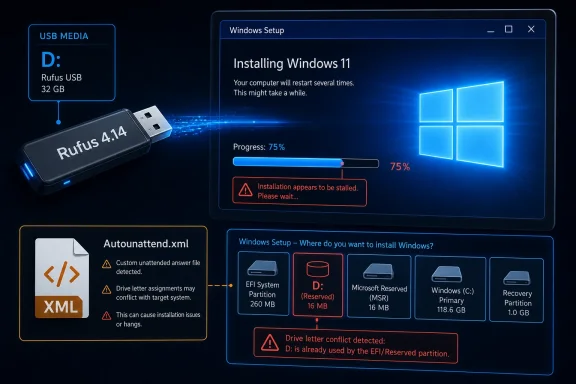
The reports now circulating around Rufus 4.14 suggest a consistent pattern. Install media created with the new silent option can fail at roughly 75 percent, across different hardware. Removing the Autounattend XML file reportedly allows the same installation to proceed, which narrows the blast radius away from a bad ISO, faulty SSD, or random USB weirdness and toward the answer file that makes the install silent in the first place.
The Answer File Became the Crime Scene
An Autounattend XML file is one of those Windows technologies that sounds straightforward until it is not. It answers setup prompts, supplies configuration choices, and can direct the installer through disk selection and post-install behavior. In enterprise imaging, answer files are old friends; in consumer Windows tinkering, they are the difference between clicking through a dozen screens and letting the machine do the boring work.
The new Rufus feature leans on that machinery. But when one user removed the XML and the installation succeeded, the answer file became the obvious suspect. Another modified XML reportedly worked around the problem, which made the issue look less like “Rufus made broken media” and more like “Rufus asked Windows Setup to do something that only fails under a particular disk-discovery state.”
Peter Batard, Rufus’s developer, then said he could reproduce the failure after completely clearing the target disk. His theory is unusually specific and therefore more useful than the usual forum fog. If Windows Setup sees an existing accessible partition, it may assign that partition D:, reserving C: for the future system volume. Rufus’s own mapping of the USB drive then gets pushed to another letter, and everything survives.
On a truly blank disk, however, Setup may not map an existing partition to D:. Rufus’s attempt to map the USB media to D: can then succeed. That sounds harmless until it intersects with Windows Setup’s own apparent expectations. Batard observed that even without explicitly mapping anything to D:, a blank-disk install can produce a D: drive during the file-copy stage, labeled EFI and apparently empty. The conclusion is blunt: D: may be a reserved or at least special drive letter inside Setup, and taking it for the USB drive is asking for trouble.
The Failure Mode Punishes the Cleanest Installs
The irony is that the bug appears most likely to bite the scenario many enthusiasts consider the purest: a fully wiped disk. Reinstalling over an existing Windows environment may leave enough structure for Setup to assign drive letters in the order Rufus implicitly expected. Starting from zero changes the geometry.
That distinction is important because “blank disk” is not an edge case for Rufus users. It is a core use case. People use Rufus when building new PCs, resurrecting old laptops, installing Windows on unsupported hardware, replacing OEM images, or preparing machines for resale. In many of those cases, wiping the target disk first is not unusual; it is the whole point.
Silent installation raises the stakes further. If a tool is going to install Windows “automatically, and without prompt” on the first detected disk, the disk state must be boringly predictable. A hidden dependency on whether Setup has already discovered and lettered an old partition is the opposite of boring. It is a trapdoor.
This is also why the 75 percent failure mark feels so maddening. The system has already booted the installer. The media has already worked. The target disk has already begun the process. To a normal user, a late-stage failure implies hardware instability, a corrupt image, or Microsoft’s usual opaque install gremlins. In reality, the problem may be a drive letter chosen too early in a setup environment that is doing more behind the curtain than it admits.
D: Is Not Just a Letter in Windows Setup
Drive letters are one of Windows’ oldest compromises. They look simple because users see them every day, but underneath them sits a pile of historical behavior, mount manager state, firmware volumes, recovery partitions, boot environments, and setup-time abstractions. In the full Windows desktop, drive-letter assignment is familiar enough. In Windows Setup, it is stranger.
Setup is not merely copying files. It is booting from installation media, discovering disks, creating or reusing EFI system partitions, preparing boot configuration, assigning temporary paths, and transitioning between preinstallation and installed environments. It is a choreography of temporary identities. A volume that appears as D: during one stage may not be D: later, and the user may never see that transient mapping at all.
That is why Batard’s observation about a D: volume labeled EFI matters. If Setup uses D: internally, or at least tends to create a D: mapping under certain conditions, third-party automation that also assumes D: is available can become a collision. Neither side has to be malicious or incompetent. It is enough for one component to treat a behavior as incidental while another treats it as stable.
This is the kind of bug that makes deployment engineers suspicious of elegant shortcuts. A clean answer file that works in a virtual machine may fail on a physical machine. A USB stick that works on a laptop with an existing install may fail on a newly assembled desktop. A process that appears hardware-independent may actually be state-dependent, and the state is not the CPU, TPM, or SSD controller. It is the installer’s temporary internal bookkeeping.
Microsoft’s Installer Is the Platform Rufus Has to Reverse-Read
There is a recurring temptation to frame every Rufus-versus-Windows problem as a morality play. Microsoft locks things down; Rufus routes around the lock; Microsoft changes something; Rufus breaks. Sometimes that framing is too neat. In this case, the evidence points less to a deliberate block than to the ordinary brittleness of building reliable automation on top of Windows Setup behavior that Microsoft does not treat as a public contract.
That distinction matters. Rufus is not using stolen magic. Unattended setup is a Microsoft-supported concept, and Windows deployments have relied on answer files for decades. But “supported” does not mean every internal timing and drive-letter side effect is stable enough for a consumer tool to wrap in a one-click interface.
Rufus lives at the boundary between official installation media and user control. Microsoft’s tools tend to preserve Microsoft’s preferred defaults: online account nudges, hardware requirement enforcement, bundled apps, and the out-of-box experience as a product surface. Rufus exists because a large audience wants those defaults negotiated, reduced, or bypassed. The more Rufus automates, the more it must model not only what Windows Setup documents, but what Windows Setup actually does.
That is a hard position for an open-source utility. Microsoft can revise setup flows, app provisioning, account requirements, security policy handling, and boot media behavior as part of Windows’ normal evolution. Rufus then has to absorb those changes from the outside, often through user reports, logs, and issue threads. It is less a partnership than a long-running act of technical archaeology.
The Bug Arrives in the Middle of a Bigger Windows 11 Argument
Rufus 4.14’s timing is not incidental. Windows 11 remains defined by friction around eligibility, defaults, and control. Hardware requirements, TPM enforcement, Secure Boot expectations, Microsoft account pressure, Copilot integration, Outlook and Teams bundling, and the steady growth of cloud-connected setup experiences have turned installation into an ideological battleground.
For Microsoft, these defaults are part security posture, part ecosystem strategy, and part support simplification. A modern Windows 11 PC with TPM 2.0, Secure Boot, a Microsoft account, and cloud-connected services is easier for Microsoft to secure, monetize, synchronize, and explain. The official install path is therefore designed not just to put Windows on a disk, but to enroll the user into Microsoft’s preferred operating model.
For Rufus users, that operating model is precisely the problem. They may be installing on older hardware, building lab machines, avoiding online account setup, stripping bundled apps, or trying to keep installation media predictable across many systems. They are not necessarily hostile to Windows. Often they are Windows’ most technically invested users. But they want Windows to behave like software they administer, not a funnel they pass through.
The silent installation feature is therefore politically loaded in the small-p “politics of computing” sense. It says: do not ask me the same questions again, do not make me decline the same experiences again, and do not pretend the only legitimate Windows installation is the one that maximizes Microsoft’s post-install engagement surface. When that feature breaks, it is not just a bug report. It is another reminder that user control in Windows is often achieved by leaning on seams Microsoft did not design for that purpose.
The New Bloat Toggle Shows Why Rufus Keeps Winning Attention
The other major Rufus 4.14 addition — disabling Teams, Outlook, Copilot, and other preinstalled or forced experiences — explains why a USB-formatting utility keeps making headlines. Rufus is responding to a real fatigue in the Windows user base. People are not merely annoyed by apps they did not ask for. They are annoyed by the feeling that the operating system’s first-run experience has become a negotiation with Microsoft’s quarterly priorities.
Windows used to ship with unwanted extras, of course. OEM trialware was practically a rite of passage. But the modern version is different because the pressure increasingly comes from the platform owner itself, not just the PC manufacturer. Copilot, Microsoft 365 prompts, Teams integrations, Outlook transitions, OneDrive nudges, account sign-in flows, and ad-like recommendations blur the line between operating system setup and service acquisition.
Rufus’s “quality of life” framing is telling. It does not describe these removals as radical surgery. It describes them as nuisance reduction. That language resonates because many users have stopped arguing about whether Microsoft has the right to bundle its services. They simply want a practical way to install Windows without spending the first hour undoing decisions made in Redmond.
This is the real competitive advantage of Rufus: it names the user’s irritation and turns it into a checkbox. Microsoft often treats setup friction as education, safety, or personalization. Rufus treats it as friction. That difference is why every major Rufus release now reads like a commentary on Windows itself.
Silent Install Is Powerful Enough to Deserve Fear
There is another side to this, and it should not be dismissed. A silent installation option that automatically installs Windows onto the first detected disk is not a toy. Used casually, it can wipe the wrong drive, erase a data disk, or turn a repair session into a disaster. Rufus makes the action explicit, but the entire value proposition is that the user will not be prompted later.
That is acceptable for experienced users who understand their hardware layout. It is potentially dangerous for anyone who sees “silent” and thinks “easy.” The first detected disk is not always the disk the human has in mind, especially in systems with multiple NVMe drives, SATA disks, external drives, card readers, or unusual firmware ordering. Automation is only as safe as the assumptions beneath it.
The current bug is not primarily about data loss, but it sits in the same risk category: setup automation compresses many decisions into one moment of trust. If the assumptions are right, the process feels miraculous. If the assumptions are wrong, the failure can be confusing, destructive, or both.
That is why Batard’s decision to provide a test build rather than hand-wave the issue is important. Silent install cannot be “mostly reliable” in the same way a cosmetic option can. If the feature is going to remain in Rufus, the drive-letter mapping needs to avoid Setup’s apparent D: sensitivity, and the tool may need to be extra conservative about blank-disk scenarios. In deployment, boring is a feature.
Small Shops Need This More Than Microsoft Admits
Enterprise IT already has mature deployment options. Microsoft Intune, Autopilot, Configuration Manager, provisioning packages, deployment shares, scripts, and custom images all exist for organizations with the licensing, staffing, and process discipline to use them. Those tools are powerful, but they are not lightweight.
Rufus serves the space beneath that enterprise layer. It is the tool for the consultant rebuilding three office PCs, the repair shop refreshing a customer laptop, the homelab admin reinstalling Windows on rotating hardware, the enthusiast creating a clean image for a family member, and the small business without a dedicated endpoint management stack. For these users, the official Microsoft answer is often too heavy or too opinionated.
That is why silent install in Rufus is compelling. It brings a taste of deployment automation to people who are not going to build a full Windows imaging pipeline. It can make repeated installs faster, reduce missed prompts, and create more consistent outcomes. It also brings enterprise-grade risk into a consumer-grade workflow.
Microsoft often designs as if there are two worlds: managed enterprise and guided consumer. Rufus exists because there is a third world of technically competent users who manage machines without wanting the full enterprise apparatus. The Windows ecosystem depends on those people more than Microsoft’s setup experience usually acknowledges.
This Is Not a Reason to Abandon Rufus
The immediate practical advice is simple: if you are using Rufus 4.14 to install Windows 11 right now, avoid the new silent installation option unless you are deliberately testing the fix. A normal Rufus-created installer without the silent Autounattend behavior remains a different proposition. The reports point to the new automation path, not to a universal Rufus failure.
That distinction is worth preserving because bugs in Rufus attract a peculiar kind of overreaction. Critics can cast the tool as unsafe because it modifies the installation experience. Fans can cast every breakage as Microsoft sabotage. Neither reflex helps users. This appears to be a specific implementation problem triggered by a specific interaction with Windows Setup’s drive-letter behavior.
It is also exactly the kind of bug open-source tools are relatively good at surfacing and correcting. A user noticed the XML connection. Batard reproduced the failure. A theory emerged. A test build followed. That is not a guarantee of instant resolution, but it is a transparent troubleshooting loop that many commercial products would bury behind a vague “known issue” note.
Rufus’s credibility has never rested on being magically immune to Windows changes. It rests on being responsive to them. The utility is valuable because it adapts to the real Windows that users encounter, not the idealized Windows described in marketing copy. Sometimes that adaptation involves bypassing requirements. Sometimes it involves removing annoyances. Sometimes it involves discovering that D: is a bad place to stand.
The 75 Percent Stall Leaves a Map for the Fix
The likely fix is conceptually straightforward: stop colliding with D:, or otherwise change the answer-file and media-mapping behavior so Windows Setup’s temporary volume assignments are not disturbed. The implementation may be less tidy, because setup phases, firmware boot paths, UEFI partitions, removable media, and answer-file processing all intersect in ways that are easy to test incompletely.
The test build Batard has made available is therefore the right kind of response. It lets affected users validate the theory across real hardware, not just the developer’s reproduction case. That matters because the bug seems state-dependent, and state-dependent installer bugs have a habit of disappearing in neat lab conditions.
The lesson for users is equally straightforward. If you are testing unattended installation, test it on hardware that resembles the real target state. A VM with an already-initialized virtual disk may not tell you what happens on a blank NVMe drive. A reinstall over an old Windows partition may not tell you what happens after a full disk wipe. The cleanest test is often the one most likely to reveal the ugly assumption.
For now, manual installation is the safer path. That does not mean abandoning Rufus 4.14 entirely. It means treating silent install as a newly introduced feature that is still being hardened against Windows Setup’s less visible behaviors.
The Rufus 4.14 Lesson Is Written in Drive Letters
The concrete takeaways are narrow enough to act on, but they point to a broader truth: Windows installation automation is only as reliable as the undocumented assumptions it avoids.
- Rufus 4.14’s ordinary bootable-media creation is not the same thing as the new silent installation path that is drawing failure reports.
- The reported failures appear tied to the Autounattend XML behavior used by silent install, especially on systems where the target disk has been completely cleared.
- The leading theory is that mapping the USB installer to D: can interfere with Windows Setup’s own use or reservation of that drive letter during installation.
- Users who need a reliable install today should avoid the silent installation option and proceed with a normal attended Windows setup.
- Anyone testing the proposed fix should do so on non-production hardware or on machines where the target disk can be safely erased.
- The episode reinforces that unattended Windows installs should always be validated against the same disk state and hardware layout they will encounter in real use.
The fix will likely arrive faster than the lesson will fade. Rufus can change its mapping, adjust its answer file, and make silent installs safer on blank disks. Microsoft, meanwhile, will continue to evolve Windows Setup around its own priorities, and independent tools will continue decoding the side effects. That is the bargain Windows power users have made for years: control is still possible, but it often comes from people willing to follow the installer into the weeds and discover which drive letter was never really theirs.
