

Running AI software locally on Windows 11 in 2026 means using free desktop apps, command-line runtimes, and self-hosted web interfaces to run open or open-weight models such as Llama, DeepSeek, Qwen, Gemma, Phi, and Mistral without sending prompts to a cloud service. The best tool depends less on ideology than on where you sit on the spectrum between “I want a chat window” and “I want an API endpoint.” The local AI stack has matured quickly, but the marketing around it has also grown sloppy. The real story is not that every Windows user suddenly needs a private chatbot; it is that the PC has become a credible AI workstation again.
The pitch for local AI usually starts with cost, and that is fair enough. Cloud AI has trained users to think in tokens, rate limits, subscriptions, and usage tiers, which is a strange way to draft an email or summarize a PDF. A local model flips that relationship: once the model is downloaded, the marginal cost of another prompt is essentially the electricity your PC burns while answering it.
But the stronger argument is privacy. If you are pasting client notes, legal drafts, internal scripts, medical summaries, or unpublished research into a cloud chatbot, you are making a trust decision every time. Local inference removes that entire transaction. The model may still be imperfect, biased, hallucination-prone, or badly suited to the job, but your prompt is not being shipped to someone else’s server as part of the bargain.
Offline access is the quieter advantage. Once the model weights are on disk, a Windows laptop can keep answering questions on a train, in a hotel with captive Wi-Fi, or inside a locked-down environment where internet access is unreliable or forbidden. That matters to students, developers, field technicians, researchers, and anyone who has learned the hard way that “cloud-first” often means “cloud-dependent.”
This does not mean local AI replaces ChatGPT, Copilot, Claude, or Gemini for every task. The largest hosted models still outperform typical consumer-PC models on broad reasoning, long-context analysis, and tool-rich workflows. What has changed is the floor: a decent 7B or 8B local model is now good enough for drafting, summarizing, coding assistance, note cleanup, search-like Q&A, and lightweight automation. For many Windows users, that is the workday.
That shift matters because Windows remains the default desktop environment for a huge portion of students, hobbyists, creators, and small-business users. The audience that wants local AI is not only the Linux crowd living in terminals. It is also the Windows 11 user with an RTX card, a folder full of PDFs, and a vague sense that paying monthly for every experiment is a bad deal.
The other change is model packaging. GGUF, quantization, and improved runtimes have made it practical to run models that would once have been laughably out of reach on consumer hardware. A heavily quantized 7B model is not magic, but it can be useful. A 14B model on a machine with enough RAM or VRAM can be genuinely impressive.
The result is a Windows ecosystem with two personalities. On one side are consumer-friendly chat apps that hide the machinery. On the other are developer runtimes that expose APIs, loaders, context windows, sampling settings, and GPU offload knobs. The best choice depends on whether you want a local assistant or a local AI platform.
That said, comfort begins around 16GB of RAM. This is where 7B and 8B models become much less annoying, and where casual experimentation stops feeling like a stunt. At 32GB, larger models and document workflows become more realistic, especially if you are juggling a browser, IDE, office apps, and the model runtime at the same time.
A dedicated GPU changes the experience more than any other upgrade. If the model and its context fit into VRAM, responses move from “watch the machine think” to “this feels interactive.” NVIDIA remains the most straightforward path for many Windows users because CUDA support is widely targeted, though AMD and integrated GPU support have improved across some tools and runtimes.
The practical rule remains brutally simple: the model has to fit. A quantized model’s file size is a rough proxy for the memory it will need, but context length and runtime overhead also matter. A model that barely fits at startup may still fall over when you feed it a long document or ask it to maintain a large conversation history.
For Windows users, Ollama’s strength is not that it is the prettiest experience. It is that it behaves like infrastructure. You install it, pull a model, and suddenly local LLMs are available to scripts, applications, browser interfaces, coding tools, and experiments. That makes it the right first stop for developers and IT pros who want local inference as a service rather than a novelty chat window.
Its model library is one of its biggest advantages. Llama, Qwen, DeepSeek, Gemma, Phi, Mistral, and many other families are easy to fetch and run. That breadth matters because local AI is not about finding one perfect model; it is about swapping models based on the job.
The trade-off is that Ollama’s natural habitat is still technical. Even with improving desktop polish, its center of gravity is the command line and the API. If your goal is to avoid terminals entirely, Ollama may be something you use indirectly through Open WebUI or another frontend rather than something you touch directly every day.
Its built-in Hugging Face model browsing is particularly valuable because model discovery remains one of the ugliest parts of the ecosystem. New users are faced with cryptic filenames, quantization tags, context-size claims, and compatibility notes. LM Studio does not eliminate the complexity, but it makes the process less hostile.
The catch is philosophical and practical: LM Studio itself is not open source. That does not make it useless, malicious, or unworthy of recommendation. It does mean it should not be described as free and open-source software simply because it runs open models or relies on open components underneath.
For beginners, LM Studio is still probably the easiest starting point. For strict FOSS users, Jan or GPT4All will be more comfortable choices. This distinction matters because “local” and “open source” are not synonyms. A local tool can be closed source, and an open-source tool can still connect to cloud services if configured that way.
That makes it especially useful for older PCs and privacy-first users who do not want to assemble a stack. The app gives users a curated route into local models, which can be a blessing in a world where too much choice becomes its own kind of friction. For someone who wants to ask questions of notes, PDFs, and files without learning Docker or CUDA jargon, GPT4All remains a serious option.
Its LocalDocs-style document workflow is the important feature. Retrieval-augmented generation, or RAG, is one of the few local AI use cases that immediately makes sense to non-developers. The model does not need to know everything in the world if it can search and summarize the documents you actually care about.
The limitation is that GPT4All is not usually the fastest or broadest tool in the room. Power users may outgrow it. Beginners and privacy-minded users may not care, because the whole point is to avoid turning a simple assistant into a weekend infrastructure project.
That makes Jan important beyond its feature list. The local AI community often blurs together open models, open weights, open runtimes, open frontends, and free proprietary apps. Jan is a reminder that the frontend matters too. If privacy is the selling point, users are right to ask what the wrapper app does, not just what model it runs.
Jan supports popular local model families and can expose an OpenAI-compatible local server, which moves it beyond simple chatting. Developers may still prefer Ollama as the backbone, but Jan gives less technical users a credible open alternative to LM Studio.
Its weaknesses are the usual weaknesses of younger software. Model management and stability under heavier workloads may not feel as mature as the most established tools. Still, for users who want polish without surrendering the open-source argument, Jan is one of the most important names on the Windows local AI shortlist.
That is powerful for air-gapped machines, lab environments, demos, and locked-down systems where installing a full stack is inconvenient or impossible. It also has a pleasingly old-school Windows quality: download a thing, run the thing, use the thing. No account, no cloud service, no orchestration layer.
Windows complicates the romance. Large self-contained executables can run into platform limits and practical handling problems, especially as model files cross the multi-gigabyte mark. The workaround is to use the smaller llamafile runtime with separate GGUF weights, which preserves portability but weakens the “one file to rule them all” story.
Even with that caveat, Llamafile deserves attention because it pushes against the bloat tendency in local AI. Not every use case needs a dashboard, users, plugins, hosted services, and a database. Sometimes the best local AI tool is the one that can be copied to a USB drive.
Its strengths are multi-user access, conversation management, document features, and compatibility with OpenAI-style endpoints. In practice, the classic setup is Ollama underneath and Open WebUI on top. The user talks to the browser. The backend handles the model.
For Windows enthusiasts and sysadmins, this is where local AI starts to resemble a service rather than a toy. You can run it on a spare box, expose it only on the LAN, attach it to local models, and give multiple users a shared assistant without paying per seat. That is a very different value proposition from “I installed a chatbot on my laptop.”
The setup is more involved than LM Studio or Jan. Docker often enters the picture, and users need to understand that Open WebUI does not magically make models run faster or fit into less memory. It is the face, not the engine. But for anyone who wants a browser-based local AI hub, it is one of the most useful pieces of the stack.
The reason this matters is that many users do not actually need an all-purpose oracle. They need a machine that can help them navigate a messy private archive. Local RAG is compelling because it narrows the task: retrieve relevant chunks from your files, pass them to the model, and generate a useful answer grounded in your material.
AnythingLLM’s workspace concept fits that workflow. You can separate classes, clients, projects, or knowledge bases instead of dumping everything into one undifferentiated chatbot memory. That organizational layer is not glamorous, but it is exactly what document-heavy work requires.
It still needs a model backend, whether local or otherwise. That means users should think of AnythingLLM as the document brain sitting beside a runtime such as Ollama or LM Studio, not as a complete replacement for them in every configuration. If your main reason for local AI is document Q&A, it belongs near the top of the list.
That makes it less sleek but more interesting. Creative writers often care about sampling behavior, context handling, memory tricks, prompt formats, and the feel of long outputs in ways that business-chatbot users do not. KoboldCpp caters to that crowd.
For a Windows user who simply wants to summarize meeting notes, KoboldCpp may feel like walking into a radio shack to buy a light switch. The controls are there, but they are not all meant for you. For tinkerers, that density is the point.
Its continuing relevance is a reminder that local AI is not one market. Developers, writers, students, roleplayers, researchers, and sysadmins all mean different things when they say they want to run a model locally. KoboldCpp serves one of those tribes well.
That power comes with fragility. More options mean more ways to misconfigure the environment, choose the wrong loader, exhaust memory, or spend an evening debugging dependency conflicts. It is not the right first stop for someone who has never run a local model before.
But it remains important because experimentation needs a place to happen. The mainstream tools get easier partly because power-user projects absorb the chaos first. New formats, loaders, workflows, and community habits often get tested in places like Text Generation WebUI before they become boring enough for consumer apps.
For Windows users, the recommendation is simple: do not start here unless you enjoy the machinery. Come here when LM Studio, Jan, GPT4All, or Ollama no longer expose enough control. At that point, the steep learning curve becomes a feature rather than a warning sign.
Running llama.cpp directly is for users who value performance, minimalism, and control more than comfort. You compile or download builds, manage models yourself, pass command-line arguments, and think directly about threads, GPU layers, context sizes, and quantization. That is not a mass-market workflow.
The upside is transparency. There is less wrapper logic between you and the model. If something is slow, broken, or misconfigured, you are closer to the reason. Developers chasing maximum throughput or trying to understand how local inference actually behaves often end up here.
The average Windows user should not feel guilty for using a friendlier app built on top of it. That is how healthy software ecosystems work. The engine room does not need to be the living room.
That makes it compelling for developers, homelab users, small teams, and organizations experimenting with private AI services. It can support more than text-only LLM workflows, including image and audio-related model backends depending on configuration. In spirit, it is closer to infrastructure than desktop software.
The advantage is API compatibility. If your app expects an OpenAI-like endpoint, a local replacement can let you prototype, test, or deploy without sending everything to a commercial API. That is especially useful when building internal tools, automations, or offline systems.
The downside is obvious: this is more machinery than most desktop users need. If all you want is a private assistant for writing and research, LocalAI is probably overkill. If you are building a local AI backend for software, it moves from overkill to exactly the point.
A tool can be free but closed source. LM Studio is the obvious example: useful, polished, and widely recommended, but not itself open source. A model can have open weights without meeting every philosophical definition of open-source software. A local app can still include analytics or cloud features unless configured otherwise. A self-hosted web UI can be open in one sense while raising licensing or governance arguments in another.
For Windows users, the practical test should be concrete. Does the app run inference on-device? Does it send telemetry by default? Is the source code available under a recognized license? Are the models under licenses that permit your intended use? Can the tool be used offline after setup? These questions matter more than badge collecting.
This is especially important in business and education. A student experimenting at home can tolerate ambiguity. A consultant handling client documents or a company building internal tooling needs to know what is running, where data goes, and what licenses apply. Local AI reduces some risks, but it does not abolish due diligence.
Llama remains the compatibility default. If a tool supports local LLMs, it probably supports Llama-family models or Llama-compatible formats. Tutorials, prompts, integrations, and troubleshooting advice are abundant, which makes Llama a safe first choice even when another model might edge it out on a narrow benchmark.
Qwen has become a favorite for coding, multilingual work, and strong small-model performance. DeepSeek’s reasoning-oriented releases pushed local users to think harder about math and chain-of-thought-style tasks, though local reasoning models can be slower and more verbose than general chat models. Mistral remains a dependable workhorse when speed and stability matter.
Microsoft’s Phi family is the efficiency story: relatively small models that punch above their size in structured reasoning and STEM-like tasks, though context window and task fit still matter. Google’s Gemma models are increasingly relevant for users who want compact, capable models with modern features. The trap is assuming any one of these is universally best. Local AI rewards matching the model to the job.
The first fix is to go smaller. A fast 7B model that answers reliably is more useful than a 32B model that turns your desktop into a space heater and crashes halfway through a document. Quantization is not a moral failure. It is the reason these models can run locally in the first place.
The second fix is to reduce context. Huge context windows sound impressive, but they consume memory quickly. If you are not feeding the model long documents, shrinking context can improve stability and speed without noticeably hurting quality.
The third fix is to check acceleration honestly. Many tools advertise GPU support, but the details vary by vendor, driver, backend, and model format. On Windows, keeping GPU drivers current and verifying that the runtime is actually offloading layers to the GPU can save hours of magical thinking.
Storage is the final annoyance. Models are large enough that casual downloading turns into disk clutter fast. A few variants of Llama, Qwen, DeepSeek, and Mistral can chew through tens or hundreds of gigabytes. Local AI is free at the point of inference, but it is not free of housekeeping.
Developers should start with Ollama. Its API-first design, model-pull workflow, and broad ecosystem make it the best default backend. Add Open WebUI when you want a browser interface, user management, and a more ChatGPT-like front end.
Document-heavy users should look at AnythingLLM or GPT4All, depending on how much structure they need. AnythingLLM is better when workspaces and knowledge bases are the center of the workflow. GPT4All is better when simplicity and offline desktop use matter most.
Power users and experimenters should keep Text Generation WebUI, KoboldCpp, llama.cpp, and LocalAI in view. Each serves a different kind of control: model-format experimentation, creative writing, raw inference, or API self-hosting. None of them is the best first app for everyone, and that is fine.
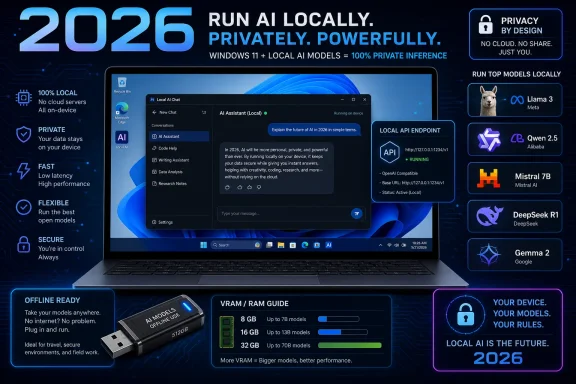 The Local AI Boom Is Really a Trust Rebellion
The pitch for local AI usually starts with cost, and that is fair enough. Cloud AI has trained users to think in tokens, rate limits, subscriptions, and usage tiers, which is a strange way to draft an email or summarize a PDF. A local model flips that relationship: once the model is downloaded, the marginal cost of another prompt is essentially the electricity your PC burns while answering it.But the stronger argument is privacy. If you are pasting client notes, legal drafts, internal scripts, medical summaries, or unpublished research into a cloud chatbot, you are making a trust decision every time. Local inference removes that entire transaction. The model may still be imperfect, biased, hallucination-prone, or badly suited to the job, but your prompt is not being shipped to someone else’s server as part of the bargain.
Offline access is the quieter advantage. Once the model weights are on disk, a Windows laptop can keep answering questions on a train, in a hotel with captive Wi-Fi, or inside a locked-down environment where internet access is unreliable or forbidden. That matters to students, developers, field technicians, researchers, and anyone who has learned the hard way that “cloud-first” often means “cloud-dependent.”
This does not mean local AI replaces ChatGPT, Copilot, Claude, or Gemini for every task. The largest hosted models still outperform typical consumer-PC models on broad reasoning, long-context analysis, and tool-rich workflows. What has changed is the floor: a decent 7B or 8B local model is now good enough for drafting, summarizing, coding assistance, note cleanup, search-like Q&A, and lightweight automation. For many Windows users, that is the workday.
Windows 11 Is No Longer the Awkward Platform
For a long time, local AI on Windows felt like a Linux project reluctantly dragged onto a gaming PC. Users had to juggle Python versions, CUDA builds, Visual Studio dependencies, Git checkouts, and forum folklore. The arrival of tools such as Ollama, LM Studio, GPT4All, Jan, and AnythingLLM changed the entry point from “build a stack” to “install an app.”That shift matters because Windows remains the default desktop environment for a huge portion of students, hobbyists, creators, and small-business users. The audience that wants local AI is not only the Linux crowd living in terminals. It is also the Windows 11 user with an RTX card, a folder full of PDFs, and a vague sense that paying monthly for every experiment is a bad deal.
The other change is model packaging. GGUF, quantization, and improved runtimes have made it practical to run models that would once have been laughably out of reach on consumer hardware. A heavily quantized 7B model is not magic, but it can be useful. A 14B model on a machine with enough RAM or VRAM can be genuinely impressive.
The result is a Windows ecosystem with two personalities. On one side are consumer-friendly chat apps that hide the machinery. On the other are developer runtimes that expose APIs, loaders, context windows, sampling settings, and GPU offload knobs. The best choice depends on whether you want a local assistant or a local AI platform.
The Hardware Story Is Kinder Than the Hype Suggests
The biggest misconception is that local AI requires a workstation-class GPU. It does not. A plain Windows 11 laptop with 8GB of RAM can run small models, particularly in the 1B to 3B range, and can sometimes run 7B or 8B models if the user accepts slower responses and careful quantization.That said, comfort begins around 16GB of RAM. This is where 7B and 8B models become much less annoying, and where casual experimentation stops feeling like a stunt. At 32GB, larger models and document workflows become more realistic, especially if you are juggling a browser, IDE, office apps, and the model runtime at the same time.
A dedicated GPU changes the experience more than any other upgrade. If the model and its context fit into VRAM, responses move from “watch the machine think” to “this feels interactive.” NVIDIA remains the most straightforward path for many Windows users because CUDA support is widely targeted, though AMD and integrated GPU support have improved across some tools and runtimes.
The practical rule remains brutally simple: the model has to fit. A quantized model’s file size is a rough proxy for the memory it will need, but context length and runtime overhead also matter. A model that barely fits at startup may still fall over when you feed it a long document or ask it to maintain a large conversation history.
Ollama Won Because Developers Needed a Default
Ollama became the default local AI runtime because it solved the developer problem first. It made pulling and running models feel like using a package manager. It exposed a local API. It worked well enough that other tools could build on top of it instead of reinventing the model-management layer.For Windows users, Ollama’s strength is not that it is the prettiest experience. It is that it behaves like infrastructure. You install it, pull a model, and suddenly local LLMs are available to scripts, applications, browser interfaces, coding tools, and experiments. That makes it the right first stop for developers and IT pros who want local inference as a service rather than a novelty chat window.
Its model library is one of its biggest advantages. Llama, Qwen, DeepSeek, Gemma, Phi, Mistral, and many other families are easy to fetch and run. That breadth matters because local AI is not about finding one perfect model; it is about swapping models based on the job.
The trade-off is that Ollama’s natural habitat is still technical. Even with improving desktop polish, its center of gravity is the command line and the API. If your goal is to avoid terminals entirely, Ollama may be something you use indirectly through Open WebUI or another frontend rather than something you touch directly every day.
LM Studio Is the Best Doorway, Not the Purest Choice
LM Studio is the app to hand to someone who wants local AI to feel like normal software. It wraps model discovery, downloads, chat, settings, and local server mode in a polished desktop interface. For many Windows users, that is the difference between trying local AI once and actually using it.Its built-in Hugging Face model browsing is particularly valuable because model discovery remains one of the ugliest parts of the ecosystem. New users are faced with cryptic filenames, quantization tags, context-size claims, and compatibility notes. LM Studio does not eliminate the complexity, but it makes the process less hostile.
The catch is philosophical and practical: LM Studio itself is not open source. That does not make it useless, malicious, or unworthy of recommendation. It does mean it should not be described as free and open-source software simply because it runs open models or relies on open components underneath.
For beginners, LM Studio is still probably the easiest starting point. For strict FOSS users, Jan or GPT4All will be more comfortable choices. This distinction matters because “local” and “open source” are not synonyms. A local tool can be closed source, and an open-source tool can still connect to cloud services if configured that way.
GPT4All Still Understands the Offline User
GPT4All’s value is focus. It is not trying to be the most configurable local AI laboratory or the slickest model browser. It is trying to give normal users a private desktop chatbot that runs on everyday hardware and can work with local documents.That makes it especially useful for older PCs and privacy-first users who do not want to assemble a stack. The app gives users a curated route into local models, which can be a blessing in a world where too much choice becomes its own kind of friction. For someone who wants to ask questions of notes, PDFs, and files without learning Docker or CUDA jargon, GPT4All remains a serious option.
Its LocalDocs-style document workflow is the important feature. Retrieval-augmented generation, or RAG, is one of the few local AI use cases that immediately makes sense to non-developers. The model does not need to know everything in the world if it can search and summarize the documents you actually care about.
The limitation is that GPT4All is not usually the fastest or broadest tool in the room. Power users may outgrow it. Beginners and privacy-minded users may not care, because the whole point is to avoid turning a simple assistant into a weekend infrastructure project.
Jan Is the Open-Source Answer to the Polished Desktop App
Jan occupies the sweet spot that many Windows users were waiting for: a ChatGPT-style desktop app with a strong local-first story and an open-source posture. It is approachable in the way LM Studio is approachable, but it speaks more directly to users who want the software itself to be auditable.That makes Jan important beyond its feature list. The local AI community often blurs together open models, open weights, open runtimes, open frontends, and free proprietary apps. Jan is a reminder that the frontend matters too. If privacy is the selling point, users are right to ask what the wrapper app does, not just what model it runs.
Jan supports popular local model families and can expose an OpenAI-compatible local server, which moves it beyond simple chatting. Developers may still prefer Ollama as the backbone, but Jan gives less technical users a credible open alternative to LM Studio.
Its weaknesses are the usual weaknesses of younger software. Model management and stability under heavier workloads may not feel as mature as the most established tools. Still, for users who want polish without surrendering the open-source argument, Jan is one of the most important names on the Windows local AI shortlist.
Llamafile Turns Portability Into a Philosophy
Llamafile is the oddball, and that is its appeal. Instead of asking users to install a runtime, configure a backend, and download separate model files, the project’s core idea is to bundle the model and runtime into something that behaves like a single executable. Conceptually, it is local AI reduced to a file you can carry around.That is powerful for air-gapped machines, lab environments, demos, and locked-down systems where installing a full stack is inconvenient or impossible. It also has a pleasingly old-school Windows quality: download a thing, run the thing, use the thing. No account, no cloud service, no orchestration layer.
Windows complicates the romance. Large self-contained executables can run into platform limits and practical handling problems, especially as model files cross the multi-gigabyte mark. The workaround is to use the smaller llamafile runtime with separate GGUF weights, which preserves portability but weakens the “one file to rule them all” story.
Even with that caveat, Llamafile deserves attention because it pushes against the bloat tendency in local AI. Not every use case needs a dashboard, users, plugins, hosted services, and a database. Sometimes the best local AI tool is the one that can be copied to a USB drive.
Open WebUI Is Where Local AI Becomes a Household Service
Open WebUI is not primarily a model runner. It is the interface layer that turns a backend such as Ollama into something that feels like a private ChatGPT instance in a browser. That distinction is important because many users do not need another desktop app; they need one shared interface for a family, lab, classroom, or small team.Its strengths are multi-user access, conversation management, document features, and compatibility with OpenAI-style endpoints. In practice, the classic setup is Ollama underneath and Open WebUI on top. The user talks to the browser. The backend handles the model.
For Windows enthusiasts and sysadmins, this is where local AI starts to resemble a service rather than a toy. You can run it on a spare box, expose it only on the LAN, attach it to local models, and give multiple users a shared assistant without paying per seat. That is a very different value proposition from “I installed a chatbot on my laptop.”
The setup is more involved than LM Studio or Jan. Docker often enters the picture, and users need to understand that Open WebUI does not magically make models run faster or fit into less memory. It is the face, not the engine. But for anyone who wants a browser-based local AI hub, it is one of the most useful pieces of the stack.
AnythingLLM Wins When the Documents Matter More Than the Model
AnythingLLM has a clearer mission than most local AI tools: it wants to help you talk to your own information. That makes it especially relevant to students, researchers, consultants, lawyers, sysadmins, and anyone with folders of PDFs, notes, manuals, tickets, transcripts, or project files.The reason this matters is that many users do not actually need an all-purpose oracle. They need a machine that can help them navigate a messy private archive. Local RAG is compelling because it narrows the task: retrieve relevant chunks from your files, pass them to the model, and generate a useful answer grounded in your material.
AnythingLLM’s workspace concept fits that workflow. You can separate classes, clients, projects, or knowledge bases instead of dumping everything into one undifferentiated chatbot memory. That organizational layer is not glamorous, but it is exactly what document-heavy work requires.
It still needs a model backend, whether local or otherwise. That means users should think of AnythingLLM as the document brain sitting beside a runtime such as Ollama or LM Studio, not as a complete replacement for them in every configuration. If your main reason for local AI is document Q&A, it belongs near the top of the list.
KoboldCpp Keeps the Tinkerer Culture Alive
KoboldCpp comes from a different lineage than the office-assistant tools. Its roots in creative writing, roleplay, and long-form generation show up in the interface and the priorities. It gives users fine control and broad model compatibility, often in a portable package that avoids heavy installation.That makes it less sleek but more interesting. Creative writers often care about sampling behavior, context handling, memory tricks, prompt formats, and the feel of long outputs in ways that business-chatbot users do not. KoboldCpp caters to that crowd.
For a Windows user who simply wants to summarize meeting notes, KoboldCpp may feel like walking into a radio shack to buy a light switch. The controls are there, but they are not all meant for you. For tinkerers, that density is the point.
Its continuing relevance is a reminder that local AI is not one market. Developers, writers, students, roleplayers, researchers, and sysadmins all mean different things when they say they want to run a model locally. KoboldCpp serves one of those tribes well.
Text Generation WebUI Remains the Deep End
Text Generation WebUI, still widely known as oobabooga, is the power user’s bench. It supports multiple loaders, formats, extensions, and advanced settings that friendlier tools hide for good reason. If you want to experiment with GGUF, GPTQ, EXL2, different backends, prompt templates, extensions, and tuning workflows, this is where the knobs live.That power comes with fragility. More options mean more ways to misconfigure the environment, choose the wrong loader, exhaust memory, or spend an evening debugging dependency conflicts. It is not the right first stop for someone who has never run a local model before.
But it remains important because experimentation needs a place to happen. The mainstream tools get easier partly because power-user projects absorb the chaos first. New formats, loaders, workflows, and community habits often get tested in places like Text Generation WebUI before they become boring enough for consumer apps.
For Windows users, the recommendation is simple: do not start here unless you enjoy the machinery. Come here when LM Studio, Jan, GPT4All, or Ollama no longer expose enough control. At that point, the steep learning curve becomes a feature rather than a warning sign.
llama.cpp Is the Engine Room Beneath the Floorboards
llama.cpp is not the friendliest recommendation, but it may be the most important project in the local AI stack. It helped make efficient CPU inference, GGUF workflows, and lightweight local model execution central to the ecosystem. Many higher-level tools exist because llama.cpp made the underlying work practical.Running llama.cpp directly is for users who value performance, minimalism, and control more than comfort. You compile or download builds, manage models yourself, pass command-line arguments, and think directly about threads, GPU layers, context sizes, and quantization. That is not a mass-market workflow.
The upside is transparency. There is less wrapper logic between you and the model. If something is slow, broken, or misconfigured, you are closer to the reason. Developers chasing maximum throughput or trying to understand how local inference actually behaves often end up here.
The average Windows user should not feel guilty for using a friendlier app built on top of it. That is how healthy software ecosystems work. The engine room does not need to be the living room.
LocalAI Is for People Building a Service, Not Chatting After Dinner
LocalAI is aimed at a different problem: replacing or emulating cloud AI APIs with a self-hosted local stack. It is less about giving one person a pretty chat window and more about giving applications an OpenAI-compatible endpoint that runs on hardware you control.That makes it compelling for developers, homelab users, small teams, and organizations experimenting with private AI services. It can support more than text-only LLM workflows, including image and audio-related model backends depending on configuration. In spirit, it is closer to infrastructure than desktop software.
The advantage is API compatibility. If your app expects an OpenAI-like endpoint, a local replacement can let you prototype, test, or deploy without sending everything to a commercial API. That is especially useful when building internal tools, automations, or offline systems.
The downside is obvious: this is more machinery than most desktop users need. If all you want is a private assistant for writing and research, LocalAI is probably overkill. If you are building a local AI backend for software, it moves from overkill to exactly the point.
The “Open Source” Label Needs a Cleanup
The local AI world has a vocabulary problem. “Free,” “offline,” “open source,” “open weights,” “source-available,” “local,” and “private” are often used as if they mean the same thing. They do not.A tool can be free but closed source. LM Studio is the obvious example: useful, polished, and widely recommended, but not itself open source. A model can have open weights without meeting every philosophical definition of open-source software. A local app can still include analytics or cloud features unless configured otherwise. A self-hosted web UI can be open in one sense while raising licensing or governance arguments in another.
For Windows users, the practical test should be concrete. Does the app run inference on-device? Does it send telemetry by default? Is the source code available under a recognized license? Are the models under licenses that permit your intended use? Can the tool be used offline after setup? These questions matter more than badge collecting.
This is especially important in business and education. A student experimenting at home can tolerate ambiguity. A consultant handling client documents or a company building internal tooling needs to know what is running, where data goes, and what licenses apply. Local AI reduces some risks, but it does not abolish due diligence.
Models Matter, but Fit Matters More
The source article gestures at Llama, DeepSeek, Qwen, Gemma, Phi, and Mistral, which is the right neighborhood. These families dominate local experimentation because they offer capable small and mid-sized models that can be quantized and run on consumer hardware. But the best model is not an abstract leaderboard winner; it is the best model that fits your machine and your task.Llama remains the compatibility default. If a tool supports local LLMs, it probably supports Llama-family models or Llama-compatible formats. Tutorials, prompts, integrations, and troubleshooting advice are abundant, which makes Llama a safe first choice even when another model might edge it out on a narrow benchmark.
Qwen has become a favorite for coding, multilingual work, and strong small-model performance. DeepSeek’s reasoning-oriented releases pushed local users to think harder about math and chain-of-thought-style tasks, though local reasoning models can be slower and more verbose than general chat models. Mistral remains a dependable workhorse when speed and stability matter.
Microsoft’s Phi family is the efficiency story: relatively small models that punch above their size in structured reasoning and STEM-like tasks, though context window and task fit still matter. Google’s Gemma models are increasingly relevant for users who want compact, capable models with modern features. The trap is assuming any one of these is universally best. Local AI rewards matching the model to the job.
Most Local AI Problems Are Sizing Problems Wearing Fake Mustaches
When local AI feels broken, the cause is usually not mysterious. The model is too large, the quantization is too heavy, the context window is too ambitious, or the GPU is not actually being used. Users often diagnose these as software bugs because the symptoms are vague: slow responses, crashes, loading failures, or out-of-memory errors.The first fix is to go smaller. A fast 7B model that answers reliably is more useful than a 32B model that turns your desktop into a space heater and crashes halfway through a document. Quantization is not a moral failure. It is the reason these models can run locally in the first place.
The second fix is to reduce context. Huge context windows sound impressive, but they consume memory quickly. If you are not feeding the model long documents, shrinking context can improve stability and speed without noticeably hurting quality.
The third fix is to check acceleration honestly. Many tools advertise GPU support, but the details vary by vendor, driver, backend, and model format. On Windows, keeping GPU drivers current and verifying that the runtime is actually offloading layers to the GPU can save hours of magical thinking.
Storage is the final annoyance. Models are large enough that casual downloading turns into disk clutter fast. A few variants of Llama, Qwen, DeepSeek, and Mistral can chew through tens or hundreds of gigabytes. Local AI is free at the point of inference, but it is not free of housekeeping.
The Windows 11 Shortlist Has Different Winners for Different People
The sensible recommendation is not one tool. It is a starting path. Beginners should begin with LM Studio if they value ease over source-code purity, or Jan if open source is part of the requirement. Both make local chat approachable without forcing the user to understand the whole stack immediately.Developers should start with Ollama. Its API-first design, model-pull workflow, and broad ecosystem make it the best default backend. Add Open WebUI when you want a browser interface, user management, and a more ChatGPT-like front end.
Document-heavy users should look at AnythingLLM or GPT4All, depending on how much structure they need. AnythingLLM is better when workspaces and knowledge bases are the center of the workflow. GPT4All is better when simplicity and offline desktop use matter most.
Power users and experimenters should keep Text Generation WebUI, KoboldCpp, llama.cpp, and LocalAI in view. Each serves a different kind of control: model-format experimentation, creative writing, raw inference, or API self-hosting. None of them is the best first app for everyone, and that is fine.
The Practical WindowsForum Cut Through the Hype
The promise of offline AI on Windows 11 is real, but it becomes useful only when users stop treating “local AI” as a single product category. The right setup is a match between hardware, privacy needs, tolerance for complexity, and the kind of work being done.- LM Studio is the easiest doorway for most Windows users, but it should not be mislabeled as open source.
- Jan is the strongest pick for users who want a polished desktop experience while staying closer to a fully open-source stack.
- Ollama is the best default for developers because it behaves like local AI infrastructure rather than just another chat app.
- GPT4All and AnythingLLM are the most natural choices when private documents, offline use, and low-friction RAG matter more than benchmark chasing.
- Text Generation WebUI, KoboldCpp, llama.cpp, and LocalAI belong to users who want control, portability, raw performance, or self-hosted API compatibility.
- The most common performance fix is still to run a smaller or more aggressively quantized model that actually fits your RAM or VRAM.
References
- Primary source: H2S Media
Published: 2026-06-21T07:35:17.225546
10 Tools to Run AI Locally on Windows 11 - Free & Open source
No cloud, no API fees. Compare 11 free open-source tools to run Llama, DeepSeek, Qwen and more locally on Windows 11, and pick the right one for your PC.www.how2shout.com - Related coverage: windowscentral.com
Effortless Local AI: Discover Ollama's New Windows 11 Application | Windows Central
Ollama has an actual GUI now on Windows, which removes much of the need to use a terminal with the tool.www.windowscentral.com - Related coverage: computing.mit.edu
- Related coverage: local-llm.net
GPT4All — Free desktop chatbot by Nomic AI that runs LLMs on consumer CPUs. Features LocalDocs for private document Q&A with no GPU required. | local-llm.net
Free desktop chatbot by Nomic AI that runs LLMs on consumer CPUs. Features LocalDocs for private document Q&A with no GPU required. www.local-llm.net
- Related coverage: localalternative.io
GPT4All - Local Chat & Assistants | LocalAlternative | LocalAlternative
GPT4All: Free-to-use, locally running, privacy-aware chatbot by Nomic AI. Works 100% offline. Free to use. Open source. Download and run on Windows, macOS, Linux.www.localalternative.io - Official source: github.com
- Related coverage: tomshardware.com
AMD launches Gaia open source project for running LLMs locally on any PC | Tom's Hardware
Gaia runs faster on Ryzen AI PCs, using the XDNA NPU and RDNA iGPU.www.tomshardware.com - Related coverage: kwlug.org
- Related coverage: doccompiler.ai
- Related coverage: linux.dma1.org
