

Samsung has quietly but deliberately moved its mobile browser onto the desktop, releasing a beta of Samsung Internet for Windows as the company prepares to position the browser as a keystone in a broader AI strategy.
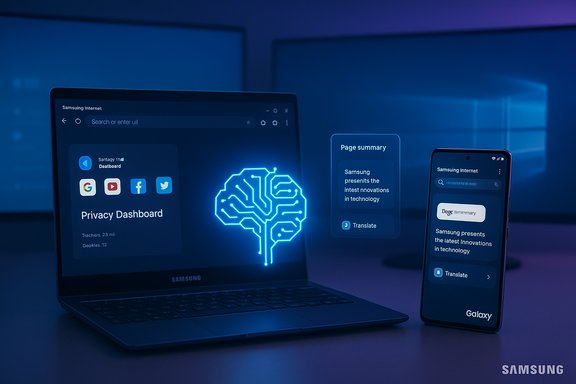
Samsung Internet for Windows arrives as a beta for Windows 11 and Windows 10 (version 1809 and later), explicitly supporting ARM-powered PCs and designed to synchronize browsing data between mobile devices and Windows machines. The desktop build mirrors core features long present on Samsung’s mobile browser: cross-device syncing of bookmarks and history, a Privacy Dashboard and tracker-blocking tools, and a promised bridge to Galaxy AI capabilities — notably a Browsing Assist feature capable of summarizing and translating page content. The initial roll-out is region-limited and delivered as a beta program; users must enroll to access the Windows client.
This launch is not merely a simple platform port. Samsung’s product messaging frames the desktop browser as part of an evolution: from a “PC browser that waits for input” to an “integrated AI platform” that anticipates needs and provides ambient assistance. Put another way: Samsung is using the Windows client to enter the increasingly crowded field of AI browsers and to ensure Galaxy users can carry a consistent, AI-enhanced browsing experience between phone, tablet, and PC.
Bringing Samsung Internet to Windows addresses a practical pain point for many Galaxy users: continuity. Many users who like Samsung’s mobile browser still rely on Chrome, Edge, or Firefox on the desktop because of cross-device syncing of passwords, tabs, and bookmarks. A polished Windows client closes that loop and makes it easier for users to adopt Samsung’s browser as their primary, cross-platform choice.
Caution: the phrase “ambient AI” is aspirational. The practical and privacy-sensitive mechanics of ambient assistance require robust transparency about what data is examined, where processing happens (local vs. cloud), how long contextual data is retained, and explicit user controls. Those technical and policy details are essential before evaluating any claim that the browser will “anticipate” needs without compromising privacy.
However, competition is fierce. Large cloud and search vendors, browser incumbents, and AI-first startups are all racing to define what an AI-powered browsing experience should be. Samsung’s success will depend on how well it differentiates technically and how confidently it addresses user expectations around privacy, accuracy, and control.
Flag: Any claim about “ambient” AI that implies seamless context sharing should be treated with caution until Samsung publishes technical documentation describing data paths and user controls.
That niche is meaningful. Many Galaxy users value the integrations Samsung offers — shared clipboard features, device continuity, and ecosystem-level services like Samsung Pass and the Samsung account — and extending that continuity to Windows removes a friction point. If Samsung maintains high standards for privacy, performance, and transparency, the browser can be adopted as the default for those users.
However, the larger AI browser battle will be decided by who can offer the most accurate, trustworthy, and privacy-safe AI features across platforms. That means not just flashy summarization but demonstrable controls, predictable behavior, and strong alliances with web publishers and enterprise customers.
There are good reasons to be optimistic. A polished Windows client with reliable sync and thoughtfully implemented AI assistance is a tangible product win for Galaxy users. But there are also significant risks: privacy uncertainty, AI hallucination hazards, the need for desktop-grade performance, and the complexities of extension and password ecosystems.
Bottom line: Samsung has opened the door to a compelling cross-platform future for its browser. The industry — and users — should watch the beta closely, insist on transparency about AI and data, and test the product rigorously before considering wider adoption. If Samsung delivers on both technical polish and privacy-first AI controls, Samsung Internet for Windows could become the natural browser for users who choose to live inside Samsung’s ecosystem; if not, it will remain one more browser fighting for attention in an already crowded market.
Source: Engadget Samsung's web browser arrives on Windows, with an AI future on its radar
 Overview
Samsung Internet for Windows arrives as a beta for Windows 11 and Windows 10 (version 1809 and later), explicitly supporting ARM-powered PCs and designed to synchronize browsing data between mobile devices and Windows machines. The desktop build mirrors core features long present on Samsung’s mobile browser: cross-device syncing of bookmarks and history, a Privacy Dashboard and tracker-blocking tools, and a promised bridge to Galaxy AI capabilities — notably a Browsing Assist feature capable of summarizing and translating page content. The initial roll-out is region-limited and delivered as a beta program; users must enroll to access the Windows client.This launch is not merely a simple platform port. Samsung’s product messaging frames the desktop browser as part of an evolution: from a “PC browser that waits for input” to an “integrated AI platform” that anticipates needs and provides ambient assistance. Put another way: Samsung is using the Windows client to enter the increasingly crowded field of AI browsers and to ensure Galaxy users can carry a consistent, AI-enhanced browsing experience between phone, tablet, and PC.
Background
Why this matters now
A decade-and-a-half after Samsung Internet debuted on mobile, the company faces a strategic moment. Browsers are no longer neutral windows to the web; they are battlegrounds for AI features that can reshape how people search, read, shop, and perform everyday tasks online. Major players and a stream of startups have debuted “AI browser” offerings with features like contextual summarization, sidebars powered by large language models, and agent-style automation that can act on behalf of the user. For Samsung, making its browser available on desktop is a prerequisite to competing on that front.Bringing Samsung Internet to Windows addresses a practical pain point for many Galaxy users: continuity. Many users who like Samsung’s mobile browser still rely on Chrome, Edge, or Firefox on the desktop because of cross-device syncing of passwords, tabs, and bookmarks. A polished Windows client closes that loop and makes it easier for users to adopt Samsung’s browser as their primary, cross-platform choice.
A short, imperfect first attempt — and what changed
Samsung previously experimented with a Windows client in late 2023; that early appearance in app stores was short-lived and removed from public distribution. Early testers and community feedback highlighted performance issues and missing features — especially around password sync and desktop-grade rendering fidelity — which made the initial desktop experience feel incomplete. The current release is more deliberate: a beta intended to test interoperability with existing Samsung account services, Galaxy AI features, and desktop-specific performance optimizations.What’s in the Windows beta
Core features
- Cross-platform syncing: Syncing of bookmarks, browsing history, open tabs, and saved login credentials via Samsung Pass (where supported) so browsing sessions can continue seamlessly between phone and PC.
- Privacy controls: Built-in tracker blocking, a Privacy Dashboard that displays blocked trackers and privacy events, and smart anti-tracking features to limit cross-site profiling.
- Browsing Assist (AI features): Early desktop integrations of Galaxy AI tools such as page summarization, inline translation, and contextual assistance to extract or condense key information from web pages.
- Platform support: Compatibility with Windows 11 and Windows 10 (version 1809 and later); ARM device support is explicitly noted for the beta.
- Modes and extensions: Support for common browsing modes (incognito/Secret mode, reader and dark modes) and planned compatibility with extensions and ad-blockers (details sparse in the beta).
What the beta explicitly does not promise (yet)
- Full parity for every desktop extension ecosystem and enterprise policy controls.
- Guaranteed password sync across every Windows machine (some earlier releases required device-specific vendor integrations).
- A final, stable privacy model and telemetry disclosures for AI features — the beta still needs documentation detailing data flow, retention, and opt-in/opt-out behavior for AI processing.
Samsung’s AI pitch: ambient and anticipatory
Samsung’s strategic language around the desktop build is telling: it does not frame the release as merely delivering feature parity, but as an on-ramp to an “integrated AI platform” and “ambient AI” that anticipates user needs. In practical terms, this means the company aims to:- Surface contextual help proactively (for example, summarizing a long article or offering to translate a page without explicit user prompts).
- Let AI tie together data from multiple devices and contexts to reduce friction (start a search on phone, finish it on PC, or have the browser nudge the user when a follow-up action is relevant).
- Offer agent-like functions that can complete multi-step tasks across websites.
Caution: the phrase “ambient AI” is aspirational. The practical and privacy-sensitive mechanics of ambient assistance require robust transparency about what data is examined, where processing happens (local vs. cloud), how long contextual data is retained, and explicit user controls. Those technical and policy details are essential before evaluating any claim that the browser will “anticipate” needs without compromising privacy.
Where Samsung’s move fits into the AI browser landscape
The last two years saw an explosion of AI-driven browser experiments and launches. The common themes are:- Sidebars or integrated chat panels that can summarize content or answer questions without leaving the page.
- Agentic features that can interact with web pages on behalf of users (filling forms, scheduling, shopping).
- Privacy and memory controls to manage what an AI can “remember” about a user across sessions.
However, competition is fierce. Large cloud and search vendors, browser incumbents, and AI-first startups are all racing to define what an AI-powered browsing experience should be. Samsung’s success will depend on how well it differentiates technically and how confidently it addresses user expectations around privacy, accuracy, and control.
Strengths: where Samsung can play to win
1. Ecosystem leverage
Samsung already has millions of users on its mobile browser and a broad hardware portfolio. A Windows client that syncs seamlessly with mobile devices is a natural extension that strengthens the Samsung ecosystem. For users who predominantly use Galaxy devices, the ability to continue browsing sessions on a PC with the same bookmarks, open tabs, and AI preferences is compelling.2. Mobile-first AI features adapted for desktop workflows
Samsung has invested in Galaxy AI features that can summarize and translate content. Bringing those to desktop, with desktop-appropriate UI and keyboard-centric workflows, solves a real problem — reading, research, and content comparison are often done on laptops and desktops. If Samsung can adapt its AI to be more efficient for long-form reading and multi-tab research, that’s a practical win.3. Privacy-first product positioning (if upheld)
The inclusion of a Privacy Dashboard and smart anti-tracking is already standard in privacy-conscious browsers. Samsung can differentiate by making privacy controls clear, granular, and easy to audit — especially for AI features. If Samsung provides transparent options for local-only processing, or clear toggles for whether page content is sent to cloud models for summarization, it will reduce friction for privacy-sensitive users.4. ARM support and broad OS compatibility
Explicit support for ARM Windows devices shows Samsung is thinking about modern hardware diversity, which matters for performance on thin-and-light notebooks and for users who run Windows on ARM-based devices.Risks and concerns
1. Privacy and AI data flows
The single largest risk is uncertainty about where AI processing occurs and how data from browsing sessions is used. Summarization and translation may require sending page content to cloud services; without clear documentation and consent models, that raises legal and reputational issues. Enterprises and privacy-conscious consumers will want explicit statements about retention, model training usage, and access controls.Flag: Any claim about “ambient” AI that implies seamless context sharing should be treated with caution until Samsung publishes technical documentation describing data paths and user controls.
2. Accuracy and hallucinations
AI summarization is useful, but language models can hallucinate or omit crucial context. Summarizing news, legal content, medical pages, or financial data without rigorous fact-checking and source attribution introduces risk. Users may rely on condensed output that simplifies nuance. Samsung will need guardrails, disclaimers, and a mechanism to show source context for AI-generated summaries.3. Performance and desktop-grade behavior
The earlier, short-lived desktop release exposed real performance gaps: smooth scrolling, GPU-accelerated rendering, and responsiveness — all of which matter deeply on desktop. Users comparing Samsung Internet to mature desktop browsers will notice missing polish quickly. Achieving parity requires sustained engineering investment and tight browser-integration testing across drivers, GPU vendors, and multi-monitor setups.4. Distribution and update cadence
A browser is a living product that must be updated continuously for security patching, extension compatibility, and new web standards. Samsung will need a clear release and update cadence for Windows users, ideally integrated with the Microsoft Store or a trusted update channel. The previous, accidental-looking release damaged confidence; Samsung must avoid repeat inconsistencies.5. Extension and password ecosystem compatibility
Desktop users expect a rich extension ecosystem and reliable password management. Early builds historically lacked full password-sync functionality, which is a non-starter for many users. Samsung must secure broad extension compatibility and clarify how Samsung Pass integrates into Windows workflows. Enterprise-controlled password vaults and single sign-on (SSO) scenarios are additional complexities.6. Legal and content licensing pressures
AI-driven summarization and content extraction can clash with publishers and rights holders. The broader AI/browser space has already seen legal pushback where content creators argue against AI systems that repurpose their work. Samsung must navigate that landscape carefully and be prepared for content licensing discussions or technical approaches that respect publishers’ terms.Practical guidance: what users, testers, and IT admins should do next
For enthusiasts and early adopters
- Enroll in the beta if you want to test cross-device syncing and Galaxy AI features on Windows, but treat it as pre-release software. Expect iterative updates and occasional bugs.
- Test performance on the actual hardware you use daily — particularly high-refresh displays and multi-monitor setups — and report any rendering or input lag to Samsung’s beta feedback channels.
- Validate syncing behavior across devices: bookmarks, open tabs, history, and (if available) saved logins via Samsung Pass. Confirm how password syncing behaves and whether it integrates with your existing password manager.
For privacy-conscious users
- Before enabling AI features, find and use the privacy toggles. If you cannot locate clear settings controlling cloud processing, avoid exposing sensitive content to summarization tools.
- Keep an eye out for explicit documentation on data retention and whether browsing data is used to train models. If the documentation is vague, err on the side of caution.
For IT admins and enterprise decision-makers
- Do not deploy Samsung Internet across managed fleets until Samsung publishes enterprise controls, telemetry documentation, and a supported update mechanism.
- Evaluate AI features against corporate data governance — ensure that the browser’s AI does not inadvertently share corporate or customer data.
- Conduct pilot tests in controlled environments to assess extension compatibility, performance, and security patching cadence.
How Samsung can deliver the product customers expect
If Samsung wants its Windows browser to be more than a well-marketed experiment, the company should focus on five concrete areas:- Ship clear, developer-level documentation that details AI processing flows, retention policies, and the boundaries of local vs. cloud computation.
- Guarantee desktop-grade rendering and input responsiveness by partnering with GPU vendors and using platform-native acceleration paths.
- Deliver robust password-sync mechanics that work across devices and integrate with existing enterprise identity providers when requested.
- Publish a predictable update and security patch cadence, ideally using Microsoft Store distribution complemented by direct enterprise channels for managed deployments.
- Offer transparency and user control over AI memories and ambient data, including granular toggles, visible indicators when AI is active, and easy data deletion.
The market question: can Samsung carve a sustainable niche?
Samsung’s Windows browser is not designed to dethrone Chrome or Edge overnight. Instead, its pragmatic path to relevance is to serve a specific audience exceptionally well: users who live inside Samsung’s hardware and services ecosystem and who want consistent AI-enabled browsing between phone, tablet, and PC.That niche is meaningful. Many Galaxy users value the integrations Samsung offers — shared clipboard features, device continuity, and ecosystem-level services like Samsung Pass and the Samsung account — and extending that continuity to Windows removes a friction point. If Samsung maintains high standards for privacy, performance, and transparency, the browser can be adopted as the default for those users.
However, the larger AI browser battle will be decided by who can offer the most accurate, trustworthy, and privacy-safe AI features across platforms. That means not just flashy summarization but demonstrable controls, predictable behavior, and strong alliances with web publishers and enterprise customers.
Final assessment: cautious optimism with clear caveats
Samsung Internet for Windows is a strategic, sensible move: it connects Samsung’s sprawling device ecosystem and positions the company in the AI browser arms race. The initial beta shows that Samsung understands the key levers — sync, privacy controls, and Galaxy AI integration — but execution matters more than vision.There are good reasons to be optimistic. A polished Windows client with reliable sync and thoughtfully implemented AI assistance is a tangible product win for Galaxy users. But there are also significant risks: privacy uncertainty, AI hallucination hazards, the need for desktop-grade performance, and the complexities of extension and password ecosystems.
Bottom line: Samsung has opened the door to a compelling cross-platform future for its browser. The industry — and users — should watch the beta closely, insist on transparency about AI and data, and test the product rigorously before considering wider adoption. If Samsung delivers on both technical polish and privacy-first AI controls, Samsung Internet for Windows could become the natural browser for users who choose to live inside Samsung’s ecosystem; if not, it will remain one more browser fighting for attention in an already crowded market.
Source: Engadget Samsung's web browser arrives on Windows, with an AI future on its radar
