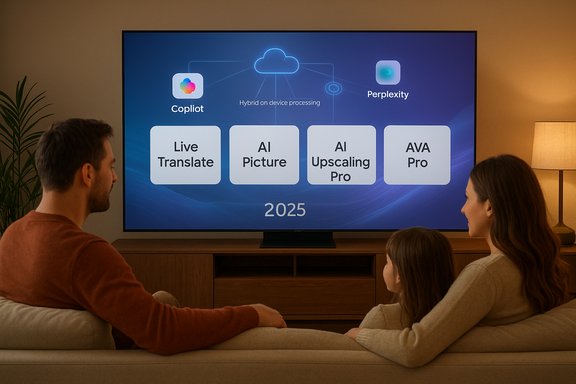
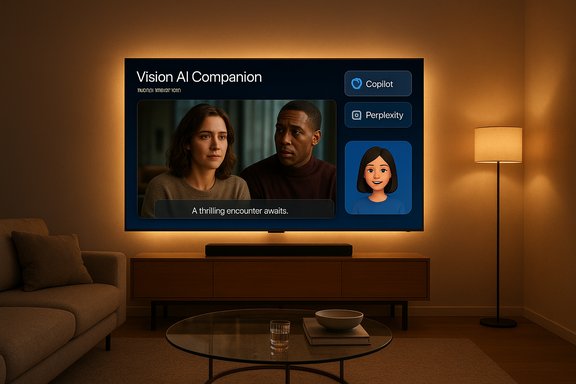
Samsung’s latest software push turns high-end TVs into full‑blown conversational surfaces, folding generative AI agents and advanced on‑device vision into a single "Vision AI Companion" experience that promises to answer questions about what’s on screen, translate dialogue in real time, tune picture and sound automatically, and even run third‑party AI agents such as Microsoft Copilot and Perplexity directly from the TV.
Samsung’s Vision AI initiative is the company’s broad strategy to make displays more than passive receivers of content: the screen becomes an interactive, context‑aware hub that can identify objects and people on screen, provide conversation‑style answers, adapt audio and image settings to the environment, and host multiple generative AI agents for retrieval and reasoning tasks. The Vision AI Companion — first shown in public demos throughout 2025 and productized during IFA and Samsung’s fall rollout — consolidates those capabilities under a single interface on Samsung’s 2025 premium televisions and selected smart monitors. This is not just a superficial voice‑assistant upgrade. Samsung positions Vision AI as a hybrid architecture: latency‑sensitive perceptual tasks (Live Translate, AI picture tuning, local audio processing) run on the TV’s SoC, while generative, long‑context reasoning and web retrieval are handled by cloud agents such as Microsoft Copilot and Perplexity. That hybrid approach is intended to balance responsiveness, capability, and privacy tradeoffs — although exact technical boundaries and telemetry behaviors are not fully documented publicly and should be treated cautiously.
Source: Deccan Herald Samsung Vision AI: New Gen AI features arrive on premium smart TVs
 Background / Overview
Samsung’s Vision AI initiative is the company’s broad strategy to make displays more than passive receivers of content: the screen becomes an interactive, context‑aware hub that can identify objects and people on screen, provide conversation‑style answers, adapt audio and image settings to the environment, and host multiple generative AI agents for retrieval and reasoning tasks. The Vision AI Companion — first shown in public demos throughout 2025 and productized during IFA and Samsung’s fall rollout — consolidates those capabilities under a single interface on Samsung’s 2025 premium televisions and selected smart monitors. This is not just a superficial voice‑assistant upgrade. Samsung positions Vision AI as a hybrid architecture: latency‑sensitive perceptual tasks (Live Translate, AI picture tuning, local audio processing) run on the TV’s SoC, while generative, long‑context reasoning and web retrieval are handled by cloud agents such as Microsoft Copilot and Perplexity. That hybrid approach is intended to balance responsiveness, capability, and privacy tradeoffs — although exact technical boundaries and telemetry behaviors are not fully documented publicly and should be treated cautiously.What Samsung is Shipping: Vision AI Companion, Copilot, and Perplexity
The core offer
At a high level, the Vision AI Companion bundles three kinds of functionality into one on‑screen experience:- Conversational Q&A and multi‑turn dialogue: Ask about actors, plot points, or real‑world facts and follow up naturally.
- On‑screen vision intelligence: Identify actors, artwork, locations, or products shown in the video and surface contextual cards.
- System‑level AI features: Auto picture and sound optimization, Live Translate subtitles, generative wallpaper, and gaming optimizations.
Microsoft Copilot on the big screen
Microsoft’s Copilot, which has become a cross‑platform conversational layer for Microsoft services, is integrated as a selectable agent inside Vision AI. On Samsung TVs and smart monitors Copilot offers voice‑first conversational assistance tailored to large displays: spoiler‑safe recaps, cast/crew lookups, personalized content recommendations, simple productivity actions on monitors, and SmartThings home control. The Copilot UI appears as talk‑back voice plus an animated avatar and visual cards designed for couch‑distance readability. Independent coverage and Samsung’s rollout materials confirm Copilot’s presence on 2025 premium models.Perplexity as a TV app
Samsung also launched a Perplexity TV App as part of Vision AI, marking the first Perplexity‑branded TV app and giving users a retrieval‑focused answer engine on their television. Perplexity’s strength is concise, web‑sourced answers and citations; on Samsung TVs it presents responses as high‑quality cards optimized for the screen and supports voice or keyboard input. Samsung announced the Perplexity TV App in October 2025 and packaged a limited promotional Perplexity Pro offer for new users on Samsung devices.Hardware, Processors, and Which Models Get Vision AI
The silicon that enables on‑device AI
Samsung’s top 2025 televisions are built around new TV‑grade AI SoCs — notably the NQ8 AI Gen3 Processor for 8K Neo QLED models — that incorporate neural processing units (NPUs) and multiple neural networks to deliver scene‑by‑scene picture and audio adjustments. Samsung’s product pages and press materials highlight features such as 8K AI Upscaling Pro, Auto HDR Remastering Pro, and Adaptive Sound Pro, all tied to the NQ8 family. These on‑device capabilities are essential to delivering low‑latency features like Live Translate and AI picture/sound tweaks without round trips to the cloud. Independent reviews and coverage confirm these processors are a practical step beyond prior generations, with the top SoCs claiming hundreds of neural networks and modest CPU/GPU performance improvements to support real‑time frame‑by‑frame analysis. Those design improvements underpin the responsiveness that Samsung needs to keep the TV experience snappy while deferring heavier generative reasoning to cloud partners.Supported models and rollout
At launch, Vision AI Companion (with Copilot and Perplexity availability varying by region) is targeted at Samsung’s 2025 premium TVs and selected Smart Monitors. The lists commonly include:- Micro RGB (Micro LED)
- Neo QLED 8K and 4K (top‑end Neo QLEDs)
- OLED premium lines (e.g., S95F family)
- The Frame and The Frame Pro lifestyle models
- Smart Monitors: M7, M8, M9 series
A Closer Look at Key Features
Click to Search and Visual Q&A
Click to Search lets viewers select on‑screen content (an actor, an artwork, a product) and get immediate context cards without pausing playback. The system combines on‑device vision processing (to detect the object) with cloud retrieval (to fetch details, clips, and related content). This flow is meant to reduce the "grab your phone" reflex and keep interactions on the TV. Early demos show concise actor bios, links to filmography, and related clips presented in large, legible cards.Live Translate
Live Translate aims to provide near‑real‑time subtitle and dialogue translation for supported languages, using local models where possible to minimize latency. While Samsung advertises the feature broadly, translation accuracy depends on language pairs and content complexity; vendors are careful to note translation accuracy is not guaranteed and may require downloads of language packs. Consumers should test the feature with their preferred languages to evaluate quality.AI Picture, Upscaling, and Generative Wallpaper
- AI Upscaling Pro and Auto HDR Remastering Pro attempt to boost non‑HDR or lower‑resolution content to a higher perceptual quality by analyzing frames and adapting color, contrast and sharpness.
- Generative Wallpaper uses text prompts or stylistic presets to create ambient imagery for idle screens — an aesthetic feature for The Frame and ambient display modes.
Active Voice Amplifier Pro and Audio
Audio features such as Active Voice Amplifier Pro and Adaptive Sound Pro use on‑device analysis to isolate dialogue and rebalance audio for noisy rooms or group viewing. These technologies are particularly valuable for living room environments where background noise can obscure speech. As with image processing, effectiveness varies by room layout and the TV’s speaker hardware.Privacy, Data Flow, and Security — What Samsung Says and What Remains Unclear
The stated approach
Samsung describes Vision AI Companion as a hybrid system: the TV performs perceptual, low‑latency tasks locally while routing conversational, web‑retrieval, and generative tasks to cloud agents (Microsoft Copilot, Perplexity). Samsung bundles security features under the Samsung Knox umbrella and has reiterated long‑term software support commitments (One UI Tizen updates) for eligible models.Practical caveats and questions
Despite vendor statements, several operational specifics remain unverifiable from current public materials:- Exactly which signals are sent to Microsoft and Perplexity during a typical query (raw audio, derived text, context metadata) are not fully documented in consumer‑facing materials.
- How long conversational histories and context are retained by Samsung, Microsoft, or Perplexity, and under what controls the end user can view or delete them, varies by service and region.
- Whether any model training data derived from user interactions might be used to improve underlying services is governed by partner privacy policies and opt‑in/opt‑out mechanisms that differ across providers.
UX, Accessibility, and Multi‑User Challenges
Designed for distance and shared use
The UI design emphasizes large text, image‑rich cards, voice narration and a small animated avatar that lip‑syncs. Those choices improve accessibility for older viewers and group settings where reading tiny UI elements is impractical. Visual cards and auditory narration help with SPOILER‑safe recaps, scene summaries, and discovery without disrupting playback.Multi‑user personalization and account complexity
To unlock personalized features and Copilot memory, the user typically signs in with a Microsoft account — often via an on‑screen QR code flow that links a phone to the TV. On shared household displays this creates multi‑user complexity: who signs in, how memories are partitioned, and how household members opt in/out of personalization are practical issues Samsung must resolve in firmware updates and UX flows. Samsung and partner materials acknowledge this but do not yet provide a single, widely adopted solution for fine‑grained multi‑user privacy on shared TVs.Business Strategy — Why Samsung, Why Microsoft, Why Perplexity
- For Samsung, integrating third‑party generative agents rapidly elevates the perceived intelligence of its TVs without building a large‑scale LLM stack in house. Vision AI pairs Samsung’s strengths in SoC design, display hardware and SmartThings with powerful cloud agents for reasoning and retrieval.
- For Microsoft, Copilot on TVs expands "Copilot Everywhere" — increasing daily touchpoints, brand familiarity, and cross‑device continuity with Microsoft accounts. It also brings Copilot’s capabilities into living rooms and shared screens.
- For Perplexity, a TV app is a new channel for its retrieval‑centric answer engine, offering curated, source‑anchored answers in a format designed for big screens. The partnership positions Perplexity as an option when users want quick, citation‑backed answers.
Risks, Limitations, and Real‑World Concerns
- Hallucinations and factual errors: Generative agents remain prone to confident but incorrect outputs. Copilot and Perplexity can both produce mistakes; users should treat answers as helpful starting points rather than authoritative sources. Vendors must design clear error states and citation displays to mitigate misuse.
- Privacy and data retention: The hybrid architecture reduces some risks but does not eliminate telemetry. Users and IT admins should review sign‑in flows, voice‑activation defaults, and any offered opt‑outs. Unresolved questions about cross‑partner data sharing warrant caution, especially in shared household contexts.
- Network dependence and latency: Cloud‑backed reasoning and web retrieval depend on stable broadband. In congested networks the experience can feel inconsistent; local on‑device fallback behaviors should be tested in the buyer’s typical home network.
- Feature fragmentation: Model‑level support, regional availability, and firmware updates will create uneven feature availability across models and markets. Consumers should check exact feature lists for their specific TV SKU rather than relying on umbrella statements.
Practical Advice: How to Evaluate and Set Up Vision AI on a Samsung TV
- Check model compatibility first: consult Samsung’s product pages and your retailer’s SKU notes to confirm Vision AI, Copilot, and Perplexity support for the exact model and screen size you’re considering.
- Test the network: ensure you have reliable broadband and, if possible, use wired Ethernet for lower latency on cloud queries.
- Review privacy settings during setup: disable always‑listening modes if you’re uncomfortable, and test the QR sign‑in flow to understand which personalization features require a Microsoft or Perplexity account.
- Try critical features before fully adopting them: run a Live Translate test with content in your target language, try Click to Search on a live show, and evaluate AI Upscaling with your most common content types. Results will vary and real viewing conditions are the best judge.
- Keep firmware updated: Samsung has committed to extended One UI Tizen updates for eligible models; firmware updates will expand and refine Vision AI features over time. Monitor those releases for privacy improvements and multi‑user UX changes.
The Competitive Landscape and the Big Picture
Samsung’s move conceptually mirrors broader industry trends: TVs and other large screens are becoming shared AI endpoints. LG, other OEMs and major cloud AI providers are racing to place conversational agents on the living room screen. Samsung’s advantage is its vertical control of display hardware, SoCs and the SmartThings ecosystem — plus strategic third‑party partnerships that deliver immediate LLM capabilities. The long game, however, hinges on execution: privacy transparency, cross‑app integrations with streaming services, and the reliability of cloud agents in real‑world home networks.Conclusion
Samsung’s Vision AI Companion materially changes the role of the television from a passive entertainment display to an interactive, multi‑agent conversational surface. The integration of Microsoft Copilot and a dedicated Perplexity TV App gives the system strong retrieval and conversational capabilities while Samsung’s new NQ‑class SoCs enable low‑latency perceptual features such as Live Translate, AI Upscaling Pro, and adaptive audio. Those combined strengths make Vision AI one of the most ambitious attempts to bring generative AI into the living room at scale. That promise comes with practical caveats: features are model‑ and region‑dependent, cloud dependencies create network and privacy tradeoffs, and generative models can still hallucinate or err. Consumers and IT‑minded buyers should verify model compatibility, test privacy and network behavior, and treat Copilot/Perplexity outputs as assistive rather than authoritative. If Samsung and its partners maintain transparent data practices, provide robust multi‑user controls, and continue refining on‑device fallbacks, Vision AI Companion could be the model for how TVs evolve into helpful household hubs. For now, the feature set is compelling, but its long‑term success will depend on steady execution and clearer answers to the privacy and governance questions that inevitably accompany putting powerful generative agents on the largest screen in the home.Source: Deccan Herald Samsung Vision AI: New Gen AI features arrive on premium smart TVs