

Microsoft is rolling out scoped SharePoint search inside the SharePoint app in Microsoft Teams, formerly Viva Connections, for Android and iOS users in June 2026 across worldwide commercial, GCC, GCC High, and DoD Microsoft 365 tenants. The change is small enough to sound like plumbing and large enough to expose Microsoft’s larger bet: the intranet is no longer a destination, but a surface inside Teams. Search is the tell. If Microsoft can make “where do I find the HR policy?” feel native in Teams, SharePoint stops being the place employees reluctantly visit and becomes the organizational memory sitting under their thumb.
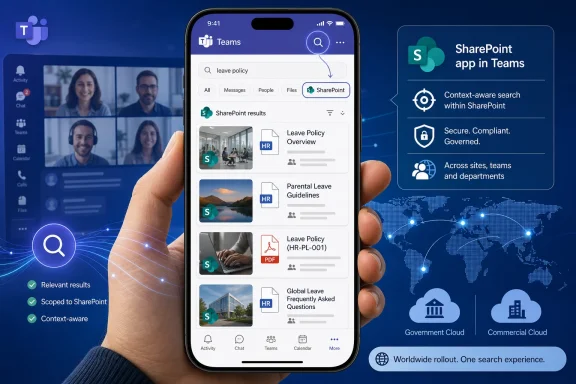
The feature is straightforward on paper. When a user is inside the SharePoint app in Teams and taps the Teams search icon, results are scoped to SharePoint global search rather than behaving like a generic Teams search. If the user enters a query and hits return, Teams opens the SharePoint search page for the query.
That is the kind of change that usually dies in a roadmap footnote. But for administrators who have watched employees search in the wrong Microsoft 365 silo for years, it is a quietly consequential correction. Microsoft is not introducing a new search engine here; it is aligning the search box with the user’s current context.
That context matters. Teams has become the front door for chat, meetings, channels, workflows, approvals, calls, apps, and increasingly the corporate intranet. A single search affordance that means one thing in chat, another in files, and another in the SharePoint app can either feel intelligent or maddening depending on whether Microsoft gets the scoping right.
This rollout says Microsoft has accepted that “one search box for everything” is not always the same as “one useful search experience.” Sometimes users do not want the whole tenant. They want the corner of Microsoft 365 they are standing in.
For years, SharePoint has powered intranets that employees experience as a mix of news, navigation, policies, files, forms, and department portals. Viva Connections tried to modernize that into a Teams-friendly employee hub. Calling it the SharePoint app in Teams signals that Microsoft wants customers to stop thinking of this as an optional Viva layer and start treating it as the mobile and Teams expression of the corporate intranet.
Scoped search reinforces that shift. If the app is SharePoint by another name, the search behavior should not pretend otherwise. A user inside the SharePoint app looking for “benefits enrollment” is probably not asking for a Teams chat transcript from six months ago; they are looking for the canonical intranet result.
That sounds obvious only because the industry spent years making it not obvious. Enterprise collaboration suites created overlapping places for the same knowledge, then tried to solve the mess with global search. Microsoft’s latest move is less glamorous: it makes the search box respect the app boundary.
Mobile users are impatient in a way desktop users can hide. They will not click through three levels of navigation to find a policy page. They will search once, maybe twice, and then ask a colleague in chat if the answer does not appear. In that world, poor scoping is not just a UX flaw; it is a knowledge-management tax.
Frontline workers are a major part of this story. Many organizations use Teams mobile as the practical hub for employees who do not live in Outlook or SharePoint all day. If the SharePoint app in Teams is supposed to carry schedules, news, resources, forms, and role-specific tools, then search cannot behave as though the user is browsing an undifferentiated Microsoft 365 attic.
The government cloud coverage also deserves notice. Microsoft lists the rollout for Worldwide, GCC, GCC High, and DoD, which means this is not merely a commercial-cloud convenience feature drifting through the consumerized edge of enterprise IT. It is being positioned as core behavior for regulated environments where employees still need fast access to authoritative internal content.
In a clean tenant with disciplined information architecture, SharePoint global search can surface the right intranet pages, hub sites, news, and files with impressive speed. In a messy tenant, it can reveal abandoned pages, duplicate policies, stale department sites, and files that technically should be searchable but should never become the first answer to a broad employee query. Scoped search does not solve that problem. It makes the quality of the SharePoint estate more visible.
That is why administrators should treat this rollout as a prompt, not a finish line. If mobile users are about to get a more direct path from Teams into SharePoint search results, the search results themselves need attention. The experience will only feel modern if the underlying content is current, permissioned correctly, and structured around how people ask for information.
Microsoft’s product direction has been consistent here. Teams is the shell, SharePoint is the content and intranet substrate, Microsoft Graph supplies connective tissue, and Copilot increasingly sits above the stack as the interpretive layer. Scoped search may not mention Copilot, but it belongs to the same strategic map: Microsoft wants organizational knowledge to be retrievable without forcing users to remember which product owns it.
That conclusion is sticky. Once employees decide enterprise search is bad, they route around it with habits that are difficult to unwind. They bookmark old pages, ask coworkers for links, create shadow copies of documents, or rely on managers to interpret policy. None of those behaviors improves security or consistency.
Scoped search is Microsoft admitting that relevance begins before the query is typed. The app context is already a signal. A query from inside the SharePoint app is not identical to the same query from the Teams chat list, and the search experience should not pretend it is.
There is a broader lesson for Microsoft 365 design. The suite’s power comes from integration, but its complexity comes from the fact that integration often blurs boundaries users rely on. The trick is not to eliminate boundaries; it is to make them permeable when helpful and firm when necessary. This rollout is an example of a firm boundary doing useful work.
That means stale content becomes more dangerous. An out-of-date benefits page buried in SharePoint is annoying. An out-of-date benefits page that appears as the top mobile result when a new hire searches from Teams is an incident waiting to happen. Better access raises the cost of poor curation.
Organizations should look at the pages and queries that matter most: HR policies, IT help, payroll, security reporting, facilities, travel, expenses, procurement, and executive communications. Those are the searches employees perform when they are trying to act, not browse. If those results are wrong, the search box becomes a liability.
Permissions also deserve a fresh look. SharePoint search respects access controls, but access controls in long-lived tenants can reflect years of exceptions, migrations, and project sprawl. A scoped SharePoint search experience in Teams mobile does not create oversharing by itself, but it can make oversharing easier to discover.
That is typical of mature SaaS platforms. The biggest user-facing improvements often come from correcting mismatches between existing systems. The hard engineering may have been done years earlier, while the meaningful improvement arrives when a user no longer has to understand the internal product map.
Still, the distinction between “search within Teams” and “search SharePoint from within Teams” is a product seam Microsoft has struggled to make intuitive. Teams users encounter files stored in SharePoint, OneDrive links shared through chat, tabs that host web content, channel documents backed by SharePoint libraries, and now a SharePoint intranet app living inside the Teams frame. To Microsoft, those are connected services. To a user, they are just places where work might be.
Scoped search reduces one bit of cognitive overhead. It says: while you are in the intranet app, the search icon behaves like intranet search. That is a more humane design than asking every employee to carry a mental model of Microsoft 365 storage and indexing.
That distinction matters for admins fielding user reports. One tenant may see the new behavior on iOS before Android. A government tenant may follow a different deployment cadence from a commercial tenant. Users may also need a current Teams mobile client before the experience appears consistently.
Microsoft 365 roadmap entries are directional, not contractual release notes. They are useful for planning and communications, but they rarely capture every dependency that determines whether a specific user sees a feature on a specific morning. The safest internal messaging is plain: Microsoft is rolling this out now, availability may vary by tenant and platform, and the expected behavior is scoped SharePoint results from the SharePoint app in Teams.
For WindowsForum readers, the mobile-only platform listing is also worth underlining. This particular roadmap item is not about the Windows desktop Teams client, even though the SharePoint app in Teams exists in desktop contexts. The immediate impact is for Android and iOS users accessing the SharePoint app from Teams mobile.
If a company invests in a polished SharePoint home site, targeted news, branded resources, and Viva Connections-style dashboards, but search dumps users into a generic Teams result set, the experience fractures. The organization may think it has built a front door. The employee experiences a hallway of side doors.
Scoped SharePoint search helps preserve intent. The SharePoint app in Teams is meant to be a place for company resources, news, and navigation. Search results scoped to SharePoint global search keep the user inside that information architecture long enough to complete the task.
This does not absolve communications teams from content discipline. In fact, it makes their work more measurable. If employees can search the intranet more naturally from Teams mobile, content owners will hear faster when the top result is wrong, missing, or written in language nobody uses.
Government and defense environments often have stricter rules around where information lives, who can access it, and how users are trained to find authoritative guidance. A search experience that respects SharePoint scoping inside Teams can reduce ambiguity for users who operate under those constraints. It also keeps Microsoft’s model consistent across clouds, at least in stated availability.
There is a tension here. Search is powerful precisely because it collapses distance between a question and an answer, but regulated environments often need friction in the right places. The answer is not to make search worse. It is to make permissions, lifecycle management, labels, and content ownership stronger so that search can be trusted.
That is the real governance bargain. Microsoft can improve the path. Customers still own much of the terrain.
Scoped search makes Teams feel less like a wrapper around other services and more like a context-aware work environment. When the search icon changes behavior based on where the user is, Teams starts to resemble an operating environment rather than a single-purpose app. That is both useful and risky.
The usefulness is obvious. Users stay in one familiar mobile app, and organizations get a better chance of guiding them to official resources. The risk is that Teams becomes the place where every Microsoft 365 surface competes for attention, each with slightly different rules and expectations.
Microsoft’s challenge is consistency without flattening. Users should not have to relearn search in every Teams-hosted app, but they also need the search results to match the place they are using. Scoped SharePoint search is a sensible compromise: the control remains familiar, while the results become more relevant.
If an intranet is full of duplicate pages, obsolete PDFs, unclear ownership, and permissive document libraries, both search and AI will reflect that disorder. Scoped search may show the problem in a traditional results page. Copilot may summarize the problem with confidence. Neither outcome is good.
That makes this feature a small warning flare. Microsoft is making it easier for users to ask SharePoint for answers inside Teams. Organizations that want AI-powered productivity tomorrow need to make sure their SharePoint content is trustworthy today.
The old intranet failure mode was neglect: employees stopped visiting because the site felt stale. The new failure mode is amplification: stale content becomes easier to retrieve, summarize, and act on. Better access is not automatically better knowledge.
On that narrow but important measure, scoped search is the correct bet. It aligns the user’s intent with the search provider most likely to satisfy that intent. It also makes the SharePoint app in Teams feel less like a bolted-on portal and more like a native part of the Teams mobile experience.
There will still be confusion. Some users will expect the Teams search icon to search everything, everywhere, all the time. Others will not notice the difference unless results improve. But invisible improvements are often the best kind in enterprise software, because they remove a frustration users never had the vocabulary to report.
The product lesson is that Microsoft 365 does not need more places to search as much as it needs better defaults for where a search begins. This rollout is one of those defaults.
 Microsoft Is Teaching Teams to Know Where You Are
The feature is straightforward on paper. When a user is inside the SharePoint app in Teams and taps the Teams search icon, results are scoped to SharePoint global search rather than behaving like a generic Teams search. If the user enters a query and hits return, Teams opens the SharePoint search page for the query.That is the kind of change that usually dies in a roadmap footnote. But for administrators who have watched employees search in the wrong Microsoft 365 silo for years, it is a quietly consequential correction. Microsoft is not introducing a new search engine here; it is aligning the search box with the user’s current context.
That context matters. Teams has become the front door for chat, meetings, channels, workflows, approvals, calls, apps, and increasingly the corporate intranet. A single search affordance that means one thing in chat, another in files, and another in the SharePoint app can either feel intelligent or maddening depending on whether Microsoft gets the scoping right.
This rollout says Microsoft has accepted that “one search box for everything” is not always the same as “one useful search experience.” Sometimes users do not want the whole tenant. They want the corner of Microsoft 365 they are standing in.
The Viva Connections Rename Was More Than Cosmetics
The timing is important because Microsoft has been repositioning Viva Connections as the SharePoint app in Teams. That rebrand is easy to dismiss as another entry in Microsoft’s long catalogue of naming churn, but this one carries a product argument. Viva Connections was framed as part of the employee-experience suite; the SharePoint app in Teams makes the underlying architecture and user expectation more explicit.For years, SharePoint has powered intranets that employees experience as a mix of news, navigation, policies, files, forms, and department portals. Viva Connections tried to modernize that into a Teams-friendly employee hub. Calling it the SharePoint app in Teams signals that Microsoft wants customers to stop thinking of this as an optional Viva layer and start treating it as the mobile and Teams expression of the corporate intranet.
Scoped search reinforces that shift. If the app is SharePoint by another name, the search behavior should not pretend otherwise. A user inside the SharePoint app looking for “benefits enrollment” is probably not asking for a Teams chat transcript from six months ago; they are looking for the canonical intranet result.
That sounds obvious only because the industry spent years making it not obvious. Enterprise collaboration suites created overlapping places for the same knowledge, then tried to solve the mess with global search. Microsoft’s latest move is less glamorous: it makes the search box respect the app boundary.
Mobile Is Where the Intranet Either Works or Disappears
The initial platform list matters: Android and iOS. This is not a desktop-first tweak for power users with three monitors and a browser profile dedicated to Microsoft 365. It is aimed at the phone, where the intranet has historically struggled to compete with the immediacy of messaging apps.Mobile users are impatient in a way desktop users can hide. They will not click through three levels of navigation to find a policy page. They will search once, maybe twice, and then ask a colleague in chat if the answer does not appear. In that world, poor scoping is not just a UX flaw; it is a knowledge-management tax.
Frontline workers are a major part of this story. Many organizations use Teams mobile as the practical hub for employees who do not live in Outlook or SharePoint all day. If the SharePoint app in Teams is supposed to carry schedules, news, resources, forms, and role-specific tools, then search cannot behave as though the user is browsing an undifferentiated Microsoft 365 attic.
The government cloud coverage also deserves notice. Microsoft lists the rollout for Worldwide, GCC, GCC High, and DoD, which means this is not merely a commercial-cloud convenience feature drifting through the consumerized edge of enterprise IT. It is being positioned as core behavior for regulated environments where employees still need fast access to authoritative internal content.
The Search Box Has Become Microsoft 365’s Most Political Control
Search in Microsoft 365 is not just a utility. It is a governance decision with a magnifying glass attached. What appears first, what appears at all, and what looks official can affect compliance, employee trust, and the daily load on support desks.In a clean tenant with disciplined information architecture, SharePoint global search can surface the right intranet pages, hub sites, news, and files with impressive speed. In a messy tenant, it can reveal abandoned pages, duplicate policies, stale department sites, and files that technically should be searchable but should never become the first answer to a broad employee query. Scoped search does not solve that problem. It makes the quality of the SharePoint estate more visible.
That is why administrators should treat this rollout as a prompt, not a finish line. If mobile users are about to get a more direct path from Teams into SharePoint search results, the search results themselves need attention. The experience will only feel modern if the underlying content is current, permissioned correctly, and structured around how people ask for information.
Microsoft’s product direction has been consistent here. Teams is the shell, SharePoint is the content and intranet substrate, Microsoft Graph supplies connective tissue, and Copilot increasingly sits above the stack as the interpretive layer. Scoped search may not mention Copilot, but it belongs to the same strategic map: Microsoft wants organizational knowledge to be retrievable without forcing users to remember which product owns it.
This Is a Fix for a Very Microsoft Kind of Confusion
The best way to understand the feature is to imagine the mistake it prevents. A user opens the company intranet experience in Teams mobile, taps search, types “expense reimbursement,” and expects the official policy. If Teams gives them chat messages, meeting references, or unrelated channel files before the intranet result, the user concludes that search is unreliable.That conclusion is sticky. Once employees decide enterprise search is bad, they route around it with habits that are difficult to unwind. They bookmark old pages, ask coworkers for links, create shadow copies of documents, or rely on managers to interpret policy. None of those behaviors improves security or consistency.
Scoped search is Microsoft admitting that relevance begins before the query is typed. The app context is already a signal. A query from inside the SharePoint app is not identical to the same query from the Teams chat list, and the search experience should not pretend it is.
There is a broader lesson for Microsoft 365 design. The suite’s power comes from integration, but its complexity comes from the fact that integration often blurs boundaries users rely on. The trick is not to eliminate boundaries; it is to make them permeable when helpful and firm when necessary. This rollout is an example of a firm boundary doing useful work.
Administrators Inherit the Consequences of Better Visibility
For IT teams, the rollout should trigger a review of intranet search hygiene. This is not because the feature requires a major deployment project; the roadmap description suggests a service-side change tied to Teams mobile and the SharePoint app. The operational impact is subtler: more users may now reach SharePoint global search from Teams at the exact moment they need an answer.That means stale content becomes more dangerous. An out-of-date benefits page buried in SharePoint is annoying. An out-of-date benefits page that appears as the top mobile result when a new hire searches from Teams is an incident waiting to happen. Better access raises the cost of poor curation.
Organizations should look at the pages and queries that matter most: HR policies, IT help, payroll, security reporting, facilities, travel, expenses, procurement, and executive communications. Those are the searches employees perform when they are trying to act, not browse. If those results are wrong, the search box becomes a liability.
Permissions also deserve a fresh look. SharePoint search respects access controls, but access controls in long-lived tenants can reflect years of exceptions, migrations, and project sprawl. A scoped SharePoint search experience in Teams mobile does not create oversharing by itself, but it can make oversharing easier to discover.
The Feature Is Small Because Microsoft Already Built the Hard Part
One reason this update looks modest is that SharePoint global search already exists. Viva Connections already sits in Teams. The SharePoint app already gives organizations a way to surface intranet resources through the Teams app bar. Microsoft is not announcing a new architecture; it is tightening a seam.That is typical of mature SaaS platforms. The biggest user-facing improvements often come from correcting mismatches between existing systems. The hard engineering may have been done years earlier, while the meaningful improvement arrives when a user no longer has to understand the internal product map.
Still, the distinction between “search within Teams” and “search SharePoint from within Teams” is a product seam Microsoft has struggled to make intuitive. Teams users encounter files stored in SharePoint, OneDrive links shared through chat, tabs that host web content, channel documents backed by SharePoint libraries, and now a SharePoint intranet app living inside the Teams frame. To Microsoft, those are connected services. To a user, they are just places where work might be.
Scoped search reduces one bit of cognitive overhead. It says: while you are in the intranet app, the search icon behaves like intranet search. That is a more humane design than asking every employee to carry a mental model of Microsoft 365 storage and indexing.
The Roadmap Date Is a Promise With Microsoft 365 Fine Print
Microsoft lists the feature as rolling out with general availability in June 2026. The roadmap entry was created in May 2026 and updated on June 29, 2026, which suggests the feature is actively moving through deployment rather than sitting in a speculative backlog. As always with Microsoft 365, “rolling out” does not mean every tenant, ring, cloud, and device sees it at the same instant.That distinction matters for admins fielding user reports. One tenant may see the new behavior on iOS before Android. A government tenant may follow a different deployment cadence from a commercial tenant. Users may also need a current Teams mobile client before the experience appears consistently.
Microsoft 365 roadmap entries are directional, not contractual release notes. They are useful for planning and communications, but they rarely capture every dependency that determines whether a specific user sees a feature on a specific morning. The safest internal messaging is plain: Microsoft is rolling this out now, availability may vary by tenant and platform, and the expected behavior is scoped SharePoint results from the SharePoint app in Teams.
For WindowsForum readers, the mobile-only platform listing is also worth underlining. This particular roadmap item is not about the Windows desktop Teams client, even though the SharePoint app in Teams exists in desktop contexts. The immediate impact is for Android and iOS users accessing the SharePoint app from Teams mobile.
This Is Also a Quiet Win for Corporate Communications
Corporate communications teams should care about this more than the feature’s technical phrasing suggests. Intranets live or die by whether employees can find official information when they need it. Search is not a back-end capability; it is part of the editorial experience.If a company invests in a polished SharePoint home site, targeted news, branded resources, and Viva Connections-style dashboards, but search dumps users into a generic Teams result set, the experience fractures. The organization may think it has built a front door. The employee experiences a hallway of side doors.
Scoped SharePoint search helps preserve intent. The SharePoint app in Teams is meant to be a place for company resources, news, and navigation. Search results scoped to SharePoint global search keep the user inside that information architecture long enough to complete the task.
This does not absolve communications teams from content discipline. In fact, it makes their work more measurable. If employees can search the intranet more naturally from Teams mobile, content owners will hear faster when the top result is wrong, missing, or written in language nobody uses.
The Government Cloud Angle Makes This More Than Convenience
The inclusion of GCC, GCC High, and DoD in the roadmap listing is not just a line for procurement teams. It shows Microsoft treating the SharePoint app in Teams as a serious enterprise and public-sector surface, not merely a commercial employee-experience add-on. For regulated organizations, the official path to internal information matters.Government and defense environments often have stricter rules around where information lives, who can access it, and how users are trained to find authoritative guidance. A search experience that respects SharePoint scoping inside Teams can reduce ambiguity for users who operate under those constraints. It also keeps Microsoft’s model consistent across clouds, at least in stated availability.
There is a tension here. Search is powerful precisely because it collapses distance between a question and an answer, but regulated environments often need friction in the right places. The answer is not to make search worse. It is to make permissions, lifecycle management, labels, and content ownership stronger so that search can be trusted.
That is the real governance bargain. Microsoft can improve the path. Customers still own much of the terrain.
Teams Is Becoming the Browser Microsoft Always Wanted
Microsoft has spent years trying to make Teams more than a chat client. It is a collaboration shell, an app platform, a meeting room, a workflow surface, and increasingly a front end for Microsoft 365 experiences that once lived mainly in the browser. The SharePoint app in Teams fits that pattern perfectly.Scoped search makes Teams feel less like a wrapper around other services and more like a context-aware work environment. When the search icon changes behavior based on where the user is, Teams starts to resemble an operating environment rather than a single-purpose app. That is both useful and risky.
The usefulness is obvious. Users stay in one familiar mobile app, and organizations get a better chance of guiding them to official resources. The risk is that Teams becomes the place where every Microsoft 365 surface competes for attention, each with slightly different rules and expectations.
Microsoft’s challenge is consistency without flattening. Users should not have to relearn search in every Teams-hosted app, but they also need the search results to match the place they are using. Scoped SharePoint search is a sensible compromise: the control remains familiar, while the results become more relevant.
Copilot Makes Good Search Hygiene Less Optional
Even though this roadmap item is not a Copilot announcement, it lands in a Microsoft 365 era increasingly defined by AI-assisted retrieval. Copilot experiences depend on the quality, permissions, and structure of the information they can reach. Search and AI are not the same product, but they are downstream of the same content reality.If an intranet is full of duplicate pages, obsolete PDFs, unclear ownership, and permissive document libraries, both search and AI will reflect that disorder. Scoped search may show the problem in a traditional results page. Copilot may summarize the problem with confidence. Neither outcome is good.
That makes this feature a small warning flare. Microsoft is making it easier for users to ask SharePoint for answers inside Teams. Organizations that want AI-powered productivity tomorrow need to make sure their SharePoint content is trustworthy today.
The old intranet failure mode was neglect: employees stopped visiting because the site felt stale. The new failure mode is amplification: stale content becomes easier to retrieve, summarize, and act on. Better access is not automatically better knowledge.
The User Experience Bet Is Correct, Even If the Naming Still Isn’t
Microsoft’s naming around Viva, SharePoint, Teams, and employee experience remains a maze. Users do not care whether the app used to be called Viva Connections, is now called the SharePoint app in Teams, or is branded by their organization with a custom icon. They care whether the place with company resources gives them the right answer.On that narrow but important measure, scoped search is the correct bet. It aligns the user’s intent with the search provider most likely to satisfy that intent. It also makes the SharePoint app in Teams feel less like a bolted-on portal and more like a native part of the Teams mobile experience.
There will still be confusion. Some users will expect the Teams search icon to search everything, everywhere, all the time. Others will not notice the difference unless results improve. But invisible improvements are often the best kind in enterprise software, because they remove a frustration users never had the vocabulary to report.
The product lesson is that Microsoft 365 does not need more places to search as much as it needs better defaults for where a search begins. This rollout is one of those defaults.
The June Rollout Turns Intranet Quality Into a Mobile Problem
The practical reading of this update is simple: Microsoft is shortening the distance between Teams mobile users and SharePoint search. That gives employees a better shot at finding official content from the app they already use, but it also gives administrators less room to hide poor intranet hygiene.- Microsoft is rolling out scoped SharePoint global search from the Teams search icon when users are inside the SharePoint app in Teams on Android and iOS.
- Pressing enter on a query opens the SharePoint search page, keeping the user’s search journey aligned with the intranet context.
- The feature is listed for General Availability in June 2026 across worldwide commercial tenants and U.S. government clouds, including GCC, GCC High, and DoD.
- The change is most important for mobile and frontline scenarios where Teams is often the primary gateway to company resources.
- Administrators should review high-value SharePoint search results, stale intranet content, and permissions before broader usage exposes weak spots.
- The update strengthens Microsoft’s larger strategy of making Teams the front door for Microsoft 365 while leaving SharePoint as the knowledge substrate underneath.
References
- Primary source: Microsoft 365 Roadmap
Published: 2026-06-29T23:02:39.0286478Z
Microsoft 365 Roadmap | Microsoft 365
The Microsoft 365 Roadmap lists updates that are currently planned for applicable subscribers. Check here for more information on the status of new features and updates.www.microsoft.com
- Official source: support.microsoft.com
Viva Connections on your desktop | Microsoft Support
Guide on using Viva Connections on your desktop with an overview of the layout, viewing announcements, customizing your dashboard view, and pinning Connections to Teams.support.microsoft.com - Official source: techcommunity.microsoft.com
- Official source: learn.microsoft.com
Search SharePoint from Viva - Microsoft Q&A
Hello, I'm wondering whether somebody knows if there are any plans on implementing SharePoint search from inside Microsoft Viva in Teams? SharePoint top bar is replaced with Teams top bar in Viva: This search bar is used to search…learn.microsoft.com - Official source: devblogs.microsoft.com
Announcing SharePoint Framework 1.13 - Extending Microsoft Viva Connections - Microsoft 365 Developer Blog
We are excited to announce general availability of the SharePoint Framework (SPFx) 1.13 with the ability to build engaging experiences for Microsoft Viva Connections.devblogs.microsoft.com - Related coverage: support.visualsp.com
Setting up Viva Connections - VisualSP Support
Effortlessly integrate VisualSP into Viva Connections on Microsoft Teams. Enhance user experience by following simple steps.support.visualsp.com
- Related coverage: windowscentral.com
New Microsoft 365 Companion Apps Are Coming to Windows 11 | Windows Central
Microsoft 365’s new companion apps bring your files, contacts, and events to the Windows 11 taskbar.www.windowscentral.com
