

Microsoft’s Secure Boot certificate transition is moving from background maintenance into an operational project that enterprises now have to manage deliberately. The short answer to your two questions is: use Microsoft Intune as the primary deployment mechanism, not a registry hack plus scheduled task, and do not assume the May 12 Patch Tuesday will magically fix weak adoption or compliance reporting. Microsoft’s own guidance and the rollout behavior reflected in current reporting point to a phased process that depends on device state, reboot completion, and in some cases firmware support, so slow progress is not unusual even when the policy is technically working
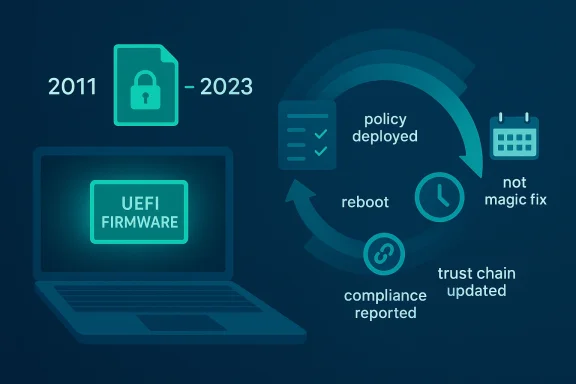
Secure Boot certificate updates are not ordinary configuration changes. They touch the UEFI trust chain, which means the update has to move through Windows servicing, firmware behavior, and device reporting before an endpoint can truly be considered compliant. Microsoft has been clear that the 2011-era certificates are aging out and that devices may keep booting even while they stop being fully protected for future boot-chain updates, which is why the transition is being treated as a security lifecycle event rather than a simple feature patch
That distinction matters because a device can look healthy from a user’s perspective while still remaining on the old trust chain. In Microsoft’s current approach, the Windows Security app is being used to surface Secure Boot certificate status directly, because relying on a plain “Secure Boot enabled” signal is not enough to confirm that the 2023 certificate family has actually been applied. Microsoft is also staging notifications and guidance over time, which is a strong clue that the company expects a mixed fleet with uneven readiness
For enterprises, the migration is fundamentally a fleet-management problem. Home systems may receive the update automatically through Windows Update, but managed environments are different: policy scope, reboot timing, firmware compatibility, and compliance telemetry all influence whether the rollout appears to “stick.” Microsoft’s own enterprise guidance implies that some devices need additional steps, and that a subset may require action outside the default Windows servicing path
The slow adoption you are seeing in Intune and in compliance dashboards is therefore not surprising. Certificate transitions at the boot layer often need one or more restarts before reporting catches up, and the system may not immediately reflect the updated state until the boot chain has fully re-established trust with the new material. That creates a lag between “policy deployed,” “payload installed,” and “device reported compliant,” which is exactly where many IT teams get tripped up
Microsoft’s rollout strategy also suggests that user-visible status and policy-driven deployment are meant to work together. The Windows Security app now becomes the human-facing indicator, while Intune or other management tooling becomes the enforcement path. In practical terms, that means the platform is trying to solve two problems at once: getting the update onto the machine and convincing administrators that the machine has really crossed the line into the new state
This is also why a lot of teams misread the rollout as “stalled” when it is actually just unfinished. A device can have the new material available but not yet have completed the full boot sequence required to make the update durable. If you only watch the compliance report and not the reboot state, the numbers will always look worse than they really are
Intune gives you a more defensible enterprise story because it aligns with Windows management, reporting, assignment scope, remediation logic, and phased deployment. The certificate update itself is not a random custom setting; it is part of a wider platform maintenance cycle. When Microsoft provides a structured path, IT should generally prefer the structured path unless a hardware-specific exception forces a fallback
The problem is that scripts and registry edits usually do not age well across a heterogeneous fleet. They can become brittle when firmware versions differ, reboot behavior changes, or future Microsoft guidance alters the expected path. What works on one laptop family can silently fail on another, and that kind of inconsistency is exactly what makes compliance dashboards look noisy and unreliable
Another issue is that some devices may need more than one restart before the new state is fully recognized. If your compliance logic checks too early, it will keep flagging the device as incomplete even though the update is already on the box and just waiting for the next boot cycle to finalize. In other words, the deployment can be operationally correct while still looking incomplete in dashboards
This is one reason administrators sometimes see a device do the right thing but not “close out” in the compliance portal. The machine has not necessarily failed; it may simply be waiting for a clean reboot, a fresh policy evaluation, or a reboot sequence that updates boot measurements after the certificate change. That delay is annoying, but it is not automatically evidence of a broken deployment
Microsoft’s own rollout cadence suggests a phased approach, not a single magic patch. The company has been adding visibility, notifications, and supporting updates over time precisely because this is a multi-stage transition. That means future updates may help, but they are not a substitute for correct deployment design and reboot governance today
The more realistic expectation is that May’s servicing wave could reduce exceptions and smooth edge cases, especially for devices that were already close to compliant. What it will not do is fix a missing reboot plan, a mis-scoped Intune profile, or a device population that is blocked by OEM firmware limitations. Those are deployment problems, not patch-calendar problems
I would also segment the fleet. Newer models are more likely to complete the transition smoothly, while older or firmware-stale systems are more likely to need exception handling. That segmentation lets you measure the rollout more honestly and focus remediation effort where it will have the highest payoff
For enterprises, the issue is different. It is a compliance and lifecycle management problem that intersects with endpoint policy, firmware heterogeneity, BitLocker behavior, and support operations. That is why the enterprise answer is never just “push the update”; it is “push the update, validate the boot chain, manage reboots, and handle exceptions by model and firmware family”
That does not mean management is the problem. It means you need to respect the dependency chain. If your fleet is heavily controlled, then the remediation plan has to include the reboot lifecycle and the reporting lifecycle, not just the configuration assignment. That is where many deployments lose momentum
Microsoft’s broader messaging also matters. The company has been expanding visibility and notifications around Secure Boot status, which suggests that reporting and guidance will continue evolving through 2026. That means the current approach should be treated as a moving target in the best possible sense: the platform is still being refined, and enterprises need to keep validating assumptions as the rollout matures
In the end, this is less about one certificate update and more about how Windows fleets absorb platform trust changes at scale. The organizations that get it right will build a reusable playbook for future firmware-era security work, while the ones that wait for a miracle Patch Tuesday will probably keep staring at flat compliance charts longer than they should.
Source: Microsoft - Message Center Ask Microsoft Anything: Secure Boot - April 23, 2026 - Windows Tech Community
 Background
Secure Boot certificate updates are not ordinary configuration changes. They touch the UEFI trust chain, which means the update has to move through Windows servicing, firmware behavior, and device reporting before an endpoint can truly be considered compliant. Microsoft has been clear that the 2011-era certificates are aging out and that devices may keep booting even while they stop being fully protected for future boot-chain updates, which is why the transition is being treated as a security lifecycle event rather than a simple feature patchThat distinction matters because a device can look healthy from a user’s perspective while still remaining on the old trust chain. In Microsoft’s current approach, the Windows Security app is being used to surface Secure Boot certificate status directly, because relying on a plain “Secure Boot enabled” signal is not enough to confirm that the 2023 certificate family has actually been applied. Microsoft is also staging notifications and guidance over time, which is a strong clue that the company expects a mixed fleet with uneven readiness
For enterprises, the migration is fundamentally a fleet-management problem. Home systems may receive the update automatically through Windows Update, but managed environments are different: policy scope, reboot timing, firmware compatibility, and compliance telemetry all influence whether the rollout appears to “stick.” Microsoft’s own enterprise guidance implies that some devices need additional steps, and that a subset may require action outside the default Windows servicing path
The slow adoption you are seeing in Intune and in compliance dashboards is therefore not surprising. Certificate transitions at the boot layer often need one or more restarts before reporting catches up, and the system may not immediately reflect the updated state until the boot chain has fully re-established trust with the new material. That creates a lag between “policy deployed,” “payload installed,” and “device reported compliant,” which is exactly where many IT teams get tripped up
What Microsoft Is Actually Changing
The important thing to understand is that Microsoft is not simply flipping one toggle. It is replacing a long-lived 2011 certificate lineage with a newer 2023 certificate family so devices can continue to trust and receive Secure Boot-related updates as the older certificates begin expiring in 2026. That replacement affects the platform trust model, so the outcome depends on whether the device can complete the update chain and reboot into the new trust state cleanlyMicrosoft’s rollout strategy also suggests that user-visible status and policy-driven deployment are meant to work together. The Windows Security app now becomes the human-facing indicator, while Intune or other management tooling becomes the enforcement path. In practical terms, that means the platform is trying to solve two problems at once: getting the update onto the machine and convincing administrators that the machine has really crossed the line into the new state
Why the reboot count matters
Your mention of up to two restarts is consistent with how boot-chain updates often behave. One restart may be needed to stage or apply the update, and another may be required for the firmware trust state and Windows reporting to reconcile. That does not mean every device will need exactly two reboots, but it does mean that a device that has not rebooted since receiving policy or a remediation action may not yet be able to report as compliantThis is also why a lot of teams misread the rollout as “stalled” when it is actually just unfinished. A device can have the new material available but not yet have completed the full boot sequence required to make the update durable. If you only watch the compliance report and not the reboot state, the numbers will always look worse than they really are
- Policy deployed does not always mean trust chain updated.
- Trust chain updated does not always mean compliance reported.
- Compliance reported does not always mean every reboot dependency has been cleared.
Best Deployment Method: Intune or Registry Plus Scheduled Task?
If the goal is scale, governance, and supportability, the best method is Microsoft Intune as the primary deployment mechanism. A registry-based approach plus a scheduled task may look faster at first, but it creates more long-term risk: it is harder to standardize, harder to audit, and easier to break across device models, especially when firmware behavior varies by OEMIntune gives you a more defensible enterprise story because it aligns with Windows management, reporting, assignment scope, remediation logic, and phased deployment. The certificate update itself is not a random custom setting; it is part of a wider platform maintenance cycle. When Microsoft provides a structured path, IT should generally prefer the structured path unless a hardware-specific exception forces a fallback
When a scheduled task makes sense
A scheduled task or remediation script can still be useful, but I would treat it as supporting infrastructure, not the main delivery vehicle. It can help force retries, trigger post-update actions, or nudge devices that missed the normal policy window. In a slow-moving rollout, that can be the difference between “policy is assigned” and “device finally completed the transition”The problem is that scripts and registry edits usually do not age well across a heterogeneous fleet. They can become brittle when firmware versions differ, reboot behavior changes, or future Microsoft guidance alters the expected path. What works on one laptop family can silently fail on another, and that kind of inconsistency is exactly what makes compliance dashboards look noisy and unreliable
Practical recommendation
The strongest enterprise pattern is usually:- Use Intune as the authoritative deployment method.
- Use remediation scripts only for exceptions and drift correction.
- Reserve registry/task-based methods for specific models or failure cases.
- Build reboot enforcement into the rollout plan.
- Measure success only after post-reboot validation, not immediately after policy assignment.
Why Adoption Looks Slow
Slow adoption is often the expected result when the update path crosses both Windows and firmware boundaries. Even when the policy is correct, the device may need time to stage the new trust material, restart, remeasure boot state, and then surface that change back through management reporting. That gap can make a healthy rollout appear weak for days or even longer, depending on how aggressively devices reboot in your environmentAnother issue is that some devices may need more than one restart before the new state is fully recognized. If your compliance logic checks too early, it will keep flagging the device as incomplete even though the update is already on the box and just waiting for the next boot cycle to finalize. In other words, the deployment can be operationally correct while still looking incomplete in dashboards
The reporting gap
There is also a difference between what Microsoft can tell the device to do and what the device reports back. Secure Boot status is now being made more visible in Windows Security, but managed environments may not surface the same consumer-style indicators by default. That means Intune compliance and Secure Boot status reporting are not necessarily identical views of the same stateThis is one reason administrators sometimes see a device do the right thing but not “close out” in the compliance portal. The machine has not necessarily failed; it may simply be waiting for a clean reboot, a fresh policy evaluation, or a reboot sequence that updates boot measurements after the certificate change. That delay is annoying, but it is not automatically evidence of a broken deployment
- Reporting lag is common.
- Reboot timing is critical.
- Managed devices may not display user-facing Secure Boot status by default.
- A flat compliance number can hide real progress.
About the May 12 Patch Tuesday Question
No, I would not treat the May 12 Patch Tuesday release as a guaranteed fix for your deployment issue. Microsoft may use that servicing window to improve components, messaging, or supporting logic, but there is no basis for assuming it will automatically resolve slow adoption across your fleet or cause compliance numbers to jump on their own. The underlying challenge is still device state, reboot completion, and management executionMicrosoft’s own rollout cadence suggests a phased approach, not a single magic patch. The company has been adding visibility, notifications, and supporting updates over time precisely because this is a multi-stage transition. That means future updates may help, but they are not a substitute for correct deployment design and reboot governance today
What the May update might do
A Patch Tuesday release can absolutely help in indirect ways. It may improve Secure Boot-related telemetry, adjust the servicing path, or include prerequisite components that make certificate reporting cleaner. It may also increase the number of machines that can complete the transition without manual intervention. But that is helpful, not guaranteedThe more realistic expectation is that May’s servicing wave could reduce exceptions and smooth edge cases, especially for devices that were already close to compliant. What it will not do is fix a missing reboot plan, a mis-scoped Intune profile, or a device population that is blocked by OEM firmware limitations. Those are deployment problems, not patch-calendar problems
Bottom line on timing
If you are waiting for May 12 to “solve” the issue, you risk losing another rollout cycle. The safer strategy is to keep pushing the deployment now, improve reboot compliance, and use the May release as an incremental improvement rather than a dependency. That is the more realistic enterprise posture, and it aligns better with Microsoft’s phased messagingHow I Would Run the Rollout
The cleanest approach is to treat this as a staged compliance project, not a one-shot profile push. The devices need a path to receive the certificate material, a guaranteed opportunity to reboot, and a post-reboot validation step that confirms the new state has actually been applied. Without all three, the dashboard will keep undercounting progressI would also segment the fleet. Newer models are more likely to complete the transition smoothly, while older or firmware-stale systems are more likely to need exception handling. That segmentation lets you measure the rollout more honestly and focus remediation effort where it will have the highest payoff
Recommended execution model
- Deploy the Microsoft-supported configuration path first.
- Add a remediation script only for known noncompliant groups.
- Force or encourage a reboot window after deployment.
- Recheck Secure Boot status after at least one full boot cycle.
- Escalate firmware/OEM issues separately from policy issues.
Enterprise vs Consumer Impact
For consumers, this story is mostly about background protection and clearer status. Most home users will never need to think about the certificate chain directly, and Microsoft’s automatic delivery path is designed to keep it that way. The risk for consumers is complacency: a device can still boot and still look healthy while quietly failing to receive the newer boot-chain protections it will need laterFor enterprises, the issue is different. It is a compliance and lifecycle management problem that intersects with endpoint policy, firmware heterogeneity, BitLocker behavior, and support operations. That is why the enterprise answer is never just “push the update”; it is “push the update, validate the boot chain, manage reboots, and handle exceptions by model and firmware family”
Why managed fleets are harder
Managed devices often have more controls, not fewer. Those controls can help with security, but they can also make a certificate migration slower because reboot timing is controlled, user interaction is restricted, and firmware updating may require separate channels. In other words, the very tools that make enterprise Windows safer can also make it slower to absorb platform trust changesThat does not mean management is the problem. It means you need to respect the dependency chain. If your fleet is heavily controlled, then the remediation plan has to include the reboot lifecycle and the reporting lifecycle, not just the configuration assignment. That is where many deployments lose momentum
Strengths and Opportunities
Microsoft’s current approach has real strengths, especially for organizations that are willing to treat Secure Boot as a lifecycle issue rather than a one-time patch. The visibility improvements in Windows Security, the automatic delivery path for many devices, and the ability to combine Intune policy with remediation all create a workable enterprise framework. Used correctly, this can become a better model for future firmware-trust transitions as well- Centralized management through Intune keeps deployment and reporting in one place.
- Automatic delivery reduces manual user action on supported devices.
- Visible status reporting helps distinguish updated, pending, and action-required states.
- Phased rollout logic gives Microsoft and IT teams time to catch edge cases.
- Remediation scripts can rescue devices that miss the normal policy path.
- Reboot-based validation improves confidence that the update really landed.
- Better user guidance reduces confusion around firmware-level security.
Risks and Concerns
The biggest risk is assuming that a policy assignment equals a completed Secure Boot migration. That assumption can leave devices in a half-updated state, especially if reboots are delayed or if the reporting logic checks too early. A second risk is over-reliance on custom scripts, which can become fragile across mixed hardware and firmware estates- False compliance if reporting happens before the reboot chain finishes.
- Firmware incompatibility on older or less standardized hardware.
- Over-customization through registry edits or scheduled tasks that are hard to maintain.
- BitLocker recovery prompts if boot measurements change unexpectedly.
- User delay when reboot prompts are deferred repeatedly.
- Mixed fleet behavior across OEM models and business units.
- Assumption risk if teams expect May Patch Tuesday to solve everything.
What to Watch Next
The next few weeks should tell you whether the rollout problem is primarily one of reboot timing or one of deeper compatibility. If the devices improve after an enforced reboot cycle, then the deployment is likely healthy and only underreported. If they remain stuck, you are more likely dealing with firmware limitations, policy gaps, or a remediation script that is not triggering the right post-boot stateMicrosoft’s broader messaging also matters. The company has been expanding visibility and notifications around Secure Boot status, which suggests that reporting and guidance will continue evolving through 2026. That means the current approach should be treated as a moving target in the best possible sense: the platform is still being refined, and enterprises need to keep validating assumptions as the rollout matures
Watch these specific signals
- Whether compliance improves after enforced reboot windows.
- Whether the May servicing wave changes reporting or only adds minor refinements.
- Which device models remain stuck despite repeated remediation.
- Whether Intune policy status and Windows Security status converge over time.
- Whether OEM firmware updates become necessary for a subset of machines.
In the end, this is less about one certificate update and more about how Windows fleets absorb platform trust changes at scale. The organizations that get it right will build a reusable playbook for future firmware-era security work, while the ones that wait for a miracle Patch Tuesday will probably keep staring at flat compliance charts longer than they should.
Source: Microsoft - Message Center Ask Microsoft Anything: Secure Boot - April 23, 2026 - Windows Tech Community
