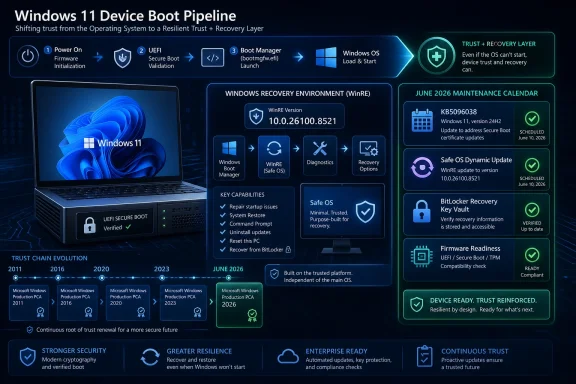
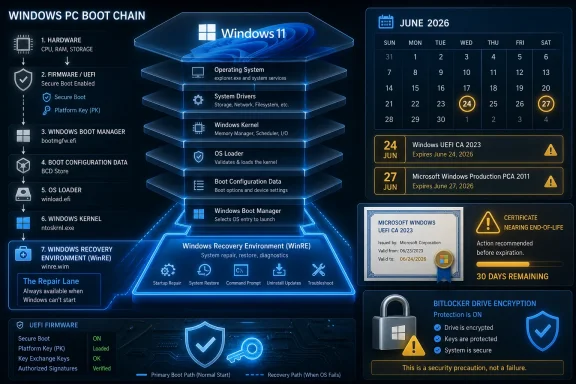
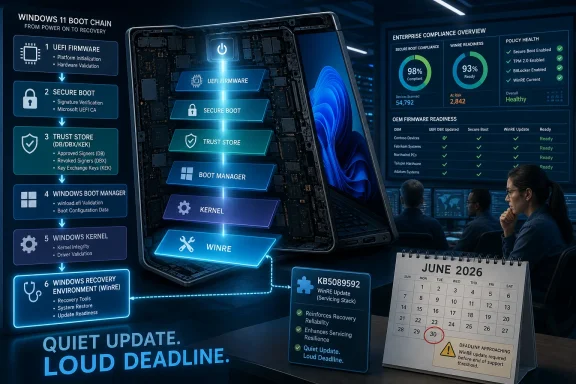
Microsoft is replacing the original 2011 Secure Boot certificate chain across Windows PCs and servers before certificates begin expiring in June 2026 and continue expiring into October, affecting supported Windows 10, Windows 11, and Windows Server systems that still trust those aging boot authorities. The update is not a flashy feature release; it is plumbing work at the foundation of the Windows security model. But plumbing is exactly what makes this story matter. When the trust anchors under Secure Boot age out, Windows does not instantly fall over — it slowly loses the ability to evolve its defenses before the operating system even starts.

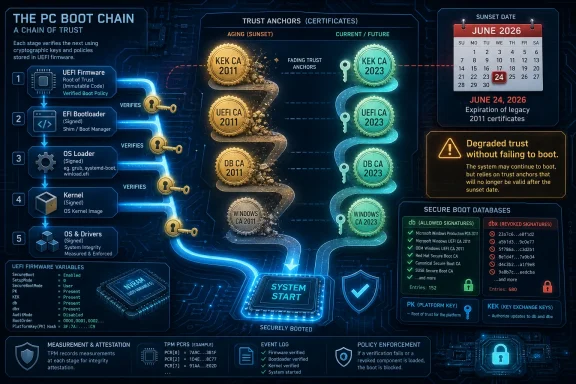
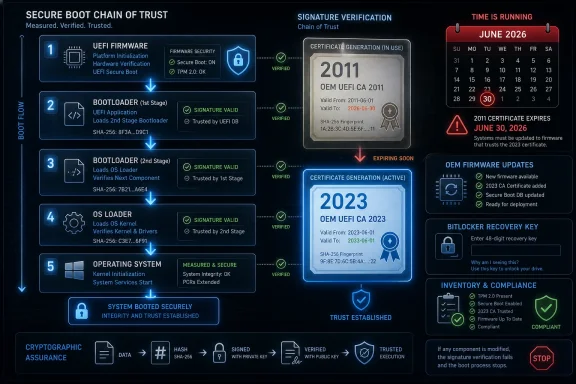
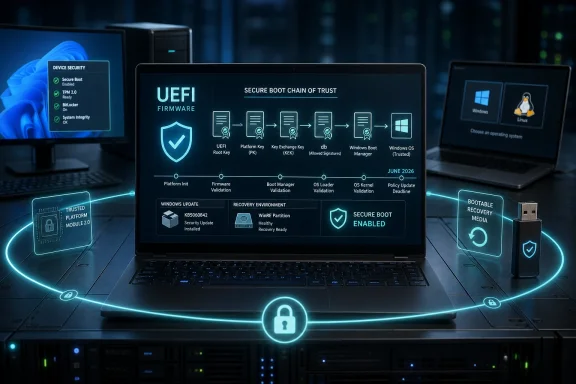
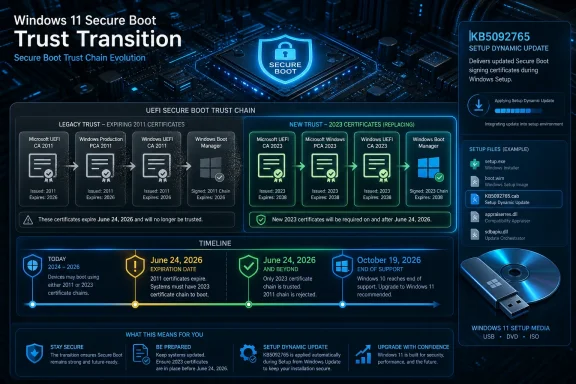
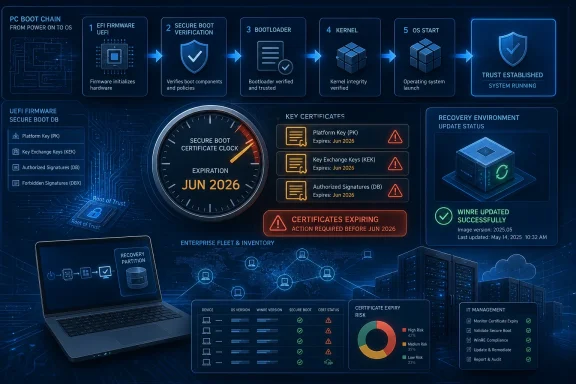
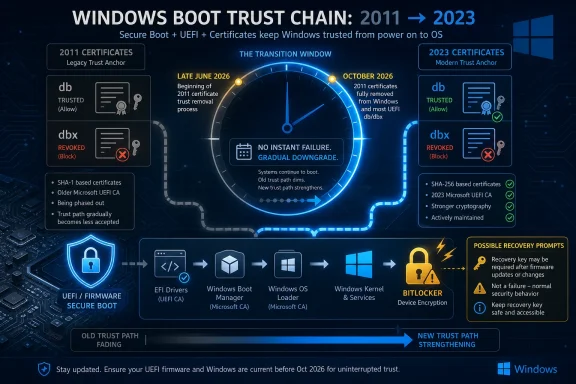
Infographic shows Windows boot trust chain transition from 2011 certificates (2011–2026) to 2023 modern trust anchors.Microsoft’s Fifteen-Year Bet Is Coming Due​

Secure Boot was always a long bet on the idea that the PC boot chain could be made boring, predictable, and resistant to tampering. When UEFI replaced the old BIOS model, Microsoft and the PC industry moved toward a world where firmware checks signatures before handing control to bootloaders, option ROMs, and operating system components. That model depends on certificates, and certificates depend on time.
The awkward part is that the first generation of Microsoft Secure Boot certificates has lasted nearly the entire modern Windows era. The same 2011-era authorities that helped usher in Windows 8-era hardware are still present across huge numbers of Windows 10, Windows 11, and Windows Server machines. That longevity was convenient until it became a deadline.
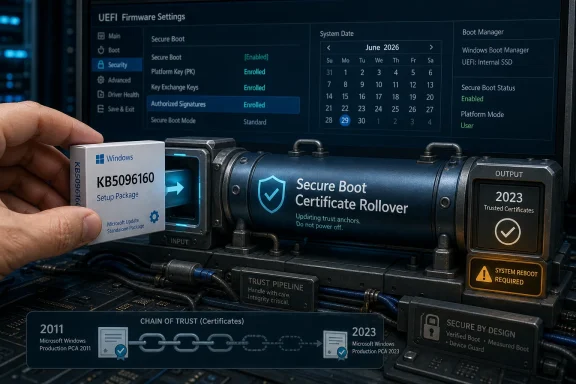
The first wave of expirations begins in late June 2026, with additional Secure Boot certificate expirations following in October 2026. Microsoft’s answer is a new 2023 certificate generation, distributed through Windows servicing, firmware updates, and enterprise deployment channels. In ordinary desktop language, that means Windows Update and possibly a BIOS or UEFI firmware update. In enterprise language, it means inventory, sequencing, rollback planning, BitLocker testing, and a nervous eye on every server SKU that does anything unusual before boot.
This is not a story about PCs refusing to turn on the morning after a certificate expires. It is more subtle than that, and therefore easier to underestimate. Unsupported or unrefreshed systems may continue to boot and receive normal operating system patches, while losing the ability to receive future Secure Boot protections for early boot components.

The Expiration Is Not a Cliff, but It Is a Security Downgrade​

The most important correction to make is also the most reassuring: the expiration of the old certificates does not mean every affected Windows system becomes a brick. Microsoft’s own guidance has been clear that devices may keep starting normally. Existing signed boot components do not simply vanish from trust because the calendar has advanced.
That distinction matters because panic is a poor patch-management strategy. Secure Boot is a chain of trust, not a subscription license check. Firmware uses databases of allowed and revoked signatures to decide whether pre-OS code should run. If the old trust material is still present, already-signed components can continue to work.
But the second half of that sentence is where the risk lives. A system that has not moved to the 2023 authorities may be unable to accept future updates to the Secure Boot database, the revocation database, or boot components signed under the newer chain. That leaves the machine in what Microsoft describes as a degraded security posture.
For home users, “degraded” can sound abstract. For administrators, it is concrete. It means future defenses against bootkits, vulnerable boot managers, or malicious pre-OS components may not apply. The operating system can still be patched while the layer beneath it stops receiving the same quality of protection.

Secure Boot’s Real Job Is Revocation, Not Just Permission​

Secure Boot is often described as a mechanism that allows only trusted software to run at startup. That is true, but incomplete. The more interesting part of the design is not simply what Secure Boot permits; it is what it can later revoke.
The Secure Boot database, usually described as db, contains trusted signatures and hashes. The revocation database, dbx, contains signatures and hashes that should no longer be trusted. The Key Exchange Key, or KEK, authorizes updates to those databases. Together, these components allow the PC ecosystem to respond when something once trusted becomes dangerous.
That is why the certificate refresh matters beyond bureaucratic expiration hygiene. The boot security model has to change over time because attackers change over time. A bootloader, shim, option ROM, or early boot component that looked acceptable years ago may become part of a bypass chain later.
The BlackLotus episode made that painfully clear. Microsoft has spent years staging mitigations for Secure Boot bypasses, including revocations that must be deployed carefully because revoking the wrong thing too quickly can strand legitimate systems. The 2026 certificate transition is part of that same uncomfortable lesson: Secure Boot is only as strong as the ecosystem’s ability to update what it trusts and distrusts.

Windows Update Can Carry the Load, but Firmware Still Owns the Door​

On many client PCs, the fix should look mundane. Keep Windows current, install the relevant cumulative updates, and apply OEM firmware updates when they are offered. For a large share of consumer and business laptops, that will be enough.
The catch is that Secure Boot lives in the borderland between Windows and firmware. Microsoft can ship certificate updates through Windows servicing, but the firmware ultimately stores and enforces Secure Boot variables. If a machine’s UEFI implementation is buggy, outdated, locked down, or weirdly customized, the operating system alone may not be able to complete the transition cleanly.
That is why Microsoft and OEMs keep pointing users toward firmware updates. Firmware updates can add compatibility for the new trust anchors, reduce the odds of failed certificate updates, and prepare systems for future Secure Boot enforcement. Anyone who has administered PCs at scale knows this is the part where theory meets the vendor support matrix.
Consumer devices complicate the picture further. Some older PCs may be technically capable of receiving certificate updates through Windows but may never receive a polished firmware update from the manufacturer. Others may have firmware updates available only through vendor utilities that users have disabled, uninstalled, or never noticed. The security foundation of a Windows PC is, inconveniently, still partly at the mercy of OEM maintenance habits.

Windows 10 Turns the Certificate Refresh Into a Lifecycle Test​

Windows 10 is where the story becomes less about cryptography and more about product lifecycle. Microsoft ended mainstream support for Windows 10 in October 2025, with Extended Security Updates available for eligible systems. That timing collides awkwardly with a Secure Boot transition that begins in 2026.
Supported Windows 10 devices, including those covered by ESU where applicable, can receive the relevant updates. Unsupported Windows 10 systems are a different matter. They may keep running, and they may keep booting, but they should not be assumed to receive the same Secure Boot certificate maintenance as supported Windows builds.
This is the hidden pressure behind Microsoft’s messaging. The company does not need to say “upgrade to Windows 11” in every paragraph for the implication to be obvious. A security feature that depends on ongoing servicing becomes another reason unsupported Windows 10 machines are less defensible over time.
That does not mean every Windows 10 holdout is doomed. Many organizations have legitimate reasons for staged migrations, application compatibility testing, and hardware replacement cycles. But the Secure Boot refresh narrows the space for complacency. If a device is old enough to be stranded on Windows 10 and neglected by its OEM, it is exactly the sort of device that deserves scrutiny before the certificate deadlines arrive.

Servers Turn a Maintenance Event Into a Change-Control Exercise​

The desktop version of this story is annoying. The server version is operationally serious. Windows Server 2016, 2019, 2022, and 2025 environments can be affected, and the path to remediation is more complex than “click update and reboot.”
Servers are full of special cases. They run older firmware, vendor storage controllers, signed option ROMs, out-of-band management stacks, clustering configurations, BitLocker or TPM dependencies, virtualization hosts, and boot paths that may have accumulated years of local assumptions. A certificate change at the boot layer touches all of that before the operating system has a chance to help.
Microsoft’s guidance for servers emphasizes inventory and troubleshooting because that is where the work is. Administrators need to identify machines still using 2011 Secure Boot certificates, confirm whether UEFI CA 2023 status has moved to the expected state, and watch event logs for signals that the transition did not apply cleanly. Those are not optional niceties; they are the only way to know whether a reboot after patch night is actually exercising the new trust chain.
The largest risk is not that every server fails. The largest risk is unevenness. A rack of nominally identical servers may have different firmware levels, different add-in cards, different histories of Secure Boot toggles, or different update channels. The machines that look boring on a spreadsheet are often the ones that ruin a maintenance window.

BitLocker Is the Canary in the Firmware Mine​

Secure Boot certificate updates interact with other boot-time security features, and BitLocker is the one most users and administrators will notice first. When boot measurements change, BitLocker can decide that the environment no longer matches what it expected and prompt for recovery. That is not a bug in the simple sense; it is BitLocker doing its job with incomplete context.
Microsoft has warned that some affected configurations can see BitLocker recovery prompts, startup hangs, or Secure Boot validation errors if the transition goes badly. These risks are higher on systems with older firmware or incomplete certificate updates. They are also exactly why Microsoft recommends pilots and staged deployments instead of fleet-wide enthusiasm.
For enterprises, the practical answer is boring and essential. Recovery keys must be escrowed and verified before touching boot trust. Pilot rings should include multiple OEMs, firmware generations, and device classes. The first successful reboot in a lab is not proof that every branch-office workstation or hypervisor host will behave.
The consumer version is simpler but still important. Before installing firmware updates, users should make sure BitLocker recovery information is available through their Microsoft account or organizational recovery process. Most people will never need it. The unlucky minority will be very glad they checked.

The OEM Layer Is Where Confidence Gets Uneven​

Microsoft can coordinate the Windows side, but the PC ecosystem is not a single organism. Dell, Lenovo, HP, server vendors, motherboard makers, and niche hardware suppliers all have different firmware release policies. Some will publish clear advisories and BIOS updates. Some will update only supported models. Some older systems will be left in the gray zone.
That is not new, but Secure Boot makes it more visible. For years, users could treat firmware as something updated only when a fan curve was broken or a CPU compatibility issue appeared. Now firmware becomes part of a timed security transition across the Windows estate.
The server vendor angle is especially important. Major OEMs have been publishing guidance for PowerEdge, UCS, and other platforms because enterprise customers cannot remediate what they cannot certify. A server that boots Windows is not automatically ready for a Secure Boot certificate transition. The platform firmware, option ROMs, and management stack all matter.
This is also where small organizations are most exposed. Big enterprises have endpoint management platforms and vendor account teams. A 40-person company with a mix of old desktops, one aging Hyper-V host, and a part-time IT provider may not even know which firmware is current. The 2026 transition rewards organizations that kept boring asset records and punishes those that treated firmware as folklore.

The Calendar Is Forcing a Cleaner Trust Boundary​

There is a philosophical tension under this whole episode. Secure Boot was designed to reduce trust in arbitrary early boot code, but the ecosystem itself became dependent on a long-lived set of broadly trusted Microsoft certificates. The 2026 refresh is an attempt to modernize that trust without breaking the world.
That is harder than it sounds. If Microsoft revokes old trust too aggressively, legitimate systems can fail to boot. If it moves too slowly, vulnerable boot paths remain usable for attackers. If it relies entirely on users, many machines will never update. If it relies entirely on automation, some unusual systems will break in ways that are hard to diagnose.
The result is a staged, cautious transition that can look indecisive from the outside. Microsoft is trying to get new certificates onto devices, preserve compatibility with old signatures long enough to avoid mass disruption, and create a path for future revocations. That balancing act is messy because the PC ecosystem is messy.
The alternative would be worse. A security architecture that cannot rotate keys is not a security architecture; it is a monument. The fact that this refresh is operationally painful is evidence that it should not be allowed to become a once-every-15-years ritual again.

Administrators Should Treat This as a Fleet Health Audit​

The right response is not panic, and it is not indifference. The right response is to treat Secure Boot certificate status as a fleet health signal alongside TPM readiness, firmware age, Windows support state, and BitLocker recovery posture.
For client fleets, Microsoft Intune, Group Policy, registry signals, event logs, and remediation scripts can help identify devices that have not moved to the 2023 certificate authorities. For server fleets, the process should be slower and more explicit. Anything that changes boot trust on a server belongs in change control, especially when storage controllers, clustering, virtualization, or remote sites are involved.
The most useful question for IT teams is not “Will this machine boot on June 28?” It is “Will this machine be able to accept the next boot-level security update after June 2026?” That reframing turns the issue from a deadline scare into a maintainability problem.
It also exposes unsupported systems. If a machine cannot receive current Windows updates, cannot receive OEM firmware updates, and cannot be verified for the 2023 Secure Boot chain, then the organization has learned something valuable. The device may still have a business purpose, but it no longer belongs in the same risk category as maintained hardware.
Microsoft’s Quiet Update Has a Loud Security Message​

The concrete lessons are not complicated, but they are easy to defer because the machines mostly keep working. That is the trap. Secure Boot certificate expiration is a security-maintenance problem whose consequences appear gradually, not a dramatic outage that forces instant attention.
  • Systems using Microsoft’s 2011 Secure Boot certificates need to transition to the 2023 certificate authorities before the old certificates expire in June and October 2026.
  • Updated systems should continue receiving future Secure Boot protections for boot managers, Secure Boot databases, and revocation lists.
  • Unupdated systems may still boot and receive ordinary Windows updates, but they can fall behind on boot-level security protections.
  • Client PCs will often be remediated through Windows Update plus OEM firmware, while servers require more deliberate testing and sequencing.
  • Administrators should verify BitLocker recovery readiness before boot-chain updates and should pilot changes across representative hardware.
  • Unsupported Windows and abandoned firmware are now more than lifecycle annoyances; they are obstacles to maintaining the platform’s root of trust.
The Secure Boot certificate refresh is the kind of Windows story that looks small because it has no new interface, no new subscription tier, and no keynote-friendly demo. But it is a reminder that the security of modern PCs depends on maintenance far below the desktop. Microsoft is trying to rotate the keys before the lock gets old enough to become the vulnerability, and the next few months will show which parts of the Windows ecosystem can still be serviced like a platform rather than merely used like an appliance.

References​

  1. Primary source: Network World
    Published: Thu, 21 May 2026 18:34:31 GMT
  2. Related coverage: windowscentral.com
  3. Official source: support.microsoft.com
  4. Official source: microsoft.com
  5. Official source: learn.microsoft.com
  6. Official source: techcommunity.microsoft.com
 

The first Microsoft Secure Boot certificate from the Windows 8 era expires on June 24, 2026, beginning a staged retirement of 2011 trust anchors that still underpin boot security on many Windows PCs, servers, and embedded systems. The immediate danger is not a wave of unbootable laptops. It is subtler and more uncomfortable: machines that keep starting normally can slide into a degraded security state where future boot-level fixes no longer arrive. That makes this deadline less like a Y2K-style cliff and more like a warranty expiring on the part of Windows security most users never see.

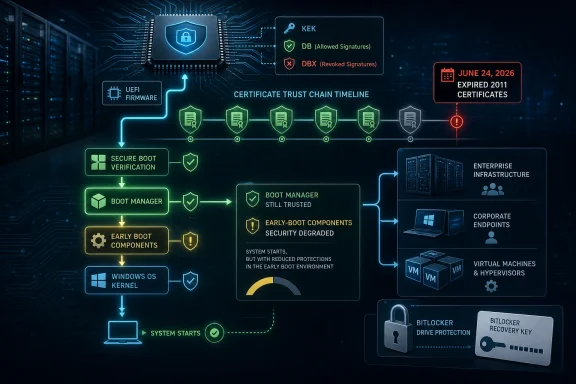
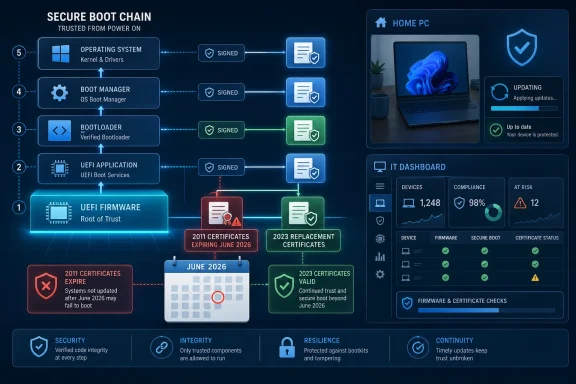
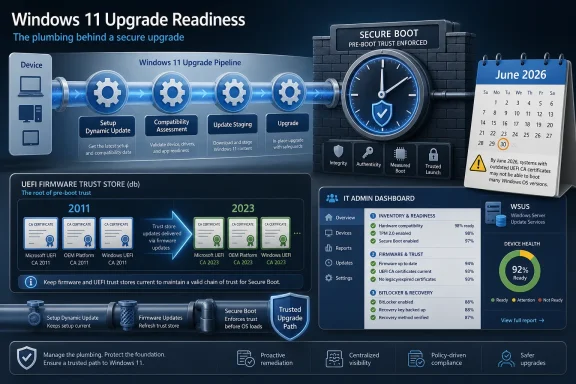
Infographic shows the PC secure boot trust chain with certificate lifetimes expiring June 2026.The Boot Chain Is Having Its First Real Aging Crisis​

Secure Boot was introduced to make the earliest moments of a PC’s startup less of a free-for-all. Before Windows loads, firmware checks whether the boot components it is about to execute are signed by trusted authorities. That design is meant to stop bootkits, malicious option ROMs, and tampered bootloaders from getting control before the operating system and its security stack are awake.
The problem is that trust is not timeless. The certificates that made sense in 2011 were never supposed to be immortal, and Microsoft is now trying to rotate the ecosystem to newer 2023 certificates before the old ones age out. That sounds routine until you remember where these certificates live: in firmware databases, OEM images, deployment media, server platforms, recovery environments, dual-boot setups, and machines that may not have had a BIOS update since the Obama administration.
Three Microsoft-provided certificates form the core of this transition. The Microsoft Corporation KEK CA 2011 expires first on June 24, 2026. The Microsoft UEFI CA 2011 follows days later, with reporting and vendor material placing the date around June 27 for many affected paths. The Microsoft Windows Production PCA 2011, the certificate associated with signing Windows boot manager components, reaches its more consequential deadline on October 19, 2026.
That October date is the one administrators should circle in red, but June is when the floor starts shifting. The Key Exchange Key is what authorizes updates to Secure Boot databases such as the allowed-signature database and the forbidden-signature database. If a device cannot accept new Secure Boot database updates, it cannot participate fully in the next round of boot-layer defense.

Nothing Explodes, Which Is Exactly Why This Could Be Missed​

The most important corrective to the panic version of this story is that PCs are not expected to stop booting on June 24. Microsoft’s guidance has repeatedly framed the transition as a security-maintenance problem, not an instant availability disaster. Devices with old certificates may continue to start, run Windows, install ordinary updates, and appear healthy to users who never inspect their firmware trust state.
That surface calm is the trap. Boot security is a layer users notice only when it breaks, and Microsoft’s task here is to fix it without producing the very boot failures that would make the public pay attention. If the migration succeeds, most supported Windows 11 systems will quietly receive new certificates through Windows Update and never know anything happened.
But a machine that continues to boot is not necessarily a machine that remains fully protected. Once the relevant Secure Boot certificates expire, systems that did not receive the replacement chain may lose the ability to accept future Secure Boot database updates, including revocations and other mitigations for newly discovered boot-stage attacks. In other words, the machine can remain operational while its boot-defense channel becomes stale.
That distinction matters because Secure Boot is not merely a checkbox used to satisfy Windows 11 setup. It is a living trust mechanism. When Microsoft needs to revoke a vulnerable bootloader or push a database change after a real-world exploit appears, that update path is part of the response.

BlackLotus Made the Abstract Threat Concrete​

For years, Secure Boot discussions had a theoretical feel outside firmware and Linux circles. Then BlackLotus showed why the boot chain is not academic. The bootkit targeted the pre-OS environment and forced Microsoft into a long, careful revocation process because fixing a bootloader vulnerability is not like patching Notepad.
The BlackLotus episode exposed the operational fragility of boot security. Revoking vulnerable boot components too aggressively can strand legitimate systems. Moving too slowly leaves attackers with a known path beneath the operating system. Microsoft had to stage mitigations, provide management knobs, and give enterprises time to test because the Secure Boot trust chain is both a security boundary and a boot dependency.
The 2026 certificate rollover sits in that same uncomfortable category. Microsoft is not just replacing some paperwork. It is preserving the ability to respond to the next BlackLotus-like problem. A PC that misses the 2023 certificate update may still run today’s Windows, but it may be cut off from tomorrow’s Secure Boot remediation.
That is why the “your PC will still start” reassurance is only half the story. It is true, and it is useful, but it can also lull users into thinking there is no practical consequence. The consequence is deferred risk: the kind that becomes visible only when a new boot-layer vulnerability requires a revocation your machine can no longer consume.

Microsoft Is Trying to Rotate the Foundation While the House Is Occupied​

Microsoft began preparing the replacement chain well before the 2026 dates. The 2023 certificates are intended to succeed the 2011-era authorities, and the company has been using Windows Update, firmware channels, and management guidance to push the ecosystem toward the new trust chain. The May 2026 Windows 11 update, KB5089549, continued that work by expanding device targeting for automatic certificate deployment.
That targeting language matters. Microsoft is not simply blasting every system with identical Secure Boot changes. The company has to decide which devices are eligible, which firmware configurations can safely accept updates, and which machines need OEM coordination. That is sensible engineering, but it also means users and administrators may see uneven behavior across fleets.
Some PCs will receive the new certificates through Windows Update without fuss. Some will need the latest cumulative update plus a firmware update from the manufacturer. Some will show ambiguous states until inventory and management tooling catches up. And some older systems may never receive the firmware-side support needed to make the transition clean.
This is the part of the story where Microsoft’s control ends. Windows Update can deliver operating-system payloads and, on many systems, firmware updates distributed through the same channel. But the Secure Boot trust store ultimately lives in firmware. OEMs decide whether older models get updated firmware defaults, whether enterprise platforms receive backported support, and how clearly they communicate the status of machines that are no longer in active support.

The Old-PC Problem Is Really an OEM Accountability Problem​

The machines most exposed by this transition are not necessarily obscure antiques. They include Windows 10-era PCs still in daily use, workstations kept alive for compatibility reasons, industrial systems, lab machines, point-of-sale boxes, and budget laptops that never received long firmware support in the first place. Many of these devices are perfectly capable of running useful workloads. Their problem is that their security foundation depends on vendor attention that may have expired years ago.
This is where the neat Microsoft narrative of a generational certificate refresh meets the messy reality of PC support. The Windows ecosystem has always sold hardware as long-lived and modular, but firmware support has rarely matched that promise. A desktop can accept more RAM, a new SSD, and a fresh Windows install; it may not receive a firmware trust update if the board vendor has moved on.
For consumers, that will look arbitrary. Two PCs of similar age may behave differently depending on vendor policy, firmware design, and whether the manufacturer shipped updated Secure Boot databases. One may show the 2023 certificate chain after routine updates. Another may remain stuck on 2011 entries even though Windows itself is fully patched.
For enterprises, the issue is less emotional and more expensive. A fleet inventory that says “Windows updated” is not enough. IT teams need to know whether Secure Boot variables in firmware contain the new authorities, whether boot media is compatible, whether recovery workflows still work, and whether any business-critical machines rely on older third-party boot components signed through the 2011 UEFI CA.

Windows 10 Turns the Deadline Into a Policy Problem​

Windows 10’s position makes the Secure Boot certificate story more politically loaded. The operating system is already at the edge of mainstream life, and Microsoft has been steering users toward Windows 11, paid Extended Security Updates, or replacement hardware. Secure Boot certificate expiration adds another pressure point, especially for machines that cannot meet Windows 11’s hardware requirements.
A supported Windows 11 system is the easiest case. Keep it updated, keep firmware current, and Microsoft’s phased rollout should handle most of the certificate transition. The hard cases are Windows 10 machines outside extended support, unsupported Windows 11 installations, and systems that sit in the gray zone between “still works” and “still protected.”
Microsoft’s guidance makes clear that support status matters. If a Windows 10 machine is no longer receiving the relevant updates, it should not be assumed to receive the new Secure Boot certificates or future boot-level mitigations. That does not mean the machine bricks itself in late June. It means its security story gets worse at precisely the layer where ordinary antivirus and user caution do the least good.
This is a familiar Microsoft pattern with a firmware twist. The company can say, accurately, that aging platforms cannot be supported forever. Users can say, accurately, that a functioning PC should not become a security orphan because of certificate plumbing most buyers never knew existed. Both statements are true, and neither makes the June deadline less real.

The May Update Was a Warning Shot, Not Just Another Patch Tuesday​

KB5089549 drew attention for the usual Patch Tuesday reasons: installation failures on some Windows 11 systems, user reports of odd behavior, and the appearance of a new SecureBoot folder that caused confusion before Microsoft and others clarified that it was related to certificate servicing. That noise should not obscure the larger point. The May 2026 update was part of Microsoft’s final sprint before the first certificate expiry.
The fact that a Secure Boot servicing change can create visible filesystem artifacts and support threads is a reminder that this transition touches more than a hidden firmware setting. Microsoft is layering scripts, targeting logic, compatibility checks, and documentation around a process that must happen safely across a chaotic hardware universe. That is not the footprint of a trivial update.
It is also a preview of the support burden ahead. As the June and October dates approach, more users will discover that “Secure Boot enabled” is not the same as “Secure Boot certificate state is current.” Some will find they have the right Windows update but an old BIOS. Others will find an OEM page listing their model as out of scope for firmware updates. Still others will be told, correctly but unsatisfyingly, that the device should continue to boot but may not be eligible for every future Secure Boot protection.
Patch Tuesday has trained Windows users to think in terms of monthly fixes. Secure Boot certificate rotation asks them to think in terms of trust chains, firmware variables, and long-term revocation capacity. That is a much harder story to communicate in a notification badge.

The Check Is Simple; The Meaning May Not Be​

For ordinary users, Microsoft’s recommended first stop is Windows Security. Open Windows Security, go to Device Security, and inspect the Secure Boot section. Microsoft’s support article KB5062710 explains the certificate-expiration issue and the status indicators users may see as the rollout progresses.
That check is useful, but it should not be mistaken for a full enterprise audit. Windows Security can tell a user whether Secure Boot is enabled and may expose relevant update status, but administrators will want scriptable inventory. Microsoft’s Learn guidance includes management approaches for identifying whether the Windows UEFI CA 2023 certificate is present in the Secure Boot signature database and whether remediation has applied.
There is another practical caution: do not casually toggle Secure Boot settings in firmware while trying to “fix” the certificate issue. On some systems, changing Secure Boot mode, restoring factory keys, or flipping between standard and custom modes can alter the trust database. A user who goes spelunking through BIOS menus without a recovery plan can create more confusion than the certificate expiration itself.
For managed environments, the sane path is boring: update Windows, update firmware, inventory certificate state, test recovery media, and verify that critical boot-time software still works. That includes disk encryption workflows, endpoint security tools, hypervisors, Linux dual-boot configurations, and any appliance-like Windows deployments that rely on signed boot components outside the default Microsoft path.

Linux, Recovery Media, and Third-Party Bootloaders Complicate the Story​

The Windows framing is only part of the Secure Boot ecosystem. The Microsoft UEFI CA has long been used to sign third-party bootloaders and UEFI components, including the shim loaders that make many Linux distributions boot smoothly on Secure Boot-enabled PCs. Any certificate transition at this level inevitably ripples beyond Windows.
The good news is that existing signed binaries do not necessarily stop working merely because a certificate reaches its expiration date, especially when the relevant trust anchor remains in the firmware database. The bad news is that future signing, revocation, and compatibility paths become more complicated. Distribution maintainers, encryption vendors, rescue-tool creators, and hardware vendors all have to align with the 2023-era authorities.
This is one reason Microsoft has moved cautiously. The Secure Boot databases are a shared surface across operating systems and hardware ecosystems. A revocation or certificate change that looks clean from a Windows-only perspective can break dual-boot systems, recovery environments, or older install media.
Administrators should treat bootable media as part of the audit. A fleet that has current certificates on installed systems but relies on old rescue ISOs, imaging tools, or network boot environments is only half prepared. The worst time to discover that recovery media depends on an obsolete boot path is during an outage.

The Real Deadline Is October, but June Decides Who Is Ready​

The June 24 expiry of the KEK certificate is the opening act because it affects the authority used to sign updates to Secure Boot databases. The June 27 window around the Microsoft UEFI CA matters for third-party UEFI components and non-Windows boot paths. The October 19 expiration of the Windows Production PCA 2011 is the deadline with the broadest symbolic and operational weight because it sits closest to Windows bootloader validation.
But it would be a mistake to wait until October. Certificate rotations are infrastructure projects disguised as security updates. They require lead time, especially where firmware, vendor support, and fleet diversity are involved. If a device has not received the 2023 chain by late June, administrators should not assume the problem will solve itself by autumn.
The calendar also creates a communications problem. Users may hear “June 24” and expect catastrophe. When nothing happens, they may dismiss the whole issue as overblown. Then October arrives, and the systems that were quietly unprepared remain quietly unprepared.
Microsoft and OEMs need to be blunt about this: continued booting is not proof of completed remediation. The absence of a boot failure on June 25 should not be treated as a passing grade. The relevant question is whether the device can receive and validate future Secure Boot updates through the new chain.

Microsoft’s Smoothest Outcome Still Leaves Some Machines Behind​

If this rollout goes well, the most common story will be anticlimax. Supported Windows 11 PCs will receive the new certificates automatically. Recent Surface and OEM devices will already have firmware support or receive it through normal channels. Many home users will never know the transition happened.
That outcome would be a technical success, but it would not erase the stranded edge cases. Some older devices will lack OEM firmware updates. Some unsupported Windows installations will sit outside Microsoft’s servicing model. Some business systems will be trapped by application compatibility, regulatory validation, or vendor abandonment. Those machines may keep doing their jobs while accumulating a boot-layer risk that cannot be neatly patched away.
This is where the PC industry’s long tail becomes a security liability. Windows’ hardware diversity is one of its strengths, but Secure Boot depends on coordinated trust management across Microsoft, firmware vendors, OEMs, silicon providers, and software publishers. When that coordination fails, the user at the keyboard sees only a vague message, an unsupported model list, or no warning at all.
The charitable reading is that Microsoft is doing the responsible thing by rotating old certificates before attackers or cryptographic age make them a bigger problem. The less charitable reading is that the industry sold Secure Boot as a durable security foundation without making firmware lifecycle support durable enough to match. The truth is both.

The Machines That Need Attention Before the Calendar Wins​

The practical lesson is not to panic, but to stop treating Secure Boot as a static BIOS checkbox. This certificate rollover is a reminder that boot trust is maintained, not merely enabled. The systems most likely to need human attention are the ones least likely to be checked by casual users.
  • Devices running supported Windows 11 builds should be brought fully up to date, including the latest cumulative updates and firmware offered through Windows Update or the manufacturer’s support tools.
  • Windows 10 systems outside Extended Security Updates should be treated as security-risk exceptions rather than normal endpoints, especially if they remain exposed to sensitive workloads.
  • Administrators should verify the presence of the 2023 Secure Boot certificates rather than relying only on whether Secure Boot is enabled.
  • Older PCs with no recent OEM firmware should be checked against vendor guidance, because Windows Update alone may not resolve every firmware trust-state problem.
  • Recovery media, imaging tools, dual-boot environments, and third-party boot components should be tested before October, not during the first incident after it.
  • Users should avoid resetting Secure Boot keys or changing firmware trust modes unless they understand the recovery path and have BitLocker keys and backups available.
The June 24 deadline will probably pass without the dramatic failure mode that makes for easy headlines, and that is precisely why it deserves attention now. Microsoft is attempting one of the least glamorous jobs in platform security: replacing a trust foundation laid down fifteen years ago while keeping billions of boot paths intact. For Windows users and administrators, the right response is neither panic nor indifference, but verification — because the PC that still starts tomorrow may not be the PC that can be protected next time the boot chain comes under attack.

References​

  1. Primary source: Notebookcheck
    Published: Sun, 24 May 2026 09:29:00 GMT
  2. Official source: learn.microsoft.com
  3. Related coverage: notebookcheck.org
  4. Official source: support.microsoft.com
  5. Official source: microsoft.com
  6. Related coverage: windowscentral.com
 

Microsoft’s 2011-era Secure Boot certificates begin expiring on June 24, 2026, and Windows PCs that have not moved to the 2023 certificate chain should still boot, but they may lose future boot-level security protections and eventually hit upgrade or servicing barriers. That is the important distinction Microsoft has been trying to hammer home: this is not a mass bricking event, but it is also not optional hygiene. Secure Boot is the foundation under the operating system, and the certificate rollover is a rare case where Windows Update must coordinate with motherboard firmware, BitLocker, OEM behavior, and enterprise deployment policy. The deadline matters because, once the old trust chain expires, Microsoft cannot keep papering over the gap with the same signing infrastructure that got Windows PCs through the last 15 years.

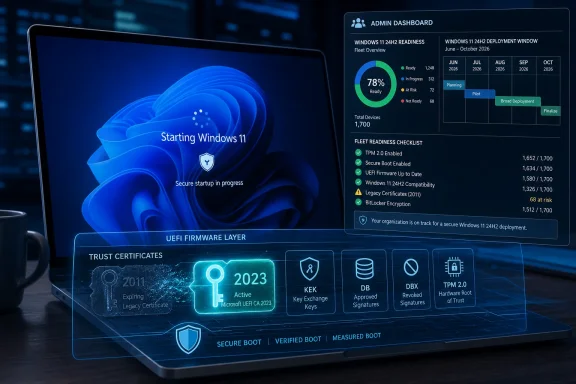
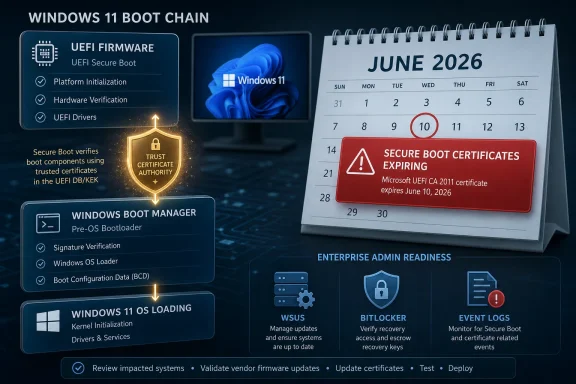
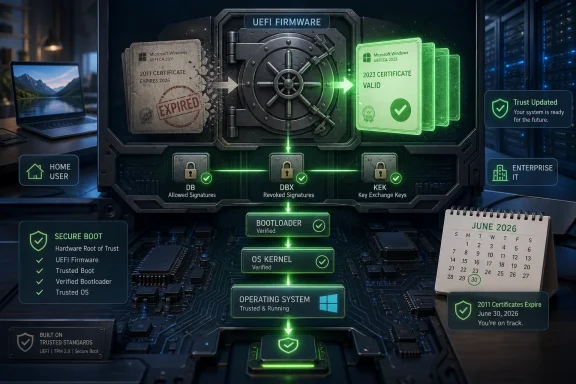
Diagram showing secure boot certificate trust chain timeline with UEFI firmware, trusted KEK/DB, and revoked DBX.The Deadline Is Not a Kill Switch, but It Is a Security Cliff​

The easiest misunderstanding to clear up is the scariest one. A Windows 11 PC that misses the Secure Boot certificate transition should not suddenly become a paperweight the morning the 2011 certificates expire. Microsoft’s own guidance says affected systems may continue to start and may continue receiving ordinary Windows updates.
That reassurance, however, is narrower than it sounds. The machine can keep running while losing access to future protections for the earliest and most sensitive phase of startup. That includes the Windows Boot Manager, Secure Boot databases, revocation lists, and other pre-OS components that decide what code is trusted before Windows itself is in control.
That is why Microsoft’s language around this rollout has become more urgent as June 2026 approaches. The risk is not that every unpatched machine fails at once. The risk is that a large installed base quietly slips into a degraded security state, where future bootkit defenses cannot be delivered reliably.
For consumers, that may sound abstract until a future Windows feature update refuses to proceed or a firmware-specific issue blocks remediation. For administrators, it is more concrete: you cannot treat the boot chain like another monthly patch if the signing authority needed to update it is expiring underneath you.

Secure Boot’s 2011 Trust Chain Has Finally Aged Out​

Secure Boot exists to stop a compromised or unauthorized boot path from taking control before Windows loads. On a modern PC, UEFI firmware checks signatures for bootloaders, UEFI drivers, EFI applications, and other startup components. If the signatures are trusted, the system hands off to the operating system; if they are not, the boot should fail.
That trust model depends on certificates stored in firmware. The Platform Key, usually controlled by the OEM, governs the top of the Secure Boot hierarchy. The Key Exchange Key authorizes updates to the allow and deny databases. The DB contains trusted signatures and certificates, while the DBX contains revoked signatures and hashes that should no longer be allowed to boot.
The problem is mundane and enormous at the same time: the Microsoft Secure Boot certificates from 2011 are expiring in 2026. The Microsoft Corporation KEK CA 2011 begins expiring in late June, while other 2011-era boot certificates expire later in the year. The replacement chain is built around Microsoft’s 2023 Secure Boot certificates.
This is the first time the Windows PC ecosystem has had to move a broad Secure Boot installed base across a certificate generation at this scale. That makes the rollout less like a normal Windows patch and more like an infrastructure migration, except the infrastructure is embedded in millions of motherboards, laptops, virtual machines, servers, and recovery environments.

Microsoft Is Updating Firmware Because Windows Alone Cannot Solve This​

The awkward part of the transition is that the new trust anchors must end up in UEFI firmware. Windows can stage files, schedule tasks, write events, and coordinate the update flow, but the firmware ultimately owns Secure Boot variables. That is why the same Windows cumulative update can behave differently across systems with different BIOS versions, OEM policies, or virtualization stacks.
Microsoft has been rolling the change out gradually rather than blasting it across every eligible PC. The company’s high-confidence targeting model depends on telemetry from systems that successfully apply the update without boot failures, BitLocker recovery loops, or other serious regressions. When enough matching hardware looks safe, Microsoft can move more devices in that bucket.
That approach is conservative for a reason. Updating Secure Boot variables is not like replacing Notepad. A bad firmware interaction can strand a device before Windows has a chance to recover it. The diversity of PC firmware remains one of the platform’s strengths and one of its operational liabilities.
This is also why Microsoft’s guidance has repeatedly pushed administrators toward pilots instead of fleet-wide optimism. The correct question is not “Does Windows support the 2023 certificates?” It is “Does this exact hardware model, on this firmware revision, under this boot configuration, with this encryption and recovery posture, survive the transition cleanly?”

Legacy BIOS Machines Are Outside the Blast Radius​

One useful clarification from Microsoft is that machines running true legacy BIOS are not candidates for this Secure Boot update. If a system is not Secure Boot-capable, Windows should recognize that and skip the certificate application path. A PC with no UEFI Secure Boot implementation cannot be remediated into one by registry policy.
The more complicated class is systems with UEFI firmware that are configured in legacy compatibility mode. Some machines use a Compatibility Support Module to boot in a legacy style while still having UEFI and Secure Boot capability underneath. Those systems are not all the same, and their update behavior depends on how the firmware reports its capabilities and how the boot disk is configured.
This matters because a lot of older Windows installations are messy. A machine may have UEFI firmware but an MBR-formatted boot disk, or Secure Boot may be disabled because the system was once dual-booted, cloned, repaired, or upgraded through several Windows generations. Those machines can look deceptively modern until the firmware enforcement path is actually tested.
Microsoft’s decision to avoid forcing updates when Secure Boot is disabled is therefore defensive. Some firmware can update Secure Boot certificates while the feature is off. Other firmware behaves badly or applies changes unexpectedly when Secure Boot is later re-enabled. In a rollout this broad, Microsoft has chosen not to gamble on firmware consistency that does not exist.

BitLocker Is Supposed to Be Protected, but Firmware Still Makes Admins Nervous​

BitLocker is the other reason this transition feels more dangerous than a standard update. Secure Boot, TPM measurements, Virtualization-based Security, and Windows Hello all lean on assumptions about the boot path. Change the trust chain carelessly, and the system may decide that something fundamental has changed.
Microsoft says the Secure Boot certificate update process is BitLocker-aware. In the normal flow, Windows should reseal the relevant keys and preserve the ability to boot without surprising users with recovery prompts. That is the design, and it is essential if Microsoft expects the consumer installed base to move quietly.
But “BitLocker-aware” is not the same as “immune to every firmware edge case.” Enterprise environments often stack vendor firmware updates, driver packages, endpoint security tools, custom boot paths, and recovery partition changes on top of one another. If an update changes the Platform Key or Key Exchange Key, or if firmware reports boot state inconsistently, the system can still land in recovery.
That is why the sensible operational advice remains boring: back up recovery keys, update firmware, test representative devices, and avoid combining Secure Boot certificate changes with unrelated BIOS maintenance in the same reboot window. The certificates may be Microsoft’s problem, but the recovery call at 7 a.m. belongs to the local IT team.

The Multiple Reboots Are a Symptom of Where the Update Lands​

Some users have noticed unusual reboot behavior after manually triggering the Secure Boot update tasks. That is not surprising. The update has to stage new certificate material, allow firmware to apply it, then boot through the newly trusted path with a boot manager signed under the new chain.
Automated rollout can hide some of this choreography by scheduling work early in startup or folding it into normal servicing. Manual testing exposes the plumbing. What looks like a machine restarting too many times may simply be the system walking through the firmware handoff and validation steps.
This is one reason server administrators are more cautious than home users. A desktop rebooting twice is annoying. A host, cluster node, or critical VM doing so outside a maintenance window is an incident. The same technical sequence has a very different operational meaning depending on where the device sits.
For WindowsForum readers, the practical lesson is that “reboot required” understates the work being done. The certificates are not just files dropped into a folder. They are part of the trust contract between Windows, firmware, and the code that runs before the OS can defend itself.

PXE, Recovery Media, and Imaging Pipelines Are the Hidden Enterprise Trap​

The client PC story is only half the rollout. Enterprises also have to think about boot media, network deployment, recovery environments, and bare-metal provisioning. Those workflows often depend on Windows PE images, boot.wim files, and PXE servers that may still assume the 2011 trust chain.
PXE is especially unforgiving because a server typically presents a single boot manager to the client. You cannot neatly hand every device both a 2011-signed and 2023-signed boot path and expect firmware to sort out the right answer in all cases. If you move deployment infrastructure too early, unremediated clients may fail. If you move it too late, updated clients may be blocked once revocations become stricter.
That creates a sequencing problem for large estates. Administrators need to know which machines have the 2023 DB certificate in firmware before they swap deployment boot managers. They also need contingency media that matches the state of the hardware they are trying to recover.
This is where the Secure Boot deadline becomes less of a Windows 11 consumer story and more of a systems management story. Imaging pipelines are often built once and then neglected because they work. Certificate rollover turns that neglect into technical debt with an expiration date.

Revocation Is the Part That Turns Compatibility Into Security​

Adding the 2023 certificates is only one side of the transition. The other side is revocation. Secure Boot is not just a list of things allowed to run; it is also a mechanism for blocking boot components that have become unsafe.
The BlackLotus bootkit made this point painfully clear. The broader mitigation for Secure Boot bypasses depends not only on issuing newer boot managers, but also on preventing rollback to older vulnerable ones. That is where DBX updates and security versioning matter.
This is the point at which many enthusiasts get understandably wary. Revocation can be hard to undo, and mistakes in Secure Boot policy can strand older media or unusual operating systems. Microsoft has therefore staged Secure Boot hardening over time, because revoking trust too broadly before the ecosystem is ready would be its own outage generator.
But without revocation, the certificate rollover would be mostly theater. A system that trusts new boot code while continuing to accept vulnerable old boot code has not really closed the door. It has merely installed a newer lock next to the old one.

Servers Are Not Just Bigger Clients​

Windows Server deserves separate attention because Microsoft is not treating it like consumer Windows. Servers are often isolated, telemetry-light, tightly change-controlled, and attached to business processes where surprise reboot behavior is unacceptable. Automatic confidence-based rollout is a poor fit for that world.
Microsoft’s server guidance therefore emphasizes administrator action. Server operators need to identify affected machines, validate firmware support, deploy the updates through supported methods, and troubleshoot failures explicitly. The burden shifts from Microsoft’s telemetry system to the organization’s change-management process.
Virtualization adds another layer. Hyper-V Generation 2 VMs, Trusted Launch VMs, confidential VMs, and third-party hypervisors each introduce their own firmware abstraction. A VM’s Secure Boot state is not merely a guest Windows property; it depends on the virtual firmware and the host platform’s ability to expose and update the relevant keys.
That makes the phrase “my server is patched” dangerously incomplete. The host may be patched while the guest cannot update its KEK. The guest may be current while the virtual firmware blocks writes. The estate may look compliant at the OS layer while Secure Boot variables remain stuck in a pre-2023 state.

Event ID 1801 Is a Warning Light, Not a Diagnosis​

One reason this story has spread among enthusiasts is that Windows has started surfacing Secure Boot certificate state more visibly. Event Viewer entries, registry values, PowerShell checks, and Intune remediations can now show whether updated certificates are available, applied, pending, blocked, or waiting for more confidence data.
Event ID 1801 has become a particular magnet for confusion. In many cases, it means Windows has the updated certificate material available but has not yet applied it to firmware. The reason may be benign, such as waiting for a reboot or high-confidence targeting. It may also indicate that firmware needs an OEM update or that the machine is in a configuration Microsoft will not automatically touch.
The problem is that the event is not a universal instruction. “More data needed” does not necessarily mean the user should start forcing registry keys. “Available but not applied” does not automatically mean the machine is broken. It means the Secure Boot transition is in a staged state, and the next step depends on the hardware, firmware, management policy, and risk tolerance.
For home users, that argues for patience unless Windows or the OEM provides a clear remediation path. For administrators, it argues for inventory. You cannot manage this transition by spot-checking Event Viewer on a handful of machines and hoping the rest of the fleet looks the same.

OEM Firmware Is the Variable Microsoft Cannot Fully Control​

Microsoft can sign boot managers, publish guidance, ship cumulative updates, and provide scripts. It cannot retroactively make every motherboard firmware implementation behave well. OEM firmware remains the largest uncontrolled variable in this transition.
That is not simply an indictment of vendors. Secure Boot spans years of platform evolution, chipsets, BIOS teams, business laptops, gaming boards, servers, embedded systems, and virtual platforms. Some devices were designed when 2026 sounded comfortably distant. Some are still in service long after their original firmware maintenance window should have ended.
The result is a familiar PC ecosystem split. Newer Windows 11 systems, especially those still actively supported by OEMs, are likely to make the transition with little drama. Older or enthusiast-built systems may require BIOS updates, manual checks, or a more cautious approach. Rare platforms may not generate enough telemetry to land quickly in Microsoft’s high-confidence bucket.
That last point matters. Microsoft’s confidence model can use telemetry from other devices of the same hardware class, but rare configurations are harder to bless automatically. The less common the system, the more the owner or administrator may need to verify the state directly.

The “Do Nothing” Option Gets Worse Over Time​

The central temptation is to treat all of this as another deadline that will move. PCs still boot. Windows still updates. The world does not end on June 24. That makes inaction feel rational, especially for users who have been burned by BIOS updates or BitLocker recovery prompts.
But the cost of inaction compounds. A device that cannot trust the 2023 chain cannot reliably consume future boot-level fixes signed for that chain. A device that cannot receive future DBX updates remains exposed when the next bootkit technique needs revocation. A device stuck on old assumptions may eventually hit a feature update that refuses to install because proceeding would risk an unbootable system.
The danger is not theatrical failure. It is gradual exclusion from the security maintenance path. That is how infrastructure ages out in the real world: first nothing happens, then a narrow exception appears, then the exception becomes a permanent unsupported state.
Microsoft’s messaging is therefore more sober than sensational. It is telling users that ignoring the deadline does not instantly destroy the machine, while also warning that the machine’s boot security posture will be increasingly obsolete. Both statements can be true.

The June 2026 Rollover Leaves a Short Checklist, Not a Shortcut​

The Secure Boot certificate transition is too firmware-specific for a universal one-click fix, but the practical shape of the work is now clear. The machines most likely to glide through are the ones already on supported Windows builds, current firmware, UEFI boot, GPT disks, enabled Secure Boot, and standard Microsoft-managed boot paths.
The machines most likely to cause pain are also predictable. They are old but still useful desktops, custom-built PCs with neglected BIOS updates, servers with conservative change windows, VMs whose virtual firmware has not kept up, and deployment environments that assume a 2011-signed boot manager will be trusted forever.
  • Windows PCs that miss the 2023 Secure Boot certificate update should generally keep booting, but they may stop receiving future protections for early boot components.
  • Secure Boot must be treated as a firmware-and-operating-system transition, not merely a Windows Update payload.
  • BitLocker recovery keys should be backed up before administrators test or force certificate deployment across managed devices.
  • PXE, WinPE, recovery media, and imaging workflows need their own migration plan because boot media signed for the wrong trust chain can fail at the worst moment.
  • Servers and virtual machines require deliberate validation because they do not always participate in the same automatic rollout path as consumer Windows clients.
  • Event logs and registry status are useful signals, but they must be interpreted in the context of firmware support, reboot state, and Microsoft’s confidence targeting.
The Secure Boot certificate rollover is the kind of maintenance event the PC industry prefers users never have to think about, yet it exposes exactly how much modern Windows security depends on code and keys that live below Windows itself. If Microsoft and OEMs execute well, most users will experience the June 2026 deadline as a quiet non-event; if administrators ignore it, the bill will arrive later in the form of blocked boot protections, brittle recovery workflows, and machines that still run but no longer stand on the current trust foundation.

References​

  1. Primary source: Windows Latest
    Published: Mon, 25 May 2026 19:05:14 GMT
  2. Official source: support.microsoft.com
  3. Official source: microsoft.com
  4. Official source: learn.microsoft.com
  5. Related coverage: dell.com
  6. Official source: techcommunity.microsoft.com
 

Microsoft is warning Windows 11 users and IT administrators in May 2026 to update Secure Boot certificates before 2011-era Microsoft certificates begin expiring in June 2026, with additional expirations stretching into October, so supported PCs can keep receiving boot-level security protections. The message is not that millions of machines will suddenly become bricks overnight. The more uncomfortable truth is that Windows’ trust chain is aging out in public, and the cleanup reaches into firmware, OEM support, BitLocker, Linux dual-boot setups, and enterprise change-control calendars. A certificate rollover sounds mundane until it is the thing standing between an operating system and the code it is willing to trust before Windows even starts.

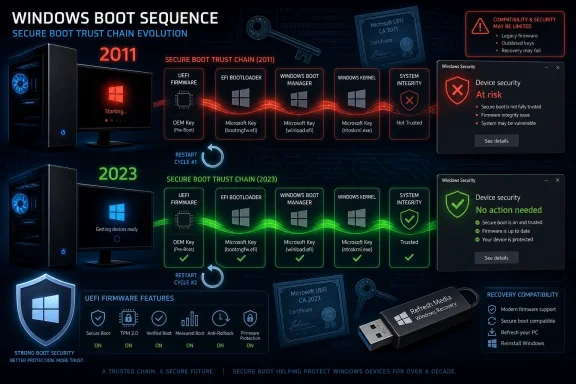
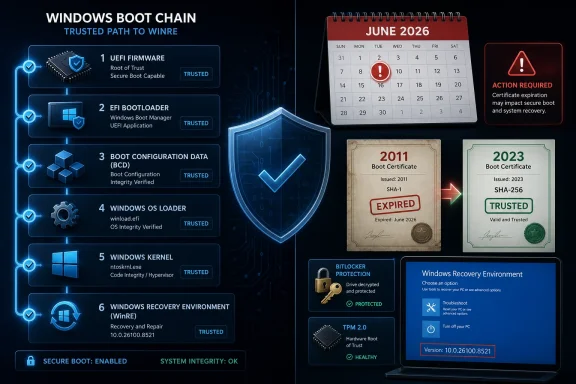
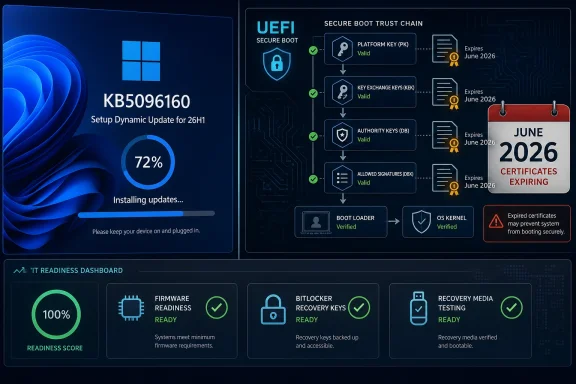
A laptop displays an admin dashboard monitoring secure Windows 11 deployment and readiness.Microsoft’s Oldest Windows 11 Requirement Is Becoming a Servicing Problem​

Secure Boot was one of the flashpoints of the Windows 11 launch because Microsoft made it part of the platform’s minimum security baseline, alongside TPM 2.0. To many home users, that requirement looked like a blunt compatibility gate. To Microsoft, it was part of a broader attempt to drag the Windows PC ecosystem toward hardware-backed security, measured boot, virtualization-based defenses, and a world where malware cannot simply slide underneath the operating system before the kernel wakes up.
Now the same security layer is creating a different kind of test. Some Windows devices still rely on Microsoft Secure Boot certificates issued in 2011, and those certificates are reaching the end of their validity period in 2026. Microsoft’s current guidance is to move systems to the newer 2023 Secure Boot certificate authorities so that Windows can continue to validate and update early boot components using modern trust anchors.
That distinction matters. This is not a normal Patch Tuesday update that swaps out a DLL and asks for a reboot. Secure Boot trust lives partly in UEFI firmware variables, using databases that tell the machine which bootloaders, option ROMs, and pre-OS components are allowed to run. Updating that trust store means Windows, firmware, device makers, and enterprise management tools all have to agree on a sequence that does not leave machines in recovery screens at scale.
The Gizchina framing — “update before expiration” — captures the consumer-facing urgency, but it undersells the operational complexity. Microsoft is not just asking Windows 11 users to click “install.” It is asking the PC ecosystem to complete a trust-chain migration that has been theoretically inevitable since 2011 and practically awkward ever since Secure Boot became a default assumption.

The Expiration Date Is Real, but the Panic Version Is Too Simple​

The 2011 Secure Boot certificates do not all expire at the same instant. Microsoft’s published guidance identifies 2026 as the turnover year, with some certificates beginning to expire in June and others expiring later, including October. The important names include Microsoft Corporation KEK CA 2011, Microsoft UEFI CA 2011, and Microsoft Windows Production PCA 2011, each serving a different role in the Secure Boot trust model.
The Key Exchange Key, or KEK, authorizes updates to Secure Boot databases. The database known as DB contains allowed signatures, while DBX contains revoked signatures. The Windows Production PCA is tied to signing Windows boot components. The UEFI CA has historically mattered not only to Windows but also to third-party bootloaders and EFI applications, which is why Linux distributions, recovery tools, and certain device utilities are also part of the blast radius.
This is why “the certificate expires next month” is a useful alarm bell but not a complete map. A Windows 11 PC may continue to boot after a certificate expires, and Microsoft has been explicit that regular Windows updates may still install on affected devices. The failure mode is subtler and, for security people, more serious: the device may no longer receive future Secure Boot protections for early boot components.
That is the kind of degradation that does not always announce itself with a crash. A machine can appear healthy, pass casual user inspection, and still be behind on boot-level protections that matter when the next bootkit or Secure Boot bypass emerges. In other words, the risk is less “your laptop dies in June” and more “your laptop’s pre-OS trust chain stops evolving when attackers do not.”

The 2023 Certificates Are a Security Migration, Not a Cosmetic Refresh​

The new 2023 Secure Boot certificates are the replacement trust anchors Microsoft wants devices to use going forward. They are intended to preserve the ability to sign, validate, and revoke boot-level components after the 2011-era certificates age out. For supported Windows 11 machines, the migration can be delivered through Windows Update, though firmware readiness and OEM support can still matter.
This is where Secure Boot differs from many Windows security features. Microsoft can ship an operating system update, but it cannot pretend every UEFI implementation behaves identically. Firmware has vendor-specific behaviors, board-specific histories, and, in the worst cases, abandoned update channels. The older the device, the more likely the clean Microsoft flow becomes a negotiation with the realities of hardware support.
Microsoft’s guidance points users and administrators toward updated firmware where needed, validation through event logs and registry signals, and staged deployment methods for managed environments. That is bureaucratic language for a simple truth: do not treat a firmware-adjacent security update like a routine browser patch. If Secure Boot updates collide with BitLocker, recovery partitions, old firmware, or unusual boot configurations, the symptom may be a machine that demands a recovery key at precisely the wrong moment.
For most home Windows 11 users on mainstream hardware, the correct advice remains boring. Keep Windows Update current, install firmware updates from the PC maker when offered, and do not disable Secure Boot because a forum post says it avoids a prompt. The machines most likely to suffer are not necessarily the newest Windows 11 systems but the messy middle: older supported hardware, managed fleets with update deferrals, dual-boot rigs, and systems that have been customized just enough to drift away from the happy path.

Windows 11’s Security Baseline Cuts Both Ways​

Microsoft sold Windows 11’s hardware requirements as a security reset. TPM 2.0, Secure Boot, virtualization-based security, and modern CPUs were presented as the price of admission for a safer Windows ecosystem. Critics countered that the policy stranded capable PCs and pushed users toward workarounds that Microsoft would never fully bless.
The Secure Boot certificate rollover gives both sides something to point at. Microsoft can argue that this is precisely why supported, modern, updateable hardware matters. If the boot trust chain needs a coordinated update, the company wants devices that can receive Windows servicing, firmware changes, and OEM validation without heroics. Security is not just a feature; it is a maintenance relationship.
But the critics also have a point. The PC ecosystem’s strength has always been its variety, and Secure Boot imposes a centralized trust structure on that variety. When Microsoft-controlled certificates are involved in whether operating systems and bootloaders run cleanly, a routine expiration becomes a platform event. Windows users may not care about certificate hierarchies, but they will care if a firmware update, boot manager change, or revocation rollout interferes with their machine.
The uncomfortable middle ground is that both are true. Secure Boot has become an essential layer against bootkits and early-boot tampering, and its certificate infrastructure gives Microsoft enormous influence over what the PC regards as trustworthy at startup. The 2026 certificate transition is therefore not a scandal, but it is a reminder that modern PC security is less decentralized than the beige-box mythology suggests.

Enterprise IT Does Not Fear the Certificate; It Fears the Reboot​

For enterprise administrators, the certificate expiration is less a mystery than a scheduling problem with teeth. Updating Secure Boot certificates across a fleet means identifying affected devices, checking firmware readiness, piloting changes on representative hardware, monitoring event IDs and registry status, and sequencing updates so BitLocker and boot validation do not surprise the help desk.
The most dangerous assumption is that Windows Update alone will silently fix everything everywhere. Microsoft says many devices will receive the updated certificates automatically, depending on configuration and support status. “Many” is not “all,” and in enterprise language, the gap between those two words is where weekend maintenance windows go to die.
Managed environments often suppress, defer, or stage updates for good reasons. They also contain the machines vendors would rather forget: old conference-room PCs, lab systems, kiosks, point-of-sale endpoints, engineering workstations with custom boot chains, and servers that have not been touched because they have not yet failed. Secure Boot certificate status is the sort of inventory attribute many organizations did not historically track because it did not matter every month.
Now it does. Microsoft’s recommended methods include Intune, registry keys, Windows configuration tooling, and Group Policy, but the real work is validation. Administrators need to know not only whether the 2023 certificates are present, but whether the device can continue through the boot process cleanly after the change. BitLocker recovery prompts are not inherently catastrophic, but at fleet scale they are indistinguishable from an outage if users do not have keys and support desks do not have runbooks.

The BitLocker Angle Is Where Users Will Actually Notice​

For ordinary Windows users, Secure Boot is invisible until it breaks something adjacent. BitLocker is the obvious candidate. Because BitLocker can use measured boot signals to decide whether the machine’s startup environment has changed, firmware and Secure Boot database updates can cause recovery prompts on some systems.
That does not mean the Secure Boot certificate update is “breaking BitLocker” in the usual sloppy sense. It means boot trust changes are exactly the kind of thing disk encryption is designed to notice. From the user’s perspective, however, the nuance will not matter if the laptop suddenly asks for a recovery key during a workday.
This is why the safest consumer advice is practical rather than dramatic. Before applying firmware or Secure Boot-related updates, users should make sure their BitLocker recovery key is backed up and accessible through their Microsoft account or organization. They should avoid interrupting firmware updates. They should not clear Secure Boot keys in firmware setup unless they know exactly what they are doing.
Power users should be even more careful. Dual-boot systems, custom bootloaders, self-signed Secure Boot keys, older Linux shims, and modified boot paths all deserve scrutiny before the certificate transition is treated as routine. The closer a PC is to a standard OEM Windows configuration, the more likely the update path is to be uneventful. The more the boot chain has been customized, the more the user has to become their own platform engineer.

Linux and Third-Party Bootloaders Sit in the Shadow of Microsoft’s Trust Chain​

The Secure Boot transition is a Windows story, but it is not only a Windows story. Many Linux distributions have historically depended on Microsoft-signed components to boot on Secure Boot-enabled consumer PCs. That arrangement exists because Microsoft’s UEFI CA is widely enrolled by OEMs, making it the practical common denominator for third-party operating systems on Secure Boot hardware.
That dependency has always been awkward. Linux can support Secure Boot, and advanced users can enroll their own keys, but the mainstream path has often run through Microsoft’s signing ecosystem. When certificates expire or are replaced, the question is not merely whether Windows Boot Manager is ready. It is whether the third-party boot chain has a valid, trusted path on the firmware in front of it.
The 2023 UEFI CA transition should not be treated as a conspiracy against alternative operating systems. Certificate lifetimes are normal, and old trust anchors have to be retired eventually. But the episode does show how Secure Boot turned the PC’s once-loose boot culture into a managed trust market, where OS vendors, OEMs, and certificate authorities have to coordinate before code can run at the earliest stage of startup.
For WindowsForum readers who keep Linux around for development, rescue work, or principle, the practical lesson is simple: test before the deadline becomes a crisis. Make sure distributions and bootloaders are current. Check whether firmware updates are available. Understand how to temporarily manage Secure Boot only if necessary, and avoid assuming that disabling it is a harmless long-term fix on a Windows 11 machine that relies on other hardware-backed protections.

Unsupported PCs Are Where Microsoft’s Policy Becomes Most Visible​

The certificate rollover lands in the same era as Windows 10’s long goodbye and Windows 11’s stricter support model. That timing matters. Supported Windows 11 systems are the intended beneficiaries of Microsoft’s certificate update process. Supported Windows 10 systems, including certain Extended Security Updates scenarios, may also receive relevant updates. Unsupported systems are where the official path gets narrower.
This is the predictable consequence of tying security posture to servicing eligibility. A PC that bypassed Windows 11 requirements may run the operating system today, and it may appear perfectly usable. But when platform-level trust maintenance depends on Windows Update, OEM firmware, and validated hardware states, the unsupported status becomes more than a watermark in Settings. It can become a reason the machine is outside the intended remediation pipeline.
That does not automatically mean every unsupported or modified system stops booting when June arrives. Microsoft’s own messaging is more measured than that. The more likely issue is that such devices may not receive future Secure Boot protections reliably, or may require manual intervention that Microsoft and the OEM do not support.
This is the hidden cost of running around the Windows 11 gates. The bypass may solve the installer problem, but it does not make the hardware part of Microsoft’s supported security lifecycle. For enthusiasts, that tradeoff may be acceptable. For businesses, schools, clinics, and anyone else with compliance obligations, it should be a red flag.

Microsoft Is Trying to Retire the Myth of the One-Time PC Purchase​

The Secure Boot certificate story is really a story about the changing nature of PC ownership. For decades, users treated the PC as a device that could be bought once, upgraded piecemeal, and kept alive through stubbornness. Firmware existed somewhere below the waterline. Certificates, revocation databases, and measured boot logs were not part of the consumer relationship.
Modern Windows breaks that model. A secure PC is no longer just a working motherboard, a supported CPU, and enough RAM. It is an actively serviced stack that includes firmware, boot trust, encryption state, cloud-backed recovery keys, OS policy, and vendor-maintained security baselines. The machine is still yours, but its security posture depends on institutions continuing to agree about what it should trust.
That reality is frustrating, but it is not optional. Bootkits and firmware-level attacks exploit the exact zone Secure Boot is meant to defend. The BlackLotus episode and related Secure Boot bypass research showed why Microsoft cannot simply let old boot components remain trusted forever. Revoking vulnerable components and moving to updated certificates is painful because it touches the bedrock of the system.
The alternative is worse. A Secure Boot ecosystem that never retires old trust anchors becomes a museum of yesterday’s assumptions. Attackers love museums when the exhibits still execute.

The Work Users Should Do Before the Deadline Gets Real​

The useful response to Microsoft’s warning is neither panic nor dismissal. Users should treat the Secure Boot certificate transition as a maintenance event that deserves a few minutes of attention now rather than an emergency later. Administrators should treat it as a fleet-readiness project, not a footnote in a cumulative update.
For home users, the path is mostly familiar: install Windows updates, accept OEM firmware updates from trusted channels, verify BitLocker recovery access, and avoid boot-chain tinkering during the transition window. For IT pros, the work is more formal: inventory certificate status, pilot on mixed hardware, monitor Microsoft’s signals, and document recovery procedures before users discover them under pressure.
The broader lesson is that boot security is not static. A PC that was secure by 2011 standards is not automatically secure by 2026 standards just because it still powers on. Certificate rollover is the maintenance tax that comes with trusting cryptographic roots for fifteen years.

The June Deadline Is a Trust Test for the Whole Windows Ecosystem​

Microsoft’s Secure Boot certificate warning leaves users and administrators with a small number of concrete jobs, none of them glamorous and all of them easier before expiration pressure sets in.
  • Windows 11 users should install current Windows updates and pay attention to firmware updates offered by their PC maker.
  • Administrators should identify machines still using 2011 Secure Boot certificates and validate that 2023 certificates have been applied successfully.
  • BitLocker users should confirm their recovery keys are available before firmware or Secure Boot-related changes are deployed.
  • Dual-boot and custom-boot users should update bootloaders and test Secure Boot behavior instead of assuming the Windows path covers them.
  • Unsupported or heavily modified systems should be treated as higher risk because they may sit outside Microsoft’s intended servicing model.
  • The likely failure mode is not instant mass bricking, but a degraded ability to receive future boot-level protections.
The Secure Boot certificate rollover is the sort of story that sounds boring until it reaches the one machine that cannot afford to be surprised. Microsoft is right to push users toward the 2023 certificates, and users are right to expect clearer tooling, better OEM communication, and fewer firmware-era mysteries in return. The next phase of Windows security will not be won by a single toggle in UEFI setup; it will be won or lost by whether the PC industry can make deep trust maintenance feel as routine as installing a cumulative update.

References​

  1. Primary source: gizchina.com
    Published: Tue, 26 May 2026 01:43:26 GMT
  2. Official source: support.microsoft.com
  3. Official source: learn.microsoft.com
  4. Related coverage: techspot.com
  5. Related coverage: windowscentral.com
  6. Related coverage: dell.com
 

Microsoft will begin running into the first expirations of its original 2011 Secure Boot certificate chain in June 2026, forcing Windows PCs, servers, recovery media, and firmware ecosystems to move to newer 2023 certificates through a staged Windows Update process. The practical sign for many users will be mundane but unnerving: extra restarts, new Windows Security warnings, and a boot-security status that suddenly matters. The deeper story is that one of Windows’ least visible trust systems is becoming a live operational dependency. Microsoft is not merely patching Windows here; it is trying to rotate the cryptographic roots beneath the operating system without making millions of machines unbootable.

Infographic comparing Windows secure boot trust chain from 2011 to 2023, showing trusted vs at-risk states.Microsoft Is Replacing the Locks While the House Is Occupied​

Secure Boot was supposed to be boring. Its job is to make sure a PC starts only with firmware, bootloaders, and early-boot components that are trusted before Windows ever gets a chance to defend itself. For more than a decade, that trust has leaned heavily on certificates issued in 2011, when UEFI Secure Boot was becoming a normal part of the Windows PC ecosystem.
Those certificates are now aging out. Microsoft’s current guidance says some of the original Secure Boot certificates begin expiring in June 2026, with other parts of the chain following later. That means the company has to move the ecosystem from the 2011-era trust anchors to newer 2023 certificates while preserving the ability of existing Windows installations, recovery environments, install media, and firmware implementations to start cleanly.
This is the sort of security maintenance that sounds simple until it touches firmware. A browser certificate expires, the browser gets a new trust store, and most users never notice. A Secure Boot certificate expires in the wrong place, and a device can lose the ability to validate boot components at the exact moment when no full operating system is available to help.
That is why Microsoft is moving cautiously. The update is not just another cumulative patch that drops files into System32 and calls it a day. It involves Windows, the boot manager, UEFI firmware variables, OEM implementation details, BitLocker behavior, revocation lists, and a phased rollout mechanism that tries to decide which machines are ready to absorb the change.

The Extra Restart Is a Symptom, Not the Disease​

The headline-grabbing change is the restart behavior. Earlier messaging around the Secure Boot certificate refresh had prepared users for an extra reboot on some systems. The newer warning is broader: some Windows 11 systems may restart multiple times as Windows stages and applies the new Secure Boot material.
That does not mean Windows Update is broken. It means the update has to cross a boundary that normal patches rarely cross. Microsoft has described a multi-step sequence in which Windows pushes data toward firmware, then starts again to load newly signed boot components, then starts again so firmware can apply or recognize the updated trust state. Depending on the device, there may be more than one cycle before the system lands in the desired configuration.
The important distinction is between annoying and alarming. A PC that restarts more than once during a normal monthly patch cycle is usually a red flag for users trained by years of update mishaps. In this case, repeated restarts can be expected behavior, especially as the Secure Boot 2023 certificate update is rolled through cumulative updates and controlled targeting.
Still, Microsoft has a messaging problem. Telling people not to panic when their machine reboots repeatedly only works if the status reporting is clear, the failure modes are rare, and the recovery path is understandable. Firmware updates have a long history of making even experienced admins tense, and for good reason: when the boot chain is the object being changed, a bad outcome is not a broken app. It is a machine that may not start.

The 2011 Trust Chain Was Always Going to Become Technical Debt​

The fact that Microsoft is rotating Secure Boot certificates after roughly 15 years should not be read as a surprise failure. Cryptographic infrastructure expires by design. Long-lived certificates are convenient because they reduce churn across hardware, software, and vendors, but they also create a future cliff where the entire ecosystem has to move.
Windows has now reached that cliff. The original Secure Boot authorities were issued when Windows 8 was the new operating system, before Windows 10, before Windows 11, before today’s firmware security expectations, and before years of boot-level attacks forced the industry to take pre-OS security more seriously. The trust model persisted because changing it was disruptive.
That is the hidden bargain of platform security. A certificate that works for 15 years gives PC makers, OS vendors, Linux distributions, recovery-tool vendors, anti-cheat systems, enterprise imaging teams, and hardware accessory makers a stable target. But the longer that stability lasts, the more assumptions accumulate around it.
Now those assumptions have to be audited. Old boot media may not boot on future systems if it depends on retired trust anchors. Some devices may need firmware updates before Windows can safely apply the new certificates. Unsupported Windows versions may not receive the updates they need. Systems that sit offline in closets, disaster-recovery cabinets, classrooms, labs, or warehouses may age into a problem without anyone touching them.

The Windows Security App Becomes the New Dashboard for a Firmware Problem​

One useful change is that Microsoft has updated the Windows Security app to show Secure Boot certificate update status. That matters because the old user experience around Secure Boot was mostly binary: either Secure Boot was on, or it was off. That was never enough detail for this transition.
A machine can have Secure Boot enabled and still be relying on an older boot trust configuration. It can have updated certificates available but not yet applied to firmware. It can be in a warning state that asks for action, or it can show a more serious status that suggests the device is not positioned to keep receiving boot-security updates normally.
For home users, the advice is blunt: install current Windows updates, let the system restart as needed, and check Windows Security if a warning appears. For IT pros, the dashboard is only the visible end of a larger inventory problem. Administrators need to know which devices are on supported Windows builds, which firmware revisions are current, which devices are managed by Windows Update or enterprise tooling, and which hardware models have known caveats.
The phrase “Secure Boot is on” is no longer sufficient evidence. The better question is whether the machine has moved to the newer trust chain and remains eligible for future boot-critical servicing, including revocation updates that block known-bad boot components.

The Real Risk Is Not Instant Failure; It Is Security Decay​

The scariest version of this story is that millions of PCs suddenly fail to boot in June. That is not the most likely outcome for a normal, patched, supported Windows 11 machine. Microsoft has been preparing the update path, OEMs have had time to ship firmware support, and the rollout is being governed rather than blasted indiscriminately to every PC at once.
The more realistic risk is quieter. Machines that do not receive or cannot apply the new certificates may continue to run, but with a degraded security posture. They may stop receiving certain boot-critical updates or revocation list updates that Secure Boot relies on to distrust compromised or vulnerable components.
That is arguably worse from a security perspective because it looks like normal operation. A user sees Windows load, opens a browser, checks email, and assumes the machine is fine. But the foundation that validates the earliest stages of the boot process may be stuck in an obsolete state.
Secure Boot is not magic, and it has never been a complete defense against all boot-level attacks. But it is one of the few controls that operates before Windows itself is alive. Letting its trust data stagnate is like keeping the front door locked while ignoring that the locksmith stopped updating the list of stolen keys.

Windows 10 Turns This Into a Support-Status Test​

The Secure Boot deadline lands at an awkward moment for Windows 10. Microsoft’s mainstream support lifecycle has already pushed many users toward Windows 11, while Extended Security Updates remain the bridge for organizations and individuals who cannot move immediately. The Secure Boot certificate transition adds another reason unsupported Windows 10 machines should not be treated as merely “old but fine.”
A Windows 10 PC enrolled in an eligible Extended Security Updates path should be positioned to receive the relevant servicing, assuming the hardware and firmware cooperate. A Windows 10 PC outside that supported path is a different story. If it does not get the certificate update, it may be left behind as boot-security servicing moves forward.
That distinction will be easy for enthusiasts to understand and easy for ordinary users to miss. Many Windows 10 machines are perfectly capable PCs from a performance standpoint. Their owners may see no immediate reason to replace them, especially if Windows 11 hardware requirements already felt arbitrary or poorly explained.
But Secure Boot is not about whether a CPU can run the Start menu smoothly. It is about whether the device can participate in the current Windows trust ecosystem. That makes the ESU decision more than a monthly patch question; it becomes part of whether the machine can keep its pre-boot defenses current.

Enterprises Have a Firmware Change Disguised as a Windows Update​

For enterprise IT, the certificate rotation is less a Windows Update event than a fleet-management exercise. The dangerous machines are not necessarily the everyday laptops that check in daily, reboot regularly, and run a supported OS. They are the edge cases: devices in storage, kiosks, lab machines, dual-boot systems, servers with conservative reboot windows, specialized hardware with vendor-controlled images, and endpoints where firmware updates have been deferred for years.
Microsoft’s controlled rollout is designed to reduce broad breakage, but it also means administrators need visibility into state, not just patch compliance. A device can be “up to date” by one dashboard and still not have completed the Secure Boot certificate workflow. Reboot deferrals, maintenance windows, BitLocker policies, and firmware readiness all matter.
The BitLocker angle deserves particular caution. Any change to boot measurements can interact with BitLocker recovery behavior, especially on systems with specific PCR and Secure Boot configurations. Microsoft and OEMs have been working around known issues, but admins should not assume that a certificate rotation touching the boot chain is operationally identical to a .NET patch.
The right enterprise playbook is boring but necessary: pilot representative hardware, validate BitLocker recovery readiness, update firmware where required, monitor Windows Security or management signals, and avoid doing the first real test on an executive laptop Monday morning.

Recovery Media Is Where the Past Comes Back to Bite​

One of the least glamorous but most important parts of the transition is bootable media. Recovery drives, old Windows installation ISOs, imaging tools, rescue environments, and vendor utilities may depend on older Secure Boot signing assumptions. As the ecosystem moves to 2023 certificates, some old media may not boot under Secure Boot on newly updated or newly shipped systems.
That does not mean every USB stick in a drawer becomes useless overnight. It does mean organizations should stop assuming that a recovery drive created years ago will remain compatible with a refreshed trust chain. The failure mode here is brutal because recovery media is usually needed when something else has already gone wrong.
This is where IT hygiene meets security reality. Disaster recovery plans often document which image to deploy, which server to restore, or which account can retrieve a BitLocker key. They less often document whether the bootable media itself is signed in a way the target firmware will trust after a certificate transition.
For WindowsForum readers, this is a good week to remake critical install and recovery media from current sources, not because panic is warranted, but because stale boot media is the kind of problem that hides until the worst possible day.

Linux, Anti-Cheat, and Dual-Boot Users Are Part of the Blast Radius​

Although this is framed as a Windows story, Secure Boot is not used only by Windows. Linux distributions, third-party bootloaders, kernel-level anti-cheat systems, endpoint security products, and specialized boot tools all operate around the same trust terrain. The move from 2011 to 2023 certificates therefore has consequences outside Microsoft’s own boot manager.
For most mainstream Linux users, the major distributions have had years of experience working within Secure Boot constraints. But dual-boot systems are always more fragile than single-OS configurations because they depend on multiple vendors, shims, bootloaders, and firmware behaviors lining up. A certificate transition increases the number of things that can be almost right but not quite.
Gamers may see this through the anti-cheat lens. Some competitive titles and anti-cheat systems rely on Secure Boot or related platform-integrity signals to decide whether a machine is in a trusted state. A PC stuck on old certificates may not fail immediately, but the direction of travel is obvious: more software will treat modern Secure Boot posture as part of the baseline.
That is uncomfortable for users who dislike firmware-enforced trust chains, and there are legitimate debates about control, repairability, and alternative operating systems. But the mainstream PC market has already chosen Secure Boot as a default defense. The certificate rotation is not creating that reality; it is exposing how dependent the ecosystem has become on it.

Microsoft’s Controlled Rollout Is Both Sensible and Opaque​

Microsoft is using signals from devices to decide when and how to deliver the Secure Boot certificate updates. In plain English, the company is trying to avoid handing a firmware-touching update to machines that are not ready for it. That is the right instinct.
It is also inherently opaque. Users want a clean answer: “Will my PC be updated before the certificates expire?” Administrators want a reportable state: “Which devices are done, which are pending, and which are blocked?” Microsoft can provide some of that through Windows Security and enterprise tooling, but controlled rollouts always create a gray zone between “not yet targeted” and “unable to update.”
This is where trust in Windows Update becomes part of the story. Microsoft is asking users to accept multiple restarts, new warnings, and firmware-adjacent changes because the alternative is worse. That request lands in a market where Windows Update’s reputation is mixed, to put it gently.
The company can reduce anxiety by being precise. A restart loop is different from a planned sequence of reboots. A yellow warning is different from a red failure state. A device waiting for rollout is different from a device that will never be serviced. The more Microsoft compresses those distinctions into generic update language, the more users will fill the gaps with fear.

The PC Industry’s Security Model Depends on Vendors Not Disappearing​

The certificate rotation also highlights a structural weakness in the Windows hardware ecosystem: firmware support is uneven. Microsoft can ship Windows updates, but the firmware that stores and enforces Secure Boot variables comes from OEMs and platform vendors. If that firmware is old, buggy, or abandoned, Windows can only do so much.
Newer PCs, especially systems shipped with updated certificates or recent firmware, should be in the best shape. Older machines may need BIOS or UEFI updates from the manufacturer. Some niche devices may be dependent on vendors that are slow, vague, or no longer interested in supporting products that are still in use but no longer profitable.
This is not new. Firmware has always been the least consumer-friendly layer of PC maintenance. Update tools vary wildly, release notes can be thin, and many users are understandably reluctant to flash a BIOS unless something is visibly broken.
But Secure Boot certificate expiration makes firmware maintenance a security dependency rather than a performance tweak. The PC industry has spent years pushing more trust into hardware-backed and firmware-mediated systems. It now has to prove that the maintenance culture around those systems is mature enough to handle routine cryptographic turnover.

The Calendar Finally Catches Up With Invisible Infrastructure​

The most useful way to understand this moment is not as a Windows crisis, but as a calendar-driven reckoning for invisible infrastructure. Certificates expire. Revocation lists grow. Bootloaders are replaced. Attackers adapt. The strange part is not that Microsoft has to rotate Secure Boot trust; the strange part is that the PC ecosystem went so long without most users needing to think about it.
That invisibility was a success until it wasn’t. Secure Boot worked best when nobody had to know which certificate signed which boot component. But as soon as the trust chain changes, the abstraction leaks. Suddenly users are checking Windows Security badges, admins are auditing firmware versions, and tech sites are explaining why three restarts may be normal.
Microsoft’s challenge is to make the transition feel like maintenance rather than emergency surgery. That means minimizing failures, surfacing clear status, and giving unsupported users an honest account of their risk. It also means not pretending that every affected machine will glide through the process automatically.
The broader lesson is that security features age. A PC that was secure by 2016 assumptions is not necessarily secure by 2026 assumptions. Trust is not a static setting in firmware; it is a relationship among keys, vendors, operating systems, and update channels that has to be renewed.

The June Secure Boot Deadline Leaves Users With Practical Homework​

The immediate task is not to panic-reinstall Windows or disable Secure Boot. It is to make sure the machine is supported, updated, and allowed to finish the certificate workflow. For most users, that means the boring advice is also the correct advice: install updates, reboot when asked, and check the Windows Security app if it raises a Secure Boot certificate warning.
  • Windows PCs using the older 2011 Secure Boot certificates need to move to the newer 2023 trust chain as certificate expirations begin in June 2026.
  • Multiple restarts after recent or upcoming Windows updates can be expected on some systems because the update has to coordinate Windows boot components with UEFI firmware.
  • A green Secure Boot status in Windows Security is the state users want, while amber or red warnings should be treated as prompts to update, reboot, or investigate firmware readiness.
  • Windows 10 machines outside an eligible Extended Security Updates path are at greater risk of being left with degraded boot-security servicing.
  • IT administrators should validate firmware, BitLocker recovery readiness, recovery media, and pilot-device behavior before assuming fleetwide compliance.
  • Old installation or rescue media should be refreshed from current sources so that recovery plans do not depend on retired Secure Boot assumptions.
The next week will not decide whether Secure Boot survives as a Windows security feature. It will decide how gracefully Microsoft, OEMs, administrators, and users can handle the maintenance burden that comes with trusting firmware to enforce security before the operating system wakes up. If the transition works, most people will remember only a few strange restarts and a green badge in Windows Security. If it stumbles, the industry will get a much harsher reminder that the deepest layers of PC security are only as reliable as the update paths that keep them alive.

References​

  1. Primary source: Forbes
    Published: Tue, 26 May 2026 06:45:26 GMT
  2. Official source: support.microsoft.com
  3. Official source: learn.microsoft.com
  4. Official source: microsoft.com
  5. Related coverage: windowslatest.com
  6. Related coverage: pcworld.com
 

Microsoft’s original Windows Secure Boot certificates, issued in 2011 and embedded across years of PCs, begin expiring in June 2026, forcing Microsoft, OEMs, administrators, and some users to move devices to newer 2023 certificate authorities before boot-level security protections fall behind. This is not a Y2K-style cliff where every old Windows box instantly refuses to start. It is more awkward than that: a slow trust rollover in the one part of the PC stack most users never see and most administrators are reluctant to touch. The real story is not panic; it is that Windows’ security foundation has finally aged into an operational deadline.

Secure boot trust chain infographic with signature verification and expiring certificate timeline for June 2026.The Certificate Clock Has Reached the Firmware Layer​

Secure Boot was always sold as a clean idea. Before Windows loads, the firmware checks that the bootloader, option ROMs, and other early-start components are signed by authorities the machine trusts. If the chain of trust holds, the machine continues. If it does not, the firmware blocks execution before malware gets the first move.
That model depends on certificates, and certificates expire. Microsoft’s 2011-era Secure Boot authorities were created when Windows 8 was still the coming attraction, when UEFI was displacing the old BIOS world, and when “modern PC” meant something rather different from what it means in 2026. Fifteen years later, those trust anchors are no longer background plumbing. They are calendar-bound infrastructure.
The expiring set includes Microsoft’s 2011 Key Exchange Key and the certificate authorities used to validate Windows boot components and third-party UEFI code. Microsoft’s replacement chain is the 2023 generation, including updated authorities for Windows boot components, third-party UEFI applications, and option ROMs. That split matters because Secure Boot does not protect one thing; it protects a sequence of firmware and pre-OS decisions.
For most consumer PCs that are supported, updated, and left in Microsoft’s normal servicing lane, the transition should be quiet. Windows Update and OEM firmware channels are supposed to do the work. But the word “supposed” is doing a lot of labor here, because Secure Boot lives at the boundary between Microsoft’s operating system, OEM firmware implementation, hardware add-ins, deployment media, BitLocker, virtualization, and the bootloaders used by non-Windows systems.
This is why the correct reaction is neither shrugging nor doomscrolling. The deadline matters because it turns a security architecture into an inventory problem.

Secure Boot Was Optional Until It Became the Price of Admission​

Secure Boot entered the Windows mainstream with Windows 8, but its political and technical shadow stretched much farther. It was part of the UEFI move away from legacy BIOS, and it arrived with familiar anxieties: Would Microsoft use it to lock out alternative operating systems? Would OEMs expose usable controls? Would users understand what was being trusted on their behalf?
The practical answer settled into an uneasy compromise. Windows systems shipped with Microsoft’s keys. Linux distributions found ways to work through Microsoft-signed shim loaders or machine owner keys. Enterprises learned to treat Secure Boot as one more control to validate during hardware procurement. Power users learned where the firmware toggle lived, usually after needing to boot something unusual.
Windows 10 kept Secure Boot in the “strongly encouraged but not universal” category because the PC base was still messy. Windows 11 changed the temperature. By making Secure Boot capability part of the hardware baseline, alongside TPM 2.0 and other platform requirements, Microsoft moved it from an optional modernity marker to a default assumption.
That history explains why the 2026 expiration is so broad. The original 2011 certificates were not a niche artifact. They became part of the trust fabric for more than a decade of Windows machines, servers, workstations, gaming rigs, point-of-sale systems, industrial PCs, and virtualized environments. The longer something works invisibly, the more surprised everyone is when it needs maintenance.
The irony is that expiration is evidence the system was designed with a lifecycle. A certificate that never expires is not a certificate; it is a fossilized trust decision. But the PC ecosystem is not a single service where one operator rotates keys behind the curtain. It is a federation of firmware vendors, OEMs, component makers, OS images, recovery tools, and administrators who may or may not have touched the BIOS setup screen since deployment day.

The PC Will Probably Boot, Which Is Part of the Problem​

The most important correction to the emerging panic is simple: expiration does not necessarily mean a Windows PC bricks itself in June 2026. Microsoft’s guidance has repeatedly framed the risk as a degraded security and servicing state, not an automatic mass boot failure. Many affected devices may continue to start and install ordinary Windows updates.
That distinction is accurate, but it is also dangerous if it becomes an excuse for inaction. The issue is not merely whether the machine reaches the desktop the morning after a certificate date passes. The issue is whether it can continue to receive and enforce future Secure Boot protections for early boot components, revocation lists, boot manager updates, and mitigations for new classes of pre-OS attack.
In security terms, “still boots” is a low bar. A machine can boot while becoming less able to trust future boot components. It can install monthly updates while missing the firmware trust changes required to protect the earliest part of startup. It can appear healthy to a user while becoming a future exception in an administrator’s compliance report.
That is the operational trap. Catastrophic failures get attention; degraded trust states get deferred. Windows administrators know this pattern from certificate expirations, TLS deprecations, domain functional levels, SHA-1 retirement, and old authentication protocols. The ecosystem rarely collapses overnight. Instead, the unsupported corner cases accumulate until a later update, audit, or incident turns “we’ll get to it” into a weekend outage.
Secure Boot certificate renewal therefore has to be understood as preventive maintenance, not emergency repair. The point is to complete the transition while the machine still has known-good update paths, vendor support, recovery options, and time for staged testing.

Microsoft Is Rotating Trust, Not Merely Replacing a File​

It is tempting to describe this as “install the new certificate,” but that undersells the choreography. Secure Boot uses several databases and trust relationships. The Key Exchange Key authorizes updates to Secure Boot databases. The allowed database contains trusted signing authorities. The forbidden database contains revoked signatures and hashes. Boot managers and firmware components are signed against those authorities.
The 2023 refresh therefore has multiple parts. Systems need the new Microsoft KEK so future updates to Secure Boot trust databases can be authorized. They need the newer Windows signing authority for bootloader and boot component validation. They may need the newer Microsoft UEFI authority and option ROM authority for third-party bootloaders, EFI applications, and expansion card firmware paths.
That separation is not administrative trivia. It reflects lessons from the last decade of Secure Boot attacks and mitigations. The BlackLotus bootkit and related Secure Boot bypass concerns showed that trusting a boot path is not enough if old, vulnerable components remain usable. A mature Secure Boot ecosystem needs updated trust anchors and revocations, and revocations are where operational risk rises.
Revocation is the sharp edge of Secure Boot. Adding trust is usually reversible and low drama. Removing trust can strand old media, old bootloaders, recovery environments, add-in cards, or niche deployment workflows. Microsoft has therefore treated Secure Boot hardening as a staged process, because pushing every revocation at once across the Windows installed base would invite the kind of firmware chaos that makes administrators disable controls rather than manage them.
The 2026 deadline makes that staged process less abstract. It says the old roots cannot remain the quiet assumption forever. The platform has to learn to trust the 2023 chain before the 2011 chain becomes a liability.

OEM Firmware Is the Unromantic Center of the Story​

For Windows enthusiasts, it is natural to focus on Microsoft because the certificates carry Microsoft’s name and Windows Update is the most visible delivery vehicle. But the firmware layer is where many of the hardest cases will live. Secure Boot variables are stored and enforced by UEFI firmware, and firmware quality varies.
A newish Windows 11 laptop from a major vendor, fully patched and still within its support lifecycle, is the easy case. An aging workstation with a discrete GPU, a stale BIOS, BitLocker enabled, a third-party disk encryption bootloader, and a fleet image created years ago is not. A server platform with conservative firmware update windows is a different problem again. An IoT device deployed in a closet and forgotten until audit season is its own genre of pain.
Microsoft can ship certificate update logic, but it cannot make every firmware implementation elegant. Some machines may require OEM firmware updates before the 2023 certificates can be applied reliably. Some platforms may be out of scope for new BIOS releases yet still able to receive certificate updates through Windows. Some may expose confusing signals that require administrators to distinguish “not yet updated,” “blocked,” and “unsupported.”
This is why vendor pages and hardware inventories matter. The Secure Boot certificate rollover is not just a Windows version question. It is a device model question, a firmware revision question, and sometimes a peripheral question. A fleet that looks uniform from the Windows build number may be heterogeneous below the OS line.
The consumer version of this problem is simpler but not trivial. Users who never install firmware updates, who run old Windows 10 systems outside a clear support path, or who have disabled Secure Boot for dual-boot experiments may not receive the intended remediation. A PC bought in the last year or two is probably already better positioned. A PC that barely met Windows 11’s requirements, or never did, deserves more scrutiny.

Windows 10 Turns a Security Rollover Into a Support Rollover​

The timing is particularly uncomfortable because Windows 10 is already in its late-life era. Microsoft’s mainstream Windows 10 support ended in October 2025, with extended security update paths available for certain users and organizations. That means the Secure Boot certificate issue lands in the same mental bucket as a larger question: which older PCs are still being kept alive, by whom, and under what servicing assumptions?
For an individual user, the practical answer may be “keep installing updates if you are eligible, check firmware support, and avoid turning Secure Boot into a weekend project unless you know why.” For an organization, the answer is less forgiving. If Windows 10 devices remain in production, they need to be visible in inventory and covered by a support plan that includes Secure Boot remediation, not merely monthly OS patching.
The danger is that some administrators will treat Windows 10 and Secure Boot as separate migrations. They are not the same project, but they overlap in the riskiest places: older hardware, inconsistent firmware support, deferred replacement cycles, and systems that have acquired local exceptions over years. The machine that missed the Windows 11 hardware cutoff is also more likely to be the machine with aging firmware and neglected boot configuration.
Extended security updates may keep Windows 10 viable for a time, but they do not magically modernize the platform beneath it. If a device cannot receive updated Secure Boot trust anchors, the administrator has to decide whether that device remains acceptable for its role. That decision is not ideological. It depends on exposure, data sensitivity, compensating controls, and the cost of replacement.
This is where Microsoft’s “degraded security state” phrasing becomes useful. It avoids exaggerating the risk into instant failure, but it also gives IT a defensible reason to push hardware refreshes or firmware remediation. “It still boots” is not a compliance strategy.

Linux, Recovery Media, and Anti-Cheat Are the Edge Cases That Become Headlines​

Secure Boot has always been most complicated outside the default Windows path. Linux distributions, bootable rescue tools, imaging systems, hypervisors, encryption products, and some anti-cheat systems interact with pre-OS trust in ways that ordinary users rarely see. The certificate rollover therefore raises a predictable question: what happens to everything signed under the older Microsoft UEFI CA?
The answer depends on the component, the firmware trust database, and the update path. Existing binaries do not necessarily vanish into untrustworthiness simply because a certificate reaches its date, especially if the relevant certificate remains in the device’s Secure Boot database. But future signing, future revocation, and future validation behavior can diverge. That distinction is exactly why the topic is confusing.
Linux vendors and maintainers have been dealing with Microsoft’s Secure Boot ecosystem for years, often through shim loaders signed by Microsoft. They will need to ensure their boot chain works under the 2023 authorities where required. The same is true for tools that boot before Windows for backup, recovery, forensics, or deployment. Enterprises that rely on such media should not wait until a crisis to discover whether an ISO, USB stick, PXE workflow, or appliance bootloader still fits the trust model.
Gaming PCs add another wrinkle. Some anti-cheat systems and competitive titles already require Secure Boot or related platform integrity features. That means a misconfigured Secure Boot state can surface not as a Windows boot problem, but as a game refusing to launch or an anti-cheat driver complaining about platform trust. For enthusiasts, the firmware security stack has become part of the consumer software experience, however absurd that may feel.
Then there are option ROMs and add-in cards. Graphics cards, storage controllers, network adapters, and other hardware may rely on firmware components signed under older authorities. Most mainstream configurations should have a path forward, but niche hardware and older expansion cards deserve testing. Secure Boot is not just about the Windows bootloader; it is about what the firmware is willing to execute on the way there.

BitLocker Makes Firmware Maintenance Feel Riskier Than It Is​

No discussion of Secure Boot changes is complete without BitLocker anxiety. BitLocker binds disk encryption trust to platform state, and firmware or Secure Boot changes can cause recovery prompts if the measured boot environment changes in ways BitLocker interprets as suspicious. That is a feature, not a bug, but it can feel like punishment when a planned update turns into a recovery-key scramble.
The sensible enterprise response is sequencing. Back up recovery keys. Confirm escrow into Active Directory, Microsoft Entra ID, or the organization’s chosen management platform. Pilot representative hardware. Avoid combining Secure Boot certificate changes, BIOS updates, storage firmware updates, and bootloader changes into one heroic reboot unless the vendor guidance explicitly says to do so.
For consumers, the advice is more basic: know where your BitLocker recovery key is before making firmware-level changes. Many Windows 11 systems encrypt by default or through device encryption, and users may not realize that a Microsoft account holds the recovery key until they are staring at a blue recovery screen. The Secure Boot rollover does not mean everyone should dive into firmware menus, but anyone who does should prepare first.
This is the recurring theme: the update itself is not inherently exotic, but the layer it touches is unforgiving. Windows users are accustomed to rolling back drivers, uninstalling patches, and rebooting twice. Firmware trust changes are not that casual. They are manageable, but they reward planning and punish improvisation.
That is especially true for revocations. Adding 2023 trust anchors is one stage. Enforcing revocations against older vulnerable boot components is another. Administrators should understand the distinction and resist the urge to compress the entire Secure Boot modernization story into a single maintenance window simply because the calendar is making noise.

The Right Enterprise Question Is Not “Are We Patched?” but “Are We Transitioned?”​

Patch management dashboards are good at telling administrators whether a Windows cumulative update installed. They are less naturally good at proving that UEFI variables, firmware trust databases, boot managers, and revocation states are where they should be. The Secure Boot certificate rollover is a test of whether endpoint management reaches below the OS in a meaningful way.
Microsoft has exposed event log and registry signals that can help identify whether a device has moved to the expected 2023 state. Enterprises should use those signals in inventory, compliance reporting, and staged rollout rings. The goal is not merely to install a package; it is to verify that the device’s Secure Boot trust state changed as intended.
That means creating groups. Which devices already have the 2023 authorities? Which are pending? Which are blocked because Secure Boot is disabled? Which require firmware updates? Which are out of OEM support? Which are servers with separate maintenance rules? Which are virtual machines whose firmware template predates the new certificates?
Virtualization deserves special attention because administrators may forget that virtual machines have firmware too. A VM created years ago may present an older Secure Boot environment even if the host is current. Templates, golden images, recovery media, and offline devices can all lag behind. The rollover is therefore not just an endpoint project; it touches image engineering and platform operations.
This is also a moment to stop treating Secure Boot disablement as harmless convenience. In labs and enthusiast setups, turning Secure Boot off may be a temporary workaround. In production, it can become a silent permanent exception. If Windows cannot update active Secure Boot variables while Secure Boot is disabled, then disabled systems may miss the very transition they need in order to remain secure later.

Microsoft’s Messaging Has to Thread a Narrow Needle​

Microsoft’s public posture has been careful because it has to be. If it says too little, administrators defer the work. If it says too much, consumers panic and vendors drown in support tickets. If it promises a seamless transition, every firmware edge case becomes a betrayal. If it emphasizes degraded security, headlines turn that into “millions of PCs at risk.”
The company’s best argument is also the most boring one: certificate rotation is normal security hygiene. Credentials age. Cryptographic ecosystems evolve. Boot attacks improve. A platform that never renews its roots becomes brittle and eventually indefensible.
But Windows is not a cloud service where Microsoft owns the whole stack. The company can coordinate, publish guidance, ship updates, and pressure OEMs, but the installed base includes years of hardware decisions that Microsoft did not fully control. The Secure Boot certificate rollover exposes the limits of centralized platform security in a decentralized PC ecosystem.
There is also a trust cost to Windows 11’s hardware line. Microsoft told users that modern Windows needed a more secure platform baseline, then left many otherwise functional Windows 10 PCs outside the official upgrade path. Now a separate but related platform-security deadline reinforces the same message: old hardware can keep running, but it increasingly lives outside the fully protected path.
That message is defensible from a security standpoint and irritating from a user standpoint. Both can be true. The PC’s openness has always depended on old machines continuing to do useful work long after vendors would prefer to stop thinking about them. Secure Boot certificate expiration is one of the moments when that culture collides with the maintenance demands of a cryptographic trust system.

The Home User’s Best Move Is Boring: Update, Don’t Tinker​

For ordinary Windows users, the right response is refreshingly dull. Keep Windows Update enabled. Install OEM firmware updates from the PC manufacturer when offered through trusted channels. Do not disable Secure Boot because a forum post made the deadline sound scary. Do not download random “certificate fix” utilities from search results.
If you are on a supported Windows 11 PC from a mainstream vendor, the odds are good that remediation either has happened or will happen through normal servicing. If you bought a recent PC, it may already ship with the 2023 authorities. If you are running Windows 10 under an eligible extended update arrangement, the path may still exist, but you should be more deliberate about confirming support.
The harder consumer cases are the ones enthusiasts know well. Dual-boot systems, modified bootloaders, custom encryption setups, older discrete hardware, and machines that have had Secure Boot toggled on and off over the years should be checked before the deadline becomes urgent. The right test is not “does Windows boot today?” but “does this configuration still have a supported path for Secure Boot trust updates?”
Users should also separate firmware updates from internet folklore. A BIOS update from Dell, HP, Lenovo, ASUS, MSI, Gigabyte, or another OEM is a normal maintenance channel. A mysterious executable promising to “fix Secure Boot certificates” is not. The closer a change gets to boot trust, the more conservative the source should be.
For many readers of WindowsForum.com, this is familiar advice dressed in new clothes. The boot chain is not a place for bravado. Make a backup, know your recovery keys, update through official channels, and test unusual setups before you need them.

The Calendar Is Forcing a Long-Delayed Inventory Conversation​

The Secure Boot certificate deadline has a way of sounding narrow until you map the affected assets. It touches hardware age, OS lifecycle, firmware support, deployment media, recovery practices, Linux compatibility, BitLocker readiness, virtual machine templates, and security compliance. That is too broad to be handled as a last-minute helpdesk bulletin.
The healthiest organizations will treat the 2026 rollover as an excuse to improve visibility. They will query Secure Boot status, firmware versions, certificate state, and model support. They will build pilot rings and watch for event log failures. They will test rescue media and imaging workflows. They will decide which old machines are worth remediating and which should finally leave production.
The less healthy organizations will wait until a security update, audit finding, game anti-cheat error, BitLocker prompt, or failed boot media forces the conversation. That is how platform debt usually announces itself. Not as a single outage, but as a sequence of small exceptions that no one budgeted time to understand.
The consumer version of inventory is simpler: know what PC you have, whether it is still supported, whether Secure Boot is enabled, and whether firmware updates exist. That alone puts a user ahead of most panic-driven advice. The goal is not to become a UEFI engineer; it is to avoid being surprised by the part of the computer that runs before the operating system has a chance to help.
Secure Boot’s certificate refresh is therefore a useful reminder that security is not only software features and monthly patches. It is also maintenance of the trust assumptions buried in firmware, keys, and supply-chain coordination. The more invisible a layer is, the more deliberate its upkeep has to be.

The Practical Read Before June Becomes a Deadline​

The Secure Boot rollover is manageable, but it rewards readers who separate concrete action from ambient dread. The near-term job is to confirm that supported systems can receive the 2023 trust anchors and that unusual systems are tested before the old assumptions expire.
  • Most supported Windows PCs should continue booting after the 2011 Secure Boot certificates begin expiring, but systems that miss the transition may lose access to future boot-level protections.
  • The important replacement authorities are the 2023 Secure Boot certificates, including updated trust for Windows boot components, third-party UEFI code, option ROMs, and future Secure Boot database updates.
  • Windows Update may handle the process for many consumer and managed devices, but older firmware, disabled Secure Boot, unsupported hardware, or unusual boot configurations can block or complicate remediation.
  • Administrators should verify the actual Secure Boot certificate state through inventory signals rather than assuming that a monthly Windows update proves the firmware trust store is current.
  • BitLocker recovery keys, firmware update plans, deployment media, virtual machine templates, and dual-boot workflows should be checked before making broad Secure Boot or revocation changes.
  • Devices that cannot transition should be treated as security exceptions, not merely old PCs that still power on.
The deeper lesson is that Windows’ security baseline now extends into places that once felt optional, obscure, or safely ignorable. Secure Boot began as a controversial firmware feature, matured into a Windows 11-era requirement, and is now undergoing the kind of trust renewal that every cryptographic system eventually faces. The PCs that pass through this transition cleanly will not feel different the next morning, and that is precisely the point; the work is being done so the boot chain remains boring, trusted, and ready for the next attack that tries to run before Windows does.

References​

  1. Primary source: Computerworld
    Published: Tue, 26 May 2026 10:03:28 GMT
  2. Official source: learn.microsoft.com
  3. Official source: microsoft.com
  4. Related coverage: windowscentral.com
  5. Related coverage: notebookcheck.net
  6. Related coverage: techspot.com
 

Microsoft’s original 2011 Secure Boot certificates for Windows PCs begin expiring in June 2026, and Microsoft is rolling out 2023 replacement certificates through Windows Update so supported UEFI systems can keep validating trusted boot software without losing future early-boot security protections. That is the plain answer; the more interesting one is that Microsoft is trying to replace part of the PC trust fabric without making it look like a crisis. For most home users, the right move is boring: keep Windows and firmware updated. For IT departments, dual-boot users, and anyone managing older hardware, this is the kind of quiet platform transition that deserves attention before it becomes an outage story.

Infographic showing a secure boot chain with signed components, expiring certificates, and device security dashboard.Microsoft Is Replacing a Trust Anchor, Not Flipping a Kill Switch​

Secure Boot is one of those technologies that disappears when it works and becomes infamous when it does not. It sits below Windows, before the operating system has a chance to defend itself, and checks whether the early boot chain is signed by entities the machine already trusts. That chain includes firmware components, boot managers, EFI applications, and the operating system loader.
The certificates at issue date back to the first Windows 8-era Secure Boot rollout. Microsoft’s 2011 certificate authorities helped define which boot software was considered trusted across a huge range of PCs, servers, add-in cards, recovery tools, Linux bootloaders, and enterprise deployment environments. Fifteen years later, those certificates are reaching the end of their planned life.
That matters because Secure Boot is not simply a Windows feature in the user-interface sense. It is part of the UEFI ecosystem, implemented by firmware vendors, exposed through OEM settings screens, consumed by Windows, and depended on by third parties. When a certificate authority ages out, the replacement has to land across a messy hardware estate that was never designed to move in lockstep.
Microsoft’s public message is calibrated to avoid panic. PCs that have not yet received the new certificates are not supposed to suddenly stop booting the day the old certificates expire. The more realistic risk is subtler: systems left on the old trust chain may be unable to receive newer boot-level protections, leaving them in what Microsoft has described elsewhere as a degraded security state.
That distinction is important. This is not Y2K for laptops. It is closer to a root certificate migration for the lowest layer of the Windows security model, and those migrations are only invisible when everyone does the dull work early.

The 2011 Secure Boot Era Is Finally Showing Its Age​

Secure Boot arrived in the Windows mainstream at a moment when the PC industry was trying to push malware defense below the operating system. Traditional antivirus could inspect files and processes after Windows loaded, but bootkits and firmware-level malware sought to get there first. If malicious code could insert itself before Windows, it could tamper with the operating system’s view of reality.
The answer was a chain of trust. Firmware would trust certain keys. Those keys would validate boot components. Boot components would hand off to the operating system. At each stage, unsigned or improperly signed software could be blocked before it gained control.
This model made sense, but it also concentrated enormous importance in certificate authorities that most users never see. The Microsoft Corporation KEK CA 2011, Microsoft UEFI CA 2011, and Microsoft Windows Production PCA 2011 became part of the practical plumbing of the Windows PC ecosystem. They helped sign or authorize updates to Secure Boot databases, third-party EFI applications, and Windows boot components.
The problem is not that the 2011 certificates suddenly became bad. The problem is that certificates have lifetimes, and long-lived trust anchors eventually collide with the calendar. A certificate system that never expires would be its own security failure. A certificate system that expires without a smooth replacement would be an operational failure.
Microsoft’s 2023 certificate set is meant to thread that needle. The new authorities include replacements for Windows boot components and third-party UEFI software, along with certificates used to update the Secure Boot databases themselves. The naming is bureaucratic, but the goal is straightforward: move the ecosystem from the old trust root to the new one while machines are still healthy enough to accept the change.

Windows Update Can Carry the Keys, but Firmware Still Owns the Door​

The comforting part of Microsoft’s plan is that many supported Windows devices can receive the new Secure Boot certificates through Windows Update. That makes the transition look like just another servicing event, not a field trip through BIOS menus. For mainstream Windows 11 machines, especially those manufactured recently, the odds are good that the update either has arrived or will arrive without drama.
But the PC boot process is not owned by Windows alone. Secure Boot keys live in UEFI firmware databases, and firmware behavior varies by vendor, model, age, and configuration. Some systems may need OEM firmware updates before Microsoft’s certificate update can be applied cleanly. Others may have Secure Boot disabled, custom keys installed, unusual deployment images, or management policies that affect the rollout.
That is where the story stops being a consumer alert and becomes an IT operations issue. Microsoft can publish guidance and push updates, but it cannot rewrite every firmware implementation shipped over the past decade and a half. The PC market’s strength — its diversity — is also what makes platform-wide security transitions messy.
For home users, the practical instruction is simple: install current Windows updates, install firmware updates offered by the PC manufacturer, and do not treat Secure Boot warnings as cosmetic. For administrators, the work is more formal. Inventory which devices have Secure Boot enabled, which certificates are present, which machines are still on old firmware, and which systems rely on third-party bootloaders or recovery environments.
The awkward truth is that the machines most likely to need attention are also the machines least likely to get it. A 2024 Windows 11 laptop is probably fine. A fleet of older workstations, lab machines, point-of-sale systems, or lightly managed branch-office PCs is where calendar-based security maintenance becomes real.

The PC Probably Will Still Boot, and That Is Exactly Why Some People Will Ignore It​

The most dangerous sentence in this story is that unupdated PCs should continue operating normally. It is true, and it is also the kind of truth that encourages postponement. If a deadline does not come with smoke, sparks, and a help-desk ticket, it can be mistaken for a non-event.
Microsoft’s engineers have tried to draw the line carefully. Systems that do not receive the new certificates are not expected to lose ordinary Windows security updates solely because the certificate refresh has not landed. The immediate issue is narrower: they may not be able to support newer protections for the earliest parts of the boot process.
That is still meaningful. Bootkits, firmware rootkits, and boot-sector malware are not the most common threats faced by ordinary users, but they are serious precisely because they operate below the level where many defenses are strongest. Secure Boot is not a cure-all, but weakening its update path gives attackers more room in a part of the machine where defenders have fewer tools.
The risk profile also varies by environment. A single home PC behind automatic updates is different from a high-value enterprise endpoint, a developer workstation, a machine used for sensitive credentials, or a system exposed to physical access. For administrators, the question is not whether every unrefreshed machine will be attacked. The question is whether they are willing to leave part of the boot trust chain frozen in 2011 while the rest of the platform moves on.
This is how security debt often looks in practice. Nothing breaks immediately. The dashboard stays mostly green. Then a future mitigation, bootloader update, or incident response requirement assumes a newer trust chain, and the organization discovers that a quiet prerequisite was missed months earlier.

Legacy BIOS Machines Are Outside the Tent​

One source of confusion is the distinction between legacy BIOS and UEFI. Secure Boot is a UEFI feature. A machine booting through true legacy BIOS does not participate in Secure Boot at all, so there is no Secure Boot certificate update for Windows to apply.
That does not mean such systems are protected in some alternative way. It means they are outside this particular trust model. Older machines that cannot use Secure Boot are not affected by this certificate rollover because they were never using the certificates in the first place.
The gray area is the Compatibility Support Module, or CSM. Some systems use UEFI firmware while presenting a legacy-style boot environment for compatibility. If the underlying machine is still UEFI-capable and Secure Boot-compatible, it may be eligible for the certificate update depending on configuration and vendor support.
This is why blanket advice fails. “Old PC” is not a technical category. A device may be old but UEFI-capable, new but misconfigured, supported by Windows but abandoned by its OEM, or perfectly current except for a disabled firmware setting. The only reliable answer is to check the system’s actual Secure Boot state and update status.

The Linux and Third-Party Bootloader Angle Is Not a Footnote​

Secure Boot has always had a complicated relationship with non-Windows operating systems. Many Linux distributions support Secure Boot by relying on boot components signed through Microsoft’s third-party UEFI certificate path. That arrangement is pragmatic, but it also means Microsoft’s certificate lifecycle affects more than Windows.
The 2023 certificate transition therefore matters to dual-boot users, recovery vendors, imaging tools, hypervisor environments, and hardware add-ins that load EFI drivers. Anything that expects to run in the Secure Boot path has to be signed in a way the firmware accepts. As the ecosystem moves from the 2011 trust chain to the 2023 one, lagging components can become operational hazards.
This does not mean Microsoft is using certificate expiration to squeeze out Linux, as the more conspiratorial corners of the internet will inevitably suggest. It means Secure Boot’s centralized trust arrangements have consequences. Microsoft is both the steward of a critical Windows security mechanism and, by historical accident and market power, a gatekeeper for a broader PC boot ecosystem.
For enthusiasts, the lesson is to check distribution guidance before assuming a dual-boot setup will behave exactly as before. For organizations, the lesson is broader: validate boot media, recovery images, endpoint encryption tools, and deployment workflows against systems that have already received the new certificates. The bad time to discover that a rescue USB no longer boots is during a ransomware recovery.

The Enterprise Problem Is Inventory, Not Understanding​

Most IT teams do not need a lecture on what Secure Boot is. They need to know which devices are exposed, which firmware versions are required, which certificates are installed, and which exceptions will turn into business interruptions. This is less glamorous than a zero-day response, but it is exactly the kind of maintenance that separates managed environments from lucky ones.
The challenge is that Secure Boot status lives across several layers. Windows can report whether Secure Boot is enabled. Firmware determines what keys are installed and how updates are accepted. OEM support channels determine whether older systems receive firmware fixes. Management tools determine whether the organization can see all of this clearly enough to act.
There is also a sequencing problem. Administrators may need to update Windows, update firmware, apply certificate changes, and then validate that boot components still work. In sensitive environments, they may need staged rings, rollback procedures, and test coverage for encrypted disks, virtualization-based security, device guard policies, and third-party preboot agents.
Servers add their own gravity. A laptop that needs a firmware update is annoying. A server that needs a maintenance window, vendor coordination, and application-owner approval is an entirely different proposition. Microsoft’s guidance for Windows Server has emphasized preparation because the cost of improvising at the firmware layer is high.
The irony is that the underlying change is routine in concept. Certificates expire; new ones replace them. But at PC scale, routine cryptography becomes logistics. That is why this story belongs not only in the security column but also in the asset-management column.

Microsoft Is Trying to Normalize a Security Maintenance Model the PC Never Fully Had​

The certificate rollover is part of a larger shift in how Microsoft treats the Windows boot chain. The company increasingly wants firmware, bootloaders, virtualization security, TPM-backed identity, and cloud-managed policy to behave like a continuously serviced security platform. That is a reasonable goal, but it runs into the history of the PC as a loosely federated hardware ecosystem.
Windows Update trained users to expect operating-system servicing. It did not train them to expect the root of boot trust to be renewed like a browser certificate. Firmware updates, meanwhile, still carry a reputation for danger among ordinary users and inconvenience among administrators. Many people update drivers casually but hesitate when the word BIOS appears, even if the machine is actually UEFI.
Microsoft’s challenge is to make this feel normal without making it invisible. If the process is too visible, users panic or postpone. If it is too invisible, administrators miss dependencies and edge cases. The company’s Ask Microsoft Anything session, support documents, and phased rollout suggest it understands that the message has to be both calming and insistent.
The best version of this transition would be boring. Supported devices receive the new certificates, OEM firmware fills the gaps, administrators validate special cases, and June 2026 passes without becoming a folklore date. The worst version would be uneven: consumer PCs mostly glide through while older managed estates, dual-boot systems, and neglected firmware fleets accumulate avoidable risk.
That unevenness is not a Microsoft-only failure if it happens. It is the predictable result of a hardware ecosystem in which security depends on cooperation among Microsoft, OEMs, firmware vendors, peripheral makers, Linux distributions, enterprise administrators, and users who just want the laptop to wake from sleep.

June’s Deadline Rewards the Machines That Were Already Being Maintained​

The most reassuring part of this story is also the most revealing. Newer Windows 11 devices, particularly machines manufactured since 2024, are generally expected to have the 2023 certificates already or receive them through normal servicing. In other words, the systems that live on current hardware, current firmware, and current Windows builds are the least interesting ones.
The machines at the edge tell the real story. Windows 10 systems still in use after mainstream support changes, older UEFI devices whose OEMs have slowed firmware releases, specialized workstations with conservative update policies, and dual-boot machines with unusual loaders all deserve a closer look. None of these categories automatically means trouble, but each adds friction.
There is a temptation to read every Windows security transition through the lens of Windows 11 hardware requirements. Secure Boot, TPM 2.0, virtualization-based security, and modern CPU support have all been folded into the broader debate over Microsoft’s definition of a supported PC. The certificate rollover is not the same issue, but it rhymes with it: modern Windows security increasingly assumes modern platform plumbing.
That is uncomfortable for users who keep hardware running for a long time. It is also difficult for organizations with budget cycles longer than Microsoft’s preferred security cadence. The PC industry spent decades celebrating backward compatibility, and now the security model keeps asking whether old compatibility paths are still worth the risk.
Microsoft will say, correctly, that updating certificates is necessary. Critics will say, also with some justification, that ordinary users should not have to understand certificate authorities to keep a PC secure. Both things can be true. The modern PC is a consumer appliance built on infrastructure assumptions that still look very much like enterprise computing.

The Practical Advice Is Boring, Which Is Usually a Good Sign​

For an individual Windows user, the action plan should not be dramatic. Open Windows Update, install available updates, check the optional firmware or manufacturer updates if your OEM provides them through Windows or its own utility, and confirm Secure Boot status in Windows Security or System Information. If the machine is very old or configured for legacy boot, understand that Secure Boot may not apply at all.
For enthusiasts, the advice is to document before tinkering. If you dual-boot Linux, use custom Secure Boot keys, rely on unsigned tools, or maintain old recovery media, test those workflows on an updated machine before the deadline becomes urgent. Secure Boot failures are often solvable, but they are much less fun when the only working search device is your phone.
For IT teams, the job is to turn the certificate refresh into a managed change. That means inventory, pilot groups, OEM coordination, and validation of boot-critical software. It also means deciding what to do with devices that cannot or will not receive the necessary firmware support.
The larger lesson is that early-boot security is now a lifecycle commitment. Buying a PC with Secure Boot is not the end of the story. Maintaining the trust chain over the life of the device is part of the cost of depending on it.

The Certificate Rollover Turns “Keep Your PC Updated” Into Specific Work​

Microsoft’s Secure Boot certificate deadline is easy to summarize and easy to underestimate. The useful response is not panic, but neither is indifference. The calendar is forcing Windows users and administrators to verify whether the foundation under the operating system is still being serviced.
  • Supported Windows PCs should receive the 2023 Secure Boot certificates through Windows Update, but some systems may also require OEM firmware updates.
  • Devices that miss the refresh are not expected to immediately stop booting, but they may lose access to newer early-boot security protections.
  • True legacy BIOS machines are not eligible for Secure Boot certificate updates because Secure Boot is a UEFI feature.
  • Dual-boot systems, recovery media, third-party bootloaders, and enterprise deployment tools should be tested against machines that have received the new certificates.
  • Older hardware deserves the most attention because firmware support, configuration drift, and management visibility are often weakest there.
The June 2026 Secure Boot certificate expiration is not a cliff for most PCs, but it is a warning about what Windows security has become: a layered service that begins before Windows itself and depends on firmware, certificates, vendors, and administrators moving together. If Microsoft and the OEMs execute well, most users will never notice the transition. If they do not, the failures will not look like one global outage; they will look like scattered boot problems, unsupported security states, and another reminder that the deepest parts of the PC are no longer set-and-forget machinery.

References​

  1. Primary source: TechSpot
    Published: Tue, 26 May 2026 16:26:00 GMT
  2. Official source: learn.microsoft.com
  3. Official source: microsoft.com
  4. Official source: support.microsoft.com
  5. Related coverage: windowscentral.com
  6. Related coverage: windowslatest.com
 

Microsoft released KB5096160 on May 26, 2026, as a Setup Dynamic Update for Windows 11 version 26H1 that refreshes setup-related files for feature updates and repeats Microsoft’s warning that aging Secure Boot certificates begin expiring in June 2026. That pairing is the story: a routine-looking setup patch now sits beside one of the more consequential trust-maintenance deadlines in the Windows ecosystem. The update itself is not dramatic, but the warning attached to it is. Microsoft is telling users and administrators that the boot chain’s 2011-era foundation has reached retirement age, and the replacement cannot be treated as just another checkbox in Windows Update.

Secure Boot Windows 11 boot chain diagram with a June 10, 2026 expiring certificate warning.A Small Setup Patch Carries a Much Bigger Warning​

KB5096160 is, on paper, a narrowly scoped update. Microsoft describes it as improving Windows setup binaries and files used by setup during feature updates to Windows 11 version 26H1. It arrives through Windows Update automatically, can be obtained from the Microsoft Update Catalog, and syncs through WSUS when administrators enable the Windows 11 product and Update classification.
There are no prerequisites and no restart requirement. It also replaces KB5083990, the previous Setup Dynamic Update for Windows 11 version 26H1 released in March. In other words, the patch belongs to the plumbing layer: the part of Windows servicing that most users never see unless something goes wrong.
But Microsoft’s prominent Secure Boot notice changes the tone. The company is using these support pages to keep repeating the same message: Secure Boot certificates used by most Windows devices are set to expire starting in June 2026, and some devices may lose the ability to boot securely if they are not updated in time.
That does not mean every unpatched machine suddenly becomes a brick the day the calendar flips. Microsoft’s own guidance is more nuanced: many affected devices may still boot and continue receiving ordinary Windows updates. The risk is that they may no longer receive future Secure Boot protections for early boot components, revocation lists, or related trust updates. That is a quieter failure mode, but for security teams it is the kind that matters.

Secure Boot’s 2011 Trust Anchor Is Finally Aging Out​

Secure Boot was designed to stop untrusted code from running before the operating system takes control. It depends on firmware databases, allowed signatures, revoked signatures, and certificates that establish which bootloaders and pre-OS components are trusted. For more than a decade, much of that trust has rested on Microsoft certificates issued in 2011.
Those certificates were never meant to last forever. Microsoft has now been preparing the ecosystem to move from 2011 certificate authorities to newer 2023-era authorities, including certificates used to sign Windows boot components, third-party UEFI applications, option ROMs, and Secure Boot database updates. This is the maintenance bill for a security architecture that spans Windows, OEM firmware, enterprise imaging, Linux dual-boot scenarios, hardware drivers, anticheat systems, recovery media, and server platforms.
The important distinction is that Secure Boot is not just an operating system feature. It is a handshake among firmware, Microsoft’s signing infrastructure, OEM implementation choices, and the software that runs before Windows fully loads. That is why Microsoft cannot solve the whole transition with a single cumulative update.
For many consumer Windows 11 systems, the process should be automatic. Supported devices receiving current Windows updates are expected to get the new certificates through normal servicing channels where firmware and platform readiness allow it. For some devices, though, an OEM firmware update may be required before the certificate update can be applied safely.
That is where the risk moves from theoretical to operational. A Windows Update that lands cleanly on one laptop fleet may be blocked or postponed on another because firmware behavior differs. A desktop that has never had its UEFI updated may not be in the same position as a newer Surface, Lenovo, Dell, HP, or ASUS system that has already received vendor-side preparation.

Microsoft Is Trying to Avoid a Boot-Time Y2K Moment​

The obvious comparison is Y2K, but the better comparison is a slow-moving certificate rollover in a system where the recovery path is painful. If a web certificate expires, a browser throws an error and the site operator fixes it. If a boot trust certificate expires or cannot be refreshed correctly, the failure can arrive before the administrator has remote access, before endpoint tools have loaded, and before the help desk script becomes useful.
Microsoft’s staged approach reflects that reality. The company is not merely replacing certificates. It is trying to update trust anchors, preserve compatibility, coordinate with OEM firmware, support future revocations, and avoid breaking machines that enforce Secure Boot differently.
That is also why the language around this issue has been careful. Microsoft warns of degraded security, possible Secure Boot validation failures, BitLocker recovery prompts, startup hangs, and boot failures in higher-risk scenarios. Those outcomes are not the same thing as saying every unpatched PC fails in June, but they are serious enough that administrators should not wait for a visible crisis.
The timing makes the issue sharper. Windows 10 is now in its post-mainstream consumer era, with extended support arrangements and organizational exceptions carrying some environments forward. Windows 11 24H2, 25H2, and now 26H1-era servicing are the center of Microsoft’s active client strategy. The Secure Boot transition lands exactly as enterprises are already juggling hardware refreshes, Windows 11 migrations, AI PC procurement cycles, and baseline security changes.
That is the hidden cost of long-lived platform trust. The certificates worked so quietly for so long that many organizations never built an inventory habit around them. Now the expiration date turns a background assumption into an asset-management problem.

The 26H1 Label Signals a Servicing Machine Already in Motion​

KB5096160’s Windows 11 version 26H1 label is notable because Setup Dynamic Updates are about the installation and feature-update experience, not flashy desktop features. They refresh setup components so a feature update has the latest compatibility fixes, setup logic, and supporting files when it runs. In managed environments, these updates help reduce the chances that an upgrade fails because setup used stale components.
That matters for 26H1 because Microsoft’s Windows servicing story increasingly depends on a smooth setup pipeline. Feature updates, enablement-style transitions, platform-specific releases, and OEM-tuned images all require setup to be boring. Boring setup is good setup.
But the Secure Boot notice sitting inside this KB also shows how Microsoft’s support pages have become a bulletin board for platform-wide risk. The actual payload of KB5096160 is setup improvement. The message is broader: do not treat 2026 Windows servicing as separable from firmware trust.
For IT pros, that means the question is not simply whether KB5096160 is installed. The better question is whether the devices that will run 26H1 are also ready for the Secure Boot certificate transition. A successful feature update on a device with stale Secure Boot trust is not the same thing as a fully remediated device.

The Consumer Story Is Mostly Automatic, Until It Isn’t​

For home users, Microsoft’s advice is essentially to stay current. Keep Windows Update enabled, install firmware updates from the device manufacturer when offered, and do not ignore warnings from Windows Security or OEM utilities. Most supported Windows 11 PCs should receive the relevant Secure Boot certificate updates automatically.
That is reassuring, but it is not a promise for every machine in every condition. Devices with Secure Boot disabled, unsupported hardware, outdated firmware, heavily customized boot configurations, or neglected vendor updates may not follow the happy path. Dual-boot systems and machines that rely on older third-party bootloaders deserve particular care, because Secure Boot changes can expose assumptions that have gone untouched for years.
The consumer risk is also psychological. Users have learned that “certificate expiration” usually means a website error, not a boot-chain maintenance event. Microsoft’s phrasing that devices may still boot can make the issue sound optional. But if future boot-level protections stop arriving, the machine is gradually falling behind in a place where ordinary antivirus tools have limited visibility.
That is the uncomfortable message: the absence of immediate breakage is not proof of safety. A PC can appear normal while its Secure Boot trust state becomes stale. The user experience may not change until a later boot component, revocation, firmware update, or recovery event exposes the gap.

Enterprise IT Has to Treat This as Firmware Change Management​

In businesses, schools, and government environments, this is not a “tell users to click update” problem. Secure Boot certificate remediation touches the same operational nerves as BIOS updates, BitLocker recovery planning, endpoint compliance, and staged deployment rings. The right process looks less like a Patch Tuesday sprint and more like controlled firmware change management.
Administrators need to identify which devices still depend on 2011-era certificates and whether they have received the 2023 replacements. Microsoft’s guidance points to signals such as event logs and registry status, including indicators that show whether UEFI CA 2023 remediation has succeeded. Those signals should be pulled into inventory systems rather than checked manually on a handful of machines.
The harder part is sequencing. Firmware updates, Secure Boot database changes, BitLocker protectors, virtualization-based security, recovery partitions, and operating system servicing can all intersect during reboot. Updating everything at once may be tempting, but it is exactly the kind of efficiency that creates ugly edge cases.
The safest enterprise pattern is familiar: pilot representative hardware, validate recovery keys, separate firmware and Secure Boot certificate changes where guidance recommends it, watch event logs, and expand deployment rings gradually. That may sound conservative, but boot failures are one of the few endpoint problems that can turn remote management into a spectator sport.

Servers and Clusters Raise the Stakes​

Client PCs are only part of the story. Windows Server, Azure Local, Azure Stack Hub, and other infrastructure platforms have their own Secure Boot certificate guidance because the blast radius is different. A laptop that drops into BitLocker recovery is disruptive. A host cluster with boot-trust problems can become an outage.
Server guidance emphasizes the same core issue: some systems may continue running if certificates are not updated, but they may lose the ability to apply future Secure Boot protections or maintain the expected trust posture. That distinction matters for compliance and incident response. A server that still boots is not necessarily a server that satisfies the organization’s security baseline.
Infrastructure operators also have more dependencies. OEM firmware packages, cluster-aware updating, maintenance windows, node draining, hardware compatibility matrices, and recovery procedures all matter. Secure Boot on a server is less about one machine’s startup and more about preserving a trusted platform across a fleet that is supposed to survive failure.
This is where Microsoft’s repeated warnings are justified. The company is not trying to manufacture urgency around a cosmetic certificate refresh. It is trying to prevent thousands of organizations from discovering in July, August, or October that their boot trust plan was “we assumed Windows Update handled it.”

The BlackLotus Lesson Still Hangs Over the Conversation​

The Secure Boot certificate transition also cannot be separated from the last few years of bootkit anxiety. Vulnerabilities such as CVE-2023-24932, associated with BlackLotus-style Secure Boot bypass concerns, forced Microsoft and the industry to confront a painful truth: revoking old boot components is necessary for security, but revocation is dangerous if done carelessly.
If a platform trusts old boot managers forever, attackers can abuse that trust. If Microsoft revokes too aggressively before devices are ready, legitimate machines can fail to boot. The result is a staged mitigation model that feels slow to security purists and nerve-wracking to administrators.
The 2023 certificate rollout is part of that broader reset. New trust anchors allow future boot components and revocations to move forward without depending indefinitely on 2011-era authorities. That is essential if Secure Boot is to remain more than a static logo requirement in firmware setup screens.
The irony is that Secure Boot’s success made this transition harder. Because it became a default expectation across Windows hardware, its certificate lifecycle now affects a sprawling installed base. A niche security feature can be fixed with niche tooling. A platform trust anchor used by hundreds of millions of devices requires diplomacy.

WSUS and the Catalog Are Necessary but Not Sufficient​

KB5096160 is available through Windows Update, Microsoft Update Catalog, and WSUS synchronization under the Windows 11 product with Update classification. For administrators, that makes deployment straightforward in the narrow sense. The update can be approved, imported, or allowed to flow through existing servicing rings.
But installing the Setup Dynamic Update should not be confused with completing Secure Boot certificate readiness. The KB page’s warning points administrators toward additional guidance because the certificate transition is broader than the setup patch. A device can have current setup files and still require Secure Boot remediation.
That distinction is especially important in WSUS-heavy environments. WSUS can distribute Microsoft updates, but it does not magically solve OEM firmware drift. Nor does it guarantee that every endpoint’s UEFI state matches the assumptions needed for the certificate change. The management plane can say “patched” while the firmware reality says “not ready.”
This is why Microsoft’s modern guidance leans toward inventory and status monitoring. The real compliance target is not whether a particular KB is present. It is whether the device has updated Secure Boot certificates and remains able to receive future Secure Boot database and revocation updates.

The Windows 10 Shadow Makes the Deadline Messier​

The Secure Boot deadline arrives while Windows 10 remains present in many organizations and homes. Even after end-of-support milestones, large fleets do not disappear overnight. Some move to extended security arrangements, some become isolated legacy systems, and some simply remain unmanaged because reality is messier than lifecycle charts.
That matters because certificate updates depend on support status and servicing eligibility. In-support Windows versions are the cleanest path. Unsupported systems are more likely to become exceptions, and exceptions are where security debt accumulates.
For consumers still running Windows 10 without a supported update path, the message is blunt: this is another reason to move. Not because the desktop will necessarily stop loading in June, but because the platform’s ability to stay aligned with future boot security work is narrowing. Windows 10 nostalgia does not refresh UEFI trust anchors.
For enterprises paying for extended coverage, the job is more procedural than emotional. They need to confirm which Windows 10 devices receive the relevant updates, which require firmware intervention, and which should be accelerated into replacement or isolation. A spreadsheet that says “Windows 10 ESU” is not the same as proof that Secure Boot certificates are current.

OEMs Own More of This Than Users Realize​

One reason this story feels complicated is that Microsoft is both central and not fully in control. Microsoft signs important boot components and publishes guidance, but OEMs ship firmware, expose Secure Boot behavior, issue BIOS updates, and decide how quickly older models receive platform fixes. A Windows device is a partnership, whether the buyer thinks of it that way or not.
Surface devices provide the cleanest Microsoft-controlled example, because firmware and Windows servicing sit under the same corporate roof. The broader PC market is more varied. Business-class models from major OEMs often have documented firmware channels and enterprise deployment tools. Consumer machines, white-box systems, and older hardware can be more uneven.
That variance is why some users will see nothing more than a normal update flow, while others may need to visit OEM support pages or apply firmware packages. It is also why administrators should not assume that two devices running the same Windows build have the same Secure Boot readiness. The operating system version is only one piece of the boot trust puzzle.
The industry has had years to prepare, and Microsoft has been publishing guidance well before the first expirations. Still, the final month before a certificate deadline is when neglected systems surface. That is not a Microsoft-only problem. It is the predictable result of a hardware ecosystem where firmware maintenance is still less standardized than OS patching.

The Real Risk Is a Slow Drift Into a Weaker Boot Chain​

The scariest version of this story is not millions of PCs failing to boot on the same morning. That would be visible, measurable, and impossible to ignore. The subtler risk is worse in a different way: devices continue operating while silently missing future boot-level protections.
That is how security baselines decay. A fleet looks current because monthly updates install. Endpoint dashboards stay mostly green. Users keep working. But the pre-OS trust chain stops receiving the same class of protection as remediated devices.
Attackers tend to like those seams. Bootkits and pre-OS tampering are difficult areas precisely because they sit below the normal operating system defenses. Secure Boot is not perfect, but weakening its update path gives defenders one less lever at a layer where levers are already scarce.
For WindowsForum readers, the practical takeaway is that this is not just a Patch Tuesday footnote. It is a rare moment when the PC’s firmware-era trust model becomes visible to ordinary Windows servicing. The correct response is neither panic nor shrugging. It is verification.

The Deadline Turns Trust Into an Inventory Problem​

The Secure Boot certificate rollover is manageable, but only if treated as a fleet state to measure rather than a warning banner to dismiss. KB5096160 is a useful reminder because it lands inside the Windows 11 26H1 servicing stream while pointing to a deadline that affects much more than setup.
  • KB5096160 is a Setup Dynamic Update for Windows 11 version 26H1 that improves setup files and replaces KB5083990.
  • Microsoft says Secure Boot certificates used by most Windows devices begin expiring in June 2026, with additional certificate lifecycle pressure later in 2026.
  • Many supported Windows devices should receive updated certificates automatically, but some systems may require OEM firmware updates before remediation succeeds.
  • Devices that miss the transition may still boot and receive ordinary Windows updates, but they may lose future Secure Boot protections for early boot components and revocation updates.
  • Administrators should inventory Secure Boot certificate status, test on representative hardware, validate BitLocker recovery readiness, and separate firmware changes from Secure Boot remediation where guidance recommends it.
  • Windows Server, Azure Local, Azure Stack Hub, and other infrastructure platforms need their own staged plans because boot-trust failures can become service outages rather than single-device annoyances.
The Windows ecosystem is not heading toward a simple cliff so much as a narrowing bridge: most supported, well-maintained devices should cross quietly, while neglected firmware, unsupported operating systems, and unmanaged exceptions become the danger zones. KB5096160 may be a small setup update, but its warning points to the larger maintenance reality of modern Windows: security now depends not only on monthly patches, but on keeping the firmware-rooted trust chain alive before the operating system ever starts.

References​

  1. Primary source: Microsoft Support
    Published: Tue, 26 May 2026 21:02:58 Z
  2. Official source: learn.microsoft.com
  3. Related coverage: windowscentral.com
  4. Related coverage: notebookcheck.net
  5. Related coverage: pcworld.com
  6. Related coverage: asus.com
 

Microsoft released KB5096038 on May 26, 2026, as a Safe OS Dynamic Update for Windows 11 versions 24H2 and 25H2, delivering Windows Recovery Environment improvements while repeating its warning that Secure Boot certificates on most Windows devices begin expiring in June 2026 and require planning. That sounds like a small servicing footnote, the kind of update admins approve between larger cumulative patches. It is not. KB5096038 is another sign that Microsoft is moving the Windows boot chain from a 2011 trust model to a 2023 one, and the clock is now measured in weeks rather than quarters.

Secure Windows boot chain diagram shows June 2026 certificate expiry and Windows recovery environment status.Microsoft Hides a Boot-Chain Deadline Inside a Recovery Update​

KB5096038 is, on its face, a Safe OS Dynamic Update. In Microsoft’s servicing vocabulary, that means it targets the Windows setup and recovery environment rather than the day-to-day desktop shell, Start menu, kernel fixes, or application compatibility layers that dominate normal cumulative update chatter.
The stated payload is simple: improvements to the Windows Recovery Environment, or WinRE. Microsoft says the update applies to all editions of Windows 11 version 24H2 and Windows 11 version 25H2, arrives through Windows Update automatically, is available from the Microsoft Update Catalog, and does not require a restart after application. Once installed, the WinRE version should report as 10.0.26100.8521.
That would normally be the whole story. WinRE updates are not glamorous; they are the plumbing that matters most when something else has already gone wrong. They support recovery, repair, reset, BitLocker workflows, and the offline servicing path that administrators would rather not need but absolutely need to trust.
The headline inside the headline is Microsoft’s repeated Secure Boot warning. The KB article again tells users and administrators that Secure Boot certificates used by most Windows devices are set to expire starting in June 2026, and that affected systems may lose the ability to boot securely if not updated in time.
That warning is not decorative boilerplate. Microsoft has been seeding the same message across support pages, Windows release notes, server guidance, and IT pro documentation because Secure Boot is one of those technologies that only becomes visible when it fails. The practical lesson of KB5096038 is that recovery readiness and boot-chain trust now belong in the same conversation.

The 2011 Trust Anchor Is Finally Aging Out​

Secure Boot arrived in the Windows mainstream with Windows 8, at a moment when bootkits and pre-OS malware had become a credible platform threat. Its promise was straightforward: before Windows loads, firmware checks whether the code trying to run is signed by a trusted authority. If that code is not trusted, the platform should stop it before the operating system ever gets a chance to be compromised.
That trust depends on certificates stored in UEFI firmware databases. There is a Platform Key, Key Enrollment Keys, an allowed signature database, and a disallowed signature database. Most users never see these structures, but every Secure Boot decision depends on them.
The problem is not that Secure Boot suddenly became broken. The problem is that much of the ecosystem still relies on Microsoft certificates issued in 2011. Those certificates were not meant to last forever, and their expiration schedule now collides with the lived reality of Windows hardware: long-lived PCs, forgotten servers, disconnected spares, lab machines, point-of-sale systems, and firmware that may not have been touched since procurement day.
Microsoft’s certificate table is blunt about the calendar. The Microsoft Corporation KEK CA 2011 expires on June 24, 2026. The Microsoft UEFI CA 2011 expires on June 27, 2026. The Microsoft Windows Production PCA 2011 follows on October 19, 2026.
The replacement architecture moves to 2023 certificates, including a new KEK certificate and new UEFI CA certificates. Microsoft is also splitting some trust roles more cleanly, separating certificates used for third-party boot loaders from those used for option ROMs. That is sensible security engineering, but sensible security engineering still has to survive the messy world of OEM firmware, BitLocker recovery keys, imaging workflows, and machines that only connect to management once in a while.

This Is Not a Panic Patch, and That Is the Point​

The most important thing Microsoft says about the expiration is also the easiest to misunderstand: devices that have not received the newer certificates may still start and operate normally, and standard Windows updates may still install. In other words, June 24 is not necessarily a mass bricking event.
That distinction matters. A device missing the updated Secure Boot certificates is not automatically dead, and Microsoft is not saying every affected PC will fail to boot the morning a certificate expires. The danger is subtler and more operationally awkward: those devices may no longer receive future Secure Boot protections for early boot components, including boot manager updates, Secure Boot database updates, revocation lists, and mitigations for newly discovered boot-level vulnerabilities.
That is the kind of degradation enterprises hate because it does not always break loudly. It can leave a machine apparently healthy while weakening the foundation beneath disk encryption, boot validation, third-party boot loaders, recovery operations, and future revocation handling.
Security teams should resist both extremes. This is not a reason to declare Secure Boot useless theater, nor is it proof that every unremediated laptop is hours away from becoming a paperweight. It is a lifecycle event for a root of trust, and lifecycle events are where IT process either proves itself or collapses into heroics.
Microsoft’s messaging reflects that tension. The company is trying to make the update routine for the broadest possible population while giving managed environments enough knobs to inventory, pilot, and stage the transition. That dual-track approach is necessary, but it also guarantees confusion: home users are told to keep updating, while administrators are told to validate firmware, status signals, policy settings, and deployment rings.

WinRE Is the Place You Notice Boot Trust After It Breaks​

KB5096038 updates WinRE, not the Secure Boot certificate store directly. Still, the pairing of a recovery update and a Secure Boot warning is not accidental in practical terms. When boot policy, BitLocker, firmware, or recovery partitions misbehave, WinRE is where users and technicians end up.
Windows recovery is the operating system’s safety net. It is where automatic repair runs, where reset workflows begin, where command-line repair tools live, and where BitLocker recovery prompts can become the difference between a recoverable incident and a lost afternoon. If the pre-boot and recovery path is stale, the endpoint’s resilience story is stale too.
Microsoft says KB5096038 has no prerequisites, requires no restart, and cannot be removed once applied to a Windows image. That last point is normal for this class of servicing, but it should remind administrators that Safe OS updates are image-maintenance events, not casual app updates. They become part of the recovery substrate.
For Windows 11 24H2 and 25H2, the shared servicing branch also matters. Microsoft has treated these releases as closely related from a servicing standpoint, which means Safe OS Dynamic Updates can serve both version lines. That is good for operational simplicity, but it also concentrates responsibility: if your 24H2 and 25H2 deployment rings share the same imaging or update assumptions, a blind spot can spread quickly.
The lesson is not that KB5096038 is dangerous. The lesson is that recovery environments deserve the same reporting discipline as monthly cumulative updates. If admins can tell you the OS build but not the WinRE version, the Secure Boot certificate status, or whether firmware updates are actually landing, they do not yet have a complete picture of endpoint health.

Automatic Updates Will Save Many PCs, but Not Every Fleet​

For ordinary Windows users, Microsoft’s preferred answer is simple: keep the device supported, connected, and receiving Windows updates. A significant share of consumer, business, and school devices should receive the new Secure Boot certificates through normal Microsoft-managed servicing.
That is the ideal outcome. The least disruptive certificate migration is the one most users never notice. If Windows Update can deliver the required changes and the firmware accepts them cleanly, the whole event becomes another invisible piece of platform maintenance.
But Microsoft’s own guidance makes clear that not every device belongs to that easy category. Older firmware, OEM-specific behavior, managed update policies, disconnected devices, and systems with specialized boot requirements can complicate the transition. Some machines may need firmware updates before certificate remediation succeeds.
That is where enterprise risk begins. The affected population is not defined only by Windows version. It is defined by firmware state, Secure Boot configuration, certificate inventory, update channel, management model, and sometimes by whether a device has been sitting on a shelf since a hardware refresh.
This is also why “we patch monthly” is not a sufficient answer. Monthly patch compliance may tell you that a device has current Windows fixes, but it may not prove that its UEFI Secure Boot databases have been updated, that BitLocker will behave after the change, or that a future boot manager revocation will apply successfully.
The problem becomes more interesting in mixed environments. A corporate fleet might contain Windows 11 24H2 laptops, Windows 10 ESU systems, Windows Server instances, Azure Virtual Desktop hosts, Windows 365 Cloud PCs, lab hardware, and dual-boot developer machines. Secure Boot is a platform boundary, not a neat Windows SKU boundary.

The Real Failure Mode Is Inventory​

Most large IT incidents begin as inventory failures. Not because administrators do not know inventory matters, but because the inventory that exists is usually optimized for yesterday’s problem. It tracks installed apps, OS build numbers, warranty dates, antivirus state, and maybe TPM presence. It may not reliably track Secure Boot certificate remediation status.
Microsoft has documented status signals, including event log indicators and registry values, that administrators can use to determine whether systems have moved to the expected 2023 certificate state. The presence or absence of those signals is where organizations should start, not with vague confidence that update rings are working.
Event IDs such as 1795 and 1801, along with values like UEFICA2023Status, matter because they turn an abstract trust migration into a measurable deployment. Without that measurement, admins are left with anecdotes: a pilot group seemed fine, a few laptops prompted for BitLocker recovery, a firmware package was approved, a help desk ticket mentioned a startup hang.
A good inventory pass should separate devices into at least four practical buckets: already remediated, eligible but pending, blocked by firmware or policy, and unknown. The last bucket is the one that deserves the most suspicion. Unknown systems are how a June security deadline becomes an October outage.
The same logic applies to spares and cold storage. Devices that are powered off during the transition window may miss the smooth path. They may still be recoverable later, but recovery later is more expensive than remediation now, especially when the device is needed for a new employee, a field replacement, or an incident response surge.

BitLocker Turns Small Boot Changes Into Help Desk Events​

Any discussion of Secure Boot updates must treat BitLocker as more than a footnote. BitLocker depends on platform measurements and boot integrity assumptions. Change enough about the early boot environment, firmware, or Secure Boot state, and a device may decide it needs recovery proof before releasing the disk.
Microsoft’s guidance warns that higher-risk scenarios can include BitLocker recovery prompts, repeated recovery loops, startup hangs, Secure Boot validation errors, and devices failing to boot. That does not mean those outcomes are expected for most machines, but it does mean they are plausible enough to plan around.
For home users, the practical advice is boring but vital: make sure the Microsoft account or other recovery-key location is current before experimenting with firmware settings. For business users, the burden is heavier. Recovery keys must be escrowed, retrievable, and tested through the same support process that would be used during a real incident.
The riskiest organization is not the one with BitLocker enabled everywhere. It is the one with BitLocker enabled everywhere but recovery-key hygiene treated as someone else’s problem. Secure Boot certificate updates expose that gap because the boot chain is exactly where encryption policy meets hardware reality.
This is why pilots need to include BitLocker-enabled systems across multiple OEM models and firmware revisions. A pilot made of fresh hardware from a single vendor tells you very little about the odd machines that actually generate tickets.

Servers Make the Calendar Less Forgiving​

Microsoft’s KB5096038 article points Windows Server administrators to separate Secure Boot resources, and that separation is justified. Servers carry a different risk profile from client PCs. They may run longer without reboots, use stricter change windows, sit behind firmware baselines that lag client fleets, or run workloads where downtime is negotiated weeks in advance.
Virtualization complicates the story further. Secure Boot exists in physical firmware, but it also exists in virtualized trust models for cloud and hypervisor-backed machines. Azure, Windows 365, Azure Virtual Desktop, Trusted Launch virtual machines, and confidential VM scenarios each introduce a different operational surface.
For server teams, the question is not merely whether a certificate update can be applied. It is whether the update fits into a maintenance sequence that includes firmware, hypervisor compatibility, backup validation, cluster failover, disaster recovery testing, and rollback planning.
Here again, the expiration dates should not be read as a single cliff. The June certificates and the October Windows Production PCA date create a staged pressure curve. That can be useful if organizations treat it as a runway. It will be brutal if they treat it as trivia until a security tool starts flagging boot-chain exposure.
The server lesson for client admins is clear: if the machine matters, test the boot path before the calendar tests it for you.

Microsoft’s Messaging Is Clearer Than Its Servicing Model Feels​

Microsoft deserves credit for publishing detailed guidance well before the certificate deadlines. The company has support pages, Learn content, IT pro playbooks, server guidance, status indicators, deployment options, and OEM-facing material. This is not a silent change being smuggled into Windows.
And yet the user experience remains awkward because Secure Boot sits at the intersection of Microsoft, OEMs, firmware vendors, enterprise management tools, and local device state. Microsoft can provide the certificates and the Windows-side machinery, but firmware compatibility still matters. OEM updates still matter. Admin policy still matters.
That is the perennial Windows platform bargain. The ecosystem’s flexibility is also its management burden. Microsoft can update a Surface fleet more predictably than it can update a decade of mixed hardware from every PC maker, white-box vendor, and embedded-device supplier.
The KB5096038 article illustrates the tension. One paragraph says the update will download and install automatically through Windows Update. Another prominent warning says Secure Boot certificates used by most Windows devices are expiring and may require action. Both statements are true, but they speak to different layers of the stack.
For WindowsForum readers, that distinction is everything. KB5096038 should be approved like a recovery update, but understood as part of a larger boot-trust migration. Treating it as only one or the other misses the point.

Windows 10 Makes the Edge Cases Sharper​

Although KB5096038 is for Windows 11 24H2 and 25H2, the Secure Boot certificate story reaches beyond those releases. Microsoft’s broader guidance covers supported Windows client and server versions, including Windows 10 and long-term servicing editions.
The Windows 10 angle matters because 2026 is already a messy year for legacy estates. Windows 10 has moved beyond its mainstream consumer endpoint story, and organizations keeping it alive through extended servicing have to think carefully about which systems continue receiving the updates required for Secure Boot certificate migration.
A Windows 11 fleet on current servicing is the simplest case. A Windows 10 fleet with mixed eligibility, partial ESU coverage, older firmware, and hardware that failed the Windows 11 requirements is not. Those systems are exactly where Secure Boot status can become one more variable in an already overloaded migration plan.
There is a temptation to view Secure Boot certificate work as an argument for accelerating hardware refresh. In some environments, it will be. If a device is old enough that firmware support is gone, Windows 11 is not viable, and Secure Boot remediation is uncertain, the rational answer may be retirement rather than another workaround.
But not every old device can disappear overnight. Industrial PCs, kiosks, classroom machines, lab instruments, and branch-office spares often outlive neat lifecycle diagrams. Those are the places where administrators should start asking vendors uncomfortable questions now, while there is still time to get useful answers.

Dual-Boot and Third-Party Boot Loaders Remain the Cultural Fault Line​

Secure Boot has always been technically important and culturally controversial. For many Windows users, it is just a default firmware setting. For Linux users, developers, security researchers, and hobbyists, it is also a gatekeeper that determines which boot loaders and pre-OS tools are trusted.
The expiration of the Microsoft UEFI CA 2011 certificate brings that tension back into view. Microsoft’s 2023 certificate model separates third-party boot loader signing from option ROM signing, which is cleaner from a trust-management perspective. But cleaner trust boundaries can still produce friction for users who run unusual boot chains.
Most mainstream Linux distributions have spent years adapting to Secure Boot through signed shims and Microsoft-trusted paths. Still, the transition to new certificates means dual-boot users should pay attention to firmware updates, distribution guidance, and whether their boot loader path depends on older trust anchors.
This is not a reason to disable Secure Boot reflexively. Disabling it may restore a boot path in some troubleshooting scenarios, but it also removes a protection layer that Windows increasingly assumes is present. For many users, the better answer is to update the firmware, update the OS, update the boot loader, and verify that the new trust chain works.
The enthusiast community can help here by doing what it does best: testing odd configurations before enterprises encounter them accidentally. The edge cases are not noise. They are early warning systems.

The Recovery Partition Deserves a Place in Patch Management​

WinRE has spent years as the neglected room in the Windows house. It only gets attention when a recovery partition is too small, a BitLocker prompt appears, a reset fails, or a vulnerability forces Microsoft to service recovery images that many tools barely report on.
KB5096038 is another argument for making WinRE visible in normal patch management. Administrators should know whether WinRE is enabled, whether the recovery partition has enough space, whether the expected version is installed, and whether offline images used for deployment are being updated alongside live systems.
This matters because recovery images can lag behind installed Windows. If an organization keeps deploying an older image and then relies on post-install updating to fix everything, it may create a window where the recovery environment, Secure Boot state, firmware, and OS are not aligned. That may be survivable in normal operation and painful during recovery.
Microsoft’s note that KB5096038 can be manually added to Windows RE is a reminder that image servicing is still a discipline. Modern management tools have made Windows updating feel automatic, but recovery partitions and offline media still require deliberate maintenance.
The best practice is not complicated, but it is often skipped: update the deployment image, update WinRE, validate Secure Boot certificate status, check BitLocker recovery flow, and test the device after firmware changes. That is less exciting than a new feature release. It is also closer to what keeps endpoints alive.

The June Deadline Turns Theory Into Operational Work​

The most useful way to read KB5096038 is as a calendar marker. Microsoft is no longer merely previewing a future Secure Boot event. It is shipping routine servicing updates in the same window that the first 2011 certificates begin to expire.
That should change behavior. Security teams should stop treating Secure Boot certificate migration as a policy document to read later. Endpoint teams should stop assuming Windows Update compliance alone proves success. Help desks should prepare for the possibility of BitLocker and boot-related tickets. Procurement teams should ask OEMs which models are supported and which firmware updates are required.
For smaller shops and power users, the practical path is less elaborate but still real. Install current Windows updates, install OEM firmware updates, confirm BitLocker recovery keys are available, and avoid last-minute firmware experiments on a machine you cannot afford to troubleshoot.
For large organizations, the work should already be in flight. If it is not, the next best time is immediately. The certificate expiration itself may not brick fleets, but the inability to receive future boot-level protections is exactly the kind of deferred risk that turns into an emergency when the next bootkit, revocation, or firmware issue appears.

The KB5096038 Checklist Is Really a Trust-Chain Checklist​

KB5096038 is a narrow update, but the action it implies is broader. The point is not to panic over one Safe OS package; it is to use this servicing moment to verify the entire early-boot and recovery chain.
  • KB5096038 applies to Windows 11 versions 24H2 and 25H2 and updates the Windows Recovery Environment to version 10.0.26100.8521.
  • The update is available through Windows Update and the Microsoft Update Catalog, has no prerequisites, requires no restart, and cannot be removed once applied to a Windows image.
  • Microsoft’s first 2011 Secure Boot certificate expiration date is June 24, 2026, followed by another on June 27 and the Windows Production PCA expiration on October 19.
  • Devices without the 2023 Secure Boot certificates may continue to run but may lose future early-boot security protections, including revocations and boot-manager-related mitigations.
  • Administrators should inventory certificate status, firmware readiness, BitLocker recovery-key escrow, WinRE version, and offline image servicing rather than relying on OS build compliance alone.
  • Mixed fleets, stored devices, dual-boot systems, older firmware, and servers deserve special attention because they are where automatic remediation is most likely to meet reality.
KB5096038 will not be remembered because it changed the Windows desktop. It will be remembered, if at all, because it landed at the moment Microsoft’s old Secure Boot trust anchors finally approached their end date. The smart move is to treat this not as another minor recovery update but as a rehearsal for the next decade of Windows boot security: quieter when it works, harsher when ignored, and increasingly dependent on administrators knowing what their machines trust before those machines are asked to prove it.

References​

  1. Primary source: Microsoft Support
    Published: Tue, 26 May 2026 21:02:34 Z
  2. Official source: learn.microsoft.com
  3. Official source: microsoft.com
  4. Related coverage: windowscentral.com
  5. Related coverage: notebookcheck.net
  6. Official source: blogs.windows.com
 

Microsoft published KB5089592 on May 26, 2026, as a Safe OS Dynamic Update for Windows 11 version 26H1, while again warning that Secure Boot certificates used by most Windows devices begin expiring in June 2026. The update itself is narrow, but the timing is not. Microsoft is using the machinery of Windows servicing to refresh part of the platform’s boot-time chain of trust before old certificates become a long tail of security debt. For users and administrators, the real story is not one KB number; it is whether their firmware, recovery environment, deployment media, and update policies are ready for a security transition that has been 15 years in the making.

Secure boot UEFI firmware chain-of-trust shown on a laptop with connected security icons and boot media.A Small Servicing Package Carries a Much Larger Warning​

KB5089592 sits in the unglamorous category of Safe OS Dynamic Updates, the kind of Windows package most users never notice unless an upgrade fails, a recovery environment behaves oddly, or a servicing log starts filling with clues. These updates are designed to improve the Windows recovery and setup environment rather than deliver a marquee desktop feature. They matter precisely because they operate in the borderlands between a running OS and the pre-boot world where Windows has to prove that the next thing it loads can be trusted.
That makes the Secure Boot language attached to the support note hard to dismiss as boilerplate. Microsoft’s warning is blunt: Secure Boot certificates used by most Windows devices are set to expire starting in June 2026, and some personal and business devices could be affected if they are not updated in time. The company’s recommendation is equally direct: review the guidance and update certificates before the deadline becomes an outage.
The important nuance is that expiration does not mean every Windows PC turns into a brick the morning a certificate ages out. Microsoft’s own guidance has repeatedly framed the risk more carefully: devices may continue to boot and receive ordinary Windows updates, but they may lose the ability to receive future Secure Boot protections for early boot components. That distinction is comforting only if you manage one well-maintained laptop. At fleet scale, “may continue to boot” is not the same as “is still in a known-good security state.”
The KB therefore lands as a reminder that Windows servicing has become inseparable from firmware trust. The old division of labor — Microsoft patches Windows, OEMs patch BIOS, administrators worry about both only when something breaks — is no longer enough. Secure Boot certificates live in the firmware trust store, are consumed by Windows boot components, and are updated through a combination of operating system policy, manufacturer support, and staged rollout confidence.

The 2011 Trust Anchor Is Finally Aging Out​

Secure Boot arrived in the Windows 8 era as part of the industry’s broader shift to UEFI firmware and measured, signed startup. Its basic promise was simple: before Windows loads, the platform checks whether bootloaders and other early components are signed by trusted authorities. That trust is anchored in certificates stored in firmware databases, including keys that authorize updates and databases that list allowed or revoked components.
The trouble with a trust anchor is that it is not timeless. Microsoft’s 2011-era Secure Boot certificates have served for roughly a decade and a half, and the company is now moving devices toward 2023-era replacements. The expiring set includes certificates used to validate Windows boot components, third-party UEFI applications, option ROMs, and updates to Secure Boot databases. Some begin expiring in June 2026, while other related certificates expire later in 2026.
For a consumer, that sounds like invisible plumbing. For an administrator, it is the kind of invisible plumbing that can decide whether a firmware update, boot manager revocation, or future mitigation applies cleanly. If a device cannot accept the new trust material, it may keep running with yesterday’s assumptions while the ecosystem moves on.
This is also why Microsoft has been careful to avoid portraying the transition as a one-click patch. Some systems will receive the new certificates automatically through Windows Update. Some will need OEM firmware first. Some servers, specialized appliances, offline machines, or devices held in storage will require explicit planning. And some old or poorly supported hardware may become the sort of exception that turns into a help desk ticket six months after everyone assumed the project was over.
The uncomfortable lesson is that Secure Boot was never just a Windows feature. It is a contract among Microsoft, OEM firmware, silicon platforms, operating systems, Linux distributions, recovery tools, enterprise imaging workflows, and security vendors. Certificate rotation tests whether that contract was documented, maintained, and operationally understood.

Microsoft Is Trying to Rotate the Keys Without Replaying a Boot Crisis​

Microsoft’s posture throughout this transition has been cautious because boot security is one of the least forgiving areas of system administration. A bad application update can be uninstalled. A bad driver can sometimes be rolled back. A bad boot-trust change can put a machine in BitLocker recovery, strand it before the OS loads, or force a technician into firmware menus with a recovery key and a shrinking maintenance window.
That history explains the staged approach. Microsoft has already dealt with boot-chain trust updates in the context of vulnerabilities such as CVE-2023-24932, where older boot managers and revocation lists had to be handled with care. The playbook is familiar: introduce new trusted components, validate that systems can boot with them, then eventually revoke older components that should no longer be accepted.
The certificate expiration adds a calendar to that process. Unlike a vulnerability response, where vendors can delay a mitigation to avoid disruption, a certificate has an end date. The old trust material does not become malicious because the calendar flips, but it does stop being a durable basis for future secure updates. That forces the ecosystem to move from “recommended” to “necessary.”
Microsoft is leaning on telemetry, staged rollout controls, and confidence signals to avoid pushing Secure Boot changes onto systems likely to fail. That is sensible from a fleet safety perspective, but it also means not every unmanaged or underreported device is equally visible to the rollout machinery. A machine that rarely checks in, blocks diagnostic signals, runs unsupported Windows, or depends on an OEM firmware branch that has gone quiet may not be on the happy path.
The company’s messaging is therefore doing two things at once. It reassures ordinary users that supported, updated Windows devices should largely be handled automatically. It also tells administrators that automatic does not mean passive, especially where firmware diversity and compliance requirements intersect.

Safe OS Updates Matter Because Recovery Has to Trust the Future Too​

It is tempting to treat KB5089592 as a footnote beside the Secure Boot certificate deadline, but Safe OS servicing is part of the same operational picture. The Windows recovery environment and setup stack are the places a system turns when it cannot complete an update, repair a boot problem, roll forward an upgrade, or reset itself. If those components lag behind the trust model of the installed OS, recovery becomes a weak link.
Safe OS Dynamic Updates typically refresh the environment used during Windows setup and recovery rather than the user-facing shell. That can include compatibility improvements, setup reliability changes, and recovery-related components needed for modern servicing. In the Secure Boot era, the recovery path cannot be treated as an afterthought, because a compromised or outdated recovery flow undermines the integrity of the system it is trying to repair.
The practical impact for Windows 11 version 26H1 is that Microsoft is continuing to service the pieces of the operating system that sit closest to the boot chain. A clean desktop after Patch Tuesday is not the whole security story. Administrators also need confidence that recovery partitions, installation media, deployment images, and repair environments understand the same trust transition as production machines.
This is where many enterprise Windows problems begin. The live OS is patched. The golden image is not. The laptop firmware is current. The USB recovery media in a drawer is not. The management console reports compliance for running endpoints, while loaner devices, lab machines, field spares, and offline systems remain outside the picture.
KB5089592 is small in isolation, but it reinforces the bigger servicing reality: Microsoft is not just patching Windows as an application platform. It is patching Windows as a boot participant.

The Consumer Story Is Mostly Automatic, Until It Isn’t​

For home users on supported Windows 11 hardware, the correct advice is still boring: install Windows updates, accept firmware updates from the device maker, and do not disable Secure Boot because a Reddit thread turned a certificate expiration into a doomsday clock. Most modern systems that remain connected to Windows Update should receive the required certificate updates without drama. PCs sold recently are more likely to already include newer trust material.
But the consumer edge cases are not imaginary. Gaming laptops with slow firmware support, small-brand desktops, dual-boot systems, older Windows 10 machines, and devices that have had Secure Boot settings manually altered all deserve extra attention. So do PCs that have BitLocker enabled, because boot-chain changes can sometimes trigger recovery prompts if the platform state changes in a way the TPM does not expect.
The sharpest consumer confusion is around the phrase “fail to boot.” Some reports compress the risk into a cliff-edge event, as if every unpatched system stops at a black screen in June. Microsoft’s own framing is more conditional. The larger concern is that devices without updated certificates may be unable to receive future boot-level protections, revocations, and secure component updates.
That is still serious. It just belongs in the category of security posture degradation, not universal sudden death. A machine that boots but cannot safely consume future boot-security updates is a machine accumulating risk below the operating system, where antivirus tools and user caution have the least leverage.
For Windows enthusiasts, the advice is to verify rather than panic. Check whether the device is receiving firmware through Windows Update or the OEM’s support utility. Keep recovery keys accessible before applying firmware or Secure Boot changes. If the machine dual-boots Linux or uses third-party boot tools, pay attention to whether those components are signed by authorities that remain trusted after the transition.

Enterprise IT Has to Treat This as a Fleet Inventory Problem​

For businesses, the Secure Boot certificate transition is not a patching footnote. It is an inventory, firmware, compliance, and recovery exercise wrapped around a security deadline. The hardest part is not understanding the cryptography; it is finding every class of machine that can fall outside automatic remediation.
Managed Windows fleets usually contain more variety than the asset database admits. There are conference-room PCs that wake only for meetings, factory-floor stations frozen for application compatibility, executive laptops with deferred firmware, remote machines behind fragile VPN assumptions, lab systems with custom bootloaders, and servers whose maintenance windows are negotiated like international treaties. Any one of those categories can turn a platform trust update into a project.
Microsoft’s recommended paths include management through Intune, Group Policy, registry-driven deployment, Windows configuration mechanisms, and manual methods for special cases. That menu is useful, but it also signals that there is no single universal switch. Administrators must pilot on representative hardware, confirm firmware readiness, watch event and registry indicators, and plan around BitLocker behavior.
The most important operational sequence is firmware first where the OEM recommends it. Secure Boot certificates sit in firmware variables, and firmware bugs or outdated implementations can block or mishandle updates. For older models, a missing BIOS update may be the real blocker, not Windows Update itself.
This is where procurement discipline meets security maintenance. Devices bought from vendors with weak firmware support do not merely age poorly; they become harder to carry through platform-wide trust transitions. The 2026 certificate deadline is a reminder that endpoint lifecycle management includes the firmware supply chain, not just OS support dates.

Servers and Appliances Make the Quiet Risk Louder​

The server side deserves special caution because Secure Boot certificate updates are more likely to intersect with change-control culture. A workstation can often absorb an update cycle with user inconvenience. A server, hyperconverged host, or appliance-like Windows system may require coordination across application owners, storage teams, backup teams, and hardware vendors.
Microsoft’s server guidance has emphasized planning ahead, especially for systems where OEM firmware packages and Windows updates must be applied in a particular order. That is not merely bureaucratic conservatism. In a data center, a boot failure can cascade into service impact, cluster imbalance, recovery delays, or an emergency maintenance window that introduces more risk than the original update.
The Azure Stack and Azure Local guidance around expiring Secure Boot certificates illustrates the pattern. These platforms depend on a validated hardware and firmware stack, and the remediation process can include OEM extensions, hotfixes, platform health checks, and post-update actions. The lesson generalizes beyond those products: when Windows is part of an integrated appliance, Secure Boot remediation belongs to the appliance lifecycle, not just Windows Update.
Virtualization adds another layer. Some virtual machines use virtual Secure Boot implementations, and administrators need to understand how hypervisors, templates, and guest OS support line up. A VM that appears abstracted from hardware can still depend on a chain of trust decisions made by the virtualization platform and its configuration.
The server world also contains many systems that administrators avoid touching because they are fragile, undocumented, or tied to vendor software no one wants to recertify. Those are exactly the systems that need early attention. If a machine is too important to reboot casually, it is too important to discover its Secure Boot state after the certificate deadline.

Windows 10 Turns the Certificate Deadline Into a Support Boundary​

The Secure Boot transition also lands during the long tail of Windows 10. Consumer support for Windows 10 ended in October 2025, and extended security arrangements now separate machines that remain within Microsoft’s servicing model from those drifting outside it. That matters because certificate updates are delivered through supported servicing channels.
Windows 10 devices enrolled in appropriate extended security arrangements may still receive the relevant updates, depending on configuration and eligibility. Unsupported Windows 10 devices are a different story. They may continue to run, but relying on them through a platform-trust transition is an increasingly poor bet.
This is not just Microsoft using security as leverage for upgrades, though Microsoft certainly benefits from the pressure. The boot ecosystem really does need a supported update path to rotate trust anchors safely. A device outside OS support and outside OEM firmware support is not just old; it is isolated from the mechanisms designed to keep pre-OS trust current.
For organizations still carrying Windows 10, the certificate deadline should be folded into migration planning rather than treated as a separate exception. The question is not simply whether the machine can run legacy applications. It is whether the machine can remain in a defensible boot-security state while doing so.
For home users, the same logic applies in simpler form. If a PC is not eligible for Windows 11 and is not covered by an extended update path, Secure Boot certificate expiration is one more reason to stop treating it as a secure daily driver. It may still be useful for offline work, lab use, or low-risk tasks, but the security assumptions are changing underneath it.

The Linux and Dual-Boot Angle Is a Real Compatibility Test​

Secure Boot is often discussed as a Windows security feature, but the Microsoft UEFI CA has long played an important role outside Windows. Many Linux distributions and third-party boot tools rely on Microsoft-signed shim loaders or related signing paths to boot on Secure Boot-enabled PCs. Rotating certificates therefore affects the broader PC ecosystem, not just Microsoft’s own boot manager.
The optimistic version is that the ecosystem has had years to prepare. Major distributions, OEMs, and security vendors understand the transition and have been moving toward updated signing chains. The pessimistic version is that dual-boot systems are inherently full of local variation, and local variation is where boot trust changes become interesting.
Users who run Linux alongside Windows should avoid blindly deleting old certificates or changing Secure Boot modes without understanding their boot path. A machine that boots Windows cleanly after the update might still expose problems with older removable media, rescue images, custom kernels, or distribution installers that depend on aging signatures. That does not mean Secure Boot should be disabled as a reflex. It means boot media and alternate operating systems need to be updated too.
The same applies to security, forensic, backup, and recovery tools that boot outside Windows. An enterprise that validates only the installed OS may discover later that its emergency tooling no longer starts under the desired Secure Boot policy. The right time to test rescue media is before the outage that requires it.
This is the recurring theme of the 2026 transition: the boot chain is an ecosystem, and ecosystems fail at the edges. Microsoft can update Windows. It cannot magically modernize every ISO, every forgotten USB stick, every old PXE image, or every firmware branch abandoned by an OEM.

The Real Deadline Is Before the Certificate Date​

June 2026 is the visible date, but the practical deadline is earlier. Organizations need enough runway to inventory affected devices, apply firmware, pilot certificate updates, validate BitLocker behavior, update boot media, and remediate exceptions. Waiting until certificates begin expiring turns a manageable platform refresh into a scramble.
The smartest administrators will treat the transition as a phased campaign. First, identify devices still using 2011-era certificates or lacking the expected 2023 certificate state. Then sort the fleet by hardware model, firmware version, Secure Boot status, Windows support status, and business criticality. Only after that does broad deployment make sense.
Testing must include the ugly cases. A pilot made entirely of new laptops on a pristine corporate image will prove very little. The useful pilot includes older firmware, multiple OEMs, BitLocker-protected devices, docking stations, remote users, specialized peripherals, and machines that have survived several in-place upgrades.
Administrators should also test rollback and recovery assumptions. If a Secure Boot update leads to a BitLocker recovery prompt, does the user have a recoverable key escrowed? If a machine fails to boot, does the support team have updated recovery media? If a firmware update is required, is it approved and deployable through existing management tools?
The work is tedious because the problem is foundational. Boot security is not something users experience as a feature. It is something they notice only when it fails, or when it quietly stops receiving protections. That makes it easy to defer until the cost of deferral is suddenly visible.

Microsoft’s Messaging Is Reassuring, but Not an Excuse to Coast​

Microsoft deserves some credit for making the certificate transition visible before it becomes a crisis. The company has published guidance for clients, servers, administrators, partners, and specialized platforms. It has emphasized automatic updates for supported systems while calling out the need for OEM firmware and managed deployment in more complex environments.
But vendor reassurance has limits. Microsoft cannot know the condition of every fleet, every disconnected laptop, every unsupported Windows installation, or every BIOS version still running in production. It can stage rollouts, track confidence, and avoid known-bad configurations. It cannot replace local accountability.
The phrase “most devices” is doing a lot of work. Most devices may be fine, but enterprise incidents often begin with the minority that are not. A small population of devices with blocked Secure Boot updates can still matter if those devices run point-of-sale systems, lab equipment, plant-floor controllers, executive travel laptops, or domain-critical services.
There is also a communication challenge. Users hear “certificate expiration” and assume either nothing matters because the PC still boots, or everything is doomed because Secure Boot will fail. Administrators have to explain the middle ground: the machine may continue operating, but the trust framework that protects future boot components needs to be refreshed.
That middle ground is harder to sell than a red-alert outage. It is also where serious security work happens.

KB5089592 Shows Windows 11 26H1 Is Being Serviced From the Boot Path Up​

Windows 11 version 26H1 is not just another label in Microsoft’s version matrix. It represents the company’s ongoing attempt to keep Windows aligned with new silicon, new security baselines, and new servicing models. KB5089592’s Safe OS role makes it a small but telling part of that effort.
The servicing model is increasingly layered. Monthly cumulative updates patch the running OS. Dynamic Updates improve setup and recovery. Firmware updates carry platform changes. Secure Boot database updates adjust what the system trusts before Windows even starts. The user sees one “Update and restart” button, but behind it is a stack of trust decisions that span multiple vendors and multiple boot phases.
That complexity is why certificate rotation can feel disproportionate to the casual observer. If Secure Boot is enabled and Windows works, why should anyone care which certificate generation is in the firmware database? The answer is that secure platforms have to retire old trust before old trust becomes an attack surface, and doing that safely requires the platform to recognize the new trust first.
KB5089592 is not the whole certificate fix, and it should not be read as such. It is one servicing package in a broader campaign. Its importance is that it arrived with the same warning Microsoft has been amplifying for months: the boot trust transition is no longer theoretical.

The Machines That Miss This Update Will Define the Next Six Months​

The immediate work is concrete, not philosophical. Microsoft’s warning should push Windows users and administrators toward verification, not speculation.
  • Supported Windows 11 devices should be kept current with both operating system updates and OEM firmware updates before the June 2026 certificate expirations begin.
  • Administrators should inventory Secure Boot certificate state across the fleet instead of assuming Windows Update has reached every machine.
  • Firmware readiness should be treated as a prerequisite for broad deployment on older or business-critical hardware.
  • BitLocker recovery preparedness should be verified before changing boot-chain trust on managed endpoints.
  • Recovery media, deployment images, PXE workflows, and dual-boot tooling should be updated and tested against the new Secure Boot trust chain.
  • Unsupported Windows installations should not be treated as safe exceptions simply because they still start successfully.
The next phase of Secure Boot will be judged less by the devices that update automatically than by the exceptions that do not. Microsoft has built the runway; now users, OEMs, and IT departments have to prove they can land on it.
If there is a broader lesson in KB5089592, it is that Windows security now extends well below the desktop and well beyond Microsoft’s own code. The expiration of 2011-era Secure Boot certificates is not a bug, and it is not a surprise; it is the scheduled retirement of an old root of trust. The organizations that treat it as routine maintenance will barely remember it by year’s end. The ones that treat it as someone else’s problem may discover, at the worst possible moment, that the most important part of Windows is the part that runs before Windows appears.

References​

  1. Primary source: Microsoft Support
    Published: Tue, 26 May 2026 21:02:26 Z
  2. Related coverage: windowscentral.com
  3. Official source: learn.microsoft.com
  4. Official source: microsoft.com
  5. Related coverage: notebookcheck.net
  6. Official source: techcommunity.microsoft.com
 

Microsoft released KB5092765 on May 26, 2026, as a Setup Dynamic Update for Windows 11 versions 24H2 and 25H2, improving setup components while repeating its warning that Secure Boot certificates on most Windows devices begin expiring in June 2026 worldwide. The update itself is small, almost administrative, and easy to miss. The warning attached to it is not. Microsoft is using even routine servicing notes to tell customers that the Windows boot chain is entering a once-in-a-generation trust transition.

Windows 11 Secure Boot trust chain update diagram showing KB5092765 and transition timeline to new certificates.Microsoft Hides the Big Story in a Setup Update​

KB5092765 is not a flashy cumulative update, a feature drop, or a Patch Tuesday security bulletin. It is a Setup Dynamic Update, the kind of package Windows uses to refresh setup binaries and related files during feature updates. In practical terms, it helps Windows 11 24H2 and 25H2 installation and upgrade workflows use newer setup components.
That sounds mundane because it is. Setup Dynamic Updates are the plumbing of Windows servicing, not the furniture. They matter most when administrators are building installation media, managing in-place upgrades, or relying on Windows Update, WSUS, or the Microsoft Update Catalog to keep deployment machinery current.
But Microsoft’s decision to lead the KB article with Secure Boot certificate expiration changes the reading. The company is not saying KB5092765 alone solves the Secure Boot problem. It is using the page as another signpost in a broader campaign: if your boot trust store still depends on Microsoft’s 2011 Secure Boot certificates, the clock is running.
The update is available through Windows Update, the Microsoft Update Catalog, and WSUS. Microsoft says there are no prerequisites, no restart is required after applying it, and it replaces the earlier KB5081494. Those are the quiet details administrators expect from a setup package. The loud part is the date: June 2026.

The 2011 Trust Chain Is Finally Aging Out​

Secure Boot’s promise has always been simple: before Windows loads, the system checks that the boot components are trusted. That trust is anchored in certificates stored by the firmware, including keys and signature databases that decide which bootloaders, option ROMs, and early boot components are allowed to run.
For more than a decade, Windows devices have carried Microsoft Secure Boot certificates issued in 2011. Those certificates are now reaching the end of their planned life. Microsoft’s current guidance says the Microsoft Corporation KEK CA 2011 expires on June 24, 2026, the Microsoft UEFI CA 2011 expires on June 27, 2026, and the Microsoft Windows Production PCA 2011 expires on October 19, 2026.
That sequence matters because Secure Boot is not one certificate doing one job. The KEK signs updates to the Secure Boot databases. The Windows Production PCA is used for the Windows boot loader. The Microsoft UEFI CA has historically covered third-party bootloaders and EFI applications, a role that touches Linux dual-boot scenarios, recovery tools, expansion hardware, and vendor utilities.
Microsoft’s replacement set is built around 2023 certificates. Notably, the old UEFI CA role is being split so that third-party bootloaders and option ROMs can be trusted separately. That is a sensible security refinement, but it also means the migration is not just a date rollover. It is a reshaping of what the firmware trusts.

The Expiration Does Not Mean Every PC Bricks Overnight​

The most important corrective is also the least dramatic: an unupdated PC is not expected to stop booting the moment a certificate expires. Microsoft’s own language is more careful. Devices may continue to start and may continue receiving ordinary Windows updates, but they can lose the ability to receive future Secure Boot protections for early boot components.
That is a subtle distinction, and it is exactly where many users will get confused. This is not a Y2K-style midnight failure scenario for every Windows laptop. It is a security-maintenance cliff. A machine that misses the certificate refresh can keep working while becoming increasingly unable to participate in future boot-level trust updates.
For home users, that may sound abstract until BitLocker enters the conversation. For administrators, it is immediately concrete. Microsoft’s guidance flags potential Secure Boot validation errors, BitLocker recovery prompts, startup hangs, and devices failing to boot in higher-risk environments, particularly where firmware is old or certificate updates do not apply cleanly.
The right mental model is not “my PC dies in June.” It is “my PC’s root of trust may stop evolving.” That is worse than a one-time patch failure because boot security is a long game. Revocations, mitigations, boot manager updates, and future trust decisions depend on the system being able to accept new Secure Boot database changes.

Firmware Is the Weak Link Microsoft Cannot Patch Alone​

Windows Update can deliver a lot, but Secure Boot lives at the boundary between Windows and firmware. That makes this transition messier than a normal operating system update. Microsoft can publish new certificates, provide deployment controls, and update boot components, but it cannot guarantee every aging UEFI implementation will behave well.
This is where the story becomes familiar to anyone who has managed Windows at scale. The operating system layer is comparatively visible. Firmware is fragmented, inconsistently updated, and often treated as a once-per-device nuisance rather than a managed software surface. The Secure Boot certificate migration drags that neglected layer back into the center of enterprise risk.
Microsoft’s own playbook tells IT teams to inventory hardware and firmware versions, test representative models, deploy OEM firmware updates where needed, and monitor event logs and registry state. That is not a casual recommendation. It is an acknowledgement that the certificate update can succeed on one model and fail on another, even inside the same nominal Windows fleet.
This is also why KB5092765 matters despite not being the Secure Boot certificate update itself. Windows setup is one of the places where old assumptions become dangerous. If organizations are refreshing devices, building images, or moving between Windows 11 releases, they need the setup stack and the boot trust transition to be aligned.

Windows 11 24H2 and 25H2 Share More Than a Servicing Branch​

KB5092765 applies to both Windows 11 24H2 and 25H2. That pairing is not incidental. Microsoft has leaned into a servicing model where adjacent Windows 11 releases can share a common platform foundation, with feature enablement and servicing layered on top.
For administrators, that means the Secure Boot issue should not be treated as a one-version problem. A fleet moving from 24H2 to 25H2 does not escape the certificate calendar. A machine freshly upgraded to 25H2 can still be sitting on old firmware trust if the Secure Boot update path has not completed.
The practical implication is that OS version compliance and boot trust compliance are separate questions. A dashboard that says “Windows 11 25H2 installed” is not enough. The useful question is whether the device has accepted the 2023 Secure Boot certificates and whether Windows can move to boot components signed under the newer chain.
That separation will be uncomfortable for some shops because it exposes a blind spot in many compliance programs. Windows patch level is easy to measure. Firmware readiness and Secure Boot database state require more deliberate inventory. Microsoft is providing signals such as event IDs and status values, but organizations still have to collect and act on them.

The Home User Version Is Simpler, but Not Effortless​

For most consumer Windows devices, Microsoft’s message is essentially: keep Windows Update enabled, install firmware updates from the manufacturer, and do not ignore security prompts. Many supported PCs should receive the new certificates automatically. Newer devices, especially those already shipping with updated firmware and modern Windows 11 builds, are likely to have the least drama.
The problem is the edge of the consumer market. Older Windows 11-capable PCs, machines upgraded across multiple Windows generations, devices with stale OEM utilities, and systems where users have paused or disabled updates are more likely to become interesting. “Interesting,” in boot security, is rarely a compliment.
There is also the Windows 10 hangover. Microsoft has said unsupported Windows versions will not receive the new Secure Boot certificates through normal servicing. Windows 10 systems enrolled in paid Extended Security Updates are a special case, but the broader message is unmistakable: the certificate transition is another pressure point pushing users away from unsupported Windows.
That does not mean every old PC instantly becomes useless. It means unsupported systems are increasingly cut off from the maintenance channels that keep the boot chain defensible. For security-minded users, that is a stronger argument than rounded corners, Copilot buttons, or Start menu redesigns ever were.

Enterprise IT Should Treat This Like a Firmware Migration, Not a Patch​

The worst way to handle this transition is to wait for Windows Update to make the problem disappear. That may work for a large number of devices, but the failures are likely to cluster in exactly the places where failures hurt: older models, specialized endpoints, BitLocker-protected laptops, virtualized environments, kiosks, labs, and machines with unusual boot dependencies.
Microsoft’s guidance points administrators toward Intune, registry-based targeting, Group Policy, Windows Configuration Service Provider methods, and monitoring through event logs. The company also describes a staged process in which the Windows UEFI CA 2023, option ROM and third-party UEFI certificates, the 2023 KEK, and eventually a boot manager signed by the newer chain are applied in sequence.
That sequencing is important. It means administrators should not think of this as flipping a single switch. The process has intermediate states, restart behavior, and monitoring requirements. A device can be targeted, pending, partially updated, remediated, or failed in ways that matter operationally.
The sane enterprise playbook is boring, which is why it is likely to work. Inventory the estate. Group machines by manufacturer, model, BIOS version, and Secure Boot state. Pilot the update on representative hardware. Confirm BitLocker behavior. Push firmware before certificate migration where vendors recommend it. Then expand in waves, with help desk scripts ready for recovery prompts and boot anomalies.

Linux, Recovery Media, and Anti-Cheat Sit in the Blast Radius​

Secure Boot is a Windows story, but it is not only a Windows story. The Microsoft UEFI CA has long been part of the way many non-Windows bootloaders, recovery environments, and third-party pre-OS tools coexist with Secure Boot enabled. Splitting trust between third-party bootloaders and option ROMs is a cleaner design, but transitions expose assumptions.
Dual-boot users should pay attention. Linux distributions that rely on shim and Microsoft-signed boot components have been preparing for this ecosystem change, but users with older installation media or unusual boot chains should not assume everything will work forever without updates. The same caution applies to backup tools, rescue disks, deployment media, and hardware diagnostics.
Gaming adds another wrinkle. Kernel anti-cheat systems increasingly lean on Secure Boot and platform integrity signals. The certificate refresh is not aimed at games, but anything that depends on a trusted early boot state can be affected by how cleanly a device migrates.
This is the hidden cost of treating Secure Boot as a checkbox in firmware setup. Once enabled, it becomes part of the system’s identity. It affects operating systems, recovery workflows, encryption, driver assumptions, and some application ecosystems. Changing the trust anchors after fifteen years is necessary, but it was never going to be invisible.

Microsoft’s Messaging Is Finally Catching Up to the Risk​

Microsoft has been publishing guidance on this transition for months, including documentation for home users, IT professionals, servers, virtual environments, and OEM coordination. The KB5092765 notice shows the company has moved from publishing guidance in specialist corners to placing the warning in ordinary servicing pages.
That is the right move. The people who read Setup Dynamic Update articles are exactly the people who build images, run WSUS, test feature updates, and manage enterprise deployment rings. They are also the people most likely to understand that a boot-chain migration needs time.
Still, Microsoft’s challenge is tone. If the company shouts “Secure Boot certificates expire,” users may hear “my computer will not start.” If it softens the message too much, administrators may treat it as another background servicing note. The accurate version is harder to sell: most devices will probably be fine, but the devices that are not fine need to be found before June and October deadlines turn into operational incidents.
That is why this KB is more important than its payload. It is another breadcrumb in a communications campaign that Microsoft should have no interest in keeping subtle. The expiration dates are fixed. The fleet readiness is not.

The Real Deadline Is Before the Deadline​

The June 2026 expiration date is a trap if administrators treat it as the project start date. The useful deadline is earlier: before the last maintenance window, before the summer change freeze, before the next device refresh wave, before the help desk is asked to distinguish a BitLocker recovery loop from a dead SSD at scale.
For personal PCs, the prescription is simpler but still real. Install Windows updates. Check for OEM firmware updates. Avoid relying on old rescue media. If Secure Boot is off, understand why before turning it on or leaving it off. If the machine is unsupported, do not pretend the risk is theoretical just because the desktop still loads.
For enterprises, the migration belongs in the same bucket as BIOS updates, TPM readiness, BitLocker recovery validation, and Windows feature update planning. It is not glamorous work. But it is the kind of work that separates a managed Windows environment from a collection of hopeful endpoints.

The Windows Boot Chain Has a Short Checklist Now​

KB5092765 is a reminder that the Windows servicing calendar and the Secure Boot certificate calendar have converged. The details are technical, but the operating principle is not: devices need to be able to trust the next generation of boot components before the old generation ages out.
  • KB5092765 updates Windows setup components for Windows 11 versions 24H2 and 25H2, and it is available through Windows Update, the Microsoft Update Catalog, and WSUS.
  • Microsoft’s 2011 Secure Boot certificates begin expiring on June 24, 2026, with another key Windows boot certificate expiring on October 19, 2026.
  • Most supported Windows devices should receive the new 2023 certificates through Microsoft-managed update paths, but some systems may need OEM firmware updates first.
  • An unupdated device may still boot, but it can lose access to future Secure Boot protections for early boot components and revocation updates.
  • Administrators should inventory Secure Boot status, firmware versions, BitLocker behavior, event logs, and certificate update state before broad deployment.
  • Unsupported Windows installations are increasingly outside the trust refresh path, making the certificate transition another practical reason to move to a supported platform.
Microsoft has spent years making Windows updates feel routine, almost ambient, but Secure Boot certificate expiration is a reminder that even the most automated platform still rests on cryptographic roots with real dates attached. KB5092765 is a modest setup package carrying a much larger message: the Windows boot chain is being renewed, and the safest organizations will be the ones that treat that renewal as infrastructure work now rather than emergency work later.

References​

  1. Primary source: Microsoft Support
    Published: Tue, 26 May 2026 21:02:22 Z
  2. Official source: learn.microsoft.com
  3. Official source: microsoft.com
  4. Related coverage: windowscentral.com
  5. Related coverage: notebookcheck.net
  6. Official source: blogs.windows.com
 

Microsoft released KB5096160 on May 26, 2026 as a Setup Dynamic Update for Windows 11 version 26H1, a narrowly scoped install-time package that refreshes setup components while repeating the company’s warning that Secure Boot certificates begin expiring in June 2026. The update is not the story because it changes the daily experience of Windows 11 users. The update is the story because it places a small setup package inside a much larger trust rollover that Microsoft, OEMs, and administrators have only weeks left to finish cleanly. Windows has had plenty of dramatic update moments; this one is quieter, lower in the stack, and potentially more consequential for machines that are ignored until they fail.

Hand holds a Windows KB5096160 update package beside a “Secure Boot Certificate Rollover” setup screen.A Small Setup Package Carries a Larger Warning​

KB5096160 belongs to the category of Windows updates that most users never notice unless something goes wrong. Setup Dynamic Update is designed to improve the Windows setup process itself, supplying refreshed files that setup can use during installation, upgrade, or recovery scenarios. It is plumbing, not wallpaper.
That makes the inclusion of Microsoft’s Secure Boot warning more interesting, not less. Microsoft is using even these low-glamour support pages to repeat the same message: the Secure Boot certificate rollover is no longer an abstract future concern. The original certificates used by most Windows devices are reaching expiration, and the replacement path needs to be in place before the calendar forces the issue.
Windows 11 version 26H1 adds another wrinkle. Microsoft has described 26H1 as a release scoped for new devices that came to market in early 2026, not as a broad feature update for existing Windows 11 24H2 or 25H2 systems. In other words, KB5096160 is aimed at a relatively specific branch of Windows 11, but the Secure Boot warning attached to it is not narrow at all.
That is the strange shape of this moment: a specialized setup update for a specialized Windows release is also a reminder of a platform-wide security maintenance deadline. Microsoft is not shipping a flashy new feature here. It is trying to keep the chain of trust from aging out underneath the operating system.

Secure Boot’s Old Keys Are Finally Reaching the End of Their Lease​

Secure Boot has always been one of those technologies that users experience mostly as a checkbox in firmware settings and administrators experience as a dependency chain. It sits before Windows loads, checking whether early boot software is trusted before control passes into the operating system. When it works, it is invisible. When it breaks, the machine may not get far enough for ordinary troubleshooting tools to matter.
The certificates now expiring are part of the original Secure Boot trust fabric introduced in the Windows 8 era. They helped define which bootloaders, firmware components, option ROMs, and pre-OS code could be trusted. That trust was never meant to be eternal, but for more than a decade it effectively became part of the assumed background of Windows computing.
Microsoft’s current guidance is careful on one important point: devices that miss the update are not expected to suddenly become bricks the moment the first certificate expires. Windows may still boot, and normal Windows updates may still install. That matters, because panic is a poor deployment strategy.
But Microsoft is equally clear that a device without the new 2023 Secure Boot certificates may stop receiving future protections for the earliest phase of startup. That includes updates to boot components, Secure Boot databases, revocation lists, and mitigations for newly discovered boot-level vulnerabilities. The machine may appear fine while silently falling behind where it is hardest for endpoint tooling to compensate.
This is the difference between an outage and a security regression. The former is easy to see. The latter is easier to postpone, explain away, or miss entirely until an attacker or a compliance auditor starts asking better questions.

The June Deadline Is Not One Date, But a Chain Reaction​

The Secure Boot rollover is often summarized as “certificates expire in June 2026,” but the actual schedule is more staggered. Microsoft’s updated guidance identifies the Microsoft Corporation KEK CA 2011 certificate as expiring on June 24, 2026, and the Microsoft UEFI CA 2011 certificate as expiring on June 27, 2026. Another major certificate, Microsoft Windows Production PCA 2011, follows on October 19, 2026.
That sequence matters because these certificates do different jobs. The KEK is tied to authority over Secure Boot database updates. The database certificates are tied to the code that is allowed to run before Windows fully starts. Losing freshness in one part of the chain affects the ability to maintain trust in the others.
Microsoft’s replacement certificates are from the 2023 generation. The new design also separates some trust roles that were previously bundled more broadly, including a split between third-party boot loader signing and option ROM signing. That is not merely housekeeping. It gives Microsoft and OEMs finer control over what a device trusts, which is especially important after years of bootloader vulnerabilities, revocation headaches, and awkward compatibility compromises.
The difficult part is that this trust state lives partly in firmware, not simply in Windows files on disk. Windows Update can deliver much of the remediation, but firmware behavior, OEM implementation, Secure Boot configuration, and enterprise management policy all influence whether the update actually lands. A cumulative update can be installed successfully while the pre-OS trust state still deserves inspection.

Microsoft’s Quiet Bet Is That Windows Update Can Reach Enough Machines​

For consumer PCs and many business devices, Microsoft’s preferred outcome is boring: leave Windows Update enabled, install current updates, and let the certificate refresh happen in the background. That is a reasonable default for modern, supported hardware. It is also a bet on a supply chain that includes Windows servicing, OEM firmware, cloud-managed policy, and a user base that frequently postpones anything that smells like risk.
The bet will probably pay off for many current laptops and desktops. Devices sold recently are more likely to have firmware and factory images aligned with the new certificate era. Machines enrolled in Microsoft-managed update channels are more likely to receive the right payloads without administrators scripting every step by hand.
The problem is the long tail. Windows estates are full of hardware that is technically supported but operationally dusty: laptops in storage, kiosks behind counters, lab machines, conference-room PCs, factory workstations, loaner devices, and servers that everyone is afraid to reboot. These are exactly the systems that turn an orderly security migration into a scavenger hunt.
There is also a psychological trap. Because Microsoft says affected machines may continue to boot and receive ordinary Windows updates, some organizations will treat the issue as optional. That misreads the warning. The question is not whether Windows still starts on June 28. The question is whether the device remains eligible for the next round of boot-layer trust decisions.

Firmware Is Where Patch Management Gets Humbling​

Enterprise patching has improved enormously over the past decade, but firmware remains the place where otherwise mature processes show their age. Windows Update can move operating system components at cloud scale. Firmware updates still vary by OEM, model, BIOS lineage, device age, and fleet-management discipline.
Microsoft’s guidance for administrators sensibly starts with inventory and validation. Identify devices still using the 2011 certificates. Check event logs and registry indicators. Look for certificate status signals rather than assuming that a successfully installed Windows update means the firmware trust store is current.
That distinction is uncomfortable but necessary. Secure Boot data lives in UEFI variables, and not every device handles updates identically. Older firmware may need OEM remediation first. Some platforms may require staged deployment. BitLocker-enabled systems deserve particular care because changes near the boot chain can trigger recovery prompts if sequencing, protectors, or validation assumptions go sideways.
This is where IT departments should resist the temptation to treat the Secure Boot rollover like a routine Patch Tuesday item. It is not just another cumulative update. It is a trust migration across the boundary between Windows and firmware, and that boundary is where rollback plans become more complicated.

The 26H1 Context Shows How Fragmented Windows Servicing Has Become​

Windows 11 version 26H1 is a useful symbol of the current Windows servicing model. It exists, it is supported, and it has a servicing channel, but it is not the general-purpose feature upgrade path for most existing Windows 11 users. Microsoft has positioned it for new hardware rather than broad in-place adoption from 24H2 or 25H2.
That reflects a more modular Windows world. Some releases exist to support new silicon, new device classes, or platform enablement work without dragging every existing PC through a feature update cycle. From Microsoft’s perspective, that is cleaner than making one monolithic Windows release carry every hardware and compatibility requirement.
From the outside, it can feel messy. Users see version numbers, KB numbers, build numbers, Dynamic Updates, cumulative updates, enablement packages, and feature releases that do not all map neatly to the old mental model of “new Windows version equals new features.” KB5096160 is exactly the kind of update that deepens that confusion because it matters mainly during setup, yet sits next to a security warning that matters across the ecosystem.
For WindowsForum readers, the practical interpretation is simple: do not assume 26H1 is coming to your existing 25H2 desktop as the next big thing, and do not assume the Secure Boot certificate issue is limited to 26H1 because this particular KB page mentions it. The update and the warning overlap, but they are not the same problem.

The Real Risk Is Not Mass Boot Failure, But Quiet Decay​

The most dramatic version of this story would be millions of PCs refusing to start in late June. That is not the scenario Microsoft is describing. The more plausible risk is duller: a subset of devices keeps working while losing the ability to receive future Secure Boot protections, and nobody notices until a later update, audit, exploit, or hardware refresh exposes the gap.
That is how infrastructure debt usually behaves. It does not announce itself with a theatrical crash. It accumulates as exceptions, unsupported configurations, one-off workarounds, and “we’ll get to that after quarter-end” tickets.
Secure Boot is particularly vulnerable to this kind of neglect because it has lived in the uneasy space between security feature and firmware dependency. Security teams like the assurance it provides. Operations teams fear the boot-time consequences of touching it. End users only notice when a game anti-cheat system complains, BitLocker asks for a recovery key, or a firmware menu suddenly becomes relevant.
Microsoft’s messaging tries to thread that needle. It avoids saying “your PC will die,” because that would be inaccurate. It also avoids saying “nothing to see here,” because that would be irresponsible. The actual message is harder to market: your device may continue to work, but its root-of-trust maintenance path may become stale if you do not update it.

Servers, VMs, and Dormant Devices Deserve Their Own Plan​

Client PCs will get most of the attention, but servers and managed virtual environments are where the stakes can become less forgiving. Windows Server fleets often include older hardware, stricter change windows, clustered dependencies, and firmware update processes that are slower than ordinary OS patching. Even when the technical fix is straightforward, the operational choreography can be painful.
Virtual machines add their own ambiguity. Secure Boot in a VM depends on the hypervisor, VM generation, template settings, trusted launch configuration, and cloud provider implementation. Administrators should not assume that a VM is unaffected simply because it has no physical keyboard and no visible BIOS splash screen.
Dormant devices may be the most easily overlooked category. A laptop in a drawer, a spare workstation in storage, or a disaster-recovery machine that rarely comes online may miss the update window entirely. Those systems have a way of reappearing during incidents, relocations, mergers, or executive travel, which is precisely when nobody wants to debug firmware trust.
This is where asset management becomes security work. If a device is important enough to keep, it is important enough to bring online, patch, validate, and document. If it is not important enough to maintain, it probably should not be sitting around as a future exception.

The Administrator’s Job Is to Prove the Trust State, Not Hope for It​

The right response to KB5096160’s warning is not to manually install that update on every machine and declare victory. The right response is to treat it as another flare from Microsoft that the Secure Boot certificate migration is now inside the active operational window. The work is verification.
Administrators should build a representative pilot that includes multiple OEMs, older firmware, BitLocker-enabled laptops, remote users, and any oddball devices that normally get excluded from clean dashboards. The goal is not only to apply updates, but to confirm that the 2023 certificates are actually present and that systems reboot without recovery loops or Secure Boot validation errors.
For organizations using Intune, Group Policy, registry-based deployment, or configuration service providers, Microsoft has published supported methods for managing the rollout. The specific tool matters less than the discipline around it. Inventory first, update firmware where needed, deploy in rings, validate status, and keep a rollback and recovery process ready for the small percentage of devices that behave badly.
Consumers have a simpler but still meaningful checklist. Install current Windows updates. Install firmware updates from the PC maker. Do not ignore Secure Boot-related prompts simply because the PC still starts. And if Windows Security begins surfacing certificate status more visibly, treat that as a useful signal rather than yet another notification to dismiss.

The Windows Trust Rollover Leaves a Short List on the Whiteboard​

This is not a story about one optional setup package. It is a story about Windows reaching the end of a 15-year trust assumption and trying to renew it without turning Secure Boot into the next great support desk fire drill. The concrete takeaways are narrower than the anxiety around them, but they are not optional for anyone responsible for real machines.
  • KB5096160 is a Setup Dynamic Update for Windows 11 version 26H1, not a broad feature release for existing Windows 11 24H2 or 25H2 systems.
  • The Secure Boot warning attached to the update is ecosystem-wide, because most Windows devices still need the 2023 certificate refresh before the 2011 certificates age out.
  • The first major expiration dates arrive in late June 2026, with another important Windows boot certificate expiring in October 2026.
  • Devices that miss the refresh may still boot and install ordinary Windows updates, but they can lose future protections for early boot components and revocation updates.
  • Administrators should validate the actual Secure Boot certificate state in firmware rather than relying only on Windows Update installation history.
  • Older firmware, BitLocker-enabled systems, stored devices, servers, and managed virtual environments deserve extra testing before the deadline becomes an incident.
The lesson of KB5096160 is that modern Windows maintenance is no longer confined to the operating system you can see. The next few weeks will test whether Microsoft’s servicing machinery, OEM firmware pipelines, and enterprise inventory practices can move a root-of-trust change through a messy installed base without drama. If they can, most users will never know anything happened; if they cannot, the failures will arrive later, unevenly, and in exactly the places where “just reboot it” is least helpful.

References​

  1. Primary source: Microsoft Support
    Published: Tue, 26 May 2026 21:02:58 Z
  2. Official source: learn.microsoft.com
  3. Official source: microsoft.com
  4. Related coverage: asus.com
  5. Related coverage: notebookcheck.net
  6. Related coverage: windowscentral.com
 

Microsoft released KB5096038 on May 26, 2026, as a Safe OS Dynamic Update for Windows 11 versions 24H2 and 25H2, improving the Windows Recovery Environment while reiterating that Secure Boot certificates used by most Windows devices begin expiring in June 2026. That pairing is not accidental. A recovery update landing days before the industry’s Secure Boot certificate deadline is Microsoft telling administrators that the next Windows servicing story starts before Windows itself loads. The uncomfortable lesson is that boot trust has become part of routine patch management, and the organizations that still treat firmware, recovery partitions, and Secure Boot databases as background plumbing are running out of calendar.

Infographic showing the Windows 11 11 device boot pipeline with Secure Boot, WinRE, and trust + recovery updates.Microsoft Moves the Maintenance Window Below the Operating System​

KB5096038 is a small-looking update with a large context. On paper, it makes improvements to the Windows Recovery Environment, the stripped-down recovery platform that matters most when the full operating system cannot start, repair itself, or complete a servicing operation cleanly. It applies to Windows 11 24H2 and 25H2, arrives automatically through Windows Update, has no prerequisites, does not require a restart after application, and cannot be removed once applied to a Windows image.
The verification detail is the giveaway that this is not merely another anonymous servicing payload. After installation, Microsoft says the WinRE version should be 10.0.26100.8521. That is the sort of number enterprise administrators will now have to inventory alongside build numbers, firmware revisions, BitLocker state, and Secure Boot certificate status.
Safe OS Dynamic Updates occupy an odd place in Windows servicing. They are not the flashy monthly cumulative updates that bring user-visible fixes, nor are they feature updates that change the desktop experience. They update the environment Windows relies on when setup, recovery, or rollback must operate outside the running OS.
That makes them easy to ignore until they are suddenly central. Recovery environments are where failed updates are unwound, BitLocker challenges are surfaced, broken boot chains are repaired, and administrators discover whether their emergency media is actually aligned with the systems they manage. In a year defined by Secure Boot certificate turnover, that layer deserves more attention than it usually gets.

The Certificate Clock Is Now a Servicing Problem​

The immediate trigger is the expiration of Microsoft’s 2011-era Secure Boot certificates, which begin aging out in June 2026 and continue through later 2026 milestones. These certificates have been part of the trust fabric for modern Windows PCs since the UEFI Secure Boot era took hold. They help determine whether early boot components, third-party boot loaders, option ROMs, and related firmware-level code are trusted before Windows loads.
Microsoft’s replacement path is a transition to newer 2023 certificate authorities. The old Microsoft Corporation KEK CA 2011, Microsoft Windows Production PCA 2011, and Microsoft UEFI CA 2011 are being succeeded by newer certificate chains used to sign and authorize future Secure Boot database updates, Windows boot components, third-party boot loaders, and related pre-OS code.
The danger is easy to misunderstand. The typical affected PC is not expected to stop booting the morning a certificate expires. Microsoft has repeatedly framed the risk as a degradation of future boot-level protection rather than a universal instant-brick event.
That distinction matters, but it should not comfort anyone into inaction. A machine that still starts but cannot reliably receive future Secure Boot protections, revocation updates, or boot manager trust changes is not healthy in the way administrators mean when they say “compliant.” It is a system whose security baseline is drifting away from the servicing model.

Secure Boot Was Always a Supply Chain​

Secure Boot is often described as a switch in firmware setup, but the switch is the least interesting part. The real mechanism is a chain of trust built from firmware variables, allowed-signature databases, revoked-signature databases, boot managers, certificate authorities, OEM implementation choices, and operating-system servicing logic.
That chain has always been a supply chain. Microsoft signs Windows boot components. OEMs ship firmware that stores trust anchors and interprets updates to those trust anchors. Windows Update delivers payloads that may update the Secure Boot database or prepare the system to accept newly signed boot components. Enterprises decide how quickly those changes move through fleets that may include consumer laptops, ruggedized devices, servers, virtual machines, kiosks, lab systems, and old hardware with uncertain firmware support.
The 2026 deadline exposes that hidden machinery. For years, most users experienced Secure Boot as a checkbox required for Windows 11 eligibility or a setting that anti-cheat systems and enterprise compliance tools cared about. Now the trust roots behind that checkbox are being rotated, and rotation is one of the hardest maintenance jobs in security because it combines urgency with fragility.
A compromised certificate can be revoked. An expiring certificate can be replaced. But a poorly staged replacement can break systems before it protects them. That is why Microsoft’s guidance emphasizes phased rollout, device confidence, telemetry signals, firmware readiness, and representative testing rather than a single universal command.

The Recovery Environment Becomes the Insurance Policy​

The KB5096038 timing makes sense because Secure Boot changes are not just security updates; they are boot-path updates. Anything that touches the boot path has failure modes that ordinary application patching does not. If a browser update fails, users complain. If a boot manager, firmware database, or recovery partition update fails, the machine may not reach the point where normal management tools can help.
WinRE is therefore not a side story. It is the insurance policy for the class of servicing work Microsoft is now asking the ecosystem to complete. When boot files change, when BitLocker notices a different path to startup, when firmware behaves inconsistently, recovery tooling becomes the last predictable interface between the administrator and the device.
That is why administrators should read “Safe OS Dynamic Update” less as a minor Windows Update category and more as a maintenance signal. Microsoft is preparing the recovery layer while it also pushes customers to prepare the trust layer. Those are different components, but they meet at the same unpleasant moment: a machine that cannot complete startup cleanly.
Home users may never notice the distinction if Windows Update, OEM firmware, and Secure Boot rollout logic all work as intended. Enterprises do not get to rely on that optimism. They have to assume some models will lag, some firmware will block or postpone updates, some BitLocker-protected systems will need careful handling, and some management reports will show ambiguous states that require hands-on investigation.

The June Deadline Is Not a Patch Tuesday Event​

The most dangerous mental model is to treat the certificate expiration as a single Patch Tuesday issue. It is not. Microsoft has been staging the groundwork through cumulative updates, device targeting data, support articles, server guidance, Intune remediations, Group Policy options, registry controls, and OEM coordination.
That slow rollout exists because Secure Boot certificate updates are unusually sensitive. A monthly cumulative update can patch a DLL across millions of machines with a relatively predictable rollback story. A Secure Boot trust update has to account for firmware diversity that Microsoft does not fully control.
The company has also signaled that devices may receive the new certificates only after meeting confidence criteria. In plain English, Microsoft does not want to push boot trust changes to machines that look likely to fail. That is prudent engineering, but it means administrators cannot assume that “fully patched” and “Secure Boot certificate updated” are identical states.
This is the part that will frustrate help desks. A Windows 11 24H2 or 25H2 device may be current on monthly updates and still require certificate-status validation. Another device may need an OEM firmware update before the Secure Boot transition completes. A third may be unsupported, paused, offline, enrolled in a special servicing program, or configured in a way that prevents automatic remediation.

Windows 10 Is the Shadow Over the Windows 11 Story​

Although KB5096038 is a Windows 11 24H2 and 25H2 update, the certificate story inevitably pulls Windows 10 back into the room. Unsupported Windows versions do not get the same clean path forward, and that matters because Windows 10’s long tail remains large in homes, small businesses, labs, and industrial settings.
Microsoft’s position is blunt: supported systems are the path to new Secure Boot certificates. Windows 10 systems in eligible support programs may still have a servicing route, but unsupported installations are a different risk category. They may continue running, but they will not be kept aligned with the evolving boot-security baseline.
This creates a subtle pressure point in upgrade planning. Windows 11 adoption has often been discussed in terms of CPU requirements, TPM 2.0, performance, UI changes, and application compatibility. Secure Boot certificate rotation adds a lower-level reason to modernize: the platform’s ability to keep receiving boot-chain protections.
For enthusiasts, that may mean checking an older gaming rig or dual-boot machine before the deadline. For IT departments, it means unsupported Windows 10 should no longer be described merely as “missing OS patches.” It may also be missing the next generation of pre-OS trust maintenance.

Servers Turn a PC Warning Into an Operations Program​

The server side of this story is less forgiving. A desktop that requires user intervention is an annoyance. A server host, virtualization node, Azure Stack Hub system, or branch-office box that cannot complete a boot-chain update cleanly becomes an incident.
Microsoft’s server guidance has been more procedural for that reason. Administrators are being told to review certificate state, prepare firmware where required, test on representative hardware, and use supported deployment mechanisms rather than improvising. That is not bureaucracy; it is an acknowledgment that servers often live longer, boot less frequently, run with tighter maintenance windows, and carry more operational risk when firmware or boot components change.
The hardest cases will be mixed estates. Many organizations do not have a single hardware generation or a clean management plane. They have aging servers next to newer laptops, OEM images next to custom deployments, virtualized workloads next to physical appliances, and systems that were installed years ago by people who no longer work there.
Secure Boot certificate rotation will expose those inventories. If an organization cannot say which devices still rely on 2011 certificates, which firmware versions are deployed, which systems have Secure Boot enabled, and which recovery environments are current, then the problem is no longer just a Microsoft deadline. It is an asset-management failure becoming visible through cryptography.

BitLocker Is Where Users Will Feel the Blast Radius​

For ordinary users and many help desks, the most visible symptom may not be a certificate warning. It may be BitLocker. Any change in the early boot path can interact with BitLocker’s view of platform integrity, and Microsoft’s own guidance has treated unexpected or repeated BitLocker recovery prompts as a risk scenario to watch during Secure Boot remediation.
This does not mean the Secure Boot certificate update is inherently dangerous. It means the systems involved are tightly coupled. Secure Boot, TPM measurements, boot manager signatures, firmware state, and BitLocker recovery behavior all live in the same neighborhood.
That coupling is good when it stops tampering. It is painful when legitimate maintenance changes look enough like tampering to trigger recovery workflows. A user staring at a BitLocker recovery screen does not care that the underlying security model is working as designed. They care that they cannot reach the desktop.
Administrators should therefore treat recovery-key availability as part of the Secure Boot rollout, not as an unrelated backup chore. If devices are joined to Entra ID, managed through Intune, domain-joined, or handled through another key escrow process, now is the time to verify that recovery keys are present, retrievable, and mapped to the right devices.

OEM Firmware Is the Variable Microsoft Cannot Patch Away​

Microsoft can deliver Windows updates, publish guidance, expose registry signals, and improve WinRE. It cannot retroactively make every firmware implementation behave perfectly. That is the stubborn constraint beneath the whole program.
Some devices will need OEM firmware updates before they can accept or safely use the new Secure Boot certificates. Others may already be ready. Newer machines, especially those built with the transition in mind, should be in better shape. Older systems may be more dependent on vendor attention, BIOS updates, and the owner’s willingness to install firmware packages that many users habitually avoid.
This is where consumer advice and enterprise advice diverge. A home user should install Windows updates, check the PC maker’s support utility or website, and avoid disabling Secure Boot out of frustration. An enterprise should build model-by-model readiness reports, stage firmware updates, and test certificate deployment on hardware that actually represents the fleet.
The phrase “most devices” is doing work in Microsoft’s warning. Most devices may update automatically. Most is not all. The machines outside “most” are the ones that create tickets, outages, and weekend recovery projects.

The Anti-Cheat and Linux Angles Are Not Side Shows​

Secure Boot’s certificate chain also matters beyond Windows itself. Third-party boot loaders, EFI applications, option ROMs, and some anti-cheat scenarios intersect with the Microsoft UEFI CA. Linux dual-boot users have long understood that Secure Boot trust decisions can affect whether non-Windows boot paths load smoothly.
That does not make Microsoft’s certificate refresh a Windows-only maintenance event. It is a platform event in which Windows is the dominant distribution channel for many consumer and business PCs. The practical question is whether the firmware trust store and boot components on a given machine are ready for the next generation of signatures.
Gamers may encounter the issue through anti-cheat requirements that insist on Secure Boot. Developers may hit it through test machines, bootable media, hypervisors, or custom EFI tooling. Security teams may care because bootkits and vulnerable boot managers are exactly the sort of threats Secure Boot is supposed to help contain.
There is an irony here. Secure Boot has attracted criticism for years from users who see it as vendor control disguised as security. Yet the certificate expiration shows why the machinery exists: trust anchors age, signing authorities rotate, revocations must be distributed, and platforms need a way to distrust old boot components without waiting for every user to manually rebuild a firmware policy.

KB5096038 Is Boring in the Way Infrastructure Is Boring​

The update itself will not change the Start menu, Copilot, File Explorer, gaming performance, or the desktop UI. That makes it easy to underrate. Infrastructure updates are often boring until they fail, and then they become the only thing anyone wants to talk about.
KB5096038 replaces a previously released Safe OS Dynamic Update and pushes WinRE forward for Windows 11 24H2 and 25H2 systems. It is automatically delivered, lacks prerequisites, and does not require a post-install restart. Those characteristics make it look low drama, which is precisely how Microsoft wants recovery-environment maintenance to feel.
But the broader message is not low drama. Microsoft is hardening and aligning the machinery that repairs Windows while also preparing users for a certificate rollover that affects the machinery that starts Windows. Those are not the same update, but they are part of the same platform-maintenance era.
For WindowsForum readers, the useful posture is neither panic nor dismissal. Panic leads people to flip firmware settings, disable Secure Boot, or apply random scripts without understanding device state. Dismissal leads people to discover in July that their “fully patched” machine is not actually ready for future boot-chain protections.

Administrators Need Evidence, Not Assumptions​

The practical work begins with inventory. Administrators need to know which systems have Secure Boot enabled, which still show 2011-era certificate state, which have received the 2023 updates, which firmware versions are deployed, and which devices are blocked, deferred, or missing telemetry that would allow automatic targeting.
Microsoft’s newer guidance points organizations toward Intune, registry-based approaches, Windows Configuration Service Provider paths, Group Policy, event logs, and device-status monitoring. The exact tooling matters less than the discipline. A spreadsheet of “probably fine” machines is not a control.
Pilot groups matter as well. The representative sample should include multiple OEMs, older firmware, BitLocker-enabled devices, systems with docking stations or external storage habits, and machines that have previously shown update oddities. A pilot made only of new premium laptops on current firmware is an optimism exercise, not a readiness test.
The same logic applies to recovery media. If boot components are changing, installation and recovery media should not be fossilized. Administrators should review whether their deployment images, recovery drives, task-sequence boot media, and offline servicing processes are aligned with the updated boot-manager and certificate expectations.

Microsoft’s Security Story Depends on Servicing Trust​

This certificate rollover also says something broader about Microsoft’s security strategy. The company increasingly treats Windows security as an always-serviced stack rather than a static product. Kernel mitigations, vulnerable driver blocklists, firmware signals, boot manager revocations, cloud reputation, and hardware-backed identity all assume continuous maintenance.
That model is powerful when it works. It lets Microsoft respond to boot-level vulnerabilities, retire aging trust anchors, and move the ecosystem away from stale cryptographic dependencies without requiring every user to understand UEFI internals. It is also fragile because it depends on a chain of participants doing their part: Microsoft, OEMs, enterprises, users, and occasionally third-party boot software vendors.
The Secure Boot certificate deadline is a stress test of that model. If the transition is mostly quiet, it will validate years of investment in staged rollout and device confidence. If it produces visible boot disruptions, BitLocker loops, or stranded hardware, critics will argue that the Windows servicing stack has grown too opaque and too dependent on telemetry-mediated decisions users cannot easily audit.
The likely outcome is mixed. Many current Windows 11 systems will glide through. Some older, unmanaged, or firmware-neglected systems will not. The difference between those outcomes will often be preparation rather than luck.

The Calendar Has Become a Security Boundary​

The next few weeks should be treated as a controlled-change period, not a vague reminder to “keep Windows updated.” KB5096038 is one tile in a larger mosaic that includes Secure Boot certificate status, OEM firmware readiness, WinRE currency, BitLocker recovery planning, and support lifecycle reality.
  • Windows 11 24H2 and 25H2 devices should receive KB5096038 automatically, but administrators should verify that WinRE reports version 10.0.26100.8521 where the update applies.
  • Secure Boot certificate expiration begins in June 2026, and devices that miss the transition may continue booting while losing access to future boot-level protections.
  • Fully patched Windows status does not automatically prove that the new Secure Boot certificates have been applied successfully.
  • Older firmware, unsupported Windows versions, BitLocker-protected systems, and mixed OEM fleets deserve special attention before broad deployment.
  • Recovery keys, recovery media, and Windows Recovery Environment versions should be validated before boot-chain changes are allowed to surprise users.
  • Disabling Secure Boot to avoid the problem trades a managed security transition for a weaker platform posture.
The lesson of KB5096038 is that Windows maintenance has moved deeper into the machine. The visible operating system still gets the headlines, but the decisive work is increasingly happening in firmware variables, recovery images, boot managers, and trust stores that most users never see. If Microsoft and the OEM ecosystem execute well, the June 2026 certificate rollover will pass for many PCs as just another quiet update; if administrators wait for visible symptoms, they may discover that the most important Windows patching deadline of the year was the one that arrived before Windows started.

References​

  1. Primary source: Microsoft Support
    Published: Tue, 26 May 2026 21:02:34 Z
  2. Official source: learn.microsoft.com
  3. Official source: microsoft.com
  4. Related coverage: asus.com
  5. Related coverage: windowscentral.com
  6. Related coverage: pcworld.com
 

Microsoft published KB5089592 on May 26, 2026, as a Safe OS Dynamic Update for Windows 11 version 26H1 that refreshes the Windows Recovery Environment, replaces KB5089591, and arrives with a prominent warning about Secure Boot certificates beginning to expire in June 2026. That warning is the real story. A recovery-environment patch is routine; a global root-of-trust rollover touching consumer PCs, enterprise fleets, servers, and firmware supply chains is not. Microsoft is effectively telling administrators that the boot chain is now a servicing dependency, not a set-and-forget BIOS checkbox.

Secure boot process diagram showing certificate expiration warning and recovery update status for system trust.A Small WinRE Update Carries a Much Larger Message​

KB5089592 is, on paper, the sort of update most Windows users never notice. It improves the Windows Recovery Environment for Windows 11 version 26H1, installs automatically through Windows Update, is also available through the Microsoft Update Catalog, and does not require a reboot after application. Microsoft says the installed WinRE version should be 10.0.28000.2169 after the update lands.
That sounds like maintenance plumbing, and in many ways it is. Safe OS Dynamic Updates are part of the machinery Microsoft uses to keep recovery and setup components current outside the user-facing sparkle of cumulative updates. They matter when Windows needs to repair itself, reset itself, upgrade itself, or recover from a failed boot.
But the support note attached to KB5089592 makes clear that Microsoft is using even narrow servicing vehicles to amplify a broader warning: Secure Boot certificates used by most Windows devices are nearing expiration. Starting in June 2026, the aging certificates introduced during the early UEFI Secure Boot era begin to age out. If the device has not received the newer certificate set in time, it may not maintain the secure-boot posture Microsoft expects.
That distinction matters. Microsoft is not saying every unpatched PC will suddenly become a brick at midnight. It is saying the trust fabric that decides what can run before Windows starts is being refreshed, and devices outside the servicing path may lose the ability to receive future Secure Boot database updates or maintain a fully modern chain of trust. For IT departments, that is less dramatic than a mass outage and more operationally annoying: a security deadline hiding inside firmware state.

Secure Boot’s Fifteen-Year Clock Is Finally Running Out​

Secure Boot was sold to users as a shield against bootkits and pre-OS malware. It verifies early boot components before the operating system loads, anchoring trust in keys and certificates stored in firmware databases. That design assumes the certificates themselves are not eternal.
The first mainstream Windows Secure Boot certificates date back to the Windows 8 era, when Microsoft, OEMs, and firmware vendors pushed UEFI Secure Boot into the PC mainstream. Those 2011-era certificates have now done more than a decade of service. Their scheduled expiration is not a surprise bug; it is the bill coming due on a security design that always had a lifecycle.
Microsoft’s public guidance has framed the rollover as a normal but unusually large industry refresh. The certificates involved include Microsoft’s key exchange and production-signing authorities used to authorize updates to Secure Boot databases, Windows boot components, and third-party UEFI applications or bootloaders. The replacements are the 2023 certificate authorities intended to carry the platform forward.
That is a deceptively simple sentence. In practice, replacing Secure Boot certificates means coordinating Windows servicing, firmware behavior, OEM validation, recovery media, boot managers, option ROMs, and sometimes non-Windows operating systems. The root of trust is only tidy in diagrams. On real machines, it is a messy dependency graph spread across silicon vendors, BIOS teams, device manufacturers, OS vendors, and fleet administrators.
This is why the KB5089592 warning reads more urgent than the update itself. Microsoft knows the calendar is now close enough that passive awareness is no longer adequate. By late May 2026, the window for “we’ll inventory that later” is almost gone.

The Boot Chain Has Become a Servicing Channel​

Windows administrators are used to patching the operating system. They are less comfortable with the idea that firmware-resident trust databases are part of the same operational cadence. KB5089592 reinforces that shift.
The modern Windows servicing model no longer stops at system files under C:\Windows. It reaches into WinRE, setup media, recovery partitions, Secure Boot databases, revocation lists, and firmware-mediated state. A device may appear patched from a Windows Update history screen while still carrying stale boot trust data in firmware. Conversely, a firmware update from an OEM may be required before Windows can successfully apply some of the Secure Boot certificate changes.
This is the uncomfortable part for enterprise IT. Microsoft can publish the guidance, ship updates, and automate the common path, but it cannot fully control every UEFI implementation already sitting on desks, in server racks, in classrooms, in labs, or in storage closets. The PC ecosystem’s diversity is a feature until a trust rollover requires consistent behavior from all of it.
For consumers on supported Windows builds with normal Windows Update behavior, the answer is likely boring: stay updated, do not disable servicing, and pay attention if Windows Security or Windows Update flags certificate status. Microsoft has repeatedly signaled that most managed-by-Windows consumer devices should receive the new certificates automatically. But “most” is doing a lot of work.
For organizations, “most” is not a plan. If one percent of a 30,000-device fleet has a firmware-specific failure mode, that is 300 support tickets waiting to happen. If the affected machines are kiosk systems, point-of-sale devices, medical workstations, classroom carts, or servers with strict maintenance windows, the operational blast radius grows quickly.

Recovery Is Where Microsoft Hides the Practical Risk​

The most interesting detail in KB5089592 may be that it targets WinRE. Recovery environments are often ignored until something fails, yet they are precisely where boot trust, encryption, and repair workflows collide. A stale recovery partition can turn a manageable update problem into a hands-on support event.
Windows Recovery Environment is used for startup repair, reset operations, BitLocker recovery flows, and servicing operations that need to run outside the live OS. If WinRE is outdated, undersized, disabled, or missing, Windows may not be able to apply certain recovery-related updates cleanly. We have already seen in recent Windows servicing history that recovery partitions can become a surprise failure point when Microsoft tries to update components outside the normal OS volume.
That matters because Secure Boot certificate renewal is not just a certificate-management story. It touches the ability of a device to boot, recover, and continue trusting updated boot components. The line between “security update” and “boot support update” is getting thinner.
KB5089592 does not claim to be the Secure Boot certificate fix by itself. It is a Safe OS Dynamic Update for Windows 11 26H1. But Microsoft’s decision to place the Secure Boot expiration warning prominently inside the support article is a signal that recovery readiness is part of the same campaign. If your fleet cannot reliably update WinRE, your fleet is probably not as ready for a boot-trust rollover as your dashboard suggests.
The lesson is not that KB5089592 is dangerous. It is that the boring parts of Windows servicing are now load-bearing. Recovery partitions, EFI System Partition free space, firmware updates, and certificate databases have become part of mainstream patch hygiene.

The Consumer Message Is Simple, Until It Isn’t​

For a typical home user running a supported Windows 11 build, the best advice is almost disappointingly plain: install updates, keep firmware current where the OEM provides tooling, and do not treat Secure Boot warnings as optional noise. The user who leaves Windows Update alone is likely in better shape than the enthusiast who has spent years disabling “annoying” platform security features in firmware.
Windows enthusiasts are a special case because they often maintain dual-boot setups, custom bootloaders, older GPUs, unsigned utilities, or experimental storage configurations. Secure Boot is exactly where those choices can surface. The Microsoft UEFI CA has historically mattered for third-party bootloaders and EFI applications, including some non-Windows boot scenarios. A certificate rollover can therefore expose assumptions that were invisible for years.
That does not mean Secure Boot is hostile to advanced users. It does mean advanced users need to understand which keys their machines trust and which boot components depend on those keys. If a dual-boot setup relies on an old shim, an old bootloader, or a firmware implementation that never receives OEM attention, the certificate transition deserves testing before it becomes a deadline.
The consumer PC market also has a long tail. Machines that are technically capable of running Windows 11 may have firmware support that depends on the manufacturer’s willingness to ship updates years after sale. Machines that remain on unsupported Windows releases are worse off, not because Secure Boot instantly vanishes, but because the automated servicing path is weaker or absent.
This is where Microsoft’s clean message runs into the dirty reality of the installed base. “Keep Windows updated” is correct. It is also incomplete for any device whose firmware is abandoned, whose owner disabled Secure Boot, whose recovery partition is unhealthy, or whose OEM update utility has not been opened since the unboxing day.

Enterprises Need Inventory Before They Need Heroics​

The correct enterprise response is not panic patching. It is inventory. Before an administrator can assess risk, they need to know which devices have the 2023 Secure Boot certificates, which still depend on the 2011 authorities, which firmware versions are approved by OEMs, and which machines are unlikely to receive updates without manual intervention.
That inventory has to include more than the usual Windows build number. It should cover Secure Boot state, firmware version, device model, OS servicing channel, WinRE status, recovery partition health, and whether the system is managed through Windows Update for Business, WSUS, Intune, Configuration Manager, or a third-party patching tool. The certificate rollover cuts across all of those boundaries.
Servers deserve special attention. Server fleets often have more conservative firmware policies, stricter change controls, and more diverse hardware lifecycles than client fleets. A laptop that needs a firmware update is annoying; a clustered host, domain controller, storage appliance, or remote branch server that needs pre-boot attention can become a maintenance project.
The server guidance Microsoft has been pointing to is not decorative. Secure Boot on servers intersects with hardware vendor baselines, hypervisor support, remote management controllers, disaster recovery procedures, and boot media used for repair. It is easy to imagine organizations updating production OS images while forgetting offline recovery media, golden images, or cold spares sitting on a shelf.
The machines in storage are a particularly awkward category. A device that is powered off for months may miss the normal update cadence. When it is finally brought online after certificate expiration dates have passed, it may need careful sequencing: firmware first, Windows servicing second, certificate verification third. That is not hard if planned. It is miserable if discovered during a deployment crunch.

Microsoft’s Automation Promise Has an OEM Asterisk​

Microsoft’s preferred message is that supported devices will largely be handled through Windows Update. That is the right default for an ecosystem at Windows scale. Manual certificate deployment for hundreds of millions of PCs would be absurd.
Yet the automation promise includes an OEM-shaped caveat. Some devices may require firmware updates before the new Secure Boot certificates can be installed or fully trusted. That is not Microsoft dodging responsibility so much as acknowledging where the trust data lives and how UEFI implementations vary.
OEMs are therefore part of the story whether they want to be or not. They need to publish clear guidance, ship validated firmware, and explain what happens to older models that remain in service. The better vendors will turn this into a managed advisory with model tables and update tooling. The worse ones will leave administrators to discover edge cases through failed pilots.
This is also a test of PC lifecycle claims. Vendors often sell business machines with promises of manageability and long-term support. Secure Boot certificate renewal is exactly the sort of lifecycle event that reveals whether those promises were operational or merely marketing. If a business-class device cannot receive the needed firmware support while still inside a reasonable service life, customers should remember that during the next procurement cycle.
Microsoft, for its part, has tried to socialize the deadline well before June 2026. The company has published consumer and IT guidance, discussed the rollover in Windows blogs and support notes, and attached warnings to update articles like KB5089592. The problem is not that the warning does not exist. The problem is that many organizations are structurally bad at acting on warnings until a deadline becomes an outage.

The Windows 10 Shadow Still Falls Across the Deadline​

The Secure Boot rollover lands at an awkward moment in the Windows lifecycle. Windows 10’s mainstream support era has ended, and the remaining population is split between devices eligible for paid extended servicing, devices stranded by hardware requirements, and users who simply have not moved. Secure Boot certificate updates are therefore entangled with a migration story Microsoft would rather simplify.
Supported Windows systems have the clearest path. Unsupported systems do not. Windows 10 devices enrolled in appropriate extended update programs may still receive relevant updates, but unmanaged or unsupported installations are much more likely to fall behind. That distinction may be lost on ordinary users who think “my PC still turns on” is the same as “my PC is still in a supported security state.”
This matters because Secure Boot is foundational rather than decorative. It helps protect the pre-OS environment where traditional antivirus tools are not yet running. Weaknesses there are attractive to attackers precisely because they sit below the operating system. Certificate expiration does not magically infect a machine, but stale trust infrastructure reduces the platform’s ability to evolve against boot-layer threats.
The Windows 10 tail also creates support ambiguity for families, small businesses, and local IT shops. A machine may be too old for Windows 11, not enrolled in paid updates, still used daily, and still relied upon for sensitive work. Those users may hear “Secure Boot certificate expiration” and reasonably ask whether they need a new PC. The honest answer is: not always, but the older and less supported the device is, the less confidence anyone should have in a smooth automatic path.
For Microsoft, this is a security argument wrapped in a platform transition. For users, it can feel like another pressure point pushing them toward newer hardware. Both interpretations can be true. Security lifecycles are real, and so is the frustration of being told that a working computer is no longer on the happy path.

The Risk Is Not a Single Catastrophe but a Thousand Exceptions​

The temptation is to frame June 2026 as a cliff. That is probably the wrong mental model. The more likely outcome is uneven friction: some devices quietly update, some need firmware, some report confusing status, some fail compliance checks, and some surprise administrators only when boot media, recovery workflows, or third-party components enter the picture.
That kind of risk is harder to communicate than a hard stop. A hard stop gets budget. A thousand exceptions get deferred, ticketed, and normalized until they become institutional drag. Secure Boot certificate renewal is exactly the kind of cross-layer maintenance work that gets ignored because every individual piece looks manageable.
The problem is compounded by visibility. Most users do not know what certificates live in their firmware databases. Many administrators do not routinely query Secure Boot certificate state across their fleets. Security teams may assume endpoint management covers it; endpoint teams may assume firmware tooling covers it; firmware teams may assume Microsoft Update covers it. Assumptions are where boot problems breed.
There is also a compliance angle. Organizations that attest to secure configurations, measured boot, BitLocker baselines, or hardened endpoint posture will need evidence that devices have moved to the new trust chain. “Windows Update says current” may not satisfy auditors if the relevant state lives below the operating system.
The most mature organizations will treat this as a rehearsal for future platform-trust rotations. Certificates will expire again. Revocation lists will change. Bootloaders will be distrusted. Hardware roots of trust will evolve. The lesson of 2026 should not be “survive this one rollover,” but “build a repeatable operating model for pre-OS trust.”

KB5089592 Is Routine, but Its Timing Is Not​

Seen narrowly, KB5089592 is a straightforward replacement for KB5089591 with an updated WinRE version target. It has no prerequisites, does not require a restart, and cannot be removed once applied to a Windows image. Those are normal characteristics for this class of servicing update.
Seen in context, it is one more breadcrumb in Microsoft’s broader push to get the Windows ecosystem ready before the Secure Boot certificate deadline. The article’s warning is not filler. It is a reminder that Microsoft is threading the message through multiple support surfaces because no single advisory will reach everyone who needs to act.
The version number also matters because this update is for Windows 11 version 26H1. That release line sits at the leading edge of Microsoft’s 2026 Windows servicing story. By tying WinRE maintenance and Secure Boot messaging into 26H1 support content, Microsoft is reinforcing that new Windows versions are not just feature delivery vehicles. They are also carriers for platform security transitions.
For WindowsForum readers, the practical interpretation is simple: do not dismiss Safe OS Dynamic Updates as background noise. They are part of the machinery that keeps the rescue environment aligned with the installed OS and the security assumptions around it. If the recovery layer is stale, your device’s ability to absorb bigger platform changes is weaker.
The same applies to image builders. Anyone maintaining custom Windows images, deployment media, offline WIMs, or recovery workflows needs to integrate these updates rather than relying on post-deployment Windows Update to clean everything up later. The further left the fix moves in the deployment pipeline, the fewer unpleasant surprises appear in the field.

The Calendar Now Belongs to the Bootloader​

There is still time to act, but not enough time to be casual. With certificates beginning to expire in June 2026, organizations should already be in validation mode. Pilot groups should be confirming certificate status, firmware readiness, WinRE health, and recovery scenarios on representative hardware.
This is where labs earn their keep. Test the oldest supported laptops, the weirdest desktops, the remote-office mini PCs, the dual-boot engineering workstations, the devices with third-party disk encryption, and the servers nobody likes rebooting. Test not only whether Windows starts, but whether recovery, BitLocker unlock, network boot, and emergency media still behave as expected.
The update sequencing deserves attention. Firmware updates may need to precede Windows-side certificate updates on some systems. Recovery partitions may need repair before WinRE updates apply. Offline images may need servicing before deployment. None of these steps is exotic, but each can become painful if discovered at scale after the deadline.
Users should also resist folk remedies. Disabling Secure Boot to avoid certificate issues may make a device boot, but it weakens the security model and may break assumptions for features or games that require Secure Boot. The right fix is to update the trust chain, not to turn off trust.
Microsoft has spent years making Windows Update feel like the center of PC maintenance. Secure Boot certificate expiration reminds us that the center is bigger than Windows. The operating system is only one participant in the act of starting a modern PC.

The May 26 Patch Turns Certificate Hygiene Into an Action Item​

KB5089592 is not the update that should frighten anyone. It is the update that should end procrastination. The concrete work now is mundane, measurable, and better done before users discover it for you.
  • Supported Windows 11 26H1 systems should receive KB5089592 automatically, and administrators can verify success by checking that WinRE reports version 10.0.28000.2169.
  • The Secure Boot certificate deadline begins in June 2026, so organizations should treat late May as validation time rather than planning time.
  • Devices need to be checked for Secure Boot status, firmware readiness, updated certificate authorities, and healthy recovery environments.
  • OEM firmware updates may be required on some systems before Microsoft’s certificate updates can complete cleanly.
  • Offline images, recovery media, cold spares, and devices in storage should be included in the remediation plan rather than assumed safe.
  • Disabling Secure Boot is a workaround of last resort for diagnosis, not a serious long-term answer to a certificate lifecycle problem.
KB5089592 will pass quietly on most machines, which is exactly how infrastructure updates are supposed to behave. But the warning attached to it deserves more attention than the patch payload, because Microsoft is now days away from the first wave of a Secure Boot certificate transition that has been fifteen years in the making. The Windows ecosystem will probably not fall off a cliff in June 2026; instead, it will reveal which devices, vendors, images, and IT processes have been quietly aging below the operating system.

References​

  1. Primary source: Microsoft Support
    Published: Tue, 26 May 2026 21:02:26 Z
  2. Related coverage: windowscentral.com
  3. Official source: learn.microsoft.com
  4. Official source: microsoft.com
  5. Related coverage: notebookcheck.net
  6. Official source: blogs.windows.com
 

Microsoft released KB5092765 on May 26, 2026, as a Setup Dynamic Update for Windows 11 versions 24H2 and 25H2, delivering revised setup components through Windows Update, the Microsoft Update Catalog, and WSUS while repeating warnings about Secure Boot certificate expirations beginning in June 2026. The package is small in description but large in context. It is not a flashy feature drop, not a cumulative update headline, and not a fix most home users will ever recognize by name. It is instead part of the machinery that determines whether Windows upgrades cleanly, securely, and predictably when the industry’s Secure Boot trust anchors start aging out.
That is why KB5092765 matters. Microsoft is not merely polishing setup binaries for the next feature update cycle; it is maintaining the plumbing around an unusually sensitive transition from 2011-era Secure Boot certificates to newer 2023 certificate authorities. For administrators, the update is another reminder that the riskiest Windows changes are often the ones that happen before Windows has fully booted.

Infographic shows Windows 11 upgrade readiness with secure boot, firmware trust store timeline, and IT readiness dashboard.Microsoft Hides a Boot-Security Deadline Inside a Setup Update​

Setup Dynamic Updates are easy to ignore because they live in the shadow of cumulative updates. They do not usually arrive with user-facing features, Start menu changes, or a new Settings page. Their job is more prosaic: refresh the files that Windows Setup uses during a feature update so that upgrade logic, compatibility checks, drivers, and setup components are current at the moment the operating system is being replaced underneath itself.
KB5092765 follows that familiar pattern. Microsoft says it improves Windows setup binaries or files that setup uses for feature updates in Windows 11 version 24H2 and version 25H2. It applies to all editions of both releases, has no prerequisites, does not require a restart after installation, and replaces KB5081494, the earlier Setup Dynamic Update released in March 2026.
The unusual part is the warning wrapped around it. Microsoft again flags that Secure Boot certificates used by most Windows devices are set to expire starting in June 2026. That date is no longer comfortably distant; as of this update, it is days away.
The practical message is blunt: if a device estate has not been reviewed for Secure Boot certificate readiness, the window for leisurely planning has closed. KB5092765 is not itself the entire Secure Boot remediation story, but it lands squarely in the same operational calendar.

The Setup Stack Is Where Upgrade Theory Meets Firmware Reality​

Windows feature updates are not just file copies with a progress ring. Setup has to evaluate hardware, migrate drivers, preserve user state, stage boot files, handle rollback conditions, and survive firmware behavior that ranges from pristine to eccentric. A Setup Dynamic Update exists because Microsoft cannot freeze that logic at the moment an ISO is cut and hope every machine behaves.
That matters more in the 24H2 and 25H2 generation because these releases sit in the long tail of Windows 11’s platform transition. Devices still on older Windows 11 builds are being pushed toward the newer servicing baseline, while enterprises are trying to standardize images, Autopatch rings, Intune policies, and WSUS approvals. Every setup improvement is a hedge against a failed in-place upgrade becoming a desk-side support ticket.
The update’s delivery channels tell the same story. Home and unmanaged systems can receive it automatically through Windows Update. Enterprises can pull it from the Update Catalog or synchronize it through WSUS under the Windows 11 product and Update classification. Microsoft is making the package available everywhere because Setup reliability is not a consumer-only concern.
The absence of a required restart is also worth noting, though it should not be oversold. The package updates setup-related files; it is not a live kernel replacement. But in a managed environment, “no reboot required” means it can be staged with less immediate user disruption, which is precisely the kind of detail administrators care about when lining up upgrade rings.

Secure Boot’s 2011 Trust Model Is Finally Reaching Its Expiration Date​

Secure Boot depends on certificates stored in firmware databases. In simplified terms, those certificates help firmware decide which pre-boot components are trusted before Windows starts. The model is designed to prevent unsigned or untrusted code from inserting itself into the earliest phase of the boot chain, where malware can be particularly hard to detect and remove.
The problem is not that Secure Boot suddenly stops being a good idea in June 2026. The problem is that much of the Windows ecosystem has relied on Microsoft Secure Boot certificates issued in 2011, and those certificates are now reaching their planned expiration horizon. The relevant certificates include authorities used for updating Secure Boot databases and signing Windows or third-party UEFI boot components.
Microsoft’s newer guidance has become more nuanced than the first-order panic version of the story. Devices that have not received the newer certificates may still boot and may still receive ordinary Windows updates. The sharper risk is that they may no longer receive future protections for the early boot process, including updates related to Windows Boot Manager, Secure Boot databases, revocation lists, and mitigations for newly discovered boot-level vulnerabilities.
That distinction matters. This is not necessarily a June morning mass-bricking event. It is a security posture cliff, and cliffs in enterprise IT are often more dangerous when they look like normal pavement.

The Real Risk Is Not One Failed Boot, but a Frozen Trust Store​

For a home user, “my PC still boots” feels like success. For a security team, a device that boots but can no longer reliably accept future boot-chain protections is a liability with a delayed fuse. Secure Boot is valuable because it can evolve as threats evolve; if a machine is stranded on old trust anchors, it loses part of that adaptive defense.
The early boot environment has already become a battleground. Microsoft’s past work around boot manager revocations and Secure Boot bypasses showed how difficult it is to patch this layer without breaking edge cases. Revoking old boot components too aggressively can strand recovery media or misconfigured systems. Moving too slowly leaves known-bad components trusted for too long.
Certificate rotation therefore has to be staged, observable, and reversible where possible. That is the opposite of a simple monthly patch. It involves firmware, Windows servicing, OEM readiness, BitLocker behavior, recovery planning, and sometimes the unpleasant discovery that two machines with the same model name do not behave the same way because their firmware histories differ.
This is where KB5092765’s timing becomes interesting. Setup Dynamic Updates are about getting Windows through major transitions. The Secure Boot certificate effort is about getting firmware trust through a major transition. Both sit at the boundary between an operating system Microsoft controls and hardware realities it can only influence.

Enterprise IT Gets the Hard Version of the Problem​

For unmanaged Windows PCs, Microsoft can lean heavily on Windows Update and OEM firmware delivery. That does not make every consumer device safe, but it gives the company a broad default path. Enterprise fleets are more complicated because the very controls that make them manageable can also prevent automatic remediation.
Some organizations defer firmware updates. Some block diagnostic data. Some rely on golden images that age badly. Some have BitLocker recovery procedures that work beautifully in a policy document and less beautifully when hundreds of laptops ask for recovery keys after a firmware-sensitive change. Some still treat Secure Boot as a checkbox rather than a lifecycle dependency.
The Microsoft guidance for IT professionals points toward inventory first. Administrators need to know which devices still use the 2011 certificates, whether the expected 2023 certificate status is present, and whether event logs or registry indicators show remediation gaps. That discovery phase is not glamorous, but it is the difference between a controlled rollout and a surprise incident.
The second move is firmware hygiene. Secure Boot certificates live in the firmware trust ecosystem, so Windows can only do so much if the firmware is outdated, buggy, or unprepared. OEM updates are not optional background noise here; they are part of the remediation path.

BitLocker Turns Certificate Maintenance Into a Help Desk Event​

BitLocker is the reason many administrators will treat this transition with caution rather than impatience. Secure Boot state, firmware configuration, and boot-chain measurements can all affect the trust assumptions used during startup. If those assumptions change unexpectedly, BitLocker may ask for recovery.
That is not a bug in the abstract. BitLocker is doing what it was designed to do: detect that the pre-boot environment no longer matches expectations. But at fleet scale, a correct security prompt can still become an operational failure if users do not have recovery keys, help desks are understaffed, or remote devices are offline at the wrong moment.
This is why pilot rings matter. A representative pilot is not five new laptops from the IT department. It is a cross-section of OEMs, firmware versions, device ages, docking scenarios, encrypted drives, dual-boot exceptions if any exist, and recovery workflows. The point of testing is not to prove Microsoft’s guidance is wrong; it is to discover which part of your environment is stranger than your asset database admits.
Administrators should also resist the urge to compress the work into a single heroic maintenance weekend. Secure Boot certificate updates, firmware updates, Windows feature updates, and BitLocker policy changes all touch startup trust. Layering them without sequencing is how manageable risk becomes forensic archaeology.

24H2 and 25H2 Share the Stage, but Not Every Upgrade Path Is Equal​

KB5092765 applies to Windows 11 versions 24H2 and 25H2, which is a reminder that Microsoft’s Windows 11 servicing story is now less about individual monolithic releases and more about shared baselines with enablement-style transitions where possible. For organizations already on 24H2, moving to 25H2 can be a smaller operational event than leaping from older builds. For organizations still dragging 22H2 or 23H2-era assumptions forward, the path is less forgiving.
Setup Dynamic Updates reduce friction, but they do not erase compatibility holds, driver problems, application blockers, or policy misconfigurations. They are one component in the upgrade chain, not a magic solvent. Still, they are worth taking seriously because failed setup logic is one of the fastest ways to turn a routine feature update into a months-long deployment drag.
The Secure Boot certificate deadline adds another dimension. A device that is behind on feature updates may also be behind on firmware and security servicing. The same governance weakness that leaves a machine off the current Windows baseline may leave it unprepared for certificate rotation.
That does not mean every organization must rush to 25H2 immediately. It does mean the Windows version, firmware level, Secure Boot certificate state, and recovery posture should be viewed together. Treating them as separate workstreams may be administratively convenient, but the boot process experiences them as one chain.

Microsoft’s Messaging Has Shifted From Alarm to Managed Degradation​

The earliest read of “certificates expire starting in June 2026” invited a dramatic interpretation: update or devices may not boot. Microsoft’s current language is more careful. It acknowledges that many devices will continue to start and operate normally if they have not yet received the newer certificates, but warns that they may lose access to future Secure Boot protections.
That shift is important because it changes the operational priority from panic patching to risk-managed remediation. A machine that keeps booting after June is not necessarily fine. It may simply be falling out of the security maintenance path for the pre-OS layer.
Microsoft is also signaling that the process will be ongoing. It has published guidance for Windows clients, Windows Server, Azure Virtual Desktop, Azure Local, and other managed environments. It has added visibility in the Windows Security app and provided administrative guidance for checking certificate update status. This is not a one-KB event; it is a campaign.
For IT pros, the danger is alert fatigue. Microsoft has placed the Secure Boot warning across many update pages, including routine cumulative and dynamic updates. Repetition can make an urgent message feel like boilerplate. In this case, boilerplate is the message.

WSUS Shops Should Not Sleep Through the “Update” Classification​

One of the more practical details in KB5092765 is the WSUS classification. Microsoft says the update will sync automatically with WSUS if administrators configure the product as Windows 11 and the classification as Update. That sounds obvious until one remembers how many organizations have spent years tuning WSUS to reduce noise.
Setup Dynamic Updates can be easy to miss if a team focuses primarily on Security Updates, cumulative updates, and feature update payloads. But missing setup updates can mean deploying feature updates with older setup logic than Microsoft intended. In a straightforward environment that may not matter; in a messy one, it can be the difference between a clean upgrade and an avoidable rollback.
The same point applies to offline media. If an organization relies on static ISOs, task sequences, or image-based refresh workflows, it should account for dynamic update behavior rather than assuming the media’s original setup files are forever sufficient. Windows Setup is a moving target because the hardware and compatibility landscape is a moving target.
KB5092765 is therefore a useful audit trigger. If your deployment system does not make it easy to answer whether the latest Setup Dynamic Update is being used, the problem is not merely this KB. The problem is visibility into the upgrade pipeline.

Servers Raise the Stakes Because Uptime and Trust Collide​

Windows Server environments face a sharper version of the same Secure Boot certificate problem. Servers may be more carefully managed than client PCs, but they are also more likely to have conservative firmware policies, longer hardware lifecycles, maintenance windows measured in quarters, and change boards that move slower than certificate expiration dates.
Microsoft’s server guidance emphasizes that systems may continue to operate while suffering a degraded security posture if the certificate update is not completed. That is a dangerous kind of partial success. A server that stays online can still become harder to protect against future boot-level attacks.
Virtualization does not make the issue disappear. Secure Boot-enabled virtual machines, trusted launch scenarios, confidential VMs, and persistent virtual desktops all have their own certificate readiness considerations. In cloud and hybrid estates, the boundary between firmware, platform trust, and guest OS maintenance is more abstract, but it is not imaginary.
The operational takeaway is that Secure Boot certificate rotation belongs on the same calendar as firmware baselines, hypervisor maintenance, recovery testing, and compliance evidence. If it is treated as just another Windows patch, it will be under-scoped.

The May 26 Update Is a Small Package With a Big Calendar Attached​

KB5092765 does not deserve breathless treatment as a standalone emergency fix. It is a Setup Dynamic Update, and Microsoft’s description is characteristically spare. But it deserves attention because it sits at the intersection of feature update reliability and a once-in-a-generation Secure Boot certificate rollover.
The most concrete facts are straightforward. The update applies to Windows 11 24H2 and 25H2, improves setup files used by feature updates, arrives through Windows Update, the Update Catalog, and WSUS, requires no prerequisites, requires no restart, and replaces KB5081494. None of that sounds dramatic until you remember that setup is the bridge between where a device is and where Microsoft needs it to go.
The Secure Boot warning is the larger editorial signal. Microsoft is using even routine servicing pages to remind customers that certificates begin expiring in June 2026. That suggests the company is trying to widen the funnel of awareness before the support burden lands.
For enthusiasts, the lesson is to keep firmware and Windows current and to check Secure Boot status where Microsoft exposes it. For admins, the lesson is to inventory, pilot, deploy, and verify rather than assume the automatic path covered every corner case.

The Checklist Hidden in the Setup Changelog​

KB5092765 should prompt a short, concrete review rather than a vague sense of unease. The work is not exotic, but it is cross-disciplinary: Windows servicing, firmware management, endpoint security, and recovery operations all have a stake.
  • Organizations should confirm that Windows 11 24H2 and 25H2 deployment workflows are consuming current Setup Dynamic Updates rather than relying on stale setup media.
  • Administrators should inventory Secure Boot certificate status across managed clients and servers before June 2026 becomes a troubleshooting date instead of a planning date.
  • Firmware updates should be treated as part of the Secure Boot remediation path, especially for older devices and models with inconsistent update histories.
  • BitLocker recovery readiness should be tested before broad Secure Boot certificate deployment, not after users begin seeing recovery prompts.
  • WSUS and configuration-management teams should verify that Windows 11 updates under the relevant classifications are syncing, approved, and visible in reporting.
  • Security teams should treat devices that keep booting without updated certificates as degraded, not necessarily healthy.
This is the kind of Windows maintenance story that will look boring if it goes well. That is the point. The best outcome for KB5092765 and the Secure Boot certificate transition is not a dramatic rescue in July; it is a series of quiet, verified changes in May and June that users never notice.
Microsoft has spent years training Windows customers to watch Patch Tuesday, feature updates, and lifecycle deadlines. The Secure Boot certificate rollover asks them to watch something lower in the stack and easier to neglect: the trust fabric that exists before Windows itself is fully awake. KB5092765 is not the whole answer, but it is another marker on the road to that deadline, and the organizations that treat it as routine plumbing rather than strategic maintenance may discover too late that plumbing is what keeps the building open.

References​

  1. Primary source: Microsoft Support
    Published: Tue, 26 May 2026 21:02:22 Z
  2. Official source: techcommunity.microsoft.com
 

Microsoft is replacing the 2011 Secure Boot certificates used by many Windows PCs before they begin expiring in late June 2026, because machines that miss the update may keep running but lose future boot-level protections, malware revocation updates, and potentially compatibility with later Windows feature upgrades. This is not a Y2K-style midnight shutdown, and Microsoft has been careful to say as much. But it is a rare moment when a background trust mechanism, normally invisible to users, becomes a deadline that home users and enterprise administrators can no longer ignore.
The short version is that Windows’ chain of trust has a sell-by date. The longer version is more interesting: Microsoft and the PC industry are trying to rotate one of the foundational security assumptions of the UEFI era without stranding the enormous installed base of Windows machines that were built around certificates issued fifteen years ago.

UEFI firmware security flow with validated certificates and verified boot on a server-chip background.The PC Boot Process Has Become a Trust Ceremony​

Secure Boot is easy to describe and harder to appreciate. Before Windows loads, the machine’s UEFI firmware checks whether the next thing in the boot chain is signed by a trusted authority. If the signature checks out, the Windows Boot Manager can continue; if it does not, the system is supposed to stop untrusted code from gaining control before the operating system and its defenses are awake.
That makes Secure Boot one of those security features whose success is measured by invisibility. Most users never see it, never configure it, and only learn about it when Windows 11 refuses to install on unsupported hardware or when a Linux dual-boot setup runs into signing trouble. Yet for modern Windows, it is part of the minimum-security floor, sitting alongside TPM 2.0, measured boot, BitLocker, virtualization-based security, and other technologies that assume the machine starts from a known-good state.
The certificates now causing anxiety date back to 2011, when UEFI Secure Boot moved from specification to mainstream PC reality. At the time, 2026 was comfortably distant. Microsoft, OEMs, firmware vendors, Linux distributions, recovery-tool makers, and peripheral software ecosystems all built around those trust anchors because they were the keys that made boot-time interoperability work.
That bargain is now ending. Certificates are not meant to be immortal, and security systems age badly when the same trust anchors remain in place for too long. The uncomfortable part is that rotating them is not like replacing a browser certificate or patching a DLL. These certificates live at the boundary between Windows and motherboard firmware, which means the update must touch the one layer of the PC most users are least equipped to troubleshoot.

Microsoft’s Message Is Reassuring, but Not Relaxing​

Microsoft’s public line is deliberately calming: supported Windows devices should receive the new 2023 Secure Boot certificates through Windows Update, and ordinary users should generally not need to perform a manual firmware ritual. That is the right message for the broad consumer base. Panic would create more bricked systems than the certificate rollover itself.
But the reassuring phrasing also hides a more complicated technical sequence. Windows must add the new certificate material, use boot components signed with the new trust chain, and eventually stop relying on the old 2011 certificates. The system also has to preserve the ability to boot during the transition, because a botched trust update is not a failed app install; it is a machine that may no longer start cleanly.
This is why the update cannot be treated as just another cumulative patch. The Secure Boot database, the forbidden-signature database known as DBX, the Key Exchange Key database, and the Windows bootloader’s own signing chain all interact. Microsoft cannot simply revoke the old world before the new one is present and proven on the device.
The nuance matters because some headlines make the June 2026 date sound like an instant mass failure event. That is probably too dramatic for most Windows 11 PCs. The more likely failure mode is quieter and, in some ways, more dangerous: a machine that continues to run while gradually falling out of the supported boot-security ecosystem.

The Scariest Outcome Is Not Always a Black Screen​

For home users, “will my PC boot?” is the natural question. Microsoft and reporting around its engineering guidance suggest that many systems with outdated certificates may still start and run after the old certificates expire. That distinction is important: expiration does not necessarily mean the firmware suddenly refuses to execute every currently installed Windows boot component.
The bigger problem is what happens next. A PC that lacks the new 2023 certificates may be unable to trust newer boot-critical binaries signed under the updated chain. Microsoft may also stop delivering certain boot-level security updates to systems that cannot validate them properly. That includes updates to the boot path and revocation data used to block known-malicious or vulnerable bootloaders.
That last point deserves attention. DBX updates are one of the mechanisms Microsoft uses to blacklist boot components that attackers can abuse, including bootkits and vulnerable signed loaders. If a machine falls behind on those revocations, it can remain operational while becoming a more attractive target for attacks that live below Windows itself.
The difference between “won’t boot” and “boots in a degraded security state” is not comforting for administrators. A dead machine is obvious. A machine that runs normally while no longer receiving the same class of early-boot protections is the kind of problem that lingers in inventories, spare-device closets, lab benches, and remote offices until it matters.

The 2023 Certificates Are a Firmware Update in Windows Clothing​

The most awkward part of this transition is that Microsoft is using the normal Windows servicing pipeline to update something that ultimately belongs to the firmware trust model. That is sensible; Windows Update is the only realistic way to reach hundreds of millions of machines. It is also why the rollout must be staged, conservative, and heavily dependent on device eligibility checks.
On newer PCs, especially machines shipped recently with updated firmware and Windows 11 images, the transition may already be done or nearly invisible. On older UEFI systems, the situation is less predictable. Some machines will receive everything they need through Windows Update. Others may depend on OEM firmware readiness, vendor-specific implementation details, or administrative policy choices that delay certificate updates.
Very old BIOS-based computers are largely outside this story because Secure Boot is a UEFI feature. But that does not mean every UEFI-era machine is equally prepared. The Windows ecosystem includes consumer laptops that receive frequent firmware updates, desktops whose BIOS has not been touched in years, industrial PCs frozen on validated images, and business fleets managed with tightly controlled update rings.
The messy middle is where the risk lives. A technically supported Windows device can still be misconfigured, paused from updates, parked offline, managed by a cautious IT policy, or running in an environment where firmware changes are treated as high-risk events. Those machines are exactly the ones least likely to absorb a low-level trust migration smoothly.

Enterprise IT Has Seen This Movie Before​

For administrators, the Secure Boot rollover is less a single deadline than an asset-management exam. The question is not merely whether Windows Update can deliver the new certificates. It is whether the organization knows which machines have Secure Boot enabled, which firmware versions are deployed, which devices are offline or in storage, which systems boot non-Windows workloads, and which recovery workflows depend on old signed media.
That last category is easy to overlook. Recovery environments, imaging tools, preboot authentication utilities, endpoint security agents, and dual-boot setups can all intersect with Secure Boot policy. A certificate update that is boring on a standard office laptop may be more consequential on a kiosk, a lab workstation, a field device, or a machine that boots into specialized maintenance environments.
There is also a governance problem. Security teams tend to want revocations applied promptly because old trust anchors create attack surface. Operations teams tend to fear boot-chain changes because the blast radius of a mistake is physical and expensive. Microsoft’s job is to make the safe path the default, but organizations still have to decide how aggressively to test, stage, and enforce the transition.
The worst enterprise response would be to wait until late June 2026 and then discover that a subset of machines cannot take the update because they have been excluded from normal servicing. The second-worst response would be to force changes everywhere without testing BitLocker recovery behavior, firmware variance, and critical boot media. This is a maintenance event disguised as a security bulletin.

Windows 10 Makes the Calendar More Complicated​

The Secure Boot certificate story lands in the shadow of Windows 10’s extended sunset. Although the PCWorld item focuses on Windows 11, the installed base still includes many Windows 10 systems that are technically UEFI Secure Boot machines and still depend on Microsoft’s trust infrastructure. That overlap creates confusion because “supported Windows,” “eligible for Windows 11,” and “capable of receiving Secure Boot certificate updates” are related but not identical ideas.
Microsoft’s broad strategy is to move the supported ecosystem onto the 2023 certificates, but Windows 10 machines outside normal servicing channels deserve scrutiny. Some will be covered through Extended Security Updates or enterprise management arrangements. Others may be aging consumer systems that are already on borrowed time from a servicing perspective.
That matters because Secure Boot is not a Windows 11-only feature. The same early-boot trust assumptions apply across modern Windows releases, and the consequences of stale certificates can affect future security updates even if the machine’s day-to-day desktop experience appears unchanged. Users who treat Windows Update as optional are exactly the users most likely to miss a transition that was designed to be automatic.
There is an irony here. Windows 11’s stricter hardware requirements were widely criticized, and often fairly, for making capable PCs feel prematurely obsolete. But the Secure Boot deadline shows why Microsoft keeps trying to raise the platform baseline: the lower layers of PC security are full of legacy assumptions that eventually become operational liabilities.

The Linux and Anti-Cheat Edges Are Not Side Stories​

Secure Boot is often discussed as a Windows feature, but the Microsoft UEFI certificate authority has long played an outsized role in the broader PC ecosystem. Many Linux distributions, third-party bootloaders, utilities, and security-sensitive applications have depended on Microsoft-signed components to work on commodity PCs with Secure Boot enabled. That is not because Microsoft owns UEFI; it is because Microsoft’s signing infrastructure became the practical compatibility layer for the Windows-dominated PC market.
That reality complicates the transition. If the old certificates are retired too abruptly, some non-Windows boot paths can break. If they are trusted indefinitely, attackers retain more opportunities to abuse signed but vulnerable components. Secure Boot has always been a compromise between platform openness and platform control, and certificate rotation exposes the compromise.
Gaming adds another wrinkle. Anti-cheat systems increasingly care about Secure Boot because cheats and kernel-level tampering can start early. A PC that appears “fine” to Windows but sits in an outdated Secure Boot state may run into problems with games, anti-cheat enforcement, or future platform checks that assume the newer certificate chain.
None of this means users should disable Secure Boot to avoid the problem. That is usually the wrong instinct. Disabling a security boundary because maintaining it is inconvenient is how temporary workarounds become permanent exposure. The better answer is to verify status, update normally, and treat unusual boot configurations as things to test before the deadline rather than after it.

The Consumer Fix Is Boring by Design​

For most Windows 11 users, the practical advice is deliberately unglamorous: keep Windows updated, do not block firmware-related updates without a reason, and check the Secure Boot status surfaced in Windows Security. Microsoft has been adding clearer status reporting so users can see whether their devices are prepared for the June 2026 certificate transition.
That kind of visibility is overdue. For years, Secure Boot has been a setting buried in firmware menus, a requirement screen in Windows setup, or a line item in System Information. Bringing the certificate readiness state into the Windows Security app turns an abstract trust-chain migration into something a normal user can inspect without knowing what KEK, DB, DBX, or PCA mean.
Users may see multiple restarts during the process, and that should not automatically be read as a failure. BitLocker generally should not need to be disabled merely because the Secure Boot certificates are being updated, though anyone managing sensitive systems should still ensure recovery keys are backed up before making firmware-adjacent changes. The best consumer experience is one where the user notices nothing except a green check mark.
The problem is that “boring by design” only works if users let the design run. Machines held back by metered connections, third-party update blockers, half-finished restarts, or a habit of postponing patches can turn an automatic migration into a self-inflicted support issue. The Secure Boot deadline is another reminder that modern Windows security is not a single switch; it is a service relationship.

Microsoft Is Rotating Trust, Not Merely Patching Windows​

The broader significance is that Microsoft is treating PC trust as something that must be renewed, not something installed once at the factory and forgotten. That is healthy security engineering. Long-lived certificates become brittle over time, and attackers have shown repeated interest in the boot path precisely because compromising it gives them leverage before endpoint defenses are fully active.
Still, the episode undercuts the comforting myth that hardware-rooted security is simple. The more Windows depends on firmware, TPMs, virtualization features, measured boot, and pre-OS trust decisions, the more Windows servicing becomes entangled with components users do not think of as part of Windows. The operating system is no longer just the thing on the drive; it is the coordinator of a platform trust stack.
That raises accountability questions. If an OEM stops issuing firmware updates, if a device is technically capable but poorly maintained, or if a business freezes a gold image for years, who owns the resulting security gap? Microsoft can provide the servicing machinery and the new certificates, but it cannot make every PC vendor’s firmware history clean or every administrator’s inventory complete.
The answer, practically, is shared responsibility. Microsoft must make the automatic path safe. OEMs must ensure firmware does not sabotage the transition. IT departments must test and deploy before the deadline. Users must stop treating update prompts as decorative wallpaper.

The Green Check Mark Is the New Trust Anchor​

The June 2026 Secure Boot deadline is not a reason to panic, but it is a reason to stop ignoring the part of Windows security that happens before Windows appears. The most concrete lessons are simple enough, even if the machinery behind them is not.
  • Windows PCs using the old 2011 Secure Boot certificates need to move to the 2023 certificate chain before the old certificates begin expiring in late June 2026.
  • A PC that misses the transition may still boot, but it can fall into a degraded security state and lose access to future boot-critical protections.
  • Windows Update is expected to handle the transition for many supported devices, but firmware readiness and update policy can still affect real-world outcomes.
  • Administrators should inventory Secure Boot status, firmware versions, offline devices, recovery media, and unusual boot configurations before the deadline.
  • Home users should check Windows Security for Secure Boot readiness and avoid postponing Windows updates through the transition period.
  • Disabling Secure Boot is not a fix; it is usually a retreat from the very protection the certificate refresh is meant to preserve.
The coming certificate rollover is the kind of maintenance story that only becomes famous if it goes badly. If Microsoft, OEMs, and administrators do their jobs, most users will never experience more than an extra restart and a reassuring status indicator. But the lesson will remain: the trust that lets a Windows PC start safely is not permanent infrastructure. It is a living contract, and in 2026 the PC industry has to renew it in public.

References​

  1. Primary source: PCWorld
    Published: Wed, 27 May 2026 10:30:00 GMT
  2. Official source: microsoft.com
  3. Related coverage: windowscentral.com
  4. Official source: techcommunity.microsoft.com
  5. Official source: learn.microsoft.com
  6. Related coverage: notebookcheck.net
 

Microsoft released KB5096160 on May 26, 2026 as a Setup Dynamic Update for Windows 11 version 26H1, improving the setup files used during feature updates while again warning that Secure Boot certificates on most Windows devices begin expiring in June 2026. The update itself is mundane plumbing, but the warning attached to it is not. Microsoft is now tying routine Windows setup maintenance to a broader deadline that reaches below the operating system, into the firmware trust chain that decides what gets to run before Windows starts. For home users, it may look like another background update; for IT departments, it is a calendar-driven security migration with very little room for superstition.

IT readiness dashboard shows Windows update progress and a verified UEFI secure boot trust chain for June 2026 certificates.A Small Setup Update Carries a Big Firmware Reminder​

KB5096160 is not a flashy release. It does not promise a redesigned Start menu, a new Copilot surface, or a dramatic fix for an obvious user-facing bug. Microsoft describes it as an update that improves Windows setup binaries and the files Windows setup uses when moving a device through a feature update to Windows 11 version 26H1.
That makes it part of the dynamic update machinery that Microsoft has leaned on for years to smooth upgrades. These packages are meant to refresh setup components before or during an OS transition, so that the machine is not trying to install a modern Windows release with stale compatibility logic, old setup files, or outdated recovery assets. In plain terms, it is the scaffolding around the upgrade rather than the house itself.
The timing is what makes KB5096160 interesting. Microsoft’s support note includes the now-familiar warning that Secure Boot certificates used by most Windows devices are set to expire starting in June 2026. That language has been appearing across Microsoft’s Windows communications for months, but its placement inside a 26H1 setup update is a useful reminder: the next Windows transition is happening at the same time as a once-in-a-generation refresh of the trust anchors beneath Windows.
This is not merely a problem for people who like reading firmware release notes. Secure Boot sits in the pre-OS path, validating bootloaders and other early components before Windows gets a chance to defend itself. If that chain of trust cannot be updated cleanly, organizations may discover that their patching strategy, imaging process, recovery media, dual-boot assumptions, and firmware fleet management all depend on a layer they rarely audit.

The Certificate Deadline Is Not a Surprise, Which Makes It More Serious​

The expiring Secure Boot certificates date back to the original Windows 8-era Secure Boot ecosystem. They were never immortal. Certificates have lifetimes, and a 15-year runway is long by technology standards, even if it feels short when measured against the life of industrial PCs, lab equipment, embedded systems, point-of-sale machines, and “temporary” servers that somehow survive three procurement cycles.
Microsoft’s replacement path moves devices from the 2011-era Secure Boot certificate authorities toward 2023-era certificates. The affected trust material includes Microsoft’s key exchange and UEFI certificate authorities used to sign and validate boot-related components, third-party EFI applications, and other pre-OS code. The practical goal is simple: keep Secure Boot able to trust the things it should trust, revoke the things it should not, and continue receiving future Secure Boot protections.
That last clause matters. Microsoft has repeatedly tried to tamp down panic by explaining that many devices will continue to boot even if the certificate refresh has not completed. This is not a Y2K-style midnight failure where every unpatched PC becomes a brick at 12:01 a.m. on a single date. But “still boots” is not the same thing as “still protected.”
The more accurate risk is a degraded security state. A machine that misses the certificate transition may continue installing ordinary Windows updates while losing the ability to receive or validate future Secure Boot protections for early boot components. That is a subtle failure mode, and subtle failure modes are the ones enterprises are worst at noticing until an incident forces a review.

Microsoft Is Trying to Automate the Easy Cases​

For consumer PCs and many business devices, Microsoft’s preferred answer is straightforward: stay on a supported Windows version, keep Windows Update enabled, and let the certificate refresh arrive through normal servicing. On recent Windows 11 systems, especially devices built with newer firmware and still inside OEM support windows, that may be enough.
That is the optimistic version of the story, and it is probably true for a large share of ordinary laptops. A well-maintained Windows 11 device with Secure Boot enabled, current cumulative updates, and active OEM firmware support should not require the owner to become a UEFI engineer. Microsoft has also added more user-visible status indicators in Windows Security, including warning states intended to tell Home and Pro users whether action is needed.
But automation has boundaries. Secure Boot certificate updates are not just files copied into C:\Windows. They interact with UEFI variables, firmware behavior, boot managers, BitLocker, recovery paths, and, in some cases, OEM-specific update logic. The Windows servicing stack can deliver the payload, but the platform still has to accept and apply it.
That is why Microsoft’s messaging keeps returning to a bifurcated model. Some devices will be handled automatically. Some will need firmware updates from manufacturers. Some managed environments will need explicit deployment using Intune, Group Policy, registry-based configuration, scripts, or other administrative tooling. And some unsupported machines will simply fall outside the path Microsoft is willing to service.

Unsupported Windows Is Where the Graceful Story Ends​

The certificate transition lands at an awkward moment for Windows 10 holdouts. Windows 10’s mainstream consumer support ended in October 2025, with Extended Security Updates available in certain channels and configurations. Microsoft’s guidance is blunt: devices running unsupported Windows versions do not receive Windows updates and should not be expected to receive the new Secure Boot certificates through that path.
That does not mean every old Windows 10 PC instantly fails to start. It means those machines are increasingly detached from the servicing model that keeps the boot chain current. The longer they remain outside support, the more their “it still works” status becomes a liability rather than a comfort.
This is especially painful because Secure Boot became one of the symbolic battlegrounds of the Windows 11 upgrade cycle. Windows 11’s hardware requirements pushed TPM 2.0, Secure Boot capability, and newer CPU generations into the center of mainstream PC discourse. Many users who stayed on Windows 10 did so not because they loved Windows 10 forever, but because their hardware fell on the wrong side of Microsoft’s line.
Now the Secure Boot certificate refresh adds a second pressure point. Even if an older PC continues functioning, its long-term security posture may depend on an update pipeline it no longer has. That is less dramatic than a forced shutdown, but it is exactly the sort of slow attrition that turns “unsupported” from a licensing term into an operational risk.

Servers Make the Problem Less Forgiving​

Client PCs are messy, but servers are where this transition becomes politically expensive. A laptop that needs a firmware update is an inconvenience. A server that enters a BitLocker recovery loop, refuses to validate a boot component, or requires hands-on firmware remediation during a maintenance window can turn into an outage.
Microsoft has published separate guidance for Windows Server because the operational model is different. Server fleets are more likely to have strict change windows, firmware baselines, remote management dependencies, clustered workloads, vendor-certified images, and conservative patching rings. They are also more likely to include older hardware that has been stable precisely because nobody has touched its firmware in years.
That stability is now a risk factor. Firmware that has not been updated may not support the new certificate path cleanly. Hardware appliances and specialized Windows Server deployments may require OEM packages before Windows can finish the transition. In virtualized environments, administrators also have to think about VM generation, virtual firmware, host behavior, templates, and recovery images.
The uncomfortable lesson is that Secure Boot is not only a feature of Windows. It is an agreement among Microsoft, firmware vendors, hardware manufacturers, security teams, and administrators. When that agreement has to be renewed, the weakest process in the chain becomes visible.

Dynamic Update Is the Quiet Glue in Microsoft’s Upgrade Strategy​

KB5096160’s role as a Setup Dynamic Update gives it a particular place in this larger story. Dynamic updates exist because feature upgrades are not static installations. Microsoft wants setup to evaluate compatibility, refresh recovery components, update setup binaries, and avoid known blockers before the main OS payload lands.
In the Windows-as-a-service era, that setup layer has become strategically important. Feature updates are no longer boxed events with a clean beginning and end; they are rolling transitions across hardware, policy states, firmware levels, recovery partitions, and deployment tools. If setup logic is stale, the upgrade experience can fail before the operating system itself has a chance to prove anything.
That is why a setup update can carry a Secure Boot warning without being a Secure Boot update in the narrow sense. Microsoft is using every relevant servicing surface to tell administrators that the next upgrade cycle and the certificate refresh are entangled. If you are preparing for Windows 11 version 26H1, you should also be checking whether the device can survive the Secure Boot trust-anchor migration.
The message is not elegant, but it is coherent. Microsoft does not want organizations to treat Secure Boot remediation as a separate someday project while they continue planning Windows 11 upgrades, imaging workflows, and hardware refreshes. The certificate deadline is now part of the upgrade calendar.

The Real Risk Is Not Bricking, It Is False Confidence​

The public conversation around Secure Boot certificate expiration often gravitates toward the word “brick.” That is understandable but not especially helpful. Bricking is dramatic, binary, and easy to imagine. The more likely enterprise problem is ambiguity.
A device may boot normally and still be missing the updated Secure Boot certificate state. A machine may install monthly Windows updates while failing to receive future boot-layer protections. A small subset of systems may show event log signals, registry states, or Windows Security warnings that require interpretation. Recovery media built before the transition may not behave the way administrators expect after revocations and certificate changes advance.
That ambiguity creates room for two bad reactions. The first is panic: disable Secure Boot, postpone updates, and treat the certificate refresh as a threat rather than maintenance. The second is complacency: assume that because a machine booted this morning, the migration is done. Both are wrong.
The correct posture is verification. Microsoft has been pointing administrators toward event logs, registry state, management tooling, Windows Security indicators, and inventory methods that can show whether devices have updated to the 2023 Secure Boot certificate authorities. In managed environments, the question should not be “Did Windows Update run?” It should be “Can we prove which devices have completed the Secure Boot certificate transition?”

OEMs Are the Unavoidable Middle Layer​

Microsoft can publish guidance and ship Windows updates, but it cannot fully abstract away firmware vendors. The Secure Boot trust store lives in firmware-controlled territory, and OEM implementation details matter. That is why device manufacturers have been issuing their own advisories and firmware guidance as the June 2026 deadline approaches.
For newer PCs, this should be manageable. OEMs have had years of notice, and many recent systems already include or can accept the newer certificates. For older devices, the picture is more uneven. A machine may be technically capable of running Windows 11 but still need a BIOS or UEFI update before the Secure Boot refresh applies cleanly. Another device may be out of OEM support entirely.
This is where procurement history becomes security destiny. Enterprises that standardized on well-supported business-class hardware will have a cleaner path than organizations with a long tail of consumer models, one-off purchases, inherited branch-office machines, and forgotten lab PCs. The certificate refresh rewards boring fleet discipline.
It also exposes a gap in the way many organizations talk about patching. OS patch compliance is not firmware patch compliance. A dashboard that shows every endpoint current on cumulative updates may still miss the machines that need OEM intervention. If Secure Boot is part of the organization’s security claims, firmware inventory has to be part of the evidence.

BitLocker Turns Firmware Maintenance Into a Help Desk Event​

Any change that touches the boot path raises the specter of BitLocker recovery prompts. Microsoft’s guidance acknowledges this because administrators know the pattern: a firmware update, Secure Boot state change, TPM measurement shift, or boot component change can cause BitLocker to ask for recovery information. At small scale, that is manageable. At fleet scale, it becomes a support incident.
This does not mean organizations should avoid the update. It means they should treat it like a real change. Recovery keys must be escrowed and tested. Pilot groups should include representative hardware. Remote users need instructions that assume stress, not perfect comprehension. Help desks need to know the difference between a normal Secure Boot certificate status warning and a failed boot.
The same logic applies to recovery drives, installation media, and imaging pipelines. If an organization depends on USB boot media, PXE workflows, custom WinPE images, third-party boot tools, or dual-boot Linux configurations, those paths should be validated against the updated Secure Boot state. The trust chain does not care that a rescue stick was carefully labeled and placed in a drawer in 2023.
This is the kind of maintenance that looks unnecessary right up until the first emergency restore fails. The certificate deadline is an opportunity to test the boring things before they become the only things that matter.

The Security Context Is Bigger Than Certificate Hygiene​

Microsoft’s urgency is easier to understand in the shadow of bootkit attacks and Secure Boot bypasses. Secure Boot has never been a magic shield, but it is a foundational control. When attackers can compromise the boot path, they can get below the operating system, below many endpoint tools, and below the assumptions administrators use to reason about trust.
The BlackLotus episode made that plain. Fixing boot-layer vulnerabilities is not as simple as patching an application. Microsoft and OEMs must update boot components, manage revocations, avoid breaking legitimate systems, and account for recovery media. Secure Boot’s strength depends not only on accepting trusted code but on being able to withdraw trust from code that should no longer run.
That is why expiring trust anchors matter. Old certificates are not automatically malicious, but aging credentials become harder to defend as the ecosystem changes around them. A modern Secure Boot posture needs current certificate authorities, updated revocation databases, and a servicing model that can respond to future boot-layer threats.
Viewed through that lens, KB5096160’s warning is less a footnote than a symptom of Microsoft’s broader security shift. The company is trying to move Windows from a world where firmware trust was mostly invisible to one where boot-chain health becomes a managed, measurable state. That is the right direction, even if the transition is likely to be noisy.

Microsoft’s Messaging Still Has to Fight Windows Update Fatigue​

There is a communication problem here that Microsoft has never fully solved. Windows users have been trained to see update warnings as background noise. Restart prompts, preview updates, feature updates, driver updates, Store updates, firmware updates, and security advisories all arrive through overlapping channels, each insisting on its own importance.
Secure Boot certificates are a difficult subject to explain inside that environment. Tell users the issue is urgent, and they fear their machines will be bricked. Tell them most devices will keep booting, and they assume nothing matters. Tell administrators to verify registry states and event IDs, and the message may not reach the budget owner who controls hardware refresh decisions.
Microsoft’s recent addition of Windows Security app indicators is a useful step for unmanaged PCs. A visible green, yellow, or red status is better than asking home users to inspect UEFI databases. But enterprises need more than icons. They need inventory queries, compliance reporting, vendor matrices, deployment rings, rollback guidance, and a clear understanding of which failures are warnings and which are outages.
The company’s support material has improved as the deadline nears, but the fundamental challenge remains: Secure Boot is both critical and invisible. The only time most users notice it is when something goes wrong. Microsoft is trying to make them notice it before then.

The 26H1 Angle Gives Administrators a Planning Hook​

Windows 11 version 26H1 will not be judged solely by Setup Dynamic Updates, but KB5096160 gives administrators a useful planning hook. Any organization preparing deployment rings for 26H1 should fold Secure Boot certificate status into the same readiness process. Treating them as separate projects invites duplicated testing and missed dependencies.
That means the 26H1 pilot ring should not consist only of modern, IT-issued laptops that are guaranteed to pass. It should include the awkward machines: older firmware, remote workers, encrypted systems, dual-boot devices, specialized peripherals, branch-office hardware, and servers or workstations with strict uptime assumptions. Those are the machines that reveal whether the process works.
It also means imaging and recovery processes deserve equal scrutiny. A pristine Windows 11 image is not enough if the boot media, deployment environment, or firmware baseline is out of date. The certificate refresh pushes organizations to test the whole lifecycle: install, update, recover, reimage, and retire.
This is the unglamorous work that separates patch management from endpoint management. Windows setup can be improved by KB5096160, but setup is only one participant in the chain. The rest of the chain belongs to the organization.

The June Deadline Turns Secure Boot Into an Inventory Problem​

The most practical way to understand this story is not as a Microsoft update story, but as an inventory story. Who has which devices? Which firmware versions are installed? Which systems are still supported by the OEM? Which Windows versions are in support? Which machines have Secure Boot enabled? Which have completed the 2023 certificate transition? Which recovery paths still work?
Those questions sound basic because they are. They are also exactly the questions that many organizations struggle to answer with confidence. Asset inventories often lag reality, especially after mergers, emergency purchases, pandemic-era remote work, and years of “just keep it running” exceptions.
The certificate expiration punishes that uncertainty. Microsoft can provide the mechanism, but it cannot know that a forgotten kiosk in a warehouse runs an unsupported Windows build, that a field laptop has not connected to VPN in six months, or that a critical workstation depends on an old bootable utility signed under assumptions that are about to change.
This is why the right response is not simply “install KB5096160.” That update matters for Windows 11 version 26H1 setup, but the larger job is to make Secure Boot status observable. If administrators cannot measure the transition, they cannot manage it.

The Calendar Is Now Part of the Threat Model​

The concrete lesson from KB5096160 is that Windows servicing and Secure Boot maintenance have converged. The setup update is ordinary. The deadline attached to it is not. Organizations that wait for a visible failure may miss the window in which this can be handled as routine maintenance.
  • Windows 11 version 26H1 received KB5096160 on May 26, 2026 to improve setup components used during feature updates.
  • Microsoft is warning that Secure Boot certificates used by most Windows devices begin expiring in June 2026.
  • Many supported Windows devices should receive the newer Secure Boot certificates automatically through normal servicing, but some systems require OEM firmware or managed deployment work.
  • Devices may continue to boot even if they miss the transition, but they risk losing future Secure Boot protections for early boot components.
  • Unsupported Windows installations are the most exposed because they sit outside the normal update channel Microsoft is using for certificate delivery.
  • IT teams should verify certificate status, firmware readiness, BitLocker recovery preparedness, and recovery media behavior before the deadline becomes an incident.
The Secure Boot certificate refresh is the kind of maintenance story that rewards readers who do not wait for the disaster headline. KB5096160 will likely pass quietly through Windows Update on many machines, doing exactly the setup work Microsoft says it does. But the warning attached to it is the real news: Windows’ next upgrade cycle is arriving alongside a renewal of the platform’s pre-boot trust, and the organizations that treat that as background noise may discover too late that the most important part of Windows was the part that loaded before Windows did.

References​

  1. Primary source: Microsoft Support
    Published: Tue, 26 May 2026 21:02:58 Z
  2. Official source: learn.microsoft.com
  3. Official source: microsoft.com
  4. Related coverage: windowscentral.com
  5. Related coverage: notebookcheck.net
  6. Related coverage: asus.com
 

Microsoft released KB5096038 on May 26, 2026, as a Safe OS Dynamic Update for Windows 11 versions 24H2 and 25H2, delivering Windows Recovery Environment improvements while repeating a warning that Secure Boot certificates used by most Windows devices begin expiring in June 2026. The update itself is small in description but large in implication. Microsoft is not merely patching WinRE; it is reminding the Windows ecosystem that the trust anchors below the operating system are now on a deadline. For IT departments, the message is blunt: the boot chain has become part of the 2026 maintenance calendar.

Digital cyber security scene with glowing shield, locked icon, and an hourglass against a futuristic circuit board.Microsoft Turns a Routine Recovery Patch Into a Boot-Trust Warning​

KB5096038 is the kind of support article that usually passes unnoticed outside deployment teams. It improves the Windows Recovery Environment, applies to all editions of Windows 11 24H2 and 25H2, arrives through Windows Update and the Microsoft Update Catalog, requires no prerequisites, and does not require a restart after application. Once installed, Microsoft says the WinRE version should be 10.0.26100.8521.
That would normally make it a housekeeping patch. WinRE matters because it is the repair lane Windows uses when the main OS cannot boot, when recovery tools are needed, or when servicing has to happen outside the running system. But Microsoft’s prominent Secure Boot warning at the top of the article changes the tone.
The company is using even narrow servicing notices to amplify a broader campaign: Secure Boot certificates issued in the Windows 8 era are reaching the end of their planned life. The first major expiration lands on June 24, 2026, with another on June 27, and the Windows Production PCA 2011 certificate expiring on October 19, 2026. That is not a theoretical lifecycle footnote anymore. It is next month’s operational risk.
The uncomfortable part is that Secure Boot lives in the seam between Microsoft, PC makers, firmware vendors, enterprise management systems, Linux distributions, anticheat software, BitLocker policy, and whatever is hiding in the pre-boot environment. Windows Update can carry a lot of the remediation, but it cannot magically flatten every firmware quirk across 15 years of hardware.

The Expiring Certificates Are Not a Blue Screen Deadline​

The most important correction is also the least dramatic: expiration does not mean every unpatched Windows PC becomes a brick in late June. Microsoft’s own guidance says devices without the newer 2023 certificates may continue to start and may continue receiving standard Windows updates.
That distinction matters because Secure Boot is easy to sensationalize. The feature verifies pre-boot software against certificates stored in firmware, helping ensure that firmware drivers, boot loaders, option ROMs, and related components are trusted before Windows takes control. If that trust plumbing ages out, the first-order consequence is not necessarily immediate boot failure.
The bigger issue is future protection. A device that remains on the old certificate set may lose the ability to receive new Secure Boot database updates, revocations, Windows Boot Manager updates, or mitigations for newly discovered boot-level vulnerabilities. In plain English, the machine may still start, but its earliest line of defense becomes harder to service.
That is why Microsoft’s warning lands differently from the usual “install updates” boilerplate. This is not only about keeping Windows patched after startup. It is about preserving Microsoft’s ability, and in some cases an OEM’s ability, to keep changing what the firmware trusts before startup.

Safe OS Dynamic Updates Are Where Windows Fixes the Roadside Toolkit​

Safe OS Dynamic Updates occupy a less glamorous corner of Windows servicing. They update the recovery and setup-adjacent environment rather than headline features in Explorer, Copilot, Settings, or the taskbar. They are the service trucks of the Windows highway: not the thing users came to see, but the thing you want available when the main vehicle breaks down.
That makes KB5096038 relevant even if its changelog is terse. A modern Windows deployment is not just the installed OS image. It includes recovery partitions, boot files, servicing stack behavior, firmware expectations, BitLocker interactions, and the ability to repair or roll forward when something goes wrong.
WinRE has been a recurring sore spot in recent years because recovery partitions are often undersized, stale, disabled, or inconsistent across OEM images and enterprise deployments. A recovery environment that is not current can become a liability precisely when administrators need it most. When the trust chain below Windows is also being refreshed, the recovery layer deserves more scrutiny than usual.
Microsoft says KB5096038 replaces KB5089593 and cannot be removed once applied to a Windows image. That is normal for this class of update, but it reinforces the need for controlled validation. The patch may install automatically through Windows Update, but enterprise imaging teams still need to know which recovery image version they have, where it lives, and whether their deployment process actually services it.

The 2011 Trust Model Is Finally Running Out of Calendar​

The certificates at the heart of this story date back to the first broad Windows Secure Boot era. Secure Boot arrived with Windows 8, when bootkits and pre-OS malware were becoming a more visible threat. The idea was straightforward: before the operating system loads, firmware should verify that the code it is about to run chains back to trusted authorities.
For more than a decade, much of the PC ecosystem depended on Microsoft certificates issued in 2011. Those certificates helped validate Windows boot components, third-party UEFI bootloaders, EFI applications, option ROMs, and updates to the Secure Boot databases. That longevity is part of the problem. A trust anchor can be durable without being eternal.
Microsoft’s 2023 replacements split responsibilities more finely. The Microsoft Corporation KEK CA 2011 is being replaced by Microsoft Corporation KEK 2K CA 2023 for signing updates to the Secure Boot allowed and disallowed databases. The Windows Production PCA 2011 is superseded for Windows boot loader signing. The Microsoft UEFI CA 2011 is replaced by separate 2023-era certificates for third-party bootloaders and option ROMs.
That split is not merely cosmetic. Separating trust for third-party bootloaders from trust for option ROMs gives administrators and platform makers finer control over what their devices accept. It also reflects the reality that pre-boot trust has become more contested, not less.

The Real Risk Is the Machine Microsoft Cannot See​

Microsoft’s preferred story is reassuring: most supported Windows devices with Microsoft-managed updates will receive the new certificates automatically. For many home users and smaller businesses, that will be true enough. Keep Windows Update enabled, install firmware updates when offered, and the certificate rollover should disappear into the normal maintenance stream.
The devices that matter most to IT pros are the ones outside that happy path. They are the laptops sitting in storage, the point-of-sale terminals that wake only for quarterly maintenance, the factory PCs frozen on a validated image, the lab workstations with Secure Boot exceptions, the dual-boot systems, the servers with vendor-controlled firmware baselines, and the fleets where “automatic” means “after change control says yes.”
Those machines are not edge cases in the real world. They are the residue of every enterprise standardization project, every hardware refresh delayed by budget, every regulated environment where updates are tested slowly, and every small business where the person who knew the firmware password left three years ago.
The expiration also exposes a classic Windows ecosystem dependency: Microsoft can publish guidance, push OS updates, and provide registry, Intune, Group Policy, and CSP methods, but the firmware still belongs to the device maker. Some hardware may need OEM firmware updates before the new certificates apply cleanly. That is where broad platform campaigns get messy.

BitLocker Turns a Certificate Refresh Into a Help Desk Event​

The most practical fear is not an abstract cryptographic failure. It is the BitLocker recovery screen appearing at scale on Monday morning.
Microsoft’s guidance flags BitLocker recovery prompts, repeated recovery loops, startup hangs, Secure Boot validation errors, and boot failures as higher-risk outcomes in environments with outdated firmware or certificate update problems. That does not mean KB5096038 causes those symptoms. It means the Secure Boot transition touches the same low-level trust state that BitLocker uses to decide whether a device’s boot path still looks familiar.
BitLocker is deliberately suspicious. If firmware, boot configuration, Secure Boot state, TPM measurements, or early boot components change in a way policy considers significant, recovery can be triggered. That is a feature when malware tampers with the boot chain. It is a ticket storm when an administrator underestimated how many firmware variants were hiding in the fleet.
The right answer is not to avoid the certificate update. The right answer is to pilot it across real hardware cohorts, especially BitLocker-enabled devices, older models, and systems with a history of firmware oddities. If the first time an organization tests the 2023 certificates is after the 2011 certificate starts expiring, it has turned a planned rollover into incident response.

Windows 11 24H2 and 25H2 Share the Burden​

KB5096038 applies to both Windows 11 24H2 and 25H2, which is unsurprising given their shared servicing lineage. Microsoft has treated 25H2 less like a traditional full platform jump and more like an enablement-style evolution on the 24H2 base. That makes recovery and Safe OS updates relevant across both versions.
For administrators, this shared foundation simplifies and complicates the work at the same time. It simplifies because the same Safe OS Dynamic Update applies across the two current Windows 11 releases. It complicates because the boundary between “OS version upgrade” and “servicing baseline” has become less visible to end users.
The certificate issue also cuts across OS labels. Windows 10, Windows 11, Windows Server, Azure virtualized scenarios, Windows 365, and OEM-specific platforms all have their own wrinkles. The headline attached to KB5096038 is Windows 11 24H2 and 25H2, but the Secure Boot campaign is ecosystem-wide.
That is why treating this as “just another Windows 11 update” misses the point. Microsoft’s May 26 patch is one tile in a mosaic that includes firmware, recovery, certificate stores, deployment rings, management tooling, and hardware vendor support pages.

The Server Story Is More Delicate Than the Client Story​

Client PCs can often absorb more automation. Servers cannot. Microsoft’s separate server guidance exists because the blast radius is different when a boot-trust change affects domain controllers, virtualization hosts, storage nodes, branch servers, or clustered infrastructure.
Server estates are also more likely to include hardware support contracts, vendor-specific firmware baselines, maintenance windows, and change advisory boards. Those controls can be healthy, but they can also slow certificate remediation until the calendar becomes the enemy. A fleet that requires three approvals to update firmware needs to start before expiration dates become emergency dates.
The issue is sharper for environments running older Windows Server releases or systems under extended support. These devices may remain important precisely because they are difficult to change. Secure Boot certificate renewal is a reminder that “supported” and “easy to service” are not synonyms.
Administrators should also resist the temptation to think of Secure Boot as only a client-security checkbox. Servers increasingly depend on measured boot, TPM-backed protections, virtualization-based security, and attestation-adjacent models. The pre-OS trust chain is part of that stack, even when nobody logs into the console.

Linux and Third-Party Bootloaders Sit in the Crossfire​

The Microsoft UEFI CA has long mattered beyond Windows. Many Linux distributions and third-party tools rely on Microsoft-signed shims or boot components to work with Secure Boot enabled on commodity PCs. That arrangement has always been politically awkward but practically useful: Microsoft became, by market position, a gatekeeper for much of the PC Secure Boot ecosystem.
The 2026 rollover makes that dependency visible again. Microsoft’s newer certificate model separates third-party bootloader signing from option ROM signing, which is a more precise trust design. But precision does not eliminate deployment risk.
Dual-boot users, recovery-media vendors, security tools, anticheat systems, disk utilities, and endpoint products can all live close to the boot boundary. If they depend on old signatures, old firmware assumptions, or stale removable media, they may behave differently on machines that have moved to the 2023 certificates.
That does not make the update bad. It makes testing essential. The old PC habit of treating firmware as something you never touch unless a fan curve is broken is no longer compatible with a Secure Boot model that needs periodic trust renewal.

Microsoft’s Communication Is Better, but Still Fragmented​

To Microsoft’s credit, this is not a zero-day scramble. The company has been publishing guidance, support pages, playbooks, deployment options, monitoring recommendations, and change-log updates for months. The Secure Boot certificate article was originally published in June 2025 and has been updated repeatedly, including a May 2026 change adding exact days of the month to the certificate table.
That is the good news. The less good news is that the guidance is scattered across support articles, Learn pages, Tech Community posts, OEM pages, and product-specific notes. An IT pro can find the information, but the path is still too much like spelunking through Microsoft’s documentation estate.
The KB5096038 page illustrates the problem. It is primarily about a WinRE update, but its most urgent prose concerns Secure Boot certificate expiration. That may be an efficient way to get the warning in front of more administrators, yet it also blends two separate tasks: apply this Safe OS Dynamic Update, and prepare for the Secure Boot CA rollover.
Microsoft is not wrong to repeat the warning. But repetition across update notes can train readers to skim past it as boilerplate. The company needs administrators to do the opposite.

The Practical Test Is Inventory, Not Intent​

The organizations that handle this well will not be the ones with the best PowerPoint risk slide. They will be the ones that can answer a few basic questions with live data.
Which devices still carry the 2011 Secure Boot certificates? Which have the 2023 certificates installed? Which models require firmware first? Which systems have Secure Boot disabled, and is that intentional? Which BitLocker policies are likely to trigger recovery after boot-chain changes? Which recovery partitions are current, enabled, and large enough to be serviced?
Microsoft points to event logs, registry signals, Intune remediation, Group Policy, CSP, and other supported deployment methods. The tool choice matters less than the feedback loop. If an administrator cannot measure update status, then “we deployed the setting” is only a hope with a ticket number.
This is also where smaller businesses are exposed. They may rely on Windows Update and assume that is enough. For many devices it will be. But a handful of older machines, firmware-blocked laptops, or systems that have not been powered on for months can still become expensive exceptions.

Recovery Images Deserve a Seat at the Patch Table​

KB5096038’s WinRE focus should not be lost beneath the Secure Boot warning. Recovery images are too often treated as static leftovers from the day a device was imaged. That is risky in 2026.
If the production OS is patched but WinRE is stale, administrators can end up with a recovery environment that lacks current fixes or cannot handle the scenarios it is being asked to repair. Microsoft has previously had to deal with WinRE servicing failures when recovery partitions did not have enough free space. The lesson is that recovery is not outside maintenance; it is maintenance’s last resort.
Safe OS updates are also relevant for deployment media. Offline images, task sequences, gold images, and recovery partitions need attention. A fleet can appear current from inside Windows while still carrying recovery components that lag behind.
That is why KB5096038 should be folded into broader image hygiene. If an organization is already validating Secure Boot certificate state, it should also validate WinRE status. The two jobs are not identical, but they both belong to the same neglected layer of Windows administration: the parts users see only when something has already gone wrong.

The June Deadline Rewards the Boring Teams​

There is a predictable split in how this story will be received. Enthusiasts will ask whether their personal machine is safe. Administrators will ask how to prove compliance across thousands of machines. Security teams will ask what happens if certificate remediation fails silently. Linux users will ask whether Secure Boot will trust their boot path.
The answer in every case starts with boring discipline. Keep Windows current. Apply firmware updates from the OEM. Check Secure Boot certificate status. Pilot before broad deployment. Watch BitLocker. Verify recovery. Document exceptions.
That may not satisfy anyone hoping for a single magic command. But low-level platform trust is precisely where single-command confidence tends to be false. The deeper the component, the more the environment matters.
The good news is that Microsoft is not telling users to buy new PCs en masse. The company expects many devices to receive the updated certificates automatically. The bad news is that “many” is not “all,” and IT departments are paid to worry about the remainder.

The Calendar Now Belongs to the Firmware Layer​

The most striking part of the Secure Boot certificate rollover is how it reframes PC maintenance. For decades, Windows users thought in terms of operating system patches, driver updates, and occasional firmware flashes. Now the root of trust itself has a visible expiration schedule.
That is healthy in one sense. Cryptographic trust should not be immortal. Certificates expire for a reason, and a platform that can rotate trust anchors is better than one that quietly depends forever on aging credentials from 2011.
But it also reveals how much modern Windows security depends on coordination outside Windows. Microsoft can issue the new certificates. OEMs need firmware that can consume them. Administrators need policies that deploy them. Users need machines that actually come online. Security products and alternate bootloaders need to remain compatible.
That coordination is the real story behind KB5096038. The update improves WinRE, but the warning above it says the Windows boot ecosystem is entering a scheduled trust migration. The organizations that treat it as routine patching may get lucky. The organizations that treat it as platform maintenance will sleep better.

The KB5096038 Lesson Is Written Below Windows​

The concrete advice is not glamorous, but it is specific. KB5096038 is a recovery-environment update, while the Secure Boot certificate expiration is a broader platform event that starts in June 2026 and continues into October.
  • KB5096038 applies to Windows 11 versions 24H2 and 25H2 and updates the Windows Recovery Environment to version 10.0.26100.8521.
  • The update is available through Windows Update and the Microsoft Update Catalog, but not through Windows Server Update Services.
  • Microsoft says there are no prerequisites, no restart requirement, and no supported removal path once the update is applied to a Windows image.
  • The first major Secure Boot certificate expiration date is June 24, 2026, followed by another on June 27 and the Windows Production PCA 2011 expiration on October 19.
  • Unupdated devices may continue to boot and receive normal Windows updates, but they may lose future Secure Boot protections for early boot components.
  • Administrators should verify firmware readiness, certificate status, BitLocker behavior, and WinRE health before rolling changes broadly across managed fleets.
Microsoft’s warning is not that Windows will suddenly stop working for everyone in June; it is that the machinery that lets Windows keep trusting its earliest boot code is aging out, and that machinery sits partly beyond the OS itself. KB5096038 is therefore best read as a flare from the recovery lane: the next Windows reliability story will be written in firmware, certificates, and recovery partitions as much as in cumulative updates. For users, the safest path is to keep Windows and firmware current; for IT, the only defensible path is to measure, pilot, remediate, and prove it before the calendar does the testing for them.

References​

  1. Primary source: Microsoft Support
    Published: Tue, 26 May 2026 21:02:34 Z
  2. Official source: learn.microsoft.com
  3. Official source: microsoft.com
  4. Related coverage: windowscentral.com
  5. Related coverage: notebookcheck.net
  6. Official source: techcommunity.microsoft.com
 

Attachments

  • windowsforum-kb5096038-safe-os-update-warns-secure-boot-certificates-expire-in-2026.webp
    windowsforum-kb5096038-safe-os-update-warns-secure-boot-certificates-expire-in-2026.webp
    231.6 KB · Views: 0
Microsoft released KB5089592 on May 26, 2026, as a Safe OS Dynamic Update for Windows 11 version 26H1, improving the Windows Recovery Environment while again warning that Secure Boot certificates on most Windows devices begin expiring in June 2026. The update itself is narrow, automatic, and unrecoverable once applied to an image. The warning attached to it is the larger story. Microsoft is using routine servicing notes to push administrators toward a boot-chain maintenance deadline that can no longer be treated as distant background noise.

Futuristic Windows 11 secure boot boot chain graphic with compliance dashboard, update KB card, and June 2026 calendar.A Small Recovery Update Carries a Much Bigger Alarm​

KB5089592 is not a feature drop, not a cumulative update in the usual Patch Tuesday sense, and not a headline-grabbing security fix. It is a Safe OS Dynamic Update, the class of servicing package Microsoft uses to refresh the environment Windows relies on during setup, recovery, and repair. In this case, Microsoft says the update improves the Windows Recovery Environment, or WinRE, for Windows 11 version 26H1.
That would normally be the sort of release that only deployment engineers and image maintainers notice. It arrives through Windows Update automatically, is also available from the Microsoft Update Catalog, requires no restart after application, has no prerequisites, and cannot be removed once applied to a Windows image. Microsoft says the WinRE version after installation should be 10.0.28000.2169, and KB5089592 replaces the earlier KB5089591 released two weeks prior.
But the support article opens with a warning that dwarfs the package description. Secure Boot certificates used by most Windows devices are set to expire starting in June 2026, and Microsoft says some personal and business devices could be affected if they are not updated in time. That placement matters. Microsoft is not merely maintaining 26H1 recovery bits; it is threading Secure Boot preparation through the monthly machinery of Windows servicing.
The result is a deceptively quiet update with a loud subtext. Microsoft’s boot trust infrastructure is approaching a scheduled rollover after roughly a decade and a half, and the company is trying to make the transition feel like ordinary servicing before it becomes an emergency ticket queue.

The 26H1 Footnote Is Not the Deployment Story​

Windows 11 version 26H1 is already an unusual release. Microsoft describes it as a specialized Windows 11 release for select new devices and new hardware platforms, not a broad feature update for existing PCs. It is not the successor that most Windows 11 24H2 or 25H2 users should expect to install through Windows Update.
That makes KB5089592 easy to misread. If you are managing a normal fleet of 24H2 or 25H2 devices, this particular KB number may not be destined for most of your machines. But the Secure Boot warning attached to it is not confined to 26H1. Microsoft has been repeating the certificate-expiration notice across Windows servicing communications because the underlying issue sits below any one Windows release.
Safe OS Dynamic Updates are part of the setup and recovery plumbing, which is why they attract attention from IT pros who build offline media, maintain deployment images, or troubleshoot upgrade failures. They are not glamorous, but they sit in the same operational neighborhood as BitLocker recovery surprises, WinRE partition constraints, and boot repair scenarios. When Microsoft attaches a Secure Boot certificate warning to this class of update, it is effectively telling administrators to look below the desktop layer.
The practical distinction is important. KB5089592 is about 26H1 WinRE. The certificate rollover is about the broader trust chain that allows Windows and other signed boot components to pass Secure Boot validation. One is a package; the other is a platform event.

Secure Boot’s 2011 Trust Chain Is Finally Aging Out​

Secure Boot was designed to prevent unsigned or untrusted code from running before the operating system loads. That is the right layer to defend if the threat is a bootkit, a compromised bootloader, or a malicious pre-OS component designed to hide below Windows. The mechanism depends on firmware databases and trusted certificates, not just Windows files on disk.
The problem now is not that Secure Boot suddenly stopped working. The problem is that foundational Microsoft certificates issued in the 2011 era are reaching the end of their planned life. Microsoft has identified replacement 2023 certificate authorities and has been moving devices toward them through Windows updates, OEM firmware updates, and staged rollout logic.
That distinction should calm one kind of panic while sharpening another. A PC does not necessarily become a brick the instant a certificate reaches its expiration date. Microsoft’s own guidance has been more nuanced: devices may continue to start, but they can lose the ability to receive future Secure Boot database updates, revocations, or newly signed boot components if the trust store is not modernized.
For security teams, that is still a real problem. A Secure Boot stack that cannot accept fresh trust updates becomes stale at the exact layer where staleness is most dangerous. The risk is not just whether Windows boots on June 25; it is whether the machine can keep adapting to boot-layer vulnerabilities after the old certificates age out.

Microsoft Is Trying to Make a Firmware Problem Look Like a Windows Update​

The ideal Microsoft story is simple: keep Windows updated, let Microsoft manage the process, and the new Secure Boot certificates arrive with minimal drama. For many consumer PCs and well-managed business devices, that may be true. Microsoft has already been expanding targeting data and rolling out certificate updates in phases rather than trying to flip the entire Windows ecosystem at once.
The less tidy reality is that Secure Boot is not owned by Windows alone. Firmware vendors, OEMs, silicon platforms, recovery partitions, BitLocker state, third-party bootloaders, and fleet management policies all sit in the blast radius. A Windows update can deliver part of the remediation, but firmware must accept and store the relevant Secure Boot database changes.
That is why Microsoft’s guidance keeps nudging organizations toward OEM firmware updates and validation. Some devices may need BIOS or UEFI updates before the Windows-side certificate update succeeds cleanly. Some may have storage, recovery, or firmware quirks that make the rollout noisier than the support article implies.
This is the recurring bargain of the Windows ecosystem. Microsoft gets the scale advantage of servicing hundreds of millions of PCs through a common update pipeline, but the firmware layer remains fragmented by vendor, model, age, and enterprise configuration. The company can coordinate the transition, but it cannot make every device’s UEFI implementation equally boring.

The Real Deadline Is Earlier Than the Expiration Date​

The calendar says June 2026. IT departments should read that as “already late for discovery.” The first job is not installing one KB package; it is identifying which devices still rely on 2011-era Secure Boot certificates, which ones have already received 2023 replacements, and which ones need firmware help before Windows can finish the job.
That work is unglamorous and essential. Administrators need inventory signals, update compliance data, event logs, firmware baselines, OEM advisories, BitLocker recovery readiness, and a realistic exception list. The machines most likely to cause trouble are rarely the ones sitting at headquarters on current firmware with clean Windows Update telemetry.
The awkward devices are the ones on shelves, in labs, in classrooms, in branch offices, in kiosks, in factories, and in “do not touch” executive travel bags. They may be Windows 11 capable, but they may not have seen recent firmware. They may boot only a few times a year. They may run dual-boot configurations, security tools, disk encryption products, or specialized pre-boot environments that depend on a specific Secure Boot trust path.
In that sense, the expiration date is a poor planning milestone. If a fleet administrator waits until certificates have already started expiring to begin inventory, the problem has shifted from planned maintenance to incident response.

Recovery Plumbing Is Where Windows Servicing Gets Real​

WinRE is easy to ignore until the day it is the only thing between a failed update and a truck roll. Microsoft has spent years discovering that recovery environments are not peripheral. They are where BitLocker recovery behavior, update rollback, reset flows, repair tools, and automated remediation meet the hard facts of disk layout.
KB5089592 sits squarely in that world. It improves WinRE for a hardware-scoped Windows 11 release, and Microsoft says it cannot be removed once applied to an image. That is normal for this class of package, but it is also a reminder that servicing the recovery environment is not the same as installing a userland app.
Dynamic Updates exist because Windows setup and recovery need current components while the operating system is not fully online. In enterprise deployment, these updates matter for install media and offline images. If administrators disable Dynamic Update or maintain custom media without refreshing it, they can find themselves installing an OS with stale setup or recovery components even after monthly updates are available elsewhere.
The Secure Boot certificate transition raises the stakes for that discipline. Boot trust, recovery, and setup are all parts of the same pre-desktop chain of custody. A fleet that treats WinRE, firmware, and Secure Boot as separate silos will have a harder time diagnosing failures when they collide.

The May 2026 Servicing Pattern Shows Microsoft Tightening the Net​

KB5089592 did not arrive in isolation. Microsoft’s May 2026 Windows communications have already included language about Secure Boot certificate rollout, additional restarts for some devices, and improved targeting for systems eligible to receive new certificates. The company is clearly moving from awareness to execution.
That phased approach is prudent. Secure Boot changes are exactly the kind of update that can create ugly edge cases if pushed too broadly without telemetry. Microsoft wants devices to demonstrate successful update signals before receiving certain certificate changes, because a failed boot-chain update is worse than a delayed one.
But staged rollout also creates uncertainty for administrators. A device that has not yet received the new certificate may be intentionally deferred, misconfigured, unsupported, firmware-blocked, offline, or simply waiting its turn. The difference matters, and it cannot be inferred from one missing update alone.
This is where Microsoft’s consumer-friendly message and enterprise reality diverge. “Windows Update will handle it” is a reasonable simplification for many home users. For a business fleet, it is a starting assumption that must be verified with actual compliance data.

Windows 10 Makes the Rollover More Politically Awkward​

The certificate expiration lands after Windows 10’s mainstream consumer support cutoff, which makes the optics messier. Many Windows 10 devices remain physically capable, operationally embedded, and still important to users or businesses. But their ability to receive the latest Secure Boot certificate updates depends on support status and update eligibility.
For organizations paying for Extended Security Updates, Microsoft’s path is clearer. For unmanaged or unsupported Windows 10 systems, the question becomes part of the larger post-support dilemma: an old operating system can continue to run, but its security maintenance story gets narrower and more conditional.
This matters because Secure Boot is not a decorative Windows 11 feature. It is part of the baseline security posture for modern Windows, Linux distributions using Microsoft-signed shims, anti-cheat systems, endpoint security stacks, and enterprise compliance frameworks. A stale Secure Boot trust store can ripple beyond Windows Update itself.
The transition therefore reinforces Microsoft’s broader migration pressure. Even when the company frames certificate replacement as routine cryptographic hygiene, the operational message is hard to miss: unsupported endpoints are losing their margin for error at the firmware layer, not just the OS layer.

Linux, Dual-Boot, and Third-Party Bootloaders Sit in the Crossfire​

Secure Boot on PCs is often discussed as a Windows feature, but the Microsoft UEFI CA has long played a broader ecosystem role. Many non-Windows bootloaders and EFI applications depend on Microsoft’s UEFI signing infrastructure because it is the trust anchor widely present on commodity PCs. That includes common Linux Secure Boot workflows through signed shim loaders.
The 2023 certificate transition should not be interpreted as Microsoft trying to break Linux. It is a planned certificate lifecycle event, and aging credentials eventually have to be retired. But any trust-store transition at this layer can expose assumptions made by dual-boot users, distribution maintainers, device vendors, and administrators who manage mixed environments.
The risks are not evenly distributed. A mainstream Windows-only laptop from a current OEM is likely to have a smoother path than an older workstation with custom boot media, a Linux dual-boot install, vendor recovery tools, and a firmware setup screen nobody has opened in years. The more bespoke the boot chain, the more testing matters.
That is where Windows enthusiasts should resist the urge to treat this as either a non-event or an apocalypse. It is neither. It is a large-scale trust migration in a messy PC ecosystem, and messy ecosystems punish assumptions.

The Enterprise Burden Is Proof, Not Hope​

For IT pros, the central task is to prove readiness. That means proving that firmware is current enough, Windows Update or enterprise update tooling is delivering the right payloads, recovery partitions are healthy, BitLocker recovery keys are escrowed, and affected models have been tested through reboot cycles after receiving Secure Boot-related changes.
A surprising amount of this work is social rather than technical. Desktop engineering needs OEM firmware data. Security needs to know whether Secure Boot remains enforceable. Service desk teams need scripts for BitLocker recovery and boot failures. Procurement needs to understand whether unsupported hardware is becoming a security liability. Application owners need to test systems that use special boot drivers or pre-OS authentication.
The hardest part may be convincing leadership that this is not “just another certificate expiration.” In web PKI, a certificate problem usually breaks a site or a connection. In Secure Boot, the failure domain can include OS startup, updateability, and recovery. That moves the issue from routine housekeeping into business continuity.
Good organizations will make the rollover boring by treating it as a campaign. Bad organizations will wait for the first visible symptom and then discover that the machines most affected are the least instrumented.

Home Users Should Update, But Not Panic​

For individual Windows users, the advice is simpler. Keep Windows Update enabled, install firmware updates from the PC manufacturer, and do not ignore restart prompts over the next several weeks. If the device is a relatively recent Windows 11 PC receiving normal updates, the odds are good that Microsoft and the OEM have already done much of the work.
Users with older PCs, dual-boot setups, custom boot tools, or disabled updates should pay closer attention. The danger is not that every affected device will suddenly fail on the same morning. The danger is drifting into a degraded security state without realizing it, then discovering the problem when a later bootloader, recovery tool, or security update expects the newer trust chain.
BitLocker adds another practical wrinkle. Firmware and boot-chain changes can sometimes trigger recovery prompts, especially on systems with unusual configurations. Users should make sure their recovery key is backed up before applying firmware or Secure Boot-related updates, because a security maintenance event should not turn into a data-access crisis.
The best consumer posture is boring: update Windows, update firmware, verify backups, and avoid random Secure Boot toggling unless you understand the consequences. Turning Secure Boot off to dodge a certificate problem is not a fix; it is surrendering the very protection being maintained.

Microsoft’s Messaging Is Clearer Than Its Naming​

The KB naming here does Microsoft no favors. “KB5089592: Safe OS Dynamic Update for Windows 11, version 26H1” sounds like a narrow technical bulletin for a niche Windows release. The support article then immediately pivots to a warning about Secure Boot certificates used by most Windows devices.
That mismatch is classic Microsoft servicing communication. The company publishes precise, package-oriented notes because that is how Windows servicing is cataloged. But the operational meaning often spans multiple releases, update channels, and hardware layers. Administrators have to translate the KB language into fleet risk.
To Microsoft’s credit, the company has been more explicit than usual about the certificate deadline, the need for preparation, and the possibility that some devices require OEM firmware. It has also repeated the message across support pages, release-health notes, and server guidance. The drumbeat is deliberate.
Still, the burden remains on readers to understand that KB5089592 is not the Secure Boot fix for every PC. It is one new entry in a broader servicing campaign. Treating it as a universal remedy would be as mistaken as ignoring it because 26H1 is not broadly deployed.

The May 26 Update Turns June’s Certificate Deadline Into an Operations Checklist​

The useful way to read KB5089592 is as another marker on Microsoft’s countdown. The specific package updates WinRE for Windows 11 26H1, but the attached warning is a reminder that Secure Boot certificate maintenance is now an immediate operations issue rather than a future advisory. The organizations that win here will be the ones that can show status, not the ones that can quote the deadline.
  • Microsoft released KB5089592 on May 26, 2026, for Windows 11 version 26H1, and it updates the Windows Recovery Environment rather than delivering visible desktop features.
  • The update installs automatically through Windows Update, has no prerequisites, requires no restart after application, and cannot be removed once applied to a Windows image.
  • Microsoft says the expected WinRE version after installation is 10.0.28000.2169, and this package replaces KB5089591.
  • The Secure Boot warning in the article applies far beyond 26H1 because most Windows devices rely on certificates that begin expiring in June 2026.
  • Administrators should verify certificate status, firmware readiness, recovery health, BitLocker key escrow, and OEM guidance before the deadline rather than waiting for symptoms.
  • Home users should keep Windows and firmware updates current, especially on older PCs, dual-boot systems, and machines that have been offline for long periods.
The deeper lesson is that Windows security now depends as much on quiet lifecycle work as on dramatic vulnerability patches. KB5089592 will not change how most users experience Windows 11, and many will never see its number. But its warning belongs on every administrator’s calendar: the boot chain is becoming a live maintenance surface, and the next phase of Windows reliability will be decided before the operating system even starts.

References​

  1. Primary source: Microsoft Support
    Published: Tue, 26 May 2026 21:02:26 Z
  2. Official source: learn.microsoft.com
  3. Official source: microsoft.com
  4. Related coverage: windowscentral.com
  5. Related coverage: notebookcheck.net
  6. Official source: techcommunity.microsoft.com
 

Attachments

  • windowsforum-kb5089592-may-26-2026-winre-update-secure-boot-cer.webp
    windowsforum-kb5089592-may-26-2026-winre-update-secure-boot-cer.webp
    420 KB · Views: 0
Microsoft released KB5092765 on May 26, 2026 as a Setup Dynamic Update for Windows 11 versions 24H2 and 25H2, improving setup reliability while again warning that older Secure Boot certificates used by most Windows devices begin expiring in June 2026. The update itself is not the drama; the timing is. Microsoft is using the machinery of Windows setup to push administrators toward a deadline that lives below the operating system, in firmware, where mistakes are harder to see and more expensive to unwind. For once, the most important Windows update story is not about the desktop after boot, but the chain of trust before it.

Futuristic cybersecurity workflow diagram with chips, calendars, certificates, and encrypted validation on servers.Microsoft Turns a Setup Update Into a Firmware Deadline​

KB5092765 is, on paper, one of those unglamorous Windows servicing components that usually passes beneath the news cycle. Setup Dynamic Updates are meant to improve the Windows installation and upgrade process, refreshing setup binaries and related files so feature updates have a better chance of landing cleanly. They are plumbing, not product theater.
But the support note attached to this one carries a warning that should matter to anyone responsible for Windows devices at scale. Secure Boot certificates issued in the Windows 8 era are reaching the end of their planned life, with the first major expirations beginning in late June 2026. That puts Microsoft in the uncomfortable position of having to coordinate a trust-anchor rollover across consumer PCs, business fleets, servers, virtual machines, OEM firmware, third-party boot loaders, and long-lived devices that may not have been touched in years.
The company’s message is carefully calibrated. Microsoft is not saying that unpatched PCs will all brick the moment a certificate expires. In fact, its guidance says affected devices may continue to start and may continue receiving ordinary Windows updates. The risk is subtler and, for administrators, more worrying: systems that do not receive the newer 2023 Secure Boot certificates may lose the ability to receive future protections for early boot components.
That distinction matters. A machine that still boots can look healthy to a user and still be drifting into a weaker security state. In enterprise terms, that is the kind of failure that hides inside compliance dashboards until the day a firmware update, BitLocker event, bootloader change, or revocation update exposes the gap.

The Root of Trust Is Aging Out in Public​

Secure Boot was introduced to make the pre-OS environment less hospitable to bootkits and other malware that loads before Windows can defend itself. The idea is simple enough: firmware checks signatures before allowing boot components to run, and those signatures chain back to certificates stored in firmware databases. In practice, the system is a complicated handoff among UEFI firmware, OEM keys, Microsoft keys, boot managers, option ROMs, and revocation lists.
The expiring certificates are not obscure edge-case artifacts. They include Microsoft’s 2011-era Key Enrollment Key and UEFI certificate authorities, the credentials that helped establish trust for Windows boot components and third-party UEFI applications across more than a decade of PC hardware. Microsoft’s replacement set uses 2023 certificates, including separate trust paths for Windows boot loaders, third-party boot loaders, and option ROMs.
That separation is one of the more important architectural changes in the rollover. The old world leaned heavily on broad trust relationships that made sense when Secure Boot was new and the ecosystem needed to coalesce around a common implementation. The new world gives vendors and administrators finer control over what they trust before the operating system starts.
This is where the story becomes bigger than a certificate date. Microsoft is not merely swapping one expiring credential for another. It is tightening the way trust is expressed in the boot path, and doing so at a moment when firmware security is no longer a theoretical concern reserved for high-end threat models.

The Expiration Date Is Not a Kill Switch, but It Is a Boundary​

The most misleading reading of the June 2026 deadline is that millions of Windows PCs will suddenly refuse to boot. Microsoft has been at pains to avoid that panic, and rightly so. The more accurate reading is that June 2026 begins a staged loss of future-proofing for machines that remain on the 2011 certificate set.
If a device lacks the newer certificates, it may still boot because the firmware still has enough trust material to validate what is already there. But future updates to the Secure Boot database, revocation lists, boot manager trust, and mitigations for newly discovered boot-level vulnerabilities depend on the device being able to accept and validate the new chain. Once the old chain ages out, the device is not necessarily dead; it is less adaptable.
That is a different class of risk than the one most users associate with Windows Update. A failed monthly cumulative update is visible. A missing Secure Boot trust update may not be. It lives in firmware state, event logs, registry signals, and OEM-specific behavior.
For home users, the answer is mostly boring in the best way: keep Windows and firmware updates enabled, do not defer security servicing indefinitely, and check the Windows Security app if Microsoft exposes certificate status on the device. For IT departments, boring is not enough. They need inventory, rings, firmware baselines, BitLocker recovery planning, and a way to identify machines that will not accept the new certificates automatically.

Setup Dynamic Update Is the Messenger, Not the Mechanism​

KB5092765’s relevance is partly symbolic. A Setup Dynamic Update is not the same thing as the Secure Boot certificate payload itself, and administrators should not treat this one package as the magic fix for every device in their estate. Its importance is that Microsoft is threading the Secure Boot warning through the Windows 11 upgrade path for 24H2 and 25H2.
That makes sense. Feature updates are moments when Windows setup evaluates hardware, boot configuration, recovery partitions, drivers, compatibility blocks, and servicing state. If Microsoft wants to remind users and administrators that the firmware trust base needs attention, setup is one of the few places where that message has operational context.
It also reinforces how Microsoft now sees Windows servicing as a shared model across adjacent releases. Windows 11 24H2 and 25H2 are closely related from a servicing standpoint, and KB5092765 landing for both versions underscores that the Secure Boot issue is not tied to one marketing release. It is a platform maintenance event.
The timing is blunt. May 26, 2026 leaves only weeks before the first June certificate expirations. If an organization is learning about this from a Setup Dynamic Update support page, it is already behind the ideal planning curve.

The Consumer Story Is Automatic Until It Isn’t​

Microsoft says a significant portion of Windows devices will receive the new certificates through normal update channels. That is the message most consumers need to hear, because the last thing the ecosystem needs is users manually poking firmware settings they do not understand. Secure Boot mistakes can cascade into boot failures, BitLocker recovery prompts, or unnecessary reinstalls.
The trouble is that “most devices” is not the same as all devices. Older models, stale firmware, unsupported Windows versions, unusual boot configurations, dual-boot systems, and machines that have spent months powered off can all fall outside the cleanest path. So can devices whose OEMs need to provide firmware updates before Microsoft’s certificate changes can be safely applied.
This is where Microsoft’s language becomes deliberately cautious. It recommends reviewing guidance and acting in advance, but it does not frame the update as a universal emergency patch. That balance is hard. Understate the issue and administrators procrastinate; overstate it and consumers panic.
The better interpretation is that Microsoft is trying to avoid a boot-trust cliff by stretching the work across Windows Update, OEM firmware releases, support documentation, and enterprise deployment tooling. The company knows that firmware migrations move more slowly than OS patches, especially in fleets full of mixed vendors and replacement cycles.

Windows 10 Makes the Deadline Politically Awkward​

The Secure Boot rollover also arrives in the long shadow of Windows 10’s end-of-support transition. Microsoft’s broad position is that supported Windows versions receive the relevant updates, while unsupported versions do not. That is straightforward as policy and messy as reality.
Many Windows 10 PCs are perfectly serviceable for daily work but cannot move to Windows 11 because of hardware requirements. Some are enrolled in Extended Security Updates. Some are not. Some live in small businesses where the “IT department” is one overworked person and a spreadsheet. The Secure Boot certificate deadline gives those environments another reason to confront the cost of staying behind.
Microsoft can argue, with some justification, that boot trust cannot be maintained forever on abandoned software stacks. Security certificates expire precisely because indefinite trust is bad practice. But users hear something different: a PC that worked yesterday may be increasingly excluded from future security plumbing because the operating system servicing contract has ended.
That is not a new tension in Windows. It is the same tension that accompanied TPM requirements, virtualization-based security, driver signing enforcement, and older CPU cutoffs. Secure Boot certificates simply move the argument lower in the stack, where user choice is more constrained and vendor coordination matters more.

Servers Are Where “Automatic” Stops Being Reassuring​

The server side of this story is less forgiving. Microsoft has said Windows Server systems do not receive the 2023 Secure Boot certificates through the same Controlled Feature Rollout path used for many Windows PCs. Administrators must take explicit action on in-scope servers with Secure Boot enabled, particularly systems that did not ship with the 2023 certificates and have not otherwise been updated.
That difference is easy to understand and hard to operationalize. Server estates are more conservative by design. They include clustered workloads, hypervisors, domain controllers, backup appliances, storage systems, edge boxes, lab hosts, and physical machines with firmware that may not have been updated since installation. The blast radius of a bad boot event is larger.
Virtualization complicates the picture further. A virtual machine’s Secure Boot state depends not just on the guest OS but on the hypervisor platform, VM generation, template age, and cloud or on-premises configuration. A shiny Windows Server 2025 guest is not automatically immune if the platform trust settings around it are stale.
For administrators, the practical work is not simply “install updates.” It is sequencing. Firmware first where needed, then cumulative updates, then certificate deployment, then validation, then monitoring. In environments with BitLocker or measured boot dependencies, recovery-key readiness is not optional paperwork; it is the difference between maintenance and an outage.

The Risk Is Operational Before It Is Cryptographic​

Security stories often get framed as attacker-versus-defender, but the immediate risk here is operational. The hard part is not understanding that old certificates expire. The hard part is discovering which devices still depend on them, which firmware versions can accept replacements, and which systems will respond badly during the transition.
Microsoft’s guidance points administrators toward event logs, registry indicators, Windows Security status, Intune remediations, Group Policy, registry-key methods, and other deployment paths. That is useful, but it also reveals the problem: there is no single universal dashboard for the entire Windows ecosystem. The trust state spans Windows, firmware, OEM support, and deployment management.
The danger zone is the in-between machine. It is not brand new enough to have shipped with the 2023 certificates. It is not centrally managed enough to be inventoried cleanly. It has Secure Boot enabled, BitLocker protecting the disk, perhaps an old BIOS release, and a user who will not report a problem until the system asks for a recovery key on a Monday morning.
That is why this rollover deserves more attention than its dry KB title suggests. A certificate transition at the firmware layer is exactly the sort of project that looks like routine hygiene until it intersects with asset management debt.

OEMs Hold More Cards Than Users Like to Admit​

Microsoft owns the Windows servicing pipeline, but it does not own every part of the Secure Boot chain. OEMs own firmware implementation details, update packaging, platform keys, and the messy compatibility work that determines whether a given model handles the new certificates cleanly. That means Microsoft can coordinate the transition, but it cannot single-handedly guarantee the experience on every device.
This is an old Windows truth that tends to reappear during hardware-adjacent transitions. Driver updates, firmware capsules, TPM behavior, Modern Standby, BIOS settings, and recovery quirks all depend on the manufacturer. Secure Boot certificate updates sit in the same family, except the failure modes are more intimidating because they can happen before Windows is fully awake.
The best OEMs have already published guidance or delivered firmware updates. Others will follow unevenly. Some older devices may simply never receive the sort of maintenance attention administrators would prefer.
That unevenness creates a practical hierarchy of confidence. Newer devices built in 2024 and 2025 are more likely to be ready. Managed Windows 11 fleets receiving regular updates are in a better position than dusty unmanaged PCs. Servers and specialized devices require deliberate planning. Dual-boot and third-party bootloader users should assume they need to pay attention.

Linux, Anti-Cheat, and the Third-Party Bootloader Problem​

Secure Boot on Windows PCs has never been only about Windows. The Microsoft UEFI CA has long played a role in allowing third-party bootloaders and EFI applications to run on Secure Boot-enabled hardware. That includes many Linux boot scenarios, recovery tools, and niche pre-OS utilities.
The 2023 certificate split matters here because Microsoft is separating trust for third-party bootloaders from trust for option ROMs. That is more precise security engineering, but it also means unusual boot paths deserve testing. A Windows-only laptop may glide through the transition unnoticed, while a dual-boot workstation or specialized imaging environment exposes assumptions nobody documented.
Gaming adds another wrinkle. Kernel anti-cheat systems increasingly lean on Secure Boot, TPM, virtualization security, and boot integrity signals as part of their trust model. The certificate rollover is not fundamentally an anti-cheat story, but any ecosystem that treats Secure Boot state as a gatekeeper will care when that state changes or becomes stale.
This is the larger lesson: Secure Boot has become infrastructure. It is no longer a Windows 8-era checkbox buried in firmware setup. It is a signal consumed by operating systems, security tools, management platforms, cloud services, game publishers, and compliance frameworks.

Microsoft’s Real Bet Is That Servicing Can Reach Firmware​

The Windows servicing model has spent years expanding outward. Monthly updates no longer patch only user-mode components and kernel files. They refresh recovery environments, revocation databases, microcode delivery paths, setup components, compatibility holds, and sometimes firmware-delivered packages. KB5092765 belongs to that broader shift.
That is both necessary and unsettling. Necessary, because modern threats do not respect the boundary between operating system and firmware. Unsettling, because Windows users have been trained to think of updates as something that happens inside Windows, with a reboot as the price of admission. Secure Boot certificate maintenance challenges that mental model.
Microsoft’s strategy is to make as much of this automatic as possible for ordinary PCs and as scripted as possible for managed environments. The alternative would be worse: a fragmented scramble in which every OEM and administrator invents their own certificate rollover plan. Still, automation is only as strong as the population it actually reaches.
The machines that need attention most are often the hardest to reach. They are offline, unmanaged, frozen for compatibility, running older firmware, or excluded from feature updates. They are conference-room PCs, lab benches, spare laptops, point-of-sale endpoints, classroom carts, remote-office servers, and industrial-adjacent systems that Windows administrators inherit but rarely love.

The Calendar Is Now a Security Control​

There is something almost mundane about certificate expiration. Cryptographic credentials have lifetimes. They expire. They are replaced. This is how healthy trust systems are supposed to work.
But when a certificate sits in firmware across hundreds of millions of devices, expiration becomes a global maintenance event. The calendar itself becomes a security control, and every organization that postponed firmware hygiene gets a deadline it did not choose.
The first visible date is June 24, 2026, when Microsoft’s 2011 Key Enrollment Key certificate reaches expiration. The Microsoft UEFI CA 2011 follows shortly after on June 27. The Windows Production PCA 2011 runs later, into October. Those dates do not all mean the same thing operationally, but together they mark the end of the original Secure Boot trust generation.
That chronology is important because it turns vague advice into a schedule. This is not “sometime soon.” It is now. KB5092765 landed on May 26, 2026, less than a month before the first of those dates, and it sits in the path of Windows 11 24H2 and 25H2 setup precisely because Microsoft wants the warning to be unavoidable.

The Work Administrators Should Have Already Started​

The most useful response is not panic, and it is not passive confidence. It is inventory. Administrators need to know which devices have the 2023 certificates, which still show 2011-era trust, which have Secure Boot disabled, which require OEM firmware, and which cannot be remediated cleanly.
That work should be tied to existing management systems rather than handled as a one-off helpdesk campaign. Intune, Configuration Manager, Group Policy, PowerShell, event log collection, and endpoint security tooling can all play a role depending on the environment. What matters is not the tool brand; it is whether the organization can prove the state of the fleet.
Pilot rings are especially important because Secure Boot touches hardware diversity. Testing one vendor model does not validate another. Testing a laptop without BitLocker does not validate a field device with BitLocker, recovery partitions, third-party drivers, and an old firmware branch.
For servers, the change belongs in maintenance windows with rollback thinking and recovery material close at hand. For clients, it belongs in phased deployment with monitoring for BitLocker recovery prompts, boot failures, and certificate status anomalies. For devices in storage, it means bringing them online before they become tomorrow’s unpleasant surprise.

The May 26 Update Is a Warning Shot With a KB Number​

The concrete lesson of KB5092765 is that Microsoft is running out of quiet runway. The company has published broad guidance, updated support pages, hosted technical sessions, and worked with OEMs, but the Secure Boot certificate transition is now colliding with the calendar. A setup update is not the whole story; it is the latest signpost.
The details administrators should carry away are narrower and more actionable than the surrounding noise:
  • KB5092765 was released on May 26, 2026 for Windows 11 versions 24H2 and 25H2 as a Setup Dynamic Update, not as a standalone cure-all for every Secure Boot certificate issue.
  • The original Microsoft Secure Boot certificates from 2011 begin expiring in late June 2026, with additional related expiration dates later in the year.
  • Devices that miss the 2023 certificate update may still boot and receive ordinary Windows updates, but they can lose future Secure Boot protections for early boot components.
  • Most consumer Windows devices should be handled through normal Windows and firmware updates, but older systems, unsupported Windows versions, and unusual boot configurations need closer attention.
  • Windows Server environments require deliberate administrator action rather than relying on the same automatic rollout behavior expected on many Windows PCs.
  • The safest enterprise approach is to inventory certificate state, update firmware where needed, pilot across real hardware diversity, and validate before the June and October deadlines become incident tickets.
The broader message is that Windows security has moved below the line most users can see. Microsoft can make the operating system smarter, more automated, and more insistent, but it cannot remove the operational reality that trust begins before Windows loads. KB5092765 is a small update with a large subtext: the next phase of Windows maintenance is not just about patching files, but preserving the firmware trust chain that decides whether those files should ever run.

References​

  1. Primary source: Microsoft Support
    Published: Tue, 26 May 2026 21:02:22 Z
  2. Official source: learn.microsoft.com
  3. Official source: microsoft.com
  4. Related coverage: windowscentral.com
  5. Related coverage: pcworld.com
  6. Related coverage: notebookcheck.net
 

Back
Top