

MakeUseOf has highlighted simplewall, a free, open-source Windows network-control tool aimed at users who find Microsoft Defender Firewall’s advanced console too rule-centric for everyday outbound decisions.
The appeal is straightforward: simplewall starts with the executable. Rather than building an outbound rule through the familiar sequence of program path, direction, protocol, profiles, ports and addresses, users can see applications and choose which ones may connect. Under its default configuration, unapproved applications are blocked until explicitly allowed.
That reverses the normal Windows model. Microsoft’s documentation says Defender Firewall allows outbound traffic by default unless a blocking rule applies, while inbound traffic is generally blocked unless an exception exists. That is sensible for broadly compatible desktop deployments, but it does not make for a particularly visible per-app privacy or containment workflow.
simplewall is not a replacement interface for Microsoft Defender Firewall and does not manage Defender Firewall’s rule set. As its developer, Henry++, explains in the project documentation, it creates its own filters using the Windows Filtering Platform (WFP), the Windows network-filtering framework also available to security products and other system tools.
The current stable release remains simplewall 3.8.7, published on August 8, 2025, according to the project’s official GitHub releases page. The tool is available as installer and portable builds, but requires administrator rights to deploy its system-level filters.
It offers application, service, UWP app, connection, system-rule and packet-log views. The connection view is particularly useful for troubleshooting: users can identify an executable with an active network connection, inspect its local and remote endpoints, and create a more specific rule if an all-or-nothing application decision is not enough.
That application-first presentation is the core difference. The underlying policy can still become complicated, but the first question is practical: “Should this program be online?”
This makes simplewall a tool for technically curious users and administrators running controlled systems, not a set-and-forget recommendation for every PC. The project itself labels the software as intended for advanced users.
Users should also avoid treating its optional telemetry-oriented blocklists as a malware-control layer or as definitive evidence about every destination. Network blocklists can be useful policy inputs, but they do not replace endpoint protection, patching, application control or investigation of suspicious processes.
The most important operational warning is removal: simplewall’s own documentation says its installed filters remain active after the application is closed and can survive an uninstall. Disable its filters before removing the tool, or use its provided uninstall mechanism to remove the filters cleanly.
For users who want a manageable outbound allowlist, simplewall offers a clearer control surface, but it demands careful testing before it belongs on a daily-use Windows machine.
The appeal is straightforward: simplewall starts with the executable. Rather than building an outbound rule through the familiar sequence of program path, direction, protocol, profiles, ports and addresses, users can see applications and choose which ones may connect. Under its default configuration, unapproved applications are blocked until explicitly allowed.
That reverses the normal Windows model. Microsoft’s documentation says Defender Firewall allows outbound traffic by default unless a blocking rule applies, while inbound traffic is generally blocked unless an exception exists. That is sensible for broadly compatible desktop deployments, but it does not make for a particularly visible per-app privacy or containment workflow.
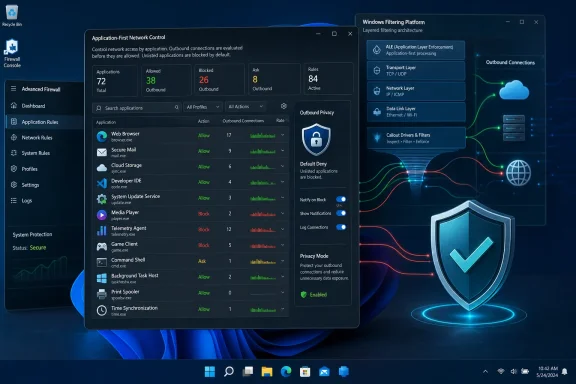 WFP filters, not a Defender Firewall skin
simplewall is not a replacement interface for Microsoft Defender Firewall and does not manage Defender Firewall’s rule set. As its developer, Henry++, explains in the project documentation, it creates its own filters using the Windows Filtering Platform (WFP), the Windows network-filtering framework also available to security products and other system tools.The current stable release remains simplewall 3.8.7, published on August 8, 2025, according to the project’s official GitHub releases page. The tool is available as installer and portable builds, but requires administrator rights to deploy its system-level filters.
It offers application, service, UWP app, connection, system-rule and packet-log views. The connection view is particularly useful for troubleshooting: users can identify an executable with an active network connection, inspect its local and remote endpoints, and create a more specific rule if an all-or-nothing application decision is not enough.
That application-first presentation is the core difference. The underlying policy can still become complicated, but the first question is practical: “Should this program be online?”
Default deny has a cost
A default-deny outbound policy can break more than a browser. Windows Update, DNS, DHCP, time synchronization, Store apps, cloud clients, VPNs and services hosted bysvchost.exe may need explicit allowances or system rules. A blocked dependency can look like a random application failure rather than a firewall issue.This makes simplewall a tool for technically curious users and administrators running controlled systems, not a set-and-forget recommendation for every PC. The project itself labels the software as intended for advanced users.
Users should also avoid treating its optional telemetry-oriented blocklists as a malware-control layer or as definitive evidence about every destination. Network blocklists can be useful policy inputs, but they do not replace endpoint protection, patching, application control or investigation of suspicious processes.
Keep Defender Firewall on unless testing requires otherwise
simplewall can operate alongside Microsoft Defender Firewall, but Microsoft recommends leaving its firewall enabled. Defender Firewall continues to provide protections and features beyond a simple allow/block decision, including IPsec connection-security rules, service hardening and boot-time filtering.The most important operational warning is removal: simplewall’s own documentation says its installed filters remain active after the application is closed and can survive an uninstall. Disable its filters before removing the tool, or use its provided uninstall mechanism to remove the filters cleanly.
For users who want a manageable outbound allowlist, simplewall offers a clearer control surface, but it demands careful testing before it belongs on a daily-use Windows machine.
References
- Primary source: MakeUseOf
Published: 2026-07-13T11:01:15+00:00
I ditched Windows Firewall's confusing interface for this free alternative that actually makes sense
This app turned firewall rules from secret paperwork into buttons I could actually use. www.makeuseof.com
- Official source: learn.microsoft.com
Windows Firewall Overview | Microsoft Learn
Learn overview information about the Windows Firewall security feature.learn.microsoft.com - Official source: support.microsoft.com
Risks of Allowing Apps Through Windows Firewall | Microsoft Support
Learn about the risks of allowing apps through Windows Firewall, and how to add or remove apps from the list of allowed apps.support.microsoft.com
