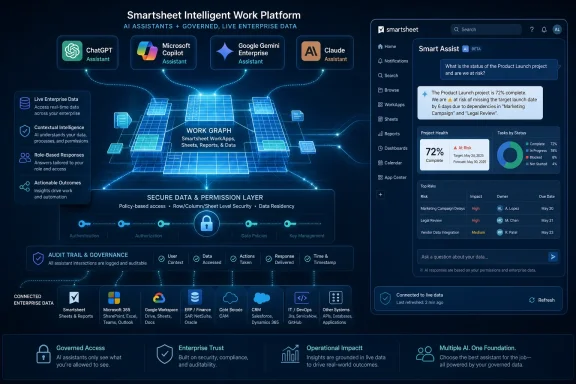
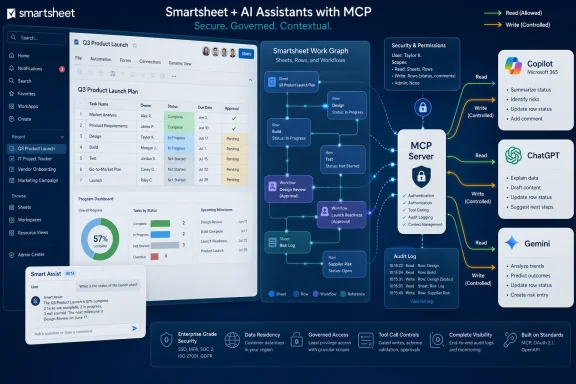
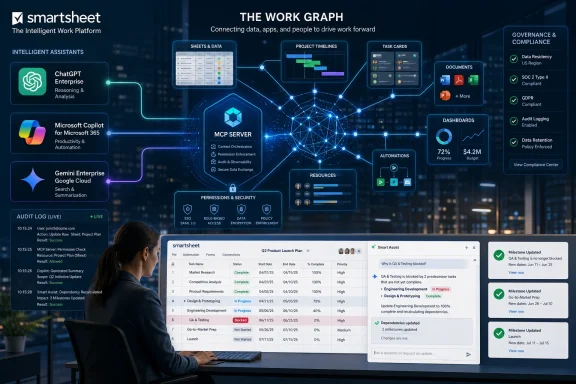
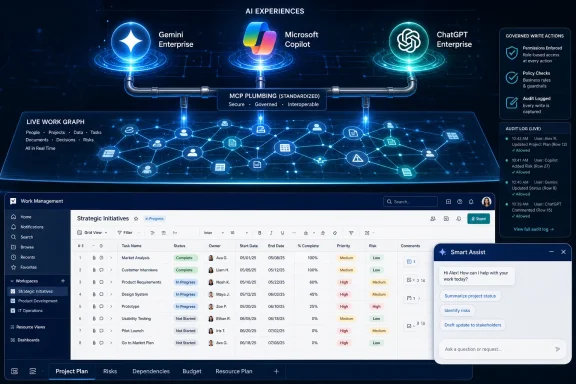
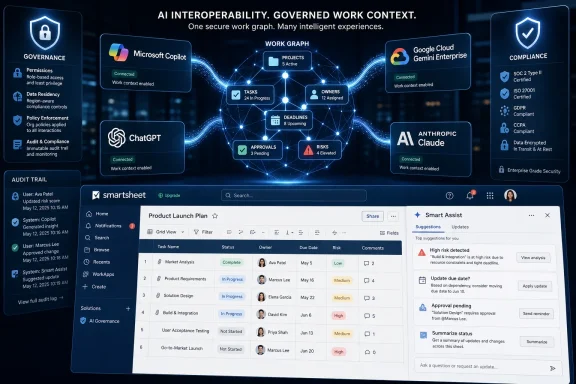
Smartsheet announced in June 2026 that its MCP Server now connects with ChatGPT, Microsoft Copilot and Google Cloud Gemini Enterprise, while also adding Smart Assist inside the Smartsheet platform for customers that want AI help without leaving the application. The move is less about another chatbot integration than about a bigger shift in enterprise software: the work-management layer is becoming an AI-accessible data layer. Smartsheet wants to be where assistants go when they need to understand not just documents, but deadlines, dependencies, owners, approvals and operational reality.
The most important phrase in Smartsheet’s announcement is not ChatGPT, Copilot, Gemini or even Claude. It is live work data. That is the thing every enterprise AI demo tends to gesture at and every enterprise AI rollout tends to trip over.
A general-purpose assistant can summarize a document, draft an email or produce a slide outline. But if it does not know which project slipped, which blocker was accepted as a risk, which owner changed last week, or which approval is still waiting in a sheet buried three workspaces down, it is mostly operating on vibes. Smartsheet’s pitch is that the operational truth of many organizations already lives in its platform, and AI becomes more useful when it can query and modify that truth directly.
That is why the MCP Server matters. Model Context Protocol, originally pushed into the mainstream by Anthropic, gives AI clients a standardized way to connect to outside tools and data sources. For Smartsheet, MCP is a way to avoid betting the company’s AI strategy on one assistant brand while still making its platform available to the assistants customers are already standardizing on.
The result is a more realistic kind of enterprise AI strategy. Instead of telling users to abandon their preferred assistant, Smartsheet is trying to make itself available wherever that assistant sits. If a company’s developers live in Claude, its executives use Copilot, its analysts experiment with ChatGPT and its cloud team works in Gemini Enterprise, Smartsheet would rather be the shared operational substrate than the assistant of record.
But workplace software vendors have a different incentive. They do not necessarily need to win the assistant interface war. They need to make sure that, whichever assistant wins inside a customer account, it still needs their data.
That is the strategic logic behind Smartsheet’s expanded MCP connections. The company is not saying its own assistant will replace ChatGPT or Copilot. It is saying those assistants become materially more useful when they can see and act on Smartsheet data under enterprise governance.
This is the part of the AI platform battle that will matter most to IT departments. A flashy model can write a decent status report. A governed connection to a work-management system can generate that report from current tasks, dependency chains, comments, row history and ownership metadata. The first is a writing aid. The second starts to look like operational automation.
Smartsheet is trying to position itself as the second thing. It is not just opening a read-only peephole for AI search. The company says nearly one in three AI-driven actions through its MCP Server creates, updates or modifies live work. That is a meaningful threshold because it suggests customers are not merely asking “what happened?” They are asking AI tools to help change what happens next.
Adding ChatGPT, Microsoft Copilot and Google Cloud Gemini Enterprise changes the customer conversation. It turns the MCP Server from a Claude-adjacent feature into a multi-assistant access layer. That distinction matters because enterprise AI adoption is fragmented, and fragmentation is likely to persist.
Many companies will not choose a single assistant. They will inherit several. Microsoft 365 customers will have Copilot pressure from licensing and procurement. Developers may push for Claude or ChatGPT. Google Cloud customers may test Gemini Enterprise as part of a broader cloud AI stack. Security teams may approve one tool for one class of data and another tool for another.
In that world, the software vendor that insists on one AI front end risks being treated as parochial. Smartsheet is taking the more pragmatic path: if the enterprise assistant market is plural, the work data layer must be plural too.
There is also a defensive move here. If AI assistants become the primary interface through which employees access work systems, then platforms that are invisible to assistants may become invisible to users. Smartsheet cannot afford to be a tab that people forget to open while their assistant becomes the new command line for office work.
Not every workflow belongs in a third-party assistant window. Some users will be more comfortable asking questions inside the system where the work is already visible. Some organizations will prefer the cleaner governance story of AI interactions contained within the application. And some tasks simply make more sense when the assistant is surrounded by the relevant rows, dashboards and project artifacts.
Smart Assist also protects Smartsheet from becoming merely a backend connector. If all of the perceived AI value happens in ChatGPT, Copilot, Claude or Gemini, Smartsheet risks being treated as plumbing. By embedding Smart Assist, the company can claim a share of the user experience while still supporting external assistants.
That balance is becoming a standard pattern in enterprise software. Vendors want open connections because customers demand choice. They also want native AI because interface control still matters. The ideal platform posture is increasingly: bring your assistant if you want, but do not leave our product to get AI value.
Those numbers should not be mistaken for proof that agentic AI has conquered project management. They are still early adoption metrics, and vendors naturally choose the most flattering slices of their telemetry. But they do suggest something more than a press-release experiment.
The most interesting number is the share of actions that modify live work. Enterprise users often begin with safe AI tasks: summarize this, explain that, draft a note. Once they allow an assistant to create rows, update statuses or change project information, they have crossed into a different trust model.
That trust model is where the next few years of enterprise AI will be decided. It is one thing to let a model read project data and produce a status summary. It is another to let it adjust the system of record. Smartsheet’s claim that almost a third of AI actions are write-oriented suggests customers are at least testing that boundary.
The reported growth in net-new organizations is also worth watching. Smartsheet says nearly 3,000 net-new organizations joined in the prior 30 days, with close to 700 new organizations discovering the server each week. That points to MCP acting not only as a feature for existing customers, but as a discovery surface for new ones.
Every company has a semi-formal operating system made of spreadsheets, project plans, approval flows, recurring meetings, status notes, exceptions and tribal knowledge. Smartsheet’s argument is that a significant portion of that operating system is already captured in its platform. The MCP Server is a way to expose that memory to AI tools without requiring users to manually restate context every time they ask a question.
This is why work-management data is more valuable than it may look from the outside. A sheet is rarely just a table. It can encode priorities, accountability, deadlines, dependencies, comments, escalation paths and tacit process rules. An assistant that can interpret and update those objects is closer to the actual pulse of a business than one that only searches files.
That does not mean the assistant understands the company in any human sense. It means it has better grounding. And in enterprise software, grounding is often the difference between a useful automation and an elegant hallucination.
If Smartsheet data can be surfaced through Copilot, a project manager may not need to open Smartsheet to ask about blockers. An executive may ask for a status digest in the assistant they already use for meetings and documents. An IT admin may need to understand how Smartsheet permissions, Microsoft identity, Copilot access and downstream data handling interact.
That last point is where the announcement becomes more than a convenience story. Enterprise AI governance is no longer just about whether a tool is approved. It is about what data the tool can reach, what actions it can take, what logs exist, and how permissions are enforced across systems.
Smartsheet says the products sit on the same governance framework for IT teams managing AI use across organizations. That is the correct answer, but admins will still need to test the details. In a Copilot-heavy shop, the practical questions will include identity mapping, conditional access, auditability, data retention, and how quickly permissions changes propagate into assistant-accessible contexts.
The arrival of MCP connections does not remove old access-control problems. It makes them more urgent because natural-language interfaces can make broad access feel deceptively simple.
But standards do not eliminate strategy. They relocate it. Even if multiple assistants can connect to the same MCP Server, vendors still compete on permissions, performance, supported actions, metadata richness, reliability, logging and cost control. The protocol opens the door; the implementation determines whether anyone should walk through it.
Smartsheet has been careful to emphasize that its MCP Server respects authenticated user permissions and routes requests through its existing API model. That is important because no enterprise wants an AI integration that becomes a shortcut around established access controls. The more interesting question is whether the assistant experience can make those controls legible to users and admins.
There is also the token-cost problem. When AI tools query enterprise systems, they can generate large payloads. Smartsheet has talked about filtering and optimization to reduce unnecessary data transfer. That sounds mundane, but it is central to scaling AI workflows. A clever assistant that burns through budget every time it summarizes a portfolio will not survive contact with procurement.
MCP may become a common layer, but common layers still need grown-up operations. Expect IT teams to treat MCP servers less like fun integrations and more like APIs with a conversational attack surface.
But the risks are real too. When AI moves from answering questions to updating work systems, mistakes become operational. A misunderstood prompt, a stale context window or an overbroad permission grant can create changes that look legitimate because they were made through an authenticated user.
That does not mean enterprises should avoid these tools. It means they should deploy them as production integrations, not novelty chatbots. The right mental model is closer to automation with a natural-language interface than search with a friendly tone.
For admins, the practical discipline will be familiar. Limit access by role. Test in low-risk workspaces. Review logs. Separate read and write capabilities where possible. Confirm how external assistant providers handle prompts, outputs and retrieved data. Train users that “the AI did it” is not a governance category.
The hardest cultural shift may be accountability. If a user asks an assistant to update a project plan, the organization still needs a responsible human owner. AI can accelerate work, but it should not blur ownership of decisions that affect schedules, budgets or compliance.
This messiness is where work-management platforms earn their keep. They sit between the polished systems of record and the chaos of daily coordination. They often contain the freshest version of what teams believe is happening.
That makes them attractive fuel for AI assistants. It also makes them dangerous fuel if context is incomplete or permissions are sloppy. A model that sees half a project may give a confident answer about the whole thing. A user who assumes AI has “checked Smartsheet” may not realize which workspace, sheet or row set it actually accessed.
Smartsheet’s challenge is therefore not only to expose data, but to expose provenance. Users need to know what an answer was based on. Admins need to know what was touched. Organizations need enough transparency to trust the system without pretending that AI outputs are self-validating.
This is where enterprise AI will separate serious platforms from demo platforms. The demo says, “Ask anything about your work.” The production system says, “Here is what I checked, here is what I changed, here is who had permission, and here is how to undo it.”
A Microsoft-centric organization may still have developers using Claude. A Google Cloud customer may still have executives experimenting with ChatGPT. A regulated company may approve one assistant for internal data and another for public drafting. The result is an assistant landscape that looks less like a single platform and more like a portfolio.
Smartsheet wants to make that portfolio less chaotic by turning its own platform into a common context source. If every approved assistant can reach the same governed work data, users have more freedom at the interface layer without fragmenting the operational layer.
That is the optimistic version. The pessimistic version is that enterprises end up with multiple assistants, multiple connectors, multiple logs, multiple data-handling agreements and a fresh round of shadow IT under the banner of AI. Both outcomes are plausible.
The difference will come down to governance and product maturity. MCP gives vendors and customers a shared technical language, but it does not automatically create a coherent operating model. That work still falls to IT.
Smart Columns, AI Dashboard Builder, Smart Assist and MCP Server all point in that direction. The grid remains, but the product value increasingly comes from metadata, automation, relationships and machine-readable context. The more those elements are exposed to AI tools, the less the user experience depends on manually navigating rows.
This is part of a broader evolution in workplace software. The user interface is no longer the only front door. APIs were the first alternative entrance. AI assistants are becoming the next one. A user may interact with a project plan through a dashboard, a chat window, a mobile app, a command-line agent or an automated workflow.
That makes the underlying data model more important than the visible surface. If Smartsheet can make its operational data clean, permissioned and actionable across assistants, it can remain relevant even as users spend less time inside the traditional app. If it cannot, AI interfaces may simply expose the inconsistencies that humans previously worked around.
Smartsheet’s DPR Construction example points to the kind of use case that can justify the effort. Large construction programs involve many participants, moving constraints and high coordination costs. If frontline workers can create tailored Smartsheet workflows in natural language, test ideas quickly and reduce errors, the value is concrete.
But even there, the system must prove itself in the unglamorous middle. It must handle imperfect prompts, inconsistent project structures, permission edge cases, regional availability differences and user training gaps. It must work when the project is behind schedule and everyone is impatient.
That is why the availability detail matters. Smart Assist, the MCP Server, and connections to Claude and Google Cloud Gemini Enterprise are available now, while ChatGPT and Microsoft Copilot connections are available to US customers first, with APJ and EMEA rollouts due later. For global organizations, staggered availability can complicate standardization.
Enterprise AI is often announced globally before it is operationally global. IT teams should read availability notes as carefully as feature lists.
The company is betting that the next interface to project and portfolio management may not be a dashboard at all. It may be a natural-language request from whichever assistant a user already has open. That assistant will need live context, permissioned actions and reliable links back to the system of record.
For Windows and Microsoft 365-heavy organizations, the Copilot connection will be watched closely because it could bring Smartsheet data closer to the daily flow of meetings, email and documents. For mixed-tool enterprises, ChatGPT, Claude and Gemini support make the pitch more flexible. For admins, the same flexibility introduces a larger governance surface.
The practical message is clear:
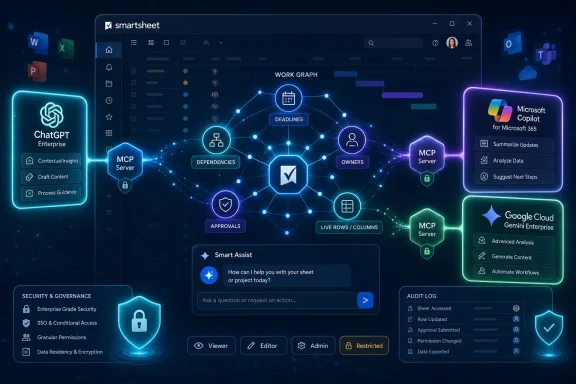 Smartsheet Is Selling Context, Not Another Chat Window
The most important phrase in Smartsheet’s announcement is not ChatGPT, Copilot, Gemini or even Claude. It is live work data. That is the thing every enterprise AI demo tends to gesture at and every enterprise AI rollout tends to trip over.A general-purpose assistant can summarize a document, draft an email or produce a slide outline. But if it does not know which project slipped, which blocker was accepted as a risk, which owner changed last week, or which approval is still waiting in a sheet buried three workspaces down, it is mostly operating on vibes. Smartsheet’s pitch is that the operational truth of many organizations already lives in its platform, and AI becomes more useful when it can query and modify that truth directly.
That is why the MCP Server matters. Model Context Protocol, originally pushed into the mainstream by Anthropic, gives AI clients a standardized way to connect to outside tools and data sources. For Smartsheet, MCP is a way to avoid betting the company’s AI strategy on one assistant brand while still making its platform available to the assistants customers are already standardizing on.
The result is a more realistic kind of enterprise AI strategy. Instead of telling users to abandon their preferred assistant, Smartsheet is trying to make itself available wherever that assistant sits. If a company’s developers live in Claude, its executives use Copilot, its analysts experiment with ChatGPT and its cloud team works in Gemini Enterprise, Smartsheet would rather be the shared operational substrate than the assistant of record.
The Assistant Wars Are Moving Down Into the Data Layer
The early AI productivity race rewarded whatever tool sat closest to the user’s cursor. ChatGPT won mindshare because it was simple and flexible. Copilot gained enterprise attention because Microsoft could place it inside Office, Teams, Outlook and Windows. Claude carved out territory with long-context reasoning and developer-heavy workflows. Gemini has Google’s productivity, cloud and search orbit behind it.But workplace software vendors have a different incentive. They do not necessarily need to win the assistant interface war. They need to make sure that, whichever assistant wins inside a customer account, it still needs their data.
That is the strategic logic behind Smartsheet’s expanded MCP connections. The company is not saying its own assistant will replace ChatGPT or Copilot. It is saying those assistants become materially more useful when they can see and act on Smartsheet data under enterprise governance.
This is the part of the AI platform battle that will matter most to IT departments. A flashy model can write a decent status report. A governed connection to a work-management system can generate that report from current tasks, dependency chains, comments, row history and ownership metadata. The first is a writing aid. The second starts to look like operational automation.
Smartsheet is trying to position itself as the second thing. It is not just opening a read-only peephole for AI search. The company says nearly one in three AI-driven actions through its MCP Server creates, updates or modifies live work. That is a meaningful threshold because it suggests customers are not merely asking “what happened?” They are asking AI tools to help change what happens next.
Claude Was the Beachhead, Not the Destination
Smartsheet’s Claude integration, launched earlier in 2026, gave the company a useful first proof point. Anthropic’s ecosystem was the natural place to begin because MCP’s public momentum came from Anthropic and because Claude has become a favored tool among technical and operations-heavy users. But the new announcement makes clear that Claude was never meant to be the whole strategy.Adding ChatGPT, Microsoft Copilot and Google Cloud Gemini Enterprise changes the customer conversation. It turns the MCP Server from a Claude-adjacent feature into a multi-assistant access layer. That distinction matters because enterprise AI adoption is fragmented, and fragmentation is likely to persist.
Many companies will not choose a single assistant. They will inherit several. Microsoft 365 customers will have Copilot pressure from licensing and procurement. Developers may push for Claude or ChatGPT. Google Cloud customers may test Gemini Enterprise as part of a broader cloud AI stack. Security teams may approve one tool for one class of data and another tool for another.
In that world, the software vendor that insists on one AI front end risks being treated as parochial. Smartsheet is taking the more pragmatic path: if the enterprise assistant market is plural, the work data layer must be plural too.
There is also a defensive move here. If AI assistants become the primary interface through which employees access work systems, then platforms that are invisible to assistants may become invisible to users. Smartsheet cannot afford to be a tab that people forget to open while their assistant becomes the new command line for office work.
Smart Assist Is the Insurance Policy Inside the Product
The external assistant integrations are the more dramatic part of the announcement, but Smart Assist may be just as important. It gives Smartsheet a native AI companion for users who want conversational help without leaving Smartsheet itself. That matters for both usability and control.Not every workflow belongs in a third-party assistant window. Some users will be more comfortable asking questions inside the system where the work is already visible. Some organizations will prefer the cleaner governance story of AI interactions contained within the application. And some tasks simply make more sense when the assistant is surrounded by the relevant rows, dashboards and project artifacts.
Smart Assist also protects Smartsheet from becoming merely a backend connector. If all of the perceived AI value happens in ChatGPT, Copilot, Claude or Gemini, Smartsheet risks being treated as plumbing. By embedding Smart Assist, the company can claim a share of the user experience while still supporting external assistants.
That balance is becoming a standard pattern in enterprise software. Vendors want open connections because customers demand choice. They also want native AI because interface control still matters. The ideal platform posture is increasingly: bring your assistant if you want, but do not leave our product to get AI value.
Usage Numbers Show Curiosity Has Turned Into Operational Testing
Smartsheet’s usage figures are striking, even allowing for the usual vendor-announcement polish. The company says more than 22,000 unique users have carried out 3 million AI actions since the March Claude launch. Weekly active users reportedly rose from under 1,000 at launch to more than 9,000, while weekly tool-call volume climbed from 42,000 to more than 700,000.Those numbers should not be mistaken for proof that agentic AI has conquered project management. They are still early adoption metrics, and vendors naturally choose the most flattering slices of their telemetry. But they do suggest something more than a press-release experiment.
The most interesting number is the share of actions that modify live work. Enterprise users often begin with safe AI tasks: summarize this, explain that, draft a note. Once they allow an assistant to create rows, update statuses or change project information, they have crossed into a different trust model.
That trust model is where the next few years of enterprise AI will be decided. It is one thing to let a model read project data and produce a status summary. It is another to let it adjust the system of record. Smartsheet’s claim that almost a third of AI actions are write-oriented suggests customers are at least testing that boundary.
The reported growth in net-new organizations is also worth watching. Smartsheet says nearly 3,000 net-new organizations joined in the prior 30 days, with close to 700 new organizations discovering the server each week. That points to MCP acting not only as a feature for existing customers, but as a discovery surface for new ones.
The Real Enterprise Prize Is Workflow Memory
Pratima Arora, Smartsheet’s chief product and technology officer, framed the problem bluntly: many teams do not lack access to AI; their AI lacks an understanding of how the organization works. That is the core enterprise AI problem in one sentence. Models can be powerful and still be organizationally naïve.Every company has a semi-formal operating system made of spreadsheets, project plans, approval flows, recurring meetings, status notes, exceptions and tribal knowledge. Smartsheet’s argument is that a significant portion of that operating system is already captured in its platform. The MCP Server is a way to expose that memory to AI tools without requiring users to manually restate context every time they ask a question.
This is why work-management data is more valuable than it may look from the outside. A sheet is rarely just a table. It can encode priorities, accountability, deadlines, dependencies, comments, escalation paths and tacit process rules. An assistant that can interpret and update those objects is closer to the actual pulse of a business than one that only searches files.
That does not mean the assistant understands the company in any human sense. It means it has better grounding. And in enterprise software, grounding is often the difference between a useful automation and an elegant hallucination.
Windows Shops Will See This Through the Copilot Lens
For many WindowsForum readers, the Microsoft Copilot connection is the most consequential part of the announcement. Copilot is not just another AI assistant in enterprise environments. It is bundled into the broader Microsoft 365, Teams, Edge, Windows and Azure gravity well that already shapes IT procurement and user behavior.If Smartsheet data can be surfaced through Copilot, a project manager may not need to open Smartsheet to ask about blockers. An executive may ask for a status digest in the assistant they already use for meetings and documents. An IT admin may need to understand how Smartsheet permissions, Microsoft identity, Copilot access and downstream data handling interact.
That last point is where the announcement becomes more than a convenience story. Enterprise AI governance is no longer just about whether a tool is approved. It is about what data the tool can reach, what actions it can take, what logs exist, and how permissions are enforced across systems.
Smartsheet says the products sit on the same governance framework for IT teams managing AI use across organizations. That is the correct answer, but admins will still need to test the details. In a Copilot-heavy shop, the practical questions will include identity mapping, conditional access, auditability, data retention, and how quickly permissions changes propagate into assistant-accessible contexts.
The arrival of MCP connections does not remove old access-control problems. It makes them more urgent because natural-language interfaces can make broad access feel deceptively simple.
MCP Is Becoming the USB-C of Enterprise AI, With All the Same Caveats
The appeal of MCP is obvious: one protocol for many tools, one pattern for connecting assistants to systems, one emerging ecosystem instead of a mess of bespoke integrations. For software vendors, it offers a way to meet AI clients where they are. For customers, it promises less lock-in and faster experimentation.But standards do not eliminate strategy. They relocate it. Even if multiple assistants can connect to the same MCP Server, vendors still compete on permissions, performance, supported actions, metadata richness, reliability, logging and cost control. The protocol opens the door; the implementation determines whether anyone should walk through it.
Smartsheet has been careful to emphasize that its MCP Server respects authenticated user permissions and routes requests through its existing API model. That is important because no enterprise wants an AI integration that becomes a shortcut around established access controls. The more interesting question is whether the assistant experience can make those controls legible to users and admins.
There is also the token-cost problem. When AI tools query enterprise systems, they can generate large payloads. Smartsheet has talked about filtering and optimization to reduce unnecessary data transfer. That sounds mundane, but it is central to scaling AI workflows. A clever assistant that burns through budget every time it summarizes a portfolio will not survive contact with procurement.
MCP may become a common layer, but common layers still need grown-up operations. Expect IT teams to treat MCP servers less like fun integrations and more like APIs with a conversational attack surface.
The Security Story Is Permissioned, Not Magical
The phrase “securely connect to preferred AI tools” appears in the customer framing around DPR Construction, and it is easy to see why. Construction projects, healthcare builds and data center work involve complex schedules, contractors, compliance constraints and expensive mistakes. If an AI assistant can reduce errors or accelerate workflow creation, the upside is real.But the risks are real too. When AI moves from answering questions to updating work systems, mistakes become operational. A misunderstood prompt, a stale context window or an overbroad permission grant can create changes that look legitimate because they were made through an authenticated user.
That does not mean enterprises should avoid these tools. It means they should deploy them as production integrations, not novelty chatbots. The right mental model is closer to automation with a natural-language interface than search with a friendly tone.
For admins, the practical discipline will be familiar. Limit access by role. Test in low-risk workspaces. Review logs. Separate read and write capabilities where possible. Confirm how external assistant providers handle prompts, outputs and retrieved data. Train users that “the AI did it” is not a governance category.
The hardest cultural shift may be accountability. If a user asks an assistant to update a project plan, the organization still needs a responsible human owner. AI can accelerate work, but it should not blur ownership of decisions that affect schedules, budgets or compliance.
Smartsheet’s Advantage Is That Work Management Is Messy
Smartsheet’s best argument is not that it has the most glamorous AI interface. It is that enterprise work is messy in precisely the way general AI tools struggle to understand without connected context. Projects span departments. Plans change. Comments contain decisions. Dashboards abstract away detail. A “status” field may mean one thing in a marketing launch and another in a regulated infrastructure project.This messiness is where work-management platforms earn their keep. They sit between the polished systems of record and the chaos of daily coordination. They often contain the freshest version of what teams believe is happening.
That makes them attractive fuel for AI assistants. It also makes them dangerous fuel if context is incomplete or permissions are sloppy. A model that sees half a project may give a confident answer about the whole thing. A user who assumes AI has “checked Smartsheet” may not realize which workspace, sheet or row set it actually accessed.
Smartsheet’s challenge is therefore not only to expose data, but to expose provenance. Users need to know what an answer was based on. Admins need to know what was touched. Organizations need enough transparency to trust the system without pretending that AI outputs are self-validating.
This is where enterprise AI will separate serious platforms from demo platforms. The demo says, “Ask anything about your work.” The production system says, “Here is what I checked, here is what I changed, here is who had permission, and here is how to undo it.”
The Multi-Assistant Strategy Is a Bet Against AI Monoculture
The most commercially interesting part of the announcement is that Smartsheet is refusing to choose a single AI champion. That is sensible because customers are refusing to choose one too. Enterprise AI is being pulled by procurement, developer preference, cloud commitments, security posture and user habit all at once.A Microsoft-centric organization may still have developers using Claude. A Google Cloud customer may still have executives experimenting with ChatGPT. A regulated company may approve one assistant for internal data and another for public drafting. The result is an assistant landscape that looks less like a single platform and more like a portfolio.
Smartsheet wants to make that portfolio less chaotic by turning its own platform into a common context source. If every approved assistant can reach the same governed work data, users have more freedom at the interface layer without fragmenting the operational layer.
That is the optimistic version. The pessimistic version is that enterprises end up with multiple assistants, multiple connectors, multiple logs, multiple data-handling agreements and a fresh round of shadow IT under the banner of AI. Both outcomes are plausible.
The difference will come down to governance and product maturity. MCP gives vendors and customers a shared technical language, but it does not automatically create a coherent operating model. That work still falls to IT.
The Spreadsheet Metaphor Finally Breaks
Smartsheet has always carried the ghost of the spreadsheet in its name and interface. That familiarity helped it spread because teams understand grids, rows and columns. But the AI push reveals the company’s larger ambition: Smartsheet does not want to be understood as a better spreadsheet. It wants to be understood as a programmable work graph.Smart Columns, AI Dashboard Builder, Smart Assist and MCP Server all point in that direction. The grid remains, but the product value increasingly comes from metadata, automation, relationships and machine-readable context. The more those elements are exposed to AI tools, the less the user experience depends on manually navigating rows.
This is part of a broader evolution in workplace software. The user interface is no longer the only front door. APIs were the first alternative entrance. AI assistants are becoming the next one. A user may interact with a project plan through a dashboard, a chat window, a mobile app, a command-line agent or an automated workflow.
That makes the underlying data model more important than the visible surface. If Smartsheet can make its operational data clean, permissioned and actionable across assistants, it can remain relevant even as users spend less time inside the traditional app. If it cannot, AI interfaces may simply expose the inconsistencies that humans previously worked around.
The Numbers Are Promising, But the Hard Part Starts After Adoption
Early usage growth is encouraging, but the enterprise AI graveyard will be filled with tools that had impressive trial metrics. The harder measure is whether these systems become durable parts of work. Do they reduce cycle time? Do they lower error rates? Do they improve decision quality? Do they survive governance review after the pilot excitement fades?Smartsheet’s DPR Construction example points to the kind of use case that can justify the effort. Large construction programs involve many participants, moving constraints and high coordination costs. If frontline workers can create tailored Smartsheet workflows in natural language, test ideas quickly and reduce errors, the value is concrete.
But even there, the system must prove itself in the unglamorous middle. It must handle imperfect prompts, inconsistent project structures, permission edge cases, regional availability differences and user training gaps. It must work when the project is behind schedule and everyone is impatient.
That is why the availability detail matters. Smart Assist, the MCP Server, and connections to Claude and Google Cloud Gemini Enterprise are available now, while ChatGPT and Microsoft Copilot connections are available to US customers first, with APJ and EMEA rollouts due later. For global organizations, staggered availability can complicate standardization.
Enterprise AI is often announced globally before it is operationally global. IT teams should read availability notes as carefully as feature lists.
The Work Graph Now Has an AI Front Door
Smartsheet’s announcement is one of those enterprise software moves that can sound incremental until you consider the direction of travel. Another connector. Another assistant. Another AI companion. But taken together, the pieces describe a broader rewiring of how work systems are accessed.The company is betting that the next interface to project and portfolio management may not be a dashboard at all. It may be a natural-language request from whichever assistant a user already has open. That assistant will need live context, permissioned actions and reliable links back to the system of record.
For Windows and Microsoft 365-heavy organizations, the Copilot connection will be watched closely because it could bring Smartsheet data closer to the daily flow of meetings, email and documents. For mixed-tool enterprises, ChatGPT, Claude and Gemini support make the pitch more flexible. For admins, the same flexibility introduces a larger governance surface.
The practical message is clear:
- Smartsheet is turning its MCP Server into a multi-assistant access layer for live work data rather than a single-vendor AI integration.
- Smart Assist gives Smartsheet a native AI experience for users and organizations that prefer to keep assistance inside the platform.
- The strongest evidence of real adoption is not the user count alone, but the reported share of AI actions that modify live work.
- Microsoft Copilot support will matter disproportionately in Windows and Microsoft 365 environments because it places Smartsheet context closer to existing enterprise workflows.
- IT teams should treat MCP connections as governed production integrations, with the same scrutiny they would apply to APIs that can read and write business data.
- The long-term contest is shifting from which assistant has the best chat interface to which platforms control the operational context those assistants need.
References
- Primary source: IT Brief Australia
Published: 2026-06-11T13:50:15.507373
Smartsheet adds ChatGPT & Copilot links to MCP Server
Enterprise teams can now use live Smartsheet work data through ChatGPT, Copilot and Gemini Enterprise, as AI adoption races across workplaces. itbrief.com.au
- Independent coverage: AiThority
Published: Thu, 11 Jun 2026 13:46:37 GMT
Smartsheet Adds ChatGPT, Microsoft Copilot and Google Cloud Gemini Enterprise Connections for its MCP Server
Smartsheet announced that enterprise teams can now connect Microsoft Copilot, ChatGPT and Google Cloud Gemini Enterprise to Smartsheet, joining existing support for Anthropic’s Claude.aithority.com - Related coverage: smartsheet.com
Smartsheet API now speaks AI: Introducing Smartsheet MCP server for every MCP-compliant AI tool
Smartsheet MCP Server is live — connect any MCP-compliant AI tool to your Smartsheet data.www.smartsheet.com - Related coverage: stackone.com
The Best MCP Gateways for Gemini Enterprise in 2026 | StackOne
The best MCP gateways for Gemini Enterprise (formerly Agentspace), compared: StackOne, Composio, Zapier, Arcade vs Google's native connectors. www.stackone.com
- Related coverage: agentmarketcap.ai
Microsoft Copilot Studio MCP Server GA: 16M Enterprise Seats Meet the Universal Agent Protocol | AgentMarketCap
Microsoft's GA of MCP in Copilot Studio and federated connectors creates the largest single MCP client deployment, reshaping enterprise agent infrastructure.agentmarketcap.ai - Related coverage: itwire.com
Smartsheet MCP Server Achieves Exceptional Customer Adoption in First Week; 4,000 Users with 1.74 Million Total Actions Since Launch | iTWire
Smartsheet brings AI to where complex work actually lives, connecting the most critical systems and data sources across the enterprise ChatGPT and Gemini integrations to follow... itwire.com
- Related coverage: epcgroup.net
Microsoft Copilot vs Google Gemini Enterprise | EPC Group
Microsoft 365 Copilot vs Google Gemini for Workspace — enterprise feature parity, governance, integration with M365 + Azure OpenAI.www.epcgroup.net - Related coverage: manatech.nz
- Related coverage: intuitionlabs.ai