Smartsheet announced in June 2026 that its MCP Server now connects with ChatGPT, Microsoft Copilot and Google Cloud Gemini Enterprise, while also adding Smart Assist inside the Smartsheet platform for customers that want AI help without leaving the application. The move is less about another chatbot integration than about a bigger shift in enterprise software: the work-management layer is becoming an AI-accessible data layer. Smartsheet wants to be where assistants go when they need to understand not just documents, but deadlines, dependencies, owners, approvals and operational reality.

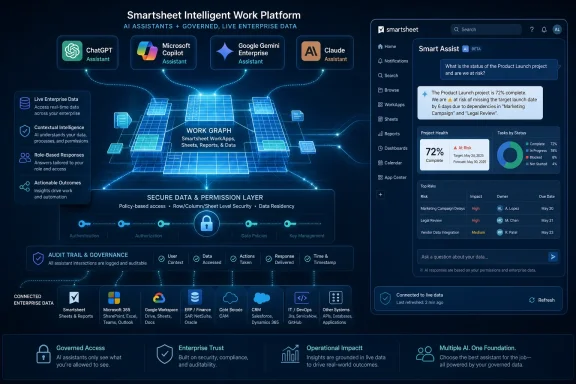
SmartSheet enterprise dashboard visualizing secure AI workflow with Microsoft Copilot and Google Gemini servers.Smartsheet Is Selling Context, Not Another Chat Window​

The most important phrase in Smartsheet’s announcement is not ChatGPT, Copilot, Gemini or even Claude. It is live work data. That is the thing every enterprise AI demo tends to gesture at and every enterprise AI rollout tends to trip over.
A general-purpose assistant can summarize a document, draft an email or produce a slide outline. But if it does not know which project slipped, which blocker was accepted as a risk, which owner changed last week, or which approval is still waiting in a sheet buried three workspaces down, it is mostly operating on vibes. Smartsheet’s pitch is that the operational truth of many organizations already lives in its platform, and AI becomes more useful when it can query and modify that truth directly.
That is why the MCP Server matters. Model Context Protocol, originally pushed into the mainstream by Anthropic, gives AI clients a standardized way to connect to outside tools and data sources. For Smartsheet, MCP is a way to avoid betting the company’s AI strategy on one assistant brand while still making its platform available to the assistants customers are already standardizing on.
The result is a more realistic kind of enterprise AI strategy. Instead of telling users to abandon their preferred assistant, Smartsheet is trying to make itself available wherever that assistant sits. If a company’s developers live in Claude, its executives use Copilot, its analysts experiment with ChatGPT and its cloud team works in Gemini Enterprise, Smartsheet would rather be the shared operational substrate than the assistant of record.

The Assistant Wars Are Moving Down Into the Data Layer​

The early AI productivity race rewarded whatever tool sat closest to the user’s cursor. ChatGPT won mindshare because it was simple and flexible. Copilot gained enterprise attention because Microsoft could place it inside Office, Teams, Outlook and Windows. Claude carved out territory with long-context reasoning and developer-heavy workflows. Gemini has Google’s productivity, cloud and search orbit behind it.
But workplace software vendors have a different incentive. They do not necessarily need to win the assistant interface war. They need to make sure that, whichever assistant wins inside a customer account, it still needs their data.
That is the strategic logic behind Smartsheet’s expanded MCP connections. The company is not saying its own assistant will replace ChatGPT or Copilot. It is saying those assistants become materially more useful when they can see and act on Smartsheet data under enterprise governance.
This is the part of the AI platform battle that will matter most to IT departments. A flashy model can write a decent status report. A governed connection to a work-management system can generate that report from current tasks, dependency chains, comments, row history and ownership metadata. The first is a writing aid. The second starts to look like operational automation.
Smartsheet is trying to position itself as the second thing. It is not just opening a read-only peephole for AI search. The company says nearly one in three AI-driven actions through its MCP Server creates, updates or modifies live work. That is a meaningful threshold because it suggests customers are not merely asking “what happened?” They are asking AI tools to help change what happens next.

Claude Was the Beachhead, Not the Destination​

Smartsheet’s Claude integration, launched earlier in 2026, gave the company a useful first proof point. Anthropic’s ecosystem was the natural place to begin because MCP’s public momentum came from Anthropic and because Claude has become a favored tool among technical and operations-heavy users. But the new announcement makes clear that Claude was never meant to be the whole strategy.
Adding ChatGPT, Microsoft Copilot and Google Cloud Gemini Enterprise changes the customer conversation. It turns the MCP Server from a Claude-adjacent feature into a multi-assistant access layer. That distinction matters because enterprise AI adoption is fragmented, and fragmentation is likely to persist.
Many companies will not choose a single assistant. They will inherit several. Microsoft 365 customers will have Copilot pressure from licensing and procurement. Developers may push for Claude or ChatGPT. Google Cloud customers may test Gemini Enterprise as part of a broader cloud AI stack. Security teams may approve one tool for one class of data and another tool for another.
In that world, the software vendor that insists on one AI front end risks being treated as parochial. Smartsheet is taking the more pragmatic path: if the enterprise assistant market is plural, the work data layer must be plural too.
There is also a defensive move here. If AI assistants become the primary interface through which employees access work systems, then platforms that are invisible to assistants may become invisible to users. Smartsheet cannot afford to be a tab that people forget to open while their assistant becomes the new command line for office work.

Smart Assist Is the Insurance Policy Inside the Product​

The external assistant integrations are the more dramatic part of the announcement, but Smart Assist may be just as important. It gives Smartsheet a native AI companion for users who want conversational help without leaving Smartsheet itself. That matters for both usability and control.
Not every workflow belongs in a third-party assistant window. Some users will be more comfortable asking questions inside the system where the work is already visible. Some organizations will prefer the cleaner governance story of AI interactions contained within the application. And some tasks simply make more sense when the assistant is surrounded by the relevant rows, dashboards and project artifacts.
Smart Assist also protects Smartsheet from becoming merely a backend connector. If all of the perceived AI value happens in ChatGPT, Copilot, Claude or Gemini, Smartsheet risks being treated as plumbing. By embedding Smart Assist, the company can claim a share of the user experience while still supporting external assistants.
That balance is becoming a standard pattern in enterprise software. Vendors want open connections because customers demand choice. They also want native AI because interface control still matters. The ideal platform posture is increasingly: bring your assistant if you want, but do not leave our product to get AI value.

Usage Numbers Show Curiosity Has Turned Into Operational Testing​

Smartsheet’s usage figures are striking, even allowing for the usual vendor-announcement polish. The company says more than 22,000 unique users have carried out 3 million AI actions since the March Claude launch. Weekly active users reportedly rose from under 1,000 at launch to more than 9,000, while weekly tool-call volume climbed from 42,000 to more than 700,000.
Those numbers should not be mistaken for proof that agentic AI has conquered project management. They are still early adoption metrics, and vendors naturally choose the most flattering slices of their telemetry. But they do suggest something more than a press-release experiment.
The most interesting number is the share of actions that modify live work. Enterprise users often begin with safe AI tasks: summarize this, explain that, draft a note. Once they allow an assistant to create rows, update statuses or change project information, they have crossed into a different trust model.
That trust model is where the next few years of enterprise AI will be decided. It is one thing to let a model read project data and produce a status summary. It is another to let it adjust the system of record. Smartsheet’s claim that almost a third of AI actions are write-oriented suggests customers are at least testing that boundary.
The reported growth in net-new organizations is also worth watching. Smartsheet says nearly 3,000 net-new organizations joined in the prior 30 days, with close to 700 new organizations discovering the server each week. That points to MCP acting not only as a feature for existing customers, but as a discovery surface for new ones.

The Real Enterprise Prize Is Workflow Memory​

Pratima Arora, Smartsheet’s chief product and technology officer, framed the problem bluntly: many teams do not lack access to AI; their AI lacks an understanding of how the organization works. That is the core enterprise AI problem in one sentence. Models can be powerful and still be organizationally naïve.
Every company has a semi-formal operating system made of spreadsheets, project plans, approval flows, recurring meetings, status notes, exceptions and tribal knowledge. Smartsheet’s argument is that a significant portion of that operating system is already captured in its platform. The MCP Server is a way to expose that memory to AI tools without requiring users to manually restate context every time they ask a question.
This is why work-management data is more valuable than it may look from the outside. A sheet is rarely just a table. It can encode priorities, accountability, deadlines, dependencies, comments, escalation paths and tacit process rules. An assistant that can interpret and update those objects is closer to the actual pulse of a business than one that only searches files.
That does not mean the assistant understands the company in any human sense. It means it has better grounding. And in enterprise software, grounding is often the difference between a useful automation and an elegant hallucination.

Windows Shops Will See This Through the Copilot Lens​

For many WindowsForum readers, the Microsoft Copilot connection is the most consequential part of the announcement. Copilot is not just another AI assistant in enterprise environments. It is bundled into the broader Microsoft 365, Teams, Edge, Windows and Azure gravity well that already shapes IT procurement and user behavior.
If Smartsheet data can be surfaced through Copilot, a project manager may not need to open Smartsheet to ask about blockers. An executive may ask for a status digest in the assistant they already use for meetings and documents. An IT admin may need to understand how Smartsheet permissions, Microsoft identity, Copilot access and downstream data handling interact.
That last point is where the announcement becomes more than a convenience story. Enterprise AI governance is no longer just about whether a tool is approved. It is about what data the tool can reach, what actions it can take, what logs exist, and how permissions are enforced across systems.
Smartsheet says the products sit on the same governance framework for IT teams managing AI use across organizations. That is the correct answer, but admins will still need to test the details. In a Copilot-heavy shop, the practical questions will include identity mapping, conditional access, auditability, data retention, and how quickly permissions changes propagate into assistant-accessible contexts.
The arrival of MCP connections does not remove old access-control problems. It makes them more urgent because natural-language interfaces can make broad access feel deceptively simple.

MCP Is Becoming the USB-C of Enterprise AI, With All the Same Caveats​

The appeal of MCP is obvious: one protocol for many tools, one pattern for connecting assistants to systems, one emerging ecosystem instead of a mess of bespoke integrations. For software vendors, it offers a way to meet AI clients where they are. For customers, it promises less lock-in and faster experimentation.
But standards do not eliminate strategy. They relocate it. Even if multiple assistants can connect to the same MCP Server, vendors still compete on permissions, performance, supported actions, metadata richness, reliability, logging and cost control. The protocol opens the door; the implementation determines whether anyone should walk through it.
Smartsheet has been careful to emphasize that its MCP Server respects authenticated user permissions and routes requests through its existing API model. That is important because no enterprise wants an AI integration that becomes a shortcut around established access controls. The more interesting question is whether the assistant experience can make those controls legible to users and admins.
There is also the token-cost problem. When AI tools query enterprise systems, they can generate large payloads. Smartsheet has talked about filtering and optimization to reduce unnecessary data transfer. That sounds mundane, but it is central to scaling AI workflows. A clever assistant that burns through budget every time it summarizes a portfolio will not survive contact with procurement.
MCP may become a common layer, but common layers still need grown-up operations. Expect IT teams to treat MCP servers less like fun integrations and more like APIs with a conversational attack surface.

The Security Story Is Permissioned, Not Magical​

The phrase “securely connect to preferred AI tools” appears in the customer framing around DPR Construction, and it is easy to see why. Construction projects, healthcare builds and data center work involve complex schedules, contractors, compliance constraints and expensive mistakes. If an AI assistant can reduce errors or accelerate workflow creation, the upside is real.
But the risks are real too. When AI moves from answering questions to updating work systems, mistakes become operational. A misunderstood prompt, a stale context window or an overbroad permission grant can create changes that look legitimate because they were made through an authenticated user.
That does not mean enterprises should avoid these tools. It means they should deploy them as production integrations, not novelty chatbots. The right mental model is closer to automation with a natural-language interface than search with a friendly tone.
For admins, the practical discipline will be familiar. Limit access by role. Test in low-risk workspaces. Review logs. Separate read and write capabilities where possible. Confirm how external assistant providers handle prompts, outputs and retrieved data. Train users that “the AI did it” is not a governance category.
The hardest cultural shift may be accountability. If a user asks an assistant to update a project plan, the organization still needs a responsible human owner. AI can accelerate work, but it should not blur ownership of decisions that affect schedules, budgets or compliance.

Smartsheet’s Advantage Is That Work Management Is Messy​

Smartsheet’s best argument is not that it has the most glamorous AI interface. It is that enterprise work is messy in precisely the way general AI tools struggle to understand without connected context. Projects span departments. Plans change. Comments contain decisions. Dashboards abstract away detail. A “status” field may mean one thing in a marketing launch and another in a regulated infrastructure project.
This messiness is where work-management platforms earn their keep. They sit between the polished systems of record and the chaos of daily coordination. They often contain the freshest version of what teams believe is happening.
That makes them attractive fuel for AI assistants. It also makes them dangerous fuel if context is incomplete or permissions are sloppy. A model that sees half a project may give a confident answer about the whole thing. A user who assumes AI has “checked Smartsheet” may not realize which workspace, sheet or row set it actually accessed.
Smartsheet’s challenge is therefore not only to expose data, but to expose provenance. Users need to know what an answer was based on. Admins need to know what was touched. Organizations need enough transparency to trust the system without pretending that AI outputs are self-validating.
This is where enterprise AI will separate serious platforms from demo platforms. The demo says, “Ask anything about your work.” The production system says, “Here is what I checked, here is what I changed, here is who had permission, and here is how to undo it.”

The Multi-Assistant Strategy Is a Bet Against AI Monoculture​

The most commercially interesting part of the announcement is that Smartsheet is refusing to choose a single AI champion. That is sensible because customers are refusing to choose one too. Enterprise AI is being pulled by procurement, developer preference, cloud commitments, security posture and user habit all at once.
A Microsoft-centric organization may still have developers using Claude. A Google Cloud customer may still have executives experimenting with ChatGPT. A regulated company may approve one assistant for internal data and another for public drafting. The result is an assistant landscape that looks less like a single platform and more like a portfolio.
Smartsheet wants to make that portfolio less chaotic by turning its own platform into a common context source. If every approved assistant can reach the same governed work data, users have more freedom at the interface layer without fragmenting the operational layer.
That is the optimistic version. The pessimistic version is that enterprises end up with multiple assistants, multiple connectors, multiple logs, multiple data-handling agreements and a fresh round of shadow IT under the banner of AI. Both outcomes are plausible.
The difference will come down to governance and product maturity. MCP gives vendors and customers a shared technical language, but it does not automatically create a coherent operating model. That work still falls to IT.

The Spreadsheet Metaphor Finally Breaks​

Smartsheet has always carried the ghost of the spreadsheet in its name and interface. That familiarity helped it spread because teams understand grids, rows and columns. But the AI push reveals the company’s larger ambition: Smartsheet does not want to be understood as a better spreadsheet. It wants to be understood as a programmable work graph.
Smart Columns, AI Dashboard Builder, Smart Assist and MCP Server all point in that direction. The grid remains, but the product value increasingly comes from metadata, automation, relationships and machine-readable context. The more those elements are exposed to AI tools, the less the user experience depends on manually navigating rows.
This is part of a broader evolution in workplace software. The user interface is no longer the only front door. APIs were the first alternative entrance. AI assistants are becoming the next one. A user may interact with a project plan through a dashboard, a chat window, a mobile app, a command-line agent or an automated workflow.
That makes the underlying data model more important than the visible surface. If Smartsheet can make its operational data clean, permissioned and actionable across assistants, it can remain relevant even as users spend less time inside the traditional app. If it cannot, AI interfaces may simply expose the inconsistencies that humans previously worked around.

The Numbers Are Promising, But the Hard Part Starts After Adoption​

Early usage growth is encouraging, but the enterprise AI graveyard will be filled with tools that had impressive trial metrics. The harder measure is whether these systems become durable parts of work. Do they reduce cycle time? Do they lower error rates? Do they improve decision quality? Do they survive governance review after the pilot excitement fades?
Smartsheet’s DPR Construction example points to the kind of use case that can justify the effort. Large construction programs involve many participants, moving constraints and high coordination costs. If frontline workers can create tailored Smartsheet workflows in natural language, test ideas quickly and reduce errors, the value is concrete.
But even there, the system must prove itself in the unglamorous middle. It must handle imperfect prompts, inconsistent project structures, permission edge cases, regional availability differences and user training gaps. It must work when the project is behind schedule and everyone is impatient.
That is why the availability detail matters. Smart Assist, the MCP Server, and connections to Claude and Google Cloud Gemini Enterprise are available now, while ChatGPT and Microsoft Copilot connections are available to US customers first, with APJ and EMEA rollouts due later. For global organizations, staggered availability can complicate standardization.
Enterprise AI is often announced globally before it is operationally global. IT teams should read availability notes as carefully as feature lists.

The Work Graph Now Has an AI Front Door​

Smartsheet’s announcement is one of those enterprise software moves that can sound incremental until you consider the direction of travel. Another connector. Another assistant. Another AI companion. But taken together, the pieces describe a broader rewiring of how work systems are accessed.
The company is betting that the next interface to project and portfolio management may not be a dashboard at all. It may be a natural-language request from whichever assistant a user already has open. That assistant will need live context, permissioned actions and reliable links back to the system of record.
For Windows and Microsoft 365-heavy organizations, the Copilot connection will be watched closely because it could bring Smartsheet data closer to the daily flow of meetings, email and documents. For mixed-tool enterprises, ChatGPT, Claude and Gemini support make the pitch more flexible. For admins, the same flexibility introduces a larger governance surface.
The practical message is clear:
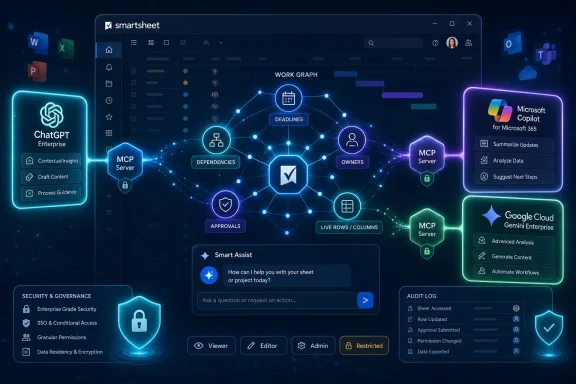
  • Smartsheet is turning its MCP Server into a multi-assistant access layer for live work data rather than a single-vendor AI integration.
  • Smart Assist gives Smartsheet a native AI experience for users and organizations that prefer to keep assistance inside the platform.
  • The strongest evidence of real adoption is not the user count alone, but the reported share of AI actions that modify live work.
  • Microsoft Copilot support will matter disproportionately in Windows and Microsoft 365 environments because it places Smartsheet context closer to existing enterprise workflows.
  • IT teams should treat MCP connections as governed production integrations, with the same scrutiny they would apply to APIs that can read and write business data.
  • The long-term contest is shifting from which assistant has the best chat interface to which platforms control the operational context those assistants need.
Smartsheet’s move will not settle the enterprise AI race, but it shows where that race is heading: away from isolated chatbots and toward assistants that can reach into the live systems where work actually happens. The winners will not be the vendors that merely bolt AI onto a sidebar; they will be the ones that can make organizational context portable, permissioned and useful across the messy mix of tools enterprises already use.

References​

  1. Primary source: IT Brief Australia
    Published: 2026-06-11T13:50:15.507373
  2. Independent coverage: AiThority
    Published: Thu, 11 Jun 2026 13:46:37 GMT
  3. Related coverage: smartsheet.com
  4. Related coverage: stackone.com
  5. Related coverage: agentmarketcap.ai
  6. Related coverage: itwire.com
  1. Related coverage: epcgroup.net
  2. Related coverage: manatech.nz
  3. Related coverage: intuitionlabs.ai
 

Smartsheet has expanded its MCP Server to connect with ChatGPT, Microsoft Copilot, and Google Cloud Gemini Enterprise in June 2026, adding those assistants to existing Claude support while also introducing Smart Assist inside the Smartsheet platform itself. The move is less about another AI button and more about a land grab for the operational data layer. Smartsheet is betting that enterprises will not standardize on a single assistant, but they may standardize on the system those assistants query when the work gets real.

SmartSheet Intelligent Work Platform dashboard with AI assistants, secure data layer, and project health insights.Smartsheet Wants to Be the Work Graph Beneath Everyone’s Chatbot​

The fashionable version of enterprise AI still imagines a single assistant that follows the worker everywhere. Microsoft wants that role for Copilot, OpenAI for ChatGPT, Google for Gemini, and Anthropic for Claude. Smartsheet’s announcement is a useful reminder that the assistant may be the least durable part of the stack.
By adding links for ChatGPT, Microsoft Copilot, and Google Cloud Gemini Enterprise to its MCP Server, Smartsheet is positioning itself as the place where AI tools go to find live project context. The company already supported Anthropic’s Claude, and the expansion turns that first integration into something broader: an assistant-agnostic access layer for work management data.
That matters because most organizations are not running one AI strategy. They are running five unofficial ones at once. Finance may live in Copilot because Microsoft 365 is already licensed, product teams may prefer ChatGPT, developers may favor Claude, and cloud teams may be experimenting with Gemini. Smartsheet’s pitch is that the tool preference should not fracture the truth of the work.
This is the pragmatic version of agentic AI. Not a glowing orb that knows everything, but a governed connector that lets different assistants see the same sheets, rows, comments, dashboards, discussions, and workflows through the permissions of the user making the request.

MCP Turns the Connector Business Into a Protocol Fight​

The Model Context Protocol has quickly become one of the more consequential pieces of plumbing in enterprise AI. Originally introduced by Anthropic, MCP gives AI clients a standardized way to connect to tools and data sources. In ordinary language, it is an attempt to keep every software vendor from building a bespoke connector for every AI assistant.
That is why Smartsheet’s MCP Server is strategically more important than a one-off Claude integration. A traditional integration says, “This product works with that assistant.” An MCP server says, “Any compatible assistant can talk to this product through a common interface.” For customers, the difference is the gap between a demo and an architecture.
Smartsheet says its MCP Server exposes work management objects through standardized access, drawing on the same underlying Smartsheet API infrastructure and respecting user permissions. That last phrase will do a lot of work in sales conversations. In enterprises, AI access is not just about whether a model can answer a question; it is about whether the person asking the question should have been able to see the underlying data in the first place.
The more interesting question is whether MCP becomes a neutral standard or merely another terrain for platform politics. Microsoft, Google, OpenAI, Anthropic, Salesforce, Atlassian, ServiceNow, and the rest all have incentives to make their assistants feel indispensable. But every enterprise vendor with valuable data has an equally strong incentive to avoid being trapped inside another company’s AI interface.
Smartsheet’s announcement lands squarely in that tension. It is saying, in effect, that the assistant market can fight above the waterline while Smartsheet controls a slice of the work data underneath.

The AI Assistant Is Useless Without Local Knowledge​

Pratima Arora, Smartsheet’s chief product and technology officer, framed the problem bluntly: many teams do not lack access to AI; their AI lacks understanding of how the organization actually works. That is the part of the generative AI boom that vendors have been slow to say out loud. A general-purpose model can write a crisp project update, but it cannot reliably know which delayed dependency matters unless it can read the living record of the project.
This is why the new integrations are aimed at live work data rather than static document search. The enterprise AI wave began with summarization because summarization was safe, legible, and easy to demonstrate. The next phase is messier: updating rows, changing workflows, creating artifacts, and moving project state based on natural-language instructions.
Smartsheet says nearly one in three AI-driven actions through its MCP Server creates, updates, or modifies live work. That figure is the most revealing number in the announcement. It suggests that users are not merely asking, “What happened?” They are asking systems to help make something happen.
For IT departments, that is both the promise and the headache. Read-only AI is a knowledge management problem. Read-write AI is an operational risk problem. Once an assistant can alter a project plan, assign work, update dependencies, or modify live records, governance stops being an abstract compliance requirement and becomes a daily controls issue.
Smartsheet’s argument is that its existing permission model and enterprise governance framework make this safer than unmanaged copy-and-paste use of AI tools. That is a credible argument, but not a self-proving one. Every organization will still need to decide which assistants are allowed, what data they can touch, how actions are logged, and whether users understand when a conversational prompt has operational consequences.

The Adoption Numbers Say This Is Not Just AI Theater​

Smartsheet is pointing to rapid adoption since its Claude integration launched in March. The company says more than 22,000 unique users have performed 3 million AI actions, with weekly active users rising from fewer than 1,000 at launch to more than 9,000. Weekly tool call volume reportedly grew from 42,000 to more than 700,000, while the first 10 days of June accounted for more than 860,000 AI actions.
Vendor adoption statistics always deserve caution. They are selected to tell a story, and “AI actions” can cover a wide range of significance. A lightweight query and a workflow-changing update are not the same thing, even if both count as usage.
Still, the direction is difficult to dismiss. Smartsheet also says nearly 3,000 net-new organizations joined in the last 30 days, with close to 700 new organizations discovering the server each week. More than 1,825 organizations were active in a single day during the latest usage peak.
Those numbers matter because AI features inside workplace software often suffer from a novelty curve. Users try them, produce a summary or two, and then return to the old workflow because the AI does not sit where decisions are made. Smartsheet’s usage claims suggest that MCP-backed access to live work data may have more staying power than a decorative chatbot panel.
The distinction is important. A chatbot that answers questions about stale exports is an accessory. A governed AI tool that can reason over current operational data and make controlled changes starts to become part of the workflow fabric.

Smart Assist Is the Defensive Half of the Same Strategy​

The external assistant integrations will get the attention, but Smart Assist may be just as important. Smartsheet is adding an AI companion inside its own platform for users who want to ask questions, describe tasks, and receive responses based on live Smartsheet data without leaving the product.
That is the defensive move. If Smartsheet only made its data available to ChatGPT, Copilot, Gemini, and Claude, it would risk training customers to treat Smartsheet as invisible infrastructure. The work would still happen in Smartsheet, but the user relationship would migrate to whichever assistant sits on the desktop.
Smart Assist keeps Smartsheet in the foreground. It gives the company a native AI surface for users who do not want to jump into a third-party assistant or whose organizations have not approved one. It also lets Smartsheet shape the experience more tightly around its own vocabulary: sheets, dashboards, dependencies, forms, automations, and project status.
This dual strategy is becoming common across enterprise software. Vendors cannot ignore the major assistants, because users are already there. But they also cannot surrender the user interface entirely, because whoever owns the interface increasingly owns the workflow, the habit, and eventually the budget conversation.
Smartsheet is therefore trying to be both visible and embedded. Smart Assist says, “Use AI here.” MCP says, “If your company insists on using AI somewhere else, Smartsheet still comes with you.”

Microsoft, OpenAI, Google, and Anthropic Are the Distribution Layer​

The addition of Microsoft Copilot and ChatGPT is particularly significant for WindowsForum readers because it brings Smartsheet’s work data closer to the two AI surfaces many enterprises are already evaluating on Windows desktops. Copilot has the advantage of Microsoft 365 proximity. ChatGPT has the advantage of broad user familiarity and enterprise momentum. Gemini Enterprise brings Google Cloud’s push into agentic orchestration and Workspace-adjacent workflows.
For sysadmins, the practical result is more complicated than the press-release version. A company may now have Smartsheet available through its own web interface, through Claude, through ChatGPT, through Copilot, and through Gemini Enterprise. That flexibility is valuable, but it multiplies the places where access policies, audit trails, data handling rules, and user education must line up.
The platform vendors will describe this as choice. IT departments will hear “more consoles.” Security teams will hear “more paths for sensitive project data to move.” Business teams will hear “finally, I can ask the tool I already use.”
None of those reactions is wrong. The enterprise AI market is not consolidating around one assistant; it is fragmenting by role, department, contract, and habit. Smartsheet’s move acknowledges that reality rather than pretending a CIO can simply decree one chatbot to rule them all.
The deeper shift is that assistants are becoming distribution channels for SaaS functionality. In the old world, a user opened Smartsheet to do Smartsheet work. In the emerging one, a user may ask Copilot for an update, ask ChatGPT to create a plan, ask Claude to analyze blockers, or ask Gemini to coordinate across cloud systems — with Smartsheet as the live system of record behind the interaction.

The Read-Write Threshold Changes the Risk Model​

The most consequential line in Smartsheet’s announcement is not the list of assistants. It is the claim that a meaningful share of AI-driven actions modifies live work. That is the threshold where AI stops being a search interface and starts becoming an actor.
Enterprises have spent the last two years worrying about data leakage from prompts. That concern remains valid, but it is no longer sufficient. The next governance problem is AI-induced change: a user asks for something in plain English, an assistant interprets the request, and a system of record changes as a result.
This is not necessarily reckless. In fact, it may be exactly where enterprise AI delivers measurable value. If a frontline construction manager can generate a Smartsheet workflow for a project-specific problem in minutes instead of waiting for an operations analyst, that is real productivity. DPR Construction’s endorsement in Smartsheet’s announcement points to precisely that kind of scenario: large, technical projects with thousands of participants and constant coordination pressure.
But every productivity story has a control story behind it. Who approved the workflow? What data did the assistant rely on? Was the change reversible? Did the user understand what would be modified? Could a prompt injection hidden in a comment or attachment influence the assistant’s behavior?
These questions are not reasons to reject the model. They are reasons to treat AI connectors as production integrations, not experimental toys. If an MCP server can expose live data and tools to multiple assistants, it belongs in the same risk conversation as APIs, service accounts, automation platforms, and privileged admin workflows.

The Vendor-Neutral Pitch Still Depends on Vendor Trust​

Smartsheet is careful to position the MCP Server as open and assistant-agnostic. That is attractive to customers tired of being herded into single-vendor AI stacks. But neutrality at the protocol layer does not eliminate trust questions at the service layer.
When a user connects an external AI assistant to enterprise work data, several trust relationships come into play. Smartsheet must enforce permissions correctly. The assistant provider must handle data according to the customer’s contract. The organization must configure access sensibly. The user must understand what is being shared and changed.
That makes “it supports MCP” a starting point, not an answer. MCP can standardize how tools are exposed, but it does not magically solve identity, retention, logging, model training policies, regional data handling, or regulatory obligations. Those remain contractual and architectural concerns.
Smartsheet appears to know this. Its messaging emphasizes governance and IT control, and availability differs by region and platform. Smart Assist, the MCP Server, Claude, and Google Cloud Gemini Enterprise are available now, while ChatGPT and Microsoft Copilot connections are available to U.S. customers first, with APJ and EMEA rollouts expected later.
That staggered availability is a reminder that AI integration is not just a feature flag. It intersects with regional compliance, customer contracts, assistant readiness, and support obligations. The more deeply AI touches live work, the less credible it becomes to treat global rollout as a marketing checkbox.

The Spreadsheet Metaphor Finally Breaks​

Smartsheet has always occupied an unusual space: spreadsheet-like enough for business users, structured enough for enterprise workflows, and extensible enough for project operations. AI may be the moment when that spreadsheet metaphor becomes less central.
If users can ask for a risk summary, generate a dashboard, modify a workflow, or create a project structure through natural language, the grid becomes less of a starting point and more of a substrate. The value shifts from the visible table to the relationships, metadata, permissions, history, comments, and automations that surround it.
That is why Smartsheet’s reference to two decades of operational data is more than marketing nostalgia. Work management platforms accumulate institutional context. They know which teams missed deadlines, which fields matter, which approvals recur, which dashboards executives consult, and which dependencies reliably become blockers.
Generative AI needs exactly that kind of context to become useful in enterprises. The model supplies language and reasoning patterns; the work platform supplies reality. Without the latter, the assistant is fluent but shallow.
This is also where Smartsheet faces competition from every system that claims to be the enterprise work graph. Microsoft has Microsoft Graph and the gravitational pull of Office, Teams, SharePoint, Planner, and Project. Google has Workspace and Cloud. Atlassian has Jira and Confluence. ServiceNow has workflow data. Salesforce has customer data. The fight is not merely about whose AI sounds smartest; it is about whose data makes AI operationally useful.

Windows Shops Will Feel This Through Copilot Governance​

For Windows-heavy organizations, the Copilot integration is the most politically loaded part of the announcement. Microsoft has spent years trying to make Copilot the AI front door for work, especially inside Microsoft 365 environments. If Smartsheet data becomes queryable and actionable through Copilot, it strengthens Microsoft’s claim that users do not need to leave the Microsoft surface to get work done.
But it also complicates the boundary between Microsoft data and non-Microsoft data. Once Copilot can reach into Smartsheet through an approved connection, admins need to think beyond SharePoint permissions and Teams retention policies. The AI work surface becomes a federation point for external SaaS systems.
That is not inherently bad. In fact, it is probably what many organizations want. Users are tired of switching tabs and assembling status updates from five systems. The promise of Copilot connected to Smartsheet is that a user can ask for operational context in the same assistant they already use for documents, meetings, email, and collaboration.
The risk is that organizations may overestimate how unified the governance really is. Microsoft can govern its side of the experience, Smartsheet can govern its side, and the customer still has to ensure the seam between them is understood. That seam is where permissions mistakes, oversharing, and audit gaps often appear.
For admins, the right posture is neither panic nor blind enablement. Treat the connector as a privileged enterprise integration. Pilot it with real business users, watch the logs, define which actions are acceptable, and decide whether read-write operations require additional review in sensitive workspaces.

The Construction Example Shows Why This Will Spread​

DPR Construction’s quoted use case is telling because construction projects are hostile environments for neat software narratives. They involve shifting schedules, subcontractors, safety constraints, procurement dependencies, design changes, field conditions, and a constant gap between plans and reality. If AI-assisted work management has practical value there, it is not because the demo was tidy.
The customer story emphasizes frontline workers building workflows, testing ideas, and getting answers in natural language. That is a powerful use case because it removes a layer of translation. The person closest to the operational problem can express the need directly instead of filing a request with a central systems team.
This is where enterprise AI may have its most durable impact: not replacing professional project managers, but reducing the friction between local knowledge and structured systems. The person who knows the problem can create or adjust the workflow without needing to become a Smartsheet power user first.
There is a familiar trap here, however. Citizen development always begins with empowerment and eventually runs into sprawl. AI will accelerate both. Organizations that let users create workflows through natural language will need lifecycle management, naming conventions, ownership rules, cleanup processes, and escalation paths when AI-created structures become business-critical.
The productivity gain is real, but so is the administrative debt. Smartsheet’s governance framework will be judged not by whether it sounds enterprise-ready, but by whether it can help customers manage the long tail of AI-assisted workflow creation after the excitement wears off.

The Real Lock-In Is Moving From Models to Data​

For the past year, enterprise AI debates have often centered on model choice. Is Claude better for reasoning? Is ChatGPT better for general productivity? Is Gemini better for Google-centric organizations? Is Copilot worth the premium because it sits inside Microsoft 365? Those questions still matter, but Smartsheet’s announcement points to a more durable layer of competition.
Models are improving quickly and unevenly. Assistants rise and fall in favor. Procurement deals change. But operational data, once embedded in a company’s workflows, is sticky. The vendor that holds the authoritative record of work has leverage regardless of which model is fashionable this quarter.
That does not mean Smartsheet has an unbeatable position. It means the company is trying to make itself harder to displace by becoming useful to every major assistant. If the customer chooses ChatGPT, Smartsheet is there. If the customer standardizes on Copilot, Smartsheet is there. If a department wants Claude or Gemini Enterprise, Smartsheet is there too.
This is a subtle form of lock-in because it does not look like lock-in. It looks like openness. The customer gets assistant choice, but the underlying workflows remain anchored in Smartsheet. In a market where AI interfaces may be volatile, that is a rational strategy.
The same pattern will likely spread across enterprise SaaS. Every serious work platform will want to expose its data to multiple AI systems while retaining governance, identity, and monetization control. The winners will not be the vendors with the flashiest chatbot; they will be the vendors whose data remains trusted when AI starts making decisions.

The Announcement Is Also a Warning to Single-Assistant Strategies​

There is a lesson here for CIOs tempted to simplify everything into one corporate AI assistant. Standardization has obvious benefits: simpler training, clearer support, better contract leverage, and tighter controls. But it may not match how work actually happens.
Teams choose tools for local reasons. Developers, marketers, project managers, analysts, executives, and frontline workers may not converge on the same assistant, especially when model strengths and interface habits differ. A rigid single-assistant mandate can push users toward shadow AI if the approved tool does not meet their needs.
Smartsheet’s approach assumes pluralism. It says the enterprise can allow multiple assistants while keeping the work data governed through a common platform layer. That is likely closer to the reality many organizations will inhabit for the next several years.
The challenge is that pluralism requires discipline. It is not enough to approve every connector and hope the permission model saves the day. Organizations need policies that distinguish between asking questions, generating content, modifying live work, and triggering downstream automation.
This is where IT leadership becomes more important, not less. The AI vendor message is that natural language makes software easier. The administrative reality is that natural language makes powerful actions more accessible, which means governance must become more explicit.

The Numbers to Watch After the Launch Halo Fades​

Smartsheet’s early usage figures are strong, but the next phase will be more revealing. Weekly active users and tool calls show curiosity and early utility. Long-term value will show up in retention, repeat workflows, reduced manual reporting, faster project recovery, and fewer errors in complex operational environments.
The read-write share will also be worth watching. If modification actions remain high, Smartsheet can argue that AI is becoming embedded in actual work execution. If usage drifts back toward read-only queries, the MCP Server may still be useful, but the transformation story becomes less dramatic.
Another number to watch is organizational spread. A few power users can generate a lot of tool calls, especially in technical teams. The more important signal is whether adoption crosses departments and roles without turning into unmanaged sprawl. Smartsheet’s claim that thousands of net-new organizations have recently discovered the server suggests broad interest, but breadth and depth are different things.
Regional rollout will matter too. U.S.-first availability for ChatGPT and Copilot may be sensible, but global enterprises will want consistent controls across APJ, EMEA, and North America. If availability or governance differs too much by region, multinational deployments will slow.
Finally, pricing and packaging will shape adoption. AI features often begin as strategic announcements and eventually become line items. Customers will tolerate that if the value is concrete. They will resist if AI becomes another ambiguous premium layered onto tools they already pay for.

The Smartsheet Bet Comes Down to Five Hard Realities​

Smartsheet’s announcement is best read as an early marker of where enterprise AI is going: away from isolated chat windows and toward governed access to systems of record. The practical implications are sharper than the marketing language suggests.
  • Smartsheet is making its work management data available across the major AI assistant camps instead of betting exclusively on Claude or its own native AI interface.
  • Smart Assist gives Smartsheet a native AI experience so the company does not become invisible infrastructure behind third-party assistants.
  • The MCP Server matters because it standardizes assistant access to live Smartsheet data and tools, but it does not remove the need for identity, audit, retention, and regional governance decisions.
  • The most important adoption signal is that a significant share of AI actions reportedly modifies live work rather than merely retrieving information.
  • Windows and Microsoft 365 environments should treat the Copilot connection as a serious enterprise integration, not just another productivity add-on.
  • The long-term competitive fight is shifting from which model writes the best answer to which platform holds the trusted operational context that models need.
Smartsheet’s move does not settle the enterprise AI race, but it clarifies the battlefield. The assistant may be ChatGPT, Copilot, Claude, Gemini, or something that has not yet reached procurement’s desk; the harder question is where that assistant gets permissioned, current, actionable knowledge about the business. If Smartsheet can make itself the governed work layer beneath many assistants instead of one more app with a chatbot, it will have found a more durable role in the AI stack than the interface wars alone can offer.

References​

  1. Primary source: IT Brief UK
    Published: 2026-06-11T13:50:28.631352
  2. Related coverage: smartsheet.com
  3. Related coverage: developers.smartsheet.com
  4. Related coverage: techtarget.com
  5. Related coverage: workmanagementhub.com
  6. Related coverage: gantt-chart.co.uk
  1. Official source: help.openai.com
  2. Related coverage: manatech.nz
  3. Related coverage: intuitionlabs.ai
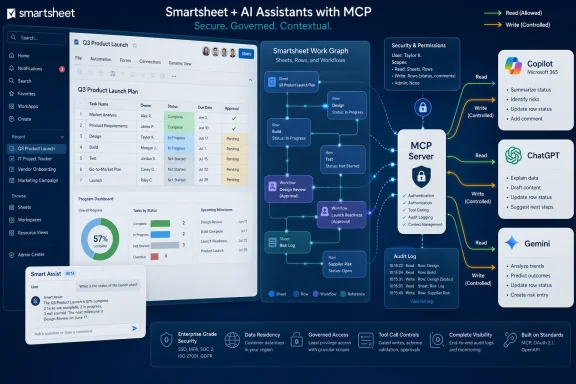
 

Smartsheet announced on June 11, 2026, from Bellevue, Washington, that enterprise customers can connect Microsoft Copilot, ChatGPT and Google Cloud Gemini Enterprise to its Model Context Protocol server, alongside existing Claude support and a new in-product Smart Assist companion. The move is less about adding another AI button than about turning Smartsheet into a live operational data layer for competing assistants. For WindowsForum readers, the Microsoft Copilot angle matters most, but the broader story is that enterprise AI is rapidly shifting from chat windows to governed access to business systems.

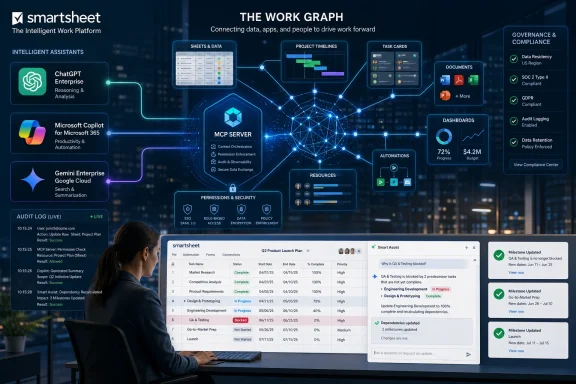
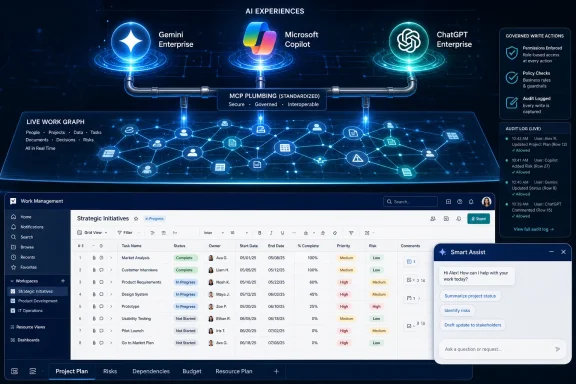
Smartsheet dashboard shows secure AI assistants flow via MCP server for governed reading and controlled writes.Smartsheet Is Betting That AI Assistants Need a Work Graph, Not Another Prompt Box​

The pitch from Smartsheet is straightforward: assistants are only as useful as the operational context they can safely reach. A generic chatbot can summarize a project plan if someone uploads the file. A connected assistant can inspect the plan, understand dependencies, check status, and potentially update the underlying work without forcing the user to become a part-time integration engineer.
That distinction is why the phrase Model Context Protocol has moved from developer circles into the vocabulary of enterprise software announcements. MCP is meant to standardize how AI clients connect to tools, data and actions. In practice, it lets a platform like Smartsheet expose its work objects — sheets, rows, columns, workspaces, comments and related operations — to AI systems that understand the protocol.
Smartsheet’s announcement puts that idea into a familiar enterprise frame. Teams using Claude already had a direct path into Smartsheet data. Now the company says ChatGPT, Microsoft Copilot and Google Cloud Gemini Enterprise can join the same party, with Smart Assist offering a native option inside Smartsheet itself.
The strategic message is obvious: Smartsheet does not want to be the AI assistant. It wants to be the place where AI assistants discover what work actually looks like.

Copilot Support Makes This a Microsoft 365 Story​

For many organizations, Microsoft Copilot is not merely another AI tool. It is the assistant bundled into the Microsoft 365 universe, sitting close to Outlook, Teams, Word, Excel, SharePoint and the identity controls that IT already understands. Smartsheet’s Copilot connection therefore gives the announcement a different weight than a generic chatbot integration.
If Copilot can reason over Smartsheet projects while remaining within an enterprise’s Microsoft-facing workflow, the value proposition becomes easier to explain to administrators. Users do not have to leave the tool where they already ask work questions. IT does not have to bless a completely separate AI surface just to reach project data.
That is the idealized version, of course. Real deployments will still depend on licensing, tenant policy, regional availability, data-handling terms and the maturity of each assistant’s MCP implementation. Smartsheet says Copilot and ChatGPT connections are available to U.S. customers now, with APJ and EMEA availability coming later, while Claude, Gemini Enterprise, the MCP Server and Smart Assist are available to all customers today.
Still, the Copilot connection is important because it fits the way enterprise AI is actually being adopted. Many companies are not choosing one assistant forever. They are standardizing around a few sanctioned AI environments and then asking vendors to meet them there.

ChatGPT and Gemini Turn “Bring Your Own Assistant” Into a Procurement Strategy​

Adding ChatGPT and Gemini Enterprise makes the announcement less Microsoft-centric and more telling. Smartsheet is acknowledging a messy reality: enterprises are not converging on a single AI platform. Some teams live in Microsoft 365, some executives want ChatGPT Enterprise, some data and cloud groups are aligning around Google Cloud, and some technical teams prefer Claude.
That fragmentation is a headache for vendors that build one-off integrations. It is also the business case for MCP. If Smartsheet can expose one governed protocol layer and let multiple assistants connect to it, the company reduces the risk of picking the wrong AI horse.
This is also a subtle shift in bargaining power. In the old SaaS world, integrations were often bilateral trophies: Vendor A supports Vendor B, and customers wait for the roadmap to catch up. In the MCP world, the dream is that any compliant client can connect to any compliant server, with authentication and permissions doing the hard work.
The dream is not the same as reality. Standards become useful only when implementations are consistent, secure and boring. But Smartsheet’s multi-assistant announcement is one more sign that enterprise software vendors increasingly see MCP as the least bad answer to AI platform sprawl.

The Numbers Suggest Curiosity Has Become Usage​

Smartsheet is not presenting this as a speculative developer preview. The company says its MCP and Claude integration, launched in March, has grown to more than 22,000 unique users and 3 million AI actions. It also says weekly active users climbed from fewer than 1,000 at launch to more than 9,000, with weekly tool-call volume rising from 42,000 to more than 700,000.
Those numbers need the usual press-release caveat. “AI actions” can mean many things, and tool-call volume is not the same as business value. A noisy integration can generate a lot of calls without changing how an organization delivers projects.
But the adoption curve is still meaningful. Enterprise work-management software is not a consumer social app where novelty can inflate usage overnight. If thousands of organizations are discovering the server and a meaningful share of AI-driven actions are creating, updating or modifying live work, that suggests users are moving beyond “summarize this sheet” demos.
That is the more interesting claim: nearly one in three AI-driven actions reportedly changes live work. Read-only AI is a search interface with better manners. Write-capable AI is operational automation, and that is where the governance conversation becomes unavoidable.

Write Access Is Where the Demo Becomes an Audit Problem​

Every enterprise AI announcement eventually runs into the same uncomfortable question: what is the assistant allowed to do? Reading status is one thing. Updating a project, modifying a row, changing a dependency or creating a workflow is another.
Smartsheet’s argument is that its MCP Server is built on the same governance foundation as the rest of the platform. That matters because project systems are full of sensitive operational information: staffing constraints, launch dates, vendor dependencies, budget signals, customer escalations and internal accountability. When an AI assistant touches that layer, it is no longer just helping someone write nicer emails.
For administrators, the essential questions are practical rather than philosophical. Does the assistant inherit the user’s permissions? Are tool calls logged in a way that can be audited? Can administrators disable write operations while allowing read-only analysis? Can data residency and downstream model-handling obligations be reconciled across Microsoft, OpenAI, Google and Anthropic environments?
Smartsheet’s announcement gestures toward those answers, but customers will need to validate them in their own contracts and controls. MCP can standardize the plumbing. It cannot magically harmonize every vendor’s compliance posture.

Smart Assist Is the Hedge Against Assistant Fatigue​

The new Smart Assist feature is easy to miss because the marquee names are Copilot, ChatGPT and Gemini. But it may be just as important to Smartsheet’s product strategy. Not every customer wants operational AI mediated through a third-party assistant, and not every user wants to context-switch into a separate chat product.
Smart Assist brings the same broad idea inside Smartsheet: ask a question, describe a task and receive answers grounded in live platform data. That gives Smartsheet a native AI story even as it opens the door to external assistants. The company can tell customers: use the AI surface your teams prefer, but keep the work context anchored here.
This is a sensible hedge. If Copilot becomes the default AI interface for Microsoft-heavy enterprises, Smartsheet can plug into it. If ChatGPT remains the executive and knowledge-worker favorite, Smartsheet can meet users there. If regulated teams prefer a more contained in-platform experience, Smart Assist gives them that path.
It also protects Smartsheet from becoming invisible infrastructure. Vendors love being the system of record, but users notice the assistant they talk to. Smart Assist keeps Smartsheet’s own interface in the AI conversation.

The Real Product Is Live Context​

Smartsheet’s most revealing phrase in the announcement is not “ChatGPT” or “Copilot.” It is the idea that “the work is the intelligence.” That is vendor language, but it captures a real enterprise problem.
Most AI assistants are strongest when the task is self-contained. Draft this. Summarize that. Compare these documents. The moment the question becomes operational — which launch is slipping, which team is blocked, which dependency is at risk — the assistant needs a model of how work moves across people and systems.
Smartsheet’s bet is that its platform already contains that model. Sheets, dashboards, comments and workflows are not just rows in a database; they are a record of execution. If an assistant can read and act on that record, it can theoretically produce answers tied to live business state rather than stale exports.
That is the upside. The risk is that enterprise work data is messy, political and often incomplete. An assistant connected to a poorly maintained project system will not become magically insightful. It will become confidently aware of bad hygiene.

MCP Is Becoming the USB-C Port for Enterprise AI, With All the Usual Caveats​

The industry wants MCP to be the universal connector for AI agents. That analogy is useful, but only up to a point. USB-C standardized the shape of the port while still leaving consumers to discover differences in charging speed, display support and cable quality. MCP may follow a similar path.
A vendor can say it supports MCP, but the customer still has to ask what operations are exposed, how authentication works, what scopes are available, how errors are handled, whether writes are reversible, and how the assistant explains what it did. A protocol does not eliminate product judgment. It simply gives vendors a common language for exposing capabilities.
For Windows and Microsoft 365 administrators, this is especially relevant because Copilot is becoming a control plane for more work. If every SaaS system exposes an MCP server, Copilot could become a front door to a sprawling estate of business actions. That is powerful, but it also expands the blast radius of misconfiguration.
The lesson from decades of Windows administration still applies: convenience becomes risk when permissions are too broad. AI does not repeal least privilege. It makes least privilege harder and more important.

The Competitive Map Is Shifting Under Work Management Software​

Smartsheet competes in a crowded category that includes Microsoft Project, Planner, Asana, Monday.com, Jira-adjacent workflows, Airtable-style databases and countless internal spreadsheets. AI changes the competitive map because the interface layer can float above the application.
If users increasingly ask Copilot or ChatGPT what needs attention, the underlying work-management platform risks becoming a back-end database. That could commoditize parts of the category. It could also make platforms with better data models and governance more valuable, because assistants will need reliable systems to reason over.
Smartsheet’s announcement is therefore both offensive and defensive. It makes the platform more useful inside whichever AI environment a customer chooses. It also asserts that Smartsheet has enough operational context to remain central even if the user’s first interaction is with Copilot rather than a Smartsheet dashboard.
This is the next phase of SaaS competition. The best interface may not belong to the system of record. The system of record must prove that its context is indispensable.

IT Should Treat This as an Integration Rollout, Not an AI Toy​

The temptation with announcements like this is to hand them to innovation teams and let early adopters experiment. That may be fine for a pilot, but production use belongs in the same governance lane as any integration that can read and modify business data.
A sensible rollout starts with inventory. Which Smartsheet workspaces contain sensitive data? Which AI assistants are sanctioned? Which user groups need read-only access, and which genuinely need write actions? Which operations should require human confirmation?
The next step is logging and review. AI tool calls should be auditable in language administrators can understand. If a row changes, the organization should be able to determine whether a human changed it directly, an automation changed it, or an AI assistant invoked an operation on the user’s behalf.
Finally, organizations need user education that is more specific than “be careful with AI.” Users should understand that connected assistants act through their permissions. They should know when they are asking for analysis and when they are authorizing a system change. The future of enterprise AI will be full of subtle consent moments, and most software is not yet good at making those moments obvious.

Developers Get a Clearer Path, But Not a Free Lunch​

Smartsheet also released CLI Agent Power Tools, described as a free, open-source toolkit of six Claude Code agents built against the MCP Server. That detail matters because MCP is not just an end-user integration story. It is also a developer workflow story.
For technical teams, a standardized server means they can build internal agents that inspect project state, generate workflows, validate dependencies or automate repetitive operational tasks. In theory, the same Smartsheet MCP layer can serve commercial assistants and custom enterprise platforms. That is a cleaner model than maintaining separate API integrations for every AI client.
But developers should resist the fantasy that agents remove integration work. They move it. Someone still has to design safe operations, constrain scopes, handle failures, test prompts against real data, and prevent runaway automation from turning a project workspace into a crime scene.
The best MCP deployments will look less like chatbot hacks and more like disciplined API programs. The assistant is the interface. The engineering work is still engineering work.

The Smartsheet Announcement Is a Preview of the Next Admin Console​

The bigger implication is that enterprise admin consoles are about to get more complicated. Today, administrators manage users, groups, apps, permissions, audit logs and data retention. Tomorrow, they will also manage which AI agents can invoke which tools against which systems under which identity context.
That is not science fiction. It is the natural consequence of connecting assistants to live work systems. Once AI can act across applications, the boundary between collaboration software, automation software and identity governance becomes blurry.
Microsoft is well positioned in this world because it already owns identity, productivity and a growing AI interface in many enterprises. Google has a comparable argument for Workspace and Cloud customers. OpenAI and Anthropic have strong assistant experiences and developer momentum. Smartsheet’s move is to avoid choosing a single winner and instead become a governed operational node behind all of them.
That may be the most pragmatic position. Enterprise AI is too early, too political and too vendor-driven for customers to want permanent lock-in. A protocol-based approach gives Smartsheet a way to say yes to multiple ecosystems without rebuilding its platform around any one of them.

The Calendar Now Belongs to Connected AI​

Smartsheet’s timing is also notable. The company launched its MCP Server and Claude integration in March, reported rapid early usage, and now, less than a quarter later, is expanding across the three other assistant brands that dominate enterprise AI conversations. That is a fast cadence for business software.
It reflects a wider acceleration. Vendors no longer have the luxury of treating AI integrations as roadmap decorations. Customers are asking whether their existing systems can participate in AI workflows now, and procurement teams are trying to avoid buying isolated assistants that cannot reach operational data.
The early winner is not necessarily the assistant with the best prose. It may be the platform that can safely connect to the most useful work context. Smartsheet wants to argue that its project and portfolio data is exactly that context.
The company still has to prove that customers can govern these connections at scale. Adoption numbers are encouraging, but governance quality is what will determine whether this becomes infrastructure or another pilot that never escapes the innovation lab.

The Useful Lesson From Smartsheet’s Multi-AI Gambit​

The announcement is less about one vendor’s feature list than about the direction of enterprise software. Smartsheet is showing how SaaS platforms will try to survive and prosper as AI assistants become the front end for work.
  • Smartsheet is expanding its MCP Server beyond Claude to include Microsoft Copilot, ChatGPT and Google Cloud Gemini Enterprise.
  • Smart Assist gives customers a native AI option inside Smartsheet rather than forcing every workflow through an external assistant.
  • U.S. customers get Copilot and ChatGPT connections now, while APJ and EMEA availability is expected later.
  • The most important technical distinction is that connected assistants can act on live work data, not merely summarize exported content.
  • Administrators should evaluate permissions, logging, regional availability and downstream AI vendor terms before enabling broad use.
  • MCP reduces integration fragmentation, but it does not remove the need for careful governance, testing and least-privilege design.
The safest reading is that Smartsheet is not trying to win the assistant war; it is trying to make sure that whoever wins still needs Smartsheet. For enterprises, that may be the more durable model: let users choose Copilot, ChatGPT, Gemini or Claude, but insist that business-critical work flows through governed systems with auditable permissions. The next phase of AI at work will not be decided by which chatbot sounds smartest in a demo, but by which platforms can connect intelligence to live operations without turning convenience into chaos.

References​

  1. Primary source: New Castle News
    Published: Thu, 11 Jun 2026 13:03:36 GMT
  2. Related coverage: smartsheet.com
  3. Related coverage: stackone.com
  4. Related coverage: newshub.medianet.com.au
  5. Related coverage: businesswire.com
  6. Related coverage: cdata.com
  1. Related coverage: intuitionlabs.ai
  2. Related coverage: manatech.nz
 

Smartsheet announced on June 11, 2026, that enterprise customers can connect ChatGPT, Microsoft Copilot, and Google Cloud Gemini Enterprise to its MCP Server, expanding beyond Claude while also adding Smart Assist as a native AI companion inside the Smartsheet platform. The move is less about another chatbot integration than about a land grab for the place where enterprise work data becomes actionable. Smartsheet is betting that the next phase of workplace AI will be won not by the model with the flashiest demo, but by the system that knows what teams are actually doing.

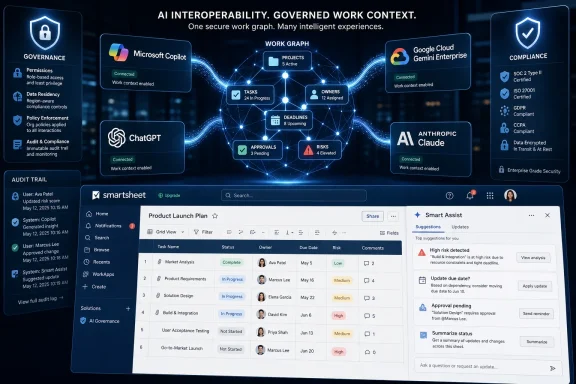
Smartsheet work-graph dashboard shows AI assistants, project timelines, tasks, and compliance analytics in a tech office.Smartsheet Wants to Be the Work Graph Behind Everyone Else’s Assistant​

The AI market has spent the last two years teaching workers to ask better questions. Smartsheet’s announcement is about giving those questions somewhere more useful to land.
By opening its MCP Server to ChatGPT, Microsoft Copilot, and Google Cloud Gemini Enterprise, Smartsheet is trying to turn its platform into a shared operational memory for multiple AI assistants. That is a more ambitious position than “we have an AI feature,” because it treats the assistant itself as replaceable and the work context as the asset.
This is the pitch hiding beneath the press-release language. Enterprises may standardize on Copilot because they live in Microsoft 365, experiment with ChatGPT because employees already know it, use Gemini because Google Workspace is deeply embedded, or deploy Claude for certain reasoning-heavy workflows. Smartsheet does not need to win that model war if it can become the server those models consult before answering.
That framing also explains why Smart Assist matters. A native assistant inside Smartsheet keeps power users from having to leave the platform, but it does not undercut the broader connector strategy. Instead, it tells customers that the intelligence layer should follow the work, whether the user approaches it from an outside AI interface or from inside Smartsheet itself.

MCP Turns AI Integration From Feature Checklists Into Infrastructure​

Model Context Protocol, or MCP, has become one of the more important acronyms in enterprise AI because it addresses a mundane but critical problem: AI assistants are only useful at work when they can safely reach the systems where work lives. Anthropic introduced MCP in late 2024 as an open standard for connecting AI applications to external tools, data sources, and services. Since then, it has become a default reference point for vendors trying to avoid building one-off connectors for every model and every application.
That matters because the old integration model was badly suited to the speed of AI adoption. If every SaaS product had to build and maintain separate deep integrations for Claude, Copilot, ChatGPT, Gemini, and whatever comes next, enterprise AI would collapse under its own middleware. MCP offers a cleaner abstraction: the assistant speaks to an MCP server, and the server exposes governed tools and context.
Smartsheet’s announcement shows how quickly that abstraction is moving from developer novelty to enterprise product strategy. The company launched Claude support earlier this year, then moved rapidly to support the AI platforms that matter most in corporate environments. That pace suggests Smartsheet sees MCP not as a side project but as the new connective tissue for work management.
There is a subtle but important distinction here. A basic connector can retrieve a file or summarize a row. A mature MCP implementation can expose actions and work semantics: what a project is, who owns a task, which dependencies matter, and which updates change the state of a plan. That is where AI stops being a search bar with better prose and starts becoming an operational interface.

The Real Product Is Not the Chatbot, It Is the Permissioned Context​

Smartsheet’s most pointed claim is that many AI connectors provide read access without understanding how work flows through an organization. That sounds like vendor positioning, because it is, but the underlying critique is fair.
Enterprise data is not just information scattered across SaaS applications. It is permissioned, hierarchical, time-sensitive, and political. A row in a project plan may be meaningless without knowing whether it belongs to a portfolio milestone, a regulated workflow, a construction schedule, a launch dependency, or an executive dashboard.
That is why “live work intelligence” is doing so much work in Smartsheet’s messaging. The company is arguing that its platform contains not merely data, but context: assignments, approvals, dates, ownership, dependencies, dashboards, and the accumulated patterns of how teams move projects forward. If an AI assistant can reason over that context, its answers can become more specific and less performative.
The sharper version of the argument is that enterprise AI will fail if it remains trapped in personal productivity mode. A worker asking Copilot to summarize email is useful. A project lead asking an assistant to identify blocked milestones, draft a mitigation plan, update owners, and modify live project artifacts is materially different. The first saves minutes; the second changes how work is coordinated.

Smart Assist Is Smartsheet’s Insurance Policy Against Interface Drift​

The new Smart Assist feature is easy to underestimate because it sounds like every other embedded AI companion. Ask a question, describe a task, get an answer. That is now table stakes across enterprise software.
But Smart Assist has a defensive role in Smartsheet’s strategy. If Smartsheet only lived behind external assistants, it would risk becoming invisible plumbing. Microsoft, OpenAI, Google, and Anthropic would own the user relationship, while Smartsheet would merely supply the data and actions.
By putting Smart Assist directly inside the platform, Smartsheet preserves a first-party AI surface for users who already spend their day in sheets, dashboards, reports, and workflows. That matters for adoption, training, and governance. It also gives Smartsheet a place to showcase AI capabilities without waiting for external platforms to expose them cleanly.
The company is tying Smart Assist to other recent AI work, including Smart Columns and AI Dashboard Builder. That combination points toward a broader product shift: Smartsheet wants AI to help structure work, not merely narrate it. Columns, dashboards, and assistants are all interfaces into the same underlying system of record.
For longtime Smartsheet users, that may feel like the natural evolution of a work-management platform that has always lived between spreadsheet flexibility and enterprise process control. For IT leaders, it raises a more pointed question: if AI can now create, update, and modify live work artifacts, how strong are the guardrails?

The Adoption Numbers Are Impressive, But They Also Raise the Stakes​

Smartsheet says its MCP Server has seen more than 22,000 unique users and 3 million AI actions since March. It also says adoption has grown nearly ninefold since the first week, from fewer than 1,000 weekly active users to more than 9,000, with weekly tool-call volume rising from 42,000 to more than 700,000.
Those are strong early metrics for a capability that still sits near the front edge of enterprise AI deployment. They suggest that users are not merely testing a demo; they are repeatedly invoking AI tools against work data. Smartsheet also says nearly one in three AI-driven actions creates, updates, or modifies live work, which is the statistic that matters most.
That number cuts both ways. It supports Smartsheet’s claim that connected AI can drive outcomes rather than just generate answers. It also reminds administrators that AI is crossing from advisory mode into execution mode. Once an assistant can change project plans, modify task ownership, or update operational data, the governance conversation becomes unavoidable.
The reported organizational adoption is also notable. Smartsheet says nearly 3,000 net-new organizations joined in the last 30 days, with close to 700 new organizations discovering the server each week. In enterprise software terms, that is the kind of usage curve that can move a feature from “interesting” to “standard procurement question” very quickly.

Microsoft, OpenAI, Google, and Anthropic Are Now Channels, Not Just Rivals​

The platform list in this announcement is strategically important. Smartsheet is not simply adding “AI integrations.” It is aligning with the main enterprise AI distribution channels.
Microsoft Copilot is the obvious WindowsForum.com angle because Copilot is increasingly embedded across Microsoft’s productivity and endpoint estate. If Smartsheet data and actions become accessible through Copilot, administrators in Microsoft-heavy organizations will need to think about Smartsheet as part of their broader Copilot governance model, not as an isolated SaaS application.
ChatGPT brings a different pressure. It has strong user familiarity and is often pulled into enterprises from the bottom up, even when IT would prefer a more orderly rollout. A sanctioned Smartsheet connection gives organizations a path to make that usage more governed, though it also increases the importance of identity, permissions, logging, and data-loss controls.
Google Cloud Gemini Enterprise rounds out the multi-cloud reality. Many organizations do not live in one productivity stack, and many large enterprises have different divisions using different ecosystems. Supporting Gemini Enterprise lets Smartsheet argue that its work graph travels across those boundaries.
Claude remains important because Smartsheet’s MCP story began there, and Claude’s early association with MCP gave it a natural head start. But the expansion beyond Claude is the real inflection point. Smartsheet is signaling that the connector layer should be model-neutral, even if the AI market around it remains fiercely competitive.

The Windows Admin Angle Is Governance, Not Glitz​

For Windows administrators and Microsoft 365 teams, the practical implications are not about whether ChatGPT writes a better project-summary paragraph than Copilot. The important issue is whether work-management actions are now part of the enterprise AI control plane.
If a user can ask Copilot to inspect Smartsheet project data, summarize risk, and trigger updates, then access policy has to span both Microsoft identity and Smartsheet permissions. The assistant becomes a mediated interface, but it should not become a permission bypass. In a healthy deployment, AI can only see and change what the user is already allowed to see and change.
That sounds simple until it meets real organizations. Contractors, frontline workers, regional teams, project managers, executives, and external partners often have overlapping but non-identical access. The value of an AI assistant is that it can move quickly across context; the danger is that it might make sensitive context feel casually accessible.
This is where Smartsheet’s governance claims will need to prove themselves in production. Enterprise customers will want admin controls, auditability, clear consent flows, and predictable behavior across assistants. They will also want to know how actions are logged, how prompts are handled, how third-party AI providers process context, and whether regional availability reflects data residency or compliance constraints.
Smartsheet says the new capabilities are built on the same governance foundation and that connections to Microsoft Copilot and ChatGPT are available to all U.S. customers now, with APJ and EMEA availability coming soon. That staged rollout is worth watching because global enterprises will not treat regional lag as a footnote. For regulated customers, availability, data routing, and compliance posture are part of the product.

“Live Work” Is a Better AI Demo Than Another Document Summary​

The most convincing part of Smartsheet’s argument is its emphasis on work that moves. AI document summaries are useful, but they are also becoming commoditized. Every major assistant can digest a meeting transcript, summarize a file, or draft a status update.
Operational work is harder. A construction project, product launch, IT migration, healthcare buildout, or enterprise transformation program contains dependencies that are not always obvious from a document corpus. The question is not merely “what does the file say?” but “what is happening, what changed, what is blocked, who owns the next step, and what action should be taken?”
That is why Smartsheet’s customer example from DPR Construction fits the announcement. Complex construction projects involve thousands of people, moving schedules, field constraints, compliance needs, and constant coordination. In that environment, natural-language access to live workflows can be more than a convenience.
The risk, of course, is that every enterprise software vendor now wants to describe its database as the place where “work happens.” Salesforce says it about customer relationships. ServiceNow says it about workflows. Atlassian says it about software delivery. Microsoft says it across the productivity stack. Smartsheet’s differentiation depends on whether its MCP Server can expose not just data but enough operational meaning to make assistant-driven work reliable.

The Security Story Is Bigger Than Smartsheet​

MCP’s rise has been fast enough that the security conversation is still catching up. The protocol’s promise is standardized connectivity; its risk is standardized reach. Once AI assistants can invoke tools, retrieve records, and modify systems, the attack surface expands beyond chat prompts and into the operational layer.
That does not mean MCP is inherently unsafe. It means MCP deployments must be treated like integration infrastructure, not like a harmless productivity add-on. The same basic disciplines apply: least privilege, scoped tools, strong authentication, explicit user authorization, logging, monitoring, vendor review, and incident-response planning.
Prompt injection remains an especially awkward problem for tool-connected assistants. If an AI system reads untrusted content and can also take actions, malicious instructions hidden in documents, tickets, comments, or web content can attempt to steer the assistant. Well-designed systems should separate instructions from data and require confirmation for sensitive actions, but this is an evolving field rather than a solved problem.
Enterprises should also distinguish between read-only copilots and action-capable agents. Smartsheet’s claim that nearly one in three AI actions creates, updates, or modifies live work is exactly the kind of metric that makes the product exciting. It is also the kind of metric that should make security teams ask for a full control map before broad deployment.

Open Toolkits Pull Developers Into the Same Orbit​

Smartsheet also announced CLI Agent Power Tools, described as a free, open-source toolkit of six Claude Code agents built against the MCP Server. That detail may look secondary, but it points to another constituency Smartsheet wants to recruit: internal developers and technically inclined operations teams.
Developer-facing agents can turn MCP from a packaged enterprise feature into an extensibility surface. If teams can build repeatable agent workflows around Smartsheet data, they can automate project setup, generate workflow structures, test ideas, or create internal tools without waiting for a formal product release.
That has obvious appeal in organizations where project-management offices, IT operations, and business teams constantly build local process machinery. Smartsheet has long benefited from users who are not traditional developers but are capable of constructing sophisticated operational systems. AI-assisted CLI tooling could amplify that pattern.
The tradeoff is maintainability. Local agents, scripts, and workflow automations can become invisible infrastructure unless IT has standards for ownership and review. The more successful Smartsheet’s MCP ecosystem becomes, the more customers will need internal practices for governing not just official connectors but also the automations built on top of them.

The Multi-Assistant Strategy Is Also an Anti-Lock-In Argument​

Smartsheet’s announcement leans heavily on the idea that customers can use “any AI tool” without lock-in. That is partly marketing, but it reflects a real enterprise anxiety.
The AI platform market is moving too quickly for most CIOs to bet everything on one assistant. Microsoft has distribution, OpenAI has mindshare, Google has data and infrastructure reach, Anthropic has a strong enterprise reputation around Claude, and new model capabilities continue to arrive at a punishing cadence. A work-management vendor that ties itself too tightly to one model risks stranding customers if preferences shift.
MCP gives Smartsheet a credible way to say that the work layer is portable across AI surfaces. Customers can choose the assistant based on their stack, licensing, region, security posture, or use case. Smartsheet can focus on exposing governed work context.
That portability is not absolute. Each assistant platform has its own admin model, connector UX, identity assumptions, and data-handling policies. “No lock-in” should be read as a direction of travel, not a magic property. Still, compared with one-off proprietary AI integrations, a common protocol is a meaningful improvement.

Smartsheet Is Trying to Move Up the Stack Without Abandoning the Sheet​

Smartsheet’s challenge has always been that its flexibility is both its strength and its burden. Users like it because it can behave like a spreadsheet, project tracker, workflow engine, dashboard layer, and lightweight application platform. Buyers sometimes struggle to categorize it for the same reason.
AI gives Smartsheet a way to turn that flexibility into a more explicit strategic claim. If the platform contains the live map of work, then AI can make that map easier to query, modify, and operationalize. The sheet remains familiar, but the interface expands beyond rows and formulas.
That is a significant shift in user experience. A project manager may no longer need to manually hunt through dependencies to understand what slipped. A frontline worker may be able to describe a local problem and generate a structured workflow. An executive may ask for portfolio risk and receive an answer grounded in current operational data rather than a stale slide deck.
The danger is overpromising. Enterprise work is messy because organizations are messy, not because the interface lacks a chatbot. AI can make coordination faster, but it cannot magically fix poor data hygiene, inconsistent ownership, broken process design, or political disagreement about priorities. Smartsheet’s best case is not autonomous management; it is better, faster decision support with controlled execution.

The Fine Print Will Decide Whether This Becomes Infrastructure​

The availability details are straightforward but important. Smart Assist, the Smartsheet MCP Server, and connections to Claude and Google Cloud Gemini Enterprise are available to all customers now. Connections to Microsoft Copilot and ChatGPT are available to all U.S. customers now, with APJ and EMEA support coming later.
That sequencing matters because the customers most likely to care about Smartsheet’s governance pitch are also the customers most likely to operate across regions. A U.S.-only launch for Copilot and ChatGPT connections is still meaningful, but multinational IT teams will need clarity on timing, data handling, and regional controls before standardizing on those integrations globally.
There is also a licensing and adoption question. Enterprise AI features often arrive with promising demos and then run into entitlement boundaries, admin setup, user education, and security review. Smartsheet’s adoption numbers suggest real demand, but scaling from early adopters to broad enterprise use is a different test.
The more interesting question is whether Smartsheet can make these capabilities feel ordinary. If AI actions become just another governed way to update work, the company has a durable platform story. If they remain impressive but exceptional demos, the MCP Server will be another feature in a crowded AI checklist.

The Numbers Make the Case, But the Controls Will Make the Market​

Smartsheet’s announcement is concrete enough to separate it from the usual AI vapor. The company is not merely promising that AI will transform work someday; it is reporting usage, expanding platform support, and giving both end users and developers new ways to interact with live operational data.
  • Smartsheet is expanding its MCP Server from Claude to ChatGPT, Microsoft Copilot, and Google Cloud Gemini Enterprise.
  • Smart Assist brings the same work-aware AI approach directly into the Smartsheet interface for users who do not want to work through an external assistant.
  • The company says users have performed more than 3 million AI actions since March, with nearly one in three actions creating, updating, or modifying live work.
  • Microsoft Copilot and ChatGPT connections are available first to U.S. customers, while APJ and EMEA availability is still pending.
  • The biggest enterprise question is whether governance, auditability, and permission boundaries can keep pace with action-capable AI.
  • Smartsheet’s strategic bet is that work context, not the chatbot interface, becomes the durable layer of enterprise AI.
Smartsheet is making the right bet for a market that is already tired of isolated AI tricks: the winner in enterprise AI will be the system that can connect models to governed, current, actionable work. The hard part begins after the announcement, when customers discover whether multi-assistant access to live operational data becomes a disciplined productivity layer or just another powerful surface IT has to contain.

References​

  1. Primary source: 01net
    Published: Thu, 11 Jun 2026 16:00:00 GMT
  2. Related coverage: smartsheet.com
  3. Related coverage: workmanagementhub.com
  4. Related coverage: newshub.medianet.com.au
  5. Related coverage: techradar.com
 

Smartsheet on June 11, 2026, expanded its MCP Server to connect Google Cloud Gemini Enterprise, Microsoft Copilot, and ChatGPT to live Smartsheet work data, while also introducing Smart Assist as an in-product AI companion for users who stay inside the platform. The announcement is less about another chatbot integration than about a more serious contest over where enterprise AI gets its context. Smartsheet is betting that the durable layer in business AI will not be the assistant interface, but the operational system that knows what work is actually happening. That is a useful bet, but it also moves AI from the low-risk world of drafting and summarizing into the messier world of modifying live business records.

Dashboard UI shows AI assistants (Gemini, Microsoft Copilot, ChatGPT) powering a live work graph with audit logs.Smartsheet Wants to Be the Work Graph Beneath Every Assistant​

The headline names are familiar: Gemini Enterprise, Microsoft Copilot, ChatGPT, and Claude. The more important phrase is live work data. Smartsheet is not merely making it easier to ask an AI assistant about a project plan; it is trying to make Smartsheet the operating memory that external assistants consult before they answer, escalate, summarize, or act.
That matters because the enterprise AI market has spent the past two years learning an awkward lesson. General-purpose assistants are impressive when they rewrite a memo, draft a formula, or summarize a document. They are much less useful when they do not know which dependency is blocked, which regional launch has slipped, which approval is waiting on legal, or which program manager quietly changed the due date yesterday afternoon.
Smartsheet’s argument is that this context already lives in its platform. Projects, workflows, dependencies, owners, comments, attachments, dashboards, and status updates are the working tissue of a company. If AI cannot see that tissue, it behaves like a talented consultant who arrived without reading the packet.
The addition of Gemini Enterprise is significant because it widens the circle beyond Anthropic’s Claude, which was Smartsheet’s earlier flagship MCP integration. Adding Microsoft Copilot and ChatGPT to the rollout signals that Smartsheet is not trying to crown a single AI winner. It is trying to become useful whichever assistant an enterprise has already standardized on.
That is a pragmatic position. Large organizations rarely converge on one AI tool cleanly. Procurement, existing cloud commitments, developer preferences, data residency requirements, and departmental politics all pull in different directions. A finance team may live in Microsoft 365, a product team may prefer ChatGPT, a software group may use Claude Code, and an executive office may be piloting Gemini Enterprise because of a Google Cloud agreement.
Smartsheet’s move says: let the assistant wars continue; the work layer still needs to be governed, current, and actionable.

MCP Turns Integration From Demo Theater Into Plumbing​

The reason this expansion is possible is the Model Context Protocol, usually shortened to MCP. The acronym may sound like one more piece of AI vendor alphabet soup, but the idea behind it is straightforward: give AI tools a standardized way to connect to external systems and call tools against them. Instead of every assistant needing a bespoke integration with every enterprise app, MCP offers a common pattern for exposing data and actions.
In Smartsheet’s case, that means the MCP Server can expose work-management objects through a protocol that compatible AI clients understand. The assistant can ask for relevant project information, inspect sheet structures, retrieve status, and, where permitted, create or update work items. The exact user experience varies by assistant, but the architecture is the same: AI reaches into Smartsheet through governed pathways rather than through screenshots, exports, pasted tables, or brittle one-off scripts.
That distinction is not academic. A lot of early enterprise AI usage has been a theater of copy and paste. Workers pull data out of systems, drop it into an assistant, ask for an analysis, then manually transpose the answer back into the original workflow. That can save time, but it also creates obvious problems: stale data, accidental disclosure, missing permissions, and no clean audit trail of what the AI saw or changed.
MCP is an attempt to move from theater to plumbing. It is not magic, and it does not eliminate the need for governance, but it does create a more coherent model. The assistant becomes a client. The enterprise application remains the system of record. Permissions, actions, and auditability can be handled closer to the data rather than improvised in the prompt box.
This is why Smartsheet’s expansion lands differently from a conventional “now with AI” product update. The company is not just placing a chatbot beside the product. It is positioning Smartsheet as a tool-enabled backend for whichever chatbot, agent, or enterprise AI surface the customer already uses.
The more assistants Smartsheet supports, the more credible that posture becomes. Claude gave the company a first mover’s story. Gemini Enterprise, Copilot, and ChatGPT give it a neutrality story.

The Real Product Is Context, Not Conversation​

Pratima Arora, Smartsheet’s chief product and technology officer, framed the announcement around a common enterprise frustration: the problem is not access to AI, but the fact that AI does not know how the organization works. That line is vendor positioning, but it identifies a real failure mode. A model may understand language, code, and business jargon, yet still know nothing about the actual commitments inside a company.
The word context gets abused in AI marketing, but here it has a concrete meaning. Context is the approved scope of a project. It is the difference between a task that is overdue and a task that was intentionally deferred because a supplier missed a shipment. It is the note buried in a comment thread explaining that a launch risk is no longer material. It is the dependency between two workstreams that only becomes visible when an assistant can inspect the underlying work graph.
This is where Smartsheet has a plausible claim. Its customers often use the platform for cross-functional work that is too structured for email and too fluid for traditional systems of record. Construction programs, marketing launches, IT rollouts, procurement processes, field operations, and transformation programs are exactly the kinds of work where the plan changes frequently and the consequences of outdated information are expensive.
If an assistant can read and reason over that data, it becomes more than a writing aid. It can identify bottlenecks, summarize project health, generate status updates, draft follow-up actions, and help users create or modify Smartsheet assets. That is the shift from individual productivity to operational assistance.
But that shift also raises the stakes. When AI summarizes a document badly, the failure is irritating. When AI updates a row, creates a workflow, or changes a project artifact based on misunderstood intent, the failure can propagate into real work. Smartsheet’s claim that its MCP Server respects user permissions and sits within existing governance structures is therefore central, not decorative.
The enterprise AI winners will be judged less by the sparkle of their demos than by how safely they let machines act around fragile business processes.

The Adoption Numbers Suggest Curiosity Has Become Habit​

Smartsheet says MCP Server usage has climbed rapidly since the Claude integration launched in March. The company reported more than 22,000 unique users globally and more than 3 million AI actions over the period. Weekly active users reportedly rose from fewer than 1,000 at launch to more than 9,000, while weekly tool calls climbed from 42,000 to more than 700,000.
Vendor adoption numbers always deserve careful handling. They are selected to tell a growth story, and “AI actions” is a broad metric whose business value depends on what those actions actually do. A tool call that fetches a sheet is not the same as a tool call that updates a project plan, and neither automatically proves return on investment.
Even so, the shape of the numbers is interesting. Smartsheet says the first 10 days of June generated more than 860,000 AI actions, with record daily activity on two consecutive days as 1,767 and 1,825 organizations were active. It also says nearly 3,000 net-new organizations joined in the last 30 days, with close to 700 new organizations discovering the server each week.
That pattern looks less like a small proof-of-concept group hammering a demo environment and more like broadening organizational usage. The Asia Pacific and Japan figures tell a similar story: in May, Smartsheet reported 561 unique users across 334 customer plans in the region, generating nearly 60,000 MCP AI actions. That works out to meaningful repeated use rather than a one-time curiosity click.
The most important statistic is the one Smartsheet says ties AI to execution: nearly one in three AI-driven actions creates, updates, or modifies live work, rather than simply retrieving information. If accurate, that is the line between AI as a search layer and AI as an operational actor. It also explains why IT leaders will look at the same number and feel both encouraged and nervous.
Retrieval is easier to govern because it mostly concerns what the assistant can see. Write access is harder because it concerns what the assistant can change. The moment AI starts modifying live work, the enterprise conversation shifts from “Is this useful?” to “Who approved this, can we audit it, and how do we reverse it?”

Smart Assist Is the Hedge Against Assistant Fragmentation​

The external connections will draw the most attention because they attach Smartsheet to the biggest names in enterprise AI. Smart Assist may be the more strategically defensive product. It gives Smartsheet users a built-in AI companion inside the platform, allowing them to ask questions or describe tasks without leaving Smartsheet.
That matters because not every user wants to work through an external assistant. In many companies, the people closest to operational work are not living in a dedicated AI client all day. They are in the project plan, the intake sheet, the dashboard, or the approval workflow. For them, opening a separate AI surface may be just enough friction to make the feature irrelevant.
Smart Assist also gives Smartsheet a way to preserve the in-product experience if the external assistant market fragments further. Today’s enterprise AI stack is unstable. Google, Microsoft, OpenAI, Anthropic, and others are all trying to make their assistants the front door for work. Customers may adopt several at once, switch vendors, or restrict certain tools by department or geography.
A native assistant gives Smartsheet a fallback: even if the customer does not standardize on Claude, Gemini, Copilot, or ChatGPT for Smartsheet workflows, the platform itself can still provide AI-powered interaction. It is a hedge against interface volatility.
The feature also changes the product’s center of gravity. Smartsheet has long been a platform that mixes spreadsheet familiarity with project and workflow management. Smart Assist pushes it toward conversational work management, where users can describe intent rather than manually assemble every workflow, dashboard, or update.
That is attractive, especially for frontline and operations-heavy teams that do not have dedicated administrators for every process. But it also requires discipline. Natural language is flexible; business process is unforgiving. The value of Smart Assist will depend on how well it translates messy requests into precise, reviewable actions.

The Construction Example Shows Why This Is More Than Office Automation​

Smartsheet cited DPR Construction as a customer using the MCP Server in project-heavy environments. That example is useful because construction is not a tidy knowledge-work demo. Large-scale technical construction involves many participants, changing conditions, regulatory constraints, suppliers, subcontractors, documentation, and expensive consequences when coordination fails.
DPR’s Matthew Feagin described Smartsheet as the backbone for managing dynamic parts of complex projects, from data centers to healthcare facilities. His point was not that AI can write a nicer status update. It was that frontline workers can use natural language to build workflows, test ideas, and get answers faster, with less dependency on specialized configuration.
That is precisely the kind of use case where AI connected to live work data can matter. A worker trying to understand a blocker does not need a generic explanation of project management. They need to know which task is blocked, who owns the next step, what dependency is causing the delay, whether the issue appears elsewhere, and what action can be taken within the system.
If the assistant can help create a tailored Smartsheet solution for a field problem, it reduces the gap between process design and process execution. That has been one of the quiet promises of no-code and low-code platforms for years: people who understand the work should be able to shape the system without waiting for a central IT queue.
AI gives that promise a new interface. Instead of dragging columns, configuring rules, or learning formulas, the user can explain the desired workflow. The system can then propose or create the structure. Done well, that can accelerate operational adaptation.
Done badly, it can create a sprawl of half-understood automations and inconsistent process artifacts. The history of enterprise software is full of tools that empowered business users and then left IT to clean up the governance mess. Smartsheet’s governance claims will matter most in these decentralized environments.

Microsoft Copilot Makes This a Windows and Microsoft 365 Story​

For WindowsForum readers, the Microsoft Copilot connection is the one to watch. Many organizations are already evaluating Copilot through Microsoft 365 licensing, security reviews, and executive mandates. If Smartsheet can make its work data available through Copilot, it potentially plugs project execution into the same assistant surface employees use for documents, email, meetings, and Teams conversations.
That is powerful because Microsoft’s enterprise advantage is not merely the Copilot brand. It is the Microsoft 365 substrate: identities, files, calendars, Teams chats, meetings, SharePoint sites, compliance controls, and admin tooling. A Copilot user asking about a project may not want an answer that only knows the project sheet. They may want the broader context of the meeting where the decision was made, the document where the requirement changed, and the Smartsheet workflow where the task remains open.
Smartsheet’s presence in that assistant surface could make cross-system answers more useful. It could also make governance more complicated. The assistant experience may feel unified to the user, but the underlying permissions, retention policies, audit logs, and action boundaries span multiple systems. IT teams will need to know where the answer came from and which system authorized the action.
There is also a competitive subtext. Microsoft wants Copilot to be the orchestration layer for enterprise work. Smartsheet wants to ensure that, even if Copilot becomes the interface, Smartsheet remains the authoritative work-management layer. That is a familiar platform tension: the front-end assistant wants to absorb the workflow, while the specialized application wants to retain the workflow’s structure and data.
Customers may benefit from that tension if it produces better integrations and less lock-in. They may suffer if the result is a confusing matrix of licensing, capabilities, regional availability, and partial feature parity. Smartsheet says Microsoft Copilot and ChatGPT connections are available first to US customers, while Smart Assist, the MCP Server, and connections to Claude and Google Cloud Gemini Enterprise are available to all customers. That staggered availability is a reminder that AI rollouts are still constrained by geography, vendor readiness, and compliance posture.
For administrators, the practical question is not whether Copilot can “talk to Smartsheet.” It is whether the resulting workflow is predictable enough to support at scale.

The Security Story Begins With Permissions, But It Does Not End There​

Smartsheet emphasizes that these products sit on the same governance structure, giving IT teams oversight as AI systems connect to work data across the organization. Its MCP materials also describe requests flowing through Smartsheet’s existing API infrastructure and respecting authenticated user permissions. Those are necessary foundations.
They are not the whole security story. Enterprise AI introduces risks that are not identical to traditional API integrations. A normal integration usually performs known operations in known patterns. An AI assistant may choose tools dynamically based on a user’s natural-language prompt, intermediate reasoning, and the data it retrieves along the way.
That difference changes how organizations should think about control. It is not enough to ask whether a user has permission to edit a sheet. IT also needs to understand when an assistant is allowed to make edits on the user’s behalf, whether the user must explicitly approve write actions, how prompts and responses are logged, how tool calls are audited, and how sensitive data is protected when responses cross assistant boundaries.
There is also the problem of intent. A user may ask, “Clean up the overdue tasks and notify owners,” expecting a draft plan. An assistant might interpret that as permission to change statuses, create comments, or trigger alerts. The safest implementations keep humans in the loop for consequential writes and make proposed changes visible before committing them.
Smartsheet’s claim that nearly a third of AI actions involve creating, updating, or modifying live work makes these controls urgent. Read-only AI is already a governance challenge. Read-write AI is a change-management challenge.
The other concern is data minimization. Work-management platforms often contain more than task names. They can include customer details, budget hints, personnel issues, vendor disputes, legal constraints, and operational risks. Connecting that context to multiple assistants increases the need for clear policies about which AI tools are approved for which data classes.
The promise of MCP is standardized connectivity. The risk is standardized overexposure if organizations connect first and design controls later.

Open AI Plumbing Does Not Mean Open Outcomes​

Smartsheet’s expansion sits inside a broader industry push toward agentic workflows. Vendors increasingly want AI systems not only to answer questions but to call tools, update records, create artifacts, and coordinate work across applications. MCP has become a favored standard because it offers a common way to expose tools to models.
The optimism is understandable. Enterprises are tired of building custom integrations for every system pair. Developers are tired of brittle glue code. Business users are tired of waiting for dashboards and reports that are out of date by the time they are published. A standard protocol for AI-to-application interaction sounds like the missing connective tissue.
But open plumbing does not guarantee open outcomes. The major AI vendors still have incentives to pull users into their own interfaces, clouds, identity systems, and billing models. Support for MCP can coexist with platform lock-in elsewhere. A company may technically be able to connect multiple assistants to Smartsheet while practically finding that one vendor’s admin controls, model quality, or licensing terms make it the path of least resistance.
Smartsheet is navigating that reality by connecting to all the major assistants rather than betting solely on one. That is customer-friendly in theory. In practice, customers will still need to test each assistant’s behavior, latency, action handling, permission mapping, and administrative experience.
The same Smartsheet data may produce different user experiences depending on whether it is accessed through Claude, Gemini Enterprise, Copilot, ChatGPT, or Smart Assist. Models differ. Tool-use behavior differs. Enterprise admin surfaces differ. The protocol may standardize the doorway, but the room on the other side still changes.
That means organizations should resist treating MCP support as a checkbox. The real evaluation is operational: does the assistant retrieve the right data, preserve permissions, ask before changing important records, produce auditable actions, and behave consistently under messy human prompts?
The standard is useful because it lowers integration friction. It does not remove the need for testing, governance, and user education.

Smartsheet Is Selling the Post-Dashboard Future​

One of the more interesting implications of this announcement is what it says about dashboards. Smartsheet, like many work platforms, has invested heavily in dashboards, reports, views, and structured summaries. AI does not make those obsolete, but it changes their role.
A dashboard is a designed answer to a known question. An assistant is an improvised answer to a question that may not have existed yesterday. In volatile projects, that matters. Leaders still need standard reporting, but workers often need situational answers: what changed since the last review, which risk has no owner, which dependency is now blocking the launch, which tasks can be safely deferred, and what should be escalated before Friday.
That is the appeal of connecting AI directly to live work data. It lets users ask questions that were not anticipated when the dashboard was built. It also lets them move from analysis to action in the same flow.
This is why Smartsheet’s line about “where the work happens” is more than marketing. The company is trying to make the work-management layer conversational without surrendering the underlying structure that makes it useful. A spreadsheet-like grid remains valuable because it imposes order. AI becomes valuable when it helps users navigate and manipulate that order without becoming spreadsheet mechanics.
There is a danger, however, in overstating the post-dashboard future. Executives still need consistent metrics. Compliance teams still need fixed reports. Program offices still need baselines. AI-generated answers can be fluid, but fluidity is not always a virtue.
The likely future is hybrid. Dashboards will remain the canonical view for recurring governance. Assistants will become the exploratory and operational layer around them. Smartsheet is trying to serve both, which is the right posture for enterprise software that cannot afford to treat every workflow as a chat.

The Admin Burden Moves From Integration to Judgment​

For IT and operations leaders, Smartsheet’s expansion reduces one kind of burden and increases another. It reduces the burden of bespoke integration. A standardized MCP Server connecting to multiple assistants is cleaner than separate custom connectors, scripts, exports, and unofficial automations.
But it increases the burden of judgment. Administrators must decide which assistants can connect, which users can use them, what actions require approval, what data classes are off-limits, and how to monitor usage without smothering adoption. The technical connection is only the beginning.
This is particularly true in organizations where Smartsheet is used by business teams without heavy central oversight. Work-management platforms often spread because they are useful and flexible. That flexibility can create a long tail of departmental processes that IT only partially understands. Adding AI actions into that environment raises the possibility of faster work and faster mistakes.
The right governance model should be proportional. A team using AI to summarize project status may not need the same controls as a team using AI to update customer-facing implementation plans. A sandboxed assistant creating draft sheet structures is different from an assistant modifying production workflows. Not all AI actions carry the same risk.
Smartsheet’s adoption metrics suggest users are moving quickly. IT rarely moves at the same speed, especially in regulated or risk-sensitive organizations. That mismatch is where shadow AI tends to grow.
The best version of this rollout gives administrators enough visibility to embrace the tools rather than block them. The worst version encourages users to find unofficial routes because official governance is too slow, too opaque, or too restrictive. Smartsheet’s success will depend partly on whether its controls feel like guardrails rather than gates.

The Numbers Are Impressive, but the ROI Is Still Unproven​

Three million AI actions sounds impressive. So does growth from fewer than 1,000 weekly active users to more than 9,000. But action volume is not the same as productivity, and productivity is not the same as business value.
The meaningful questions are harder. Did projects finish faster? Were errors reduced? Did teams spend less time in status meetings? Did risk surface earlier? Did frontline users create better workflows without admin intervention? Did the AI actions replace busywork or merely create a new stream of outputs to review?
Smartsheet’s DPR example points toward plausible value in complex, operational environments. The company’s claim that nearly one in three actions modifies live work suggests users are not merely asking novelty questions. Still, the next phase of credibility will require more than usage counts.
This is not unique to Smartsheet. The whole enterprise AI industry is moving from adoption theater to ROI scrutiny. Executives who approved early AI pilots are now asking what changed in the business. Vendors that can connect AI activity to cycle time, error reduction, risk mitigation, or revenue-impacting workflows will have stronger stories than vendors counting prompts.
Smartsheet may be better positioned than many because work management produces measurable artifacts. Tasks have owners, dates, dependencies, statuses, and completion histories. If AI genuinely improves execution, the platform should be able to show it.
That evidence will matter. The first wave of enterprise AI was sold on possibility. The next wave will be renewed, expanded, or cut based on operational proof.

The Smartsheet AI Bet Now Has Four Front Doors​

Smartsheet’s latest announcement is best read as a platform strategy rather than a feature bundle. Gemini Enterprise, Copilot, ChatGPT, Claude, and Smart Assist are different doors into the same proposition: AI becomes useful when it can safely see and act on the current state of work.
  • Smartsheet added Google Cloud Gemini Enterprise connectivity to its MCP Server on June 11, 2026, while also expanding toward Microsoft Copilot and ChatGPT.
  • The move extends Smartsheet’s earlier Claude integration and positions the MCP Server as a neutral bridge between live work data and multiple enterprise AI assistants.
  • Smart Assist gives users an in-product option for asking questions and initiating tasks without leaving the Smartsheet platform.
  • Smartsheet says MCP usage has reached more than 22,000 unique users and more than 3 million AI actions since the Claude launch period.
  • The most consequential adoption figure is that nearly one in three AI-driven actions reportedly creates, updates, or modifies live work rather than merely retrieving information.
  • IT teams should treat the rollout as a governance project as much as an AI productivity project, because write-capable assistants require auditability, approval flows, and clear data boundaries.
The strategic bet is clear. Smartsheet does not need to own the dominant assistant if it can own a trusted operational context layer underneath several of them. That is a strong position in a market where no enterprise wants to rebuild its work systems every time a new model or assistant becomes fashionable.
The challenge is equally clear. The more useful these AI connections become, the closer they get to the systems where mistakes matter. Smartsheet’s expansion gives customers a glimpse of a more practical enterprise AI future: not a chatbot hovering beside work, but an assistant wired into the work itself. Whether that future feels empowering or reckless will depend on how well Smartsheet, Google, Microsoft, OpenAI, Anthropic, and enterprise IT teams turn AI action into something users can trust.

References​

  1. Primary source: IT Brief Australia
    Published: 2026-06-11T22:50:07.781918
  2. Related coverage: smartsheet.com
  3. Related coverage: financialcontent.com
  4. Related coverage: stackone.com
  5. Related coverage: workmanagementhub.com
  6. Related coverage: developers.smartsheet.com
  1. Related coverage: ad-hoc-news.de
 

Back
Top