

The Soundcore Liberty 2 Pro remains one of the most compelling value-driven true wireless earbuds for Windows users who put sound quality first, but navigating Bluetooth codecs, Windows 10 limitations, and firmware/update workflows requires a clear plan if you want the best possible playback and call performance on a PC.
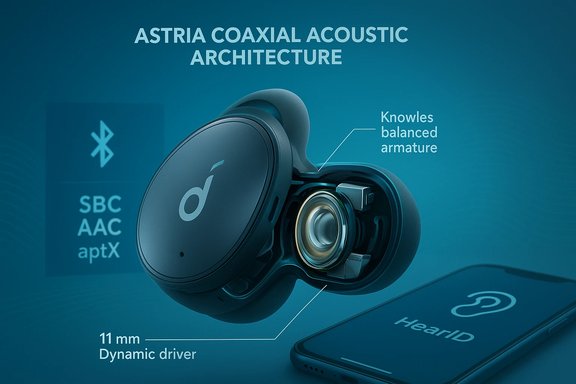
Anker’s Soundcore brand launched the Liberty 2 Pro as a flagship “studio-tuned” model that introduced the company’s Astria Coaxial Acoustic Architecture (ACAA) — a coaxial hybrid driver arrangement that pairs a customized Knowles balanced armature with an 11 mm dynamic driver inside each bud. The engineering goal was to align treble and bass timing and produce a wider, more detailed soundstage than typical single-driver TWS earphones. This was a deliberate move toward in-ear studio performance at a mid-range price point and has been a key part of the product’s marketing and review narrative since release. Soundcore positions the Liberty 2 Pro as a music-first product: HearID personalization, multiple EQ presets, and app-driven tuning are core features. At launch and across product pages, the advertised battery life is about 8 hours per charge for the buds themselves, with the charging case providing three additional full charges (totaling roughly 32 hours). The Liberty 2 Pro supports common Bluetooth codecs (SBC, AAC) and aptX when paired with compatible sources.
Source: Born2Invest https://born2invest.com/?b=style-339501512/
 Background / Overview
Anker’s Soundcore brand launched the Liberty 2 Pro as a flagship “studio-tuned” model that introduced the company’s Astria Coaxial Acoustic Architecture (ACAA) — a coaxial hybrid driver arrangement that pairs a customized Knowles balanced armature with an 11 mm dynamic driver inside each bud. The engineering goal was to align treble and bass timing and produce a wider, more detailed soundstage than typical single-driver TWS earphones. This was a deliberate move toward in-ear studio performance at a mid-range price point and has been a key part of the product’s marketing and review narrative since release. Soundcore positions the Liberty 2 Pro as a music-first product: HearID personalization, multiple EQ presets, and app-driven tuning are core features. At launch and across product pages, the advertised battery life is about 8 hours per charge for the buds themselves, with the charging case providing three additional full charges (totaling roughly 32 hours). The Liberty 2 Pro supports common Bluetooth codecs (SBC, AAC) and aptX when paired with compatible sources. Technical specifications and the reality behind the numbers
What’s inside the Liberty 2 Pro
- Astria Coaxial Acoustic Architecture (ACAA): stacked Knowles balanced armature + 11 mm dynamic driver per earbud. This hybrid aims to reduce driver interference and improve clarity across frequencies.
- Bluetooth: Bluetooth 5.0 with codec support for SBC, AAC, and aptX (aptX availability depends on the host device/drivers).
- Battery: Manufacturer-rated 8 hours on a single charge; ~32 hours total using the case. Fast-charge gives roughly 2 hours after a ~10–15 minute top-up. Real-world reviews commonly report slightly lower single-charge runtime under normal listening volumes.
- Microphones: Quad-mic uplink with Qualcomm cVc (noise reduction) for calls; performance is adequate but not market-leading.
- Ingress protection: IPX4 (resistant to splashes but not fully water- or sweatproof for heavy workouts).
- App features: HearID personalized EQ, multiple presets, firmware updates — but the Soundcore app is mobile-first, available for iOS/Android; firmware updates and advanced tuning require a smartphone.
How those specs translate to real use
Manufacturers’ battery claims are idealized; independent hands-on reviews typically find single-bud runtimes somewhere between 6.5 to 8 hours depending on volume and whether ANC (not present on Liberty 2 Pro) or extra processing is active. Reviewers also report that one ear can drop faster than the other in some real-world tests — not a universal problem, but something to monitor for long-term ownership. The charging-case quick-charge is genuinely useful for topping up on the go.Sound and tuning: why Liberty 2 Pro still matters
The Liberty 2 Pro carved out a reputation for a detailed, forward sound with an expansive stereo image for its price. Key points reviewers repeatedly highlight:- Clarity and separation: The coaxial hybrid design delivers fine instrument detail and an airy top end that makes acoustic and vocal-heavy tracks shine.
- Tunability: HearID plus a generous array of EQ presets allow users to dial in more neutral or more bass-forward profiles depending on taste. The personalization feature can materially improve perceived fidelity for casual listeners.
- Bass character: Punchy, authoritative but not extreme. For bass-head listeners, heavy EQ may be needed to match the sub-bass slam of some competitor sport models.
- Call quality: Quad-mic arrays and cVc help reduce background noise, but many reviews call out slightly muffled voice capture in windy or very noisy environments compared with premium earbuds optimized for calling.
Windows 10 and Bluetooth: what you must understand
If you plan to use Liberty 2 Pro primarily with a Windows 10 PC, there are several practical realities that affect audio quality and call behavior:- Codec negotiation is host-dependent. Windows 10’s Bluetooth stack and the PC’s adapter driver determine which codec is used, and many Windows 10 systems default to SBC even when the headset supports AAC or aptX. AptX support on a PC requires the Bluetooth adapter and driver to expose that codec (often tied to Qualcomm chipset stacks or third-party dongles). Don’t assume aptX or AAC will be used just because the earbuds support them.
- Stereo playback vs. call mode: Historically, Bluetooth separated stereo high-quality playback (A2DP) from headset/mic profiles (HFP/HSP). When the microphone is active on many Bluetooth headsets, Windows often switches to a low-bandwidth mono hands-free profile, dramatically reducing music fidelity during calls. Newer developments (LE Audio and updated Windows stacks) are improving this on Windows 11, but Windows 10 lacks many of these modern features unless specific drivers are installed.
- Windows 10 is no longer the OS most likely to expose LE Audio or super-wideband stereo: Microsoft upgraded Windows 11 with LE Audio and related features that address the stereo+mic compromise, but those improvements are not native to Windows 10. If you rely on modern Bluetooth features, you should consider upgrading to a compatible Windows 11 build or ensure your Bluetooth adapter vendor provides firmware/drivers that add needed capabilities.
- Firmware and updates: The Soundcore mobile app (iOS/Android) is required for HearID personalizations and firmware updates. There is no desktop firmware updater from Soundcore for these older Liberty models, so a smartphone is effectively required for updates and some advanced tuning. Plan accordingly if you keep a PC-centric workflow.
Practical setup: getting the best Liberty 2 Pro experience on Windows 10
Follow these steps and tips to maximize sound quality and minimize frustrating profile switches:- Update your PC’s Bluetooth drivers first. Seek OEM or chipset vendor drivers (Intel, Broadcom, Qualcomm), not the generic Windows drivers.
- Check which codec is active after pairing:
- Pair the Liberty 2 Pro via Settings → Bluetooth & other devices.
- Use a utility (third-party apps can reveal codec state) or the adapter’s driver UI to confirm if aptX or AAC is negotiated. Many adapters will fall back to SBC.
- If your adapter can’t do aptX/AAC reliably, consider a modern USB Bluetooth dongle known to support those codecs (Qualcomm-based dongles or purpose-built aptX/AAC dongles can help).
- For the highest-fidelity listening on Windows 10:
- Use A2DP (stereo) mode for music and disable the hands-free profile during serious listening. That may mean using the laptop’s built-in mic or a separate USB microphone for calls.
- If calls are required and you want better mic + music, test whether your hardware supports simultaneous higher-bandwidth codecs; on Windows 10 this is often not possible without external hardware.
- Keep a smartphone handy for firmware updates and HearID personalization — these steps cannot (practically) be done from a Windows 10 PC. Apply firmware updates periodically to fix bugs and improve stability.
- If you need uncompromised music fidelity and low latency (for audio production, critical listening or gaming), use a wired connection instead — Liberty 2 Pro lacks a wired option, so the alternative is a wired headphone with a USB DAC for PC work or a wireless system that supports low-latency codecs end-to-end.
Tips and trade-offs specific to Liberty 2 Pro
- HearID helps: The personalized EQ can noticeably improve perceived clarity and balance for many listeners. It’s one of the Liberty 2 Pro’s enduring strengths. But remember HearID requires the mobile Soundcore app to run the hearing test.
- Microphone trade-off: If you frequently take calls from your Windows 10 PC and expect studio-like voice clarity while music plays in the background, you’ll likely encounter the Bluetooth profile limitation — the OS will often drop music quality to prioritize the mic. The practical fix is using a dedicated USB mic or headset optimized for PC calls.
- Water/dampness caution: The balanced armature element in the Liberty 2 Pro is more sensitive to long-term humidity exposure than some purely dynamic designs; Anker’s documentation for some regional sites warns to avoid prolonged storage in high humidity. That’s worth noting if you live in a humid climate.
- Battery reality: Expect slightly lower than the advertised 8 hours in heavy-use scenarios — real-world tests commonly show 6–7 hours depending on volume. The case quick-charge does mitigate this for travel.
How the Liberty 2 Pro compares to newer Soundcore models and alternatives
Soundcore has continued iterating; newer Liberty-series models add features the Liberty 2 Pro lacks, notably active noise cancellation (ANC), LDAC support (on some newer models), and enhanced multipoint connectivity. For example, recent Liberty Pro models and the Liberty 4 Pro families added LDAC and improved ANC plus some novel conveniences like a charging case display on newer generations. If features like ANC, LDAC (for higher-resolution streaming on compatible Android devices), or native multi-device pairing matter, those later models might be a better fit — but they often come at a higher price. For Windows 10 users specifically, the codec and driver story matters more than the absolute earbud model: a Liberty 2 Pro paired to a modern Windows 10 machine with a poor Bluetooth adapter will sound worse than a less “capable” pair paired to a well-configured PC with aptX/AAC/LDAC exposure. In other words, the weakest link in the chain determines experience.Buying guide: who should buy Liberty 2 Pro today?
- Buy the Liberty 2 Pro if you:
- Prioritize sound quality and tunability at a bargain price.
- Use the earbuds mainly with phones (iOS/Android) for music and want HearID personalization.
- Are comfortable pairing via mobile app for firmware updates and prefer a neutral-to-detailed sound signature without a premium price tag.
- Consider alternatives if you:
- Need best-in-class mic performance for PC calls without buying a separate mic.
- Require ANC, LDAC, or guaranteed multipoint on a Windows PC.
- Depend on Windows 10 and cannot or will not use a modern Bluetooth adapter that exposes aptX/AAC.
Risks, firmware and long-term support
- Windows 10 limitations: Windows 10 lacks the LE Audio and some modern codec conveniences found in Windows 11, so long-term Windows users who want the latest Bluetooth audio features should consider upgrading to Windows 11 or ensuring their PC adapter vendors provide updated driver stacks. Community guidance and technical notes highlight that Windows 11’s newer audio stack addresses many stereo+mic compromises, while Windows 10 remains constrained without vendor-level workarounds.
- Firmware dependency on mobile app: Firmware updates and sound personalization require the Soundcore mobile app. Users who avoid smartphones may find managing the earbuds clumsy.
- Unverifiable claims and caution: Marketing endorsements (e.g., “endorsed by 10 Grammy-winning producers”) are useful for framing the product’s intent but do not substitute for blind listening tests or lab measurements. Always treat manufacturer-run studio claims as promotional; independent reviews and your ears should be decisive. Where independent lab tests exist, cross-reference battery and frequency response numbers — these are the most load-bearing technical claims.
Quick checklist: best setup for Windows 10 users buying Liberty 2 Pro
- Ensure you have a modern Bluetooth adapter with aptX/AAC support (driver-level).
- Update the PC’s Bluetooth drivers from the OEM or chipset maker.
- Use a dedicated USB microphone for calls if you need both high-quality stereo playback and voice input simultaneously.
- Keep a smartphone available for firmware updates and HearID setup.
- Test battery life at your usual listening volume to set expectations (don’t rely on the “up to” claim alone).
Conclusion
The Soundcore Liberty 2 Pro still represents a high-value choice for listeners who prioritize sound quality and personalization over bleeding-edge wireless features. Its Astria coaxial hybrid driver design continues to impress at its price point, and HearID breathes new life into the listening experience for many users. For Windows 10 users the caveat is straightforward: the PC’s Bluetooth stack and adapter will determine how much of that sound quality reaches your ears. Expect to manage codecs, accept occasional profile switching during calls, and use a smartphone for firmware and personalization. If you set expectations correctly and configure your Windows 10 setup—driver updates, a capable dongle or adapter, and perhaps a dedicated mic—the Liberty 2 Pro can be an excellent, studio-leaning wireless earbud that competes with much more expensive rivals.Source: Born2Invest https://born2invest.com/?b=style-339501512/
