

Sparkle 2.16.1 arrives as a small but telling update for one of the Windows ecosystem’s most pragmatic open-source utilities. The release does not reinvent the app, but it sharpens the basics that matter most: the updater is now more reliable, restore-point text rendering has been fixed for Cyrillic users, and the app no longer launches itself into the system tray by default. In a category crowded with debloaters, privacy toggles, and “one-click” optimization tools, those changes point to a project that is trying to become safer, less intrusive, and more maintainable rather than merely louder.
Windows optimization tools occupy a peculiar corner of the software market. They are popular because many users feel that modern Windows installs arrive with too much clutter, too many background tasks, and too many privacy tradeoffs, but they are also controversial because they can make aggressive changes that are hard to understand and even harder to undo. Sparkle enters that space with a deliberately friendlier pitch: a free, open-source Windows optimization tool that bundles debloating, privacy changes, cleanup, restore points, and performance tweaks into a GUI that is supposed to be easier than hand-editing the registry or running scripts.
That positioning matters because Windows power users have long been split between script-based tooling and polished but opaque commercial “cleaners.” Sparkle appears to be borrowing from both camps. The project’s GitHub repository describes it as a Windows app to debloat and optimize a PC, with features such as applying tweaks, managing temporary files, Winget integration, backup and revert support, and basic system information. That makes it more than a cosmetic utility; it is meant to be an end-to-end workflow for people who want to reshape the machine they already own.
The broader market context also explains why this kind of app continues to attract attention. Windows 10 and Windows 11 both remain deeply configurable systems, but Microsoft’s own direction has increasingly emphasized cloud integration, account linkage, telemetry, and richer system services. For some consumers, that translates into convenience. For others, it translates into bloat, background activity, and a sense that the operating system is doing too much without being asked. Tools like Sparkle are a response to that sentiment, offering a user-controlled layer on top of Microsoft’s defaults.
Sparkle also sits in a competitive field that includes other open-source debloaters and Windows tuning tools. The category is not new, but it has matured: modern utilities increasingly emphasize reversibility, restore points, and transparency because users have learned, often the hard way, that “optimization” can be a euphemism for breaking important functionality. That is why the release notes for 2.16.1 are notable even though they are not dramatic. A fix to the updater and a change to tray behavior may sound mundane, but they signal an app that is trying to be less surprising in daily use.
Sparkle’s release cadence also suggests a project still in active refinement. The GitHub repository shows multiple releases and a relatively recent “latest” tag in late 2025, while the Neowin item frames 2.16.1 as a maintenance build focused on user-facing polish rather than new headline features. That is exactly what a utility in this category needs if it wants to move from “interesting tweak toy” to “trusted maintenance tool.”
The app’s feature set, as described in the repository, includes applying system tweaks, managing temporary files, installing apps through Winget, backing up and reverting changes, and viewing basic system information. In other words, it is not a single-purpose debloater; it is closer to a lightweight control center for a Windows install that needs cleanup, privacy tuning, and some performance work. That breadth is important because most users do not want five separate utilities to accomplish one maintenance session.
Sparkle’s interface is also part of its trust strategy. The project explicitly advertises backup and revert support in the repository, and the Neowin summary highlights that changes are “safe and fully reversible.” Whether every tweak is equally harmless in practice is a separate question, but the product’s message is clear: it wants to compete on confidence, not just aggressiveness.
The changelog also mentions added issue templates for bug reports, feature requests, a governance improvement as much as a software one. Good issue templates make it easier for maintainers to triage reports, but they also signal that the project expects sustained commThat is a hallmark of open-source projects that want to scale beyond a single developer’s inbox.
Sparkle’s new periodic five-minute checks indicate the developers are trying to make updates more resilient. That matters especially for an app that may ik the update experience or other system services. A broken updater in a system tweaker creates an awkward contradiction: the software that promises control over Windows is unable to reliably control its own lifecycle.
There is also a subtle implication here for maintenance frequency. More reliablncourage smaller, more frequent releases, which in turn reduces the pressure to bundle every fix into a large, risky update. That is a healthier release pattern for a utility that touches privacy, startup behavior, and system cleanup.
This is especially relevant for users who are already wary of Windows software that inserts itself into startup routines. If Sparkle wants to win users over on the basis of control and reversibility, then its own default behavior should reflect those values. Making the tray optional rather than automatic aligns the product with its stated philosophy.
It also hints at an important strategic refinement: the app may be trying to reduce the perception that it is a heavy-handed “optimizer” and instead present itself as a utilitionally. That can help in a market where optimization tools are often judged not only by what they do, but by how assertively they insert themselves into the operating system.
This bug also reveals how quickly localization issues can surface in community-driven utilities. A project may work perfectly in one language and then trip over font fallback, text metrics, or rendering assumptions when deplact that the developers fixed it means they are paying attention to practical usability beyond their own locale.
That is why the fix is about more than typography. It improves the message that Sparkle sends to users in multilingual environments: your system can be customized without being trapped by English-only assumptions. For an open-source project, that kind ofdetermines whether a tool remains niche or becomes widely recommended.
But the category is also under pressure to become more responsible. The old model of indiscriminate “registry cleaning” and magical speed boosts has mostly lost credibility. Modern users want measurable benefits, reversible actions, and a clear explanation of what a tweak actually changes. Sparkle’s emphasis on backup/revert support and a more user-friendly interface fits that shift.
It also means the winners are likely to be the tools that make the fewest promises while delivering the most confidence. The most successful debloaters are the ones that show their work, explain their effects, and make rollback easy. Sparkle’s latest release reads like a project trying to occupy exactly that lane.
Consumers are also likely to appreciate the app’s “safe and reversible” framing. Many users are interested in debloating and privacy changes, but they are not always willing to risk breaking search, updates, or system services. Sparkle’s attempt to make those changes accessible without requiring PowerShell expertise helps bridge that gap.
Still, consumers shoulool as a utility, not a miracle cure. If a PC is truly slow because of aging hardware, thermal throttling, or insufficient RAM, no optimizer can substitute for real upgrades. Sparkle can re side of Windows, but it cannot rewrite physics.
The most promising enterprise angle is probably in controlled images and test systems where administrators want to reduce noise, remove consumer clutter, or standardize a minimal desktop. Even then, the real value comes from predictability. If a tweak is reversible and documented, it is easier to evaluate for a pilot environment.
For advanced enthusiasts, however, the app has obvious appeal. The mix of Winget support, backups, restore points, and cleanup tools gives power users a relatively convenient way to prepare fresh installs or tune secondary systems. In that sense, Sparkle is more useful as a controlled toolkit than as a universal prescription.
It will also be worth watching whether the developers continue investing in documentation, bug templates, and language support. Those are the unglamorous pieces that usually determine whether an open-source desktop utility becomes sustainable. In a crowded market, maintenance discipline can be more important than adding another obscure tweak.
Source: Neowin Sparkle 2.16.1
 Background
Windows optimization tools occupy a peculiar corner of the software market. They are popular because many users feel that modern Windows installs arrive with too much clutter, too many background tasks, and too many privacy tradeoffs, but they are also controversial because they can make aggressive changes that are hard to understand and even harder to undo. Sparkle enters that space with a deliberately friendlier pitch: a free, open-source Windows optimization tool that bundles debloating, privacy changes, cleanup, restore points, and performance tweaks into a GUI that is supposed to be easier than hand-editing the registry or running scripts.That positioning matters because Windows power users have long been split between script-based tooling and polished but opaque commercial “cleaners.” Sparkle appears to be borrowing from both camps. The project’s GitHub repository describes it as a Windows app to debloat and optimize a PC, with features such as applying tweaks, managing temporary files, Winget integration, backup and revert support, and basic system information. That makes it more than a cosmetic utility; it is meant to be an end-to-end workflow for people who want to reshape the machine they already own.
The broader market context also explains why this kind of app continues to attract attention. Windows 10 and Windows 11 both remain deeply configurable systems, but Microsoft’s own direction has increasingly emphasized cloud integration, account linkage, telemetry, and richer system services. For some consumers, that translates into convenience. For others, it translates into bloat, background activity, and a sense that the operating system is doing too much without being asked. Tools like Sparkle are a response to that sentiment, offering a user-controlled layer on top of Microsoft’s defaults.
Sparkle also sits in a competitive field that includes other open-source debloaters and Windows tuning tools. The category is not new, but it has matured: modern utilities increasingly emphasize reversibility, restore points, and transparency because users have learned, often the hard way, that “optimization” can be a euphemism for breaking important functionality. That is why the release notes for 2.16.1 are notable even though they are not dramatic. A fix to the updater and a change to tray behavior may sound mundane, but they signal an app that is trying to be less surprising in daily use.
Sparkle’s release cadence also suggests a project still in active refinement. The GitHub repository shows multiple releases and a relatively recent “latest” tag in late 2025, while the Neowin item frames 2.16.1 as a maintenance build focused on user-facing polish rather than new headline features. That is exactly what a utility in this category needs if it wants to move from “interesting tweak toy” to “trusted maintenance tool.”
What Sparkle Actually Is
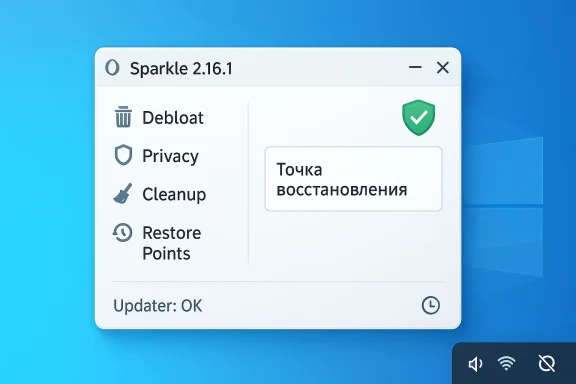
At its core, Sparkle is a Windows cleanup and tuning suite with a graphical front end. The selling point is not just that it can change settings, but that it tries to organize a long list of changes into a readable, reversible interface. That is a meaningful design choice because many Windows tweaks are individually simple but collectively intimidating. The app lowers the barrier by presenting those choices in one place and by framing them as user-controlled actions rather than irreversible hacks.The app’s feature set, as described in the repository, includes applying system tweaks, managing temporary files, installing apps through Winget, backing up and reverting changes, and viewing basic system information. In other words, it is not a single-purpose debloater; it is closer to a lightweight control center for a Windows install that needs cleanup, privacy tuning, and some performance work. That breadth is important because most users do not want five separate utilities to accomplish one maintenance session.
Why the GUI matters
A GUI changes the adoption curve. Script-based debloaters can be powerful, but they require confidence, technical literacy, and a tolerance for command-line workflows. Sparkle packages many of the same goals into a visual workflow, which is a friendlier entry point for home users and small IT teams. That lowers friction, but it also raises expectations: if a GUI promises safety, the app must be careful about defaults, warnings, and rollback.Sparkle’s interface is also part of its trust strategy. The project explicitly advertises backup and revert support in the repository, and the Neowin summary highlights that changes are “safe and fully reversible.” Whether every tweak is equally harmless in practice is a separate question, but the product’s message is clear: it wants to compete on confidence, not just aggressiveness.
- Debloat options are a major part of the pitch.
- Privacy toggles make telemetry reduction more approachable.
- Cleaner functions help with routine maintenance.
- Restore and backup features reduce the fear factor.
- Winget integration gives the app broader utility than a one-trick tweaker.
The 2.16.1 Changelog in Plai changelog is short, but every item points to a project maturing around reliability. The most obvious fix is the auto updater, which previously did not work correctly and now receives periodic five-minute checks. That means Sparkle is trying to move from a manually refreshed utility into something that can quietly maintain itself with less user intervention.
Another useful fix addresses issue #91, where the Resdid not support Cyrillic characters. This is the kind of bug that many English-language users would never notice, but it matters enormously for international usability. It also suggests Sparkle has enough reach now that localization and font rendering problems are no longer edge cases; they are part of the app’s real-world stability surface.Small fixes, large implications
The decisiolt behavior so Sparkle no longer runs in the system tray automatically is more interesting than it first appears. Tray residency can be convenient for power users, but it also makes apps feel more persistent, more resource-hungry, and more intrusive. Removing that default is a small UX change with a big trust dividend.The changelog also mentions added issue templates for bug reports, feature requests, a governance improvement as much as a software one. Good issue templates make it easier for maintainers to triage reports, but they also signal that the project expects sustained commThat is a hallmark of open-source projects that want to scale beyond a single developer’s inbox.
- Auto updater fixed
- Periodic 5-minute update checks added
- Cyrillic font issue resolved
- Issue templates added
- System tray auto-launch disabled by default
Why the Updater Fix Matters
Auto-update behavior is one of the most underrated parts of any desktop utility. If a tool is supposed to modify systemo stay current with bug fixes, compatibility changes, and occasionally new Windows build behaviors. When the updater fails, the app effectively becomes harder to trust because users must manually check whether they are running stale code.Sparkle’s new periodic five-minute checks indicate the developers are trying to make updates more resilient. That matters especially for an app that may ik the update experience or other system services. A broken updater in a system tweaker creates an awkward contradiction: the software that promises control over Windows is unable to reliably control its own lifecycle.
Reliability and user confidence
For consumer users, this fix means fewer silent failures and fewer moments where they wonder whether the app is abandoned. For enthusiasts, it means the project can respond faster to Windows changes without waiting for users to notice a new release manually. In a category where compatibility with Windows 10 and 11 can shift over time, that is not a luxury; it is basic hygiene.There is also a subtle implication here for maintenance frequency. More reliablncourage smaller, more frequent releases, which in turn reduces the pressure to bundle every fix into a large, risky update. That is a healthier release pattern for a utility that touches privacy, startup behavior, and system cleanup.
- Users are less likely to miss critical fixes.
- Developers can ship incremental improvements more safely.
- The app’s trust story becomes stronger.
- Release management becomes less dependent on manual checking.
- Compatibility regressions can be addressed sooner.
Tray Behavior and the Problem of Intrusiveness
The change to stop Sparkle from running in the system tray automatically by default is one of the release’s most user-respectful decisions. Tray apps often become invisible background residents, and while that can be useful for monitoring or notificatiolike software overstaying its welcome. For a tool that already promises system changes, privacy controls, and performance tweaks, avoiding unnecessary persistence is a smart move.This is especially relevant for users who are already wary of Windows software that inserts itself into startup routines. If Sparkle wants to win users over on the basis of control and reversibility, then its own default behavior should reflect those values. Making the tray optional rather than automatic aligns the product with its stated philosophy.
Default settings as product philosophy
Defaults are policy. They tell users what the developer believes the “normal” experience should be. By changing the default tray behavior, Sparkle is implicitly arguingtility should be available when needed, not permanently lingering in the background. That is a healthier default for a broad audience, even if some power users will turn the tray behavior back on.It also hints at an important strategic refinement: the app may be trying to reduce the perception that it is a heavy-handed “optimizer” and instead present itself as a utilitionally. That can help in a market where optimization tools are often judged not only by what they do, but by how assertively they insert themselves into the operating system.
- Less background clutter by nment with user control
- Lower suspicion from privacy-conscious users
- More predictable startup behavior
- A cleaner installation footprint in daily use
Internationalization and the Cyrillic Fix
The fix for Restore Points tab font support is small on paper and important in practice. Software that claims to be accessible to a broad Windows audience must handle non-Latin scripts correctly, especially in UI elements related to safety and recovery. If resrs incorrectly, that is not just a cosmetic flaw; it can undermine confidence in one of the app’s most important protective features.This bug also reveals how quickly localization issues can surface in community-driven utilities. A project may work perfectly in one language and then trip over font fallback, text metrics, or rendering assumptions when deplact that the developers fixed it means they are paying attention to practical usability beyond their own locale.
Why font support is not a footnote
Restore points are the psychological safety net of any debloat tool. When users are making changes to telemetry, services, and app behavior, they need to know they can roll back if something goes wrong. A visual bug in that parn reduce the sense that recovery is dependable, even if the underlying functionality works.That is why the fix is about more than typography. It improves the message that Sparkle sends to users in multilingual environments: your system can be customized without being trapped by English-only assumptions. For an open-source project, that kind ofdetermines whether a tool remains niche or becomes widely recommended.
- Better accessibility for Cyrillic users
- Stronger trust in restore-point workflows
- Fewer localization complaints
- More polished iignal that the project is listening to edge cases
What Sparkle Says About the Windows Tuning Market
Sparkle’s existence says as much about Windows as it does about the app itself. If users did not feel the need to strip back services, reduce tracking, and clean up junk files, tools like this would not have an audience. The fact that Sparkle has a stable release channel, multiple updates, and a clear feature narrative suggests the market for Windows tuning remains healthy.But the category is also under pressure to become more responsible. The old model of indiscriminate “registry cleaning” and magical speed boosts has mostly lost credibility. Modern users want measurable benefits, reversible actions, and a clear explanation of what a tweak actually changes. Sparkle’s emphasis on backup/revert support and a more user-friendly interface fits that shift.
Competitors are forcing the bar higher
Sparkle is not the only open-source Windows optimization tool in circulation. Other projects in the same space emphasize debloating, privacy controls, and performance tuning, which means users can compare experiences much more directly than they could a few years ago. That pushes every tool in the category to improve clarity, safety, and documentation.It also means the winners are likely to be the tools that make the fewest promises while delivering the most confidence. The most successful debloaters are the ones that show their work, explain their effects, and make rollback easy. Sparkle’s latest release reads like a project trying to occupy exactly that lane.
- Users want control, not mystery.
- Reversibility now matters as much as aggressiveness.
- Documentation has become part of the product.
- Transparent defaults build more trust than dramatic promises.
- Competition is moving the category toward safer design.
Consumer Impact
For regular Windows users, Sparkle 2.16.1 is mostly about confidence. A working updater means fewer missed fixes, the tray behavior change meannoyances, and the Cyrillic font fix means the interface is more usable for more people. Those are not flashy additions, but they are the details that make a utility feel finished instead of experimental.Consumers are also likely to appreciate the app’s “safe and reversible” framing. Many users are interested in debloating and privacy changes, but they are not always willing to risk breaking search, updates, or system services. Sparkle’s attempt to make those changes accessible without requiring PowerShell expertise helps bridge that gap.
Where consumers benefit most
The biggest value for consumers is probably in the combination of cleanup and privacy. A tool that can remove junk files, disable selected tracking behaviors, and suggest performance tweaks may improve perceived responsiveness more than any single setting change. The psychological value matters too: people often feel better about a machine when they understand what has been altered.Still, consumers shoulool as a utility, not a miracle cure. If a PC is truly slow because of aging hardware, thermal throttling, or insufficient RAM, no optimizer can substitute for real upgrades. Sparkle can re side of Windows, but it cannot rewrite physics.
- Easier cleanup for everyday users
- Lower friction for privacy adjustments
- Better recovery confidence
- Reduced background intrusion
- More approachable Windows maintenance overall
Enterprise and Power User Considerations
Enterprise environments are a different story. Sparkle may appeal to power users, lab machines, and enthusiast deployments, but its most aggressive use cases can conflict with managed endpoints, standardized baselines, and IT policies. That does not make the tool unsuitable for professionals, but it does mean its best fit is likely selective rather than blanket deployment.The most promising enterprise angle is probably in controlled images and test systems where administrators want to reduce noise, remove consumer clutter, or standardize a minimal desktop. Even then, the real value comes from predictability. If a tweak is reversible and documented, it is easier to evaluate for a pilot environment.
Why administrators should be cautious
Administrators should pay close attention to any tool that touches privacy, startup behavior, or Windows services. Even when individual tweaks are safe in isolation, their combined effect can be hard to model across different hardware, language packs, and policy configurations. In a managed setting, that uncertainty is often more costly than the potential performance gain. Caution is not cynicism; it is operations.For advanced enthusiasts, however, the app has obvious appeal. The mix of Winget support, backups, restore points, and cleanup tools gives power users a relatively convenient way to prepare fresh installs or tune secondary systems. In that sense, Sparkle is more useful as a controlled toolkit than as a universal prescription.
- Best suited to enthusiast and pilot deployments
- Useful for controlled clean installs
- Potentially helpful in lab or test systems
- Needs careful review in managed environments
- Reversibility is critical for adoption
Strengths and Opportunities
Sparkle’s biggest strength is that it combines a familiar Windows tuning feature set with a clearer, more humane design philosophy. The 2.16.1 release reinforces that approach by fixing core maintenance behavior rather than chasing gimmicks, and that should make the app more trustworthy to users who are tired of noisy “optimizer” utilities. The opportunity is to keep building that trust with steady quality-of-life improvements, sharper documentation, and broader language support.- Open-source transparency makes the app easier to evaluate.
- Reversible changes lower the risk barrier.
- Updater reliability improves long-term maintainability.
- Cleaner defaults make the software feel less intrusive.
- Restore points create a more responsible safety story.
- Winget integration broadens day-to-day usefulness.
- Internationalization fixes expand the potential audience.
Risks and Concerns
The biggest risk for Sparkle is the same one that shadows the entire debloat/optimizer category: users may apply changes they do not fully understand, then blame the tool if something breaks later. Even reversible tweaks can create confusion if the interface does not clearly explain side effects, dependencies, or the difference between performance gains and placebo effects. A polished UI does not eliminate the need for careful judgment.- Aggressive tweaks can affect core Windows behavior.
- Users may overestimate performance gains.
- Privacy changes can have compatibility tradeoffs.
- Background utilities can still feel invasive if defaults are wrong.
- Internationalization bugs can erode confidence.
- Updater failures can make the app feel abandoned.
- Too many options can overwhelm non-technical users.
Looking Ahead
The next phase for Sparkle will likely depend on whether the project can keep sharpening the user experience without diluting its core identaining a balance between useful aggressiveness and visible restraint. If it can keep shipping small, meaningful fixes like the 2.16.1 updater and tray behavior changes, it may gradually build a reputation for reliability instead of novelty.It will also be worth watching whether the developers continue investing in documentation, bug templates, and language support. Those are the unglamorous pieces that usually determine whether an open-source desktop utility becomes sustainable. In a crowded market, maintenance discipline can be more important than adding another obscure tweak.
- More language fixes and localization polish
- Additional updater and stability improvements
- Better documentation around risky tweaks
- Continued refinement of default behavior
- Potential expansion of Windows 11-specific tuning options
Source: Neowin Sparkle 2.16.1
Last edited:
