

Sparkle 2.20.1 is a Windows 10 and Windows 11 optimization utility release distributed as an open-source installer or portable build, adding configurable interface animation direction while tightening backend caching, network status handling, IPC cleanup, Nvidia tweak flow, tests, dependencies, and bundle contents. That sounds like a modest point release, but it lands in a category of software where small plumbing changes matter more than the changelog glamour suggests. Windows “debloaters” live at the uncomfortable intersection of convenience, privacy anxiety, gaming folklore, and real administrative need. Sparkle’s latest update is therefore less about one new setting and more about whether a modern optimizer can become boring enough to be trusted.
Sparkle presents itself as a free, open-source Windows optimization app: remove unwanted apps, disable tracking, clean temporary files, apply performance tweaks, and make the whole thing reversible through a friendly interface. In a market crowded with one-click miracle cleaners and opaque registry-tweak bundles, that positioning is deliberately reassuring. It says, in effect, that Windows maintenance should not require either blind faith in a black box or a weekend spent reading PowerShell scripts.
That message resonates because Windows itself has grown into a layered operating system where “clean” means different things to different people. For a gamer, it may mean disabling overlays, tuning power behavior, or avoiding needless background services. For a privacy-conscious user, it may mean turning off telemetry-adjacent features, removing Bing integration, disabling location tracking, or suppressing prompts that blur the line between operating system and advertising surface. For an IT pro, it may mean a repeatable baseline that reduces noise without breaking supportability.
Sparkle is not unique in promising that kind of control. Chris Titus Tech’s Windows Utility, Win11Debloat scripts, O&O ShutUp10++, Sophia Script, and a long tail of GitHub projects all live in the same orbit. What distinguishes Sparkle’s approach is not merely that it contains tweaks, but that it wraps them in a contemporary Electron-and-React application with restore-point awareness, cleaner tools, app installation helpers, DNS switching, and system utilities. That makes it more approachable, but it also raises the stakes: a friendly button that changes system policy can be more dangerous than a scary script precisely because it feels safe.
Version 2.20.1, judged on its changelog alone, is not a reinvention. It does not add a marquee privacy module, a sweeping Windows 11 26H2 compatibility claim, or a dramatic new cleanup engine. Instead, it improves the machinery around the tweaks. That is exactly the kind of update seasoned Windows users should pay attention to, because optimizer reliability is rarely decided by the tweak list; it is decided by state handling, reversibility, packaging discipline, and whether the app does what it says in the order it says it will do it.
But the ability to turn motion off is not cosmetic fluff. It acknowledges that a Windows maintenance app is not just a tweak launcher for enthusiasts with high-refresh gaming monitors. It is software people may open while troubleshooting, cleaning up a sluggish machine, or helping someone else remotely, and motion can be distracting or uncomfortable for some users.
The direction choices also suggest an application that is being treated as a product rather than a script with a skin. The Windows optimization ecosystem often over-indexes on the back end: registry keys, scheduled tasks, service states, app package removal, and PowerShell wrappers. Sparkle’s changelog shows a developer spending time on how the tool behaves in the hand, not just what levers it can pull.
That matters because trust in utilities is cumulative. Users are more likely to believe in a reversible tweak system when the interface itself behaves predictably. If motion can be disabled, if status indicators update correctly, if the app bundle stops carrying stray files, the application starts to feel less like a hobbyist experiment and more like a maintained utility.
There is a limit to how far that argument should go. An animation toggle does not prove safety, and a polished UI can hide poor engineering just as easily as it can reveal care. Still, accessibility-minded polish in a point release is a healthy sign in a category where developers often chase dramatic claims instead of ordinary usability.
The phrase system info backend also hints at Sparkle’s architecture. This is not merely a batch file that fires and exits. It is an application that gathers state, displays it, performs actions, updates status, and provides feedback. That means backend behavior becomes part of the user experience.
Caching is not automatically good. If stale state lingers too long, the app can misrepresent whether a network request succeeded, whether a tweak has been applied, or whether a machine is in the condition the UI claims. The right kind of TTL caching is a compromise: avoid hammering the system, but expire information quickly enough that users are not operating on yesterday’s truth.
Sparkle 2.20.1’s changelog pairs the caching work with updated system information tests. That pairing is the reassuring part. Optimizers are unusually prone to “works on my machine” assumptions because Windows installs vary wildly by edition, OEM image, update history, hardware vendor, enterprise policy, and user customization. Tests do not eliminate those differences, but they at least indicate that a backend change is being treated as something that can break.
For sysadmins and serious enthusiasts, this is the line between a toy and a tool. A tweak catalog is easy to grow. Reliable state management is harder. Sparkle’s value will depend less on whether it reaches 50 tweaks or 100 tweaks than on whether it can accurately understand what it is about to change.
NvidiaProfileInspector is used by many enthusiasts to manipulate Nvidia driver profile settings beyond the normal control panel. If Sparkle offers an Nvidia optimization pathway that invokes or depends on such tooling, waiting for it properly is not a nicety. It affects whether the app can correctly sequence related changes, show completion, or avoid colliding with its own next step.
This is especially relevant because graphics tweaks are where Windows optimizer culture can become most superstitious. Some settings are useful in specific cases; others are cargo-culted across forums and YouTube guides until they become ritual. A tool that applies GPU-adjacent tweaks must therefore be unusually careful about process control and user communication.
Awaiting the external operation does not tell us whether the underlying Nvidia settings are beneficial for every machine. They almost certainly are not. It does, however, reduce one class of implementation error: claiming the system has moved to a new state before the dependent operation has concluded.
That is the right kind of humility for a gaming-performance tool. The best optimizers do not promise magic frames per second. They reduce friction, expose known switches, and avoid adding chaos. In that narrow but important sense, this Sparkle change is more meaningful than another flashy “boost gaming” checkbox would have been.
This is part of a broader shift in Windows maintenance tools. The old cleaner model was local: scan temp folders, clear caches, tweak a few registry values, exit. Modern optimizers increasingly behave like small platforms. They fetch update metadata, integrate package managers, link to documentation, display release information, and sometimes depend on online services for installers or app lists.
That evolution has benefits. It lets a project move faster, update scripts more cleanly, and reduce the need for users to hunt around for compatible builds. It also creates new failure modes. Network detection, update enforcement, server availability, certificate errors, and package source reliability become part of the optimizer’s real-world trust profile.
Sparkle’s fix suggests the project hit one of those edge cases and corrected it. The more important point is that a Windows optimizer now has to be judged like any other network-aware desktop application. Does it degrade gracefully offline? Does it make clear which features require connectivity? Does it avoid blocking local maintenance because a remote check failed?
For home users, an online status bug is an annoyance. For technicians using a portable build on a troubled PC, it can be more consequential. The machines most in need of cleanup are often the ones with broken networking, captive portals, misconfigured DNS, or security tools interfering with requests. A maintenance app has to be useful in imperfect conditions.
Unwanted files can be harmless: test artifacts, development leftovers, logs, build directories, or redundant assets. They can also create confusion, enlarge downloads, expose implementation details, or trigger antivirus suspicion. In an Electron app, where bundle sizes are already a common complaint, stray files make the footprint feel less disciplined.
The submitted package size of roughly 100 MB will not surprise anyone familiar with Electron applications, but it will still annoy users who expect a Windows cleaner to be tiny. Sparkle’s own repository nods to this criticism with an “if you’re allergic to Electron” caveat, pointing users toward lighter PowerShell-based alternatives. That is refreshingly candid, but it does not remove the trade-off.
Electron buys Sparkle a modern interface, cross-cutting UI components, auto-update patterns, and a developer ecosystem that can move quickly. It costs disk space, memory overhead, and some credibility with users who believe system utilities should be lean native binaries. Both positions are reasonable.
For a debloater, the optics are especially delicate. An app that promises to remove Windows clutter while arriving as a large framework-backed bundle invites jokes. The serious version of that criticism is not the megabytes alone; it is whether the extra weight produces enough safety, clarity, and maintainability to justify itself. Fixing bundle contents is a small but necessary answer.
The symptoms of bad listener cleanup can range from duplicate actions to memory leaks, stale responses, and event handlers firing after the UI context that created them is gone. In a normal note-taking app, that might mean a duplicated notification. In a Windows optimizer, it could mean a tweak status updating twice, a stale result appearing after navigation, or an operation being reported in the wrong context.
Again, this is not proof that Sparkle had a catastrophic issue. The changelog frames it as cleanup, not an emergency. But it is exactly the sort of plumbing that deserves attention in a tool that may run with administrative permissions and trigger system-level changes.
Windows users have learned to fear the obvious dangers: malware, fake cleaners, registry “repair” scams, and installers bundling junk. The subtler risk in legitimate open-source tools is state confusion. Did the operation finish? Did the UI reflect the current machine state? Did the revert action correspond to the tweak that was actually applied?
Good IPC hygiene does not answer all of those questions, but bad IPC hygiene can undermine all of them. Sparkle is right to treat it as release-worthy.
Some changes are easy to reverse: a registry value can be restored, a service startup type can be reset, a setting can be toggled back. Others are messier. Removing apps may require reinstalling packages, restoring provisioned apps, repairing dependencies, or accepting that a future Windows cumulative update will make its own choices. Disabling features can interact with policy, edition, hardware capabilities, and Microsoft’s shifting implementation details.
Sparkle’s own documentation reportedly notes that some tweaks cannot be unapplied cleanly and may require manual reinstalls or setting changes. That caveat matters. It is the difference between responsible tooling and magical thinking.
The safest way to use a tool like Sparkle is not to apply every tweak in one victorious click. It is to make a restore point, change a small set of settings tied to a clear goal, reboot when appropriate, and observe the result. That sounds dull, but dull is what keeps a Windows install supportable.
This is where Sparkle’s GUI can be both asset and liability. A well-designed interface can make tweak descriptions clearer and reversions easier. It can also encourage users to treat complex system changes as a playlist. The app’s long-term credibility will depend on whether it nudges users toward informed changes rather than maximalist debloating.
The temptation is to describe privacy tweaks as a cure. They are not. They are a layer of preference enforcement on top of an operating system whose behavior is shaped by edition, Microsoft account state, regional regulation, device management policy, cumulative updates, and feature rollouts.
That does not make them pointless. A local switch that disables a noisy feature, suppresses location access, or removes consumer-facing clutter can materially improve a user’s experience. In managed environments, similar results may be achieved through Group Policy, Intune, provisioning packages, or enterprise baselines. For home users, a GUI utility can expose some of those preferences without requiring policy-editor fluency.
The risk is overclaiming. “Disable telemetry” can mean different things depending on what Windows SKU allows, what services remain, and what Microsoft considers required diagnostic data. “Disable tracking” is emotionally satisfying language, but serious privacy analysis needs more precision.
Sparkle should be read as a tool for reducing unwanted Windows behaviors, not as a privacy firewall. Users who need strong privacy guarantees must still consider account choices, browser telemetry, application permissions, network-level filtering, encryption, and threat model. The optimizer can help, but it cannot carry the whole burden.
Windows 11 in particular has made the Start menu, search surface, widgets, Edge integration, OneDrive prompts, Copilot placement, and cloud-adjacent experiences part of the daily interface. Some users like those integrations. Others see them as clutter that arrived without meaningful consent.
Sparkle’s catalog of tweaks sits directly inside that tension. Removing gaming apps, hiding widgets, disabling lock-screen tips, turning off Bing integration, removing OneDrive, disabling Copilot, or adjusting the context menu are not merely performance moves. They are acts of interface ownership.
This is why debloating tools remain popular despite Microsoft’s own improvement work. Windows has excellent built-in utilities: Storage Sense, Disk Cleanup remnants, winget, PowerShell, DISM, SFC, Settings pages, optional features, and enterprise policy controls. The problem is not that Windows lacks knobs. It is that the knobs are scattered, renamed, deprecated, redesigned, and sometimes hidden behind assumptions about what Microsoft would prefer users to do.
Sparkle’s appeal is consolidation. It puts many of those decisions in one place, using the language of user intent rather than Microsoft’s administrative taxonomy. That is powerful, but it also means Sparkle becomes a curator. Which defaults are “bloat”? Which services are unnecessary? Which gaming tweaks are broadly safe? Those editorial decisions are embedded in code.
In a managed environment, changes should be expressed through policy, configuration profiles, scripts under version control, documented baselines, and test rings. A GUI optimizer running interactively on endpoints is difficult to audit and harder to support. Even when open source, it introduces a layer between administrator intent and system state.
That does not mean IT pros should ignore Sparkle. Its tweak list can serve as a map of user pain points. If many enthusiasts want to disable Copilot, remove Bing integration, suppress widgets, change power behavior, or tune gaming settings, those are signals about where Windows defaults are creating friction. Administrators can translate the relevant pieces into supported configuration channels.
There is also a place for tools like Sparkle in break-fix scenarios, lab machines, personal devices, and enthusiast-managed fleets. The portable build is especially relevant here, because technicians often need a utility they can run without installing another resident application. But even then, the discipline should be the same: know what changed, document it, and avoid turning one-click optimization into one-click mystery.
The irony is that Sparkle’s best features make it more tempting to overuse. A modern interface, restore-point manager, and bundled utilities lower the barrier. That is good for accessibility, but administrators know that easy changes are still changes. The button does not absolve the operator.
But open source is not a force field. Most users will not audit the code before running a portable build. Even many technical users will skim the README, check the star count, glance at releases, and rely on reputation. Supply-chain trust still depends on build integrity, release signing if provided, dependency management, and whether the downloaded binary corresponds to the source people are reading.
Sparkle’s removal of the electron-toolkit utilities dependency in favor of an internal
The same applies to bundle cleanup. Shipping only what is intended is not glamorous, but it is part of a mature release posture. Users evaluating an optimizer should look for exactly these boring signals: active changelogs, public source, clear documentation, restore guidance, restrained claims, and fixes that address internal correctness rather than only adding more toggles.
Sparkle appears to be moving along that path, but the burden remains high. Any tool that modifies system settings at scale must earn trust repeatedly. Open source opens the door; release discipline keeps it open.
That is not a boring release. It is a revealing one. Projects often show their priorities in point releases more clearly than in major launches. A major launch must sell the vision. A point release shows whether the maintainer is willing to sand the edges.
For Sparkle, those edges are where credibility lives. Windows optimization is not a category that needs more swagger. It needs fewer broken assumptions, fewer stale UI states, fewer mystery bundles, and fewer tweaks applied without accurate sequencing.
This release therefore reads like infrastructure hardening for a tool trying to be more than a collection of popular Windows tweaks. It does not answer every question about safety, performance benefit, or enterprise suitability. It does suggest that Sparkle’s developer is paying attention to the parts of the app that users only notice when they go wrong.
That should shape how WindowsForum readers evaluate it. Sparkle 2.20.1 is not important because animation can now slide left. It is important because the changelog is mostly about making the app’s claims line up more closely with what the machine is actually doing.
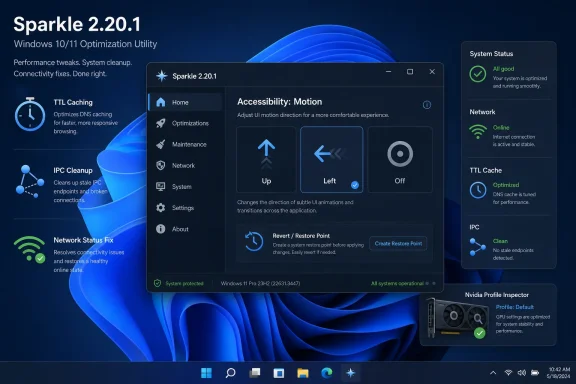 Sparkle’s Pitch Is Simpler Than the Windows Problem It Tries to Solve
Sparkle presents itself as a free, open-source Windows optimization app: remove unwanted apps, disable tracking, clean temporary files, apply performance tweaks, and make the whole thing reversible through a friendly interface. In a market crowded with one-click miracle cleaners and opaque registry-tweak bundles, that positioning is deliberately reassuring. It says, in effect, that Windows maintenance should not require either blind faith in a black box or a weekend spent reading PowerShell scripts.That message resonates because Windows itself has grown into a layered operating system where “clean” means different things to different people. For a gamer, it may mean disabling overlays, tuning power behavior, or avoiding needless background services. For a privacy-conscious user, it may mean turning off telemetry-adjacent features, removing Bing integration, disabling location tracking, or suppressing prompts that blur the line between operating system and advertising surface. For an IT pro, it may mean a repeatable baseline that reduces noise without breaking supportability.
Sparkle is not unique in promising that kind of control. Chris Titus Tech’s Windows Utility, Win11Debloat scripts, O&O ShutUp10++, Sophia Script, and a long tail of GitHub projects all live in the same orbit. What distinguishes Sparkle’s approach is not merely that it contains tweaks, but that it wraps them in a contemporary Electron-and-React application with restore-point awareness, cleaner tools, app installation helpers, DNS switching, and system utilities. That makes it more approachable, but it also raises the stakes: a friendly button that changes system policy can be more dangerous than a scary script precisely because it feels safe.
Version 2.20.1, judged on its changelog alone, is not a reinvention. It does not add a marquee privacy module, a sweeping Windows 11 26H2 compatibility claim, or a dramatic new cleanup engine. Instead, it improves the machinery around the tweaks. That is exactly the kind of update seasoned Windows users should pay attention to, because optimizer reliability is rarely decided by the tweak list; it is decided by state handling, reversibility, packaging discipline, and whether the app does what it says in the order it says it will do it.
The New Animation Setting Is a Small Accessibility Tell
The headline user-facing change in Sparkle 2.20.1 is a configurable animation direction setting. Users can now choose animation from Up, Left, or Off. On paper, that is the sort of UI tweak most power users skip over on their way to the “real” system changes.But the ability to turn motion off is not cosmetic fluff. It acknowledges that a Windows maintenance app is not just a tweak launcher for enthusiasts with high-refresh gaming monitors. It is software people may open while troubleshooting, cleaning up a sluggish machine, or helping someone else remotely, and motion can be distracting or uncomfortable for some users.
The direction choices also suggest an application that is being treated as a product rather than a script with a skin. The Windows optimization ecosystem often over-indexes on the back end: registry keys, scheduled tasks, service states, app package removal, and PowerShell wrappers. Sparkle’s changelog shows a developer spending time on how the tool behaves in the hand, not just what levers it can pull.
That matters because trust in utilities is cumulative. Users are more likely to believe in a reversible tweak system when the interface itself behaves predictably. If motion can be disabled, if status indicators update correctly, if the app bundle stops carrying stray files, the application starts to feel less like a hobbyist experiment and more like a maintained utility.
There is a limit to how far that argument should go. An animation toggle does not prove safety, and a polished UI can hide poor engineering just as easily as it can reveal care. Still, accessibility-minded polish in a point release is a healthy sign in a category where developers often chase dramatic claims instead of ordinary usability.
Backend Caching Shows Sparkle Is Growing Past “Run the Script and Hope”
The addition of TTL caching to Sparkle’s system information backend is one of those changes that will make eyes glaze over, but it is arguably more important than the animation setting. A Windows optimizer that repeatedly queries hardware, OS state, network status, or configuration details can become its own source of sluggishness. Caching with a time-to-live window is a practical way to keep the interface responsive without pretending system state never changes.The phrase system info backend also hints at Sparkle’s architecture. This is not merely a batch file that fires and exits. It is an application that gathers state, displays it, performs actions, updates status, and provides feedback. That means backend behavior becomes part of the user experience.
Caching is not automatically good. If stale state lingers too long, the app can misrepresent whether a network request succeeded, whether a tweak has been applied, or whether a machine is in the condition the UI claims. The right kind of TTL caching is a compromise: avoid hammering the system, but expire information quickly enough that users are not operating on yesterday’s truth.
Sparkle 2.20.1’s changelog pairs the caching work with updated system information tests. That pairing is the reassuring part. Optimizers are unusually prone to “works on my machine” assumptions because Windows installs vary wildly by edition, OEM image, update history, hardware vendor, enterprise policy, and user customization. Tests do not eliminate those differences, but they at least indicate that a backend change is being treated as something that can break.
For sysadmins and serious enthusiasts, this is the line between a toy and a tool. A tweak catalog is easy to grow. Reliable state management is harder. Sparkle’s value will depend less on whether it reaches 50 tweaks or 100 tweaks than on whether it can accurately understand what it is about to change.
NvidiaProfileInspector Waiting Is the Kind of Fix Gamers Actually Feel
Sparkle 2.20.1 refactors its tweak application flow to await NvidiaProfileInspector. That sentence is dry, but it addresses a common failure mode in GUI wrappers: launching an external tool or subprocess and moving on before the thing has actually finished. In optimization software, that can leave users with a success message that is more optimistic than factual.NvidiaProfileInspector is used by many enthusiasts to manipulate Nvidia driver profile settings beyond the normal control panel. If Sparkle offers an Nvidia optimization pathway that invokes or depends on such tooling, waiting for it properly is not a nicety. It affects whether the app can correctly sequence related changes, show completion, or avoid colliding with its own next step.
This is especially relevant because graphics tweaks are where Windows optimizer culture can become most superstitious. Some settings are useful in specific cases; others are cargo-culted across forums and YouTube guides until they become ritual. A tool that applies GPU-adjacent tweaks must therefore be unusually careful about process control and user communication.
Awaiting the external operation does not tell us whether the underlying Nvidia settings are beneficial for every machine. They almost certainly are not. It does, however, reduce one class of implementation error: claiming the system has moved to a new state before the dependent operation has concluded.
That is the right kind of humility for a gaming-performance tool. The best optimizers do not promise magic frames per second. They reduce friction, expose known switches, and avoid adding chaos. In that narrow but important sense, this Sparkle change is more meaningful than another flashy “boost gaming” checkbox would have been.
The Online Status Fix Is a Reminder That Optimizers Are Networked Apps Now
Sparkle 2.20.1 fixes online status not updating after successful network requests. For a utility that includes automatic updates, app installation integrations, website-based downloads, and online documentation pathways, that bug is not trivial. If the UI thinks it is offline after connectivity has returned, it can make the app look broken even when Windows networking is fine.This is part of a broader shift in Windows maintenance tools. The old cleaner model was local: scan temp folders, clear caches, tweak a few registry values, exit. Modern optimizers increasingly behave like small platforms. They fetch update metadata, integrate package managers, link to documentation, display release information, and sometimes depend on online services for installers or app lists.
That evolution has benefits. It lets a project move faster, update scripts more cleanly, and reduce the need for users to hunt around for compatible builds. It also creates new failure modes. Network detection, update enforcement, server availability, certificate errors, and package source reliability become part of the optimizer’s real-world trust profile.
Sparkle’s fix suggests the project hit one of those edge cases and corrected it. The more important point is that a Windows optimizer now has to be judged like any other network-aware desktop application. Does it degrade gracefully offline? Does it make clear which features require connectivity? Does it avoid blocking local maintenance because a remote check failed?
For home users, an online status bug is an annoyance. For technicians using a portable build on a troubled PC, it can be more consequential. The machines most in need of cleanup are often the ones with broken networking, captive portals, misconfigured DNS, or security tools interfering with requests. A maintenance app has to be useful in imperfect conditions.
Cleaner Bundles Matter Because Packaging Is a Security Signal
Sparkle 2.20.1 fixes unwanted files and folders being included in application bundles. That may sound like housekeeping, but packaging hygiene is one of the most underrated signals in open-source desktop software. What ships in the build is what users actually trust, not what the repository ideally contains.Unwanted files can be harmless: test artifacts, development leftovers, logs, build directories, or redundant assets. They can also create confusion, enlarge downloads, expose implementation details, or trigger antivirus suspicion. In an Electron app, where bundle sizes are already a common complaint, stray files make the footprint feel less disciplined.
The submitted package size of roughly 100 MB will not surprise anyone familiar with Electron applications, but it will still annoy users who expect a Windows cleaner to be tiny. Sparkle’s own repository nods to this criticism with an “if you’re allergic to Electron” caveat, pointing users toward lighter PowerShell-based alternatives. That is refreshingly candid, but it does not remove the trade-off.
Electron buys Sparkle a modern interface, cross-cutting UI components, auto-update patterns, and a developer ecosystem that can move quickly. It costs disk space, memory overhead, and some credibility with users who believe system utilities should be lean native binaries. Both positions are reasonable.
For a debloater, the optics are especially delicate. An app that promises to remove Windows clutter while arriving as a large framework-backed bundle invites jokes. The serious version of that criticism is not the megabytes alone; it is whether the extra weight produces enough safety, clarity, and maintainability to justify itself. Fixing bundle contents is a small but necessary answer.
IPC Cleanup Is Invisible Until It Fails
Sparkle 2.20.1 also improves IPC listener cleanup so the application correctly removes specific listeners. That is an architectural fix most users will never notice unless it was previously causing odd behavior. In an Electron application, inter-process communication is the bridge between the renderer interface and the privileged or system-facing backend. If listeners accumulate or detach incorrectly, things can get weird.The symptoms of bad listener cleanup can range from duplicate actions to memory leaks, stale responses, and event handlers firing after the UI context that created them is gone. In a normal note-taking app, that might mean a duplicated notification. In a Windows optimizer, it could mean a tweak status updating twice, a stale result appearing after navigation, or an operation being reported in the wrong context.
Again, this is not proof that Sparkle had a catastrophic issue. The changelog frames it as cleanup, not an emergency. But it is exactly the sort of plumbing that deserves attention in a tool that may run with administrative permissions and trigger system-level changes.
Windows users have learned to fear the obvious dangers: malware, fake cleaners, registry “repair” scams, and installers bundling junk. The subtler risk in legitimate open-source tools is state confusion. Did the operation finish? Did the UI reflect the current machine state? Did the revert action correspond to the tweak that was actually applied?
Good IPC hygiene does not answer all of those questions, but bad IPC hygiene can undermine all of them. Sparkle is right to treat it as release-worthy.
Reversibility Is the Promise That Needs the Most Scrutiny
Sparkle’s marketing emphasizes that changes are safe and reversible, with restore points and revert paths forming a central part of the appeal. That is the right promise to make, because Windows optimization is fundamentally about changing defaults. The problem is that reversibility is not binary.Some changes are easy to reverse: a registry value can be restored, a service startup type can be reset, a setting can be toggled back. Others are messier. Removing apps may require reinstalling packages, restoring provisioned apps, repairing dependencies, or accepting that a future Windows cumulative update will make its own choices. Disabling features can interact with policy, edition, hardware capabilities, and Microsoft’s shifting implementation details.
Sparkle’s own documentation reportedly notes that some tweaks cannot be unapplied cleanly and may require manual reinstalls or setting changes. That caveat matters. It is the difference between responsible tooling and magical thinking.
The safest way to use a tool like Sparkle is not to apply every tweak in one victorious click. It is to make a restore point, change a small set of settings tied to a clear goal, reboot when appropriate, and observe the result. That sounds dull, but dull is what keeps a Windows install supportable.
This is where Sparkle’s GUI can be both asset and liability. A well-designed interface can make tweak descriptions clearer and reversions easier. It can also encourage users to treat complex system changes as a playlist. The app’s long-term credibility will depend on whether it nudges users toward informed changes rather than maximalist debloating.
Privacy Tweaks Are Useful, but They Are Not a Privacy Strategy
Sparkle includes privacy-oriented controls such as disabling telemetry, tracking features, location tracking, Copilot, Recall-related functionality, Bing integration, and other Microsoft-connected experiences depending on the tweak set exposed in the current build. For many users, those controls address a real frustration: Windows 10 and Windows 11 increasingly feel like operating systems that assume cloud services, search integration, recommendations, and telemetry are part of the bargain.The temptation is to describe privacy tweaks as a cure. They are not. They are a layer of preference enforcement on top of an operating system whose behavior is shaped by edition, Microsoft account state, regional regulation, device management policy, cumulative updates, and feature rollouts.
That does not make them pointless. A local switch that disables a noisy feature, suppresses location access, or removes consumer-facing clutter can materially improve a user’s experience. In managed environments, similar results may be achieved through Group Policy, Intune, provisioning packages, or enterprise baselines. For home users, a GUI utility can expose some of those preferences without requiring policy-editor fluency.
The risk is overclaiming. “Disable telemetry” can mean different things depending on what Windows SKU allows, what services remain, and what Microsoft considers required diagnostic data. “Disable tracking” is emotionally satisfying language, but serious privacy analysis needs more precision.
Sparkle should be read as a tool for reducing unwanted Windows behaviors, not as a privacy firewall. Users who need strong privacy guarantees must still consider account choices, browser telemetry, application permissions, network-level filtering, encryption, and threat model. The optimizer can help, but it cannot carry the whole burden.
Debloating Windows Is No Longer Just About Disk Space
The old argument for debloating Windows was easy: remove unwanted apps and free storage. That still matters, especially on low-end laptops with cramped SSDs or machines that have accumulated OEM software. But in 2026, debloating is also about attention, background activity, and who gets to define the default desktop.Windows 11 in particular has made the Start menu, search surface, widgets, Edge integration, OneDrive prompts, Copilot placement, and cloud-adjacent experiences part of the daily interface. Some users like those integrations. Others see them as clutter that arrived without meaningful consent.
Sparkle’s catalog of tweaks sits directly inside that tension. Removing gaming apps, hiding widgets, disabling lock-screen tips, turning off Bing integration, removing OneDrive, disabling Copilot, or adjusting the context menu are not merely performance moves. They are acts of interface ownership.
This is why debloating tools remain popular despite Microsoft’s own improvement work. Windows has excellent built-in utilities: Storage Sense, Disk Cleanup remnants, winget, PowerShell, DISM, SFC, Settings pages, optional features, and enterprise policy controls. The problem is not that Windows lacks knobs. It is that the knobs are scattered, renamed, deprecated, redesigned, and sometimes hidden behind assumptions about what Microsoft would prefer users to do.
Sparkle’s appeal is consolidation. It puts many of those decisions in one place, using the language of user intent rather than Microsoft’s administrative taxonomy. That is powerful, but it also means Sparkle becomes a curator. Which defaults are “bloat”? Which services are unnecessary? Which gaming tweaks are broadly safe? Those editorial decisions are embedded in code.
Enterprise IT Should Admire the Idea and Distrust the Button
For enterprise administrators, Sparkle is best understood as a useful object lesson rather than an obvious deployment tool. The desire it addresses is real: create a cleaner, quieter, more predictable Windows environment with fewer distractions and better performance. But the method matters.In a managed environment, changes should be expressed through policy, configuration profiles, scripts under version control, documented baselines, and test rings. A GUI optimizer running interactively on endpoints is difficult to audit and harder to support. Even when open source, it introduces a layer between administrator intent and system state.
That does not mean IT pros should ignore Sparkle. Its tweak list can serve as a map of user pain points. If many enthusiasts want to disable Copilot, remove Bing integration, suppress widgets, change power behavior, or tune gaming settings, those are signals about where Windows defaults are creating friction. Administrators can translate the relevant pieces into supported configuration channels.
There is also a place for tools like Sparkle in break-fix scenarios, lab machines, personal devices, and enthusiast-managed fleets. The portable build is especially relevant here, because technicians often need a utility they can run without installing another resident application. But even then, the discipline should be the same: know what changed, document it, and avoid turning one-click optimization into one-click mystery.
The irony is that Sparkle’s best features make it more tempting to overuse. A modern interface, restore-point manager, and bundled utilities lower the barrier. That is good for accessibility, but administrators know that easy changes are still changes. The button does not absolve the operator.
Open Source Helps, but It Does Not Eliminate Trust
Sparkle’s open-source status is central to its appeal. Users can inspect the code, contributors can propose improvements, and the community can catch dubious behavior more easily than with closed commercial cleaners. The GPL-licensed repository, public issue flow, and visible source composition give Sparkle a trust advantage over utilities that ask for administrative access while revealing nothing.But open source is not a force field. Most users will not audit the code before running a portable build. Even many technical users will skim the README, check the star count, glance at releases, and rely on reputation. Supply-chain trust still depends on build integrity, release signing if provided, dependency management, and whether the downloaded binary corresponds to the source people are reading.
Sparkle’s removal of the electron-toolkit utilities dependency in favor of an internal
is.dev helper is a small dependency-surface reduction. It does not transform the security model, but it moves in the right direction. Fewer dependencies can mean fewer update risks, fewer transitive surprises, and less code executing in privileged pathways.The same applies to bundle cleanup. Shipping only what is intended is not glamorous, but it is part of a mature release posture. Users evaluating an optimizer should look for exactly these boring signals: active changelogs, public source, clear documentation, restore guidance, restrained claims, and fixes that address internal correctness rather than only adding more toggles.
Sparkle appears to be moving along that path, but the burden remains high. Any tool that modifies system settings at scale must earn trust repeatedly. Open source opens the door; release discipline keeps it open.
The 2.20.1 Changelog Is More Maintenance Than Marketing
The striking thing about Sparkle 2.20.1 is how much of it is maintenance work. Configurable animation direction is the visible change, but the rest of the release is mostly about correctness: cache the system information backend, await NvidiaProfileInspector, clean up specific IPC listeners, update online status after successful network requests, revise tests for caching, remove an external utility dependency, and stop packaging unwanted files.That is not a boring release. It is a revealing one. Projects often show their priorities in point releases more clearly than in major launches. A major launch must sell the vision. A point release shows whether the maintainer is willing to sand the edges.
For Sparkle, those edges are where credibility lives. Windows optimization is not a category that needs more swagger. It needs fewer broken assumptions, fewer stale UI states, fewer mystery bundles, and fewer tweaks applied without accurate sequencing.
This release therefore reads like infrastructure hardening for a tool trying to be more than a collection of popular Windows tweaks. It does not answer every question about safety, performance benefit, or enterprise suitability. It does suggest that Sparkle’s developer is paying attention to the parts of the app that users only notice when they go wrong.
That should shape how WindowsForum readers evaluate it. Sparkle 2.20.1 is not important because animation can now slide left. It is important because the changelog is mostly about making the app’s claims line up more closely with what the machine is actually doing.
The Sparkle Update Rewards Cautious Enthusiasts, Not One-Click Maximalists
Sparkle 2.20.1 is best treated as a capable maintenance utility for users who already understand that Windows tweaks are trade-offs. The release adds polish and fixes implementation details, but it does not change the basic rule: optimize with intent, not with appetite. A reversible toggle is still a system change, and a cleaner desktop is only valuable if the machine remains stable, updatable, and understandable.- Sparkle 2.20.1 adds an animation direction setting with Up, Left, and Off options, making the interface more adaptable for users who prefer reduced motion.
- The release improves internal reliability through TTL caching, IPC listener cleanup, corrected online status handling, and updated tests for the system information backend.
- The NvidiaProfileInspector flow now waits properly, which should reduce premature completion states when applying Nvidia-related tweaks.
- The project’s open-source model and restore-focused design are advantages, but users should still create restore points and apply changes selectively.
- The roughly 100 MB Electron-based package remains a trade-off between modern interface design and lightweight utility expectations.
- Sparkle is most appropriate for enthusiast and personal Windows maintenance, while enterprise administrators should translate desired outcomes into managed policy or scripted baselines.
References
- Primary source: Neowin
Published: 2026-06-29T04:20:19.142311
Sparkle 2.20.1 - Neowin
Sparkle is a free Windows optimization tool to debloat apps, boost performance, enhance privacy, clean junk, and apply safe, reversible tweaks easily. www.neowin.net
- Related coverage: sparkle-project.github.io

Sparkle: open source software update framework for macOS
sparkle-project.github.io
- Official source: github.com
GitHub - thedogecraft/sparkle: A Windows app to debloat and optimize your PC · GitHub
A Windows app to debloat and optimize your PC. Contribute to thedogecraft/sparkle development by creating an account on GitHub. github.com
- Related coverage: lovefortechnology.org
Sparkle Review: The Free Windows Debloater That Actually Works
Sparkle is a free Windows tool that removes bloatware, disables telemetry, and speeds up your PC in minutes. Safe, reversible, and open-source.www.lovefortechnology.org
- Related coverage: thedogecraft-sparkle.mintlify.app
Welcome to Sparkle - Sparkle
A free, open-source Windows app to debloat, optimize, and clean your PC.thedogecraft-sparkle.mintlify.app - Related coverage: unikoshardware.com
- Related coverage: shakeuptech.com
Sparkle Windows 11 Optimizer – Free Debloat Tool, Performance Tweaks & How to Use
Sparkle is a free, open-source tool that debloats Windows, removes bloatware, and boosts PC performance in minutes.shakeuptech.com - Official source: csrc.nist.gov
Sparkle Revisited: Proving Tight Adaptive Security of a Simple Schnorr Threshold Scheme
NIST MPTS 2026csrc.nist.gov
- Related coverage: sparkle-project.org
