

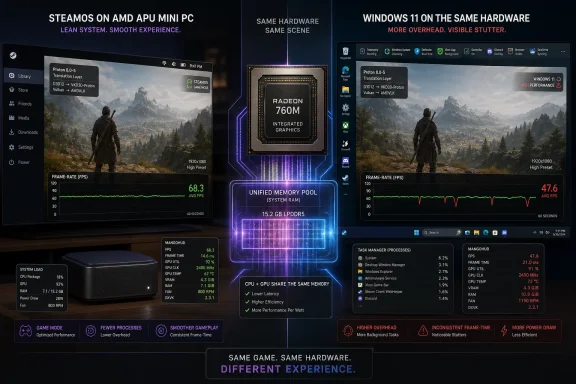
SteamOS is outperforming Windows 11 on some integrated-graphics gaming PCs because Valve’s Linux-based gaming stack, Proton compatibility layer, and lighter console-style runtime can leave more CPU, memory, and GPU headroom for games on constrained AMD APU hardware, as recent Ryzen 5 8600G testing illustrates. That does not mean Windows 11 has suddenly become a bad gaming OS, or that SteamOS wins every benchmark on every machine. It means the weakest point in modern PC gaming — shared-memory graphics — is exposing the cost of Windows’ broader ambitions. On low-power hardware, the operating system is no longer just the thing beneath the game; it is part of the frame-rate budget.
The interesting part of the SteamOS-versus-Windows 11 argument is not that Linux can win a benchmark. Linux has been doing that in isolated cases for years, usually followed by caveats about driver maturity, anti-cheat, launchers, multiplayer games, and the thousand papercuts that make PC gaming a negotiation rather than a pastime. What is different now is that the win is arriving in a segment that matters commercially: cheap desktops, mini PCs, handhelds, and living-room boxes built around AMD integrated graphics.
The Ryzen 5 8600G is a useful test case because it is not exotic. It is a six-core Zen 4 desktop APU with Radeon 760M integrated graphics, exactly the kind of chip that makes sense for a budget gaming machine where the buyer either cannot afford a discrete GPU or does not want the size, heat, and power draw that comes with one. On that kind of system, a few frames per second are not a rounding error. They are the difference between “playable if you squint” and “surprisingly decent.”
That is why the reported Sid The Geek results, amplified by Geeky Gadgets, are more interesting than another abstract operating-system shootout. SteamOS was not merely winning in a synthetic benchmark. It was reportedly delivering smoother play in games such as Sonic Frontiers, Doom Eternal, Street Fighter 6, and Black Myth: Wukong on a Radeon 760M iGPU at 1080p low settings, where every shared memory access and every background task matters.
The numbers themselves should be treated as one data point, not a universal law. But the pattern is hard to ignore. SteamOS was described as maintaining higher or steadier frame rates across several titles, while Windows 11 trailed by enough to be noticeable rather than academic.
An APU like the Ryzen 5 8600G shares system memory between CPU and GPU. That means the game, the graphics driver, the compositor, the operating system, background services, overlays, storefronts, update checkers, security components, and whatever else the user installed are all competing inside a much smaller performance envelope. On a high-end desktop, that competition may be invisible. On integrated graphics, it becomes visible in frame pacing, input latency, and minimum frame rates.
This is where SteamOS has a structural advantage. It is not a general-purpose desktop OS first and a gaming environment second. On the Steam Deck and SteamOS-style machines, it behaves more like a console shell wrapped around a PC: boot into a gaming interface, launch the game, manage power and performance profiles, keep the stack predictable. The less the system is trying to be at the moment a game runs, the more room the game has.
Windows 11, by contrast, is designed to be everything to everyone. It is a workstation OS, a gaming OS, a corporate endpoint, a tablet shell, a Microsoft account front end, a security platform, a cloud integration surface, and a compatibility museum for decades of Win32 software. That breadth is its superpower. It is also overhead.
The problem is not that any single Windows component is catastrophic. It is the accumulation. A little telemetry here, a little indexing there, a GPU-accelerated desktop compositor, background app frameworks, update services, security checks, vendor utilities, RGB control panels, launchers, overlays, and cloud sync clients all take their turn. On a system with an RTX 4080, this is background noise. On a Radeon 760M, background noise can become a measurable tax.
Proton changed that equation. Built by Valve on top of Wine and related translation technologies, Proton allows many Windows games to run on Linux without a native Linux port. It translates DirectX and Windows API calls into equivalents that can run through the Linux graphics stack, typically using Vulkan as a major part of the path. The result is not magic, and it is not perfect. But it has become good enough that the old assumption — Windows is always the safest gaming default — now needs qualifiers.
The Steam Deck accelerated that change because Valve finally had a mass-market reason to make Linux gaming boring. Boring is the goal. A compatibility layer that users do not think about is more valuable than one that wins philosophical arguments on message boards. Every game that moves from “maybe if you tweak launch flags” to “click Play” makes SteamOS more credible outside the handheld niche.
That credibility matters for integrated graphics because Proton is no longer automatically a performance penalty. In some games, the translation path can be competitive with or faster than the native Windows path, depending on the renderer, driver behavior, shader compilation, CPU overhead, and how the game interacts with the graphics stack. The old intuition that “native Windows must be faster” is too simplistic for modern PC games.
The real story is not that Proton always beats Windows. It is that Proton is now good enough for SteamOS to compete on the whole system design. Once compatibility stops being disqualifying, the argument shifts to overhead, frame pacing, suspend behavior, shader caching, controller handling, and how tightly the OS is tuned for play rather than productivity.
SteamOS does not carry that burden. Its default gaming mode is opinionated in ways Windows cannot easily be. It can assume Steam is central. It can assume a controller-friendly interface matters. It can make the game the foreground citizen and treat the rest of the machine as supporting cast.
That narrower mission pays off on hardware with limited graphics resources. A budget APU does not need the most theoretically compatible OS. It needs the OS that wastes the least while the game is running. That is a very different contest.
Microsoft has tried to address parts of this problem. Windows has Game Mode, Hardware-Accelerated GPU Scheduling, Auto HDR, DirectStorage, graphics settings per application, and a large ecosystem of vendor-tuned drivers. On many discrete-GPU systems, especially Nvidia-heavy desktops, Windows remains the path of least resistance and often the best-performing option. But those features do not erase the basic fact that Windows is carrying more of the PC world on its back.
SteamOS wins when specialization beats universality. Windows wins when universality matters more than specialization. Integrated graphics tilt the contest toward specialization because the budget is so small.
Those are meaningful deltas on integrated graphics. A jump from 34 FPS to 44 FPS is not the same kind of improvement as 144 FPS to 154 FPS. At the low end, ten frames can change how a game feels, how responsive it seems, and whether the player accepts the compromise.
But the more important signal is consistency. Integrated graphics users are not usually chasing ultra settings. They are negotiating. They lower resolution, turn off expensive effects, rely on FSR or other upscalers, cap frame rates, and accept lower presets in exchange for playable performance. In that world, fewer dips matter as much as higher averages.
This is where a gaming-first OS can feel better than its benchmark chart suggests. Smoothness is not just the average FPS number. It is shader pre-caching, fewer background interruptions, stable frame pacing, predictable controller input, and not having the system decide mid-session that some unrelated service deserves attention. SteamOS’s console-like discipline helps it avoid some of the little indignities Windows users have learned to tolerate.
That does not mean every reported win will reproduce on every machine. Driver versions, BIOS settings, RAM speed, memory channel configuration, VRAM allocation, thermal limits, and game patches can all change the outcome. Integrated graphics are especially sensitive to memory bandwidth, so a badly configured Windows machine or an optimized SteamOS install can exaggerate the spread. Still, the broader trend aligns with what handheld and mini-PC users have been noticing: Windows is often the heavier guest on low-power gaming hardware.
That matters because integrated-graphics performance is often about bottleneck identification. Is the game GPU-bound? Is the CPU feeding frames too slowly? Is the APU power-limited? Is memory bandwidth the ceiling? Is the system stuttering during shader compilation? Without telemetry, users end up guessing. With telemetry, they can see whether a tweak actually changed anything.
Windows has monitoring tools too, of course. MSI Afterburner, PresentMon-based utilities, vendor overlays, Xbox Game Bar, and driver software can expose plenty of data. The difference is cultural as much as technical. SteamOS users in the handheld and APU world have become accustomed to treating performance tuning as part of the interface. Frame-rate caps, TDP limits, upscaling, refresh-rate choices, and overlays feel native to the experience rather than bolted on.
That console-like tuning model is especially powerful on integrated graphics. If the whole machine is a constrained thermal and power envelope, the user benefits from controls that treat it that way. Windows still tends to behave like a desktop OS that happens to run on handhelds and small boxes. SteamOS behaves like a gaming appliance that happens to be a PC underneath.
That changed expectations for Windows handhelds. Devices like the ASUS ROG Ally, Lenovo Legion Go, MSI Claw, and other compact gaming PCs proved that Windows could be squeezed into a handheld form factor, but they also revealed how awkward it could be. Small touch targets, desktop dialogs, launcher friction, update prompts, driver utilities, and sleep behavior all feel worse when the device is supposed to be picked up like a Switch.
The integrated-graphics debate inherits that same lesson. SteamOS is not winning merely because Linux has fewer background processes. It is winning because Valve designed the experience around the reality of constrained gaming hardware. Windows is still adapting a desktop-first environment to a class of machines that behaves more like a console.
That is why SteamOS-style performance wins matter beyond the Steam Deck. If a living-room mini PC or cheap APU desktop can deliver better real-world gaming under SteamOS than Windows 11, Valve’s OS stops being a handheld curiosity and starts becoming a credible gaming-room platform. It does not need to replace Windows everywhere. It only needs to be better in the places where gaming is the primary job.
For players whose libraries revolve around unsupported anti-cheat titles, Windows remains non-negotiable. That is not because Windows is more elegant, lighter, or better suited to integrated graphics. It is because the game will not run, or will not run safely in the eyes of its developer, on SteamOS. Compatibility still beats efficiency when the alternative is a title screen or a ban risk.
Launchers are another nuisance. SteamOS is strongest when the game lives in Steam. Non-Steam games can work, and tools such as Lutris, Heroic Games Launcher, Bottles, and related community solutions have improved dramatically. But every additional launcher reintroduces the PC complexity that SteamOS is trying to abstract away.
This is where the argument should stay honest. SteamOS may be the better gaming OS for a growing set of integrated-graphics scenarios, but Windows remains the broader gaming compatibility layer for the entire PC ecosystem. If you play everything, mod heavily, use niche peripherals, depend on Game Pass for PC, or jump between storefronts daily, Windows is still the safer default.
That helps explain why SteamOS shines on AMD APUs. Valve’s hardware choices, Steam Deck development work, shader caching infrastructure, and Proton improvements all orbit AMD-based devices. The result is a stack where the hardware, driver model, compositor, compatibility layer, and storefront are unusually aligned.
Windows, meanwhile, depends on vendor drivers, OEM packaging, and Microsoft’s graphics architecture. That can be excellent on mainstream desktops, especially with discrete GPUs and mature drivers. But handhelds and mini PCs often arrive with custom power profiles, vendor utilities, and driver update paths that are less graceful than a normal gaming tower. The Windows experience depends heavily on the device maker doing the integration work well.
This is why some Windows handhelds feel better after months of firmware and driver updates. The hardware was not necessarily bad at launch; the software stack was immature. SteamOS’s advantage is that Valve has spent years making one kind of experience coherent. Windows vendors each have to build that coherence themselves.
The danger for Microsoft is not that Windows cannot be tuned. It is that tuning Windows for these devices requires too many parties to do the right thing. Valve controls more of the experience, and on constrained gaming hardware, control is performance.
The buyer considering an APU system wants to know whether Doom Eternal runs smoothly, whether Street Fighter 6 holds its frame target, whether the fan screams, whether sleep works, whether the controller behaves, and whether the machine feels like a bargain or a compromise. SteamOS is gaining ground because it answers more of those questions in practical terms.
A Ryzen 5 8600G system is exactly where this practicality becomes obvious. Add a discrete GPU and Windows’ overhead becomes easier to ignore. Drop down to an iGPU and the OS becomes part of the performance equation. SteamOS does not need to be philosophically superior; it only needs to turn a marginal experience into a playable one.
That is a powerful message for small-form-factor PCs. A living-room box without a discrete GPU is easier to justify if the software stack is tuned for exactly that use case. A cheap desktop for a teenager becomes more appealing if SteamOS can squeeze out enough performance to avoid the immediate GPU upgrade. A portable machine becomes more console-like if it boots directly into a gaming interface and spends fewer resources pretending to be a laptop.
This is also why Microsoft should take the threat seriously even if SteamOS remains numerically small. Platform shifts often start in niches where the incumbent’s generality becomes a liability. Netbooks exposed desktop OS bloat. Smartphones exposed the limits of PC-era interface assumptions. Handheld gaming PCs are now exposing Windows’ awkwardness on devices that need console simplicity and laptop compatibility at the same time.
The problem is that the growth area in PC-like gaming is not only the high-end tower. It is handhelds, mini PCs, TV boxes, compact desktops, and low-cost machines that blur the line between console and computer. These devices do not reward the same assumptions that made Windows dominant.
A gaming handheld does not benefit much from being able to run every enterprise app. A living-room Steam box does not need three decades of Control Panel archaeology. A budget APU gaming PC does not want background complexity competing with shared memory. Microsoft’s strengths still matter, but they are not evenly valuable across every form factor.
The company can respond. A more console-like Windows gaming mode, deeper handheld UX work, stricter background resource controls, better suspend and resume, cleaner driver delivery, and less OEM clutter would all help. Microsoft has already moved in parts of this direction, but the work has often felt incremental rather than foundational.
Valve, by contrast, had the advantage of starting with a narrower question: what should a PC gaming appliance feel like? SteamOS is the answer to that question. Windows 11 is the answer to a much larger and messier one.
SteamOS is trying to occupy the middle. It keeps enough PC flexibility to run a massive Steam library, expose performance overlays, allow desktop access, and support tinkering. But it hides enough of the operating system to make the machine feel purposeful. On integrated graphics, that purposefulness has measurable consequences.
Windows has historically assumed that users want the full PC because the full PC is the product. SteamOS assumes that users want the game first and the PC second. That distinction becomes sharper as hardware gets smaller and cheaper.
The more integrated graphics improve, the more important this becomes. AMD’s recent APUs are already capable of credible 1080p low-to-medium gaming in the right titles, especially with upscaling and careful settings. If the hardware is finally good enough for mainstream budget play, then the operating system’s job is to avoid getting in the way.
SteamOS appears to be doing that better in some of the scenarios where it matters most. Not because Linux has transcended all its problems. Not because Windows has collapsed. But because Valve has aligned the software stack around the player’s immediate goal with unusual discipline.
SteamOS is strongest when the user’s library is Steam-heavy, the hardware is AMD-based, and the goal is efficient gaming rather than general computing. Windows 11 is strongest when compatibility breadth, anti-cheat certainty, Game Pass access, productivity apps, or non-Steam launchers matter more than shaving overhead. Neither platform owns the entire answer.
But the direction of travel favors Valve in the low-power gaming niche. If SteamOS keeps expanding beyond Valve’s own handheld, and if OEMs ship more devices built around it rather than merely tolerated by it, Windows will face a more credible living-room and handheld competitor than Linux gaming has ever produced before.
This is the part Microsoft should worry about. SteamOS does not need to defeat Windows on every gaming PC. It only needs to become the obvious choice on the machines where Windows feels too large for the job.
 Valve’s Quiet Win Is Happening Where Every Watt Counts
The interesting part of the SteamOS-versus-Windows 11 argument is not that Linux can win a benchmark. Linux has been doing that in isolated cases for years, usually followed by caveats about driver maturity, anti-cheat, launchers, multiplayer games, and the thousand papercuts that make PC gaming a negotiation rather than a pastime. What is different now is that the win is arriving in a segment that matters commercially: cheap desktops, mini PCs, handhelds, and living-room boxes built around AMD integrated graphics.The Ryzen 5 8600G is a useful test case because it is not exotic. It is a six-core Zen 4 desktop APU with Radeon 760M integrated graphics, exactly the kind of chip that makes sense for a budget gaming machine where the buyer either cannot afford a discrete GPU or does not want the size, heat, and power draw that comes with one. On that kind of system, a few frames per second are not a rounding error. They are the difference between “playable if you squint” and “surprisingly decent.”
That is why the reported Sid The Geek results, amplified by Geeky Gadgets, are more interesting than another abstract operating-system shootout. SteamOS was not merely winning in a synthetic benchmark. It was reportedly delivering smoother play in games such as Sonic Frontiers, Doom Eternal, Street Fighter 6, and Black Myth: Wukong on a Radeon 760M iGPU at 1080p low settings, where every shared memory access and every background task matters.
The numbers themselves should be treated as one data point, not a universal law. But the pattern is hard to ignore. SteamOS was described as maintaining higher or steadier frame rates across several titles, while Windows 11 trailed by enough to be noticeable rather than academic.
Integrated Graphics Punish Operating-System Indulgence
A discrete GPU gives the operating system more room to be messy. It has its own VRAM, its own thermal envelope, and enough brute force to hide inefficiencies that would otherwise show up as stutter. Integrated graphics have no such luxury.An APU like the Ryzen 5 8600G shares system memory between CPU and GPU. That means the game, the graphics driver, the compositor, the operating system, background services, overlays, storefronts, update checkers, security components, and whatever else the user installed are all competing inside a much smaller performance envelope. On a high-end desktop, that competition may be invisible. On integrated graphics, it becomes visible in frame pacing, input latency, and minimum frame rates.
This is where SteamOS has a structural advantage. It is not a general-purpose desktop OS first and a gaming environment second. On the Steam Deck and SteamOS-style machines, it behaves more like a console shell wrapped around a PC: boot into a gaming interface, launch the game, manage power and performance profiles, keep the stack predictable. The less the system is trying to be at the moment a game runs, the more room the game has.
Windows 11, by contrast, is designed to be everything to everyone. It is a workstation OS, a gaming OS, a corporate endpoint, a tablet shell, a Microsoft account front end, a security platform, a cloud integration surface, and a compatibility museum for decades of Win32 software. That breadth is its superpower. It is also overhead.
The problem is not that any single Windows component is catastrophic. It is the accumulation. A little telemetry here, a little indexing there, a GPU-accelerated desktop compositor, background app frameworks, update services, security checks, vendor utilities, RGB control panels, launchers, overlays, and cloud sync clients all take their turn. On a system with an RTX 4080, this is background noise. On a Radeon 760M, background noise can become a measurable tax.
Proton Has Stopped Being the Punchline
For years, the obvious objection to Linux gaming was compatibility. Windows had the games, the drivers, the storefronts, and the developer mindshare. Linux had ideals, forums, and a reputation for turning game launches into weekend projects.Proton changed that equation. Built by Valve on top of Wine and related translation technologies, Proton allows many Windows games to run on Linux without a native Linux port. It translates DirectX and Windows API calls into equivalents that can run through the Linux graphics stack, typically using Vulkan as a major part of the path. The result is not magic, and it is not perfect. But it has become good enough that the old assumption — Windows is always the safest gaming default — now needs qualifiers.
The Steam Deck accelerated that change because Valve finally had a mass-market reason to make Linux gaming boring. Boring is the goal. A compatibility layer that users do not think about is more valuable than one that wins philosophical arguments on message boards. Every game that moves from “maybe if you tweak launch flags” to “click Play” makes SteamOS more credible outside the handheld niche.
That credibility matters for integrated graphics because Proton is no longer automatically a performance penalty. In some games, the translation path can be competitive with or faster than the native Windows path, depending on the renderer, driver behavior, shader compilation, CPU overhead, and how the game interacts with the graphics stack. The old intuition that “native Windows must be faster” is too simplistic for modern PC games.
The real story is not that Proton always beats Windows. It is that Proton is now good enough for SteamOS to compete on the whole system design. Once compatibility stops being disqualifying, the argument shifts to overhead, frame pacing, suspend behavior, shader caching, controller handling, and how tightly the OS is tuned for play rather than productivity.
Windows 11 Is Optimized for the PC Microsoft Has to Support
It is tempting to frame this as a Microsoft failure, but that undersells the difficulty of Windows’ job. Windows 11 has to support an absurd range of hardware, peripherals, enterprise policies, accessibility tools, security products, legacy applications, and workflows. It has to run games, yes, but it also has to run accounting software from 2009, endpoint detection agents, printer utilities, CAD tools, Teams, Office, browser-based line-of-business apps, and whatever unsigned helper executable an OEM decided to preload.SteamOS does not carry that burden. Its default gaming mode is opinionated in ways Windows cannot easily be. It can assume Steam is central. It can assume a controller-friendly interface matters. It can make the game the foreground citizen and treat the rest of the machine as supporting cast.
That narrower mission pays off on hardware with limited graphics resources. A budget APU does not need the most theoretically compatible OS. It needs the OS that wastes the least while the game is running. That is a very different contest.
Microsoft has tried to address parts of this problem. Windows has Game Mode, Hardware-Accelerated GPU Scheduling, Auto HDR, DirectStorage, graphics settings per application, and a large ecosystem of vendor-tuned drivers. On many discrete-GPU systems, especially Nvidia-heavy desktops, Windows remains the path of least resistance and often the best-performing option. But those features do not erase the basic fact that Windows is carrying more of the PC world on its back.
SteamOS wins when specialization beats universality. Windows wins when universality matters more than specialization. Integrated graphics tilt the contest toward specialization because the budget is so small.
The Benchmarks Are a Symptom, Not the Whole Disease
The reported game-by-game results tell a clean story. Sonic Frontiers allegedly ran a few frames faster and more smoothly on SteamOS. Black Myth: Wukong showed a larger gap, with SteamOS reportedly averaging in the low 50s while Windows 11 sat in the mid-40s. Street Fighter 6 favored SteamOS with a steadier 60 FPS target. Doom Eternal showed SteamOS ahead by roughly ten frames per second.Those are meaningful deltas on integrated graphics. A jump from 34 FPS to 44 FPS is not the same kind of improvement as 144 FPS to 154 FPS. At the low end, ten frames can change how a game feels, how responsive it seems, and whether the player accepts the compromise.
But the more important signal is consistency. Integrated graphics users are not usually chasing ultra settings. They are negotiating. They lower resolution, turn off expensive effects, rely on FSR or other upscalers, cap frame rates, and accept lower presets in exchange for playable performance. In that world, fewer dips matter as much as higher averages.
This is where a gaming-first OS can feel better than its benchmark chart suggests. Smoothness is not just the average FPS number. It is shader pre-caching, fewer background interruptions, stable frame pacing, predictable controller input, and not having the system decide mid-session that some unrelated service deserves attention. SteamOS’s console-like discipline helps it avoid some of the little indignities Windows users have learned to tolerate.
That does not mean every reported win will reproduce on every machine. Driver versions, BIOS settings, RAM speed, memory channel configuration, VRAM allocation, thermal limits, and game patches can all change the outcome. Integrated graphics are especially sensitive to memory bandwidth, so a badly configured Windows machine or an optimized SteamOS install can exaggerate the spread. Still, the broader trend aligns with what handheld and mini-PC users have been noticing: Windows is often the heavier guest on low-power gaming hardware.
MangoHUD Shows the Fight Windows Often Hides
One reason this debate has become more visible is that Linux gaming tools have grown up. MangoHUD, the overlay commonly used in SteamOS and Linux gaming tests, gives players real-time visibility into frame rate, frame time, CPU load, GPU load, temperatures, power draw, memory use, and other metrics. It turns “this feels smoother” into something closer to evidence.That matters because integrated-graphics performance is often about bottleneck identification. Is the game GPU-bound? Is the CPU feeding frames too slowly? Is the APU power-limited? Is memory bandwidth the ceiling? Is the system stuttering during shader compilation? Without telemetry, users end up guessing. With telemetry, they can see whether a tweak actually changed anything.
Windows has monitoring tools too, of course. MSI Afterburner, PresentMon-based utilities, vendor overlays, Xbox Game Bar, and driver software can expose plenty of data. The difference is cultural as much as technical. SteamOS users in the handheld and APU world have become accustomed to treating performance tuning as part of the interface. Frame-rate caps, TDP limits, upscaling, refresh-rate choices, and overlays feel native to the experience rather than bolted on.
That console-like tuning model is especially powerful on integrated graphics. If the whole machine is a constrained thermal and power envelope, the user benefits from controls that treat it that way. Windows still tends to behave like a desktop OS that happens to run on handhelds and small boxes. SteamOS behaves like a gaming appliance that happens to be a PC underneath.
The Handheld PC Exposed Windows’ Weakness First
The Steam Deck did not invent Linux gaming, but it made the trade-offs legible. Before the Deck, most mainstream PC gamers saw Linux as an alternative desktop OS. After the Deck, they saw SteamOS as the thing that lets a handheld feel like a console while still playing a huge chunk of the PC library.That changed expectations for Windows handhelds. Devices like the ASUS ROG Ally, Lenovo Legion Go, MSI Claw, and other compact gaming PCs proved that Windows could be squeezed into a handheld form factor, but they also revealed how awkward it could be. Small touch targets, desktop dialogs, launcher friction, update prompts, driver utilities, and sleep behavior all feel worse when the device is supposed to be picked up like a Switch.
The integrated-graphics debate inherits that same lesson. SteamOS is not winning merely because Linux has fewer background processes. It is winning because Valve designed the experience around the reality of constrained gaming hardware. Windows is still adapting a desktop-first environment to a class of machines that behaves more like a console.
That is why SteamOS-style performance wins matter beyond the Steam Deck. If a living-room mini PC or cheap APU desktop can deliver better real-world gaming under SteamOS than Windows 11, Valve’s OS stops being a handheld curiosity and starts becoming a credible gaming-room platform. It does not need to replace Windows everywhere. It only needs to be better in the places where gaming is the primary job.
The Anti-Cheat Wall Still Keeps Windows in the Room
SteamOS’s rise has one stubborn counterargument: compatibility is not solved equally across all games. Proton handles a large and growing library, but competitive multiplayer remains the minefield. Anti-cheat systems can block Linux or Proton support unless developers explicitly enable and validate it. Some publishers are comfortable with that. Others are not.For players whose libraries revolve around unsupported anti-cheat titles, Windows remains non-negotiable. That is not because Windows is more elegant, lighter, or better suited to integrated graphics. It is because the game will not run, or will not run safely in the eyes of its developer, on SteamOS. Compatibility still beats efficiency when the alternative is a title screen or a ban risk.
Launchers are another nuisance. SteamOS is strongest when the game lives in Steam. Non-Steam games can work, and tools such as Lutris, Heroic Games Launcher, Bottles, and related community solutions have improved dramatically. But every additional launcher reintroduces the PC complexity that SteamOS is trying to abstract away.
This is where the argument should stay honest. SteamOS may be the better gaming OS for a growing set of integrated-graphics scenarios, but Windows remains the broader gaming compatibility layer for the entire PC ecosystem. If you play everything, mod heavily, use niche peripherals, depend on Game Pass for PC, or jump between storefronts daily, Windows is still the safer default.
The Driver Story Is More Complicated Than “Linux Good, Windows Bad”
AMD’s role in this story deserves attention. SteamOS benefits from the Linux graphics stack, including Mesa drivers and Vulkan-focused improvements that have matured rapidly because of the Steam Deck. AMD hardware has generally been the friendliest foundation for this world, in part because of the openness and quality of the Linux driver ecosystem around Radeon GPUs.That helps explain why SteamOS shines on AMD APUs. Valve’s hardware choices, Steam Deck development work, shader caching infrastructure, and Proton improvements all orbit AMD-based devices. The result is a stack where the hardware, driver model, compositor, compatibility layer, and storefront are unusually aligned.
Windows, meanwhile, depends on vendor drivers, OEM packaging, and Microsoft’s graphics architecture. That can be excellent on mainstream desktops, especially with discrete GPUs and mature drivers. But handhelds and mini PCs often arrive with custom power profiles, vendor utilities, and driver update paths that are less graceful than a normal gaming tower. The Windows experience depends heavily on the device maker doing the integration work well.
This is why some Windows handhelds feel better after months of firmware and driver updates. The hardware was not necessarily bad at launch; the software stack was immature. SteamOS’s advantage is that Valve has spent years making one kind of experience coherent. Windows vendors each have to build that coherence themselves.
The danger for Microsoft is not that Windows cannot be tuned. It is that tuning Windows for these devices requires too many parties to do the right thing. Valve controls more of the experience, and on constrained gaming hardware, control is performance.
Budget Gamers Care Less About OS Theology Than Playability
There is a tendency in Linux-versus-Windows debates to drift into ideology. Open source versus proprietary software. User control versus platform control. Desktop freedom versus ecosystem lock-in. Those arguments matter, but they are not what sells a budget gaming box.The buyer considering an APU system wants to know whether Doom Eternal runs smoothly, whether Street Fighter 6 holds its frame target, whether the fan screams, whether sleep works, whether the controller behaves, and whether the machine feels like a bargain or a compromise. SteamOS is gaining ground because it answers more of those questions in practical terms.
A Ryzen 5 8600G system is exactly where this practicality becomes obvious. Add a discrete GPU and Windows’ overhead becomes easier to ignore. Drop down to an iGPU and the OS becomes part of the performance equation. SteamOS does not need to be philosophically superior; it only needs to turn a marginal experience into a playable one.
That is a powerful message for small-form-factor PCs. A living-room box without a discrete GPU is easier to justify if the software stack is tuned for exactly that use case. A cheap desktop for a teenager becomes more appealing if SteamOS can squeeze out enough performance to avoid the immediate GPU upgrade. A portable machine becomes more console-like if it boots directly into a gaming interface and spends fewer resources pretending to be a laptop.
This is also why Microsoft should take the threat seriously even if SteamOS remains numerically small. Platform shifts often start in niches where the incumbent’s generality becomes a liability. Netbooks exposed desktop OS bloat. Smartphones exposed the limits of PC-era interface assumptions. Handheld gaming PCs are now exposing Windows’ awkwardness on devices that need console simplicity and laptop compatibility at the same time.
Microsoft’s Gaming Problem Is Not DirectX
Microsoft still owns enormous advantages. DirectX remains central to PC gaming. Windows has the largest compatibility base, the most publisher support, the widest peripheral ecosystem, and deep integration with GPU vendors. For a high-end gaming desktop, Windows 11 is not going away.The problem is that the growth area in PC-like gaming is not only the high-end tower. It is handhelds, mini PCs, TV boxes, compact desktops, and low-cost machines that blur the line between console and computer. These devices do not reward the same assumptions that made Windows dominant.
A gaming handheld does not benefit much from being able to run every enterprise app. A living-room Steam box does not need three decades of Control Panel archaeology. A budget APU gaming PC does not want background complexity competing with shared memory. Microsoft’s strengths still matter, but they are not evenly valuable across every form factor.
The company can respond. A more console-like Windows gaming mode, deeper handheld UX work, stricter background resource controls, better suspend and resume, cleaner driver delivery, and less OEM clutter would all help. Microsoft has already moved in parts of this direction, but the work has often felt incremental rather than foundational.
Valve, by contrast, had the advantage of starting with a narrower question: what should a PC gaming appliance feel like? SteamOS is the answer to that question. Windows 11 is the answer to a much larger and messier one.
SteamOS Wins by Making the PC Smaller
The irony of SteamOS is that it makes PC gaming better by making the PC less visible. The traditional PC advantage is openness: install anything, tweak everything, run every launcher, attach every peripheral, mod every file. The traditional console advantage is coherence: turn it on, pick a game, play.SteamOS is trying to occupy the middle. It keeps enough PC flexibility to run a massive Steam library, expose performance overlays, allow desktop access, and support tinkering. But it hides enough of the operating system to make the machine feel purposeful. On integrated graphics, that purposefulness has measurable consequences.
Windows has historically assumed that users want the full PC because the full PC is the product. SteamOS assumes that users want the game first and the PC second. That distinction becomes sharper as hardware gets smaller and cheaper.
The more integrated graphics improve, the more important this becomes. AMD’s recent APUs are already capable of credible 1080p low-to-medium gaming in the right titles, especially with upscaling and careful settings. If the hardware is finally good enough for mainstream budget play, then the operating system’s job is to avoid getting in the way.
SteamOS appears to be doing that better in some of the scenarios where it matters most. Not because Linux has transcended all its problems. Not because Windows has collapsed. But because Valve has aligned the software stack around the player’s immediate goal with unusual discipline.
The Frame-Rate Gap Points to a Platform Gap
The practical lesson from the Ryzen 5 8600G testing is not that everyone should wipe Windows tomorrow. It is that operating-system choice has become a meaningful gaming-performance variable again, especially for machines without a discrete GPU. For years, the advice was simple: install Windows if you want to play PC games. That advice now needs a footnote.SteamOS is strongest when the user’s library is Steam-heavy, the hardware is AMD-based, and the goal is efficient gaming rather than general computing. Windows 11 is strongest when compatibility breadth, anti-cheat certainty, Game Pass access, productivity apps, or non-Steam launchers matter more than shaving overhead. Neither platform owns the entire answer.
But the direction of travel favors Valve in the low-power gaming niche. If SteamOS keeps expanding beyond Valve’s own handheld, and if OEMs ship more devices built around it rather than merely tolerated by it, Windows will face a more credible living-room and handheld competitor than Linux gaming has ever produced before.
This is the part Microsoft should worry about. SteamOS does not need to defeat Windows on every gaming PC. It only needs to become the obvious choice on the machines where Windows feels too large for the job.
The Radeon 760M Test Is a Warning Shot, Not a Coronation
The SteamOS story is compelling precisely because it is specific. The win appears on constrained AMD integrated graphics, in real games, under low-setting scenarios where players care deeply about marginal gains. That makes it useful, but not universal.- SteamOS can outperform Windows 11 on AMD integrated graphics when its lighter gaming-focused stack leaves more headroom for the game itself.
- Proton has matured enough that running Windows games on Linux is no longer automatically a performance disadvantage.
- Windows 11 remains the broader compatibility choice, especially for anti-cheat-heavy multiplayer titles, Game Pass, niche peripherals, and non-Steam workflows.
- Integrated graphics magnify operating-system overhead because CPU, GPU, and system memory are all sharing a tight performance budget.
- Valve’s biggest advantage is not Linux alone, but the way SteamOS combines drivers, shader handling, controller-first design, performance tools, and a console-like interface.
- Microsoft’s challenge is to make Windows feel less like a full desktop OS when it is running on devices that users treat like consoles.
References
- Primary source: Geeky Gadgets
Published: 2026-07-01T06:50:12.678966
SteamOS vs Windows 11: Integrated Graphics Performance Tested - Geeky Gadgets
Discover why SteamOS is outperforming Windows 11 in popular games like Doom Eternal and Black Myth Wukong on mini PC setups.www.geeky-gadgets.com - Related coverage: techspot.com
Benchmarks show Windows can still outperform SteamOS on dedicated GPUs | TechSpot
Recent benchmarks from Ars Technica show that SteamOS' performance advantage over Windows 11 largely evaporates and sometimes reverses on devices with discrete graphics. Moreover, Valve's Linux distro...www.techspot.com - Related coverage: tomshardware.com
AMD's upcoming integrated graphics matches seven years old GTX 1060 in Geekbench 6 — Ryzen 5 8600G iGPU benchmarks leak | Tom's Hardware
The desktop 760M looks lands between the mobile Radeon 780M and 760M.www.tomshardware.com - Related coverage: arstechnica.com
Games run faster on SteamOS than Windows 11, Ars testing finds - Ars Technica
Lenovo Legion Go S gets better frame rates running Valve's free operating system.arstechnica.com - Related coverage: gamingonlinux.com
A guide to Steam Play Proton, Valve's tech for playing Windows games on Linux / Steam Deck | GamingOnLinux
Looking to test the waters with Linux gaming and don't want to lose access to your favourite Windows games? Need to know how games actually run on Steam Deck? Here's a simple no-nonsense guide to actually using Steam Play Proton.www.gamingonlinux.com
