

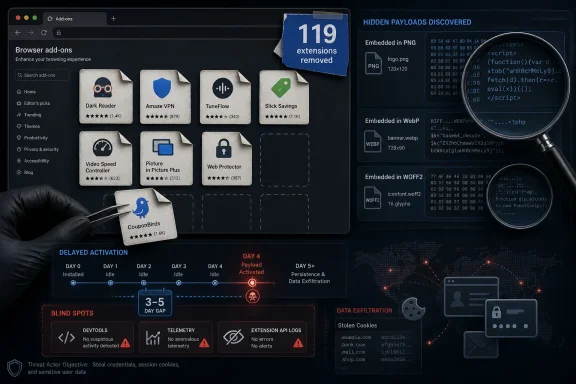
Microsoft said on June 16, 2026, that its Edge Extensions Security Team removed 119 malicious Edge add-ons tied to StegoAd, a long-running campaign that used steganography to hide malware in image and font files and may have reached up to 2.6 million installs. The takedown is not merely another dirty-extension cleanup. It is a case study in how browser add-ons have become a soft underbelly of desktop security, even when they are distributed through official stores. The uncomfortable lesson is that the modern browser is not just an app; it is an operating environment with its own supply chain, permissions model, telemetry blind spots, and criminal economy.
The StegoAd operation worked because it looked ordinary. Its extensions lived in categories users recognize and routinely trust: ad blockers, VPNs, translators, video downloaders, shopping helpers, color tools, and other small conveniences that promise to smooth out the daily web. The malicious add-ons reportedly provided real functionality, which is the oldest and most effective trick in gray-market software: do the visible job well enough that nobody asks what else is happening.
That matters because users do not evaluate extensions the way they evaluate executable downloads. An installer from a random website still carries a whiff of danger; an extension from a browser vendor’s official marketplace feels curated. The storefront supplies the trust signal before the code ever runs.
Microsoft’s own write-up frames the operation as proactive threat hunting rather than a simple abuse report. That distinction is important. StegoAd was not a crude scam extension that immediately redirects every tab to a fake search portal. It was a patient campaign that understood how marketplaces, automated scanners, researchers, and users behave.
The result was a malware operation that did not need to defeat Windows Defender at the kernel level or exploit a browser zero-day to gain value. It rode into the browser through a feature users deliberately installed, then waited for the moment when store review, sandbox testing, and user suspicion were least likely to be watching.
As defenders adapted, the operators moved. Microsoft said the campaign evolved from PNG-based payload hiding to WebP containers and later to WOFF2 font files, where malicious content could be disguised inside font data or symbols that appeared innocuous. The key point is not that any single file format is uniquely dangerous. It is that attackers are increasingly designing payloads around what automated review systems are least likely to execute, decode, or semantically understand.
That is the deeper failure mode. A store scanner can inspect manifest files, permission requests, minified scripts, and known malicious URLs. It has a harder time proving that a normal-looking image, requested only under specific runtime conditions, contains code that will later be decoded through a chain of transformations and executed.
StegoAd therefore attacked the assumptions behind static analysis. If the dangerous content does not look like code until the extension is running in the right environment, then the marketplace’s first line of defense becomes a speed bump rather than a barrier.
Microsoft said the malicious behavior could remain dormant for three to five days after installation. Some variants reportedly activated only for a fraction of installations. The extensions also checked for signs of analysis, including whether DevTools was open, and could extend their quiet period when they suspected they were being watched.
That changes the economics of detection. Many review systems and researchers observe software for short windows, because store review has to scale. A malicious extension that behaves well for the first hour, first day, or first few sessions can graduate into production while its real behavior remains offstage.
For users, delay also breaks the mental link between cause and effect. If an extension begins redirecting searches or injecting ads immediately after installation, the culprit is obvious. If the same behavior appears a week later, after browser restarts, normal browsing, and several unrelated updates, the victim may blame the website, the ISP, the browser, or “the internet” itself.
For enterprise defenders, delayed activation is even more awkward. Browser extension telemetry is often less mature than endpoint telemetry, and many organizations still treat extensions as a productivity preference rather than managed software. A delayed, selectively triggered extension can hide in that gap for far longer than an unknown executable dropped into a startup folder.
A malicious extension does not always need the most permissive old model if it can pass review, request plausible permissions, and fetch or reconstruct its payload after installation. Manifest restrictions can narrow the blast radius, but they do not automatically answer the central trust question: who controls this extension, what does its code really do, and how does its behavior change after publication?
This is a familiar Windows story in miniature. Microsoft has spent decades learning that signed code, official distribution channels, and permission prompts are useful but insufficient. Attackers adapt by becoming publishers, abusing update mechanisms, renting reputation, or hiding intent until runtime. Browser extension stores are now living through the same maturation cycle.
That does not mean Manifest V3 is useless. It means users and administrators should resist the comforting idea that a platform migration solves malicious extensions by design. The problem is not only API power. It is identity, review depth, behavioral monitoring, update integrity, and incentives.
But the more serious findings were not limited to nuisance adware. Microsoft’s analysis described payload capabilities that included credential theft targeting Google and WordPress accounts, cookie collection, and remote code execution from the browser context. That moves the campaign from annoying to strategically dangerous.
Cookie theft is especially relevant because modern account security increasingly depends on session tokens. A stolen password can be blocked by two-factor authentication; a stolen authenticated session may bypass the login ceremony entirely. If an extension can extract cookies or intercept login flows, it sits near the point where users are most exposed.
The WordPress angle is also not incidental. Administrator credentials for popular sites are useful for spam, malware distribution, SEO poisoning, credential phishing, and drive-by compromise. A browser extension installed by a site administrator can become a bridge from one compromised desktop session to a public-facing web property.
That makes malicious extensions attractive in a post-EDR world. The code runs where the user already spends the day. It can observe URLs, inject content, interact with pages, and in some cases access sensitive data presented to the browser. It can update through marketplace channels or fetch configuration from remote infrastructure. It can also blend into the user’s own customization choices.
This is why StegoAd should worry sysadmins even if their endpoint stack is strong. The endpoint may see a browser doing browser things. The browser may see an extension doing extension things. The identity provider may see a legitimate session from a familiar device. Each layer sees a partial truth, and none necessarily sees the complete attack.
For Windows environments, Edge adds another wrinkle: it is both a consumer browser and an enterprise-managed platform integrated into Microsoft’s broader security and identity story. That gives administrators policy levers, but only if they use them. Leaving extensions unmanaged in a corporate fleet is increasingly hard to defend.
But the StegoAd story also demonstrates that marketplace security is still too reactive. A campaign active since at least 2021 had years to refine packaging, developer accounts, infrastructure, activation logic, and monetization. The store eventually responded, but the adversary had already enjoyed the central advantage of software distribution: scale.
The hard problem for Microsoft, Google, Mozilla, and every extension marketplace is that legitimate extension development often looks suspicious in isolation. Extensions frequently minify code, use remote services, request broad access, inject scripts, and handle user browsing data. Some need aggressive permissions to perform their advertised function. The boundary between powerful and dangerous is not always obvious at submission time.
That is why stores need stronger publisher accountability, deeper behavioral analysis, and continuous post-publication review. The old model of “scan at submission, react to complaints, remove when exposed” is inadequate for campaigns designed to pass the first scan and activate later.
A malicious extension that blocks ads, translates pages, or downloads videos can accumulate positive reviews from users who never see the hidden behavior or cannot attribute it correctly. If only a subset of installations receive active payloads, the review pool becomes even less reliable. The majority may experience a functional tool, while the minority are quietly monetized or compromised.
This is not a reason to ignore reputation, but it is a reason to demote it. Reviews can identify obviously broken or scammy extensions. They cannot prove that an extension’s supply chain, runtime behavior, and remote infrastructure are trustworthy. For security decisions, stars are sentiment data, not assurance data.
The same applies to install counts. High adoption can mean legitimacy. It can also mean the attacker succeeded. In a marketplace where users herd toward popular tools, scale becomes both a trust signal and a target.
Edge, Chrome, and Firefox all provide ways to control extension installation, maintain allowlists or blocklists, and enforce settings through enterprise management. Many organizations use those controls only in sensitive environments. StegoAd argues for making them mainstream.
The reason is simple. Extensions sit at the intersection of web access, identity, SaaS administration, shopping, developer tools, password managers, and internal portals. A risky extension on an administrator’s workstation can be more damaging than a suspicious freeware utility on a locked-down kiosk.
The best enterprise posture is not necessarily “no extensions.” That is often unrealistic and can push users toward worse workarounds. The better model is an approved catalog, periodic review, permission scrutiny, and telemetry that treats extension changes as meaningful events. If a new extension appears across dozens of endpoints, or an old one changes behavior, security teams should know.
If Microsoft’s list contains an extension a user had installed, the right assumption is compromise, not inconvenience. That means removing the extension is only step one. Passwords for sensitive accounts should be changed, sign-in activity reviewed, and sessions revoked where possible. Hardware-backed authentication remains stronger than SMS codes, especially when attackers are targeting login flows and session material.
This is also a moment to reconsider browser profiles. Users who manage websites, handle banking, or administer cloud services from the same browser profile used for casual extension experimentation are collapsing risk boundaries. Separate profiles are not a perfect defense, but they can reduce the chance that a convenience add-on installed for one task gets visibility into everything.
The browser has become the most sensitive application on many PCs. It deserves the kind of housekeeping once reserved for startup programs and installed applications.
Attackers like extensions because the distribution channel is trusted and the permissions can be powerful. They like them because updates are normal. They like them because users often install them casually and forget them. They like them because many organizations have better controls for MSI packages than for browser add-ons.
The rise of cloud work has made the browser more valuable still. Corporate email, source repositories, admin consoles, CRM systems, password resets, finance portals, and AI tools all live behind tabs. A browser extension does not need to own the operating system if the most valuable work already happens inside the browser.
This is the strategic shift StegoAd exposes. We still talk about browsers as clients for the web, but in practice they are identity terminals. Compromise the terminal, and the distinction between local malware and SaaS compromise starts to blur.
That means defenders should expect copycats. Once a technique is documented, it becomes both a warning and a recipe. Other actors can borrow the delayed activation model, the steganographic payload trick, the selective delivery logic, or the use of ordinary extension categories as camouflage.
The extension ecosystem also has a long tail. Removed store listings do not automatically solve every installed-client scenario, every synced profile, every sideloaded package, or every cross-browser variant. Users and admins should verify, not assume.
The more lasting question is whether browser vendors can make malicious-extension operations less profitable before they reach millions of installs. That will require more than better signatures. It will require store-level friction for disposable publishers, richer behavioral detonation, stricter rules around remote logic, and clearer enterprise visibility.
 The Store Was the Attack Surface
The StegoAd operation worked because it looked ordinary. Its extensions lived in categories users recognize and routinely trust: ad blockers, VPNs, translators, video downloaders, shopping helpers, color tools, and other small conveniences that promise to smooth out the daily web. The malicious add-ons reportedly provided real functionality, which is the oldest and most effective trick in gray-market software: do the visible job well enough that nobody asks what else is happening.That matters because users do not evaluate extensions the way they evaluate executable downloads. An installer from a random website still carries a whiff of danger; an extension from a browser vendor’s official marketplace feels curated. The storefront supplies the trust signal before the code ever runs.
Microsoft’s own write-up frames the operation as proactive threat hunting rather than a simple abuse report. That distinction is important. StegoAd was not a crude scam extension that immediately redirects every tab to a fake search portal. It was a patient campaign that understood how marketplaces, automated scanners, researchers, and users behave.
The result was a malware operation that did not need to defeat Windows Defender at the kernel level or exploit a browser zero-day to gain value. It rode into the browser through a feature users deliberately installed, then waited for the moment when store review, sandbox testing, and user suspicion were least likely to be watching.
Steganography Turned Innocent Assets Into Loaders
The name StegoAd is a blunt description of the tradecraft: steganography plus adware. In practice, that meant hiding executable JavaScript inside files that appeared to be harmless images or fonts. The early technique Microsoft described involved malicious JavaScript appended after the IEND marker in PNG files, allowing the image to render normally while carrying extra data that a scanner might not treat as executable content.As defenders adapted, the operators moved. Microsoft said the campaign evolved from PNG-based payload hiding to WebP containers and later to WOFF2 font files, where malicious content could be disguised inside font data or symbols that appeared innocuous. The key point is not that any single file format is uniquely dangerous. It is that attackers are increasingly designing payloads around what automated review systems are least likely to execute, decode, or semantically understand.
That is the deeper failure mode. A store scanner can inspect manifest files, permission requests, minified scripts, and known malicious URLs. It has a harder time proving that a normal-looking image, requested only under specific runtime conditions, contains code that will later be decoded through a chain of transformations and executed.
StegoAd therefore attacked the assumptions behind static analysis. If the dangerous content does not look like code until the extension is running in the right environment, then the marketplace’s first line of defense becomes a speed bump rather than a barrier.
Delay Was the Campaign’s Quiet Superpower
The most clever part of StegoAd may not have been the steganography. It was time.Microsoft said the malicious behavior could remain dormant for three to five days after installation. Some variants reportedly activated only for a fraction of installations. The extensions also checked for signs of analysis, including whether DevTools was open, and could extend their quiet period when they suspected they were being watched.
That changes the economics of detection. Many review systems and researchers observe software for short windows, because store review has to scale. A malicious extension that behaves well for the first hour, first day, or first few sessions can graduate into production while its real behavior remains offstage.
For users, delay also breaks the mental link between cause and effect. If an extension begins redirecting searches or injecting ads immediately after installation, the culprit is obvious. If the same behavior appears a week later, after browser restarts, normal browsing, and several unrelated updates, the victim may blame the website, the ISP, the browser, or “the internet” itself.
For enterprise defenders, delayed activation is even more awkward. Browser extension telemetry is often less mature than endpoint telemetry, and many organizations still treat extensions as a productivity preference rather than managed software. A delayed, selectively triggered extension can hide in that gap for far longer than an unknown executable dropped into a startup folder.
Manifest V3 Was Not a Silver Bullet
One of the more sobering details is that the operators reportedly adapted through the industry’s shift from Manifest V2 to Manifest V3. Google and other Chromium ecosystem players have sold Manifest V3 partly as a security and privacy improvement, especially because it constrains certain extension behaviors and changes how background logic operates. Those changes may reduce some abuses, but StegoAd shows why platform hardening is not the same thing as supply-chain assurance.A malicious extension does not always need the most permissive old model if it can pass review, request plausible permissions, and fetch or reconstruct its payload after installation. Manifest restrictions can narrow the blast radius, but they do not automatically answer the central trust question: who controls this extension, what does its code really do, and how does its behavior change after publication?
This is a familiar Windows story in miniature. Microsoft has spent decades learning that signed code, official distribution channels, and permission prompts are useful but insufficient. Attackers adapt by becoming publishers, abusing update mechanisms, renting reputation, or hiding intent until runtime. Browser extension stores are now living through the same maturation cycle.
That does not mean Manifest V3 is useless. It means users and administrators should resist the comforting idea that a platform migration solves malicious extensions by design. The problem is not only API power. It is identity, review depth, behavioral monitoring, update integrity, and incentives.
Ad Fraud Was the Cover Story, Not the Ceiling
StegoAd’s visible monetization included injected ads, affiliate hijacking, and search redirection. That already creates real harm. Users see degraded browsing, merchants and publishers lose commission integrity, and the ad ecosystem absorbs another layer of fraud disguised as consumer traffic.But the more serious findings were not limited to nuisance adware. Microsoft’s analysis described payload capabilities that included credential theft targeting Google and WordPress accounts, cookie collection, and remote code execution from the browser context. That moves the campaign from annoying to strategically dangerous.
Cookie theft is especially relevant because modern account security increasingly depends on session tokens. A stolen password can be blocked by two-factor authentication; a stolen authenticated session may bypass the login ceremony entirely. If an extension can extract cookies or intercept login flows, it sits near the point where users are most exposed.
The WordPress angle is also not incidental. Administrator credentials for popular sites are useful for spam, malware distribution, SEO poisoning, credential phishing, and drive-by compromise. A browser extension installed by a site administrator can become a bridge from one compromised desktop session to a public-facing web property.
The Browser Has Become the New Persistence Layer
Traditional malware persistence is noisy. It creates services, scheduled tasks, registry keys, launch agents, or suspicious binaries. Browser extensions, by contrast, persist through a sanctioned browser mechanism that users expect to survive restarts and sync across devices.That makes malicious extensions attractive in a post-EDR world. The code runs where the user already spends the day. It can observe URLs, inject content, interact with pages, and in some cases access sensitive data presented to the browser. It can update through marketplace channels or fetch configuration from remote infrastructure. It can also blend into the user’s own customization choices.
This is why StegoAd should worry sysadmins even if their endpoint stack is strong. The endpoint may see a browser doing browser things. The browser may see an extension doing extension things. The identity provider may see a legitimate session from a familiar device. Each layer sees a partial truth, and none necessarily sees the complete attack.
For Windows environments, Edge adds another wrinkle: it is both a consumer browser and an enterprise-managed platform integrated into Microsoft’s broader security and identity story. That gives administrators policy levers, but only if they use them. Leaving extensions unmanaged in a corporate fleet is increasingly hard to defend.
Official Stores Need More Than Takedowns
Microsoft deserves credit for publishing technical detail, removing the 119 identified extensions, suspending more than 90 developer accounts, and pushing new detection capabilities. Takedowns matter. Indicators matter. Retrospective scanning matters.But the StegoAd story also demonstrates that marketplace security is still too reactive. A campaign active since at least 2021 had years to refine packaging, developer accounts, infrastructure, activation logic, and monetization. The store eventually responded, but the adversary had already enjoyed the central advantage of software distribution: scale.
The hard problem for Microsoft, Google, Mozilla, and every extension marketplace is that legitimate extension development often looks suspicious in isolation. Extensions frequently minify code, use remote services, request broad access, inject scripts, and handle user browsing data. Some need aggressive permissions to perform their advertised function. The boundary between powerful and dangerous is not always obvious at submission time.
That is why stores need stronger publisher accountability, deeper behavioral analysis, and continuous post-publication review. The old model of “scan at submission, react to complaints, remove when exposed” is inadequate for campaigns designed to pass the first scan and activate later.
Reviews and Ratings Became Part of the Camouflage
Users are routinely told to check reviews before installing software. StegoAd shows the weakness of that advice when the software actually works.A malicious extension that blocks ads, translates pages, or downloads videos can accumulate positive reviews from users who never see the hidden behavior or cannot attribute it correctly. If only a subset of installations receive active payloads, the review pool becomes even less reliable. The majority may experience a functional tool, while the minority are quietly monetized or compromised.
This is not a reason to ignore reputation, but it is a reason to demote it. Reviews can identify obviously broken or scammy extensions. They cannot prove that an extension’s supply chain, runtime behavior, and remote infrastructure are trustworthy. For security decisions, stars are sentiment data, not assurance data.
The same applies to install counts. High adoption can mean legitimacy. It can also mean the attacker succeeded. In a marketplace where users herd toward popular tools, scale becomes both a trust signal and a target.
Enterprise IT Has to Treat Extensions Like Software
The practical consequence for organizations is blunt: browser extensions need governance. Not vibes, not occasional cleanup, not “users know what they need,” but actual policy.Edge, Chrome, and Firefox all provide ways to control extension installation, maintain allowlists or blocklists, and enforce settings through enterprise management. Many organizations use those controls only in sensitive environments. StegoAd argues for making them mainstream.
The reason is simple. Extensions sit at the intersection of web access, identity, SaaS administration, shopping, developer tools, password managers, and internal portals. A risky extension on an administrator’s workstation can be more damaging than a suspicious freeware utility on a locked-down kiosk.
The best enterprise posture is not necessarily “no extensions.” That is often unrealistic and can push users toward worse workarounds. The better model is an approved catalog, periodic review, permission scrutiny, and telemetry that treats extension changes as meaningful events. If a new extension appears across dozens of endpoints, or an old one changes behavior, security teams should know.
Home Users Need a Different Kind of Hygiene
For consumers, the advice is less elegant but still actionable. Open the extensions page. Remove what you do not actively use. Be especially skeptical of extensions that duplicate built-in browser features or promise free access to services that normally cost money.If Microsoft’s list contains an extension a user had installed, the right assumption is compromise, not inconvenience. That means removing the extension is only step one. Passwords for sensitive accounts should be changed, sign-in activity reviewed, and sessions revoked where possible. Hardware-backed authentication remains stronger than SMS codes, especially when attackers are targeting login flows and session material.
This is also a moment to reconsider browser profiles. Users who manage websites, handle banking, or administer cloud services from the same browser profile used for casual extension experimentation are collapsing risk boundaries. Separate profiles are not a perfect defense, but they can reduce the chance that a convenience add-on installed for one task gets visibility into everything.
The browser has become the most sensitive application on many PCs. It deserves the kind of housekeeping once reserved for startup programs and installed applications.
StegoAd Fits a Larger Pattern of Browser Supply-Chain Abuse
StegoAd is not an isolated oddity. The past several years have produced repeated malicious-extension incidents across Chrome, Edge, and Firefox, ranging from hijacked legitimate extensions to fake productivity tools, spyware-like data collectors, search hijackers, and credential stealers. The pattern is now too consistent to dismiss as store noise.Attackers like extensions because the distribution channel is trusted and the permissions can be powerful. They like them because updates are normal. They like them because users often install them casually and forget them. They like them because many organizations have better controls for MSI packages than for browser add-ons.
The rise of cloud work has made the browser more valuable still. Corporate email, source repositories, admin consoles, CRM systems, password resets, finance portals, and AI tools all live behind tabs. A browser extension does not need to own the operating system if the most valuable work already happens inside the browser.
This is the strategic shift StegoAd exposes. We still talk about browsers as clients for the web, but in practice they are identity terminals. Compromise the terminal, and the distinction between local malware and SaaS compromise starts to blur.
The Real Test Comes After the Takedown
The immediate danger from the 119 named Edge extensions is reduced because Microsoft removed them from the Edge Add-ons Store and suspended associated accounts. But takedowns are snapshots. The operator behind StegoAd was described as adaptive, and Microsoft said it would continue monitoring for new activity.That means defenders should expect copycats. Once a technique is documented, it becomes both a warning and a recipe. Other actors can borrow the delayed activation model, the steganographic payload trick, the selective delivery logic, or the use of ordinary extension categories as camouflage.
The extension ecosystem also has a long tail. Removed store listings do not automatically solve every installed-client scenario, every synced profile, every sideloaded package, or every cross-browser variant. Users and admins should verify, not assume.
The more lasting question is whether browser vendors can make malicious-extension operations less profitable before they reach millions of installs. That will require more than better signatures. It will require store-level friction for disposable publishers, richer behavioral detonation, stricter rules around remote logic, and clearer enterprise visibility.
The StegoAd Lesson Is Smaller Extension Lists and Stronger Defaults
StegoAd does not mean users should abandon extensions altogether. It means the default posture should change from casual accumulation to deliberate trust. The safest extension is still the one never installed, and the second safest is the one governed like any other privileged software.- Microsoft removed 119 identified malicious Edge extensions and suspended more than 90 associated developer accounts after attributing the operation to a coordinated campaign active since at least 2021.
- The campaign used steganography to hide executable payloads inside PNG, WebP, and WOFF2 files, allowing malicious logic to appear as ordinary extension assets.
- Delayed activation, DevTools detection, server-side validation, and selective execution helped the extensions evade review, researchers, and user suspicion.
- The observed impact went beyond ad fraud and included credential theft, cookie harvesting, WordPress administrator targeting, and remote code execution capabilities.
- Users who installed a listed extension should remove it, rotate sensitive passwords, revoke active sessions where possible, and prefer phishing-resistant authentication such as hardware security keys.
- Organizations should move browser extensions into formal endpoint governance, using allowlists, policy controls, permission review, and monitoring for extension installation or behavior changes.
References
- Primary source: secnews.gr
Published: 2026-06-29T10:52:10.542693
StegoAd: Microsoft removed 119 malicious Edge Extensions
Microsoft removed 119 malicious extensions from the StegoAd company that hid malware in images and fonts, infecting 2.6 million users.www.secnews.gr - Related coverage: thehackernews.com
Microsoft Removes 119 Edge Extensions That Hid Malware in Images and Fonts
Microsoft removed 119 StegoAd Edge extensions that hid payloads in image and font files to steal credentials and run ad fraud.thehackernews.com
- Related coverage: techspot.com
Chrome and Edge browser extensions secretly hijacked, spied on millions of users | TechSpot
According to researchers at Koi Security, the malicious extensions were part of a coordinated operation involving at least 18 known add-ons listed on the Chrome and Edge...www.techspot.com - Related coverage: securityaffairs.com
StegoAd Archives - Security Affairs
securityaffairs.com
- Related coverage: news.risky.biz
Risky Bulletin: Microsoft takes down StegoAd operation
US government takes more control of frontier AI model releases; AMD reintroduces CPU security feature after backlash; Iranian APT member arrested in Montenegro. news.risky.biz
- Related coverage: pcworld.com
840,000+ users hit by malicious browser extensions. Uninstall these ASAP! | PCWorld
Chrome, Firefox, and Edge users must remove the following browser extensions manually. They've been identified as malicious by security experts.www.pcworld.com
- Official source: microsoft.com
Malicious AI Assistant Extensions Harvest LLM Chat Histories | Microsoft Security Blog
Malicious AI browser extensions collected LLM chat histories and browsing data from platforms such as ChatGPT and DeepSeek. With nearly 900,000 installs and activity across more than 20,000 enterprise tenants, the campaign highlights the growing risk of data exposure through browser extensions.www.microsoft.com - Related coverage: windowscentral.com
Chrome & Edge spyware scheme exposed | Windows Central
Millions of users were unknowingly tracked in a seven‑year Chrome and Edge malware scheme, as extensions turned into spyware.www.windowscentral.com - Related coverage: scworld.com
Millions of Chrome, Edge users compromised with malicious extensions | brief | SC Media
More than 2.3 million Google Chrome and Microsoft Edge users had their browsers hijacked as part of the RedDirection attack campaign involving 18 nefarious extensions, according to The Register.www.scworld.com - Related coverage: haddow.net.au
Massive browser hijack: extensions turn Trojan and infect 2.3M Chrome and Edge users
PDF documentwww.haddow.net.au
