

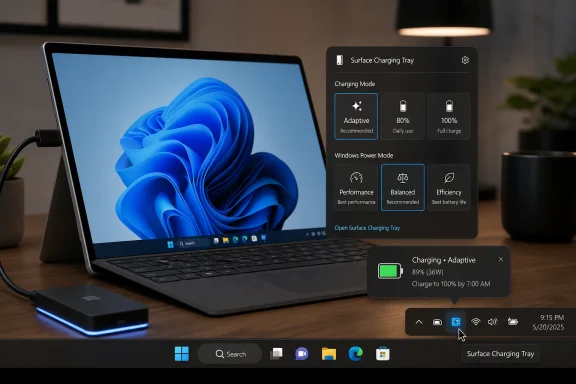
Surface Charging Tray, a third-party Windows system-tray utility from developer keyokku, launched on May 9, 2026, to let Surface owners switch charging modes and Windows power modes without repeatedly opening Microsoft’s Surface app. That is a small app solving a small annoyance, but the annoyance is revealing. Microsoft has spent years selling Surface as the most integrated expression of Windows hardware, yet some of the most useful day-to-day controls still feel buried, conditional, or oddly indirect. The result is a familiar Windows story: the platform has the capability, the first-party interface has the brand, and the community ships the workflow.
Surface Charging Tray is not trying to reinvent power management. It sits in the notification area, shows live status, and gives users quick access to Surface charging modes such as Adaptive, 80 percent, and 100 percent, along with Windows power modes such as Performance, Balanced, and Efficiency. It also supports configurable keyboard shortcuts, running at login, localization detection, and a scheduler that can flip a charging mode later.
That last feature is the one that turns a convenience app into a critique. Surface smart charging is designed to protect the battery by limiting charge when the device has been plugged in for long stretches or operating in higher-temperature conditions. In normal use, that is sensible battery stewardship; in travel use, it can become a last-minute scramble when a tablet that spent the night near 80 percent is suddenly needed at full capacity.
Microsoft’s official answer has generally been: open the Surface app, find the charging control, and pause or change the behavior there. That is not outrageous, but it is friction in exactly the place where a portable device should be least fussy. Battery limits are not an obscure enthusiast setting anymore. They are part of how people live with expensive, sealed, mobile PCs.
The app’s existence says less about one missing button than about a larger mismatch between Microsoft’s hardware ambitions and its software instincts. Surface is marketed as a premium, cohesive Windows device, but many of its best management features still feel like add-ons orbiting Windows rather than native parts of it.
The problem is not the engineering goal. It is the user experience around switching intent. A Surface used as a desk machine Monday through Thursday may need to become an airplane machine on Friday morning. The optimal charge policy changes not because the hardware changed, but because the user’s day changed.
That is where automation matters. A scheduler that can move from an 80 percent limit to a full charge before the user leaves home is not a gimmick; it is the missing bridge between battery health and battery availability. People do not want to babysit a charge curve. They want the machine to preserve itself when nothing special is happening and be ready when they say tomorrow is different.
Microsoft already understands this category of problem in other parts of Windows. Focus sessions, quiet hours, storage sense, update active hours, and power recommendations all exist because recurring intent should not require repeated manual digging. Charging policy belongs in that same family.
The system tray is where Windows users expect immediate state changes. Wi-Fi, Bluetooth, audio, battery, VPN, and power modes all live close to the taskbar because they are situational controls. Charging mode is situational in the same way. If the user can switch from Battery Saver to Best Performance in a couple of clicks, the user should be able to switch from battery preservation to full-charge preparation with the same immediacy.
Surface Charging Tray’s design is therefore obvious in the best sense. It does what a platform affordance should do: put a frequent decision near the current context. The app does not ask users to understand firmware policy, battery chemistry, or the distinction between Surface-specific controls and Windows-wide ones. It converts “I need full charge tomorrow” into a visible action.
That is precisely why it is uncomfortable for Microsoft. The app is valuable not because it is technically grand, but because the ideal first-party solution is so easy to imagine. A Surface quick setting, a taskbar flyout control, or a Power & battery page scheduler would cover most of this territory without requiring an enthusiast download from GitHub.
Surface Charging Tray currently ships in separate packages for Snapdragon X Surface devices and Intel Surface devices. That split is a reminder that the Surface family is no longer one simple hardware target. The developer has also acknowledged early-stage issues, particularly around Snapdragon X devices, which is unsurprising for a young utility manipulating Surface-specific workflows across architectures.
That should temper enthusiasm. A tray utility that pokes at app state, localization, and charging-mode detection is useful, but it is not the same thing as a documented Microsoft API with enterprise-grade support. Users who depend on predictable charging behavior should treat the app as promising rather than mission-critical, especially on newer Arm hardware.
Still, the Arm angle strengthens the case for Microsoft to act. If Windows on Arm is supposed to feel polished, premium, and appliance-like, then power controls should not depend on a third-party bridge. The more Microsoft asks users to believe in a new Windows hardware era, the less tolerance there is for old Windows rough edges.
That middle layer is important. It is not the same as a full operating system feature, and it is not the same as a one-off hack. It is the connective tissue between a supported capability and a usable workflow. Windows has always thrived when that layer is healthy, from PowerToys to AutoHotkey to vendor-specific utilities and open-source tray apps.
But there is a difference between “the ecosystem is vibrant” and “the product is relying on enthusiasts to finish the interface.” Surface Charging Tray lives on that boundary. It is a welcome utility, but it also demonstrates that Microsoft has left a high-frequency control one abstraction too far away from the user.
For sysadmins, this distinction matters. A consumer can tolerate an unsigned or niche utility if it solves a personal annoyance. An organization has to think about provenance, update channels, code review, endpoint controls, support boundaries, and what happens when Microsoft changes the Surface app’s UI. The very features that make Surface Charging Tray clever for enthusiasts make it less obviously deployable at scale.
Each piece makes sense in isolation. Together, they create a landscape where users know the machine is doing something intelligent but cannot always predict what, why, or how to override it quickly. The terminology alone can feel like a negotiation: smart charging, adaptive charging, battery limit, power mode, energy saver, performance mode.
A premium device should reduce that cognitive load. Microsoft does not need to expose every cell-management detail, but it does need to make intent clear. The user’s intent is usually simple: preserve the battery, charge fully by a certain time, maximize performance, or stretch runtime. The interface should map to those outcomes rather than force users to infer which subsystem is currently in charge.
Surface Charging Tray succeeds because it collapses that complexity into immediate choices. That is also its limitation. It can streamline what exists, but it cannot redesign the underlying Windows-and-Surface model into a coherent power policy language.
IT departments, however, do not generally want a fleet of machines depending on a community utility for a hardware-adjacent workflow. They want policy, telemetry, documentation, and predictable behavior across Windows Update cycles. They want to know whether a charging mode can be configured, audited, reset, and supported without walking users through a vendor app.
Microsoft has pieces of that story for managed Surface fleets, particularly through UEFI configuration and Surface management tooling. But the everyday user-facing experience still matters, because not every battery problem is a fleet policy problem. Sometimes the right answer is a simple scheduled full charge before travel, controlled by the user without admin intervention.
That is where Microsoft’s consumer polish and enterprise manageability should meet. A first-party implementation could expose friendly controls to users while giving admins policy boundaries: allow full-charge scheduling, cap maximum duration, enforce preservation mode on shared devices, or disable overrides on kiosk units. A third-party tray app can prove demand, but only Microsoft can make the feature trustworthy at organizational scale.
A well-designed version would not need to shout. The battery flyout could show the current charging policy with a small “Charge to 100% by…” action. The Power & battery page could offer a schedule for one-time or recurring full charges. The Surface app could remain the detailed device hub while delegating quick intent changes to Windows itself.
This would also align with where the industry has moved. Users increasingly understand battery preservation, but they do not want paternalistic automation that cannot be easily explained or overridden. The best systems make battery care feel like cooperation, not a hidden rule that reveals itself at the worst possible moment.
The irony is that Microsoft’s own hardware gives it a rare advantage. Apple can tune macOS for Mac hardware; Microsoft can do the same for Surface inside Windows while leaving room for OEM variation elsewhere. Surface should be the place where Windows power management looks most integrated, not the place where enthusiasts need to patch over the seam.
Source: Windows Central This app lets you control Surface battery charging and power modes from the taskbar
 A Tiny Tray Icon Exposes a Very Microsoft Problem
Surface Charging Tray is not trying to reinvent power management. It sits in the notification area, shows live status, and gives users quick access to Surface charging modes such as Adaptive, 80 percent, and 100 percent, along with Windows power modes such as Performance, Balanced, and Efficiency. It also supports configurable keyboard shortcuts, running at login, localization detection, and a scheduler that can flip a charging mode later.That last feature is the one that turns a convenience app into a critique. Surface smart charging is designed to protect the battery by limiting charge when the device has been plugged in for long stretches or operating in higher-temperature conditions. In normal use, that is sensible battery stewardship; in travel use, it can become a last-minute scramble when a tablet that spent the night near 80 percent is suddenly needed at full capacity.
Microsoft’s official answer has generally been: open the Surface app, find the charging control, and pause or change the behavior there. That is not outrageous, but it is friction in exactly the place where a portable device should be least fussy. Battery limits are not an obscure enthusiast setting anymore. They are part of how people live with expensive, sealed, mobile PCs.
The app’s existence says less about one missing button than about a larger mismatch between Microsoft’s hardware ambitions and its software instincts. Surface is marketed as a premium, cohesive Windows device, but many of its best management features still feel like add-ons orbiting Windows rather than native parts of it.
Smart Charging Is Sensible Until the User Needs to Be Smarter
Battery-preservation features are now table stakes across modern laptops, phones, and tablets. Lithium-ion batteries age faster when they sit at high charge for long periods, especially under heat, and an 80 percent cap can be a practical compromise for machines docked at a desk all day. Microsoft’s Surface line has long had multiple layers of battery management, including firmware-level Battery Limit settings for kiosk-like deployments and user-facing smart charging for everyday devices.The problem is not the engineering goal. It is the user experience around switching intent. A Surface used as a desk machine Monday through Thursday may need to become an airplane machine on Friday morning. The optimal charge policy changes not because the hardware changed, but because the user’s day changed.
That is where automation matters. A scheduler that can move from an 80 percent limit to a full charge before the user leaves home is not a gimmick; it is the missing bridge between battery health and battery availability. People do not want to babysit a charge curve. They want the machine to preserve itself when nothing special is happening and be ready when they say tomorrow is different.
Microsoft already understands this category of problem in other parts of Windows. Focus sessions, quiet hours, storage sense, update active hours, and power recommendations all exist because recurring intent should not require repeated manual digging. Charging policy belongs in that same family.
The Surface App Should Not Be the Final Destination
The Surface app has a reasonable role. It centralizes device information, firmware details, accessories, warranty information, and Surface-specific controls that do not belong in generic Windows settings. But when a control affects the way a mobile PC behaves every day, burying it in a vendor app makes the experience feel unfinished.The system tray is where Windows users expect immediate state changes. Wi-Fi, Bluetooth, audio, battery, VPN, and power modes all live close to the taskbar because they are situational controls. Charging mode is situational in the same way. If the user can switch from Battery Saver to Best Performance in a couple of clicks, the user should be able to switch from battery preservation to full-charge preparation with the same immediacy.
Surface Charging Tray’s design is therefore obvious in the best sense. It does what a platform affordance should do: put a frequent decision near the current context. The app does not ask users to understand firmware policy, battery chemistry, or the distinction between Surface-specific controls and Windows-wide ones. It converts “I need full charge tomorrow” into a visible action.
That is precisely why it is uncomfortable for Microsoft. The app is valuable not because it is technically grand, but because the ideal first-party solution is so easy to imagine. A Surface quick setting, a taskbar flyout control, or a Power & battery page scheduler would cover most of this territory without requiring an enthusiast download from GitHub.
Snapdragon X Makes the Gap More Visible
The timing matters because Surface Pro 11 and other Snapdragon X-powered Surface devices have made battery life central to the Surface pitch again. Windows on Arm is no longer merely an experiment for patient early adopters; it is the foundation of Microsoft’s Copilot+ PC story and one of the biggest reasons recent Surface hardware feels competitive. When battery life becomes a headline feature, battery control becomes a headline expectation.Surface Charging Tray currently ships in separate packages for Snapdragon X Surface devices and Intel Surface devices. That split is a reminder that the Surface family is no longer one simple hardware target. The developer has also acknowledged early-stage issues, particularly around Snapdragon X devices, which is unsurprising for a young utility manipulating Surface-specific workflows across architectures.
That should temper enthusiasm. A tray utility that pokes at app state, localization, and charging-mode detection is useful, but it is not the same thing as a documented Microsoft API with enterprise-grade support. Users who depend on predictable charging behavior should treat the app as promising rather than mission-critical, especially on newer Arm hardware.
Still, the Arm angle strengthens the case for Microsoft to act. If Windows on Arm is supposed to feel polished, premium, and appliance-like, then power controls should not depend on a third-party bridge. The more Microsoft asks users to believe in a new Windows hardware era, the less tolerance there is for old Windows rough edges.
Enthusiasts Keep Shipping the Missing Middle
Surface fans have a long history of filling practical gaps. Sometimes that means accessories, docks, stands, skins, or 3D-printed hardware that makes the Pro form factor behave more like a lap-friendly laptop. This time the gap is software, but the pattern is the same: users identify a recurring pain point, Microsoft moves slowly or not at all, and the community builds the missing middle layer.That middle layer is important. It is not the same as a full operating system feature, and it is not the same as a one-off hack. It is the connective tissue between a supported capability and a usable workflow. Windows has always thrived when that layer is healthy, from PowerToys to AutoHotkey to vendor-specific utilities and open-source tray apps.
But there is a difference between “the ecosystem is vibrant” and “the product is relying on enthusiasts to finish the interface.” Surface Charging Tray lives on that boundary. It is a welcome utility, but it also demonstrates that Microsoft has left a high-frequency control one abstraction too far away from the user.
For sysadmins, this distinction matters. A consumer can tolerate an unsigned or niche utility if it solves a personal annoyance. An organization has to think about provenance, update channels, code review, endpoint controls, support boundaries, and what happens when Microsoft changes the Surface app’s UI. The very features that make Surface Charging Tray clever for enthusiasts make it less obviously deployable at scale.
Microsoft’s Battery Story Is Split Across Too Many Surfaces
Part of the confusion comes from Microsoft having several battery-control stories at once. There is firmware-level Battery Limit for devices that live on power most of the time. There is smart charging for consumer-friendly battery protection. There are Windows power modes for performance and efficiency. There are OEM-specific behaviors tied to firmware, drivers, and Surface management components.Each piece makes sense in isolation. Together, they create a landscape where users know the machine is doing something intelligent but cannot always predict what, why, or how to override it quickly. The terminology alone can feel like a negotiation: smart charging, adaptive charging, battery limit, power mode, energy saver, performance mode.
A premium device should reduce that cognitive load. Microsoft does not need to expose every cell-management detail, but it does need to make intent clear. The user’s intent is usually simple: preserve the battery, charge fully by a certain time, maximize performance, or stretch runtime. The interface should map to those outcomes rather than force users to infer which subsystem is currently in charge.
Surface Charging Tray succeeds because it collapses that complexity into immediate choices. That is also its limitation. It can streamline what exists, but it cannot redesign the underlying Windows-and-Surface model into a coherent power policy language.
The Enterprise Angle Is Trust, Not Convenience
It is tempting to frame this as a pure consumer story: a handy app for Surface owners who dislike opening another app. But battery-control UX is also an enterprise issue, especially as more organizations deploy premium 2-in-1s to executives, field staff, sales teams, and hybrid workers. Those users care deeply about whether a machine is charged before a trip, a client meeting, or a full day away from a dock.IT departments, however, do not generally want a fleet of machines depending on a community utility for a hardware-adjacent workflow. They want policy, telemetry, documentation, and predictable behavior across Windows Update cycles. They want to know whether a charging mode can be configured, audited, reset, and supported without walking users through a vendor app.
Microsoft has pieces of that story for managed Surface fleets, particularly through UEFI configuration and Surface management tooling. But the everyday user-facing experience still matters, because not every battery problem is a fleet policy problem. Sometimes the right answer is a simple scheduled full charge before travel, controlled by the user without admin intervention.
That is where Microsoft’s consumer polish and enterprise manageability should meet. A first-party implementation could expose friendly controls to users while giving admins policy boundaries: allow full-charge scheduling, cap maximum duration, enforce preservation mode on shared devices, or disable overrides on kiosk units. A third-party tray app can prove demand, but only Microsoft can make the feature trustworthy at organizational scale.
Windows Already Has the Place for This
The obvious home is not mysterious. Windows 11’s Quick Settings panel already handles fast toggles. The Settings app already has Power & battery. The taskbar already displays battery state. The Surface app already knows Surface-specific charging modes. Microsoft controls all of the ingredients.A well-designed version would not need to shout. The battery flyout could show the current charging policy with a small “Charge to 100% by…” action. The Power & battery page could offer a schedule for one-time or recurring full charges. The Surface app could remain the detailed device hub while delegating quick intent changes to Windows itself.
This would also align with where the industry has moved. Users increasingly understand battery preservation, but they do not want paternalistic automation that cannot be easily explained or overridden. The best systems make battery care feel like cooperation, not a hidden rule that reveals itself at the worst possible moment.
The irony is that Microsoft’s own hardware gives it a rare advantage. Apple can tune macOS for Mac hardware; Microsoft can do the same for Surface inside Windows while leaving room for OEM variation elsewhere. Surface should be the place where Windows power management looks most integrated, not the place where enthusiasts need to patch over the seam.
The Small App That Says the Quiet Part Out Loud
Surface Charging Tray is worth watching because it turns a vague complaint into a concrete product request. Users do not merely want “better battery settings.” They want charging state visible at a glance, charging policy switchable without spelunking, and full-charge scheduling that matches real life.- Surface Charging Tray launched as an early third-party utility that brings Surface charging modes and Windows power modes into the taskbar.
- The app’s most meaningful feature is scheduled charging-mode changes, because it addresses the common problem of wanting battery preservation most days and 100 percent charge before travel.
- Microsoft’s current Surface battery controls are technically useful but spread across the Surface app, Windows power settings, and firmware-level management options.
- Snapdragon X Surface devices make this issue more important because battery life is central to their value proposition, but early third-party support may still be uneven.
- The utility is a good enthusiast solution and a poor substitute for a documented, first-party, policy-aware Microsoft implementation.
- The cleanest long-term answer is a native Windows and Surface integration that exposes charging intent directly in the battery flyout, Quick Settings, and Power & battery settings.
Source: Windows Central This app lets you control Surface battery charging and power modes from the taskbar
