

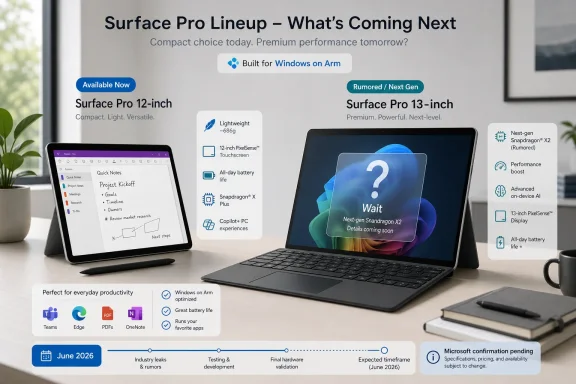
If you need a Surface Pro for work in June 2026, buy a current model only if your need is immediate and your required apps, drivers, peripherals, and accessories are already validated on Windows on Arm. If you are about to pay full price for a premium 13-inch Arm Surface Pro and you can wait, wait for Microsoft to confirm or deny the rumored Snapdragon X2 13-inch model before buying. The current comparison set is simple: 12-inch Surface Pro with Snapdragon X Plus vs. 13-inch Surface Pro 11th Edition with Snapdragon X Plus or X Elite vs. the rumored 13-inch Snapdragon X2 model. Microsoft currently lists Surface Pro for Business options in both 12-inch and 13-inch sizes, including a 12-inch Snapdragon X Plus model and a 13-inch Snapdragon model with Snapdragon X Elite and Plus processors. cite
That is the answer. Everything else is due diligence.
WindowsForum readers have already been circling this same split from different angles. The forum’s coverage of the 12-inch Surface Pro with Snapdragon X Plus treated it as Microsoft and Qualcomm pushing Windows 2-in-1s into a smaller, more portable lane rather than simply chasing the biggest spec sheet. The Surface Pro 11 review threads around Snapdragon X Plus and X Elite focused on the current generation becoming credible for mainstream Windows productivity. The WindowsForum leak discussion about a 13-inch Snapdragon X2 Surface Pro raised the practical buyer question: should you buy the known 13-inch Arm Surface today, or pause until Microsoft confirms whether the next one is real? The Surface Laptop 8 rumor threads add the same warning from the clamshell side: excitement around Snapdragon X2 is useful context, but it is not a substitute for confirmed models, prices, availability, and reviews.
The inference is broader. It is reasonable to infer that a smaller Surface Pro is the portability choice and that the 13-inch model is the better current fit if the device will be your only PC. It is also reasonable to infer that a Snapdragon X2 Surface Pro, if Microsoft ships one, would target buyers who care about premium Arm performance. But those are buying inferences, not confirmed Surface X2 specifications.
The rumor is the Snapdragon X2 Surface Pro itself. The reported 13-inch Snapdragon X2 model and the reported June 16 timing should be treated as unconfirmed until Microsoft announces the product. A leaked Surface cannot be ordered, returned, supported, imaged, benchmarked, enrolled, or piloted. A shipping Surface can.
Qualcomm’s Snapdragon X2 messaging is relevant, but it should not be overread. Qualcomm presents Snapdragon X2 Elite as a next-generation performance-and-efficiency platform for Windows PCs, but platform claims do not prove Surface Pro battery life, sustained performance, thermals, display behavior, app emulation speed, or driver compatibility in a final Microsoft tablet. cite
Choose the 12-inch model if your day is mostly:
Do not buy the 12-inch model because you hope it will behave like the most premium 13-inch configuration in a smaller shell. If you already know you need a larger workspace, higher-end display choices, more comfortable long-session typing, or the broadest current Surface Pro accessory ecosystem, you are probably shopping the wrong size.
Choose the current 13-inch model if:
The strongest reason to wait instead is price positioning. If you are about to buy a premium 13-inch Arm configuration at full price and you can delay, the rumored X2 model creates asymmetric risk: a confirmed refresh could make today’s expensive purchase feel poorly timed, while a disappointing refresh could still push discounts on current models.
That buyer should wait because the unresolved question is directly relevant. If Microsoft confirms a 13-inch Snapdragon X2 Surface Pro, the decision becomes real: price, configurations, availability, accessory compatibility, battery claims, shipping dates, and reviews. If Microsoft does not confirm it, current models can be judged without pretending a leak is a product.
Waiting is not rational if your current laptop is dying, your school or work deadline is immediate, or you mainly want the compact 12-inch model for note-taking and travel. A future 13-inch flagship rumor does not solve a present portability need.
Also, waiting for X2 is not rational if your blocker is compatibility. A faster Arm chip may make emulated apps feel better, but it will not make an unsupported driver magically work. Microsoft’s Windows-on-Arm guidance says peripherals work when their drivers are built into Windows or when the hardware developer has released Arm64 drivers, and Microsoft’s Arm developer FAQ states that kernel-mode drivers and user-mode print drivers must be native Arm64 binaries. cite
1. Make a must-run list. Include obvious apps and the boring dependencies people forget: VPN, endpoint security, printer/scanner software, smart-card tools, dock utilities, firmware tools, browser extensions, audio devices, label printers, exam lockdown software, proctoring apps, CAD/engineering tools, accounting plug-ins, game launchers, anti-cheat components, backup tools, and any app that installs a driver.
2. Check Microsoft’s compatibility guidance first. Microsoft’s Windows on Arm documentation points users to the Windows on Arm Ready Software site for app and game compatibility information, and Microsoft’s support page tells users to check hardware developers for Arm64 drivers when peripherals depend on drivers. cite
3. Check the publisher, not just forums. Look for the vendor’s official Windows on Arm, Arm64, Snapdragon X, or Copilot+ PC support statement. For business software, ask the vendor whether the app is certified or merely “not blocked.” For hardware, look for an actual Arm64 driver package or a statement that the device uses an in-box Windows driver.
4. Test on a returnable device or a pilot unit. Install the exact versions you use in production. Sign in with real accounts. Join the real VPN. Print to the real printers. Plug in the real dock. Run the real meeting stack with camera, headset, screen sharing, and background effects. Test sleep/resume, BitLocker, Windows Hello, external displays, and update behavior.
5. Classify each failure.
Buy the 12-inch Surface Pro if you want a portable digital notebook for classes, PDFs, OneNote, Office, web research, streaming, Teams, and campus travel. It is the better current choice when carry weight, tablet use, and note-taking matter more than maximum workspace.
Buy the 13-inch Surface Pro if it will be your only PC and you expect long writing sessions, split-screen research, presentations, lightweight coding, and docked desk use. Wait if you are about to spend premium money on the 13-inch Arm model and can keep using your current machine until Microsoft clarifies the rumored X2 device.
Skip Arm for now if a course requires software that is not validated on Windows on Arm. Engineering tools, architecture software, lab hardware, exam lockdown browsers, proctoring tools, and specialty drivers should be treated as blockers until proven otherwise.
Good pilot groups include:
The pilot should test Autopilot, Intune, Defender or third-party EDR, VPN, certificates, printers, scanners, docks, external displays, smart cards, accessibility tools, firmware updates, recovery, help-desk scripts, and remote support. Microsoft’s Surface page emphasizes enterprise management and accessories, but that does not replace your own validation. cite
Do not make a fleet decision on a rumored X2 model. If Microsoft announces it, pilot it against your current standard and an x86 fallback. The success metric is not a benchmark. It is fewer exceptions, fewer tickets, and no unsupported business-critical components.
Check:
It makes sense as your main PC if your work is browser-heavy, Microsoft 365-heavy, Teams-heavy, cloud-heavy, and remote-access-friendly. It can also make sense if demanding tasks happen through Windows 365, remote desktop, cloud IDEs, or a stronger desktop elsewhere.
It is a poor fit if your main PC must handle sustained local CPU/GPU loads, high-end gaming, large local builds, complex virtualization, specialized peripherals, heavy video work, or many driver-dependent tools. In that case, the correct decision may be a Surface Laptop, an Intel/AMD Windows laptop, or a workstation-class machine—not a detachable Arm tablet.
WindowsForum’s Surface Laptop 8 Snapdragon X2 rumor threads are useful because they show the same buyer pressure from another angle: some users want the next Arm chip in a more conventional laptop body. If your work is long-form typing and docked laptop use, the Surface Pro form factor may be the wrong starting point regardless of X2.
Build the real bundle:
 Buy Now / Wait / Skip
| Decision | Choose it when these thresholds are true |
|---|---|
| Buy now | Your old PC is failing, the device must be in service before Microsoft says anything official about X2, and your workload is mostly Office, browser, Teams/Zoom, OneNote, PDFs, web apps, remote desktop, and light creative work. Your battery threshold is “good enough after testing in my real apps,” not “I need a future chip to prove itself.” Your display threshold is satisfied by either the compact 12-inch class or the current 13-inch class. Your compatibility risk is low because every must-run app, driver, VPN, printer, security agent, exam tool, dock, and peripheral has been checked. |
| Wait | You are shopping a premium 13-inch Arm Surface Pro, you can keep using your current machine for a few weeks, and buyer’s remorse would matter if Microsoft announces a Snapdragon X2 Surface Pro with better real-world performance or better pricing pressure on current models. Your performance threshold is “I want the best Arm Surface available, not merely a good one.” Your battery threshold is “I need independent tests, not platform promises.” |
| Skip Arm for now | Any must-run driver, anti-cheat game, VPN/security agent, printer/scanner package, CAD/engineering tool, assistive technology, hardware utility, legacy plug-in, or line-of-business app cannot be verified on Windows on Arm. Your compatibility threshold is binary: if the app or driver fails, the device fails. In that case, Snapdragon X2 would not fix the blocker unless the vendor also supports Arm. |
WindowsForum readers have already been circling this same split from different angles. The forum’s coverage of the 12-inch Surface Pro with Snapdragon X Plus treated it as Microsoft and Qualcomm pushing Windows 2-in-1s into a smaller, more portable lane rather than simply chasing the biggest spec sheet. The Surface Pro 11 review threads around Snapdragon X Plus and X Elite focused on the current generation becoming credible for mainstream Windows productivity. The WindowsForum leak discussion about a 13-inch Snapdragon X2 Surface Pro raised the practical buyer question: should you buy the known 13-inch Arm Surface today, or pause until Microsoft confirms whether the next one is real? The Surface Laptop 8 rumor threads add the same warning from the clamshell side: excitement around Snapdragon X2 is useful context, but it is not a substitute for confirmed models, prices, availability, and reviews.
What Is Verified, and What Is Still a Bet
The verified part is narrow. Microsoft lists current Surface Pro for Business models in 12-inch and 13-inch sizes. The 12-inch Snapdragon model is listed with Snapdragon X Plus and a 12-inch PixelSense Flow touchscreen. The 13-inch Snapdragon model is listed with Snapdragon X Elite and Plus processors and a 13-inch PixelSense Flow touchscreen; Microsoft also describes Surface Pro keyboards as separate accessories, not included in the box. citeThe inference is broader. It is reasonable to infer that a smaller Surface Pro is the portability choice and that the 13-inch model is the better current fit if the device will be your only PC. It is also reasonable to infer that a Snapdragon X2 Surface Pro, if Microsoft ships one, would target buyers who care about premium Arm performance. But those are buying inferences, not confirmed Surface X2 specifications.
The rumor is the Snapdragon X2 Surface Pro itself. The reported 13-inch Snapdragon X2 model and the reported June 16 timing should be treated as unconfirmed until Microsoft announces the product. A leaked Surface cannot be ordered, returned, supported, imaged, benchmarked, enrolled, or piloted. A shipping Surface can.
Qualcomm’s Snapdragon X2 messaging is relevant, but it should not be overread. Qualcomm presents Snapdragon X2 Elite as a next-generation performance-and-efficiency platform for Windows PCs, but platform claims do not prove Surface Pro battery life, sustained performance, thermals, display behavior, app emulation speed, or driver compatibility in a final Microsoft tablet. cite
Choose the Current 12-Inch Surface Pro When Portability Is the Product
The current 12-inch Surface Pro is the clearest buy if your main reason for wanting Surface Pro is size. WindowsForum’s 12-inch Surface Pro discussion framed the Snapdragon X Plus model as an important Microsoft-Qualcomm milestone because Arm was moving into a more accessible, ultraportable 2-in-1 role. That is the useful lens: this model is not the “wait for the biggest chip” device. It is the “carry it everywhere” device.Choose the 12-inch model if your day is mostly:
- OneNote and pen notes
- PDF reading and markup
- lecture, meeting, or field notes
- browser research
- Microsoft 365
- Teams or Zoom
- email and calendars
- lightweight admin portals
- travel writing
- remote desktop into a stronger PC
Do not buy the 12-inch model because you hope it will behave like the most premium 13-inch configuration in a smaller shell. If you already know you need a larger workspace, higher-end display choices, more comfortable long-session typing, or the broadest current Surface Pro accessory ecosystem, you are probably shopping the wrong size.
Choose the Current 13-Inch Surface Pro When It Must Be Your Only PC Now
The current 13-inch Snapdragon Surface Pro is the safer current choice if the device has to be your only computer and you need it now. Microsoft’s own Surface Pro for Business page lists the 13-inch Snapdragon model separately from the 12-inch Snapdragon model, with Snapdragon X Elite and Plus processor options. citeChoose the current 13-inch model if:
- you need a larger canvas for side-by-side windows;
- you write long documents or work with research open beside notes;
- you present, dock, or travel with the same machine;
- your workload is mostly Microsoft 365, browser apps, collaboration tools, cloud services, and light creative work;
- the total bundle price is acceptable today.
The strongest reason to wait instead is price positioning. If you are about to buy a premium 13-inch Arm configuration at full price and you can delay, the rumored X2 model creates asymmetric risk: a confirmed refresh could make today’s expensive purchase feel poorly timed, while a disappointing refresh could still push discounts on current models.
Wait for X2 If You Are Buying the Premium Arm Lane, Not the Portable Note-Taking Lane
Waiting for Snapdragon X2 is rational for one buyer above all: the person already shopping the premium 13-inch Arm Surface Pro tier who does not need a machine this week.That buyer should wait because the unresolved question is directly relevant. If Microsoft confirms a 13-inch Snapdragon X2 Surface Pro, the decision becomes real: price, configurations, availability, accessory compatibility, battery claims, shipping dates, and reviews. If Microsoft does not confirm it, current models can be judged without pretending a leak is a product.
Waiting is not rational if your current laptop is dying, your school or work deadline is immediate, or you mainly want the compact 12-inch model for note-taking and travel. A future 13-inch flagship rumor does not solve a present portability need.
Also, waiting for X2 is not rational if your blocker is compatibility. A faster Arm chip may make emulated apps feel better, but it will not make an unsupported driver magically work. Microsoft’s Windows-on-Arm guidance says peripherals work when their drivers are built into Windows or when the hardware developer has released Arm64 drivers, and Microsoft’s Arm developer FAQ states that kernel-mode drivers and user-mode print drivers must be native Arm64 binaries. cite
The Windows on Arm Compatibility Check Buyers Should Actually Do
Do this before buying any Snapdragon Surface as a primary machine.1. Make a must-run list. Include obvious apps and the boring dependencies people forget: VPN, endpoint security, printer/scanner software, smart-card tools, dock utilities, firmware tools, browser extensions, audio devices, label printers, exam lockdown software, proctoring apps, CAD/engineering tools, accounting plug-ins, game launchers, anti-cheat components, backup tools, and any app that installs a driver.
2. Check Microsoft’s compatibility guidance first. Microsoft’s Windows on Arm documentation points users to the Windows on Arm Ready Software site for app and game compatibility information, and Microsoft’s support page tells users to check hardware developers for Arm64 drivers when peripherals depend on drivers. cite
3. Check the publisher, not just forums. Look for the vendor’s official Windows on Arm, Arm64, Snapdragon X, or Copilot+ PC support statement. For business software, ask the vendor whether the app is certified or merely “not blocked.” For hardware, look for an actual Arm64 driver package or a statement that the device uses an in-box Windows driver.
4. Test on a returnable device or a pilot unit. Install the exact versions you use in production. Sign in with real accounts. Join the real VPN. Print to the real printers. Plug in the real dock. Run the real meeting stack with camera, headset, screen sharing, and background effects. Test sleep/resume, BitLocker, Windows Hello, external displays, and update behavior.
5. Classify each failure.
- If the app is slow but works, it may be acceptable for occasional use.
- If the app runs only through emulation and is central to your day, treat it as a performance risk until you test it under load. Microsoft says emulation exists, but also says Arm-native apps are best for performance, responsiveness, and battery life. cite
- If the app requires an unsupported driver, it is a blocker.
- If a vendor will not support the configuration, it is a business risk even if you can make it launch.
Students: Buy Based on Course Requirements, Not Chip Rumors
Students should start with the syllabus and department software list.Buy the 12-inch Surface Pro if you want a portable digital notebook for classes, PDFs, OneNote, Office, web research, streaming, Teams, and campus travel. It is the better current choice when carry weight, tablet use, and note-taking matter more than maximum workspace.
Buy the 13-inch Surface Pro if it will be your only PC and you expect long writing sessions, split-screen research, presentations, lightweight coding, and docked desk use. Wait if you are about to spend premium money on the 13-inch Arm model and can keep using your current machine until Microsoft clarifies the rumored X2 device.
Skip Arm for now if a course requires software that is not validated on Windows on Arm. Engineering tools, architecture software, lab hardware, exam lockdown browsers, proctoring tools, and specialty drivers should be treated as blockers until proven otherwise.
IT Admins: Pilot Roles, Not Hype
IT should treat Snapdragon Surface devices as role-based pilots unless the organization has already validated Windows on Arm.Good pilot groups include:
- executives and mobile managers;
- sales teams;
- consultants;
- field staff using web apps;
- Microsoft 365-heavy knowledge workers;
- tablet-first workflows where pen input and portability matter.
The pilot should test Autopilot, Intune, Defender or third-party EDR, VPN, certificates, printers, scanners, docks, external displays, smart cards, accessibility tools, firmware updates, recovery, help-desk scripts, and remote support. Microsoft’s Surface page emphasizes enterprise management and accessories, but that does not replace your own validation. cite
Do not make a fleet decision on a rumored X2 model. If Microsoft announces it, pilot it against your current standard and an x86 fallback. The success metric is not a benchmark. It is fewer exceptions, fewer tickets, and no unsupported business-critical components.
Travelers: Test the Whole Kit
Travelers should care less about chip names and more about the complete travel setup.Check:
- weight with the keyboard you will actually carry;
- lap comfort versus desk comfort;
- charger and USB-C charging behavior;
- battery life in your real travel app mix;
- standby drain over a night in a bag;
- display readability in the places you work;
- VPN behavior on hotel and hotspot networks;
- Bluetooth headset stability;
- whether you need cellular and whether the exact model supports it;
- how many adapters are required for your routine.
Main-Workstation Users Should Be More Skeptical
A Surface Pro can be a main PC for the right person. It is not automatically a workstation.It makes sense as your main PC if your work is browser-heavy, Microsoft 365-heavy, Teams-heavy, cloud-heavy, and remote-access-friendly. It can also make sense if demanding tasks happen through Windows 365, remote desktop, cloud IDEs, or a stronger desktop elsewhere.
It is a poor fit if your main PC must handle sustained local CPU/GPU loads, high-end gaming, large local builds, complex virtualization, specialized peripherals, heavy video work, or many driver-dependent tools. In that case, the correct decision may be a Surface Laptop, an Intel/AMD Windows laptop, or a workstation-class machine—not a detachable Arm tablet.
WindowsForum’s Surface Laptop 8 Snapdragon X2 rumor threads are useful because they show the same buyer pressure from another angle: some users want the next Arm chip in a more conventional laptop body. If your work is long-form typing and docked laptop use, the Surface Pro form factor may be the wrong starting point regardless of X2.
The Accessory Trap Still Matters
Do not compare a bare Surface Pro tablet against a complete laptop. Microsoft’s Surface page describes Surface Pro keyboards and other tools as accessories sold separately, and its FAQ says Surface Pro for Business devices do not come with a keyboard. citeBuild the real bundle:
- tablet;
- keyboard;
- pen if you write, annotate, or draw;
- dock or USB-C hub;
- charger or spare charger;
- warranty;
- storage/RAM tier;
- case or sleeve;
- any adapters you need for travel or classrooms.
Frequently Asked Questions
Should I buy the current Surface Pro now or wait for Snapdragon X2?
Buy now if you need the device immediately and your apps, drivers, accessories, and workload are validated on Windows on Arm. Wait if you are shopping the premium 13-inch Arm Surface Pro tier, can delay, and want Microsoft to confirm pricing, configurations, availability, and real battery/performance claims for any rumored X2 model.Is the rumored June 16 Surface Pro launch confirmed?
No. Treat June 16 as a rumor unless Microsoft announces the product. A reported date is not a ship date, a price, a configuration list, or a review.Is Snapdragon X2 guaranteed to improve battery life?
No. Qualcomm’s platform messaging points to performance and efficiency improvements, but Surface Pro battery life depends on the final device, display, firmware, Windows build, radios, drivers, brightness, thermals, and app mix. Wait for independent testing if battery life is your deciding factor.Is Windows on Arm compatible enough now?
For many mainstream users, yes. Microsoft says Windows on Arm supports many apps and points users to app compatibility resources, but driver-dependent hardware and print components still need Arm64 support. If a required driver is not available for Arm64, that is a blocker, not a minor inconvenience. citeIs the 12-inch Surface Pro worse than the 13-inch Surface Pro?
Not exactly. It is aimed at a different buyer. Choose 12-inch for portability, notes, reading, travel, and tablet-first use. Choose 13-inch if the device will be your only PC, you need a bigger workspace, or you are shopping the more premium current Surface Pro lane.Should IT departments buy the rumored X2 Surface Pro on day one?
No. Treat it as a pilot candidate. Validate apps, drivers, security, management, firmware, docking, peripherals, recovery, and support workflows before any broad rollout.What to Do Today
- Write down your must-run list. Include apps, drivers, peripherals, accessories, VPN, security agents, printer/scanner tools, exam software, plug-ins, and hardware utilities.
- Check Windows on Arm support before shopping specs. Use Microsoft’s Windows on Arm guidance, the Windows on Arm Ready Software resource Microsoft points to, and vendor support pages. For hardware, look specifically for Arm64 drivers or in-box Windows driver support. cite
- Buy 12-inch if portability is the point. If you want a modern Surface Pro for notes, reading, PDFs, travel, and mainstream productivity, the current 12-inch Snapdragon model is the cleanest fit.
- Buy 13-inch if you need a primary Surface Pro now. If the larger canvas matters and the bundle price is right, the current 13-inch Snapdragon model is the known option.
- Wait if you are paying premium 13-inch money and can delay. Let Microsoft confirm or deny the rumored Snapdragon X2 Surface Pro before you buy into uncertainty.
- Skip Arm if compatibility fails. If a required app, driver, security tool, exam package, peripheral, or vendor certification is missing, buy an x86 Windows PC instead of hoping a future chip fixes an architecture support problem.
References
- Primary source: windowscentral.com
Surface Laptop Ultra: Microsoft and NVIDIA reveal the 128GB RAM, mini‑LED, RTX Spark powerhouse redefining Windows on Arm | Windows Central
Uncompromising raw NVIDIA N1x power meets legendary Surface craft, but can people afford it?www.windowscentral.com - Independent coverage: tomshardware.com
Qualcomm's new Snapdragon X2 Elite Extreme and Elite chips for PCs stretch up to a record 5 GHz — 3nm Arm chips sport new Oryon Prime cores | Tom's Hardware
Systems with the chips are scheduled for the first half of 2026.www.tomshardware.com
