

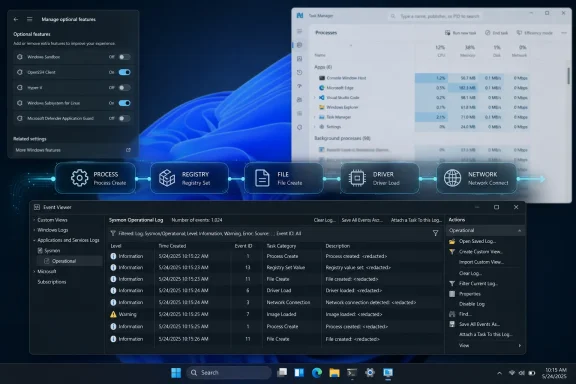
Microsoft’s Sysmon, newly available as a native Windows 11 optional feature in 2026 after years as a Sysinternals download, is a background system-monitoring service that records process, driver, file, registry, and network activity into Event Viewer for security analysis beyond Task Manager. That makes PCWorld’s “hidden tool” framing only half right: Sysmon is hidden from casual users, but it has long been a front-line instrument for defenders. The real story is not that Windows suddenly acquired a magic malware detector. It is that Microsoft is moving professional-grade visibility closer to the operating system’s center of gravity.
Task Manager is the Windows tool most people open when the machine feels slow, the fan starts screaming, or a program refuses to die. It is immediate, visual, and designed around intervention: end this process, inspect that startup app, check whether the CPU is pegged, see which program is chewing through memory.
That is not the same job as forensic visibility. Task Manager shows a live view of selected activity, but it does not preserve a durable historical record of what happened five minutes ago, which process launched another process, which command line was used, or which network endpoint a suspicious executable contacted. For the average user, that distinction sounds academic until an attack hinges on exactly those missing details.
Modern malware does not politely present itself as “malware.exe” in a neat process list. It borrows legitimate Windows tools, launches short-lived child processes, hides behind service infrastructure, abuses script interpreters, and sometimes disappears before the user opens the first troubleshooting window. A live task list is a poor witness when the event is already over.
Sysmon changes the model. Instead of asking “what is running right now,” it asks “what has this system been doing, and how did one action lead to another?” That is a security question rather than a performance question, and it is why the tool has lived for years in the kits of incident responders, blue teams, malware analysts, and administrators who need a timeline rather than a snapshot.
The new Windows 11 path brings Sysmon into the optional-feature machinery. Users can enable it through Windows Features, after which the service still needs to be initialized from an elevated command line. Functionally, the tool remains Sysmon; politically, it becomes part of Windows rather than an extra utility fetched from a Microsoft subculture.
That matters because Sysinternals has always occupied a strange place in the Windows world. It is official Microsoft software, but it feels like the operating system’s backstage pass: Process Explorer, Autoruns, Procmon, PsExec, TCPView, and the rest are what people reach for when Windows’ polished surfaces stop being enough. Bringing Sysmon closer to the inbox experience is Microsoft acknowledging that the backstage is now part of the main show.
There is also a maintenance argument. A separately downloaded monitoring agent can drift, get forgotten, or be inconsistently deployed across endpoints. A native optional component is easier for Microsoft to service and easier for IT teams to standardize, even if it remains disabled until someone intentionally turns it on. Security tools are only useful when they are present before the incident.
For enthusiasts, the move feels like a discovery. For enterprise administrators, it looks more like normalization. Microsoft is not giving Windows a new antivirus engine here; it is making a proven telemetry layer easier to find, install, and keep current.
That sounds user-hostile, but it is also the point. Sysmon produces structured records: process creation, network connections, driver loads, file creation, registry activity, image loads, service configuration changes, and other events depending on configuration. Each record is meant to be searched, filtered, correlated, forwarded, and retained.
A process creation event, for example, is more valuable than a mere process name. It can show the executable path, command line, hashes, parent process, user context, and other metadata that help distinguish normal administrative activity from something ugly wearing a familiar name. “PowerShell ran” is not very helpful. “PowerShell ran from this parent process with this encoded command line under this user at this time” is the beginning of an investigation.
This is where Sysmon’s value diverges sharply from Task Manager. Task Manager can show many instances of a browser process, but it is not a forensic ledger of the browser’s child processes, downloads, scripts, or unusual network behavior. Sysmon will not automatically explain all of that either, but it gives defenders the raw material to reconstruct what happened.
That raw material can be noisy. A busy Windows machine launches and terminates processes constantly, loads drivers, touches registry keys, and opens network connections in ways that are completely legitimate. Sysmon without filtering is like turning on a high-resolution microphone in a machine room: you will hear more, but you may not immediately understand what matters.
A process with no icon, no description, and no company name is not automatically malicious. Plenty of sloppy software ships with poor metadata. But if that same process is running from a user profile, launched by an unusual parent, contacts an unfamiliar host, and uses a name that almost—but not quite—matches a Windows component, the story changes.
Windows attackers love ambiguity because Windows is full of it. There are legitimate executables with strange names, legitimate services that run invisibly, legitimate scripts that automate system maintenance, and legitimate binaries that can be abused for illegitimate purposes. The difference between administration and intrusion often lives in command-line arguments, parent-child relationships, and timing.
Sysmon is good at preserving those relationships. If Word launches PowerShell, PowerShell downloads a payload, that payload writes to a temporary directory, and a new service appears seconds later, each individual event might look mundane in isolation. Together, they form a chain.
That is why Sysmon is not a consumer “scan my PC” tool, despite being installable by consumers. It is closer to a flight recorder. It does not stop the crash by itself, but it can tell you what the aircraft was doing when things went wrong.
Microsoft publishes examples, and the security community has long maintained more aggressive templates. These files encode choices about what to ignore, what to capture, and what patterns deserve special attention. A home user may be tempted to install Sysmon and accept the default flood; an administrator knows that the real work starts after the service starts.
Filtering is not merely convenience. It is operational survival. Browsers, collaboration apps, cloud sync clients, updaters, developer tools, game launchers, and Windows itself generate enormous amounts of legitimate activity. If every network connection to common web ports becomes an event of equal importance, analysts stop looking. If every routine process termination is logged forever, the meaningful events drown.
A good configuration is opinionated. It decides that certain Microsoft-signed drivers are expected, that common browser behavior should be suppressed unless it crosses a threshold, and that execution from temporary folders deserves attention. It also evolves, because attackers adapt and environments differ.
This is where PCWorld’s mainstream framing risks underselling the complexity. Yes, Sysmon can reveal what Task Manager misses. But it can also overwhelm the very user it is supposed to empower. The tool rewards discipline more than curiosity.
On a single PC, Event Viewer can work as an investigative window. You can open the Sysmon operational log, sort by time, inspect event details, and search for suspicious paths or process names. That is enough for enthusiasts and for targeted troubleshooting.
At scale, it is not enough. Enterprise value comes when Sysmon logs are forwarded, collected, parsed, and correlated across fleets. A single odd PowerShell invocation on one laptop might be noise. The same pattern across twenty machines after a phishing campaign is a security incident.
This distinction explains why Sysmon has been beloved by defenders without becoming a mainstream household name. The tool creates telemetry, but telemetry needs analysis. Without a collection backend, detection rules, and someone who knows what normal looks like, Sysmon is a verbose diary.
Microsoft’s decision to make Sysmon native therefore raises an obvious next question: how much of this visibility will Microsoft eventually surface through friendlier Windows security experiences? Today, enabling Sysmon still drops users into the deep end. Tomorrow, it would not be surprising to see more of its output feed managed security products, compliance tooling, or built-in diagnostics.
The native packaging mostly changes deployment, discoverability, and lifecycle management. Instead of a separate download step, the feature can be enabled from Windows’ optional components. Instead of relying entirely on manual acquisition from Sysinternals, administrators get a route that fits more naturally with Windows feature management.
That still leaves real questions for IT. If an organization already deploys the Sysinternals version with a known configuration, migration needs planning. Conflicting installations are not a trivial detail. Logging paths, service behavior, versioning, update cadence, and configuration management all matter when telemetry is part of incident response.
Administrators will also need to decide whether native availability changes their baseline builds. For high-risk endpoints, developer workstations, privileged admin machines, and servers, Sysmon may be an easy yes. For unmanaged consumer laptops or low-skill environments, the benefit is less obvious unless someone is actually going to read the logs.
The lesson is familiar: Windows adding a feature does not automatically create a security outcome. A tool becomes a control only when it is configured, monitored, and integrated into a process.
But the consumer pitch should come with guardrails. Renaming files because they look suspicious, for example, can be a reasonable temporary experiment for experienced users, but it can also break applications, drivers, licensing services, updaters, or security tools. Uploading a file to VirusTotal can help, but it may also disclose a private or proprietary file to a third-party analysis ecosystem.
Even full antivirus scans have to be interpreted carefully. A clean scan does not prove a system is clean, especially if the suspicious behavior involved legitimate administrative tools or scripts. Conversely, a single detection does not explain the scope of compromise. Sysmon’s power is not that it gives a binary answer; it gives investigators more context.
Home users who enable Sysmon should think of it as an advanced diagnostic recorder, not a replacement for Defender, backups, patching, least privilege, browser hygiene, or common sense. Its best use for enthusiasts may be learning: watching what software actually does, seeing which processes spawn which children, and becoming harder to fool when something looks wrong.
That educational value should not be dismissed. Windows is complicated partly because it hides complexity to remain usable. Tools like Sysmon expose the machinery, and exposure is often the first step toward competence.
Task Manager is a weak instrument against that strategy. By the time a user notices a flash of command-line activity, the process may have exited. Even if it remains visible, its name may be a perfectly legitimate Windows binary. The question is not whether PowerShell exists; the question is why it ran, who launched it, and what it did.
Sysmon is well suited to that question because it can log process creation with command lines and parent relationships. If a browser exploit launches a script interpreter, or an Office document spawns a shell, or a signed utility starts behaving like a downloader, the sequence becomes visible. That does not make detection automatic, but it makes detection possible.
The same applies to persistence. Malware often wants to survive reboot, so it touches services, scheduled tasks, registry run keys, startup folders, drivers, or other autostart locations. Sysmon can capture parts of that behavior when configured to do so. Again, the value is in the timeline.
This is why defenders care less about whether a tool is “hidden” and more about whether it is tamper-resistant, complete enough, and present early. Logs created after a compromise begins are useful. Logs created before the compromise begins are better.
In an enterprise, that is expected but not trivial. Security telemetry must be retained, protected, access-controlled, and eventually deleted according to policy. Logs that help investigate an intrusion can themselves become valuable intelligence if exposed.
On a home PC, the risk is different. A user may not care that local logs contain detailed system behavior until they export them to a forum, paste them into a support ticket, or upload them to an AI assistant for analysis. The more detailed the log, the more carefully it should be handled.
There is also the matter of disk space and log retention. Sysmon can fill its operational log quickly, especially with broad settings. Increasing the log size is sensible for meaningful history, but doing so without a plan just postpones overwriting. Users who expect to investigate incidents weeks later need to think about retention before the incident happens.
The security industry has learned this lesson repeatedly: visibility is never free. It consumes storage, attention, expertise, and trust. Sysmon is lightweight compared with many endpoint agents, but its output is not lightweight if treated seriously.
Microsoft acquiring Sysinternals years ago did not erase that tension. The tools remained official but separate, powerful but optional, respected but intimidating. They were the instruments professionals recommended when the normal interface ran out of answers.
Native Sysmon suggests a slow convergence. Windows is not becoming a forensic workstation by default, but Microsoft is acknowledging that baseline operating-system visibility needs to improve. That is especially important as attackers move faster, dwell times shrink, and endpoint telemetry becomes the difference between “we saw it” and “we guessed.”
There is an irony here. The more Windows improves its consumer polish, the more important these unpolished tools become. Rounded corners, centered taskbars, and simplified settings panels do not help when a signed binary launches a suspicious child process from a user profile at 2:13 a.m.
For Windows enthusiasts, that is part of the appeal. Sysmon is a reminder that the real operating system is not the Settings app. It is the swarm of services, drivers, tokens, handles, registry writes, command lines, and network sockets underneath.
That learning curve is not a flaw. It is the cost of seeing clearly. Simplified security tools hide complexity by design, and most of the time that is appropriate. But when something goes wrong, the simplified view can become a liability.
There is a middle path. Enthusiasts can enable Sysmon on a test machine, apply a reputable configuration, and learn to read common event types without pretending to be a SOC analyst. Administrators can evaluate native Sysmon as part of a broader endpoint logging strategy rather than as a novelty. Developers can use it to understand how their software behaves on real systems.
The danger is performative security: installing the tool, generating thousands of events, and feeling safer because more data exists. Data sitting unread in Event Viewer is not defense. It is potential defense.
That distinction should shape how Windows users talk about Sysmon. It is not the “real Task Manager.” It is not a hidden antivirus. It is not a magic list of every bad thing on a PC. It is a detailed activity recorder that becomes powerful when paired with knowledge, filtering, and follow-through.
That memory is especially useful after ambiguous events. A user clicked something suspicious. A browser opened and closed unexpectedly. A PowerShell window flashed. A new service appeared. A machine began connecting to an unfamiliar address. In each case, Sysmon may provide the surrounding timeline.
For small businesses, the native option could be particularly valuable if paired with log forwarding or a managed security service. Many organizations cannot justify full-blown enterprise EDR across every device, but they still need better evidence than “the PC seemed weird.” Sysmon can narrow the gap, though it does not eliminate the need for expertise.
For large enterprises, the news is less about capability than standardization. Many already use Sysmon or comparable telemetry through EDR platforms. The native packaging may simplify some deployment paths, but it also adds another variable to manage across Windows versions and configurations.
For home users, the best advice is selective ambition. If you enjoy Windows internals, Sysmon is worth learning. If you simply want to remove malware, start with Defender, reputable second-opinion scanning, backups, and professional help when the stakes are high. A powerful log is not the same as a simple cure.
Windows is no longer a world where “advanced security telemetry” can be treated as an enterprise-only concern. Consumers face credential theft, malicious ads, fake installers, supply-chain compromises, browser abuse, and remote-support scams. Small businesses face the same tactics as larger firms, just with fewer defenders.
At the same time, Microsoft has to be careful. If Windows surfaces too much raw telemetry to ordinary users, it risks creating panic, false positives, and a new genre of bad advice. If it hides too much, users and admins remain dependent on after-the-fact guesses. Sysmon’s optional status is a compromise: available to those who know why they want it, absent for those who do not.
That compromise may not last forever. The logical next step is not making every home user read XML and Event Viewer. It is building better interpretation layers on top of the telemetry Windows can already generate. Microsoft has the ingredients; the question is how much it will expose, and to whom.
This is where AI will inevitably enter the conversation, for better and worse. Summarizing event chains, flagging unusual parent-child relationships, and explaining suspicious command lines are all tasks that language models and security analytics can assist with. But automated explanation must be grounded in reliable telemetry, and Sysmon is exactly the kind of source that makes such analysis less speculative.
 Task Manager Was Built for Control, Not Forensics
Task Manager is the Windows tool most people open when the machine feels slow, the fan starts screaming, or a program refuses to die. It is immediate, visual, and designed around intervention: end this process, inspect that startup app, check whether the CPU is pegged, see which program is chewing through memory.That is not the same job as forensic visibility. Task Manager shows a live view of selected activity, but it does not preserve a durable historical record of what happened five minutes ago, which process launched another process, which command line was used, or which network endpoint a suspicious executable contacted. For the average user, that distinction sounds academic until an attack hinges on exactly those missing details.
Modern malware does not politely present itself as “malware.exe” in a neat process list. It borrows legitimate Windows tools, launches short-lived child processes, hides behind service infrastructure, abuses script interpreters, and sometimes disappears before the user opens the first troubleshooting window. A live task list is a poor witness when the event is already over.
Sysmon changes the model. Instead of asking “what is running right now,” it asks “what has this system been doing, and how did one action lead to another?” That is a security question rather than a performance question, and it is why the tool has lived for years in the kits of incident responders, blue teams, malware analysts, and administrators who need a timeline rather than a snapshot.
Microsoft Turns a Specialist’s Tool Into a Windows Feature
Sysmon’s promotion into Windows 11 is a small UI change with a larger operational meaning. Previously, administrators typically downloaded it from Microsoft’s Sysinternals collection, accepted the license, installed it as a service, and supplied a configuration file tuned to the organization’s needs. That workflow was familiar to professionals but invisible to nearly everyone else.The new Windows 11 path brings Sysmon into the optional-feature machinery. Users can enable it through Windows Features, after which the service still needs to be initialized from an elevated command line. Functionally, the tool remains Sysmon; politically, it becomes part of Windows rather than an extra utility fetched from a Microsoft subculture.
That matters because Sysinternals has always occupied a strange place in the Windows world. It is official Microsoft software, but it feels like the operating system’s backstage pass: Process Explorer, Autoruns, Procmon, PsExec, TCPView, and the rest are what people reach for when Windows’ polished surfaces stop being enough. Bringing Sysmon closer to the inbox experience is Microsoft acknowledging that the backstage is now part of the main show.
There is also a maintenance argument. A separately downloaded monitoring agent can drift, get forgotten, or be inconsistently deployed across endpoints. A native optional component is easier for Microsoft to service and easier for IT teams to standardize, even if it remains disabled until someone intentionally turns it on. Security tools are only useful when they are present before the incident.
For enthusiasts, the move feels like a discovery. For enterprise administrators, it looks more like normalization. Microsoft is not giving Windows a new antivirus engine here; it is making a proven telemetry layer easier to find, install, and keep current.
The Tool’s Power Is the Trail It Leaves Behind
Sysmon runs as a background service and writes events to the Windows Event Log, specifically under the Sysmon operational log. There is no glossy dashboard, no tray icon, and no wizard that interprets suspicious behavior for you. Its interface is the old, dense, unforgiving Event Viewer.That sounds user-hostile, but it is also the point. Sysmon produces structured records: process creation, network connections, driver loads, file creation, registry activity, image loads, service configuration changes, and other events depending on configuration. Each record is meant to be searched, filtered, correlated, forwarded, and retained.
A process creation event, for example, is more valuable than a mere process name. It can show the executable path, command line, hashes, parent process, user context, and other metadata that help distinguish normal administrative activity from something ugly wearing a familiar name. “PowerShell ran” is not very helpful. “PowerShell ran from this parent process with this encoded command line under this user at this time” is the beginning of an investigation.
This is where Sysmon’s value diverges sharply from Task Manager. Task Manager can show many instances of a browser process, but it is not a forensic ledger of the browser’s child processes, downloads, scripts, or unusual network behavior. Sysmon will not automatically explain all of that either, but it gives defenders the raw material to reconstruct what happened.
That raw material can be noisy. A busy Windows machine launches and terminates processes constantly, loads drivers, touches registry keys, and opens network connections in ways that are completely legitimate. Sysmon without filtering is like turning on a high-resolution microphone in a machine room: you will hear more, but you may not immediately understand what matters.
“Suspicious” Is a Pattern, Not a Process Name
PCWorld’s summary usefully highlights a classic Sysinternals way of thinking: suspicious processes often have missing metadata, strange paths, odd parentage, bad signatures, packed executables, or unexpected network connections. That is the right instinct. Malware hunting is rarely about one unmistakable clue; it is about a cluster of details that do not fit.A process with no icon, no description, and no company name is not automatically malicious. Plenty of sloppy software ships with poor metadata. But if that same process is running from a user profile, launched by an unusual parent, contacts an unfamiliar host, and uses a name that almost—but not quite—matches a Windows component, the story changes.
Windows attackers love ambiguity because Windows is full of it. There are legitimate executables with strange names, legitimate services that run invisibly, legitimate scripts that automate system maintenance, and legitimate binaries that can be abused for illegitimate purposes. The difference between administration and intrusion often lives in command-line arguments, parent-child relationships, and timing.
Sysmon is good at preserving those relationships. If Word launches PowerShell, PowerShell downloads a payload, that payload writes to a temporary directory, and a new service appears seconds later, each individual event might look mundane in isolation. Together, they form a chain.
That is why Sysmon is not a consumer “scan my PC” tool, despite being installable by consumers. It is closer to a flight recorder. It does not stop the crash by itself, but it can tell you what the aircraft was doing when things went wrong.
XML Configuration Is Where Sysmon Becomes Useful
The hardest part of Sysmon is not installation. It is configuration. The tool is controlled through XML files that determine which events are logged and which are filtered out, and that configuration is the difference between a useful signal and a landfill of noise.Microsoft publishes examples, and the security community has long maintained more aggressive templates. These files encode choices about what to ignore, what to capture, and what patterns deserve special attention. A home user may be tempted to install Sysmon and accept the default flood; an administrator knows that the real work starts after the service starts.
Filtering is not merely convenience. It is operational survival. Browsers, collaboration apps, cloud sync clients, updaters, developer tools, game launchers, and Windows itself generate enormous amounts of legitimate activity. If every network connection to common web ports becomes an event of equal importance, analysts stop looking. If every routine process termination is logged forever, the meaningful events drown.
A good configuration is opinionated. It decides that certain Microsoft-signed drivers are expected, that common browser behavior should be suppressed unless it crosses a threshold, and that execution from temporary folders deserves attention. It also evolves, because attackers adapt and environments differ.
This is where PCWorld’s mainstream framing risks underselling the complexity. Yes, Sysmon can reveal what Task Manager misses. But it can also overwhelm the very user it is supposed to empower. The tool rewards discipline more than curiosity.
Event Viewer Is Not a Security Console, and That Is a Problem
For WindowsForum readers, Event Viewer is familiar territory: powerful, ancient-feeling, and often maddening. Sysmon’s dependence on it is both practical and limiting. The Windows Event Log is a standard place for structured telemetry, but Event Viewer is not Splunk, Sentinel, Defender XDR, or a modern endpoint detection console.On a single PC, Event Viewer can work as an investigative window. You can open the Sysmon operational log, sort by time, inspect event details, and search for suspicious paths or process names. That is enough for enthusiasts and for targeted troubleshooting.
At scale, it is not enough. Enterprise value comes when Sysmon logs are forwarded, collected, parsed, and correlated across fleets. A single odd PowerShell invocation on one laptop might be noise. The same pattern across twenty machines after a phishing campaign is a security incident.
This distinction explains why Sysmon has been beloved by defenders without becoming a mainstream household name. The tool creates telemetry, but telemetry needs analysis. Without a collection backend, detection rules, and someone who knows what normal looks like, Sysmon is a verbose diary.
Microsoft’s decision to make Sysmon native therefore raises an obvious next question: how much of this visibility will Microsoft eventually surface through friendlier Windows security experiences? Today, enabling Sysmon still drops users into the deep end. Tomorrow, it would not be surprising to see more of its output feed managed security products, compliance tooling, or built-in diagnostics.
The Native Version Changes Deployment More Than Behavior
It is tempting to treat native Sysmon as a new Windows 11 security feature in the same way one might treat a new Defender capability. That would be misleading. Sysmon does not block malware, quarantine files, harden the kernel, or replace endpoint protection. It records.The native packaging mostly changes deployment, discoverability, and lifecycle management. Instead of a separate download step, the feature can be enabled from Windows’ optional components. Instead of relying entirely on manual acquisition from Sysinternals, administrators get a route that fits more naturally with Windows feature management.
That still leaves real questions for IT. If an organization already deploys the Sysinternals version with a known configuration, migration needs planning. Conflicting installations are not a trivial detail. Logging paths, service behavior, versioning, update cadence, and configuration management all matter when telemetry is part of incident response.
Administrators will also need to decide whether native availability changes their baseline builds. For high-risk endpoints, developer workstations, privileged admin machines, and servers, Sysmon may be an easy yes. For unmanaged consumer laptops or low-skill environments, the benefit is less obvious unless someone is actually going to read the logs.
The lesson is familiar: Windows adding a feature does not automatically create a security outcome. A tool becomes a control only when it is configured, monitored, and integrated into a process.
The Consumer Pitch Is Useful but Incomplete
PCWorld’s article performs a service by pointing ordinary Windows users toward a serious tool. For too long, the public vocabulary of Windows troubleshooting has been dominated by Task Manager, antivirus scans, startup app toggles, and vague advice to reinstall. Sysmon introduces a better concept: the machine has a history, and Windows can record it.But the consumer pitch should come with guardrails. Renaming files because they look suspicious, for example, can be a reasonable temporary experiment for experienced users, but it can also break applications, drivers, licensing services, updaters, or security tools. Uploading a file to VirusTotal can help, but it may also disclose a private or proprietary file to a third-party analysis ecosystem.
Even full antivirus scans have to be interpreted carefully. A clean scan does not prove a system is clean, especially if the suspicious behavior involved legitimate administrative tools or scripts. Conversely, a single detection does not explain the scope of compromise. Sysmon’s power is not that it gives a binary answer; it gives investigators more context.
Home users who enable Sysmon should think of it as an advanced diagnostic recorder, not a replacement for Defender, backups, patching, least privilege, browser hygiene, or common sense. Its best use for enthusiasts may be learning: watching what software actually does, seeing which processes spawn which children, and becoming harder to fool when something looks wrong.
That educational value should not be dismissed. Windows is complicated partly because it hides complexity to remain usable. Tools like Sysmon expose the machinery, and exposure is often the first step toward competence.
Attackers Already Know the Windows Surface Is Noisy
One reason Sysmon matters is that modern Windows attacks increasingly blend into legitimate administrative activity. The industry shorthand is living off the land: using built-in tools such as PowerShell, WMI, rundll32, regsvr32, mshta, scheduled tasks, and service control utilities to avoid dropping obvious malware.Task Manager is a weak instrument against that strategy. By the time a user notices a flash of command-line activity, the process may have exited. Even if it remains visible, its name may be a perfectly legitimate Windows binary. The question is not whether PowerShell exists; the question is why it ran, who launched it, and what it did.
Sysmon is well suited to that question because it can log process creation with command lines and parent relationships. If a browser exploit launches a script interpreter, or an Office document spawns a shell, or a signed utility starts behaving like a downloader, the sequence becomes visible. That does not make detection automatic, but it makes detection possible.
The same applies to persistence. Malware often wants to survive reboot, so it touches services, scheduled tasks, registry run keys, startup folders, drivers, or other autostart locations. Sysmon can capture parts of that behavior when configured to do so. Again, the value is in the timeline.
This is why defenders care less about whether a tool is “hidden” and more about whether it is tamper-resistant, complete enough, and present early. Logs created after a compromise begins are useful. Logs created before the compromise begins are better.
More Logging Also Means More Responsibility
There is a privacy and governance angle here that deserves more attention than consumer coverage usually gives it. Sysmon can record command lines, file paths, process relationships, network destinations, and other details that may reveal sensitive work habits, usernames, internal hostnames, project names, or security architecture.In an enterprise, that is expected but not trivial. Security telemetry must be retained, protected, access-controlled, and eventually deleted according to policy. Logs that help investigate an intrusion can themselves become valuable intelligence if exposed.
On a home PC, the risk is different. A user may not care that local logs contain detailed system behavior until they export them to a forum, paste them into a support ticket, or upload them to an AI assistant for analysis. The more detailed the log, the more carefully it should be handled.
There is also the matter of disk space and log retention. Sysmon can fill its operational log quickly, especially with broad settings. Increasing the log size is sensible for meaningful history, but doing so without a plan just postpones overwriting. Users who expect to investigate incidents weeks later need to think about retention before the incident happens.
The security industry has learned this lesson repeatedly: visibility is never free. It consumes storage, attention, expertise, and trust. Sysmon is lightweight compared with many endpoint agents, but its output is not lightweight if treated seriously.
The Sysinternals Ethos Finally Meets the Windows Default Experience
The Sysinternals suite has always been an implicit critique of Windows’ built-in tools. Process Explorer shows what Task Manager long failed to show. Autoruns exposes persistence mechanisms that basic startup settings ignore. Process Monitor reveals file, registry, and process activity at a level that normal users never see. Sysmon extends that tradition into continuous logging.Microsoft acquiring Sysinternals years ago did not erase that tension. The tools remained official but separate, powerful but optional, respected but intimidating. They were the instruments professionals recommended when the normal interface ran out of answers.
Native Sysmon suggests a slow convergence. Windows is not becoming a forensic workstation by default, but Microsoft is acknowledging that baseline operating-system visibility needs to improve. That is especially important as attackers move faster, dwell times shrink, and endpoint telemetry becomes the difference between “we saw it” and “we guessed.”
There is an irony here. The more Windows improves its consumer polish, the more important these unpolished tools become. Rounded corners, centered taskbars, and simplified settings panels do not help when a signed binary launches a suspicious child process from a user profile at 2:13 a.m.
For Windows enthusiasts, that is part of the appeal. Sysmon is a reminder that the real operating system is not the Settings app. It is the swarm of services, drivers, tokens, handles, registry writes, command lines, and network sockets underneath.
The Hidden Tool Is Really a Test of Windows Literacy
The practical value of Sysmon depends on the user’s Windows literacy. Installing it is easy enough for a determined hobbyist. Understanding it requires learning how Windows starts programs, how services work, how parent processes are used, where legitimate software normally lives, and why signatures matter but do not settle every question.That learning curve is not a flaw. It is the cost of seeing clearly. Simplified security tools hide complexity by design, and most of the time that is appropriate. But when something goes wrong, the simplified view can become a liability.
There is a middle path. Enthusiasts can enable Sysmon on a test machine, apply a reputable configuration, and learn to read common event types without pretending to be a SOC analyst. Administrators can evaluate native Sysmon as part of a broader endpoint logging strategy rather than as a novelty. Developers can use it to understand how their software behaves on real systems.
The danger is performative security: installing the tool, generating thousands of events, and feeling safer because more data exists. Data sitting unread in Event Viewer is not defense. It is potential defense.
That distinction should shape how Windows users talk about Sysmon. It is not the “real Task Manager.” It is not a hidden antivirus. It is not a magic list of every bad thing on a PC. It is a detailed activity recorder that becomes powerful when paired with knowledge, filtering, and follow-through.
Where Sysmon Fits in a Sensible Windows Defense
For a serious Windows setup, Sysmon belongs in a layered model. Defender or another reputable endpoint protection product still handles prevention and automatic detection. Windows Update still closes known holes. Standard accounts still reduce blast radius. Backups still matter when prevention fails. Sysmon adds memory in the investigative sense: a way to know what happened.That memory is especially useful after ambiguous events. A user clicked something suspicious. A browser opened and closed unexpectedly. A PowerShell window flashed. A new service appeared. A machine began connecting to an unfamiliar address. In each case, Sysmon may provide the surrounding timeline.
For small businesses, the native option could be particularly valuable if paired with log forwarding or a managed security service. Many organizations cannot justify full-blown enterprise EDR across every device, but they still need better evidence than “the PC seemed weird.” Sysmon can narrow the gap, though it does not eliminate the need for expertise.
For large enterprises, the news is less about capability than standardization. Many already use Sysmon or comparable telemetry through EDR platforms. The native packaging may simplify some deployment paths, but it also adds another variable to manage across Windows versions and configurations.
For home users, the best advice is selective ambition. If you enjoy Windows internals, Sysmon is worth learning. If you simply want to remove malware, start with Defender, reputable second-opinion scanning, backups, and professional help when the stakes are high. A powerful log is not the same as a simple cure.
The PCWorld Discovery Points to a Bigger Windows Shift
The most interesting thing about PCWorld’s piece is not that it describes Sysmon as hidden. It is that a tool once associated with security professionals is now being explained to mainstream Windows users. That says something about the direction of the platform.Windows is no longer a world where “advanced security telemetry” can be treated as an enterprise-only concern. Consumers face credential theft, malicious ads, fake installers, supply-chain compromises, browser abuse, and remote-support scams. Small businesses face the same tactics as larger firms, just with fewer defenders.
At the same time, Microsoft has to be careful. If Windows surfaces too much raw telemetry to ordinary users, it risks creating panic, false positives, and a new genre of bad advice. If it hides too much, users and admins remain dependent on after-the-fact guesses. Sysmon’s optional status is a compromise: available to those who know why they want it, absent for those who do not.
That compromise may not last forever. The logical next step is not making every home user read XML and Event Viewer. It is building better interpretation layers on top of the telemetry Windows can already generate. Microsoft has the ingredients; the question is how much it will expose, and to whom.
This is where AI will inevitably enter the conversation, for better and worse. Summarizing event chains, flagging unusual parent-child relationships, and explaining suspicious command lines are all tasks that language models and security analytics can assist with. But automated explanation must be grounded in reliable telemetry, and Sysmon is exactly the kind of source that makes such analysis less speculative.
The Sysmon Lesson Windows Users Should Actually Keep
Sysmon’s arrival as a native Windows 11 feature is less a consumer trick than a reminder that visibility has become a core security feature. The tool is worth knowing not because everyone should stare at Event Viewer, but because it reveals how much ordinary Windows interfaces necessarily leave out.- Sysmon records system activity over time, while Task Manager mainly shows a live operational snapshot.
- The native Windows 11 version lowers the barrier to installation, but it does not turn Sysmon into an automatic malware remover.
- XML configuration determines whether Sysmon produces useful security signal or an exhausting flood of routine Windows noise.
- The most valuable clues are often relationships among events, such as parent processes, command lines, paths, signatures, and network connections.
- Home users should treat Sysmon logs carefully because they can expose sensitive local details when shared or exported.
- Administrators should evaluate native Sysmon as part of a logging and response pipeline, not as a standalone substitute for endpoint protection.
References
- Primary source: PCWorld
Published: Mon, 08 Jun 2026 13:00:00 GMT
Meet the hidden Windows 11 tool that reveals what Task Manager misses | PCWorld
Until now, anyone wanting to know exactly which processes Windows loads at start-up had to use the external tool Sysmon. Microsoft is now integrating this feature directly into the operating system.www.pcworld.com - Official source: learn.microsoft.com
Sysmon - Sysinternals | Microsoft Learn
Monitors and reports key system activity via the Windows event log.learn.microsoft.com - Related coverage: windowscentral.com
Microsoft quietly shipped 9 meaningful Windows 11 improvements this year, and they actually make the OS feel more polished | Windows Central
No flashy redesigns, just welcome additions. These are the Windows 11 changes that actually matter in 2026 so far.www.windowscentral.com - Related coverage: techspot.com
Microsoft is baking Sysmon directly into Windows 11 and Windows Server | TechSpot
Russinovich recently announced that Sysmon will be available as a native Windows feature starting next year. The tool is part of the renowned Sysinternals suite of troubleshooting...www.techspot.com - Related coverage: eqllib.readthedocs.io
- Related coverage: windowsreport.com
How To Use Sysinternals Sysmon on Windows
Learn how Sysinternals Sysmon improves Windows security by logging detailed system events and helping you detect suspicious activity faster. windowsreport.com
- Related coverage: 1337skills.com

Sysmon Cheat Sheet | 1337skills
Windows System Monitor from Sysinternals for advanced security logging of process creation, network connections, file changes, and system activity
1337skills.com
- Related coverage: cultura-informatica.com
Windows 11 integrará Sysmon de forma nativa en 2026 | Cultura Informática
Microsoft integrará Sysmon en Windows 11 y Windows Server 2025 en 2026 para mejorar la seguridad y el monitoreo del sistema | Cultura Informáticacultura-informatica.com - Related coverage: specterops.io
- Related coverage: blog.deurainfosec.com
