

Microsoft’s plan to let Teams automatically detect when an employee is “in the office” by watching network and peripheral signals has turned a routine product update into a flashpoint for debates about trust, privacy, and how far workplace monitoring should go in the hybrid era. The capability—built on Wi‑Fi SSID/BSSID mapping and peripheral plug‑in detection—aims to solve real operational problems such as desk booking accuracy and spontaneous collaboration, but its rollout and potential use as an attendance or compliance signal raise serious legal, technical, and cultural questions that organizations cannot ignore.
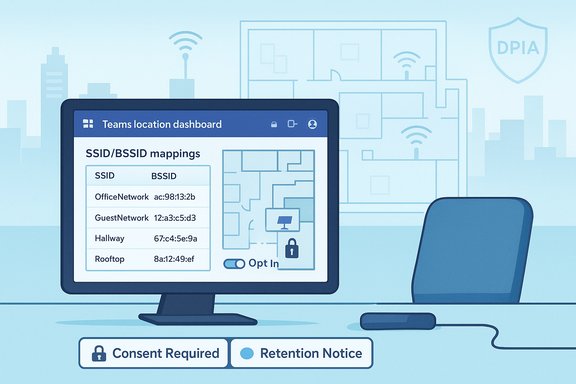
Microsoft is extending Teams’ Places and desk‑booking features with automatic work‑location detection. Administrators can map corporate wireless networks (SSID) and access‑point MAC addresses (BSSID) to Places (buildings/floors) and register desk peripherals (monitors, docks) to desks. When a user signs into Teams on Windows or macOS and either connects to a mapped wireless network or plugs into a mapped peripheral during their configured working hours, Teams can update the user’s work location to “In the office” or a specific building. The detected location is cleared at the end of the user’s work day, and tenants are off by default; users must opt in when their tenant enables the policy. Microsoft documents the admin workflow (Places configuration, SSID/BSSID lists, peripheral mapping) and provides PowerShell cmdlets for policy creation and assignment, so this is not a lightweight toggle: it requires planning, asset mapping and ongoing maintenance. At the same time, Microsoft has positioned the feature as an operational convenience for hybrid teams—helping colleagues find each other, improving desk utilization metrics, and keeping Places information current.
Source: The HR Digest https://www.thehrdigest.com/does-mi...racking-overcomplicate-employee-surveillance/
 Background
Microsoft is extending Teams’ Places and desk‑booking features with automatic work‑location detection. Administrators can map corporate wireless networks (SSID) and access‑point MAC addresses (BSSID) to Places (buildings/floors) and register desk peripherals (monitors, docks) to desks. When a user signs into Teams on Windows or macOS and either connects to a mapped wireless network or plugs into a mapped peripheral during their configured working hours, Teams can update the user’s work location to “In the office” or a specific building. The detected location is cleared at the end of the user’s work day, and tenants are off by default; users must opt in when their tenant enables the policy. Microsoft documents the admin workflow (Places configuration, SSID/BSSID lists, peripheral mapping) and provides PowerShell cmdlets for policy creation and assignment, so this is not a lightweight toggle: it requires planning, asset mapping and ongoing maintenance. At the same time, Microsoft has positioned the feature as an operational convenience for hybrid teams—helping colleagues find each other, improving desk utilization metrics, and keeping Places information current. How the feature works: the signals and the workflow
Two orthogonal signals: Wi‑Fi and peripherals
- Wireless network detection (SSID/BSSID): Administrators upload SSID lists and, for building specificity, BSSID lists that map AP MAC addresses to Places entries. If only SSIDs are configured, Teams typically shows a generic “In the office” marker; BSSID mapping yields building‑level granularity.
- Peripheral plug‑in detection: Desks and peripherals (monitors, docking stations, USB hubs) can be assigned to desk accounts or pools. When a user signs into Teams and connects to a mapped peripheral, Teams can mark them as physically present at that desk’s building. Peripheral detection relies on device identifiers (product/vendor IDs, serial numbers), which are harder to spoof than SSIDs alone.
Administrative controls and user consent
- Tenant default: off. Admins must create and assign a work‑location detection policy (for example using
New‑CsTeamsWorkLocationDetectionPolicy) to enable the capability for targeted users or groups. - User opt‑in: Even after a tenant enables a policy, Teams prompts individual users on supported desktop clients to consent to automatic detection; admins cannot grant consent on users’ behalf. The feature respects configured working hours and clears detected locations after the workday ends.
Client coverage and rollout nuance
- Initial supported clients are Windows and macOS desktop Teams apps; Virtual Desktop Infrastructure (VDI) and some other clients may be excluded at launch. Microsoft has treated wireless autodetection as a preview feature moving toward broader availability; press reporting and roadmap notes have tied the broader rollout to late‑2025 milestones for some customers, though timing has shifted across updates and previews. Treat any specific calendar date as provisional until confirmed in your tenant’s Message Center and Microsoft 365 roadmap.
Why employers may enable this: practical benefits
The product case is straightforward: hybrid workplaces struggle with mismatches between calendar presence and physical presence. Automatic detection promises several operational gains:- Faster, lower‑friction in‑office coordination: colleagues can find who’s actually on site for impromptu meetings without back‑and‑forth messaging.
- Improved desk and room utilization analytics: facilities teams can better understand occupancy and reclaim unused bookings.
- Less manual overhead: users no longer need to remember to update work location in Teams; automation fixes stale presence metadata that causes meeting planning friction.
- Safety and emergency response: up‑to‑date building presence can make evacuation and emergency communications more accurate.
Why the feature sparks privacy and trust concerns
Despite operational advantages, automatic work‑location detection elevates meaningful privacy, legal, and cultural risks. The concerns fall into four overlapping buckets.1) Perception of surveillance and culture damage
Even when technically constrained (opt‑in, working‑hours only), surfacing a visible signal that an employee is “in the building” changes social dynamics. Presence signals quickly become proxy metrics for attendance, and that perception—whether or not usage is punitive—can erode trust, reduce autonomy and produce morale problems. Many employees already view additional monitoring as a sign of mistrust; automatic detection can make managers more likely to check and less likely to trust.2) Function‑creep and misuse risk
What begins as facilities telemetry can be repurposed for performance analytics, RTO enforcement, or disciplinary decisions unless explicitly and contractually limited. Organizations that enable the feature without policy controls expose themselves to both internal HR disputes and external regulatory scrutiny. The consensus in expert guidance is clear: technical controls alone are not sufficient—policy, retention rules, and role‑based access are essential.3) Legal and regulatory exposure
Location data often carries heightened regulatory scrutiny. In EU jurisdictions and other regions with strong privacy laws, automated workplace tracking can trigger obligations such as Data Protection Impact Assessments (DPIAs), requirements for lawful bases beyond consent, and consultation with worker representatives. Collective bargaining agreements and employment law may also constrain monitoring. Failing to consult legal or update privacy notices before enabling detection can invite complaints or enforcement.4) Technical accuracy & spoofing: wrong data, wrong outcomes
SSID‑only approaches are fragile: SSIDs are public and trivial to duplicate. BSSID (AP MAC) mapping and peripheral bindings materially improve accuracy, but they are operationally intensive to maintain; MAC randomization, managed Wi‑Fi features, AP replacements and multi‑vendor environments complicate mapping. False positives and false negatives can feed misinformed managerial actions and reduce trust in the system. Administrators should not assume perfect accuracy—rather, they must plan for testing, auditing and fallback processes.Microsoft’s built‑in mitigations — and why they don’t fix everything
Microsoft implemented sensible design guards: the capability is off by default at the tenant level, requires per‑user opt‑in on supported desktop clients, respects configured working hours, and clears detected locations after the workday. Desktop consent dialogs and OS location settings are additional gates. These are important privacy‑first defaults that reduce some abuse vectors. But the technical mitigations alone don’t solve governance problems. Consent is meaningful only if it’s informed and voluntary; if an employer conditions benefits or advancement on opting in, voluntariness is undermined. Likewise, clearing a “detected” location at day’s end provides a window of visibility that can still be used punitively. As practical advice, multiple independent analyses urge: pair technical controls with explicit policy prohibiting punitive uses, limit who can query logs, and set short, defensible retention windows.Microsoft Copilot Dashboard: another telemetry vector
The Teams location update is part of a broader trend: administrative telemetry designed to measure adoption and usage. The Copilot Dashboard in Viva Insights is a concrete example. Microsoft’s Copilot Dashboard provides tenant‑level and group‑level metrics on readiness, adoption, impact and sentiment for Copilot features, and it includes adoption trendlines, usage intensity, and benchmarks that compare internal groups and, in some cases, external cohorts. That capacity turns behavioral telemetry into evaluative signals—and organizations should anticipate pressure to use those signals in performance decisions unless governance explicitly prohibits that. The existence of dashboards that benchmark employee AI usage—potentially against internal peers or external benchmarks—creates incentives to count Copilot interactions. When management ties adoption to career progression, disciplinary measures, or license renewals, telemetry designed for product adoption can become a performance lever. Several commentators and vendors have warned that such telemetry must be used carefully and transparently to avoid unfair incentives, gaming and degraded judgment.Technical and operational realities IT teams must understand
Administrators thinking about enabling automatic detection should treat it as a project, not a checkbox. Practical technical realities include:- Inventory and map Wi‑Fi infrastructure: build and maintain authoritative SSID/BSSID inventories per building and floor; incorporate change control to keep mappings current.
- Register peripherals and maintain desk bindings: peripheral detection works only if desks and devices are accurately registered; shared devices complicate attribution.
- Test across device configurations: VPNs, multi‑NIC laptops, hotspots, and BYOD vs. corporate‑managed endpoints produce varying behaviors. Validate common scenarios in pilots.
- Monitor OS privacy features: MAC randomization and OS‑level location settings influence signal availability; managed devices may suppress consent flows. Know how endpoint management interacts with Teams consent.
- Maintain audit trails and limit access: log who queries location data, restrict visibility to a minimum set of roles (facilities, designated IT), and retain queries for a limited, documented period.
Governance checklist — a practical eight‑step playbook
- Convene stakeholders: IT, HR, legal, facilities and employee representatives (or union/work council where applicable).
- Define legitimate use cases and explicitly ban punitive uses unless separately negotiated.
- Pilot: run a voluntary pilot with technical validation and participant feedback.
- Inventory infrastructure: build SSID/BSSID and peripheral inventories and assign change‑control owners.
- Update privacy notices and conduct DPIAs where required.
- Limit retention and access: set short retention windows, enable auditing and restrict queries to named roles.
- Train managers: make it clear how presence data may and may not be used; include sanctions for misuse.
- Provide employee remedies: an opt‑out pathway, a transparent appeals process and documentation of exceptions.
HR implications: fairness, morale and performance management
- Performance evaluation: Presence signals should never replace deliverables‑based assessments. Using location telemetry as a proximate productivity proxy risks bias and unfair outcomes. HR must codify how, when and whether location or Copilot adoption metrics can be used in reviews.
- Reasonable accommodations: Some employees require flexible schedules, remote work for health or caregiving reasons, or privacy protections. Policies must include explicit accommodations and exemptions to avoid disparate impact.
- Collective bargaining and consultation: In jurisdictions where works councils or unions exist, both the technical change and related policy must be treated as consultative matters. Failing to engage can create grievances.
- Communication and trust: The rollout is as much a communications program as a technical project—clear, repeated, and candid messaging about purpose, limits, and employee controls reduces the risk of reputational damage.
Realistic failure modes and how they harm credibility
- False positives: devices briefly joining guest networks, or Wi‑Fi leakage between floors, can label remote workers as in‑office (or vice versa). The consequence is not just a technical bug—it’s eroded trust when employees are flagged incorrectly and subjected to managerial questions.
- Spoofing narratives: early anecdotes of workers renaming home SSIDs to mimic corporate networks have become part of the public discussion. While BSSID mapping and peripheral binding reduce this risk, the story line itself fuels distrust and is often circulated as evidence that surveillance will be gamed or resisted. Treat simple SSID replicating as an indicator of poor configuration, not an inevitable failure mode.
- Overreliance on automated signals: when decisions (e.g., recall from a meeting, a warning, or denial of hybrid privileges) hinge on a single automated indicator, errors have outsized human consequences. Always require human review and corroborating signals for high‑stakes actions.
Practical controls and employee guidance
- Implement tiered visibility: show the detected location only to the user and limited roles; avoid organization‑wide broadcasting by default.
- Narrow retention windows: keep mapping and presence logs for the minimum time needed for operational needs (for example, 30–90 days) and document exceptions for legal holds.
- Human‑in‑the‑loop for disciplinary use: require HR sign‑off and corroborating evidence before any disciplinary action that references presence signals.
- Transparent opt‑in and opt‑out: ensure the Teams consent flow is visible, well documented, and that employees know how to withdraw consent without penalty.
- Cross‑validate signals: where accuracy matters, combine BSSID, peripheral, badge‑swipe, MDM and VPN logs rather than relying on a single source.
Verdict: useful tool — but context and governance decide whether it’s a productivity enhancer or a surveillance lever
Microsoft’s automatic work‑location detection is a technically reasonable response to legitimate hybrid‑work friction. The architecture—combining Wi‑Fi BSSIDs and desk‑peripheral signals—shows the engineering team grasped the spoofing and accuracy issues that tripped earlier, cruder approaches. The product’s privacy‑first defaults (tenant off by default, per‑user consent, working‑hours limits) are meaningful and should reduce the worst outcomes. However, technology does not act in a vacuum. The decision to enable such a capability is a governance question first: it requires HR, legal and employee‑relations buy‑in, transparent communications, and strict limits on retention and use. Without those guardrails, the same telemetry that smooths booking and collaboration can become a tool for micromanagement, disciplinary enforcement, or blunt attempts to squash hybrid flexibility—outcomes that have measurable negative effects on morale and retention.Closing recommendations for IT and HR leaders
- Treat the rollout as a program: pilot deliberately, measure accuracy, and collect employee feedback before scaling.
- Draft binding policy language before enabling: include explicit prohibitions on using presence data for disciplinary or pay decisions unless separately negotiated.
- Limit visibility and retention, and require auditing of queries: minimize the number of people who can run presence reports and log every query.
- Combine automation with human review for high‑stakes outcomes: corroborate with badge swipes, MDM/VPN, and manager attestations.
- Address AI adoption telemetry the same way: if you use Copilot Dashboard or similar adoption metrics, define fair use cases and ensure training and reskilling accompany any expectation of AI use.
Source: The HR Digest https://www.thehrdigest.com/does-mi...racking-overcomplicate-employee-surveillance/
