

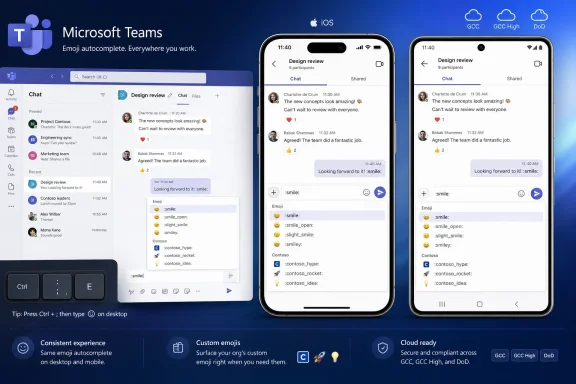
Microsoft Teams is adding colon-based emoji shortcuts with real-time autocomplete to its iOS and Android apps, with the feature listed as in development on the Microsoft 365 Roadmap and targeted for general availability in August 2026 across commercial and government cloud environments. The change sounds tiny because it is tiny, at least in the way release notes are tiny. But it also says something larger about where Teams is in its lifecycle: Microsoft is no longer merely trying to make Teams mobile available; it is trying to make it behave like the workplace muscle memory users already built elsewhere.
That is the real story behind Roadmap ID 565370. Typing
For years, Teams has carried the usual burden of enterprise software on mobile: it works, but it often feels like a translation rather than a native continuation of the desktop experience. On a laptop, power users learn shortcuts, compose quickly, and build a rhythm around the keyboard. On a phone, that rhythm breaks every time the user has to stop typing, tap into a picker, browse a grid, and return to the message.
The new mobile emoji shortcut feature narrows that gap. Users will be able to type colon-based commands such as
The change applies to Teams on both iOS and Android. Microsoft lists it for General Availability, not a preview-only experiment, and the roadmap entry covers Worldwide standard tenants as well as GCC, GCC High, and DoD. That breadth matters because it suggests Microsoft views this not as a consumer-flavored nicety but as a baseline communication feature for the full Teams estate.
There is also support for custom emojis, which is the part of the entry that makes the feature more than a Unicode convenience. In organizations where custom emojis have become shorthand for internal rituals, approvals, incidents, product names, launch jokes, or team identity, mobile access to shortcut-driven insertion makes those symbols easier to use away from the desk. The shortcut is small; the cultural plumbing behind it is not.
Teams already has ways to send emojis, GIFs, stickers, and reactions. The problem is not capability. The problem is interruption.
A colon shortcut keeps the user inside the sentence. It turns the emoji into something closer to a typed token, which is how many users already interact with Slack, Discord, GitHub, Notion, and other tools where
That is why autocomplete is essential. Without it, colon commands become trivia: useful only to people who remember exact names. With real-time suggestions, the feature becomes forgiving. A user can type
The difference between memorization and autocomplete is the difference between a shortcut for experts and a shortcut that ordinary users might actually adopt. Microsoft has often struggled with that boundary in Teams, where many features exist but remain hidden behind panels, menus, or tenant-specific policy choices. This is one case where the path to adoption is obvious: let people type and suggest the rest.
A custom emoji can mean “I reviewed this,” “ship it,” “incident acknowledged,” “customer escalation,” or “the build is cursed again.” It can compress a workplace ritual into a symbol. It can also become noise, distraction, or an HR headache if governance is absent.
That is where admins come in. A mobile shortcut feature does not necessarily create new governance questions, but it makes existing ones more visible. If custom emojis are easier to invoke from a phone, they may become more common in chats and channels. Organizations that already treat Teams as a record-bearing collaboration system will want to ensure their policies around custom content still make sense.
There is a broader compliance angle too. Microsoft’s inclusion of GCC, GCC High, and DoD in the roadmap entry indicates the feature is intended for regulated and public-sector environments. In those tenants, expressiveness exists inside stricter expectations for auditability, acceptable use, retention, and administrative control.
The lesson is not that admins should fear emoji autocomplete. It is that even lightweight communication features become part of the collaboration surface once deployed at enterprise scale. The most successful Teams administrators are the ones who understand that culture and policy collide in the compose box long before they collide in a boardroom.
That context makes small reductions in friction disproportionately valuable. A desktop user can tolerate a clumsy emoji picker because they have screen space and pointing precision. A mobile user is often typing one-handed, under time pressure, with notifications stacking above the keyboard. Every extra tap is a tax.
This is why the feature belongs in the same mental bucket as message drafts, quick reactions, synced recently used emojis, notification controls, and compose improvements. These are not headline-grabbing features, but they shape whether Teams feels like a reliable daily tool or a corporate obligation that users endure until they can get back to something faster.
The mobile angle also matters for frontline workers. Microsoft has spent years positioning Teams as the hub for frontline collaboration, where the phone may be the primary device rather than a companion. For those users, parity with desktop is not a luxury. It is a question of whether mobile Teams gets treated as a first-class client.
If the shortcut implementation is fast, predictable, and consistent with the desktop experience, it will fade into muscle memory. If it is laggy, inconsistent across keyboards, or awkward with custom emoji naming, it will become another feature users technically have but rarely trust.
That distinction matters for admins who have learned not to treat Microsoft 365 roadmap dates as deployment appointments. A roadmap month is an estimate, not a calendar invite. Features can appear gradually by tenant, cloud, client version, platform, region, and release ring.
The inclusion of iOS and Android under General Availability suggests the feature is beyond a single-platform experiment. But mobile features still depend on app updates, client-side behavior, and sometimes store rollout timing. Even after Microsoft marks a feature generally available, some users may not see it immediately if their app is outdated or their tenant is on a different deployment cadence.
This is especially true across government clouds. GCC, GCC High, and DoD inclusion is meaningful, but those environments often have separate validation and rollout rhythms. The roadmap entry says the destination is broad availability; it does not guarantee every tenant receives the feature at the same moment.
For IT teams, the practical response is simple: watch the Message Center, test on both major mobile platforms, and confirm behavior in the tenant before announcing it internally. Emoji shortcuts are not the sort of feature that requires a migration plan. They are exactly the sort of feature that can generate helpdesk confusion if users see inconsistent behavior across devices.
Slack helped normalize this pattern in workplace chat. Discord made it second nature for communities. GitHub and other developer tools made shortcodes part of technical collaboration. Even users who do not consciously think of themselves as power users may recognize the pattern from years of cross-platform chat behavior.
Teams has often been at its best when it stops trying to make every interaction uniquely Microsoft and instead adopts the grammar users already know. The company’s challenge is that Teams serves audiences with very different expectations. A developer wants speed and keyboard efficiency. A frontline worker wants clarity and tap-friendly simplicity. A compliance officer wants controls. A manager wants fewer misunderstandings.
Colon autocomplete is one of those rare interface patterns that can satisfy several of those groups at once. It gives fast users a faster path. It gives casual users suggestions. It gives organizations a clearer way to surface custom emoji names. It gives mobile users a path that does not depend on the operating system’s emoji keyboard.
The catch is naming. Autocomplete only works well when the vocabulary is sane. If custom emojis are named inconsistently, duplicated, overloaded with inside jokes, or filled with near-identical variants, the shortcut surface can become cluttered. Microsoft can provide the interface, but organizations still own the library.
For this feature, users will notice the rough edges quickly. Does autocomplete appear immediately? Does it search custom emojis as well as standard ones? Does it behave the same way in chats, channels, meeting chats, replies, and edited messages? Does it handle skin tones, aliases, and organization-specific naming cleanly? Does it conflict with the phone keyboard’s own autocorrect or emoji prediction?
These are small questions until they are not. Messaging tools live in milliseconds and annoyances. A feature that interrupts typing, inserts the wrong emoji, or fails unpredictably will be abandoned faster than it was announced.
Microsoft also needs to avoid making the feature too clever. The power of colon syntax is that it is explicit: the user types a token and gets a matching suggestion. If Teams tries to overpredict intent, or if suggestions obscure too much of the mobile compose area, the shortcut could become one more layer of UI noise.
The best version of this feature is boring. It appears when invoked, suggests quickly, inserts cleanly, respects the tenant’s custom emoji configuration, and then gets out of the way. In workplace software, boring is often the highest compliment.
Government cloud inclusion signals that Microsoft intends to carry the same collaboration affordances into environments where change control and compliance scrutiny are higher. That is a significant statement about Teams’ maturity. The modern Teams client is expected to deliver consumer-grade interaction patterns without compromising enterprise and public-sector requirements.
Still, admins in these environments should read the roadmap with appropriate caution. Inclusion on a roadmap is not the same as simultaneous feature behavior across every cloud boundary. Government tenants frequently operate under additional constraints, and client features may arrive later or behave differently depending on validation and service dependencies.
The more interesting point is philosophical. Microsoft is treating expressiveness as part of the secure collaboration baseline, not as an optional consumer layer. That aligns with how work actually happens. Employees in regulated environments still need fast acknowledgments, lightweight tone, and shared shorthand; they just need those tools inside governed systems rather than shadow IT.
If Teams can make that experience feel natural on mobile, Microsoft strengthens the case that sanctioned collaboration does not have to be joyless collaboration. That is not a trivial advantage when employees can compare Teams against every consumer messaging app on their phone.
Emoji shortcut autocomplete belongs to that second era. It does not sell a license by itself. It will not dominate Ignite. It will not convince a CIO to choose Microsoft 365. But it may make thousands of daily messages slightly faster and slightly less awkward.
That kind of improvement is easy to dismiss because it lacks drama. Yet communication software succeeds by reducing tiny bits of friction at massive scale. If millions of users save a few seconds, avoid a few misread tones, or participate more naturally from mobile, the aggregate effect is real.
There is also a trust component. Users often judge software by whether it respects their learned habits. When Teams mobile supports familiar desktop-style shortcuts, it tells users that Microsoft is paying attention to workflow continuity. When it fails to support those habits, users feel the platform boundary every time they switch devices.
This is the unglamorous work Microsoft has to keep doing. Teams cannot simply be the place meetings happen. It has to become the place everyday work messages feel effortless enough that users stop thinking about the tool.
That is the real story behind Roadmap ID 565370. Typing
:smile: and watching Teams suggest an emoji is not a platform revolution. It is a concession that the fastest interface is often the one that disappears.
 Microsoft Finally Brings the Desktop Habit to the Phone
For years, Teams has carried the usual burden of enterprise software on mobile: it works, but it often feels like a translation rather than a native continuation of the desktop experience. On a laptop, power users learn shortcuts, compose quickly, and build a rhythm around the keyboard. On a phone, that rhythm breaks every time the user has to stop typing, tap into a picker, browse a grid, and return to the message.The new mobile emoji shortcut feature narrows that gap. Users will be able to type colon-based commands such as
:smile: directly in the compose box, with autocomplete suggestions appearing as they type. That makes emoji insertion less like hunting through a panel and more like selecting a command from an inline interface.The change applies to Teams on both iOS and Android. Microsoft lists it for General Availability, not a preview-only experiment, and the roadmap entry covers Worldwide standard tenants as well as GCC, GCC High, and DoD. That breadth matters because it suggests Microsoft views this not as a consumer-flavored nicety but as a baseline communication feature for the full Teams estate.
There is also support for custom emojis, which is the part of the entry that makes the feature more than a Unicode convenience. In organizations where custom emojis have become shorthand for internal rituals, approvals, incidents, product names, launch jokes, or team identity, mobile access to shortcut-driven insertion makes those symbols easier to use away from the desk. The shortcut is small; the cultural plumbing behind it is not.
The Emoji Picker Was Always a Speed Bump
The standard mobile emoji picker is good at discovery and bad at flow. It is designed for browsing, not for precision. That distinction matters in a work chat client, where most users are not trying to explore the emotional range of Unicode; they are trying to acknowledge a message, soften a sentence, or respond without turning a thread into another meeting.Teams already has ways to send emojis, GIFs, stickers, and reactions. The problem is not capability. The problem is interruption.
A colon shortcut keeps the user inside the sentence. It turns the emoji into something closer to a typed token, which is how many users already interact with Slack, Discord, GitHub, Notion, and other tools where
:keyword: syntax is part of the shared grammar. Microsoft is not inventing a new interaction here. It is catching Teams mobile up to a convention its users likely encounter every day.That is why autocomplete is essential. Without it, colon commands become trivia: useful only to people who remember exact names. With real-time suggestions, the feature becomes forgiving. A user can type
:thu, :smi, or the beginning of a custom emoji name and let the interface meet them halfway.The difference between memorization and autocomplete is the difference between a shortcut for experts and a shortcut that ordinary users might actually adopt. Microsoft has often struggled with that boundary in Teams, where many features exist but remain hidden behind panels, menus, or tenant-specific policy choices. This is one case where the path to adoption is obvious: let people type and suggest the rest.
Custom Emojis Make This an Admin Story, Not Just a Chat Story
Custom emoji support is the detail that will catch the eye of Teams-heavy organizations. Over the past few years, Microsoft has worked to make Teams feel less sterile and more like a living workspace, adding richer reactions, custom emoji capabilities, and more expressive messaging tools. That effort can sound superficial until you watch how real teams communicate under pressure.A custom emoji can mean “I reviewed this,” “ship it,” “incident acknowledged,” “customer escalation,” or “the build is cursed again.” It can compress a workplace ritual into a symbol. It can also become noise, distraction, or an HR headache if governance is absent.
That is where admins come in. A mobile shortcut feature does not necessarily create new governance questions, but it makes existing ones more visible. If custom emojis are easier to invoke from a phone, they may become more common in chats and channels. Organizations that already treat Teams as a record-bearing collaboration system will want to ensure their policies around custom content still make sense.
There is a broader compliance angle too. Microsoft’s inclusion of GCC, GCC High, and DoD in the roadmap entry indicates the feature is intended for regulated and public-sector environments. In those tenants, expressiveness exists inside stricter expectations for auditability, acceptable use, retention, and administrative control.
The lesson is not that admins should fear emoji autocomplete. It is that even lightweight communication features become part of the collaboration surface once deployed at enterprise scale. The most successful Teams administrators are the ones who understand that culture and policy collide in the compose box long before they collide in a boardroom.
Mobile Teams Is Where Microsoft Has to Prove the Details
Teams mobile has always faced a tougher design problem than Teams desktop. The desktop app can assume a keyboard, a large screen, multiple windows, and a user who is plausibly sitting down to work. The phone version is used in elevators, hallways, trains, school pickup lines, airport lounges, warehouses, hospitals, job sites, and conference corridors.That context makes small reductions in friction disproportionately valuable. A desktop user can tolerate a clumsy emoji picker because they have screen space and pointing precision. A mobile user is often typing one-handed, under time pressure, with notifications stacking above the keyboard. Every extra tap is a tax.
This is why the feature belongs in the same mental bucket as message drafts, quick reactions, synced recently used emojis, notification controls, and compose improvements. These are not headline-grabbing features, but they shape whether Teams feels like a reliable daily tool or a corporate obligation that users endure until they can get back to something faster.
The mobile angle also matters for frontline workers. Microsoft has spent years positioning Teams as the hub for frontline collaboration, where the phone may be the primary device rather than a companion. For those users, parity with desktop is not a luxury. It is a question of whether mobile Teams gets treated as a first-class client.
If the shortcut implementation is fast, predictable, and consistent with the desktop experience, it will fade into muscle memory. If it is laggy, inconsistent across keyboards, or awkward with custom emoji naming, it will become another feature users technically have but rarely trust.
The Release Window Shows Microsoft’s New Teams Cadence
The roadmap entry was created on June 10, 2026, and updated on July 1, 2026, with general availability listed for August 2026. A related Message Center-style description reportedly frames the broader rollout as spanning from March through August 2026, which is a reminder that Microsoft’s roadmap dates often reflect availability milestones rather than a single worldwide switch being flipped.That distinction matters for admins who have learned not to treat Microsoft 365 roadmap dates as deployment appointments. A roadmap month is an estimate, not a calendar invite. Features can appear gradually by tenant, cloud, client version, platform, region, and release ring.
The inclusion of iOS and Android under General Availability suggests the feature is beyond a single-platform experiment. But mobile features still depend on app updates, client-side behavior, and sometimes store rollout timing. Even after Microsoft marks a feature generally available, some users may not see it immediately if their app is outdated or their tenant is on a different deployment cadence.
This is especially true across government clouds. GCC, GCC High, and DoD inclusion is meaningful, but those environments often have separate validation and rollout rhythms. The roadmap entry says the destination is broad availability; it does not guarantee every tenant receives the feature at the same moment.
For IT teams, the practical response is simple: watch the Message Center, test on both major mobile platforms, and confirm behavior in the tenant before announcing it internally. Emoji shortcuts are not the sort of feature that requires a migration plan. They are exactly the sort of feature that can generate helpdesk confusion if users see inconsistent behavior across devices.
Microsoft Is Borrowing From the Chat Apps That Trained Everyone
There is no shame in copying a good convention. Colon-based emoji syntax has become part of the modern collaboration dialect because it solves a real problem elegantly. It is human-readable, compact, searchable, and compatible with custom naming systems.Slack helped normalize this pattern in workplace chat. Discord made it second nature for communities. GitHub and other developer tools made shortcodes part of technical collaboration. Even users who do not consciously think of themselves as power users may recognize the pattern from years of cross-platform chat behavior.
Teams has often been at its best when it stops trying to make every interaction uniquely Microsoft and instead adopts the grammar users already know. The company’s challenge is that Teams serves audiences with very different expectations. A developer wants speed and keyboard efficiency. A frontline worker wants clarity and tap-friendly simplicity. A compliance officer wants controls. A manager wants fewer misunderstandings.
Colon autocomplete is one of those rare interface patterns that can satisfy several of those groups at once. It gives fast users a faster path. It gives casual users suggestions. It gives organizations a clearer way to surface custom emoji names. It gives mobile users a path that does not depend on the operating system’s emoji keyboard.
The catch is naming. Autocomplete only works well when the vocabulary is sane. If custom emojis are named inconsistently, duplicated, overloaded with inside jokes, or filled with near-identical variants, the shortcut surface can become cluttered. Microsoft can provide the interface, but organizations still own the library.
The Risk Is Not Emoji Chaos; It Is Another Half-Finished Parity Feature
The obvious joke is that enterprise IT now has to worry about emoji governance. The more serious concern is that Teams mobile receives another feature whose promise depends entirely on execution. Microsoft has a long history of shipping useful Teams capabilities that feel uneven across desktop, web, iOS, Android, personal accounts, work accounts, and sovereign clouds.For this feature, users will notice the rough edges quickly. Does autocomplete appear immediately? Does it search custom emojis as well as standard ones? Does it behave the same way in chats, channels, meeting chats, replies, and edited messages? Does it handle skin tones, aliases, and organization-specific naming cleanly? Does it conflict with the phone keyboard’s own autocorrect or emoji prediction?
These are small questions until they are not. Messaging tools live in milliseconds and annoyances. A feature that interrupts typing, inserts the wrong emoji, or fails unpredictably will be abandoned faster than it was announced.
Microsoft also needs to avoid making the feature too clever. The power of colon syntax is that it is explicit: the user types a token and gets a matching suggestion. If Teams tries to overpredict intent, or if suggestions obscure too much of the mobile compose area, the shortcut could become one more layer of UI noise.
The best version of this feature is boring. It appears when invoked, suggests quickly, inserts cleanly, respects the tenant’s custom emoji configuration, and then gets out of the way. In workplace software, boring is often the highest compliment.
Government Clouds Put a Spotlight on Consistency
The roadmap’s cloud list is unusually important for such a small feature. Worldwide availability is expected, but Microsoft also names GCC, GCC High, and DoD. For WindowsForum’s IT-pro audience, that means this is not merely a commercial Teams nicety drifting through standard tenants.Government cloud inclusion signals that Microsoft intends to carry the same collaboration affordances into environments where change control and compliance scrutiny are higher. That is a significant statement about Teams’ maturity. The modern Teams client is expected to deliver consumer-grade interaction patterns without compromising enterprise and public-sector requirements.
Still, admins in these environments should read the roadmap with appropriate caution. Inclusion on a roadmap is not the same as simultaneous feature behavior across every cloud boundary. Government tenants frequently operate under additional constraints, and client features may arrive later or behave differently depending on validation and service dependencies.
The more interesting point is philosophical. Microsoft is treating expressiveness as part of the secure collaboration baseline, not as an optional consumer layer. That aligns with how work actually happens. Employees in regulated environments still need fast acknowledgments, lightweight tone, and shared shorthand; they just need those tools inside governed systems rather than shadow IT.
If Teams can make that experience feel natural on mobile, Microsoft strengthens the case that sanctioned collaboration does not have to be joyless collaboration. That is not a trivial advantage when employees can compare Teams against every consumer messaging app on their phone.
The Smallest Features Often Reveal the Platform’s Priorities
Teams is a mature product now, and mature products are judged less by grand announcements than by accumulated fit and finish. The early pandemic-era Teams story was about capacity, meetings, and organizational survival. The current Teams story is about refinement, parity, speed, and whether Microsoft can make its collaboration hub feel less heavy.Emoji shortcut autocomplete belongs to that second era. It does not sell a license by itself. It will not dominate Ignite. It will not convince a CIO to choose Microsoft 365. But it may make thousands of daily messages slightly faster and slightly less awkward.
That kind of improvement is easy to dismiss because it lacks drama. Yet communication software succeeds by reducing tiny bits of friction at massive scale. If millions of users save a few seconds, avoid a few misread tones, or participate more naturally from mobile, the aggregate effect is real.
There is also a trust component. Users often judge software by whether it respects their learned habits. When Teams mobile supports familiar desktop-style shortcuts, it tells users that Microsoft is paying attention to workflow continuity. When it fails to support those habits, users feel the platform boundary every time they switch devices.
This is the unglamorous work Microsoft has to keep doing. Teams cannot simply be the place meetings happen. It has to become the place everyday work messages feel effortless enough that users stop thinking about the tool.
The August Rollout Is a Test of Microsoft’s Friction Budget
The concrete readout for admins and users is straightforward, but the strategic readout is more interesting. Microsoft is spending engineering effort on a feature that will be noticed only if it works well or if it is missing. That is exactly the category where mature collaboration platforms win or lose affection.- Teams mobile users on iOS and Android are slated to get colon-based emoji shortcuts with autocomplete, bringing the mobile compose experience closer to desktop behavior.
- The Microsoft 365 Roadmap lists the feature as in development with General Availability targeted for August 2026.
- The rollout scope includes Worldwide standard tenants as well as GCC, GCC High, and DoD, though exact timing may still vary by tenant, platform, cloud, and app version.
- Custom emoji support means organizations should expect their internal emoji libraries to become easier to use from mobile devices.
- Admins should test the feature across chats, channels, mobile platforms, and managed devices before sending broad user guidance.
- The feature’s success will depend less on the existence of shortcuts than on the speed, predictability, and consistency of autocomplete in the mobile compose box.
References
- Primary source: Microsoft 365 Roadmap
Published: 2026-07-01T23:03:18.2442931Z
Microsoft 365 Roadmap | Microsoft 365
The Microsoft 365 Roadmap lists updates that are currently planned for applicable subscribers. Check here for more information on the status of new features and updates.www.microsoft.com
- Related coverage: m365admin.handsontek.net
Microsoft Teams: Emoji shortcuts with autocomplete on mobile - M365 Admin
Teams brings desktop-style emoji shortcuts to mobile (iOS and Android), allowing you to insert emojis by typing colon-based commands like :smile:. Real-time autocomplete suggestions help you quickly find the right emoji as you type, while support for custom emojis enables more personalized and...m365admin.handsontek.net - Official source: support.microsoft.com
Send an emoji, GIF, or sticker in Microsoft Teams | Microsoft Support
To send an emoji, GIF, or sticker in a Microsoft Teams message, click Emoji, GIFs and Stickers beneath the compose box. Customize your emoji skin tone, create custom GIFs, and discover sticker packs.support.microsoft.com - Official source: techcommunity.microsoft.com
- Related coverage: emojispark.com
Emoji Keyboard Shortcuts — Every OS, App & Browser ⌨️😀 | Emoji Spark ✨
Open the emoji picker fast on every device. macOS (Ctrl+Cmd+Space), Windows (Win+.), Linux, ChromeOS, iOS, Android, plus shortcut apps for Slack, Discord, GitHub, Notion. Full reference with copy buttons. emojispark.com
- Related coverage: office365atwork.com
Emoji shortcuts for Microsoft Teams in Microsoft 365
Start to use Teams emoji using Microsoft Teams application. Learn about emoji shortcuts and improve your communication.office365atwork.com
- Related coverage: m.io
Microsoft Teams Emojis: When, How, And Why To Use Them 🤔
Discover how Microsoft Teams emojis enhance communication, covering adding, customizing, and troubleshooting for seamless cross-platform messaging.www.m.io - Official source: cdn-dynmedia-1.microsoft.com
- Related coverage: primend.com
- Related coverage: primend.ee
- Official source: download.microsoft.com
