

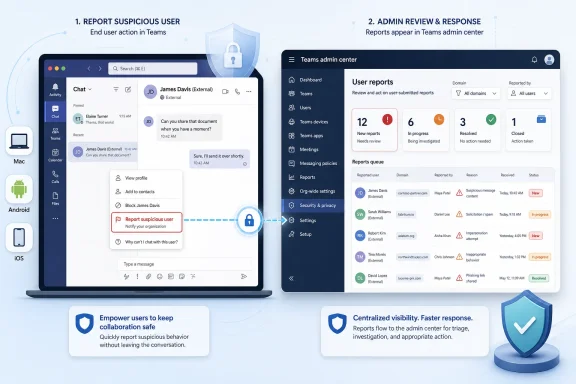
Microsoft is rolling out a Teams feature in June 2026 that lets users on desktop, Mac, Android, and iOS report suspicious external users directly from the app, with those reports appearing in the Teams admin center for administrator review. That sounds like a small addition to the block button, but it changes the security model around external collaboration. Teams is no longer treating suspicious contact as a purely local nuisance to be dismissed by the recipient. It is turning end-user discomfort into an administrative signal.
For years, the most practical advice for a suspicious external Teams message was brutally simple: do not engage, block the sender, and tell IT if something looked serious. The new roadmap item formalizes the last part. A user can now report the external account itself, not merely make the conversation disappear from their own client.
That distinction matters. Blocking is personal hygiene; reporting is organizational intelligence. A blocked external user may vanish from one employee’s view while continuing to approach others across the tenant. A reported external user becomes a pattern that administrators can see, correlate, and act on.
Microsoft’s framing is appropriately narrow. This is not a magic anti-phishing shield, nor does it make every employee a security analyst. It creates a route for suspicion to travel from the edge of the organization, where social engineering first lands, to the console where policy decisions are made.
The rollout also fits a broader direction in Teams security. Microsoft has been tightening the space where external users, unmanaged Teams accounts, federated tenants, domains, links, meetings, and calls intersect. The company is not removing external collaboration; it is admitting that external collaboration has become a front door attackers know how to knock on.
External access makes that useful. It lets organizations communicate with partners, customers, contractors, and other Microsoft 365 tenants without dragging every interaction into guest accounts or email threads. But the same convenience allows an attacker with a plausible name, a clean-looking tenant, or a disposable account to attempt a first-contact social engineering play inside a tool many users associate with internal work.
The risk is not limited to malicious links. Impersonation, payment redirection, fake support prompts, meeting-invite bait, and “please approve this now” pressure all work better when they appear in a collaboration tool rather than a spam folder. The attacker benefits from the user’s assumption that Teams is a managed workspace and therefore safer than the open internet.
Microsoft’s new reporting path is an acknowledgment of that behavioral gap. Security products can scan URLs and apply threat intelligence, but users still notice things machines do not: the odd tone, the implausible request, the external badge attached to a supposedly internal person, the vendor name that is close but not quite right. The feature gives those human observations somewhere to go.
That matters because Teams external access is controlled at multiple levels. Organizations can allow all external domains, allow only specific domains, block particular domains, restrict unmanaged Teams users, and block specific external users. Microsoft has also been connecting Teams sender and domain blocking with the broader Tenant Allow/Block List and Defender workflows, depending on configuration and licensing.
The new user-reporting feature should therefore be read as input, not enforcement. A report is not the same thing as a ban. Admins still need to determine whether the report reflects a genuine threat, a mistaken user, a legitimate but awkward vendor conversation, or a broader campaign.
That human review step is both a strength and a burden. It reduces the risk of one frustrated employee turning a legitimate partner into collateral damage. It also means organizations that enable the feature but do not staff the resulting queue may create a comforting illusion: users report, nothing happens, and the attacker simply moves on to the next target.
Microsoft’s own documentation around external access makes the tradeoff explicit. By default, Teams can be configured broadly enough to let users find, chat, call, and meet with people in external domains, provided the other organization’s settings also allow it. Administrators can narrow that down with allow lists, block lists, and controls for unmanaged Teams accounts.
The new reporting feature does not replace those controls. It makes them more responsive. Instead of deciding external policy solely in advance, admins can adjust based on what users actually encounter: repeated approaches from a suspicious domain, a specific external address generating reports, or a pattern of impersonation attempts aimed at finance and help desk personnel.
This is where the feature becomes valuable for smaller IT teams as well as large enterprises. A small company may not have a mature security operations center, but it does have employees who know when a “partner” message smells wrong. Surfacing those reports in the admin center lets a lean team use user judgment as a low-cost tripwire.
Users may report spammy sales outreach, confusing messages from legitimate contractors, or external contacts they simply do not recognize. In some environments, that may be useful; in others, it may flood administrators with low-quality alerts. Microsoft can provide the pipe, but each organization has to decide how seriously to treat what comes through it.
The better approach is to build a lightweight response loop. Admins should review reports for repeat senders, repeated domains, unusual timing, and targeting of privileged or financially sensitive users. If a report looks credible, the response should not stop at blocking the sender; it should include checking whether other users received similar messages and whether any clicked links, shared data, or joined meetings.
That loop is especially important because social engineering often succeeds before malware appears. The first message may only establish trust. The second may move to a meeting. The third may request a file, a code, or a remote-support session. A user report at the first stage can give IT a chance to interrupt the chain before the incident becomes measurable in logs.
The logic is obvious. Teams is no longer just meetings and chat. It is a workflow surface, an identity surface, an app platform, and a communication channel that crosses organizational borders. If Microsoft wants customers to keep more work inside Teams, it also has to make Teams defensible when strangers arrive at the edge.
There is a commercial dimension, too. The more Teams security is tied to Defender portals, admin center reporting, policy controls, and premium security workflows, the more Microsoft can argue that its collaboration suite is safer when run as part of the broader Microsoft stack. That is not inherently bad for customers, but it does mean admins should watch which protections are broadly available and which become more useful only with higher-tier licensing.
Still, the basic direction is hard to criticize. Collaboration tools need abuse reporting that reaches administrators. Email has had this muscle for years. Teams is catching up to the reality that attackers follow users to the tools where trust is highest.
The best implementation is likely the one Microsoft appears to be aiming for: place reporting near existing block actions, especially in the context of external users. That is where the user is already making a judgment about trust. The extra action should feel like a natural escalation: “I do not just want this person gone; I want the organization to know.”
Training still matters. Users should understand the difference between blocking, reporting, and continuing a conversation. They should also know that external labels are not decorative. An external badge is a prompt to slow down, especially when the message asks for credentials, payments, confidential files, urgent approvals, or movement to another channel.
Admins, in turn, should avoid turning every report into an interrogation. If reporting becomes socially costly, employees will stop doing it. The culture has to reward early suspicion, even when the report turns out to be harmless.
 Microsoft Turns the Block Button Into a Security Sensor
For years, the most practical advice for a suspicious external Teams message was brutally simple: do not engage, block the sender, and tell IT if something looked serious. The new roadmap item formalizes the last part. A user can now report the external account itself, not merely make the conversation disappear from their own client.That distinction matters. Blocking is personal hygiene; reporting is organizational intelligence. A blocked external user may vanish from one employee’s view while continuing to approach others across the tenant. A reported external user becomes a pattern that administrators can see, correlate, and act on.
Microsoft’s framing is appropriately narrow. This is not a magic anti-phishing shield, nor does it make every employee a security analyst. It creates a route for suspicion to travel from the edge of the organization, where social engineering first lands, to the console where policy decisions are made.
The rollout also fits a broader direction in Teams security. Microsoft has been tightening the space where external users, unmanaged Teams accounts, federated tenants, domains, links, meetings, and calls intersect. The company is not removing external collaboration; it is admitting that external collaboration has become a front door attackers know how to knock on.
Teams Became the Place Phishing Could Pretend to Be Work
Email remains the classic phishing channel, but Teams has become attractive because it carries a different social contract. A Teams message feels immediate, conversational, and work-adjacent. Users are conditioned to respond quickly because chat is where colleagues ask for approvals, vendors chase invoices, recruiters make contact, and executives create fire drills.External access makes that useful. It lets organizations communicate with partners, customers, contractors, and other Microsoft 365 tenants without dragging every interaction into guest accounts or email threads. But the same convenience allows an attacker with a plausible name, a clean-looking tenant, or a disposable account to attempt a first-contact social engineering play inside a tool many users associate with internal work.
The risk is not limited to malicious links. Impersonation, payment redirection, fake support prompts, meeting-invite bait, and “please approve this now” pressure all work better when they appear in a collaboration tool rather than a spam folder. The attacker benefits from the user’s assumption that Teams is a managed workspace and therefore safer than the open internet.
Microsoft’s new reporting path is an acknowledgment of that behavioral gap. Security products can scan URLs and apply threat intelligence, but users still notice things machines do not: the odd tone, the implausible request, the external badge attached to a supposedly internal person, the vendor name that is close but not quite right. The feature gives those human observations somewhere to go.
The Admin Center Is Where This Feature Becomes Real
The key phrase in the roadmap item is not “users can report.” It is “reports are surfaced in the Teams admin center.” Without that second half, this would be another client-side safety affordance, useful but shallow. With it, Microsoft is pushing suspicious external interaction into the operational world of admins.That matters because Teams external access is controlled at multiple levels. Organizations can allow all external domains, allow only specific domains, block particular domains, restrict unmanaged Teams users, and block specific external users. Microsoft has also been connecting Teams sender and domain blocking with the broader Tenant Allow/Block List and Defender workflows, depending on configuration and licensing.
The new user-reporting feature should therefore be read as input, not enforcement. A report is not the same thing as a ban. Admins still need to determine whether the report reflects a genuine threat, a mistaken user, a legitimate but awkward vendor conversation, or a broader campaign.
That human review step is both a strength and a burden. It reduces the risk of one frustrated employee turning a legitimate partner into collateral damage. It also means organizations that enable the feature but do not staff the resulting queue may create a comforting illusion: users report, nothing happens, and the attacker simply moves on to the next target.
External Access Policy Is Now a Living Security Boundary
Many organizations still treat Teams external access as a collaboration setting rather than a security boundary. That mental model is increasingly out of date. The boundary between “inside Teams” and “outside the company” is now porous enough that it needs the same operational care as email allow lists, identity conditional access, and endpoint alerts.Microsoft’s own documentation around external access makes the tradeoff explicit. By default, Teams can be configured broadly enough to let users find, chat, call, and meet with people in external domains, provided the other organization’s settings also allow it. Administrators can narrow that down with allow lists, block lists, and controls for unmanaged Teams accounts.
The new reporting feature does not replace those controls. It makes them more responsive. Instead of deciding external policy solely in advance, admins can adjust based on what users actually encounter: repeated approaches from a suspicious domain, a specific external address generating reports, or a pattern of impersonation attempts aimed at finance and help desk personnel.
This is where the feature becomes valuable for smaller IT teams as well as large enterprises. A small company may not have a mature security operations center, but it does have employees who know when a “partner” message smells wrong. Surfacing those reports in the admin center lets a lean team use user judgment as a low-cost tripwire.
The Security Gain Depends on What Admins Do Next
The danger with features like this is that they are easy to overstate. Reporting a suspicious external user is not detection in the same sense as a malware signature, identity-risk policy, or network alert. It is a signal with context, noise, and emotion attached.Users may report spammy sales outreach, confusing messages from legitimate contractors, or external contacts they simply do not recognize. In some environments, that may be useful; in others, it may flood administrators with low-quality alerts. Microsoft can provide the pipe, but each organization has to decide how seriously to treat what comes through it.
The better approach is to build a lightweight response loop. Admins should review reports for repeat senders, repeated domains, unusual timing, and targeting of privileged or financially sensitive users. If a report looks credible, the response should not stop at blocking the sender; it should include checking whether other users received similar messages and whether any clicked links, shared data, or joined meetings.
That loop is especially important because social engineering often succeeds before malware appears. The first message may only establish trust. The second may move to a meeting. The third may request a file, a code, or a remote-support session. A user report at the first stage can give IT a chance to interrupt the chain before the incident becomes measurable in logs.
Microsoft’s Platform Strategy Is Showing
This feature also reveals Microsoft’s larger security strategy for Teams. The company is turning Teams from a collaboration island into a signal-producing part of the Microsoft 365 security estate. External domain anomaly reporting, sender blocking, malicious-link warnings, Defender integrations, and user-submitted reports all point in the same direction.The logic is obvious. Teams is no longer just meetings and chat. It is a workflow surface, an identity surface, an app platform, and a communication channel that crosses organizational borders. If Microsoft wants customers to keep more work inside Teams, it also has to make Teams defensible when strangers arrive at the edge.
There is a commercial dimension, too. The more Teams security is tied to Defender portals, admin center reporting, policy controls, and premium security workflows, the more Microsoft can argue that its collaboration suite is safer when run as part of the broader Microsoft stack. That is not inherently bad for customers, but it does mean admins should watch which protections are broadly available and which become more useful only with higher-tier licensing.
Still, the basic direction is hard to criticize. Collaboration tools need abuse reporting that reaches administrators. Email has had this muscle for years. Teams is catching up to the reality that attackers follow users to the tools where trust is highest.
The User Experience Has to Be Frictionless or It Will Fail
The success of this rollout will depend heavily on the client experience. If reporting is buried behind too many taps, users will default to block, ignore, or complain in a side channel. If it is too prominent or vague, admins may get a stream of reports that reflect annoyance rather than risk.The best implementation is likely the one Microsoft appears to be aiming for: place reporting near existing block actions, especially in the context of external users. That is where the user is already making a judgment about trust. The extra action should feel like a natural escalation: “I do not just want this person gone; I want the organization to know.”
Training still matters. Users should understand the difference between blocking, reporting, and continuing a conversation. They should also know that external labels are not decorative. An external badge is a prompt to slow down, especially when the message asks for credentials, payments, confidential files, urgent approvals, or movement to another channel.
Admins, in turn, should avoid turning every report into an interrogation. If reporting becomes socially costly, employees will stop doing it. The culture has to reward early suspicion, even when the report turns out to be harmless.
The June Rollout Gives Admins a Practical Checklist
The most useful thing about this roadmap item is not that it promises a new security category. It gives IT teams a concrete reason to revisit Teams external access before the feature becomes just another unnoticed toggle in the admin center.- Organizations should verify whether Teams external access is still configured for their current risk tolerance rather than inherited from an old collaboration push.
- Administrators should decide who owns investigation of reported external users before reports begin appearing in the Teams admin center.
- Security teams should correlate user reports with existing Teams controls, including domain blocking, specific external user blocking, unmanaged account restrictions, and Defender-based allow/block workflows where available.
- Help desks should update user guidance so employees know when to block, when to report, and when to escalate immediately.
- High-risk departments such as finance, HR, legal, executive support, and IT support should receive targeted reminders that external Teams contact can be part of phishing and impersonation campaigns.
- Organizations should treat user reports as early-warning signals, not final verdicts, and should build a review process that can separate nuisance traffic from credible threat activity.
This Is a Small Feature With a Large Admission Inside It
Microsoft’s rollout of external-user reporting in Teams is not revolutionary, but it is revealing. It admits that the collaboration layer has become part of the attack surface, and that users at the edge often see the first signs of abuse before automated systems or administrators do. The feature will only be as effective as the response process behind it, but it nudges Teams security in the right direction: away from isolated user self-defense and toward shared visibility across the tenant. For Windows and Microsoft 365 admins, the message is simple enough: the next phishing report may not come from Outlook at all, and your Teams admin center needs to be ready when it arrives.References
- Primary source: Microsoft 365 Roadmap
Published: 2026-06-24T23:15:55.6812517Z
Microsoft 365 Roadmap | Microsoft 365
The Microsoft 365 Roadmap lists updates that are currently planned for applicable subscribers. Check here for more information on the status of new features and updates.www.microsoft.com
- Official source: learn.microsoft.com
Microsoft Teams external domain anomalies report - Microsoft Teams | Microsoft Learn
The External Domain Anomalies Report surfaces unusual external collaboration patterns between users in your organization and external domains in Microsoft Teams.learn.microsoft.com - Related coverage: blog-en.topedia.com
New External Domain Anomalies Report in the Teams admin center flags unusual external communication patterns | Topedia Blog
A new External Domain Anomalies report in the Teams admin center should provide an overview of how users in the tenant interact with people outside the organisation and flag sudden spikes or unusual engagement that fall outside normal patterns.blog-en.topedia.com - Related coverage: techradar.com
Microsoft announces new security features to boost Teams defenses | TechRadar
Expect new protections against malicious contentwww.techradar.com - Official source: support.microsoft.com
Prevent spam or phishing attempts from external chats in Microsoft Teams | Microsoft Support
Ensure your security from spam, phishing, or impersonation attempts from external chats in Microsoft Teams.support.microsoft.com - Related coverage: windowscentral.com
Microsoft RTO plan sparks privacy concerns | Windows Central
Microsoft’s RTO mandate and Teams’ new location tracking feature are arriving at the same time — and employees are questioning whether it’s coincidence or corporate micromanagement.www.windowscentral.com
- Related coverage: itpro.com
These Microsoft Teams security features will be turned on by default this month – here's what admins need to know and why you should update | IT Pro
A raft of security features for Microsoft Teams will be automatically enabled this month as the firm looks to bolster cyber capabilities for enterprise admins.www.itpro.com - Related coverage: labs.cloudsecurityalliance.org
Microsoft Teams as Phishing Infrastructure: The A0Backdoor Campaign and the Industrialization of Collaboration-Platform Attacks
PDF documentlabs.cloudsecurityalliance.org
- Official source: cdn-dynmedia-1.microsoft.com
Microsoft Summary of 2025 External Investigation and Follow Up
PDF documentcdn-dynmedia-1.microsoft.com
- Related coverage: tminus365.com
