

Microsoft plans to expand Teams live captions with a third on-screen placement and a consolidated set of meeting controls, according to a Microsoft 365 Roadmap entry published July 14. The feature is listed as in development, with general availability targeted for August 2026.
The main visible change is a right-side captions panel. Teams users can already place live captions at the top or bottom of a meeting window, or pop them into a separate window; the new option should give captions a more persistent, chat-like home without covering shared content across the top or bottom of the screen.
Microsoft is also simplifying how users configure captions while a meeting is underway. Selecting the existing gear icon in the live-captions pane will open one consolidated menu for:
The same menu will add thumbs-up and thumbs-down controls for feedback on the captioning experience. Microsoft did not specify whether that feedback will expose further diagnostic detail to users or tenant administrators.
That breadth matters for organizations that standardize on captions for accessibility, multilingual meetings, or environments where staff need a text alternative to imperfect audio. The new default-on option could also reduce the number of users who have to discover and enable captions individually, although admins should test the user experience before recommending it as a broad policy.
Microsoft’s roadmap describes release timing as an estimate, and entries can be delayed, changed, or removed before shipping. There is no indication in the listing that the update changes transcription, recording, licensing, retention, or existing Teams meeting policies; it is principally a presentation and in-meeting configuration update.
Windows Teams users should expect the new right-side layout and streamlined caption settings to begin appearing in general availability during August 2026, subject to Microsoft’s rollout schedule.
The main visible change is a right-side captions panel. Teams users can already place live captions at the top or bottom of a meeting window, or pop them into a separate window; the new option should give captions a more persistent, chat-like home without covering shared content across the top or bottom of the screen.
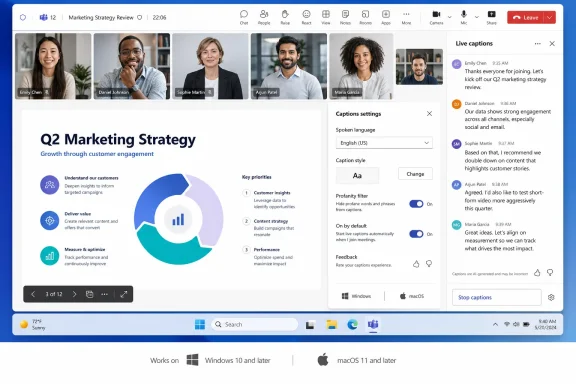 Caption controls move into the meeting
Microsoft is also simplifying how users configure captions while a meeting is underway. Selecting the existing gear icon in the live-captions pane will open one consolidated menu for:- Spoken language
- Caption styling
- Profanity filtering
- A new “on by default” setting for live captions in all meetings
The same menu will add thumbs-up and thumbs-down controls for feedback on the captioning experience. Microsoft did not specify whether that feedback will expose further diagnostic detail to users or tenant administrators.
Desktop and government clouds included
Roadmap ID 567462 applies to Teams desktop clients on Windows and macOS. Microsoft lists the rollout for its worldwide multi-tenant cloud as well as GCC, GCC High, and DoD environments, all under the general-availability release ring.That breadth matters for organizations that standardize on captions for accessibility, multilingual meetings, or environments where staff need a text alternative to imperfect audio. The new default-on option could also reduce the number of users who have to discover and enable captions individually, although admins should test the user experience before recommending it as a broad policy.
Microsoft’s roadmap describes release timing as an estimate, and entries can be delayed, changed, or removed before shipping. There is no indication in the listing that the update changes transcription, recording, licensing, retention, or existing Teams meeting policies; it is principally a presentation and in-meeting configuration update.
Windows Teams users should expect the new right-side layout and streamlined caption settings to begin appearing in general availability during August 2026, subject to Microsoft’s rollout schedule.
References
- Primary source: Microsoft 365 Roadmap
Published: 2026-07-14T22:41:38.6349466Z
Microsoft 365 Roadmap | Microsoft 365
The Microsoft 365 Roadmap lists updates that are currently planned for applicable subscribers. Check here for more information on the status of new features and updates.www.microsoft.com
