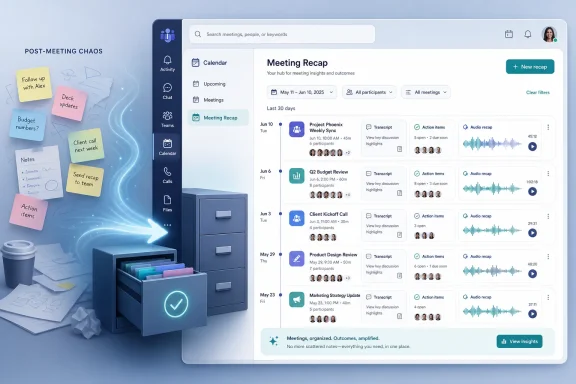
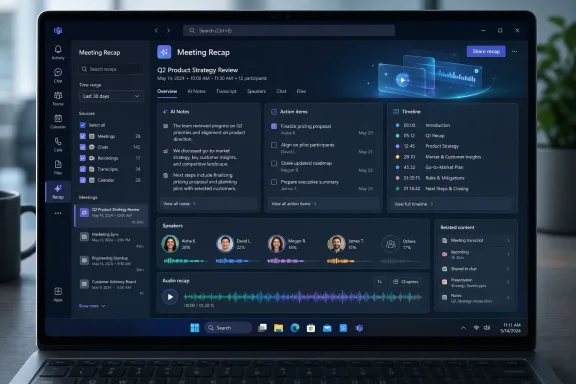
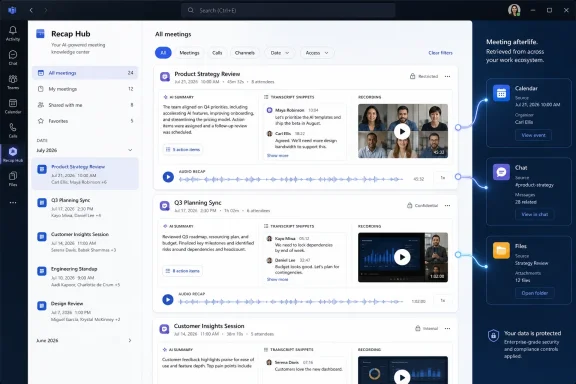
Microsoft is preparing a new Microsoft Teams Meeting recap app for general availability in July 2026, giving users a single place to find, filter, browse, and review meeting recaps from roughly the past 30 days across the Teams experience. The feature sounds small until you consider what Teams has become: not just a meeting room, but a memory system for the modern office. Microsoft is no longer merely trying to summarize meetings; it is trying to make the summaries themselves manageable. That is the real story behind this Roadmap entry, and it says a great deal about where Microsoft 365 is headed.
The original promise of AI meeting recaps was simple: let people stop taking frantic notes and start paying attention. Teams Premium and Microsoft 365 Copilot pushed that idea into the mainstream by generating notes, tasks, speaker markers, chapters, and personalized highlights after a call. In the best case, the recap became a way to catch up without rewatching an hour of corporate theater.
But software history has a nasty habit of turning every productivity improvement into a new inbox. Email needed search. Chat needed threads. Files needed OneDrive indexing. Now AI summaries need their own app because, in large organizations, even the digest has become something to digest.
That is what makes the new Meeting recap app more interesting than its modest Roadmap description suggests. Microsoft is acknowledging that the post-meeting artifact has become a first-class object in Teams. It is not just an attachment to a calendar event or a tab buried in a chat; it is a thing users will intentionally go hunting for days or weeks later.
The phrase “recap app” also matters. Microsoft could have framed this as a search improvement or a meeting-detail tweak. Instead, it is giving recaps a destination, which implies that the company expects people to treat meeting history as a browsable workspace rather than a passive archive.
Most people remember meetings by fragment: “the call where procurement pushed back,” “the one where Sarah mentioned the blocker,” “the vendor demo with the pricing slide,” or “the meeting after the outage review.” Calendar search can help, but it was not designed for that kind of associative retrieval.
Teams has been trying to solve pieces of this problem for years. Meeting chats, recordings, transcripts, shared files, Loop components, and recap tabs all orbit the same event. The trouble is that they often live in slightly different corners of the interface, depending on how the meeting was scheduled, whether it was recorded, whether transcription was enabled, whether the user attended, and what license the tenant has assigned.
The Meeting recap app appears to be Microsoft’s attempt to impose a layer of order on that sprawl. A 30-day recap view with quick filters is not a corporate knowledge-management revolution, but it is a practical concession to how Teams is actually used. The problem is no longer that users cannot get meeting information; it is that the information is scattered across too many surfaces.
For IT departments, that distinction matters. Users rarely complain in architectural language. They say, “I can’t find the meeting notes,” or “Teams ate the recap,” or “I know Copilot summarized this somewhere.” Underneath those complaints is a design problem: the system generated a useful artifact but failed to make it reliably retrievable.
That aligns with a broader shift in Microsoft 365 Copilot: work artifacts are becoming multi-format. A meeting can become notes, tasks, chapters, transcript search, summaries, and now potentially an audio review flow. A Word document can become an audio overview. An email thread can become a meeting agenda. The content is less important than the transformation layer around it.
There is an obvious appeal here. Knowledge workers already use dead time to triage messages, listen to podcasts, or catch up on Slack and Teams notifications. If Teams can turn yesterday’s meetings into a queue of short audio summaries, it makes catch-up feel less like clerical work and more like an ambient workflow.
There is also a risk. Audio summaries can make meetings feel even more optional, encouraging organizations to schedule more of them because attendance no longer seems mandatory. That is the productivity paradox at the center of AI collaboration software: the tool reduces the pain of excess, which can make the excess easier to tolerate.
The healthiest use of audio recap will not be “now everyone can miss everything.” It will be selective review. The value is in letting a manager skim three meetings they only partially needed, letting an engineer revisit a decision point without reopening the whole recording, or letting a salesperson quickly recover context before a follow-up call.
That matters because Microsoft has to balance convenience against compliance. Meeting data is sensitive. Transcripts can include customer information, personnel discussions, financial details, legal strategy, and unguarded remarks that were never intended to become searchable institutional memory. The more useful AI recaps become, the more they resemble records.
In many organizations, that will put the Meeting recap app squarely in the path of retention, eDiscovery, data-loss prevention, and access-control conversations. If a recap is easier to find, it is also easier to misuse. If audio recap can compress multiple meetings into a listening session, the question becomes who is allowed to listen, under what policy, and with what audit trail.
Microsoft’s existing Teams recap features already depend heavily on licensing and policy. Transcription, recording, Teams Premium, Microsoft 365 Copilot, and admin controls all shape what users see. The new app does not erase those dependencies; it gathers their output into a more visible place.
That visibility is good for users but potentially uncomfortable for administrators. A buried recap tab is easy to ignore. A dedicated recap app invites expectation. Once users see that such a place exists, missing recaps will feel like broken functionality, even when the root cause is a policy decision.
That phrase may sound grandiose, but it describes the direction of travel. A transcript is raw memory. A recording is sensory memory. An intelligent recap is interpreted memory. A recap app is memory retrieval. Copilot sits across the stack, promising to retrieve, summarize, compare, and transform all of it.
For Microsoft, this is strategically elegant. Teams is where the work happens, Microsoft Graph knows who and what is connected, and Copilot provides the interface that can turn that data into answers. The Meeting recap app is a small UI step in a much larger campaign to make Microsoft 365 feel less like a set of applications and more like a searchable work substrate.
For users, the value depends on trust. If the recap misses the crucial disagreement, assigns the wrong owner, or smooths over nuance, it can create a false record of what happened. If it is accurate enough most of the time, it becomes indispensable. AI meeting tools live in that uneasy middle ground where convenience arrives before complete confidence.
This is why Microsoft’s language around “review” is important. Recaps should be treated as navigational aids, not official minutes. They help users find the relevant portion of a meeting, remember the shape of a conversation, or identify follow-up tasks. They should not become unquestioned evidence of intent, agreement, or accountability without human verification.
Some meetings are not recorded. Some tenants disable transcription. Some users have Teams Premium or Microsoft 365 Copilot licenses while others do not. Some meeting types behave differently. Government cloud availability can lag commercial rollout. External meetings, multi-tenant scenarios, and compliance boundaries can introduce additional gaps.
That means help desks should expect the familiar “why don’t I see it?” wave whenever the feature reaches a tenant. The answer may involve licensing, rollout rings, policy assignments, meeting settings, organizer choices, client versions, or whether the meeting is still inside the 30-day browse window. None of that is difficult for a Teams admin to understand, but it is messy to communicate to end users who simply want yesterday’s summary.
Microsoft could blunt some of this with clear in-product explanations. If a recap is unavailable because transcription was disabled, say that. If audio recap requires a specific license, say that. If the meeting aged out of the app’s browse window, say that. The worst outcome would be a sleek recap hub that silently omits meetings for reasons only an admin can decode.
This is where Teams often tests organizational patience. Microsoft ships powerful features at cloud speed, but the real world still runs on change management. A recap app may be technically small, yet it changes user mental models. People will begin to assume that meetings are automatically recoverable.
That chain can either empower workers or enable dysfunction. In a healthy organization, better recaps reduce repetition and make decisions easier to trace. In an unhealthy one, they become a pressure valve that allows calendars to remain overstuffed.
The distinction is managerial, not technical. No app can decide whether a meeting should have been an email, whether a recurring sync still has a purpose, or whether ten optional attendees are being dragged into performative alignment. AI can summarize waste, but it cannot make waste strategic.
Still, it would be unfair to dismiss the feature as mere meeting bloat management. Modern work is distributed, asynchronous, and fragmented across time zones. People miss meetings for good reasons. Projects move quickly. A searchable recap layer can reduce the penalty for being unavailable at the exact moment a discussion occurred.
The best version of this feature supports asynchronous work. The worst version excuses synchronous overload. Microsoft will market the former, but many organizations will drift toward the latter unless leaders pair the tool with better meeting discipline.
That is increasingly the shape of Microsoft’s productivity business. Windows remains the workstation, but Microsoft 365 is where the workflow logic lives. Teams updates arrive through service-side rollout and client changes, not through the old rhythm of Windows feature releases. For administrators, that means the meaningful change may appear in Teams before any endpoint-management dashboard makes it feel “installed.”
This also makes browser parity and cross-platform consistency more important. Teams users now move between Windows, macOS, web, mobile, and virtual desktops. A recap app that behaves differently across clients would undercut the very convenience it is supposed to provide. Microsoft’s challenge is not simply to ship the hub, but to make it feel reliable wherever Teams is used.
The Windows angle is therefore practical rather than sentimental. On a Windows 11 machine, the feature will likely be judged by launch speed, search responsiveness, notification behavior, and whether it integrates cleanly with the rest of the Teams interface. Users will not care that the intelligence is cloud-hosted if the desktop experience feels sluggish or inconsistent.
That creates a familiar Microsoft 365 divide. The users most overwhelmed by meetings may not be the users licensed for the best meeting intelligence. Executives, managers, sales teams, and high-value knowledge workers are more likely to receive Copilot seats first. Frontline staff, contractors, and cost-sensitive departments may see a thinner version of the experience or none at all.
This is not unusual in enterprise software, but it complicates the cultural promise of AI productivity. If meeting recaps become a core way decisions are tracked, limiting the best retrieval tools to certain license classes could create uneven access to organizational context. In some environments, that may be acceptable. In others, it will become a governance and equity issue.
Administrators should therefore treat the Meeting recap app as part of a broader Copilot adoption conversation. Who needs recap access? Who needs audio review? Which meetings should be summarized? Which meetings should not be transcribed at all? The answers will differ by industry, department, and risk tolerance.
Microsoft would surely prefer customers to solve this with broader licensing. Customers will prefer to solve it with targeted deployment. The tension between those positions is where many 2026 Microsoft 365 planning meetings will live.
Imagine opening Teams in the morning and seeing a filtered list of yesterday’s recaps. The product starts to resemble an inbox of decisions rather than a pile of recordings. You can catch up on missed calls, review tasks, listen to audio summaries, and revisit the one meeting where your name came up. That is a different workflow from spelunking through calendar invites and chat threads.
The value of filters will depend on implementation. Time, organizer, participants, mentions, unread recaps, meetings with assigned tasks, and perhaps meetings with recordings would all make sense. Poor filtering would reduce the app to another chronological feed, which would be better than nothing but far short of the opportunity.
The deeper opportunity is semantic retrieval. Microsoft has not promised that this Roadmap item will let users search by concept across recaps, but that is the obvious direction. Once recaps are centralized, Copilot can be asked to reason across them: “Which customer calls mentioned renewal risk last month?” or “Summarize open decisions from the meetings I missed this week.” That is where a recap hub stops being a convenience and starts becoming an operational layer.
The danger is that users may not understand where summary ends and inference begins. A list of meetings is concrete. A generated cross-meeting synthesis is probabilistic. Microsoft will need to design the experience so users can trace claims back to underlying recaps, transcripts, or recordings when accuracy matters.
A recap app could expose patterns that were previously buried in individual meeting chats. It could make it simpler for a compromised account to harvest recent business context. It could also make internal investigations easier by surfacing relevant meetings quickly. Like many Microsoft 365 features, it is both a productivity gain and an information-governance event.
The correct response is not panic. It is preparation. Organizations should review meeting recording and transcription policies, revisit who receives Teams Premium or Copilot licenses, confirm retention requirements, and make sure users understand when meetings are being transcribed or summarized. The recap app will amplify whatever policy posture already exists.
There is also a cultural dimension. Employees should know that AI-generated meeting artifacts may be available after the call and may be easier to find than before. That does not require legalistic scare tactics, but it does require transparency. If a meeting is sensitive enough that a searchable recap would be dangerous, it may be sensitive enough to require different settings or a different forum.
Microsoft has spent years telling customers that Copilot respects tenant boundaries and permissions. That remains important, but permission-respecting systems can still surprise users when old content becomes easier to surface. The recap app is another reminder that discoverability is itself a security property.
But utility features are often where platforms become real. Users do not live in launch demos. They live in the daily grind of finding the thing someone said two Tuesdays ago. If Microsoft can make that experience noticeably better, Teams becomes stickier in a way that a flashy keynote feature cannot match.
The Meeting recap app also shows Microsoft learning from the second-order effects of AI. Generating summaries was the first step. Managing generated summaries is the next. After that comes reasoning across them, governing them, and deciding which ones deserve to persist as records of the business.
That progression is not unique to meetings. The same pattern is emerging across Microsoft 365. Copilot can draft documents, summarize email, analyze chats, prepare meetings, and extract tasks. Each generated artifact creates a retrieval and governance problem. Microsoft’s next challenge is not just making AI produce more output; it is making that output findable, trustworthy, and appropriately controlled.
The practical consequences are clearer than the marketing. Teams users should expect meeting recaps to become more visible and more central to daily catch-up. Admins should expect new support questions around missing recaps, licensing, audio review, and retention. Managers should expect fewer excuses for losing track of meeting outcomes, but they should not mistake that for better decision-making by default.
The most concrete implications are these:
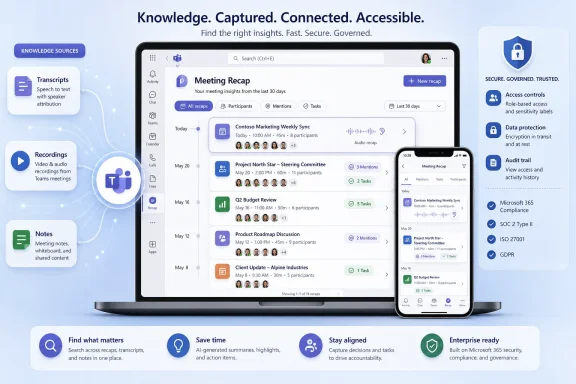 Microsoft Has Discovered the Meeting After the Meeting
The original promise of AI meeting recaps was simple: let people stop taking frantic notes and start paying attention. Teams Premium and Microsoft 365 Copilot pushed that idea into the mainstream by generating notes, tasks, speaker markers, chapters, and personalized highlights after a call. In the best case, the recap became a way to catch up without rewatching an hour of corporate theater.But software history has a nasty habit of turning every productivity improvement into a new inbox. Email needed search. Chat needed threads. Files needed OneDrive indexing. Now AI summaries need their own app because, in large organizations, even the digest has become something to digest.
That is what makes the new Meeting recap app more interesting than its modest Roadmap description suggests. Microsoft is acknowledging that the post-meeting artifact has become a first-class object in Teams. It is not just an attachment to a calendar event or a tab buried in a chat; it is a thing users will intentionally go hunting for days or weeks later.
The phrase “recap app” also matters. Microsoft could have framed this as a search improvement or a meeting-detail tweak. Instead, it is giving recaps a destination, which implies that the company expects people to treat meeting history as a browsable workspace rather than a passive archive.
The Calendar Was Never Built to Be a Knowledge Base
The meeting calendar is a terrible database. It is optimized for time, not meaning. You can find a meeting if you remember when it happened, who sent the invite, or what the subject line said, but that is a poor match for how people actually recall work.Most people remember meetings by fragment: “the call where procurement pushed back,” “the one where Sarah mentioned the blocker,” “the vendor demo with the pricing slide,” or “the meeting after the outage review.” Calendar search can help, but it was not designed for that kind of associative retrieval.
Teams has been trying to solve pieces of this problem for years. Meeting chats, recordings, transcripts, shared files, Loop components, and recap tabs all orbit the same event. The trouble is that they often live in slightly different corners of the interface, depending on how the meeting was scheduled, whether it was recorded, whether transcription was enabled, whether the user attended, and what license the tenant has assigned.
The Meeting recap app appears to be Microsoft’s attempt to impose a layer of order on that sprawl. A 30-day recap view with quick filters is not a corporate knowledge-management revolution, but it is a practical concession to how Teams is actually used. The problem is no longer that users cannot get meeting information; it is that the information is scattered across too many surfaces.
For IT departments, that distinction matters. Users rarely complain in architectural language. They say, “I can’t find the meeting notes,” or “Teams ate the recap,” or “I know Copilot summarized this somewhere.” Underneath those complaints is a design problem: the system generated a useful artifact but failed to make it reliably retrievable.
Audio Recap Turns Catch-Up Into a Commute Task
The audio recap element may be the most revealing part of the feature. Microsoft’s Roadmap wording suggests users will be able to review multiple meetings efficiently through audio, which turns the recap from a reading pane into something closer to a personalized briefing.That aligns with a broader shift in Microsoft 365 Copilot: work artifacts are becoming multi-format. A meeting can become notes, tasks, chapters, transcript search, summaries, and now potentially an audio review flow. A Word document can become an audio overview. An email thread can become a meeting agenda. The content is less important than the transformation layer around it.
There is an obvious appeal here. Knowledge workers already use dead time to triage messages, listen to podcasts, or catch up on Slack and Teams notifications. If Teams can turn yesterday’s meetings into a queue of short audio summaries, it makes catch-up feel less like clerical work and more like an ambient workflow.
There is also a risk. Audio summaries can make meetings feel even more optional, encouraging organizations to schedule more of them because attendance no longer seems mandatory. That is the productivity paradox at the center of AI collaboration software: the tool reduces the pain of excess, which can make the excess easier to tolerate.
The healthiest use of audio recap will not be “now everyone can miss everything.” It will be selective review. The value is in letting a manager skim three meetings they only partially needed, letting an engineer revisit a decision point without reopening the whole recording, or letting a salesperson quickly recover context before a follow-up call.
The 30-Day Window Is a Product Decision Disguised as a Convenience
The reported ability to browse and revisit recaps from the past 30 days sounds like a straightforward retention window, but it carries product and governance implications. Thirty days is long enough to cover most active work cycles, sprint ceremonies, monthly business reviews, and follow-up loops. It is short enough to avoid promising that Teams has become a permanent corporate memory vault.That matters because Microsoft has to balance convenience against compliance. Meeting data is sensitive. Transcripts can include customer information, personnel discussions, financial details, legal strategy, and unguarded remarks that were never intended to become searchable institutional memory. The more useful AI recaps become, the more they resemble records.
In many organizations, that will put the Meeting recap app squarely in the path of retention, eDiscovery, data-loss prevention, and access-control conversations. If a recap is easier to find, it is also easier to misuse. If audio recap can compress multiple meetings into a listening session, the question becomes who is allowed to listen, under what policy, and with what audit trail.
Microsoft’s existing Teams recap features already depend heavily on licensing and policy. Transcription, recording, Teams Premium, Microsoft 365 Copilot, and admin controls all shape what users see. The new app does not erase those dependencies; it gathers their output into a more visible place.
That visibility is good for users but potentially uncomfortable for administrators. A buried recap tab is easy to ignore. A dedicated recap app invites expectation. Once users see that such a place exists, missing recaps will feel like broken functionality, even when the root cause is a policy decision.
Teams Is Becoming the Front End for Corporate Memory
Microsoft’s larger strategy is visible if you zoom out from this one feature. Teams started as a chat and meetings product. Then it became a hub for apps, files, workflows, telephony, webinars, and communities. Now it is becoming a front end for AI-generated organizational memory.That phrase may sound grandiose, but it describes the direction of travel. A transcript is raw memory. A recording is sensory memory. An intelligent recap is interpreted memory. A recap app is memory retrieval. Copilot sits across the stack, promising to retrieve, summarize, compare, and transform all of it.
For Microsoft, this is strategically elegant. Teams is where the work happens, Microsoft Graph knows who and what is connected, and Copilot provides the interface that can turn that data into answers. The Meeting recap app is a small UI step in a much larger campaign to make Microsoft 365 feel less like a set of applications and more like a searchable work substrate.
For users, the value depends on trust. If the recap misses the crucial disagreement, assigns the wrong owner, or smooths over nuance, it can create a false record of what happened. If it is accurate enough most of the time, it becomes indispensable. AI meeting tools live in that uneasy middle ground where convenience arrives before complete confidence.
This is why Microsoft’s language around “review” is important. Recaps should be treated as navigational aids, not official minutes. They help users find the relevant portion of a meeting, remember the shape of a conversation, or identify follow-up tasks. They should not become unquestioned evidence of intent, agreement, or accountability without human verification.
Admins Will Have to Explain Why Some Recaps Exist and Others Do Not
The biggest friction point for IT teams may not be the feature itself. It will be user expectation. A dedicated Meeting recap app makes recaps feel universal, but in real deployments they are anything but universal.Some meetings are not recorded. Some tenants disable transcription. Some users have Teams Premium or Microsoft 365 Copilot licenses while others do not. Some meeting types behave differently. Government cloud availability can lag commercial rollout. External meetings, multi-tenant scenarios, and compliance boundaries can introduce additional gaps.
That means help desks should expect the familiar “why don’t I see it?” wave whenever the feature reaches a tenant. The answer may involve licensing, rollout rings, policy assignments, meeting settings, organizer choices, client versions, or whether the meeting is still inside the 30-day browse window. None of that is difficult for a Teams admin to understand, but it is messy to communicate to end users who simply want yesterday’s summary.
Microsoft could blunt some of this with clear in-product explanations. If a recap is unavailable because transcription was disabled, say that. If audio recap requires a specific license, say that. If the meeting aged out of the app’s browse window, say that. The worst outcome would be a sleek recap hub that silently omits meetings for reasons only an admin can decode.
This is where Teams often tests organizational patience. Microsoft ships powerful features at cloud speed, but the real world still runs on change management. A recap app may be technically small, yet it changes user mental models. People will begin to assume that meetings are automatically recoverable.
The Feature Is Also a Bet Against Meeting Hygiene
There is a cynical reading of the Meeting recap app: Microsoft is building better tools for a problem it helped normalize. Teams made remote and hybrid meetings frictionless. Outlook made scheduling them easy. Copilot now makes missing them survivable. The recap app makes the aftermath searchable.That chain can either empower workers or enable dysfunction. In a healthy organization, better recaps reduce repetition and make decisions easier to trace. In an unhealthy one, they become a pressure valve that allows calendars to remain overstuffed.
The distinction is managerial, not technical. No app can decide whether a meeting should have been an email, whether a recurring sync still has a purpose, or whether ten optional attendees are being dragged into performative alignment. AI can summarize waste, but it cannot make waste strategic.
Still, it would be unfair to dismiss the feature as mere meeting bloat management. Modern work is distributed, asynchronous, and fragmented across time zones. People miss meetings for good reasons. Projects move quickly. A searchable recap layer can reduce the penalty for being unavailable at the exact moment a discussion occurred.
The best version of this feature supports asynchronous work. The worst version excuses synchronous overload. Microsoft will market the former, but many organizations will drift toward the latter unless leaders pair the tool with better meeting discipline.
Windows Users Get the Benefit, but the Platform Story Is Cloud-First
For WindowsForum readers, it is tempting to ask what this means for the Windows desktop. The answer is that the client matters, but the center of gravity is clearly Microsoft 365 in the cloud. Teams on Windows will be one of the main places users experience the recap app, yet the intelligence, policy, identity, and data layer sit above the operating system.That is increasingly the shape of Microsoft’s productivity business. Windows remains the workstation, but Microsoft 365 is where the workflow logic lives. Teams updates arrive through service-side rollout and client changes, not through the old rhythm of Windows feature releases. For administrators, that means the meaningful change may appear in Teams before any endpoint-management dashboard makes it feel “installed.”
This also makes browser parity and cross-platform consistency more important. Teams users now move between Windows, macOS, web, mobile, and virtual desktops. A recap app that behaves differently across clients would undercut the very convenience it is supposed to provide. Microsoft’s challenge is not simply to ship the hub, but to make it feel reliable wherever Teams is used.
The Windows angle is therefore practical rather than sentimental. On a Windows 11 machine, the feature will likely be judged by launch speed, search responsiveness, notification behavior, and whether it integrates cleanly with the rest of the Teams interface. Users will not care that the intelligence is cloud-hosted if the desktop experience feels sluggish or inconsistent.
The Licensing Line Will Shape Who Gets the Future First
Microsoft’s recap story has always been entangled with licensing. Basic meeting recap features are useful, but the more advanced AI-powered experience has historically been tied to Teams Premium, Microsoft 365 Copilot, or both, depending on the capability. Audio recap, in particular, appears closely associated with Copilot licensing in Microsoft’s current documentation.That creates a familiar Microsoft 365 divide. The users most overwhelmed by meetings may not be the users licensed for the best meeting intelligence. Executives, managers, sales teams, and high-value knowledge workers are more likely to receive Copilot seats first. Frontline staff, contractors, and cost-sensitive departments may see a thinner version of the experience or none at all.
This is not unusual in enterprise software, but it complicates the cultural promise of AI productivity. If meeting recaps become a core way decisions are tracked, limiting the best retrieval tools to certain license classes could create uneven access to organizational context. In some environments, that may be acceptable. In others, it will become a governance and equity issue.
Administrators should therefore treat the Meeting recap app as part of a broader Copilot adoption conversation. Who needs recap access? Who needs audio review? Which meetings should be summarized? Which meetings should not be transcribed at all? The answers will differ by industry, department, and risk tolerance.
Microsoft would surely prefer customers to solve this with broader licensing. Customers will prefer to solve it with targeted deployment. The tension between those positions is where many 2026 Microsoft 365 planning meetings will live.
The Recap App Makes Search a Workflow, Not a Panic Button
The most useful thing about the Meeting recap app may be psychological. Search is often something users do when they are already frustrated. A dedicated app changes the act from emergency retrieval to routine review.Imagine opening Teams in the morning and seeing a filtered list of yesterday’s recaps. The product starts to resemble an inbox of decisions rather than a pile of recordings. You can catch up on missed calls, review tasks, listen to audio summaries, and revisit the one meeting where your name came up. That is a different workflow from spelunking through calendar invites and chat threads.
The value of filters will depend on implementation. Time, organizer, participants, mentions, unread recaps, meetings with assigned tasks, and perhaps meetings with recordings would all make sense. Poor filtering would reduce the app to another chronological feed, which would be better than nothing but far short of the opportunity.
The deeper opportunity is semantic retrieval. Microsoft has not promised that this Roadmap item will let users search by concept across recaps, but that is the obvious direction. Once recaps are centralized, Copilot can be asked to reason across them: “Which customer calls mentioned renewal risk last month?” or “Summarize open decisions from the meetings I missed this week.” That is where a recap hub stops being a convenience and starts becoming an operational layer.
The danger is that users may not understand where summary ends and inference begins. A list of meetings is concrete. A generated cross-meeting synthesis is probabilistic. Microsoft will need to design the experience so users can trace claims back to underlying recaps, transcripts, or recordings when accuracy matters.
Security Teams Should Care Before the Rollout Lands
Security and compliance teams should not wait until July 2026 to think about this feature. Any tool that centralizes meeting summaries changes the discoverability of sensitive information. The underlying data may already exist, but easier access changes risk.A recap app could expose patterns that were previously buried in individual meeting chats. It could make it simpler for a compromised account to harvest recent business context. It could also make internal investigations easier by surfacing relevant meetings quickly. Like many Microsoft 365 features, it is both a productivity gain and an information-governance event.
The correct response is not panic. It is preparation. Organizations should review meeting recording and transcription policies, revisit who receives Teams Premium or Copilot licenses, confirm retention requirements, and make sure users understand when meetings are being transcribed or summarized. The recap app will amplify whatever policy posture already exists.
There is also a cultural dimension. Employees should know that AI-generated meeting artifacts may be available after the call and may be easier to find than before. That does not require legalistic scare tactics, but it does require transparency. If a meeting is sensitive enough that a searchable recap would be dangerous, it may be sensitive enough to require different settings or a different forum.
Microsoft has spent years telling customers that Copilot respects tenant boundaries and permissions. That remains important, but permission-respecting systems can still surprise users when old content becomes easier to surface. The recap app is another reminder that discoverability is itself a security property.
A Small Roadmap Item Points to a Larger Microsoft 365 Reset
This is the kind of feature that can be easy to underrate because it lacks the theater of a major Copilot announcement. There is no new model benchmark, no futuristic agent demo, no promise that work will be reinvented by Friday. It is a utility feature: gather meeting recaps, add filters, support audio review, show recent history.But utility features are often where platforms become real. Users do not live in launch demos. They live in the daily grind of finding the thing someone said two Tuesdays ago. If Microsoft can make that experience noticeably better, Teams becomes stickier in a way that a flashy keynote feature cannot match.
The Meeting recap app also shows Microsoft learning from the second-order effects of AI. Generating summaries was the first step. Managing generated summaries is the next. After that comes reasoning across them, governing them, and deciding which ones deserve to persist as records of the business.
That progression is not unique to meetings. The same pattern is emerging across Microsoft 365. Copilot can draft documents, summarize email, analyze chats, prepare meetings, and extract tasks. Each generated artifact creates a retrieval and governance problem. Microsoft’s next challenge is not just making AI produce more output; it is making that output findable, trustworthy, and appropriately controlled.
July’s Teams Upgrade Is Really About August’s Workday
When this feature arrives, most users will not describe it in strategic terms. They will say Teams got a place to find old recaps. That is fine. The best productivity software often disappears into habit before anyone gives it credit.The practical consequences are clearer than the marketing. Teams users should expect meeting recaps to become more visible and more central to daily catch-up. Admins should expect new support questions around missing recaps, licensing, audio review, and retention. Managers should expect fewer excuses for losing track of meeting outcomes, but they should not mistake that for better decision-making by default.
The most concrete implications are these:
- Microsoft plans to make Teams meeting recaps easier to find by collecting them in a dedicated Meeting recap app rather than leaving users to hunt through calendar items and chats.
- The app is expected to support quick filters and access to recaps from approximately the past 30 days, making it most useful for active work rather than long-term archival research.
- Audio recap could turn meeting catch-up into a listening workflow, especially for users who need to review several missed or overlapping meetings quickly.
- Licensing and policy settings will still determine what users can see, so organizations should prepare for uneven availability across tenants, departments, and meeting types.
- Security and compliance teams should treat centralized recap discovery as a governance change, not merely a user-interface improvement.
- The feature’s real value will depend on whether Microsoft makes missing, restricted, or unavailable recaps understandable to ordinary users without forcing them to call the help desk.
References
- Primary source: XDA
Published: 2026-06-07T05:02:09.366741
Finding that one Teams meeting just got way faster with Microsoft's recap overhaul
It's coming soon, too. www.xda-developers.com
- Official source: microsoft.com
Microsoft 365 Roadmap | Microsoft 365
The Microsoft 365 Roadmap lists updates that are currently planned for applicable subscribers. Check here for more information on the status of new features and updates.www.microsoft.com
- Related coverage: makeuseof.com
How Microsoft Teams Is Getting Faster and Less of a Memory Hog
Remote workers, rejoice; Teams is getting a performance boost on Windows. www.makeuseof.com
- Related coverage: pcworld.com
Microsoft's new version of Teams is faster and smarter
Microsoft is showing off a new version of Microsoft Teams today, with a top-down UI, new AI features, and additional code improvements that should cut memory use and increase speed. www.pcworld.com
- Related coverage: windowscentral.com
Microsoft Teams is adding branded reactions to video meetings | Windows Central
Microsoft will soon allow companies to add their own "visual identity" in video meetings with branded emoji reactions.www.windowscentral.com - Related coverage: howtogeek.com
Microsoft Teams Is Now Faster, With a Windows 11-Like Design
Teams is about to get a *lot* better. www.howtogeek.com
- Official source: techcommunity.microsoft.com
Now in public preview: Meeting recap enhancements | Microsoft Community Hub
We are bringing improvements to meeting recap. Now, you can find your recording, transcripts, meeting content, and meeting notes all under a single new Recap... techcommunity.microsoft.com
- Related coverage: panagenda.com
What Powers Your Teams Meetings A Research Driven Breakdown of Microsoft Teams Meeting Applications
PDF documentwww.panagenda.com
- Official source: cdn-dynmedia-1.microsoft.com
- Related coverage: techriver.com