

Microsoft’s Teams ecosystem moved decisively in November, rolling out features that push collaboration deeper into the platform while adding new AI model choices and hardening security — developments that promise real productivity gains but also demand immediate, concrete governance and risk controls from IT teams.
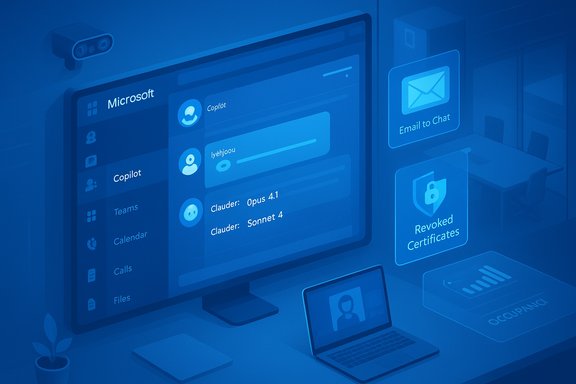
Microsoft Teams is no longer just a chat-and-meetings app; the November wave cements Teams as a hub for device management, workplace telemetry and an AI‑first collaboration fabric. The month’s updates include a low‑friction “email‑to‑chat” capability that lets users start Teams chats with any email address, a multi‑model Copilot strategy that adds Anthropic’s Claude models to Microsoft 365 Copilot, Tens‑of‑thousands‑of‑staff scale trials (notably an NHS Copilot pilot reporting large time savings), significant Teams Rooms improvements focused on hybrid meeting quality, and an urgent security response after attackers used fraudulently signed fake Teams installers to deliver backdoors and ransomware. These changes materially shift where work gets done — and raise governance, privacy, and security trade‑offs that IT leaders must address.
Source: tomtalks.blog Microsoft Teams Show November 2025 with guest Ally Ward
 Background / Overview
Microsoft Teams is no longer just a chat-and-meetings app; the November wave cements Teams as a hub for device management, workplace telemetry and an AI‑first collaboration fabric. The month’s updates include a low‑friction “email‑to‑chat” capability that lets users start Teams chats with any email address, a multi‑model Copilot strategy that adds Anthropic’s Claude models to Microsoft 365 Copilot, Tens‑of‑thousands‑of‑staff scale trials (notably an NHS Copilot pilot reporting large time savings), significant Teams Rooms improvements focused on hybrid meeting quality, and an urgent security response after attackers used fraudulently signed fake Teams installers to deliver backdoors and ransomware. These changes materially shift where work gets done — and raise governance, privacy, and security trade‑offs that IT leaders must address.What changed in November — at a glance
- Email-to‑chat invites (MC1182004): Teams can now begin chat sessions with anyone who has an email address; recipients join as guests via an email invite. This feature is enabled by default and is rolling out in early November 2025.
- Multi‑model Copilot (MC1158765): Microsoft added Anthropic’s Claude models (Claude Opus 4.1 and Sonnet 4) to Copilot Studio and Researcher, giving admins model choice and introducing cross‑cloud hosting considerations. Admin opt‑in is required.
- Copilot in group chats (Teams Mode / Copilot Groups): Copilot can participate as a shared, visible participant in multi‑person chats to summarise, propose actions and export deliverables — a change from one‑to‑one assistance to a team‑scale collaboration agent.
- NHS Copilot pilot headlines: A large NHS pilot reported average time savings of roughly 43 minutes per staffer per working day, projecting up to 400,000 hours saved per month if scaled — a headline figure that is powerful but model‑driven and merits careful scrutiny.
- Security takedown and certificate revocations: Microsoft identified a campaign delivering fake MSTeamsSetup.exe installers (using OysterLoader backdoors and Rhysida ransomware) and revoked more than 200 fraudulent code‑signing certificates to disrupt the threat. This is a stark reminder that attackers weaponise trust signals such as code signing and search‑engine poisoning.
- Teams Rooms management and Facilitator agent updates: Teams Rooms Pro management gained telemetry and occupancy insights (Cloud IntelliFrame), while the Facilitator agent grew features for live note co‑authoring, action‑item extraction and camera‑aware prompts to improve hybrid meeting fairness.
Deep dive: Email‑to‑Chat — lower friction, bigger questions
What the feature does
The Message Center item MC1182004 describes a capability where any Teams user can start a chat using an external participant’s email address; the external user receives an email invitation and joins as a guest. The feature is enabled by default and will roll out to clients across desktop, mobile and Linux, with tenant controls exposed through Teams messaging policy settings to disable the flow if desired.Strengths and operational benefits
- Reduced friction for collaboration: For cross‑company interactions and one‑off customer conversations, eliminating the need for the recipient to install or provision a Teams account lowers the adoption barrier.
- Faster business flows: Email threads that need to become active, editable conversations can be converted quickly into a collaborative space where Copilot and shared drafting can operate.
- Audit trail potential: When configured correctly, these interactions remain within tenant governance boundaries (Entra B2B guest policies) and can be subject to retention and eDiscovery.
Risks and control points
- Guest surface and data leakage: Link‑or email‑based participation can blur guest accounting and licensing boundaries; IT must decide whether these users are treated as guests for licensing and retention. This feature is enabled by default, so administrators need to proactively adjust policy if their posture requires more restriction.
- Impersonation and phishing vectors: Because the flow originates from email invites, attackers may mimic legitimate invite formats to socially engineer entry into tenant conversations — tighten external invite controls and enable domain allow/block lists.
- Compliance complexity: Even with tenant controls, the semantics of “who counts as an internal participant” change. Update retention and AUP policies accordingly.
Copilot becomes social: Teams Mode / Copilot Groups
What it is
Teams Mode (also seen as Copilot Groups) surfaces Copilot as an explicit participant in group chats — a shared session model where a single Copilot instance retains group context, proposes options, tallies votes, extracts action items and can export content into Word/PowerPoint/Excel. This moves Copilot from a personal assistant into a visible, team‑owned collaborator.Why it matters
This design reduces context switching: discussions, drafting and finalisation can happen in one thread. For teams that regularly convert meeting chat into proposals or decks, the time saved is potentially large. The UI affordances (shared sessions, export to Office formats) make the chat thread the canonical workplace artifact — not just a transient conversation.Governance and technical constraints
- Tenant gating and message caps: Availability is controlled by tenant settings and may be previewed in limited markets or client channels. The preview caps (examples: up to 32 participants in early previews) limit initial blast radius while Microsoft tunes concurrency and latency.
- Auditability of AI outputs: Outputs created by Copilot in group contexts become shared artifacts; ensure that audit logs, per‑request logging, and retention policies capture both prompts and outputs.
- Human‑in‑the‑loop enforcement: For regulated content (legal, clinical, financial), treat Copilot outputs as drafts requiring explicit sign‑off; integrate approval flowcards or triage steps into the chat workflow.
Multi‑model Copilot: Anthropic’s Claude joins the roster (MC1158765)
The change
Microsoft publicly expanded Copilot’s model options so that Researcher and Copilot Studio can use Anthropic’s Claude models (Claude Opus 4.1 and Claude Sonnet 4) alongside OpenAI and Microsoft models. Admins must opt in to enable Claude models and the deployment typically routes those requests to third‑party hosting (Anthropic endpoints often hosted via AWS/Bedrock).Benefits and trade‑offs
- Model choice for the right task: Different models have different strengths — selecting a reasoning‑focused model for deep synthesis vs. a safety‑tuned model for high‑risk conversational contexts can be a net win.
- Customization and blended agents: Copilot Studio now enables agents that mix models; this is powerful for specialized workflows (e.g., a Claude reasoning core with an OpenAI creative generator).
- Cross‑cloud data paths: Anthropic‑hosted requests can create cross‑cloud flows (Azure tenant → Anthropic on AWS), raising data residency, logging and contractual considerations.
Governance checklist for multi‑model Copilot
- Require admin opt‑in and document which models are enabled for which business units.
- Map where model inference happens (hosting provider) and update data processing agreements accordingly.
- Enable per‑request logging and retention for any model selected for regulated workflows.
- Pilot Anthropic models on low‑risk tasks, instrument hallucination rates, and measure human edit rates versus OpenAI and Microsoft models.
NHS Copilot pilot: headline numbers, real caveats
The claim
A UK government/NHS press release and vendor briefings reported that a Microsoft 365 Copilot pilot involving more than 30,000 staff across ~90 NHS organisations produced an average time saving of roughly 43 minutes per staff member per working day, and modelled this as up to 400,000 staff hours saved per month for a scaled rollout. The press release frames these as trial findings and projected system‑wide benefits.Why the numbers matter — and why to be cautious
These figures are compelling for procurement and policy audiences: time savings at scale in a workforce the size of the NHS translates to millions of saved hours annually. However, independent analysis and responsible operational planning require scrutiny:- The trial’s reported per‑user savings derive from a combination of telemetry and user reports and then extrapolation across larger populations and use cases (e.g., email triage multiplied across total NHS mail volumes).
- The 400,000‑hour figure is a projection built on assumptions about adoption rates, representative task mixes, and consistent verification burden; it is not a live, audited accounting of nationwide time reclaimed in production.
Practical mitigations for risk‑sensitive organisations (healthcare, legal, finance)
- Require mandatory human sign‑off for any clinical or legal text Copilot generates. AI outputs must be a drafting aid, not an authoritative source.
- Instrument pilots with control groups or pre/post telemetry rather than relying solely on self‑reported time savings.
- Audit for hidden verification time: Track not only draft generation time but also the time clinicians spend verifying, editing and reworking AI outputs.
- Publish methodology: When communicating savings internally, include the trial’s measurement methodology, sample composition and known limitations so executive decisions rest on the right evidence.
Security incident: fake Teams installers, backdoors and revoked certificates
What happened
Threat actors distributed fake MSTeamsSetup.exe files via malicious SEO‑poisoned landing pages that looked like legit download pages. The installers dropped OysterLoader backdoors and were later used to deploy Rhysida ransomware. Microsoft and security partners identified the campaign and revoked more than 200 fraudulent code‑signing certificates used in the attacks, while updating Defender detections and sharing IOC feeds.Why this matters to IT teams
- Code signing is a trust shortcut: Attackers that access or fraudulently obtain signing mechanisms can bypass many defensive heuristics; validating certificate provenance is essential.
- Search engine poisoning is effective: Users searching for “download Teams” can be lured to malicious domains; browsers and search results aren’t a safe distribution channel for enterprise software.
- Supply‑chain style campaigns are persistent: Platform popularity makes Teams an attractive impersonation target; expect more campaigns that weaponise brand recognition.
Practical defensive actions
- Lock down official distribution: Direct users to corporate software distribution points (SCCM/Intune/Company Portal) rather than web search results.
- Validate signatures: Require signature checks against known publisher thumbprints in device management policies.
- Enable endpoint protection: Fully enable Microsoft Defender for Endpoint and keep signature/telemetry feeds updated; Defender detections were updated to flag this campaign.
- Monitor for anomalous installer activity: Alert on new installers executed outside managed channels and block execution by policy for unknown publishers.
Teams Rooms: Facilitator, Cloud IntelliFrame and management consolidation
What’s new
The Teams Rooms Pro management portal has expanded telemetry, recommended actions and occupancy insights (Cloud IntelliFrame), and the Facilitator agent has been extended into Rooms to capture notes, attribute speakers and generate action items — artifacts that feed OneDrive/Loop and Copilot workflows when transcription is enabled. These features aim to improve hybrid equity and make recorded meeting content actionable.Operational benefits
- Improved hybrid meeting fairness: Multiple camera views and per‑person tiles reduce the “out‑of‑frame” experience for remote attendees.
- Actionable meeting artifacts: Intelligent recaps and audio summary popouts make recorded content usable rather than archival.
- Predictable remediation: Recommended Actions and occupancy reporting help IT prioritise room updates and hygiene tasks, reducing surprise work.
Governance and privacy considerations
- Camera and voice features carry privacy obligations: Notify occupants and get consent where required; signage and clear policies reduce legal risk around biometric or audio processing.
- Retention and eDiscovery: AI meeting artifacts are records; include them in retention and eDiscovery policies as appropriate and ensure transcripts are treated as sensitive content when applicable.
- Licensing: Many advanced Rooms features require Teams Rooms Pro or Copilot seats; map licensing and TCO before broad rollouts.
Special guest case study: Ally Ward and ChangePilot — practical automation in action
The problem
Microsoft 365 Message Center produces high‑volume, time‑sensitive vendor bulletins that operations teams must triage. Manual triage is slow, error‑prone and difficult to audit across large organisations.ChangePilot: what Ally Ward implemented
Ally Ward (M365 Product and Platform Services Manager at Norton Rose Fulbright) shared a pragmatic pattern called ChangePilot, which posts Message Center entries directly into a dedicated Teams channel for triage, then routes each item through a short verification workflow. The automation reduces manual triage time, preserves an auditable record, and integrates assignment and compliance evidence in a place where operational work already happens — Teams.Why this pattern scales
- Message Center items are both high volume and high value; surfacing them automatically reduces missed updates.
- Teams channels provide a persistent, searchable trail that supports later reviews and eDiscovery.
- A lightweight human‑in‑the‑loop triage step keeps speed and safety balanced: automation surfaces the signal, humans validate and own the decision.
How to replicate ChangePilot — a short technical playbook
- Subscribe to Message Center: Use the Microsoft Graph or Message Center RSS feed for tenant notifications.
- Service principal + connector: Create a service principal (app registration) with the minimal permissions to read Message Center and post to Teams channels.
- Post to a controlled channel: Post each Message Center update with metadata (MessageCenterID, published date, tenant impact) and links back to the original item.
- Adaptive card triage: Attach an Adaptive Card with three simple actions (Accept / Mitigate / Defer) that maps each decision to an owner.
- Record decisions for compliance: Log triage decisions into a governed store (SharePoint list or secure archive) capturing actor, timestamp, and rationale for audit and eDiscovery.
- Retention and eDiscovery mapping: Ensure retained chat and linked artifacts are discoverable under your retention policy and legal hold constructs.
Practical rollout guidance: pilots, measurement and governance
Pilot design (90‑day sprint)
- Pick representative teams (3–5 teams) and use cases (meeting recaps, email triage, Message Center automation).
- Baseline: measure current task completion times, error rates and compliance incidents.
- Run a controlled pilot with Copilot Groups and ChangePilot automation enabled for pilot teams only.
- Collect both quantitative telemetry (time on task, edit rates, verification time) and qualitative feedback (user satisfaction, perceived accuracy).
Security hardening checklist
- Enforce managed distribution: block untrusted installers from web downloads, require Company Portal installs.
- Validate code signatures for enterprise software and alert on unknown thumbprints.
- Enable Defender for Endpoint with full telemetry reporting and block pages flagged by Microsoft threat intelligence.
Governance essentials
- Update Acceptable Use and Data Classification policies to specify permitted Copilot uses, model selection limits and verification responsibilities.
- Define who can add Copilot to multi‑person chats and what data connectors Copilot can access.
- Require request‑level logging and retention for any Copilot calls that access regulated content or PII.
Strengths, trade‑offs and final assessment
Strengths
- Meaningful productivity gains: Copilot Groups and targeted automations (like ChangePilot) demonstrably reduce coordination friction and manual triage overhead. The NHS pilot illustrates potential scale benefits — when measured and governed carefully.
- Platform consolidation: Teams is evolving into a single place for collaboration, device management and operational workflows, simplifying where work gets done.
- Model choice: Adding Claude models gives organisations options to match model capability and safety characteristics to task types.
Trade‑offs and risks
- Governance complexity: Multi‑model orchestration, exportable artifacts and email‑to‑chat invites increase the number of axes IT must govern (retention, data residency, model logging, guest policies).
- Security surface: Fake installers and certificate misuse illustrate that platform ubiquity attracts targeted attacks; attacker sophistication will continue to rise.
- Measurement gaps: Large pilot headline figures (e.g., NHS 43 minutes / 400k hours) are compelling but often rest on self‑reporting plus modelling — organisations must replicate with hard telemetry to validate ROI.
Recommended next steps for IT leaders
- Enable a controlled pilot: Start with Copilot Groups and ChangePilot on a few high‑value teams; instrument end‑to‑end telemetry.
- Update policies now: Add Copilot, model selection and email‑to‑chat into AUPs and data classification policies before wide rollout.
- Harden distribution: Block user downloads from public web searches and require managed installation channels; validate code‑signing thumbprints for critical installers.
- Map licensing and TCO: Teams Rooms Pro, Copilot seats, and model‑usage costs can materially change TCO — model scenarios before committing.
- Require human verification for regulated outputs: Make sign‑off mandatory for clinical, legal and regulated content generated by Copilot.
Conclusion
November’s Teams updates are consequential. By lowering friction for external collaboration, embedding Copilot directly into group workflows, and adding multi‑model flexibility, Microsoft is accelerating Teams’ role as the central hub for knowledge work. At the same time, the month exposed clear operational realities: headline productivity claims require rigorous measurement, cross‑cloud model hosting demands updated contracts and logging, and attackers will keep exploiting platform trust — as shown by the fake Teams installer campaign and mass certificate revocations. The practical lesson for IT leaders is straightforward: pilot deliberately, instrument obsessively, and govern proactively. Organizations that pair these capabilities with tight policy and security controls will capture the productivity benefits while keeping risks manageable.Source: tomtalks.blog Microsoft Teams Show November 2025 with guest Ally Ward
