

Microsoft Teams users began objecting in spring 2026 after Microsoft moved an “Unlock Premium” promotion from the app’s overflow menu into the title bar, making a paid Teams Premium upsell visible beside core controls in a workplace application many employees cannot personally upgrade. The backlash is not really about whether Teams Premium has value. It is about Microsoft putting a sales surface inside the daily muscle memory of enterprise collaboration.
That distinction matters. A consumer app can plead, nag, and cross-sell with only mild reputational damage because the person seeing the offer is often the person empowered to buy. Teams is different: it is usually provisioned by an organization, governed by policy, paid for centrally, and used under compulsion by employees who may have no say in licensing at all.
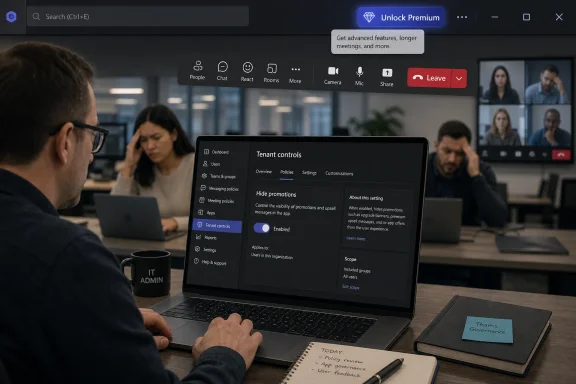
The controversy is simple on its face. Teams previously exposed the Premium option in a less prominent menu, the kind of place users expect to find settings, diagnostics, feedback, and secondary commands. Microsoft has now made the invitation to “Unlock Premium” more visible in the top bar, marked with a diamond icon and positioned close to everyday navigation.
That placement changes the meaning of the message. It is no longer a discoverable upgrade path for curious administrators or power users; it is a persistent commercial prompt inside the application chrome. In a tool people keep open all day, that is not a neutral design decision.
The title bar is valuable real estate because it is supposed to disappear into habit. Users glance past it to search, switch context, open menus, and manage the window. When Microsoft inserts a bright purchase prompt into that area, it turns infrastructure into advertising.
The frustration is amplified by the absence of a simple dismissal control. If a banner, badge, or upgrade prompt can be hidden, users may still grumble but the conflict fades. When it cannot be removed, the UI starts to feel less like software serving the user and more like software asserting the vendor’s priorities.
For IT departments running large meetings, regulated discussions, customer webinars, or executive briefings, those capabilities can be easy to justify. Security controls around recording and watermarking are not gimmicks in environments where confidential information is discussed every hour. AI-generated summaries and action items can also be useful in organizations that already accept Microsoft’s broader Copilot and Microsoft 365 posture.
That is exactly why the banner feels so self-defeating. Microsoft does not need to sell Teams Premium as if it were a browser toolbar coupon. The product has a legitimate enterprise story, but the title-bar treatment makes it look cheap.
There is a subtle reputational cost when a serious business application borrows the tactics of freemium consumer software. Teams competes for trust with Slack, Zoom, Google Meet, Webex, and an expanding universe of collaboration tools. Enterprise buyers may evaluate feature matrices, but users judge the software through daily friction.
Licensing is handled by administrators, procurement teams, department heads, or centralized IT service desks. Self-service trials may be allowed in some tenants, restricted in others, and routed through internal approval processes in more mature organizations. Either way, the average user staring at the banner is often not the economic buyer.
That makes the prompt strangely misdirected. It asks end users to take an action that their organization may prohibit, discourage, or require them to escalate through a ticket. In heavily managed environments, it may generate exactly the kind of noise administrators hate: confused questions, trial requests, and complaints about features employees believe they are being denied.
The result is an internal support problem created by an external vendor’s growth motion. Microsoft gets a new sales surface. IT gets the help-desk residue.
This is why sysadmins tend to react more sharply to these changes than casual observers expect. They are not merely defending visual purity. They are defending the boundary between vendor marketing and enterprise governance.
Microsoft’s difficulty is that it wants to be both the trusted platform steward and the aggressive subscription merchant. Those roles are not always compatible. The more Microsoft controls the operating system, productivity suite, browser, identity layer, and collaboration stack, the more sensitive users become to any sign that neutral surfaces are being converted into sales channels.
This is not just a consumer annoyance. In enterprise IT, vendor neutrality inside admin-controlled experiences is a form of trust. Organizations pay for predictable software because predictability lowers training costs, support costs, and political costs.
When an app changes its chrome to advertise an add-on, it reminds customers that they do not fully control the experience they have standardized on. That is uncomfortable even when the advertised add-on is useful.
Microsoft would argue, reasonably, that customers benefit from discovering available capabilities. The counterargument is that discovery and persistence are different things. A well-placed admin center recommendation is discovery. A non-dismissable prompt in the user’s daily workspace is pressure.
But software resentment often accumulates through paper cuts. Users forgive big failures when they seem accidental and are fixed quickly. They are less forgiving of small annoyances that appear intentional.
The “Unlock Premium” button is not perceived as a bug. It is perceived as a choice. That choice tells users something about whose attention Microsoft values.
There is also a practical discoverability complaint. By placing the Premium prompt near the three-dot menu and other top-bar controls, Microsoft risks confusing users who are trying to reach settings or window commands. Even if accidental clicks are rare, the perception of interference matters because the prompt sits in a high-frequency zone.
A good productivity interface reduces cognitive tax. The Teams banner adds a tiny toll booth at the edge of the road.
The business logic is obvious. Microsoft has spent years turning Microsoft 365 from a bundle of applications into a layered subscription platform. Base functionality gets customers in the door; add-ons, premium security, analytics, voice, compliance, AI, and automation expand revenue per seat.
That model is not inherently abusive. Enterprise software has always had tiers. The problem comes when the boundary between product navigation and monetization becomes blurry.
Teams Premium is especially sensitive because Teams itself has already been at the center of competition and bundling scrutiny. Rivals have long complained that Microsoft’s ability to package Teams with Microsoft 365 gives it structural advantages. Against that backdrop, a prominent in-app upsell is not just a UI tweak; it is another reminder that Microsoft controls both the platform and the funnel.
For Microsoft, the risk is not that users will revolt and abandon Teams overnight. Most cannot. The risk is slower and more corrosive: every unwanted prompt becomes another anecdote in the case against Microsoft’s stewardship.
Any of those options would preserve Microsoft’s ability to market Teams Premium without forcing the pitch into every user’s workday. More importantly, it would acknowledge that enterprise software has multiple audiences. The employee, the administrator, the buyer, and the executive sponsor are not the same person.
A tenant-level control would also align with Microsoft’s usual enterprise story. The company spends enormous effort telling administrators they can govern identity, devices, apps, compliance, and data. Yet here, according to the complaints circulating among users and admins, the sales prompt appears harder to govern than many security-sensitive features.
That mismatch is what makes the banner feel unserious. Microsoft gives IT intricate controls for conditional access, retention, sensitivity labels, and device compliance, but a visible subscription nag may remain outside the normal administrative contract.
The issue is not whether every organization would turn it off. Some might leave it visible. The issue is that managed environments should be able to decide.
Users are therefore unusually sensitive to anything that feels like extra clutter. Teams has improved in performance and polish compared with its most painful periods, but it still carries the reputation of an app that asks a lot of attention from people who just want to join a meeting or answer a message. A persistent upgrade banner reinforces the suspicion that Teams is becoming a container for Microsoft’s strategic ambitions rather than a disciplined communication tool.
That suspicion is not entirely fair, but it is understandable. Microsoft sees Teams as a platform. Users often experience it as a required utility. The gap between those views is where the outrage lives.
The more Microsoft wants Teams to become the workplace operating system, the more restrained its interface needs to be. Operating systems and workplace hubs are not judged like single-purpose apps. They are judged by how little they get in the way.
Consent is the hidden variable in modern UX. Users accept prompts when they believe they asked for information, entered a store, or opted into discovery. They reject prompts when those prompts appear in tools they are required to use for unrelated tasks.
This is why “just ignore it” is not a satisfying answer. The entire point of UI design is that ignored elements still shape attention. A persistent banner consumes visual space, changes habits, and subtly redefines the app’s hierarchy.
For administrators, consent has a second layer. They are responsible for the environment, but they may not be able to remove the prompt. That leaves IT accountable to users for an experience IT did not choose and cannot fully govern.
In enterprise software, that is a bad bargain.
A smarter implementation would respect those signals. If a user cannot buy, trial, or request Teams Premium through an approved path, the banner should not appear as a direct call to action. If an organization wants all requests routed through a service desk, Microsoft should allow that workflow. If an admin wants the promotion hidden, that should be a basic policy option.
Microsoft could also make the prompt contextual rather than permanent. A webinar organizer who hits a feature limit might reasonably see an explanation of what Premium unlocks. A meeting owner trying to apply watermarking without the required license might benefit from an upgrade path. A user simply opening Teams on Monday morning does not need a diamond icon staring back from the title bar.
This is the difference between useful product education and ambient monetization. Microsoft has the telemetry, licensing infrastructure, and admin tooling to do better. The fact that it apparently has not done so is why the banner has become a symbol.
That may seem like overreading a tiny icon, but iconography is part of product tone. Microsoft has spent years pushing Fluent Design and a more coherent visual system across Windows and Microsoft 365. The Teams banner cuts against that work because it draws the eye not toward a task, but toward an offer.
Good enterprise UI should communicate capability without creating class anxiety inside the application. If some users have Premium and some do not, the product should handle that distinction gracefully. It should not make the absence of an add-on feel like a constant deficiency.
There is a broader lesson here for every software vendor moving from licenses to subscriptions to AI add-ons. The more granular the upsell economy becomes, the easier it is to make users feel like they are working inside a storefront.
If every app begins advertising the next tier of AI, the workspace becomes noisy fast. Users already have to distinguish between included features, licensed features, preview features, tenant-disabled features, and features available only in certain regions or plans. Adding persistent prompts to that maze does not simplify anything.
Microsoft’s challenge is to make premium capabilities feel integrated without making the base product feel second-class. That is harder than it sounds. If Premium is too hidden, adoption suffers. If Premium is too visible, users feel nagged.
The right answer is governance and context. Put upgrade education where it helps users understand a blocked or enhanced workflow. Put broad licensing recommendations in the places where buyers and admins make decisions. Do not turn the collaboration surface into a billboard.
The concrete lessons are straightforward:
That distinction matters. A consumer app can plead, nag, and cross-sell with only mild reputational damage because the person seeing the offer is often the person empowered to buy. Teams is different: it is usually provisioned by an organization, governed by policy, paid for centrally, and used under compulsion by employees who may have no say in licensing at all.
 Microsoft Put the Upsell Where the Work Happens
The controversy is simple on its face. Teams previously exposed the Premium option in a less prominent menu, the kind of place users expect to find settings, diagnostics, feedback, and secondary commands. Microsoft has now made the invitation to “Unlock Premium” more visible in the top bar, marked with a diamond icon and positioned close to everyday navigation.That placement changes the meaning of the message. It is no longer a discoverable upgrade path for curious administrators or power users; it is a persistent commercial prompt inside the application chrome. In a tool people keep open all day, that is not a neutral design decision.
The title bar is valuable real estate because it is supposed to disappear into habit. Users glance past it to search, switch context, open menus, and manage the window. When Microsoft inserts a bright purchase prompt into that area, it turns infrastructure into advertising.
The frustration is amplified by the absence of a simple dismissal control. If a banner, badge, or upgrade prompt can be hidden, users may still grumble but the conflict fades. When it cannot be removed, the UI starts to feel less like software serving the user and more like software asserting the vendor’s priorities.
Teams Premium Is Not the Villain Here
Microsoft has a stronger product argument than its critics sometimes admit. Teams Premium is not vaporware, and it is not merely a cosmetic subscription tier. It includes features that many organizations genuinely want: intelligent meeting recaps, branded meeting experiences, advanced webinar tools, meeting protection controls, watermarking, sensitivity features, and more sophisticated appointment or event workflows.For IT departments running large meetings, regulated discussions, customer webinars, or executive briefings, those capabilities can be easy to justify. Security controls around recording and watermarking are not gimmicks in environments where confidential information is discussed every hour. AI-generated summaries and action items can also be useful in organizations that already accept Microsoft’s broader Copilot and Microsoft 365 posture.
That is exactly why the banner feels so self-defeating. Microsoft does not need to sell Teams Premium as if it were a browser toolbar coupon. The product has a legitimate enterprise story, but the title-bar treatment makes it look cheap.
There is a subtle reputational cost when a serious business application borrows the tactics of freemium consumer software. Teams competes for trust with Slack, Zoom, Google Meet, Webex, and an expanding universe of collaboration tools. Enterprise buyers may evaluate feature matrices, but users judge the software through daily friction.
The Employee Seeing the Banner Usually Cannot Buy the Thing
The most important enterprise complaint is not aesthetic. It is procedural. In most managed Microsoft 365 environments, an individual employee cannot simply decide to buy Teams Premium and apply it to their corporate identity.Licensing is handled by administrators, procurement teams, department heads, or centralized IT service desks. Self-service trials may be allowed in some tenants, restricted in others, and routed through internal approval processes in more mature organizations. Either way, the average user staring at the banner is often not the economic buyer.
That makes the prompt strangely misdirected. It asks end users to take an action that their organization may prohibit, discourage, or require them to escalate through a ticket. In heavily managed environments, it may generate exactly the kind of noise administrators hate: confused questions, trial requests, and complaints about features employees believe they are being denied.
The result is an internal support problem created by an external vendor’s growth motion. Microsoft gets a new sales surface. IT gets the help-desk residue.
This is why sysadmins tend to react more sharply to these changes than casual observers expect. They are not merely defending visual purity. They are defending the boundary between vendor marketing and enterprise governance.
The Banner Lands in a Microsoft Trust Deficit
The Teams banner controversy also arrives in a broader climate of fatigue around Microsoft’s in-product promotion. Windows users have seen OneDrive nudges, Edge prompts, Microsoft account pressure, Copilot surfacing, subscription offers, and assorted “recommended” experiences appear across the operating system and Microsoft 365. Each individual prompt can be explained. Together, they create a pattern.Microsoft’s difficulty is that it wants to be both the trusted platform steward and the aggressive subscription merchant. Those roles are not always compatible. The more Microsoft controls the operating system, productivity suite, browser, identity layer, and collaboration stack, the more sensitive users become to any sign that neutral surfaces are being converted into sales channels.
This is not just a consumer annoyance. In enterprise IT, vendor neutrality inside admin-controlled experiences is a form of trust. Organizations pay for predictable software because predictability lowers training costs, support costs, and political costs.
When an app changes its chrome to advertise an add-on, it reminds customers that they do not fully control the experience they have standardized on. That is uncomfortable even when the advertised add-on is useful.
Microsoft would argue, reasonably, that customers benefit from discovering available capabilities. The counterargument is that discovery and persistence are different things. A well-placed admin center recommendation is discovery. A non-dismissable prompt in the user’s daily workspace is pressure.
The UI Problem Is Small, Which Is Why It Feels So Large
One reason this story has traveled is that the object of complaint is almost absurdly small. It is a banner. It does not delete data, break authentication, or crash meetings. In the hierarchy of Microsoft 365 incidents, it barely qualifies as a paper cut.But software resentment often accumulates through paper cuts. Users forgive big failures when they seem accidental and are fixed quickly. They are less forgiving of small annoyances that appear intentional.
The “Unlock Premium” button is not perceived as a bug. It is perceived as a choice. That choice tells users something about whose attention Microsoft values.
There is also a practical discoverability complaint. By placing the Premium prompt near the three-dot menu and other top-bar controls, Microsoft risks confusing users who are trying to reach settings or window commands. Even if accidental clicks are rare, the perception of interference matters because the prompt sits in a high-frequency zone.
A good productivity interface reduces cognitive tax. The Teams banner adds a tiny toll booth at the edge of the road.
Microsoft’s Growth Machine Has Reached the Collaboration Layer
Teams is not just another app in Microsoft’s portfolio. It is the front door to meetings, calls, chats, files, channels, apps, approvals, phone systems, webinars, and increasingly AI-assisted work. That makes it an attractive place to surface upgrades because user attention is guaranteed.The business logic is obvious. Microsoft has spent years turning Microsoft 365 from a bundle of applications into a layered subscription platform. Base functionality gets customers in the door; add-ons, premium security, analytics, voice, compliance, AI, and automation expand revenue per seat.
That model is not inherently abusive. Enterprise software has always had tiers. The problem comes when the boundary between product navigation and monetization becomes blurry.
Teams Premium is especially sensitive because Teams itself has already been at the center of competition and bundling scrutiny. Rivals have long complained that Microsoft’s ability to package Teams with Microsoft 365 gives it structural advantages. Against that backdrop, a prominent in-app upsell is not just a UI tweak; it is another reminder that Microsoft controls both the platform and the funnel.
For Microsoft, the risk is not that users will revolt and abandon Teams overnight. Most cannot. The risk is slower and more corrosive: every unwanted prompt becomes another anecdote in the case against Microsoft’s stewardship.
The Missing Admin Switch Is the Real Design Failure
The easiest way out of this controversy would be boring, which is usually a good sign in enterprise software. Microsoft could give administrators a tenant-level policy to hide promotional surfaces for paid add-ons from end users. It could provide a user-level dismissal. It could move the Premium discovery path back into settings, licensing, or the admin center.Any of those options would preserve Microsoft’s ability to market Teams Premium without forcing the pitch into every user’s workday. More importantly, it would acknowledge that enterprise software has multiple audiences. The employee, the administrator, the buyer, and the executive sponsor are not the same person.
A tenant-level control would also align with Microsoft’s usual enterprise story. The company spends enormous effort telling administrators they can govern identity, devices, apps, compliance, and data. Yet here, according to the complaints circulating among users and admins, the sales prompt appears harder to govern than many security-sensitive features.
That mismatch is what makes the banner feel unserious. Microsoft gives IT intricate controls for conditional access, retention, sensitivity labels, and device compliance, but a visible subscription nag may remain outside the normal administrative contract.
The issue is not whether every organization would turn it off. Some might leave it visible. The issue is that managed environments should be able to decide.
The Premium Pitch Collides With the Reality of Modern Teams
Teams is already one of Microsoft’s most overloaded products. It is chat, meetings, telephony, file collaboration, workflow hub, app platform, webinar tool, and sometimes a front end for business processes that used to live elsewhere. Its interface has been redesigned, optimized, rebuilt, and rebranded through years of rapid expansion.Users are therefore unusually sensitive to anything that feels like extra clutter. Teams has improved in performance and polish compared with its most painful periods, but it still carries the reputation of an app that asks a lot of attention from people who just want to join a meeting or answer a message. A persistent upgrade banner reinforces the suspicion that Teams is becoming a container for Microsoft’s strategic ambitions rather than a disciplined communication tool.
That suspicion is not entirely fair, but it is understandable. Microsoft sees Teams as a platform. Users often experience it as a required utility. The gap between those views is where the outrage lives.
The more Microsoft wants Teams to become the workplace operating system, the more restrained its interface needs to be. Operating systems and workplace hubs are not judged like single-purpose apps. They are judged by how little they get in the way.
The Outrage Is Really About Consent
There is a reason users react differently to a product page, an admin center recommendation, an email campaign, and a permanent in-app banner. The first three feel like marketing channels. The last one feels like an imposed change to the workspace.Consent is the hidden variable in modern UX. Users accept prompts when they believe they asked for information, entered a store, or opted into discovery. They reject prompts when those prompts appear in tools they are required to use for unrelated tasks.
This is why “just ignore it” is not a satisfying answer. The entire point of UI design is that ignored elements still shape attention. A persistent banner consumes visual space, changes habits, and subtly redefines the app’s hierarchy.
For administrators, consent has a second layer. They are responsible for the environment, but they may not be able to remove the prompt. That leaves IT accountable to users for an experience IT did not choose and cannot fully govern.
In enterprise software, that is a bad bargain.
Microsoft Can Still Defuse This Without Retreating From Premium
The irony is that Microsoft does not need to abandon the Teams Premium push to fix the problem. It needs to target the message more intelligently. The company already knows which users are administrators, which tenants have Premium licenses, which organizations allow trials, and which accounts are governed by policy.A smarter implementation would respect those signals. If a user cannot buy, trial, or request Teams Premium through an approved path, the banner should not appear as a direct call to action. If an organization wants all requests routed through a service desk, Microsoft should allow that workflow. If an admin wants the promotion hidden, that should be a basic policy option.
Microsoft could also make the prompt contextual rather than permanent. A webinar organizer who hits a feature limit might reasonably see an explanation of what Premium unlocks. A meeting owner trying to apply watermarking without the required license might benefit from an upgrade path. A user simply opening Teams on Monday morning does not need a diamond icon staring back from the title bar.
This is the difference between useful product education and ambient monetization. Microsoft has the telemetry, licensing infrastructure, and admin tooling to do better. The fact that it apparently has not done so is why the banner has become a symbol.
The Diamond Icon Says More Than Microsoft Intended
The visual language of the prompt also matters. A diamond icon is not a neutral enterprise control. It evokes premium tiers, paid upgrades, games, rewards, and consumer subscription ladders. In a workplace app, that can make the interface feel oddly transactional.That may seem like overreading a tiny icon, but iconography is part of product tone. Microsoft has spent years pushing Fluent Design and a more coherent visual system across Windows and Microsoft 365. The Teams banner cuts against that work because it draws the eye not toward a task, but toward an offer.
Good enterprise UI should communicate capability without creating class anxiety inside the application. If some users have Premium and some do not, the product should handle that distinction gracefully. It should not make the absence of an add-on feel like a constant deficiency.
There is a broader lesson here for every software vendor moving from licenses to subscriptions to AI add-ons. The more granular the upsell economy becomes, the easier it is to make users feel like they are working inside a storefront.
The Backlash Is a Warning About Copilot-Era Design
The Teams Premium banner may be a preview of a larger tension in Microsoft’s Copilot era. Microsoft has invested heavily in AI as an upgrade layer across Windows, Office, security, development tools, and business applications. That creates pressure to surface paid intelligence wherever work happens.If every app begins advertising the next tier of AI, the workspace becomes noisy fast. Users already have to distinguish between included features, licensed features, preview features, tenant-disabled features, and features available only in certain regions or plans. Adding persistent prompts to that maze does not simplify anything.
Microsoft’s challenge is to make premium capabilities feel integrated without making the base product feel second-class. That is harder than it sounds. If Premium is too hidden, adoption suffers. If Premium is too visible, users feel nagged.
The right answer is governance and context. Put upgrade education where it helps users understand a blocked or enhanced workflow. Put broad licensing recommendations in the places where buyers and admins make decisions. Do not turn the collaboration surface into a billboard.
The Lesson Microsoft Should Take From One Little Banner
The Teams banner fight is not large enough to define Microsoft’s year, but it is specific enough to reveal a pattern. Users are increasingly willing to challenge design choices that convert productivity space into monetization space. Administrators are increasingly impatient with cloud vendors that bypass local governance. Microsoft, because of its reach, absorbs the brunt of that frustration.The concrete lessons are straightforward:
- Microsoft should provide a tenant-level control that lets administrators hide Teams Premium promotional surfaces from users who cannot act on them.
- The Teams client should offer a simple dismissal option for persistent upgrade prompts that are not required for security, compliance, or service health.
- Premium feature discovery should appear in context, such as when an organizer tries to use watermarking, advanced webinar controls, or intelligent recap features.
- Microsoft should avoid placing sales prompts beside high-frequency controls such as search, settings, and overflow menus.
- Enterprise applications should distinguish between the person using the software and the person authorized to buy more of it.
References
- Primary source: Guiding Tech
Published: Tue, 09 Jun 2026 15:03:46 GMT
What’s Behind the Outrage Over the Microsoft Teams Banner? - Guiding Tech
Users aren’t happy with the Microsoft Teams Banner notification. But what’s all the outrage about, and what are the causes? We take a closer look.www.guidingtech.com
- Official source: support.microsoft.com
Overview of Microsoft Teams Premium | Microsoft Support
Microsoft Teams Premium is a new offering that builds on the current Teams experience with additional features that help make Teams meetings more personalized, intelligent, and protected.support.microsoft.com - Official source: learn.microsoft.com
Microsoft Teams Premium licensing - Microsoft Teams | Microsoft Learn
Learn how to enhance your Microsoft Teams experience with the Microsoft Teams Premium add-on license.learn.microsoft.com - Related coverage: windowscentral.com
Microsoft Teams users are outraged at a new 'Unlock Premium' banner, raising questions about Microsoft's UX designs: "This seems really unprofessional" | Windows Central
A new Teams Premium banner sparks backlash, with users accusing Microsoft of using upselling tactics and poor UX.www.windowscentral.com - Official source: microsoft.com
Your request has been blocked. This could be due to several reasons.
www.microsoft.com
- Related coverage: windowsreport.com
Microsoft Teams “Unlock Premium” Banner Sparks User Backlash
Microsoft Teams’ new “Unlock Premium” banner is drawing backlash from enterprise users who say it clutters the UI and cannot be disabled. windowsreport.com
- Official source: adoption.microsoft.com
Microsoft Teams Premium – Microsoft Adoption
Teams Premium builds on the simple, smart, and secure foundation of Microsoft Teams by offering advanced capabilities that enhance collaboration, streamline communication, and optimize hybrid work.adoption.microsoft.com - Related coverage: newsminimalist.com
- Official source: enablement.microsoft.com
Microsoft Teams Premium – Microsoft Adoption
Teams Premium builds on the simple, smart, and secure foundation of Microsoft Teams by offering advanced capabilities that enhance collaboration, streamline communication, and optimize hybrid work.enablement.microsoft.com - Related coverage: techrepublic.com
Microsoft Teams Together Mode Retires June 2026 - TechRepublic
Microsoft Teams Together Mode ends June 30, 2026. Here’s what disappears, what replaces it, and what admins should update now.www.techrepublic.com
- Official source: techcommunity.microsoft.com
- Related coverage: m365maps.com
