

Microsoft has updated Microsoft 365 Roadmap item 392328 to say Teams will add a private chat for organizers, co-organizers, and presenters in structured meetings and webinars, with general availability targeted for August 2026 on desktop and Mac in Worldwide and GCC tenants. The feature is still listed as in development, but the shape of it is clear: Microsoft is carving out a backstage channel inside events that have long relied on side chats, second screens, and whispered coordination. That sounds minor until you remember how much of a live Teams event is really production work disguised as a calendar invite. This is Microsoft admitting that the public meeting chat was never the right place for the people running the show.
The modern Teams event has always had two audiences. There is the visible audience, made up of attendees asking questions, reacting, waiting for slides, or wondering whether the recording will be shared. Then there is the invisible audience of organizers, co-organizers, presenters, moderators, communications staff, executives, subject-matter experts, and IT support people trying to keep the event from wobbling in public.
Until now, that second group has usually had to improvise. They might use a separate Teams group chat, a channel thread, a phone bridge, a WhatsApp group, or a private message chain that becomes increasingly chaotic as the event gets closer to airtime. The actual webinar or structured meeting contains the audience-facing controls, but the production conversation lives somewhere else.
Roadmap ID 392328 changes that model. Microsoft says organizers, co-organizers, and presenters will be able to chat privately in a separate chat from attendees, and that the chat will be available before, during, and after the event. That is the important part: this is not just an in-meeting whisper feature. It is a persistent production lane attached to the event lifecycle.
The practical value is obvious to anyone who has run a large Teams webinar. Before the event, the backstage chat can handle prep, reminders, role coordination, and last-minute substitutions. During the event, it becomes a command channel. After the event, it becomes a record of follow-ups, decisions, and clean-up tasks.
The more interesting point is strategic. Teams is no longer just trying to be the room where work happens. It is trying to be the control surface for increasingly formal digital events, the kind where roles, policies, moderation, compliance, and audience management matter as much as audio and video.
The result has been a long period of feature accretion. Teams gained webinars, registration, Q&A, meeting roles, attendee controls, town halls, backstage-like production behaviors, and Teams Premium capabilities. Each addition moved Teams closer to the world of event platforms, but the everyday interface still often felt like a meeting app being asked to run a production.
A private organizer-and-presenter chat sounds small because chat is one of the oldest concepts in collaboration software. But context is everything. In a structured meeting or webinar, chat is not merely conversation; it is coordination infrastructure.
The public attendee chat has a different purpose. It can be a social channel, a support channel, a feedback channel, or a place where confusion spreads faster than the presenter can respond. It is not a safe place to say, “Skip slide 14,” “The CFO has dropped,” “Q&A is getting off-topic,” or “We need legal to answer that after the session.”
That gap pushed users into shadow workflows. They created private chats manually, often with inconsistent membership and no durable relationship to the event itself. Microsoft’s move is a classic Teams evolution: take the workaround that users already built and formalize it inside the product.
That matters because enterprise events are rarely just the hour on the calendar. The real work begins days or weeks before, when organizers wrangle speakers, test permissions, prepare content, decide whether Q&A is moderated, and plan how to handle sensitive questions. The live portion is the visible midpoint. The post-event work includes sharing recordings, answering unanswered questions, reviewing attendance, measuring engagement, and fixing whatever the audience noticed.
If the private chat survives across that lifecycle, it becomes more useful than a side channel spun up at the last second. It gives organizers a shared memory attached to the event rather than buried in someone’s chat list under a vague name like “Webinar prep final final.”
This is also where administrators should pay attention. Persistent chats create records. Records may be discoverable, retained, searched, governed, or exposed depending on the organization’s Microsoft 365 compliance configuration. A backstage conversation is operationally useful precisely because it may contain sensitive details. That is also why it needs governance.
Microsoft’s broader Teams management model already gives admins policy controls over meeting chat, external meeting chat, webinars, meeting roles, and event behavior. The new feature will likely sit inside that policy universe rather than outside it. IT departments should not treat it as a cosmetic upgrade.
That is why giving presenters access to a private event chat is consequential. Microsoft is acknowledging that the presenter is not merely a speaker. The presenter is part of the event staff.
This is especially relevant for organizations that run executive town halls, training sessions, customer briefings, compliance updates, investor-style internal presentations, and public webinars. These events often involve people who do not work together every day. A private event chat gives them a temporary operating room without requiring the organizer to build an ad hoc communications structure.
There is a risk, though. The more capabilities Microsoft gives presenters, the more important it becomes to assign the presenter role carefully. A guest speaker who needs only to talk for ten minutes may not need the same backstage visibility as an internal moderator. A vendor invited to present a product demo may not need to see internal debate about attendee questions or technical problems.
Role hygiene is going to matter. The feature will be useful only if organizations understand that “presenter” is not a courtesy label. In an event context, it is access.
In a small meeting, transparency is usually a virtue. Everyone can see the same chat, links, corrections, and follow-ups. In a webinar, transparency has limits. The production team needs a space to coordinate without turning every operational hiccup into part of the show.
That does not mean the backstage chat should become a place for dismissive commentary about attendees or casual handling of sensitive information. In fact, the existence of an official private chat may make such behavior more auditable, not less. But the operational need is real.
A moderator needs to tell a presenter that a question has been answered already. A co-organizer needs to warn that an attendee is repeatedly posting irrelevant messages. An IT support person needs to confirm that audio trouble is local to one presenter rather than platform-wide. A communications lead needs to ask whether the CEO should address a breaking internal issue before the prepared closing remarks.
None of that belongs in attendee chat. Much of it also should not be scattered across unrelated private messages. A purpose-built private event chat is a cleaner model.
The answer is partly that Teams grew outward from collaboration rather than inward from broadcast. Its center of gravity was the work chat, the team channel, the recurring meeting, and the document collaboration loop. Webinars and structured events were layered onto that foundation.
That heritage gave Teams an advantage: events lived close to Outlook calendars, Entra identities, Microsoft 365 groups, SharePoint files, compliance tools, and the corporate directory. But it also meant some event-native concepts arrived later than customers expected.
Private organizer-and-presenter chat is one of those catch-up features. It does not reinvent webinar production. It simply removes friction that should not have been there.
Yet timing still matters. By targeting August 2026 general availability, Microsoft is placing this feature into a Teams environment that is more mature, more policy-driven, and more tightly integrated with Microsoft 365 governance than it was during the early pandemic-era meeting explosion. That makes the feature less flashy, but potentially more useful.
GCC availability suggests Microsoft sees the feature as relevant to regulated, public-sector, and compliance-conscious environments. Those organizations run structured briefings, public meetings, internal updates, training sessions, and cross-agency events where role separation and controlled communications matter.
The feature’s inclusion in Targeted Release and General Availability rings also means admins should expect the usual staged reality: some tenants may see it before others, and the experience may evolve as Microsoft collects feedback. Roadmap dates are not contracts, and August 2026 should be read as a target rather than a guarantee.
Still, the roadmap update timestamp on June 30, 2026, gives this item fresh relevance. It is not a forgotten placeholder from 2024. Microsoft is still maintaining the entry, and the feature remains in active development.
For IT teams, that means planning can start now. Waiting until the toggle appears is how meeting governance becomes a scramble.
Microsoft has not answered every implementation detail in the roadmap summary. That is normal for a feature still listed as in development. But the questions are predictable because Teams governance is already full of per-organizer, per-user, and event-policy distinctions.
Existing Teams meeting chat controls allow admins to decide whether meeting chat is on, off, restricted to in-meeting use, or limited for anonymous users. Organizers can also manage chat availability in meeting options when policy allows it. Webinars and town halls bring their own layers of attendee interaction controls, Q&A, role assignment, and event management.
A private organizer-and-presenter chat adds another lane. If Microsoft implements it cleanly, it will reduce operational risk by moving production coordination into a governed space. If implemented sloppily, it could create confusion about where sensitive event coordination lives.
The key issue is not whether admins like private chat. It is whether they can explain it. If an organizer asks whether the private event chat is retained, whether a guest presenter can see it after the event, or whether a departed employee’s access disappears, IT needs an answer better than “probably.”
That does not make the feature dangerous. It makes it real.
Organizations already using Microsoft Purview, retention policies, communication compliance, audit logs, and eDiscovery should test how these chats appear once the feature reaches preview or targeted release. The operational question is whether the private chat is stored and surfaced like a normal Teams chat, tied to the meeting, tied to the organizer, or exposed through a particular compliance workload.
The user-facing promise of privacy is also worth parsing carefully. “Private from attendees” does not necessarily mean private from the organization. In enterprise software, privacy usually means scoped access, not secrecy from compliance systems.
That distinction should be communicated to organizers and presenters. They should use backstage chat for event coordination, not for anything they would be embarrassed or legally exposed to see in a discovery export. Microsoft can provide the lane; customers still need norms.
Many webinars include outside speakers. A customer briefing may include partner presenters. A training event may include contractors. A public-sector session may include participants from multiple agencies. The moment external presenters join the private organizer chat, access boundaries become more sensitive.
Should an external presenter see the whole pre-event thread? Should they retain access after the event? What happens if they are promoted to presenter during the session? Can a co-organizer remove someone from the private chat without changing their event role? Will guest access, anonymous join settings, and presenter permissions interact in predictable ways?
These are not reasons to avoid the feature. They are reasons to pilot it carefully. The worst outcome would be for organizations to assume that “presenter” means “safe to include in all backstage discussion” when presenter status may have been granted for a narrow purpose.
Microsoft’s meeting role model has steadily become more sophisticated, but user habits often lag behind. People promote participants to presenter because they need them to share a screen. With private presenter chat, that same promotion may carry a communications consequence.
That makes licensing an important uncertainty to watch. If the private organizer-and-presenter chat is included broadly for Teams webinars and structured meetings, it becomes a baseline usability improvement. If it is gated behind Teams Premium in some scenarios, it becomes another example of Microsoft turning event professionalism into an upsell path.
This distinction matters because the feature solves a basic operational problem. A private production chat is not artificial intelligence, advanced analytics, or a luxury branding option. It is table-stakes event coordination.
At the same time, Microsoft has increasingly treated advanced meetings and events as a monetizable layer. Teams Premium already bundles features aimed at more controlled, branded, secure, and intelligent meeting experiences. A backstage chat fits naturally into that commercial direction.
Customers should therefore watch the final documentation, not just the roadmap title. The question is not only when the feature arrives. It is who can enable it, under what license, and with which administrative controls.
But mobile still matters. Presenters join late from phones. Executives monitor events while traveling. Moderators may need to respond from a tablet. Support staff may be away from a desk when a post-event follow-up starts.
If the private chat is truly available before, during, and after an event, mobile access becomes more than a convenience. It becomes part of the continuity promise. A backstage chat that is visible only on desktop may still solve the live production problem, but it will be less effective as a persistent event coordination thread.
Microsoft often rolls out Teams features platform by platform, and the roadmap’s desktop and Mac listing should not be overread as a permanent exclusion. Still, admins should set expectations. For August 2026, the safest assumption is that the primary experience will be on desktop clients unless Microsoft publishes broader platform support.
That may be acceptable for the first release. But if Microsoft wants this to become the default event backchannel, it will eventually need to follow organizers wherever Teams already follows them.
The interface needs clear separation. A private organizer-and-presenter chat should be labeled in a way that is unmistakable during a live event. The attendee chat, Q&A pane, and private production chat must not visually collapse into the same mental category.
This is especially important under pressure. Live events are not calm software demos. Someone is screen sharing, an attendee is saying audio is broken, a presenter is asking whether they are next, and a moderator is trying to decide whether to publish a hostile question. A subtle tab label is not enough.
Microsoft has spent years trying to simplify Teams while adding more functionality to it. This feature will test that balance. The company needs to make the backstage lane discoverable without adding another layer of meeting-window clutter.
The best version would feel like part of the event role system: if you are an organizer, co-organizer, or presenter, you see the production chat where you expect event tools to live. If you are an attendee, you never know it is there.
Good event teams will use it for concise, operational communication. They will decide who monitors it, who makes decisions, and what belongs there. They will avoid turning it into a running commentary channel that distracts presenters while they are trying to deliver.
That may sound obvious, but anyone who has watched a live event team operate knows how quickly backchannels can become chaotic. The presenter sees five messages at once. The moderator is answering attendee questions in one pane and production comments in another. The organizer is trying to make a judgment call while three people type conflicting advice.
The existence of a dedicated backstage chat should prompt a small amount of process design. Organizations that run regular webinars should build templates: who joins, when the chat starts, what to use it for, and what to avoid. The feature gives them a shared place. It does not give them a producer.
Private organizer-and-presenter chat sits at the intersection. It is an ordinary collaboration primitive applied to a formal event structure. That is why it matters.
The feature also reflects Microsoft’s broader habit of absorbing adjacent workflows. If users coordinate Teams events in separate Teams chats, Microsoft can either leave that behavior alone or turn it into a first-class event capability. The company almost always chooses absorption.
For customers, that can be good. Native integration usually means less context switching, better identity handling, and more consistent governance. But it also deepens dependence on Teams as the place where not just meetings, but meeting operations, records, and event workflows live.
That is the trade. Teams becomes more useful by becoming more central. It also becomes harder to route around.
Microsoft’s private organizer-and-presenter chat will not make bad webinars good, and it will not eliminate the need for planning, moderation, rehearsal, or governance. What it should do is remove a stubborn bit of operational awkwardness from Teams events and bring the hidden work of running a meeting into the same managed environment as the meeting itself. If Microsoft gets the controls, licensing, and interface right, August 2026 may be remembered not for a flashy Teams reinvention, but for a quieter correction: the moment Teams finally gave the people behind the curtain a room of their own.
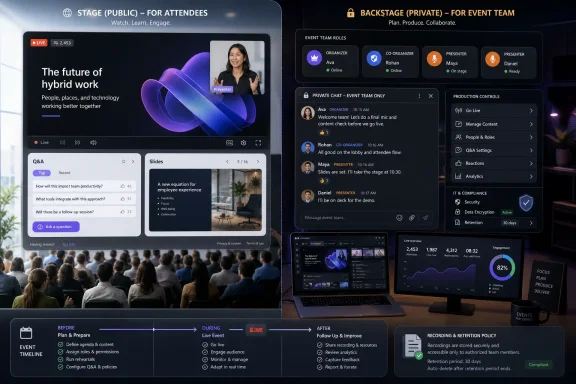 Teams Is Finally Building the Backstage Into the Stage
The modern Teams event has always had two audiences. There is the visible audience, made up of attendees asking questions, reacting, waiting for slides, or wondering whether the recording will be shared. Then there is the invisible audience of organizers, co-organizers, presenters, moderators, communications staff, executives, subject-matter experts, and IT support people trying to keep the event from wobbling in public.Until now, that second group has usually had to improvise. They might use a separate Teams group chat, a channel thread, a phone bridge, a WhatsApp group, or a private message chain that becomes increasingly chaotic as the event gets closer to airtime. The actual webinar or structured meeting contains the audience-facing controls, but the production conversation lives somewhere else.
Roadmap ID 392328 changes that model. Microsoft says organizers, co-organizers, and presenters will be able to chat privately in a separate chat from attendees, and that the chat will be available before, during, and after the event. That is the important part: this is not just an in-meeting whisper feature. It is a persistent production lane attached to the event lifecycle.
The practical value is obvious to anyone who has run a large Teams webinar. Before the event, the backstage chat can handle prep, reminders, role coordination, and last-minute substitutions. During the event, it becomes a command channel. After the event, it becomes a record of follow-ups, decisions, and clean-up tasks.
The more interesting point is strategic. Teams is no longer just trying to be the room where work happens. It is trying to be the control surface for increasingly formal digital events, the kind where roles, policies, moderation, compliance, and audience management matter as much as audio and video.
Microsoft Is Solving a Real Problem It Helped Create
Teams became a default meeting fabric for many organizations because it was bundled into the daily Microsoft 365 workflow. That ubiquity made it convenient, but it also meant the same app had to serve a one-on-one check-in, a board update, a training webinar, a town-hall-style broadcast, and a compliance-sensitive all-hands meeting. Those are not the same product, even if they all use a camera icon.The result has been a long period of feature accretion. Teams gained webinars, registration, Q&A, meeting roles, attendee controls, town halls, backstage-like production behaviors, and Teams Premium capabilities. Each addition moved Teams closer to the world of event platforms, but the everyday interface still often felt like a meeting app being asked to run a production.
A private organizer-and-presenter chat sounds small because chat is one of the oldest concepts in collaboration software. But context is everything. In a structured meeting or webinar, chat is not merely conversation; it is coordination infrastructure.
The public attendee chat has a different purpose. It can be a social channel, a support channel, a feedback channel, or a place where confusion spreads faster than the presenter can respond. It is not a safe place to say, “Skip slide 14,” “The CFO has dropped,” “Q&A is getting off-topic,” or “We need legal to answer that after the session.”
That gap pushed users into shadow workflows. They created private chats manually, often with inconsistent membership and no durable relationship to the event itself. Microsoft’s move is a classic Teams evolution: take the workaround that users already built and formalize it inside the product.
The Calendar Is Becoming the Event Container
The phrase “available before, during, and after the event” is doing a lot of work here. Microsoft is not simply adding a private tab to the live meeting window. It is tying the backstage conversation to the event as an object that exists across time.That matters because enterprise events are rarely just the hour on the calendar. The real work begins days or weeks before, when organizers wrangle speakers, test permissions, prepare content, decide whether Q&A is moderated, and plan how to handle sensitive questions. The live portion is the visible midpoint. The post-event work includes sharing recordings, answering unanswered questions, reviewing attendance, measuring engagement, and fixing whatever the audience noticed.
If the private chat survives across that lifecycle, it becomes more useful than a side channel spun up at the last second. It gives organizers a shared memory attached to the event rather than buried in someone’s chat list under a vague name like “Webinar prep final final.”
This is also where administrators should pay attention. Persistent chats create records. Records may be discoverable, retained, searched, governed, or exposed depending on the organization’s Microsoft 365 compliance configuration. A backstage conversation is operationally useful precisely because it may contain sensitive details. That is also why it needs governance.
Microsoft’s broader Teams management model already gives admins policy controls over meeting chat, external meeting chat, webinars, meeting roles, and event behavior. The new feature will likely sit inside that policy universe rather than outside it. IT departments should not treat it as a cosmetic upgrade.
The Presenter Role Keeps Getting More Serious
In ordinary meetings, “presenter” can feel like a slightly elevated participant role. In structured events, it is closer to a production credential. Presenters may share content, manage what appears on screen, answer questions, speak to attendees, and coordinate with organizers.That is why giving presenters access to a private event chat is consequential. Microsoft is acknowledging that the presenter is not merely a speaker. The presenter is part of the event staff.
This is especially relevant for organizations that run executive town halls, training sessions, customer briefings, compliance updates, investor-style internal presentations, and public webinars. These events often involve people who do not work together every day. A private event chat gives them a temporary operating room without requiring the organizer to build an ad hoc communications structure.
There is a risk, though. The more capabilities Microsoft gives presenters, the more important it becomes to assign the presenter role carefully. A guest speaker who needs only to talk for ten minutes may not need the same backstage visibility as an internal moderator. A vendor invited to present a product demo may not need to see internal debate about attendee questions or technical problems.
Role hygiene is going to matter. The feature will be useful only if organizations understand that “presenter” is not a courtesy label. In an event context, it is access.
Attendee Separation Is the Feature, Not the Chat Box
The public-facing description focuses on chat, but the architectural idea is separation. Attendees should have a place to interact with the event. Organizers and presenters should have a place to run it. Blurring those two spaces has always been one of the awkward parts of large Teams sessions.In a small meeting, transparency is usually a virtue. Everyone can see the same chat, links, corrections, and follow-ups. In a webinar, transparency has limits. The production team needs a space to coordinate without turning every operational hiccup into part of the show.
That does not mean the backstage chat should become a place for dismissive commentary about attendees or casual handling of sensitive information. In fact, the existence of an official private chat may make such behavior more auditable, not less. But the operational need is real.
A moderator needs to tell a presenter that a question has been answered already. A co-organizer needs to warn that an attendee is repeatedly posting irrelevant messages. An IT support person needs to confirm that audio trouble is local to one presenter rather than platform-wide. A communications lead needs to ask whether the CEO should address a breaking internal issue before the prepared closing remarks.
None of that belongs in attendee chat. Much of it also should not be scattered across unrelated private messages. A purpose-built private event chat is a cleaner model.
The Feature Arrives Late, But Not Too Late
It is fair to ask why this did not exist earlier. Competing event and webinar tools have long understood the need for host-only coordination. Even within Teams, town hall and webinar features have been moving toward more formal event production patterns for years.The answer is partly that Teams grew outward from collaboration rather than inward from broadcast. Its center of gravity was the work chat, the team channel, the recurring meeting, and the document collaboration loop. Webinars and structured events were layered onto that foundation.
That heritage gave Teams an advantage: events lived close to Outlook calendars, Entra identities, Microsoft 365 groups, SharePoint files, compliance tools, and the corporate directory. But it also meant some event-native concepts arrived later than customers expected.
Private organizer-and-presenter chat is one of those catch-up features. It does not reinvent webinar production. It simply removes friction that should not have been there.
Yet timing still matters. By targeting August 2026 general availability, Microsoft is placing this feature into a Teams environment that is more mature, more policy-driven, and more tightly integrated with Microsoft 365 governance than it was during the early pandemic-era meeting explosion. That makes the feature less flashy, but potentially more useful.
GCC Inclusion Signals This Is Not Just a Convenience Feature
The roadmap entry lists both Worldwide standard multi-tenant and GCC cloud instances. That detail is easy to skip, but it says something about Microsoft’s intended audience. Government Community Cloud customers are not usually the first place to look for whimsical collaboration experiments.GCC availability suggests Microsoft sees the feature as relevant to regulated, public-sector, and compliance-conscious environments. Those organizations run structured briefings, public meetings, internal updates, training sessions, and cross-agency events where role separation and controlled communications matter.
The feature’s inclusion in Targeted Release and General Availability rings also means admins should expect the usual staged reality: some tenants may see it before others, and the experience may evolve as Microsoft collects feedback. Roadmap dates are not contracts, and August 2026 should be read as a target rather than a guarantee.
Still, the roadmap update timestamp on June 30, 2026, gives this item fresh relevance. It is not a forgotten placeholder from 2024. Microsoft is still maintaining the entry, and the feature remains in active development.
For IT teams, that means planning can start now. Waiting until the toggle appears is how meeting governance becomes a scramble.
Admins Will Need to Decide Whether Backstage Chat Is a Right or a Privilege
Every useful Teams feature eventually becomes an administrative question. Who gets it? Who controls it? Is it enabled by default? Does it interact with existing meeting chat policies? Is it covered by retention? What happens when external presenters are invited? Can eDiscovery see it? Can organizers delete it? Does it appear in exports? Does it follow the meeting organizer’s policy, the presenter’s policy, or some combination?Microsoft has not answered every implementation detail in the roadmap summary. That is normal for a feature still listed as in development. But the questions are predictable because Teams governance is already full of per-organizer, per-user, and event-policy distinctions.
Existing Teams meeting chat controls allow admins to decide whether meeting chat is on, off, restricted to in-meeting use, or limited for anonymous users. Organizers can also manage chat availability in meeting options when policy allows it. Webinars and town halls bring their own layers of attendee interaction controls, Q&A, role assignment, and event management.
A private organizer-and-presenter chat adds another lane. If Microsoft implements it cleanly, it will reduce operational risk by moving production coordination into a governed space. If implemented sloppily, it could create confusion about where sensitive event coordination lives.
The key issue is not whether admins like private chat. It is whether they can explain it. If an organizer asks whether the private event chat is retained, whether a guest presenter can see it after the event, or whether a departed employee’s access disappears, IT needs an answer better than “probably.”
Compliance Teams Should Treat This as a New Record Type in Practice
A private event chat may look like any other Teams chat from a user’s perspective, but its contents can be different. It may include speaker prep, internal risk assessments, moderation decisions, personnel notes, customer escalations, legal cautions, security incidents, or communications strategy.That does not make the feature dangerous. It makes it real.
Organizations already using Microsoft Purview, retention policies, communication compliance, audit logs, and eDiscovery should test how these chats appear once the feature reaches preview or targeted release. The operational question is whether the private chat is stored and surfaced like a normal Teams chat, tied to the meeting, tied to the organizer, or exposed through a particular compliance workload.
The user-facing promise of privacy is also worth parsing carefully. “Private from attendees” does not necessarily mean private from the organization. In enterprise software, privacy usually means scoped access, not secrecy from compliance systems.
That distinction should be communicated to organizers and presenters. They should use backstage chat for event coordination, not for anything they would be embarrassed or legally exposed to see in a discovery export. Microsoft can provide the lane; customers still need norms.
The External Presenter Scenario Is Where Things Get Messy
The cleanest version of this feature is an internal company webinar with internal organizers and presenters. Everyone belongs to the same tenant, policies are consistent, and compliance expectations are relatively clear. Real events are rarely that tidy.Many webinars include outside speakers. A customer briefing may include partner presenters. A training event may include contractors. A public-sector session may include participants from multiple agencies. The moment external presenters join the private organizer chat, access boundaries become more sensitive.
Should an external presenter see the whole pre-event thread? Should they retain access after the event? What happens if they are promoted to presenter during the session? Can a co-organizer remove someone from the private chat without changing their event role? Will guest access, anonymous join settings, and presenter permissions interact in predictable ways?
These are not reasons to avoid the feature. They are reasons to pilot it carefully. The worst outcome would be for organizations to assume that “presenter” means “safe to include in all backstage discussion” when presenter status may have been granted for a narrow purpose.
Microsoft’s meeting role model has steadily become more sophisticated, but user habits often lag behind. People promote participants to presenter because they need them to share a screen. With private presenter chat, that same promotion may carry a communications consequence.
Teams Premium Hovers Over the Story
The roadmap details provided for this item list Microsoft Teams as the product and desktop and Mac as the platforms, with Worldwide and GCC availability. Some earlier roadmap mirrors and reporting have suggested licensing nuances around Teams Premium for related event capabilities, and Microsoft’s broader Teams event strategy often reserves advanced controls for premium SKUs.That makes licensing an important uncertainty to watch. If the private organizer-and-presenter chat is included broadly for Teams webinars and structured meetings, it becomes a baseline usability improvement. If it is gated behind Teams Premium in some scenarios, it becomes another example of Microsoft turning event professionalism into an upsell path.
This distinction matters because the feature solves a basic operational problem. A private production chat is not artificial intelligence, advanced analytics, or a luxury branding option. It is table-stakes event coordination.
At the same time, Microsoft has increasingly treated advanced meetings and events as a monetizable layer. Teams Premium already bundles features aimed at more controlled, branded, secure, and intelligent meeting experiences. A backstage chat fits naturally into that commercial direction.
Customers should therefore watch the final documentation, not just the roadmap title. The question is not only when the feature arrives. It is who can enable it, under what license, and with which administrative controls.
Desktop and Mac First Leaves the Mobile Edge Undefined
The roadmap entry calls out Desktop and Mac. That is sensible for event production, because serious webinar management usually happens from a full computer with multiple windows, stable input devices, and enough screen space to handle chat, Q&A, slides, participant lists, and production notes.But mobile still matters. Presenters join late from phones. Executives monitor events while traveling. Moderators may need to respond from a tablet. Support staff may be away from a desk when a post-event follow-up starts.
If the private chat is truly available before, during, and after an event, mobile access becomes more than a convenience. It becomes part of the continuity promise. A backstage chat that is visible only on desktop may still solve the live production problem, but it will be less effective as a persistent event coordination thread.
Microsoft often rolls out Teams features platform by platform, and the roadmap’s desktop and Mac listing should not be overread as a permanent exclusion. Still, admins should set expectations. For August 2026, the safest assumption is that the primary experience will be on desktop clients unless Microsoft publishes broader platform support.
That may be acceptable for the first release. But if Microsoft wants this to become the default event backchannel, it will eventually need to follow organizers wherever Teams already follows them.
The User Experience Has to Be Obvious or It Will Fail Quietly
The success of this feature will depend less on the existence of a chat box than on where Microsoft puts it. If organizers have to hunt for it, they will keep using old side chats. If presenters cannot tell whether they are messaging attendees or the backstage group, Microsoft will create new failure modes.The interface needs clear separation. A private organizer-and-presenter chat should be labeled in a way that is unmistakable during a live event. The attendee chat, Q&A pane, and private production chat must not visually collapse into the same mental category.
This is especially important under pressure. Live events are not calm software demos. Someone is screen sharing, an attendee is saying audio is broken, a presenter is asking whether they are next, and a moderator is trying to decide whether to publish a hostile question. A subtle tab label is not enough.
Microsoft has spent years trying to simplify Teams while adding more functionality to it. This feature will test that balance. The company needs to make the backstage lane discoverable without adding another layer of meeting-window clutter.
The best version would feel like part of the event role system: if you are an organizer, co-organizer, or presenter, you see the production chat where you expect event tools to live. If you are an attendee, you never know it is there.
This Is Also a Cultural Change for Meeting Organizers
Tools do not automatically create discipline. A private organizer chat can make events smoother, but it can also become another noisy feed unless teams define how to use it.Good event teams will use it for concise, operational communication. They will decide who monitors it, who makes decisions, and what belongs there. They will avoid turning it into a running commentary channel that distracts presenters while they are trying to deliver.
That may sound obvious, but anyone who has watched a live event team operate knows how quickly backchannels can become chaotic. The presenter sees five messages at once. The moderator is answering attendee questions in one pane and production comments in another. The organizer is trying to make a judgment call while three people type conflicting advice.
The existence of a dedicated backstage chat should prompt a small amount of process design. Organizations that run regular webinars should build templates: who joins, when the chat starts, what to use it for, and what to avoid. The feature gives them a shared place. It does not give them a producer.
The Small Feature That Reveals the Bigger Teams Strategy
Microsoft’s Teams strategy has been moving in two directions at once. On one side, Teams is being woven deeper into everyday productivity with chat, meetings, files, Loop components, Copilot, and Microsoft 365 integration. On the other, it is becoming a more formal event and communications platform with webinars, town halls, roles, moderation, attendee controls, and analytics.Private organizer-and-presenter chat sits at the intersection. It is an ordinary collaboration primitive applied to a formal event structure. That is why it matters.
The feature also reflects Microsoft’s broader habit of absorbing adjacent workflows. If users coordinate Teams events in separate Teams chats, Microsoft can either leave that behavior alone or turn it into a first-class event capability. The company almost always chooses absorption.
For customers, that can be good. Native integration usually means less context switching, better identity handling, and more consistent governance. But it also deepens dependence on Teams as the place where not just meetings, but meeting operations, records, and event workflows live.
That is the trade. Teams becomes more useful by becoming more central. It also becomes harder to route around.
August’s Backstage Chat Gives IT a Short Planning Window
The most concrete reading of this roadmap item is simple: if Microsoft holds to the current target, Teams organizers and presenters will get a private event chat in August 2026, and administrators have only a short runway to prepare users and policies. This is not a feature that requires a migration project, but it does deserve more than a line in a change digest.- Organizations should identify which teams run structured meetings and webinars often enough to benefit from a dedicated backstage chat.
- Teams administrators should review current meeting chat, webinar, external access, and presenter-role practices before the feature reaches general availability.
- Compliance and legal teams should verify how private organizer-and-presenter chats are retained, searched, audited, and exported once the feature is available in their tenant.
- Event owners should create simple norms for what belongs in backstage chat and what should remain in formal notes, Q&A records, or incident channels.
- Organizers should treat presenter assignment as an access decision, especially when external speakers, vendors, or temporary guests are involved.
- Microsoft’s final documentation should be checked for licensing, platform support, policy controls, and any differences between Worldwide and GCC deployments.
Microsoft’s private organizer-and-presenter chat will not make bad webinars good, and it will not eliminate the need for planning, moderation, rehearsal, or governance. What it should do is remove a stubborn bit of operational awkwardness from Teams events and bring the hidden work of running a meeting into the same managed environment as the meeting itself. If Microsoft gets the controls, licensing, and interface right, August 2026 may be remembered not for a flashy Teams reinvention, but for a quieter correction: the moment Teams finally gave the people behind the curtain a room of their own.
References
- Primary source: Microsoft 365 Roadmap
Published: 2026-06-30T22:57:58.6723014Z
Microsoft 365 Roadmap | Microsoft 365
The Microsoft 365 Roadmap lists updates that are currently planned for applicable subscribers. Check here for more information on the status of new features and updates.www.microsoft.com
- Official source: learn.microsoft.com
Manage chat in Teams meetings - Microsoft Teams | Microsoft Learn
Learn to manage meeting chat in Teams meetings and manage meeting chat in unfederated Teams meetings hosted by other organizations that you don't have a trusted relationship with.learn.microsoft.com - Related coverage: heise.de
Microsoft Teams: Private chat for organizers from April 2026 | heise online
Microsoft will introduce a separate private chat for organizers, co-organizers, and presenters in structured meetings starting April 2026. www.heise.de
- Related coverage: windowsreport.com
Microsoft Teams organizers and presenters can finally chat peacefully in webinars
Microsoft Teams organizers and presenters will have a private chat channel just for themselves, and it's quite useful. Here's why. windowsreport.com
- Official source: support.microsoft.com
Roles in Microsoft Teams meetings | Microsoft Support
If you're organizing a meeting, you can assign the role of presenter or attendee to each of the meeting participants.support.microsoft.com - Related coverage: techriver.com
- Related coverage: techradar.com
Microsoft Teams thinks it might have solved your collaboration problems at work - but I'm not so sure | TechRadar
Chat Notes look to try and make Microsoft Teams useful for collaboratingwww.techradar.com - Related coverage: windowscentral.com
Microsoft Teams adds toolbar hiding option | Windows Central
Teams is set to get a toolbar hiding option during meetings for better collaboration and productivity.www.windowscentral.com
