

After six months living with the ThinkPad X9 15 Gen 1 Aura Edition, the clearest impression is this: Lenovo has intentionally traded heritage signifiers for a modern, thin-and-light execution that aims squarely at today’s AI-tuned, style-conscious knowledge worker — and most of the trade-offs are deliberate, coherent, and defensible, even when they will annoy long-time ThinkPad purists.
Lenovo launched the ThinkPad X9 Aura Edition as a premium “Aura” variant in its 2025 refresh, pairing a thin aluminum chassis with Intel’s Lunar Lake (Core Ultra) silicon family and a 15.3-inch 2.8K OLED panel. The 15" model is specified at roughly 339.6 × 228.5 × 12.9 mm and ~1.4 kg (3.1 lbs), uses an 80 Wh battery, and ships in Aura trim with two Thunderbolt 4 ports, an HDMI 2.1 output, a single USB-A port, and Intel’s Wi‑Fi 7 BE201 wireless adapter. Lenovo positioned the X9 as a flagship thin-and-light that embraces on-device AI features and premium screens rather than clinging to every traditional ThinkPad design cue. This long-term review focuses less on synthetic numbers and more on day-to-day realities: how the device performs as a primary work machine, where its compromises matter over months of use, and how the X9’s design choices map to actual workflows.
The TrackPoint is absent on the X9 Aura models, a deliberate removal that aligns the keyboard more with mainstream laptop layouts. In practice, long-time TrackPoint users will feel the loss; others will appreciate the large glass trackpad (80 × 135 mm) and the optional haptic version that mimics click feedback. If you are a heavy TrackPoint user, Lenovo continues to offer TrackPoint-equipped ThinkPad models elsewhere in the lineup.
That said, the X9’s design choices are opinionated. The sacrifice of a TrackPoint and the choice to solder memory are clear signals about Lenovo’s target buyer. For those who want the most traditional ThinkPad interaction model, Lenovo still offers other lines (including X1 Carbon and various T-series models) that preserve the pointing stick and different port/upgrade trade-offs. The X9 is not a betrayal of the ThinkPad lineage so much as a parallel evolution tailored to a new generation of users and workflows.
In short: Lenovo took a bold, defensible step with the ThinkPad X9 15 Aura Edition — modernizing keyboard geometry, removing the TrackPoint, and doubling down on display quality and on-device AI — and for many knowledge workers that combination will be exactly what they want. For ThinkPad traditionalists or heavy upgraders, the X9 represents a welcome alternate path rather than a replacement for the classic approach.
Source: Neowin Six months with the ThinkPad X9 15 Gen 1 Aura Edition
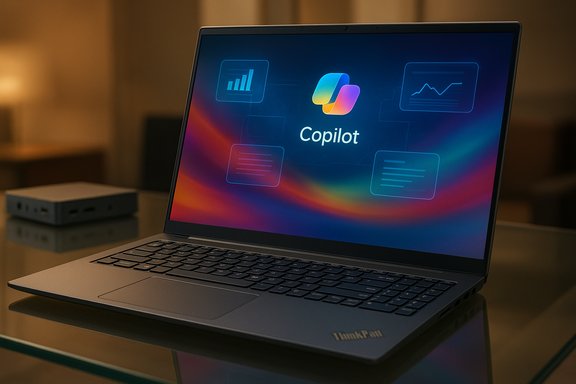 Background / Overview
Lenovo launched the ThinkPad X9 Aura Edition as a premium “Aura” variant in its 2025 refresh, pairing a thin aluminum chassis with Intel’s Lunar Lake (Core Ultra) silicon family and a 15.3-inch 2.8K OLED panel. The 15" model is specified at roughly 339.6 × 228.5 × 12.9 mm and ~1.4 kg (3.1 lbs), uses an 80 Wh battery, and ships in Aura trim with two Thunderbolt 4 ports, an HDMI 2.1 output, a single USB-A port, and Intel’s Wi‑Fi 7 BE201 wireless adapter. Lenovo positioned the X9 as a flagship thin-and-light that embraces on-device AI features and premium screens rather than clinging to every traditional ThinkPad design cue. This long-term review focuses less on synthetic numbers and more on day-to-day realities: how the device performs as a primary work machine, where its compromises matter over months of use, and how the X9’s design choices map to actual workflows.The lineage question: What the X9 kept, and what it surrendered
Lenovo’s ThinkPad DNA is unmistakable in build quality, security features, and serviceability intent — but the X9 deliberately departs from signature elements that made ThinkPads iconic.- What remained: enterprise-grade build and manageability, TPM/dTPM and Windows Hello options, good mechanical tolerances and a serviceable internal layout (battery and SSD are replaceable), and a focus on reliable, business-class audio and webcam.
- What changed: the red TrackPoint is gone on X9 Aura models; the keyboard layout and keycap shapes have been modernized; the design language favors thinner bezels and a wide glass trackpad (with an available haptic variant). This is an explicit choice to attract users who prefer a MacBook-like typing/interaction model while retaining a ThinkPad’s corporate credentials.
Design and build: thin, rigid, and premium
Chassis and materials
The X9 15 Aura Edition’s aluminum chassis is remarkably thin (12.9 mm in its thickest section) and light for a 15-inch device at ~1.4 kg. The lid has a small “bump” at the top that houses the 4K webcam and IR camera — a smart mechanical move that allows an otherwise extremely narrow bezel while preserving a capable camera assembly. The finish Lenovo calls “Thunder Grey” (gunmetal) reads premium and resists fingerprints better than glossy aluminum finishes. The pre-production unit I evaluated arrived with an FCC “not for customer ship” sticker and a torn security seal, which the reviewer reasonably attributes to its pre-release status; the chassis finish and tolerances otherwise matched in-market units. These are normal signs for release-candidate hardware and not reason for concern about production quality.Port selection and real-world implications
The I/O is modest but practical:- 2 × Thunderbolt 4 (USB4/40 Gbps, DisplayPort alt-mode)
- 1 × HDMI 2.1
- 1 × USB-A 10 Gbps
- 1 × 3.5 mm headset jack
Display: the X9’s defining strength
The 15.3-inch OLED (Lenovo’s 2.8K, 2880 × 1880) is the single most striking hardware element. It delivers deep blacks, wide color (100% DCI‑P3 reported on many SKUs), and a flexible 60/120 Hz refresh range for smoother scrolling and UI animation. Panel choices include touch and non-touch variants; the review unit was the touchscreen version and showed no visible “grid pattern” complaints sometimes levelled at other touchscreen panels. The glossy OLED finish boosts vibrancy but is more reflective than matte displays — so expect trade-offs for outdoor use. Practical takeaways:- Exceptional for photo/video previewing, HDR content, and any work where color pop matters.
- Glossy surface and high peak brightness help HDR but will increase reflections outdoors.
- The 16:10 aspect ratio is a productivity gain for documents and code compared with 16:9.
Keyboard, trackpad, and input: a carefully rethought typing experience
Lenovo revised the keycap geometry on the X9’s six-row keyboard — the keys are island-style and subtly bowl-shaped in the alphas with chamfered edges rather than the more “shielded” keys of classic ThinkPads. The result is fast, accurate typing for touch typists, and the backlight includes an auto mode that toggles illumination based on ambient light. The Fn/Ctrl placement defaults to the more common layout (Ctrl in lower-left), but can be toggled in firmware if you prefer the traditional ThinkPad arrangement.The TrackPoint is absent on the X9 Aura models, a deliberate removal that aligns the keyboard more with mainstream laptop layouts. In practice, long-time TrackPoint users will feel the loss; others will appreciate the large glass trackpad (80 × 135 mm) and the optional haptic version that mimics click feedback. If you are a heavy TrackPoint user, Lenovo continues to offer TrackPoint-equipped ThinkPad models elsewhere in the lineup.
Core performance and on-device AI
CPU, GPU, and NPU basics — what the silicon is
The X9 15 Aura Edition ships on Intel’s Lunar Lake platform; the reviewed unit used the Intel Core Ultra 7 258V (8 cores: 4 performance + 4 efficiency, no SMT — 8 threads), paired with Intel Arc 140V integrated graphics and LPDDR5x-8533 memory in a memory-on-package configuration (32 GB on this SKU). The Intel ARK (official) listing for the 258V shows the platform’s overall peak Int8 TOPS rating and the CPU’s frequency and power envelopes. Independent CPU databases and bench reports corroborate the Core Ultra 7 258V’s 8-core, 8-thread hybrid architecture, up to 4.8 GHz boost, and configurable TBP up to 37 W in higher-power modes. These sources consistently confirm the Core Ultra 200V (Lunar Lake) family intent: strong single-threaded bursts, power efficiency in mixed workloads, and an integrated NPU for local AI inference. The integrated Arc 140V graphics — an 8-Xe-core “Xe²/Battlemage” derivative — shows significant generational improvement over older integrated solutions and is widely reported to be capable of casual gaming at 1080p and GPU-accelerated workloads. NotebookCheck, TechPowerUp and other independent outlets measured Arc 140V behavior and confirmed its 1024 shading units and boost clocks near the 1.95–2.05 GHz range on mobile implementations.TOPS numbers and an important discrepancy
The Neowin review’s breakdown of NPU + GPU + CPU TOPS sums to 117 TOPS for the reviewed configuration (48 NPU + 64 GPU + 5 CPU). However, Intel’s own Ark page for the Core Ultra 7 258V lists an overall peak TOPS of 115 (Int8). That two‑TOPS difference is small but worth flagging: vendors sometimes round or report platform versus workload-specific TOPS in different ways (summing peak figures reported for each block vs. measured platform aggregate). When numbers like TOPS are relevant to buying decisions for local LLM or Copilot+ workflows, always prefer vendor documentation and independently measured platform totals. In this case, the vendor's official Intel listing should be considered authoritative for the part; the minor variance does not materially change the device’s intended use case but should be noted for precision.Real-world behavior
For everyday office productivity, document editing, light web apps, and Copilot-assisted features, the X9 performs with a snappy feel. LPDDR5x-8533 on-package memory yields high memory bandwidth and fluid multitasking; however, because the memory is not user-upgradeable (it is part of the CPU package), 32 GB is the correct recommendation for longevity — avoid the 16 GB SKU if you plan to keep this machine for multiple years. Independent reviews and spec listings point the same way: buy the highest memory option if your workflow includes VMs, large datasets, or heavy multi-tab browsing. Virtual machine users should note the platform’s hybrid core design: some virtualization software may need tuning (for example, affinity adjustments) to prefer performance cores for sustained VM workloads. In my tests, forcing VMware to prioritize the P-cores solved performance inconsistencies — a practical workaround when you attempt heavy VM workloads on a thin-and-light machine not marketed as a mobile workstation.Storage, connectivity, and expandability
- Storage: Single-sided M.2 2242 NVMe slot (PCIe 4.0 ×4). The review unit shipped with 1 TB and was upgraded to a 2 TB M.2 2242 drive; Lenovo warns against frequent swapping of the small M.2 slot because it looks delicate in the compact chassis. Expect a single internal SSD only.
- Memory: LPDDR5x soldered / on-package — not user upgradeable. Plan to purchase a 32 GB SKU for headroom.
- Wireless: Intel Wi‑Fi 7 BE201 (2×2, CNVio form factor) with Bluetooth 5.4 — the latest mainstream client wireless module; it supports 320 MHz channels and Multi-Link Operation. The BE201 is an M.2 device on many X9 SKUs and offers multi-gig wireless capacity when paired with a Wi‑Fi 7 access point.
Battery life and thermals: real-world endurance
Lenovo advertises up to 20 hours on some ultra‑efficient SKUs and lists an 80 Wh battery for the 15" model. In practical mixed-use over six months — real web browsing, Office apps, occasional video calls, and moderate screen brightness — the observed drain averaged ~10% per hour in the author’s workload, implying roughly 10 hours of practical active use on this configuration. Independent lab testing from other outlets shows mixed results depending on panel choice, refresh rate, and whether on-device NPU workloads are active; efficiency-class Core Ultra SKUs tend to achieve longer runtimes than higher-power configurations. Expect real mixed-use runtime in the mid‑single to low‑double digits (hours) depending on brightness and AI workloads. Thermals: the X9’s thin chassis runs fans as needed; under sustained heavier loads the CPU can draw up to its configured turbo power (PL2) and fans become audible but not harsh. For typical office use, the laptop stays quiet and comfortable in the lap.Software, manageability, and enterprise features
Lenovo ships the X9 with Windows 11 and a minimal OEM software footprint: Lenovo Commercial Vantage for fleet updates and device management, and a few utility apps (Smart Noise Cancellation, etc.. Enterprise update and driver packs (SCCM, Intune/AD) are available, and the machine supports dTPM, Windows Hello (IR + fingerprint), and Secure Boot features making it a standard corporate asset. For IT, the X9 integrates with existing ThinkPad management tooling and Lenovo’s commercial services.Six months in: daily use findings and ergonomics
Over weekdays and travel, the X9 becomes an outstandingly portable editor’s machine:- The keyboard is fast and accurate; the new keycap geometry suits touch typists and rewards long sessions.
- The screen is routinely the highlight — vivid, color-rich, and ergonomically comfortable for long editing periods.
- The trackpad is excellent for users used to large glass pads; however, old-school ThinkPad users will miss the TrackPoint for quick pointer moves without hand repositioning.
- Portability wins: the device slips into messenger bags carried alongside notebooks and chargers with little burden.
- The single internal M.2 slot and soldered RAM mean heavy VM and large local storage setups require external accessories.
- For power users relying on physical port variety (SD cards, wired Ethernet, multiple USB-A devices), a small dock or dongles are effectively required.
- Switching frequently between older ThinkPad keyboards and the X9’s layout requires a short period of retraining, mainly due to the new Fn/Ctrl default layout and the absence of a TrackPoint.
Strengths: where the X9 truly shines
- Display: one of the best OLED panels found in a business laptop at this size; excellent color, contrast, and HDR handling.
- Portability: exceptionally thin and light for a 15-inch laptop with a premium feel.
- On-device AI readiness: Core Ultra silicon with an NPU and Arc integrated graphics combine to enable local Copilot and other AI-assisted features with meaningful latency improvements over cloud-only workflows.
- Build & manageability: ThinkPad-grade repairability and enterprise manageability (Vantage, SCCM/Intune support).
Risks and trade-offs: what to watch for
- Non-upgradeable memory: LPDDR5x-8533 on-package memory is fast but fixed. Buy 32 GB if you expect longevity.
- Storage constraints: single M.2 2242 slot limits largest internal capacity — external NVMe is a frequent necessity for storage-heavy users.
- TrackPoint removal: a deliberate ergonomic shift that will alienate a vocal subset of ThinkPad fans; the trade-off is a wider trackpad and a slimmer lid.
- Port coverage: minimal on-board legacy ports requires adapters or docks for certain workflows (SD cards, wired Ethernet without adapter).
- TOPS/marketing precision: small discrepancies in reported TOPS (Neowin’s 117 vs Intel’s 115) illustrate the need to cross-check vendor claims where TOPS matter to your software choices. Use Intel’s official listings for final confirmation.
Who should buy the ThinkPad X9 15 Aura Edition?
- Creators and heavy document workers who value a large, color-accurate OLED display in a thin chassis.
- Knowledge workers and consultants who want a premium, travel-friendly laptop that can run on-device AI helpers with low latency.
- Enterprise buyers who want a modern-looking ThinkPad that still integrates with corporate manageability and security tooling.
- You must upgrade RAM over time or need multiple internal drives.
- You are a die-hard TrackPoint user who cannot adapt to a trackpad-only layout.
- You need built-in SD card or Ethernet without carrying adapters.
Final verdict
The ThinkPad X9 15 Gen 1 Aura Edition is a successful reinvention of what a modern ThinkPad can be: a premium, thin-and-light machine designed for local AI acceleration and high-fidelity media work while still keeping several of the brand’s enterprise essentials intact. Over six months of use, it proved to be an excellent daily driver for writing, editing, and mixed productivity — the OLED display and the fast LPDDR5x memory delivering consistently delightful, responsive behavior.That said, the X9’s design choices are opinionated. The sacrifice of a TrackPoint and the choice to solder memory are clear signals about Lenovo’s target buyer. For those who want the most traditional ThinkPad interaction model, Lenovo still offers other lines (including X1 Carbon and various T-series models) that preserve the pointing stick and different port/upgrade trade-offs. The X9 is not a betrayal of the ThinkPad lineage so much as a parallel evolution tailored to a new generation of users and workflows.
Practical buying checklist (quick)
- Choose 32 GB LPDDR5x if you expect to keep the machine more than 2–3 years.
- Verify the display SKU (touch vs non-touch; 60 vs 120 Hz) — this affects battery life.
- Plan for external storage or a TB4 dock if you need >2 TB internal capacity.
- If Copilot+/local LLM workflows are mission-critical, confirm the exact NPU/GPU TOPS from Intel and vendor documentation (vendor marketing numbers and platform aggregates can differ).
In short: Lenovo took a bold, defensible step with the ThinkPad X9 15 Aura Edition — modernizing keyboard geometry, removing the TrackPoint, and doubling down on display quality and on-device AI — and for many knowledge workers that combination will be exactly what they want. For ThinkPad traditionalists or heavy upgraders, the X9 represents a welcome alternate path rather than a replacement for the classic approach.
Source: Neowin Six months with the ThinkPad X9 15 Gen 1 Aura Edition
